Texas Instruments graphing calculators have helped many a student with algebra, pre-calculus and upside-down anatomical slang. Now, the company is back with an upgrade for the modern world, the TI-84 Evo. The new device lets you get your math on with a faster processor, a new icon-based home screen and a redesigned keypad.
TI is marketing it as something akin to the Light Phone of calculators. Unlike calculator apps on phones or computers, the "distraction-free" TI-84 Evo is a single-purpose device "designed to do one thing exceptionally well — math." Without notifications, social media apps or even Wi-Fi, there's less to draw your focus away from the math problems at hand. (However, there will always be the sidesplittingly funny "58008" to relieve your boredom.)
Texas Instruments
The new model's processor is three times faster than its predecessor. It also adds 50 percent more graphing space, a simplified keypad and USB-C charging. There's also a new feature that lets you trace along a graph to find points of interest.
The TI-84 Evo is available now. Individual customers will pay $160. (School districts can contact the company for bulk pricing.) The calculator ships in a modern array of colors: white (the standard model), mint, pink, purple, teal, raspberry and silver.
This article originally appeared on Engadget at https://www.engadget.com/mobile/texas-instruments-made-a-new-flagship-graphing-calculator-the-ti-84-evo-201903438.html?src=rss
Apple reportedly plans to fix bugs and expand the capabilities of Apple Intelligence with the release of iOS 27, iPadOS 27 and macOS 27 year, and it seems like tweaks to the company's AI could go beyond a more functional version of its Siri assistant. Bloomberg reports that this year's software updates will also include new AI-powered photo editing tools that will let users change things like the background and framing of images, too.
You can currently use the Photos app across Apple's operating systems to adjust things like saturation and contrast, apply filters, crop photos or use AI to remove objects with the Clean Up tool. Clean Up will apparently be one of several "Apple Intelligence Tools" after these new updates roll out, Bloomberg writes. Along with Clean Up, users will be able to use "Extend" to expand the background of the photo with generative AI, "Enhance" to automatically improve things like lighting and image quality and "Reframe" to shift the perspective of a photo after it's taken, primarily for Apple's spatial photos.
The new features, if released, will bring Apple's photo-editing tools more in line with competitors like Google and Samsung, though both companies still lap Apple in their willingness to create entirely generated images. Google's Magic Editor feature, which debuted in 2023, still takes the cake in terms of giving users leeway to radically add to and change their photos.
Other than new photo tools, Apple is reportedly also debuting its new version of Siri powered by Google's Gemini models, a standalone Siri app and AI-powered search inside its apps. Apple will likely introduce many of these new features during its WWDC keynote on June 8.
This article originally appeared on Engadget at https://www.engadget.com/ai/ios-27-will-reportedly-come-with-new-ai-powered-photo-editing-tools-194119562.html?src=rss
NVIDIA is releasing a new variant of its 5070 GPU for laptops. Nestled in a blog post about the latest version of its Game Ready Drivers, the company notes its partners will soon start selling 5070 laptops with 12GB of VRAM, alongside the 8GB model that NVIDIA has offered since the launch of the 50-series.
"Demand for GeForce RTX remains strong, and memory supply is contrastrained. In order to maximize memory availability, we are releasing the GeForce RTX 5070 Laptop GPU 12GB configuration with 24Gb G7 memory. This gives our partners access to an additional pool of memory to complement the 16Gb G7 supply that currently ships with most GeForce GPUs," NVIDIA said.
The first 12GB 5070-equipped laptops are slated to start shipping sometime in June, with manufacturers like ASUS, Lenovo and MSI likely to offer the video card as an option in some of their models. NVIDIA has yet to confirm pricing, but outlets like NotebookCheck are reporting that 12GB 5070 laptops could cost as much as their 5070 Ti counterparts. Right now, a 5070 Ti-equipped PC like the Acer Predator Helios Neo 16S AI can set you back as much $2,650, depending on the amount of RAM on offer. New 12GB 5070 laptops likely won't cost as much, given manufacturers will probably configure them with less RAM.
NVIDIA has yet to share the full spec list for the 12GB 5070, but as the company notes, it’s using 24Gb G7 memory, instead of 16GB G7 memory, for the new model. The two memory types are made using different manufacturing processes. The former uses 3GB memory modules, while the latter uses 2GB ones. Either way the company is tapping into a different supply of memory that, in recent months, Samsung and Micron have managed to produce more consistently at scale. That said, unless NVIDIA has redesigned the 5070 to equip it with a wider 192-bit bus interface, which seems unlikely in this case, the new model won't be able to access that additional memory as fast as the 5070 Ti and other models above it in NVIDIA's stack. For most games that shouldn't matter too much, but it does mean the new model isn't quite the upgrade it seems if you just look at the amount of raw VRAM.
This article originally appeared on Engadget at https://www.engadget.com/computing/laptops/nvidia-starts-offering-a-12gb-version-of-the-5070-for-laptops-180057515.html?src=rss
Google is celebrating Translate’s 20th birthday by launching pronunciation practice, which the company says is one of the most requested features for the product. The feature is only rolling out on Android at the moment for English, Spanish and Hindi in the US and India. If it’s available for you, you’ll see a button at the bottom of the app that says “Practice,” which gives you the option to either “pronounce” what you’ve translated or to “listen” to how it’s actually pronounced by native speakers.
If you choose the “pronounce” option, Translate will listen to you speak and then use artificial intelligence to analyze how you said the words to provide instance feedback. It will then show you a phonetic spelling of how specific words should be pronounced. In the example Google provided, for instance, the speaker pronounced the Spanish word for juice as “jugo” with the English “j” sound instead of with the Spanish “j” sound. So, Translate spells it out as “HU-go” in its pronunciation suggestion.
Google said around third of users on mobile use Translate to practice speaking and listening in order to be able to hold real-world conversations, making this new feature a very useful addition. The company also revealed other stats about the app. Apparently, it now supports over 250 languages, including some endangered and indigenous ones, and has over 1 billion monthly user who have been translating over 1 trillion words every month.
This article originally appeared on Engadget at https://www.engadget.com/ai/google-translate-uses-ai-to-help-you-practice-pronunciation-160000542.html?src=rss
Amazon has today announced a software update for both the Kindle Colorsoft and Kindle Scribe Colorsoft which will bring dark mode to both e-readers. Even better, users will be able to toggle the settings for specific menus on both devices, so if they want their library dark and their notebook light, they can. Given the option is available on plenty of other Kindle devices, its omission here always felt like something Amazon was just getting around to addressing.
In addition, the update brings Smart Shapes to notebooks, enabling users to add pre-drawn lines, arrows, circles, triangles and rectangles from the toolbar. In addition, a hold-to-snap tool lets you draw a shape freehand, after which point it’ll pull itself into a nice tidy design. Both should help folks who want to add some graphical zing to their note taking who can’t do all those fancy journal designs on their own.
The update is rolling out across the ecosystem across the next few days, further empowering would-be journal scribes using these tablets. For tablets like the Kindle Scribe Colorsoft, it’s clear Amazon needs to build out the Scribe half of the equation, which looks like a poor relative compared to its competition. As Cherlynn Low wrote in her review, it’s a fine e-reader, but one that’s sorely lacking in many areas.
This article originally appeared on Engadget at https://www.engadget.com/general/amazon-brings-dark-mode-to-kindle-colorsoft-and-scribe-colorsoft-130054573.html?src=rss
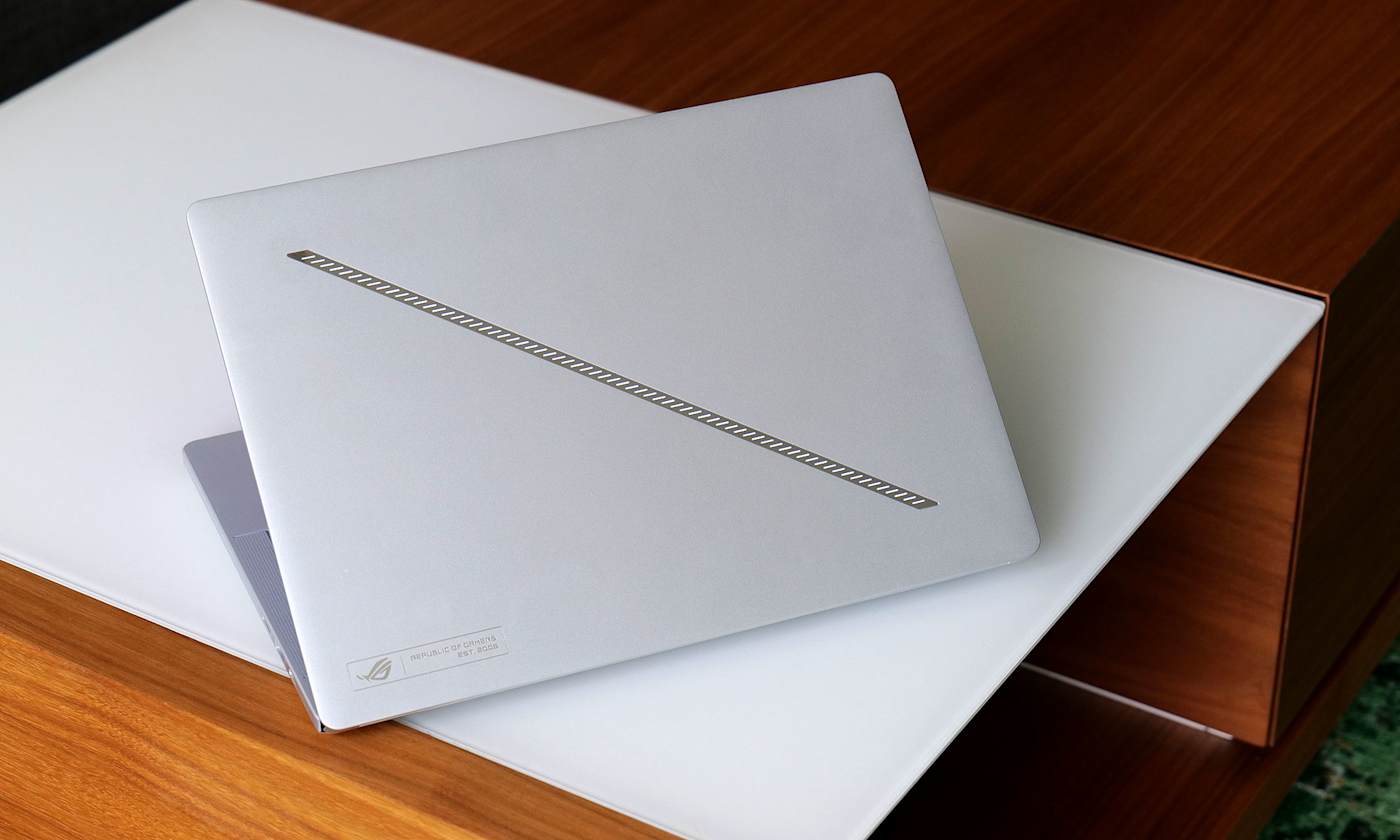
ASUS is often best when it's weird, and this year at CES 2026 the company decided to resurrect one of its weirdest laptops ever: the ROG Zephyrus Duo. Unlike the last model from 2023 that had a smallish, tilting second screen, the 2026 model rocks massive dual 16-inch OLED displays that should make it an ideal content creation and gaming machine. ASUS has now opened up pre-orders for the Zephyrus Duo and revealed that pricing will start at a breathtaking $4,500.
The Zephyrus Duo is the "world's first 16-inch dual-screen gaming laptop," according to ASUS. It boasts a pair of 3K HDR OLED touchscreens that offer a combined 21 inches of diagonal screen space. They're DisplayHDR True Black 1000 certified, and can each hit 1,100 nits of peak HDR brightness. Both offer a 120Hz refresh rate and 0.2ms response time, though only the main screen supports NVIDIA G-Sync.
ASUS
Another important piece is the detachable magnetic Bluetooth keyboard. Despite the thin 5.1mm profile, it offers a generous 1.7mm of key travel and ultra-large touchpad. With the two hinging touch displays and the keyboard, it offers five dedicated operation modes. Dual Screen mode removes the keyboard altogether, Laptop mode provides a standard 16-inch screen and keyboard setup, Sharing mode sets the Duo flat at 180 degrees, Book mode sets both screens in a portrait orientation, and Tent mode has the hinge forming an A-frame.
There's a lot of power under the hood, with a 16-core Intel Core Ultra 9 386H processor paired with an NVIDIA GeForce RTX 5070 or RTX 5090 laptop GPU with a max TGP of 135 watts. The latter is NVIDIA's flagship mobile GPU with the latest AI and gaming features including DLSS 4, frame generation and fourth-gen ray-tracing cores. It also comes with a redesigned motherboard and larger vapor chamber, along with dual fans to keep things cool.
All of that is housed in a CNC-milled aluminum chassis with a new "Stellar Grey" colorway and "Slash" lighting array with 35 discrete zones. The Zyphyrus Duo is now available for pre-order from ASUS or partners including Newegg starting at $4,500 for the RTX 5070Ti version or (brace for it) $5,500 for the RTX 5090 version. Both models come with 32GB of memory and 1TB of PCIe 5.0 storage.
This article originally appeared on Engadget at https://www.engadget.com/computing/laptops/asus-dual-screen-rog-zephyrus-duo-is-now-on-pre-order-starting-at-4500-130041463.html?src=rss
Not long ago, high-quality wireless mic systems cost over $500 and required a bulky transmitter and lav mic wire tucked under the subject’s shirt. DJI’s Mic Mini showed how unnecessary all of that was, combining mic and transmitter into a 0.35-ounce device that delivered high quality sound for under $100.
Now, DJI has released the Mic Mini 2 (around $100) as a mild update to the original at a much lower price. It’s more fashion forward thanks to the colorful new magnetic covers and offers an audio upgrade via new voice tone presets. Those changes make it the best budget wireless mic for new buyers, but it’s not worth the upgrade if you already have a Mic Mini — and DJI’s flagship Mic 3 is better if you can afford it. However, beware that the Mic Mini 2 isn’t currently on sale in the US as it hasn’t yet been certified by the Federal Communications Commission (FCC).
Design and features
The Mic Mini 2 now comes in two packages for smartphone and camera users. One includes a receiver with a 3.5mm mic output for mirrorless cameras, while the other offers a mobile receiver with a USB-C port for smartphones. Both kits include a charging case, one or two transmitters (mics) and a receiver. You also get a magnetic mount, clip mount, black and white magnetic front covers and a windscreen for each mic. The camera kit includes a smartphone adapter as well.
The camera kit contains 10 mic covers in a rainbow of hues that look like they were borrowed from ‘90s iMacs, letting you match a subject’s clothing or add a pop of color. They all have a huge, distracting DJI logo, though, so many creators may want to cover it with a piece of tape. DJI also has optional designer front covers with four very ‘90s looking abstract patterns in several pastel shades, available for around $45.
Steve Dent for Engadget
DJI has changed the transmitter design slightly from the previous model's faceted shape to a flatter design to better accommodate the new magnetic covers. The mic portion also weighs slightly more at 0.39 ounces. Though tiny, each mic is rated to run up to 11.5 hours on a charge, and the receiver is supposed to go for about 10.5 hours with noise cancellation disabled. In my own testing (recording continuously with a looped video as an audio source), I was even able to slightly exceed these times, so you could easily use it for a full shooting day. This is better than nearly all rivals including the Rode Wireless Go III, which is rated for seven hours on a charge. Another wireless mic in this price range, the Hollyland Lark M2, has a stated runtime of 10 hours between charges.
As before, the transmitters and receiver snap into the charging case magnetically. The mobile charging case is small enough to slide into a pants pocket, while the larger camera version fits into a jacket pocket or a bag. On top of being a convenient way to store the transmitters and receiver, they can charge the mics and receiver 3.6 times, giving you 48 hours of use even without a wall plug in sight. It took me about two hours to charge all three devices in the camera case and about an hour to charge the smaller receiver and single transmitter with the mobile case.
The Mic Mini 2 transmitters can be paired directly with smartphones via Bluetooth or you can connect them to DJI cameras like the Osmo Action 6, Osmo 360 and Osmo Pocket 4 via DJI’s OsmoAudio system.
Audio quality
To use the Mic Mini 2, just affix the mics (transmitters) to your subject, either via the clip or magnetic attachment, and turn them on. Then, power up the receiver and connect it to your camera via a 3.5mm cable or plug it into your smartphone’s USB-C port. Everything pairs automatically, and the final step is to adjust the level between -12 db and +12 db using the dial on the side (camera receiver only). Noise reduction is set via a switch on the mobile receiver, or the Mimo app for the camera receiver.
There are a few major differences between DJI’s Mic Mini 2 and the more expensive flagship Mic 3 when it comes to audio specs. The biggest is that the Mic 3 supports 32-bit float internal recording (with 32GB of storage) that eliminates clipping in most situations, even if your levels are too high. It also comes with dynamic gain control to balance volume if your subject tends to lower or raise their voice a lot.
Steve Dent for Engadget
In comparison, the Mic Mini 2 only offers automatic limiting, which does prevent clipping but can reduce audio quality. It also offers no internal recording so you won’t have a backup if your camera or smartphone recording fails. The Mic Mini 2 also lacks an audio level display like the Mic 3.
Despite those limitations, the 48Khz, 24-bit audio quality on the Mic Mini 2 is excellent. I recorded my voice using all three voice tone presets, and found that I could use the “rich” mode (which emphasizes low tones) without the need to do equalization in post. The “regular” setting offers neutral and balanced sound, while the “bright” mode adds clarity in noisy situations. If you prefer doing EQ yourself, the regular mode is best.
A good test of a microphone is to record your voice and then max out EQ levels in a narrow band across a range of frequencies. A mediocre mic will distort audio in more than one range, reducing sound quality. DJI’s Mic Mini 2 performed well here, showing minor distortion for my voice only at one frequency. When I reduced the gain at that range, my voiceovers sounded clear and full.
Another key feature is noise cancellation. DJI’s Mic Mini 2 offers two levels of AI-powered cancellation depending on the amount of background noise. At the low setting, it reduced background noise but produced some distortion. However, the high level noise cancellation distorts audio considerably, so you should only use it in a pinch when noise is excessive. I also tested the Mic Mini 2’s wireless range and was able to record audio at 450 yards away from the receiver as DJI claims, though the device disconnected once at that distance.
The Mic Mini 2 retains other functions from the original Mini like automatic limiting to prevent clipping. It supports two mics at once, and when used in Stereo mode, lets you capture each mic to a separate channel so you can mix them later on. To set those functions, you need to use DJI’s Mimo smartphone app.
Wrap-up
Steve Dent for Engadget
The Mic Mini 2 is now available in Europe and elsewhere but not yet the US due to lack of certification. It costs almost half as much as the Mic Mini did at launch, just €89/£89 for the camera kit with two transmitters and a receiver, or €49/£54 for the mobile kit with one transmitter and a receiver.
Given the features and price, the Mic Mini 2 doesn’t have a lot of competition. One of its main rivals is the Rode Wireless Go III, but that model is double the price and lacks noise cancellation. It does have slightly better audio quality, though. Other options in the same price range from Hollyland, Boya and others either can’t connect to both a camera and smartphone or don’t stack up in terms of sound quality and features.
Overall the Mic Mini 2 offers a great combination of range, audio quality and noise cancellation. It’s not worth an upgrade from the Mic Mini, but if you’re buying your first wireless mic and don’t want to spend a bundle, it’s a great option.
This article originally appeared on Engadget at https://www.engadget.com/audio/dji-mic-mini-2-review-the-tiny-wireless-mic-is-colorful-and-much-cheaper-120046171.html?src=rss
Thanks to the adoption of features like rapid triggers, analog switches and TMR sensors, the tech in fancy gaming keyboards has changed surprisingly quickly in the past few years. So to keep up with the pace of development, Logitech is putting a bunch of advanced components in its latest flagship offering — the G512 X — to create what may be its most configurable keyboard to date.
Available in both 75 and 98 percent layouts, the G512 X is based on a novel design that supports both mechanical and analog switches. Out of the box, every key features PBT keycaps and uses one of Logitech's MX mechanical switches. However, for important buttons like WASD, users can swap in up to nine bundled Gateron KS-20 magnetic analog switches. This means that when combined with the keyboard's 39 tunneling magnetoresistance (TMR) switch beds, users can enable support for customizable rapid triggers and multipoint actuation, complete with five bundled second actuation pressure point (SAPP) rings in case you need even more control over every keystroke. The one potential downside is that Logitech only added TMR switch beds to the left side of the keyboard, so if you prefer more unusual keybinds, you won't have quite as many configuration options.
The 39 TMR sensors on the left of the keyboard are the ones that support the included TMR switches.
Logitech
Meanwhile, to meet the demands of competitive gamers who need lightning-fast response times, Logitech added an 8K polling rate. This includes both 8K reporting and processing to deliver input times of just 0.125 milliseconds. Elsewhere, the G512 X comes with dual dials, a large RGB lightbar and game mode presets — all of which can be tweaked in Logitech's G Hub app.
However, the coolest thing about the G512 X might be all the handy little details scattered across the keyboard. For example, its adjustable feet serve double duty as keycap and switch pullers, so when you want to adjust your layout, you won't need to go searching elsewhere for the right tool. On top of that, there is built-in storage for the nine included magnetic analog switches and five SAPP rings, so you'll always have them on hand if you want to make changes. Finally, while it is an optional accessory, Logitech created a transparent palm rest with a laser-etched surface that will enhance the G512 X's onboard RGB lighting.
Logitech's optional palm rest really boosts the output of the Logitech G512 X's front-mounted RGB lightbar.
Logitech
Unfortunately, at $180 for the 75 percent layout or $200 for the 98 percent model, the G512 X is a bit pricey. And unlike some other members of Logitech's G5 family, there's no option for a wireless variant. But if you want a keyboard with practically all the latest tech and a ton of customizability (including the ability to select linear, tactile or clicky switches), the G512 X is a very intriguing option for demanding gamers.
The G512 X is available directly from Logitech today, with wider availability slated for May 2.
This article originally appeared on Engadget at https://www.engadget.com/gaming/pc/the-g512-x-is-logitechs-most-advanced-and-customizable-gaming-keyboard-yet-070100610.html?src=rss
Images and details about Samsung's upcoming smart glasses have leaked, according to a report by Android Headlines. We knew these were coming at some point, but we now have what could be actual photos and they look pretty nifty. The glasses are reportedly being developed under the codename "Jinju" and could cost anywhere from $380 to $500.
These are the first smart glasses from Samsung and look to offer a similar feature set to stuff like Meta Ray-Bans and the forthcoming Google Gemini glasses. Samsung's specs will run on the Android XR wearables platform and will likely feature heavy integration with the Google Gemini chatbot.
It has been reported that these glasses will not feature a display, but that's likely coming with another pair in 2027. The second release is being developed under the codename "Haean" and will reportedly include a micro-LED display, allowing for similar functionality to something like the Meta Ray-Ban Display glasses. These could cost anywhere from $600 to $900.
We don't know when the Jinju glasses will launch, but later this year is a safe bet. Samsung has a major Unpacked event scheduled for July. We could get some official details at that point, though it's unlikely the smart glasses will launch alongside stuff like the Galaxy Z Fold 8 and the Galaxy Watch 9.
It's far more likely we'll get a tease at that event, with a launch later in the year. This is what Samsung did with its Galaxy XR virtual reality headset last year.
It's also been reported that the Jinju glasses will include a 12MP camera, a Snapdragon AR1 chip and directional speakers with bone-conduction tech. These specs are, of course, subject to change before launch. It's also highly possible the price will tick up beyond the aforementioned range, thanks to global economic uncertainty and the rising costs of RAM and storage.
This article originally appeared on Engadget at https://www.engadget.com/ar-vr/images-of-samsungs-rumored-smart-glasses-have-leaked-184129483.html?src=rss
Don’t mistake the Steam Controller for a PC controller. Even though its main function is to play PC games, Valve’s new gamepad communicates with Steam, and only Steam. This is not a general controller for your PC, Android or iOS devices, and it’s certainly not compatible with any console on the market today, unless you count the handheld Steam Deck. In order to play a game with the Steam Controller, you have to boot it up through Steam. (More on this later).
Valve’s end goal for the Steam Controller is compatibility with the Steam Machine, a console that doesn’t yet have a public release date or price point. The Steam Machine will support 4K gaming at 60 fps with FSR, it’ll come with 512GB or 2TB of SSD storage, and it’ll work with the Steam Frame VR headset, as will the Controller. The new Steam Machine was supposed to drop early this year, fulfilling a long-promised dream of PC gaming by moving your entire Steam library to the couch in a compact but powerful box. Due to the memory shortages plaguing the tech industry, the Machine and Frame aren't here yet, so the Steam Controller is the first step in Valve’s hardware takeover of living room territory. It’s due to come out on May 4, priced at $99.
The Steam Controller represents roughly 13 years of R&D, from its first iteration announced in 2013 to the debut of the Steam Deck in 2022, and the refinement period clearly paid off.
The Steam Controller is a tidy chonker of a gamepad with a broad, Duke-like face holding two square trackpads beneath the standard analog sticks and face buttons. Despite its extra girth, the Steam Controller feels light, slim and balanced, even in my smaller-than-average hands. The grips are slender and have four circular rear buttons, two per side, that are super satisfying to click even when they don’t do anything in-game. The bumpers, triggers, D-pad and face buttons are shiny black plastic, and all of the controller’s edges are rounded, allowing for a smooth glide between the bumpers and triggers especially. The trackpads don’t get in the way when you don’t need them, but in-use, they’re incredibly sensitive and kind of mesmerizing. They look and feel just like the trackpads on the Steam Deck, following the trails of your thumbs with miniature popping bubbles.
The Steam Controller uses tunnel magnetoresistance (TMR) joysticks, which are a leveled-up version of Hall effect sticks, offering ultimate precision and long-term stability with no chance of drift. After a few days of use across a range of game genres, including competitive first-person shooters, they’ve proven to be reliable and accurate. In terms of stick precision and feel, I find the Steam Controller is comparable to the Razer Wolverine V3 Pro, my PC gamepad of choice. I otherwise much prefer the swappability, rubberized microswitches and crisp clickiness of Razer’s gamepad — but the Wolverine also costs about $100 more and doesn’t come with trackpad capabilities, so we’ll call it a wash.
Sam Rutherford for Engadget
One of the neatest aspects of the Steam Controller is its charging and connection puck, which plugs into your PC or Steam Deck through a USB cable and enables stable wireless play. The puck snaps onto the belly of the controller for charging, and when you hover the gamepad’s connection point over it, it jumps up and latches on like a cute little sucker fish. I don’t know if this behavior is an intentional selling point, but it certainly is for me. The Steam Controller also connects to devices via Bluetooth or with a cable, and in all configurations it’s performed without issue for me. Of course, Bluetooth mode has the highest latency, so that’s mainly for phones and Steam Link play. The puck can support two Steam Controllers at once. Swapping between Puck and Bluetooth mode is a simple matter of holding the right bumper and A or B, respectively, when you turn the controller on.
Pressing the power button with the Steam logo wakes up the gamepad, and pressing it twice when you’re connected to a PC launches Steam in Big Picture mode. The Steam Controller feels like a natural extension of Valve’s storefront, and with its matte black finish and bubbled edges, it’ll be familiar to anyone who’s fallen in love with a Steam Deck these past few years.
I tested out the controller on my PC with Steam games and non-Steam games (added to my Steam library first, of course — seriously, more on that later), and in my living room with my Steam Deck acting as a makeshift, low-powered Steam Machine. On PC I played The Seance of Blake Manor, Creature Kitchen and Overwatch, and on Steam Deck I played Blake Manor, Demonschool and Balatro. Whether connected with Bluetooth, the puck or USB, the Steam Controller provided seamless play and no noticeable latency. The distance from my couch to the puck nestled behind my Steam Deck is about eight feet, and I didn’t feel a frame drop while cosplaying as a Steam Machine owner. I also never ran into battery issues, but that’s not shocking considering Valve’s claim that the gamepad has more than 35 hours on a single charge. In my testing, the battery barely registered a drop after multiple hours of playtime, and I was happy to snap on the charging puck whenever I wanted to set the controller down.
Sam Rutherford for Engadget
Valve notes the battery life may be lower if playing with the Steam Frame. The Steam Controller has infrared LEDs for tracking, which will obviously drain the battery a little faster. Some VR games may have you waving your controller, as there are gyroscopic sensors in there as well. As the Steam Frame isn’t out, I wasn’t able to test some of the controller’s more interesting features.
Even against players using a keyboard and mouse in competitive Overwatch matches, I won games and earned awards, passing my personal ultimate test of a controller’s capabilities. When it comes to Overwatch, I’m mostly comparing the Steam Controller to Sony’s DualSense, and it feels surprisingly similar. I enjoy the Steam Controller’s smooth slide between the bumpers and triggers, though its haptic feedback is more subtle than the DualSense’s, lacking in the analog sticks particularly. Much like with the Steam Deck, I haven’t found a consistent use case for the trackpads on the Steam Controller, but I appreciate their inclusion, the accessibility factor, and the fact that they aren’t otherwise intrusive. Now, just add a Playdate crank and I’m really sold.
The Steam Controller is a clear and unmistakable signal that Valve is joining the console wars, and perhaps by patient and diligent design, it’s appearing at a vulnerable time. Xbox is fumbling the current generation and attempting to redefine its place in the console market amid a significant leadership shakeup, while Sony and Nintendo are carrying on with standard hardware upgrade cycles in a landscape that’s based less on platform exclusivity every day. Right now there’s room for a robust PC-based storefront to stake its claim on couch gaming, and voila, here’s Valve with the Steam Machine and Steam Controller.
Sam Rutherford for Engadget
Similarly to the way Valve used Half-Life 2 to get people to download Steam in 2004, the Steam Controller pushes players to fully consolidate their PC libraries in its own ecosystem. You’ll have to add games with their own launchers like Overwatch, Valorant, Minecraft and Fortnite to your Steam library before you can play them using Valve’s controller. This is a small inconvenience, since it takes just a few clicks to add a non-Steam game to your profile.
(Welcome to later). However, I don’t enjoy doing it. As I was browsing through files to add Overwatch to my Steam library, I couldn’t help thinking that it would have been pretty easy for Valve to add a switch that would let the Steam Controller communicate with any PC game. Maybe it's a touch of oppositional defiant disorder, but I despise being coerced into behaviors that are designed to serve a corporation’s market control over my own workflow, especially in my personal spaces.
Now more than ever, I value my ability to choose — which businesses I work with, where I store my software, how I play — and the Steam launcher requirement is another small expansion of Valve’s incredible power in the PC games industry. It’s too easy to say, most of my games are already on Steam, no big deal, and use the Controller as an excuse to consolidate them all on Valve’s launcher. Suddenly, Steam is where you begin and end every gaming session, rather than just most. Obviously and especially with the coming rollout of the Steam Machine, this is the reality that Valve wants: a rich industry utterly reliant on its platform of DRM, shitty revenue splits and random opaque censorship. It’s the situation that Microsoft, Apple or Epic also want for themselves, but the main difference is that this future is actually in reach for Valve, and the Steam Controller is a tiny part of the plan. If willing and unforced support of a monopoly makes you bristle as well, feel free to stick with 8BitDo.
Sam Rutherford for Engadget
Truly though, I get it. The Steam Controller doesn’t come with a PC switch because it’s not a PC controller. It’s for controlling Steam, a service that’s become synonymous with PC and handheld gaming, and is now creeping onto the living-room scene. The Steam Controller is designed to follow you everywhere Steam is, for all your gaming needs across every screen forever and always — and there is something soothing about that idea in a Brave New World Soma kind of way. A PC controller? That’s far too limited, from Valve’s perspective.
Encroaching corporate dystopia aside, the Steam Controller is a sturdy and sleek gamepad that stands up to the competition. It’s for Valve diehards, trackpad fanatics and anyone whose main gaming hub is Steam. Which, to be clear, is a massive market that’s only poised to grow.
This article originally appeared on Engadget at https://www.engadget.com/gaming/valve-steam-controller-review-a-gamepad-in-search-of-a-console-170054068.html?src=rss
OpenAI is opening up its partnership with Microsoft in the latest amendment to the major multi-year collaboration between the tech giants. The latest changes allow OpenAI to offer its latest AI models to other companies and through other cloud providers, stripping Microsoft of its exclusivity rights.
In a joint announcement posted on OpenAI and Microsoft's websites, Microsoft will still be OpenAI's primary cloud partner with the latest products shipping first on Azure, but OpenAI is now allowed to use any cloud provider. Sam Altman, OpenAI's CEO, posted on X that the company is "now able to make our products and services available across all clouds."
On top of that, Microsoft will still have a license for OpenAI's models and products through to 2032, but the license will no longer be exclusive. On the business side, Microsoft will no longer pay a revenue share to OpenAI, but OpenAI would still make revenue share payments to Microsoft until 2030, which will now be subject to a total cap.
The two companies have worked closely together since announcing a multiyear partnership in 2019. Microsoft and OpenAI have gone through several phases for its collaboration, but the two put out a joint statement in February of this year that still mentioned the exclusivity agreements. However, the latest update confirms that OpenAI can break exclusivity, with the companies arguing these changes are for "flexibility, certainty, and a focus on delivering the benefits of AI broadly."
This article originally appeared on Engadget at https://www.engadget.com/big-tech/openai-breaks-out-of-exclusivity-agreements-in-its-partnership-with-microsoft-162829584.html?src=rss
In its quest to become an all-in-one app, Spotify is now breaking into the fitness app world by offering "guided workout experiences" and on-demand Peloton classes. Premium subscribers will get access to Peloton's library of more than 1,400 classes in the app, while both Free and Premium can browse curated playlists (they're listed under the genre "fitness.")
Spotify
Spotify said the classes are primarily in English, but there are some options in Spanish and German. Like music and podcasts, Spotify lets you bounce between different devices for its fitness media, so you can start a video workout on your TV and switch to an audio-only version on your phone or smart speaker. Users can even download the classes for offline use.
The fitness category may feel like a sharp turn for Spotify, but the company said that nearly 70 percent of its Premium subscribers work out monthly and that fitness and workout content was one of the top use cases for its Prompted Playlist feature. Spotify has long been expanding its offerings outside of music, with its latest efforts giving users a way to buy physical books or create group chats.
This article originally appeared on Engadget at https://www.engadget.com/apps/spotify-is-now-a-fitness-app-too-144037057.html?src=rss
Somehow, ZSNES has returned after laying dormant for 20 years. The developers of the iconic Super Nintendo emulator, which originally debuted in 1997 for DOS (something I distinctly remember trying to install on my ancient Intel 486 Packard Bell), are back with a sequel release dubbed Super ZSNES. And really, what else would they call it?
Developers zsKnight and Demosay that Super ZSNES has been rewritten from scratch with a focus on a GPU-powered “Super Enhancement Engine,” which allows for high resolution playback, overclocking (which could help with games notorious for slowdown), widescreen support, uncompressed audio and 3D height maps for Mode 7 graphics. Purists, of course, can turn all of these extra features off if they want.
Super ZSNES is built on “far more accurate CPU and Audio cores” than the original emulator, according to the developers, as well as the usual fast forward/rewind save states and a higher-resolution version of the original ZSNES UI. And as a cherry on top, they promise there’s “No Vibe Coding.”
There’s no shortage of SNES emulators out there today, but it warms my gaming heart to see ZSNES completely revived. And while I still need to play with its enhancement features to truly judge them, the early footage from Modern Vintage Gamer looks very sharp without losing the SNES charm. There’s no replacement for playing the original console on a CRT, but the GPU upgrades in Super ZSNES seem to do a great job of modernizing classic games like Super Mario World for modern displays.
Super ZSNES is currently available as an early build for Windows, Mac and Android. An iOS release is coming soon, according to the emulator’s website.
This article originally appeared on Engadget at https://www.engadget.com/gaming/nintendo/the-sequel-to-the-iconic-emulator-zsnes-is-called-super-zsnes-of-course-135203417.html?src=rss
No more getting caught by a forced Windows 11 update while you're in the middle of a meeting or a match. Microsoft announced some major changes coming to Windows Update on its blog, including the ability to indefinitely pause Windows updates, 35 days at a time.
To give users more control, Windows Update introduced the option to extend update pauses as much as users want. Once you opted to pause updates for Windows 11, you won't be disturbed for 35 days at a time, but you can now reset this 35-day limit for as long as you want. You should eventually install these updates, as most of them are usually related to security upgrades and only sometimes require emergency fixes, but Microsoft is letting users decide when to do so. Microsoft's Aria Hanson wrote in the blog that these changes were a result of feedback that consistently mentioned "disruption caused by untimely updates and not enough control over when updates happen."
Beyond the update pauses, Microsoft is ensuring Windows 11 users always have the option to shut down or restart their devices without updating. These quality-of-life upgrades build on another recent change that allowed users to skip updates while setting up their new Windows devices. According to Microsoft, the latest Windows Updates features are currently rolling out to those enrolled in the Windows Insider program, specifically users in the Dev and Experimental Channels.
This article originally appeared on Engadget at https://www.engadget.com/computing/forced-windows-updates-can-now-be-paused-forever-200338487.html?src=rss
Engadget’s hottest review roundup truly has it all this week: a new pocket cam, a 2-in-1 smart grill, a pair of drones and a pricey skinny vac. And that’s before we even get to the highly capable gaming display that will only set you back $350. Read on to catch up on the reviews you might’ve missed over the last two weeks as we prepare for another slate of big events next month.
DJI Osmo Pocket 4
DJI’s Osmo Pocket cameras have become a staple of Engadget’s live event coverage over the last few years. They’re convenient, compact and product high-quality footage when speed matters. Contributing review reporter James Trew recently put the new Osmo Pocket 4 through its paces, concluding that “you’re getting better image quality that will pay you back over time.”
Recteq X-Fire Pro 825
With the X-Fire Pro, Recteq set out to make a pellet grill that would appeal to fans of gas grills. The company has done just that, offering a dual-mode device that imparts wood flavor you don’t inherently get from propane or natural gas. “Recteq has successfully combined the best aspects of pellet grills with a dedicated high-heat mode and separate controls that will be familiar to gas grillers,” I said. “This model offers robust build quality, reliable performance and Wi-Fi connectivity for extended smoking sessions.”
Alienware 27 QD-OLED monitor
Can a $350 gaming monitor offer enough to get the job done? If you’re talking about the Alienware 27 QD-OLED display, that answer is a resounding “yes.”
“The AW2726DM might not have all the fancy features you get on more expensive monitors, but it’s an excellent example of a no frills gadget done right,” senior reporter Sam Rutherford said. “You get just enough ports, a straightforward design and a beautiful QD-OLED panel with a solid resolution and refresh rate — all for just $350.”
DJI Lito drones and a Dyson PencilVac
Like the Osmo Pocket 4, DJI’s latest Drones are unlikely to make it to the US. However, if you live elsewhere, there’s a lot of performance available for under $400. “The Lito series shows that DJI is intent on dominating every drone price range and category, including the bottom end,” contributing reporter Steve Dent said. “Despite their low prices, the new drones don’t skimp on features, offering full obstacle protection, ActiveTrack subject tracking, relatively high speeds and sharp 4K video quality — just like models that cost a lot more.”
If your spring cleaning could still use a jump start, perhaps a fancy, skinny vacuum could do the trick for light duty. “With its minimalist form factor, the PencilVac is still an engineering marvel,” UK bureau chief Mat Smith said. “Its high degree of mobility makes it easy to clean in tight corners and between furniture. I just wish it were slightly more powerful.”
This article originally appeared on Engadget at https://www.engadget.com/engadget-review-recap-dji-osmo-pocket-4-recteq-x-fire-pro-and-alienware-27-qd-oled-120000428.html?src=rss
XChat, the standalone app for accessing X's messaging feature, is available to download now for iOS. X first suggested it would be stripping direct messaging from X in 2025, but at least for now, XChat is available in the original X app, the web and this new app.
Based on its launch video, the new XChat app offers many of the elements of modern messaging X had already introduced to its chats feature, like the ability to delete and edit messages, block screenshots and send disappearing messages. The new XChat app also supports video and audio calls, and X claims that all messages sent with XChat are end-to-end encrypted.
XChat will also be expected to be the home of any groups that formed around X's Communities feature. The social platform recently announced that it was retiring Communities at the end of May, and suggested that XChat's support for larger group chats could be a worthwhile alternative. XChat's group chats can currently have 350 participants, but X plans to expand that number in the future.
Elon Musk's original pitch after he rebranded Twitter as X, was to turn the platform into an "everything app," where things like an algorithmic feed, messaging, job boards and even payments could exist side-by-side. A standalone messaging app seems like the exact opposite of that, but it might also reflect where X finds itself in 2026. The company is now a subsidiary of xAI, and xAI itself is part of SpaceX. Musk's push into AI appears to be the going concern, and cloning something like WeChat might just be less important.
This article originally appeared on Engadget at https://www.engadget.com/apps/xchat-the-standalone-app-for-messaging-on-x-is-available-on-ios-now-214826886.html?src=rss
John Ternus was unavoidable when Apple debuted the Macbook Neo. He kicked off an intimate media event for the Neo, introducing it as a transformative machine for Apple thanks to its low $599 cost ($499 for education customers) and premium build quality. He was interviewed on Good Morning America, the sort of prominent media feature CEO Tim Cook typically handles. And when I asked Apple workers about the Neo at its launch event, they almost always brought up Ternus’ vision of the laptop.
For all intents and purposes, Ternus was Apple’s frontman for the MacBook Neo.
Ternus is slated for his coronation as Apple's CEO on September 1, and the Neo is not only a feather in his cap, but a likely indication of the company's approach to products going forward. It’s a sign that Apple is getting more comfortable taking risks.
Apple lives and dies on its own premium image. It completely gave up on making cheap iPhones like the SE and 5C, and the $599 iPhone 16e and 17e are more expensive than typical mid-range Android phones (though the $249 Apple Watch SE is admittedly one of the cheaper smartwatches around.). It was risky to shove a mobile processor into a full-fledged computer, which could have made it too weak. And it was a gamble to stick with a meager 8GB of RAM, practically sacrilegious within the Apple pantheon. It's not breaking new ground for product categories, but the Neo, in being a budget laptop at all, is surprisingly un-Apple.
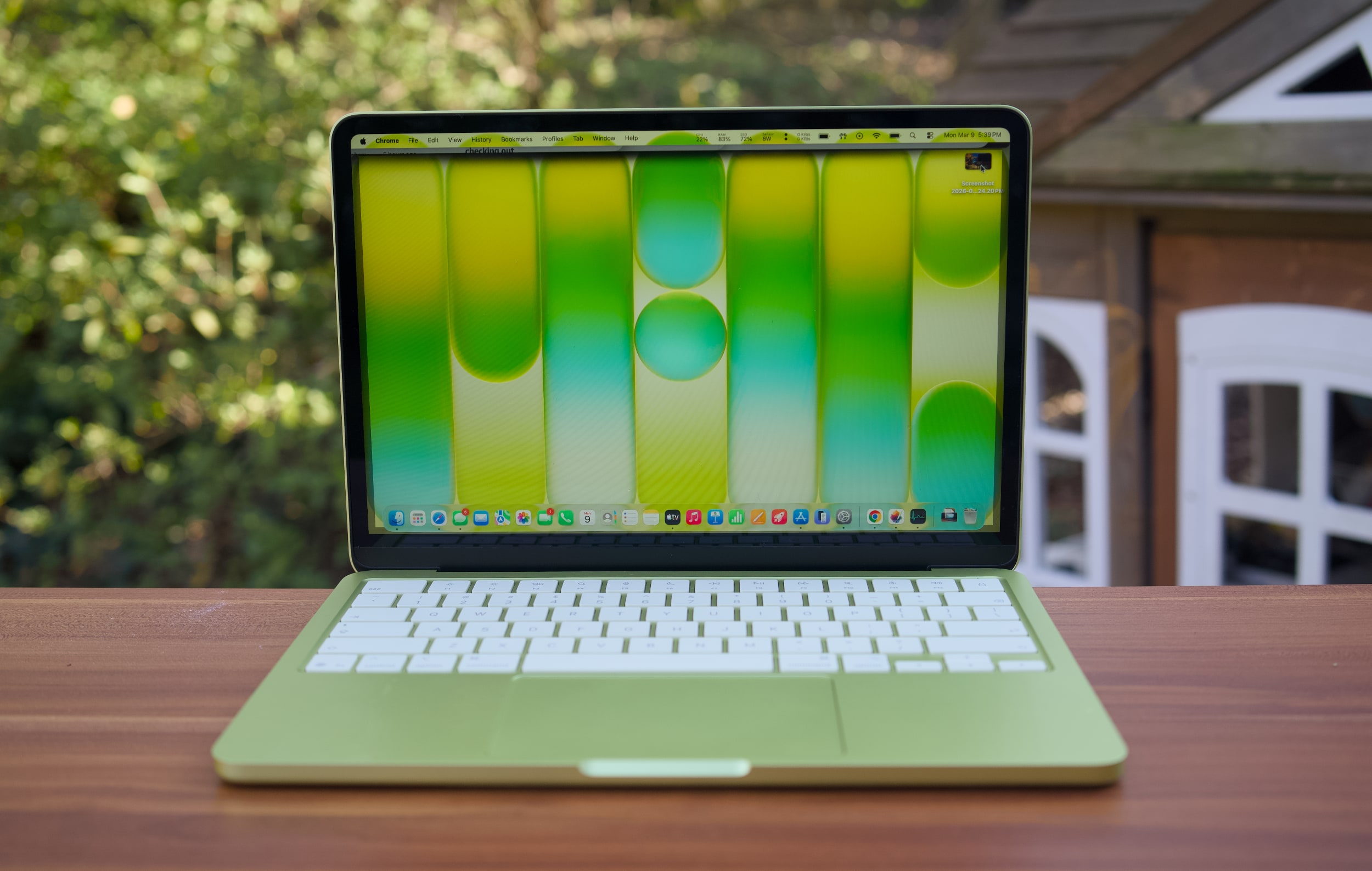
A citrus MacBook Neo on a table outside.
Devindra Hardawar for Engadget
And yet, thanks to Ternus's hardware leadership and Apple's command of its software, the MacBook Neo has been a resounding success. It has the best build quality, screen, keyboard, speakers and trackpad that I've ever seen in a $600 laptop. As I wrote in my review, "every Windows PC maker, including Microsoft, should be ashamed."
While we don’t know the full build cost for the Neo, Apple’s margins for selling it will undoubtedly be far slimmer than the MacBook Air or Pro. But the Neo is more than a profit maker. It’s a device that can serve as a gateway to the Apple ecosystem for kids and students. Even better, it could easily tempt over Windows users.
We can't give Ternus all the credit for the Neo, of course, there's an entire team of product managers and engineers below him doing the actual design work. But it's hard to deny the flex of building a $600 laptop that doesn't feel like total garbage. The MacBook Neo surprised me, a jaded technology reporter, on practically every level. And its existence makes me wonder how a Ternus-led Apple could continue to iterate without compromising quality or Apple's signature attention to detail.
Ternus is the rare Apple engineer who has played a role in almost all of its existing products — in his 25 year tenure, he’s taken charge of building the Mac, iPad, iPhone and Apple Watch. That gives him a unique perspective of where the company could go next, as well as how Apple could stretch its own capabilities. And based on what I’ve seen of the MacBook Neo, it’ll be interesting to see how Apple reshapes itself for the future.
This article originally appeared on Engadget at https://www.engadget.com/computing/laptops/the-macbook-neo-is-a-glimpse-into-john-ternuss-apple-170000842.html?src=rss
The Apple rumors were true, once again. This week, the company announced that Tim Cook will be stepping down from his CEO role on September 1. Replacing him will be John Ternus, who currently serves as Apple's SVP of hardware engineering. In this episode, Devindra and Engadget's Nathan Ingraham discuss Cook's legacy as Apple's CEO, and pontificate about how Ternus may change things. We're going from Apple being led by a logistics guru, to Apple being driven by a product and engineering wizard. Surely, that will have some impact on future products.
Tim Cook to step down as Apple CEO after 15 years, John Ternus will take his place on September 1 – 1:22
Palantir woke up last Saturday morning and posted a comic book villain manifesto on X – 26:01
DHS wants to make facial recognition smart glasses for ICE – 31:53
A lot of people panic bought PCs to avoid RAMageddon – 36:25
Meta faces a new lawsuit over running ads for outright scams –
Employees at Meta will have they keystrokes and mouse moves recorded for AI training – 40:10
Xbox Game Pass Ultimate price goes down, but it won’t include Call of Duty – 44:55
Around Engadget: a great (expensive) Dyson vac with a silly name – 49:15
Working on – 51:58
Pop culture picks – 52:55
Credits
Hosts : Devindra Hardawar and Nathan Ingraham Producer: Ben Ellman Music: Dale North and Terrence O’Brien
This article originally appeared on Engadget at https://www.engadget.com/computing/engadget-podcast-tim-cooks-apple-era-and-what-lies-ahead-for-john-ternus-121853488.html?src=rss
DeepSeek has released its latest AI models, the V4 Pro and Flash versions, a bit over a year after it went viral and became the top rated free app on Apple's App Store in the US. “Welcome to the era of cost-effective 1 million context length,” DeepSeek said in its announcement. Context length is what you call the maximum number of tokens that an AI model can remember, so the bigger it is, the more coherent and consistent an AI is when it comes to extended conversations. OpenAI’s recently announced GPT‑5.5 has a context window ranging from 400,000 to 1 million, for instance.
The new model is still open-source, allowing users to download its code and modify it if they want. DeepSeek says V4 Pro has enhanced agentic capabilities and claims that it rivals top closed-source models when it comes to reasoning. It also says that it trails only Gemini-3.1-Pro in rich world knowledge. Meanwhile, V4 Flash isn’t quite as powerful as the V4 Pro, but it has faster response times. Still, its reasoning abilities closely approach V4 Pro, DeepSeek says, and it performs on par with with the Pro version on simple Agent tasks.
Shortly after DeepSeek topped the App Store charts, it was banned for use by US federal agencies and on government-owned devices. Authorities believed it was a national security risk and posed a threat to US AI stocks. South Korea also paused downloads of its app over privacy concerns.
🚀 DeepSeek-V4 Preview is officially live & open-sourced! Welcome to the era of cost-effective 1M context length.
🔹 DeepSeek-V4-Pro: 1.6T total / 49B active params. Performance rivaling the world's top closed-source models. 🔹 DeepSeek-V4-Flash: 284B total / 13B active params.… pic.twitter.com/n1AgwMIymu
This article originally appeared on Engadget at https://www.engadget.com/ai/deepseek-promises-its-new-ai-model-has-world-class-reasoning-115733512.html?src=rss
Although it’s one of the more inoffensive topics on Polymarket, this news typifies the Wild West of prediction markets and betting sites. A hairdryer was allegedly used to rig Polymarket bets on temperatures at Charles de Gaulle Airport in Paris, according to a report by The Telegraph. French authorities noted that the official temperature readings at the airport spiked twice in the past month. On both occasions, gamblers betting on those temperature fluctuations on Polymarket appear to have walked away with thousands upon thousands of dollars.
There is no indication that Polymarket forced anyone to return winnings, but the temperature sensor has been moved to a new location. The site is also still running bets on the daily temperature in and around Paris.
In a more serious development, a US soldier was arrested for allegedly making over $400,000 on Polymarket using information he had about the plans to capture the former Venezuelan president, Nicolás Maduro.
Gannon Ken Van Dyke was arrested and charged with using classified military information to place bets on the prediction marketplace Polymarket. Van Dyke created a Polymarket account around December 26, 2025, and made 13 bets related to Maduro from December 27 to January 2.
The soldier has also been charged with one count of wire fraud, carrying a maximum penalty of 20 years in prison, and one count of unlawful monetary transaction, carrying a maximum sentence of 10 years. It’s a lot heavier than hairdryer shenanigans.
DJI is taking another stab at the budget drone market with the new Lito series. The Lito 1 and Lito X1 are both under $400 and weigh less than 249 grams — they’re ideal for beginners. Both replace DJI’s Mini series, but they offer things those models lacked, like LiDAR and 360-degree obstacle avoidance. After testing both models, I believe they offer unbeatable value and performance at these prices, by a long shot. However, due to DJI’s standing in the US, you might not see either.
As suggested by recent comments by the new boss of Xbox, Microsoft’s gaming arm is cutting the prices of both Game Pass Ultimate and PC Game Pass, effective immediately, but there’s one big caveat. New Call of Duty games will no longer be available on Game Pass Ultimate or PC Game Pass on day one. They’ll eventually hit those tiers about a year later, during the following holiday season.
Anker, of battery-pack and cable fame, has announced its own AI chip that it will integrate into its future headphones and other devices. The company is planning to debut the chip, called Thus, on a new model of headphones to be unveiled at its Anker Day event in May.
Anker’s Thus chip integrates computing power directly into NOR flash memory cells, which offer faster read speeds than NAND. Anker says headphones are a particularly challenging environment to demonstrate what a new chip can do because “hardly any other device places higher demands on an AI chip.” Anker announced one particular feature to showcase its silicon. Clear Calls will cancel noise “with a large neural network running entirely on the device, supported by eight MEMS microphones and two bone conduction sensors.”
The logo of the prediction market online platform Polymarket is seen outside their new location called "The Situation Room" during its opening day in Washington, DC, on March 20, 2026. Prediction market platforms have rapidly broken into the mainstream in the United States, positioning themselves as an alternative to both traditional polling and licensed sports betting. Platforms like Polymarket and its biggest rival Kalshi, remain illegal or unregulated in most countries outside the US, where regulators have generally classified them as unlicensed gambling. (Photo by Théo MARIE-COURTOIS / AFP via Getty Images)

 Anmelden