Cash App, the banking and payments app run by Block, has added support for parent-managed kids accounts. The new accounts include key benefits from the service's normal account, with an eye towards teaching financial literacy to younger users ages 6 to 12. Cash App first allowed teenage users on its platform in 2021.
As part of the "expanded Cash App Families experience," eligible legal guardians and parents can create managed accounts that offer "a dedicated place on the platform to send allowances, set aside savings, and track spending for their child, kickstarting their path to financial independence," Cash App says. Adults managing these accounts will be able to set up recurring transfers, see how their child is spending and do things like lock their child's account to prevent transactions. Kids will get a custom debit card and the ability to receive payments from up to five trusted accounts, though notably they won't be able to access Cash App itself.
Today, we're launching Cash App accounts for kids age 6-12. Parents manage the accounts. Kids get to learn about safety, start saving for goals, and design and use their own debit card.
Cash App says managed accounts are designed for kids 6 through 12. Once those kids turn 13, Cash App says parents will be able to choose to convert their account to a "sponsored account" to unlock more features, like the ability to send and receive payments, invest in stocks or trade crypto. Those sponsored accounts are technically still monitored and controlled by a parent or legal guardian, but they do give 13-year-olds more control over how they use their money.
A parent-managed account for kids is not a new idea in the fintech space, though Cash App is trying to reach a younger audience than some of its competitors. Venmo rolled out access to its payment platform to teens between the ages of 13 to 17 in 2023. Separately, both Apple and Google also offer their own kids accounts in Google Wallet and Apple Cash Family.
This article originally appeared on Engadget at https://www.engadget.com/apps/cash-app-now-supports-accounts-for-kids-6-12-210651025.html?src=rss
Meta is starting to test a long-overdue facelift for Threads on web. The company's head of Threads Connor Hayes showed off a new look for the web version of Threads that finally adds direct messaging and makes it easier to navigate between multiple feeds.
The new layout adds a bunch of new shortcuts to the site's left rail, including saved posts, insights, activity, and the ability to move between different feeds. Those features have all been accessible on web before, but many were hard to find. For example, the only way to currently get to "insights" is to navigate to your own profile or save it as a "pinned" column. Most importantly, though, the update finally adds the Threads inbox, which has not been available to web users even though the feature was added to the app last June.
It's not clear when the new look will roll out, but Hayes said Meta has already started to test it and that the company will "be investing more here going forward." The last time the Threads website got a major update was last April, which added some basic functionality. But since then, Meta has focused much of its efforts on the Threads app, rather than the website. Some newer features, like disappearing "ghost posts," are able to be viewed on the web but can only be created in the app.
Speaking of the Threads app, the web updates come one day after Hayes previewed some tweaks to how replies look on mobile. With the change, replies under a post will be indented slightly to make it easier to follow conversations. That change is rolling out now on iOS and currently "testing" on Android.
This article originally appeared on Engadget at https://www.engadget.com/social-media/meta-is-giving-threads-on-web-a-redesign-that-finally-adds-direct-messages-192903284.html?src=rss
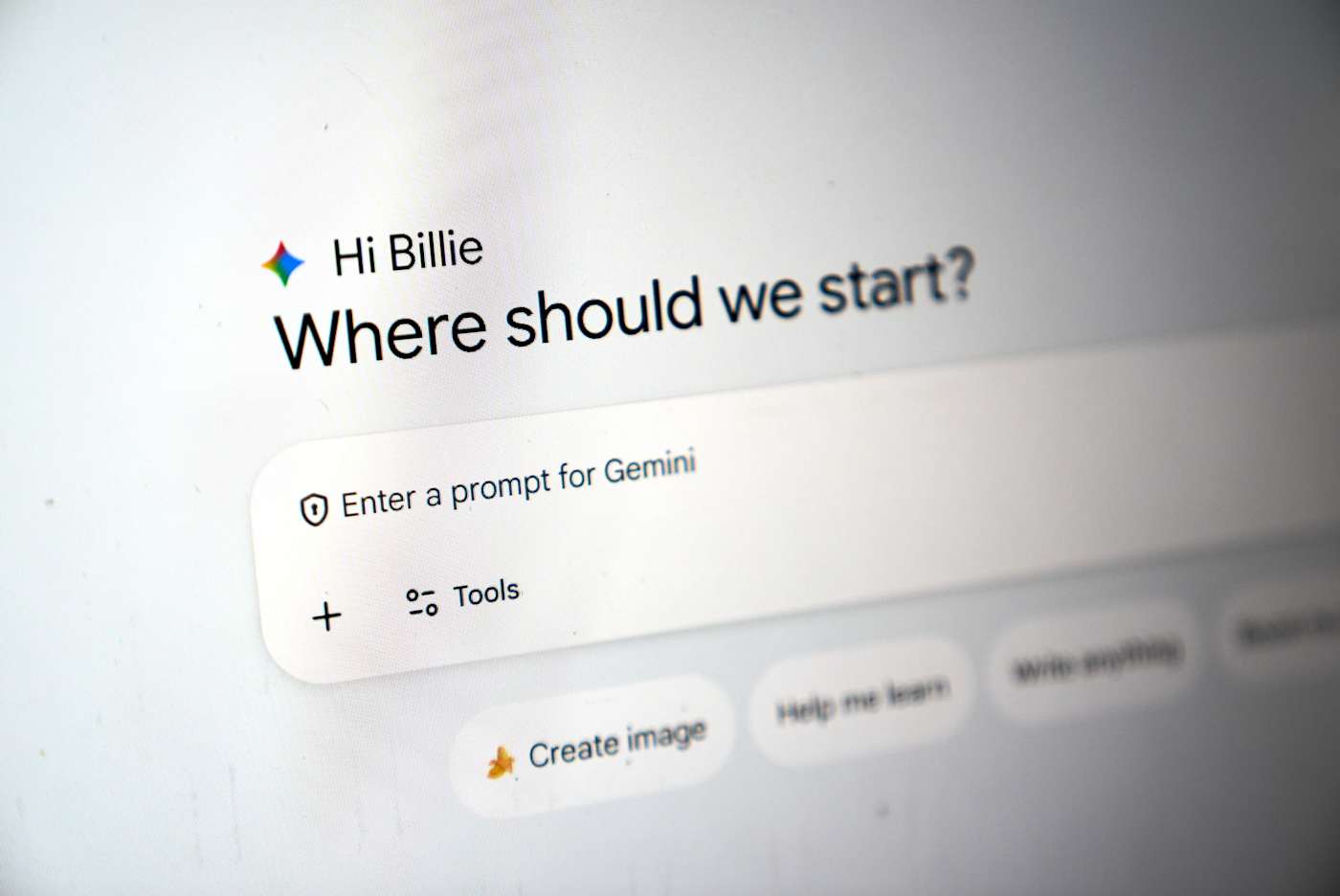
Google has fully integrated NotebookLM, its AI-powered research tool, into the Gemini app. The company launched a standalone NotebookLM app last year, but as it said in its announcement, “keeping track of everything can be a challenge.” It added NotebookLM as a source in the Gemini app last year, but now you can create notebooks right inside the chatbot.
You can now find the option to create a new notebook in Gemini’s side panel and then select “Add sources” that the tool can use, such as PDFs, documents, website URLs, YouTube videos and even copy-pasted text. NotebookLM will use information from those sources to create a searchable repository of information for you, and you can ask Gemini to create things like reviewers, infographics and video and audio overviews that turn your uploaded information into an easy-to-understand format. Take note, however, that Google warns users within the NotebookLM interface that it can be inaccurate, and that it’s best if you double-check information it puts out.
The company is rolling out NotebookLM’s full integration into Gemini this week for Google AI Ultra, Pro and Plus subscribers on the web. It will be available on mobile, in more locations and to free users over the coming weeks.
This article originally appeared on Engadget at https://www.engadget.com/ai/google-bakes-notebooklm-its-research-tool-into-gemini-101850634.html?src=rss
Meta has released a new version of WhatsApp for CarPlay that has much better integration that its previous version. As MacRumors and9to5Macreport, the new app gives users access to a native interface. The old WhatsApp for CarPlay is mostly limited to Siri-operated features. Users can, for instance, ask Siri to compose messages or place calls for them. The new interface has a contact info section, where they can see the profiles of people saved in their account, as well as a favorite contacts section that makes it easy to find users they usually message or call.
Users can also find a list of their recent chats and call history within the app. Plus, they’ll see new shortcut buttons for sending messages via dictation or for placing a call, in case they don’t want or can’t give verbal Siri commands. Meta has been beta testing the new app since at least last week. Now that it’s available, users can have access to all the features we’ve listed by updating their iOS app and connecting to their infotainment systems. OpenAI also recently rolled out ChatGPT's Voice mode to CarPlay, allowing drivers to hold a conversation with the chatbot while on the road.
This article originally appeared on Engadget at https://www.engadget.com/apps/whatsapp-adds-a-better-native-interface-for-carplay-112127361.html?src=rss
There's a new movie tracking app in town, with a twist for squeamish horror fans. Binge leverages Apple's Live Activities feature to warn viewers about jump scares in horror movies.
This seems to work rather simply. Users open the app when starting a movie and Apple devices will display warnings on the lock screen ahead of frightening scenes. The settings can be adjusted to only warn about major jump scares and the like, leaving viewers vulnerable to some of the smaller terrors.
However, the app doesn't integrate with any streaming services. It only knows a movie starts because a button has been tapped. This means that people will have to notify the app when taking a bathroom break or making popcorn, lest the timing of the notifications get all messed up. This information can also be accessed via a timeline.
Binge
Binge is also vying to become an all-in-one movie tracking app, like Letterboxd and JustWatch. So it provides details about the cast and crew of movies and shows, along with reviews, awards, runtimes and other basic information. It also tracks which streaming platforms are home to a specific piece of content, which is handy as stuff tends to move around a lot in this modern age.
Binge
Finally, there's a set of tools for parents that pulls data from external sites like Rotten Tomatoes. This displays if a movie or show has violence, sexual content, profanity or drug use.
The app is free to download, but access to jump scare warnings requires a paid subscription. This costs $2 per month or $18 each year. There's also a lifetime subscription for $50. It's available for iPhones, iPads and Macs.
Binge isn't the only way to track scary scenes ahead of time, but it is the only tool that integrates with Apple's Live Activities platform. Forget jump scares. I want an app to warn me about the super gory scenes when watching The Pitt. Those makeup artists are top-tier.
This article originally appeared on Engadget at https://www.engadget.com/apps/movie-tracking-app-binge-uses-apples-live-activities-to-warn-about-jump-scares-184840127.html?src=rss
WWDC 2026, the latest version of Apple's yearly developer conference, runs from June 8-12, and by all appearances the company has some important updates to outline. In comparison to Liquid Glass, the design material Apple introduced last year and now uses across all its operating systems, the new features the company is rumored to announce might not be aesthetic, but they could make just as big of a splash. Namely because Apple might finally be ready to show off its second stab at an overhauled version of Siri.
If you're curious to see the company's new plans for yourself, you can watch Apple's WWDC 2026 keynote live on its website, YouTube channel or the Apple Developer Bilibili channel in China. Apple will also host its Platforms State of the Union stream and individual developer workshops on its developer website if you want to learn even more details about the software updates the company will release later this year. Luckily, we do have some sense of what Apple has in store, and it looks like stability improvements and AI are the company's big focuses for the updates coming to iOS, iPadOS, macOS, watchOS, visionOS and tvOS this fall.
A Snow Leopard-esque approach to stability and performance
Apple released Mac OS X Snow Leopard in 2009, primarily as a way to clean up the performance and refine the new features the company released with Mac OS X Leopard two years prior. The decision to essentially "take a year off" to focus on making everything about the company's desktop operating system feel better was well-received, and Apple is apparently planning to have iOS 27 serve a similar role.
Bloomberg reports that Apple's upcoming update will be "focused on improving the software’s quality and underlying performance" and that the company's "engineering teams are now combing through Apple's operating systems, hunting for bloat to cut, bugs to eliminate and any opportunity to meaningfully boost performance and overall quality." Those fixes will presumably extend to the company's other operating systems, too.
Some of this effort may also be focused on cleaning up the visual changes introduced in Apple's big switch to Liquid Glass. The design overhaul has been controversial among the company's diehard fans, and Apple has already introduced tweaks in updates that arrived after the release of iOS 26 to make Liquid Glass interfaces more legible. Bloomberg reports the company could go a step further in its next updates and add a system-wide slider that will allow users to adjust the intensity of Liquid Glass (visual effects like translucency and reflectivity) they want in the interface.
The chatbot-ification of Siri
While stability and performance improvements will be a major focus of this year's updates, Apple is also rumored to be making some major changes to Siri. When the company first introduced Apple Intelligence at WWDC 2024, it promised to launch an updated version of the voice assistant that could use your personal context (like the information securely stored on your iPhone) to act across apps. Apple delayed those features in March 2025 and then announced a partnership with Google in January 2026 to use Gemini models to presumably make them possible.
Those features might finally arrive in this year's updates, but Apple is reportedly also changing how users interact with Siri by making the assistant more like a chatbot, according to Bloomberg. This would make the assistant more interactive and natural to speak to, and could open up other possibilities, like letting users direct Siri to perform two actions at the same time. Developers will reportedly also be able to integrate their own AI assistants with Siri, much like OpenAI has with ChatGPT.
New places to talk to AI
The chatbot version of Siri will be accessible in the usual ways, but also reportedly through a standalone Siri app. The new app will let users prompt the assistant to take care of tasks on their device, search the web and even access news, not unlike current Gemini and ChatGPT apps. Bloomberg writes that the app will also be a way to review past conversations with Siri and receive suggestions of prompts to try with the new chatbot version of the assistant.
Users will also be able to interact with Siri inside Apple's other apps via a new feature called "Ask Siri." This may appear as an option in app menus, and allow you to ask the AI assistant questions about content in the app. It's not clear if this will be as in-depth or capable as Google's Ask Maps or Ask Photos features, but it at least seems like Apple's thinking along the same lines as its partner.
This article originally appeared on Engadget at https://www.engadget.com/big-tech/what-to-expect-from-wwdc-2026-110000086.html?src=rss
OpenAI is developing a “super app” for desktop that unifies ChatGPT, its browser and its Codex app, according to the Wall Street Journaland CNBC. A company spokesperson told the publications that OpenAI Chief of Applications Fidji Simo will lead the application revamp with assistance from OpenAI President Greg Brockman. Simo will also help the marketing team advertise the app when it comes out. OpenAI’s leadership is apparently hoping that combining several products can help it streamline user experience and dedicate its resources to one project.
The company has yet to make an official announcement about the new app, but Simo replied to the Journal piece’s author on X. “Companies go through phases of exploration and phases of refocus; both are critical,” Simo said. “But when new bets start to work, like we're seeing now with Codex, it's very important to double down on them and avoid distractions. Really glad we're seizing this moment.”
The Journal saw the internal note Simo sent to employees, wherein she said that the company realized it was spreading its efforts across too many apps and that it needed to simplify its efforts. “That fragmentation has been slowing us down and making it harder to hit the quality bar we want,” she reportedly wrote. In an all-hands meeting, CNBC said she also told employees that the company was “orienting aggressively” towards high-productivity use cases.
It’s not clear yet when the unified app will be available, but OpenAI is reportedly focusing on developing agentic AI capabilities for it. The agents will be able to make decisions and use tools to do tasks on computers, such as writing software or analyzing data, with little human oversight.
This article originally appeared on Engadget at https://www.engadget.com/ai/openai-is-putting-chatgpt-its-browser-and-code-generator-into-one-desktop-app-025709839.html?src=rss
Google is testing a version of its Gemini app for macOS, Bloomberg reports. The app would bring the AI assistant to uncharted territory, and in more direct competition with OpenAI's ChatGPT and Anthropic's Claude, both of which offer standalone Mac apps.
Gemini remains accessible through the web, and it sounds like the macOS app offers the same set of features, with the ability to respond to prompts, search the web and generate text, images and code. The major differentiator of the Mac app could be a feature called "Desktop Intelligence," which gives Gemini a new source of information and context for its responses. According to a message in the app's code viewed by Bloomberg, "when you enable apps for Desktop Intelligence you are enabling Gemini to see what you see (such as screen context) and pull content directly from these apps to improve and personalize your experience only when Gemini is in use."
The ability to refer to information in apps and what's currently on your screen is offered by both the Claude and ChatGPT macOS apps, and something Gemini is capable of on mobile devices. It's not clear if Gemini for macOS will be able to actually take action in the apps it can view — like, for example, Anthropic's popular Claude Cowork feature — but Google has already started offering that experience in a limited form on smartphones, so who's to say that couldn't come to desktop operating systems, too.
Bloomberg reports that the Gemini app is being tested with non-Google employees, which could be a sign it's making its way to a public release. Thanks to Apple and Google's AI partnership, whether the app sees the light of day or not, some of the technology that makes Gemini possible will run on macOS in the future. Google and Apple announced in January that Google's Gemini models would power future versions of Apple Intelligence. Apple is also reportedly overhauling Siri into more of a chatbot, an experience likely made possible by Gemini.
This article originally appeared on Engadget at https://www.engadget.com/ai/google-is-reportedly-testing-a-gemini-app-for-mac-203703372.html?src=rss
Google has detailed how users will be able to sideload apps from unverified developers once it implements its more restrictive policy towards downloading software on Android. The company originally planned to require all developers to be "verified" to distribute on Android, but softened its stance in November 2025 to allow carveouts for Android power-users and hobbyist developers.
For the average Android users, the ability to sideload apps will now be locked behind a multi-step one-time process. Users will first have to enable developer mode in settings, confirm they're not being coached into disabling security, restart their phone (to cut off any phone calls), then wait a day and confirm their identity with biometric authentication or a pin before installing any apps. Google says you can enable the ability to install apps from unverified developers for seven days or indefinitely, but regardless of what you'll choose, you'll still have to dismiss a warning telling you the app you're installing is from an unverified developer.
For hobbyist developers or students who want people to try their app but don't want to create a verified developer account, Google also plans to offer free "limited distributions accounts" that let you share apps without being verified. These accounts will let you share apps with up to 20 devices without having "to provide a government-issued ID or pay a registration fee."
Google is implementing its new verification process in the name of security, and has likened the requirements being asked of developers to "an ID check at the airport, which confirms a traveler's identity but is separate from the security screening of their bags." Neither the verification nor this new approach to sideloading entirely closes off getting apps from unverified developers onto your Android device, they just make it harder to download something dangerous directly from the internet onto your phone.
Google appears to be trying to split the difference on Android, tightening up what apps can be distributed via verification, while cutting its own Play Store fees and changing its stance towards third-party app stores. Requiring verification to distribute software extends Google's influence outside of its own apps and app store, which is why some developers and digital rights organizations have publicly pushed back on the company's plan.
Developers can sign-up for early access to the developer verification process now. Google says its new workflow for enabling sideloading and small distributions of apps will go live in August.
Correction, March 19, 2026, 3:44PM ET: The headline has been change to clarify that the new procedure does not apply to all app sideloading.
This article originally appeared on Engadget at https://www.engadget.com/apps/android-will-hide-app-sideloading-behind-a-new-one-time-security-process-184651171.html?src=rss
Comet is an AI-powered browser, which has become a hot product category throughout the past year or so. This is basically a web browser combined with a chatbot that can perform some tasks on a user's behalf. Like related tools, people can ask it to summarize a webpage or conduct additional research for more context about a subject.
Perplexity says that Comet "acts as a personal assistant and thinking partner" to "turn curiosity into momentum." Those are certainly words. The company boasts that folks can use the tool to shop and make schedules. I advise some caution for both of these tasks, given that AI browsers are notorious marks that easily fall for various online scams.
One cool thing here is that the app takes full advantage of Apple's Liquid Glass technology. It certainly looks easy on the eyes and that address bar really pops. The iOS version does suffer from some limitations inherent to Apple's walled-garden approach, according to a preview by MacStories. Users cannot install third-party extensions here, though it can be made the default browser.
The Comet browser is now available for iPhones, Android devices, Windows PCs and Macs. There isn't a native iPad app yet, but the standard Perplexity app is available for Apple's tablets so maybe the browser will follow suit.
This article originally appeared on Engadget at https://www.engadget.com/apps/perplexitys-comet-ai-browser-is-now-available-for-iphones-183947569.html?src=rss
Horizon Worlds, Meta's first pass at a metaverse, will be inaccessible via virtual reality headset after June 15, 2026. The company shared plans to separate Horizon Worlds from Quest VR platform and focus exclusively on the smartphone version of the app in February, and now in a new post on its community forums, Meta detailed when the VR version of Horizon Worlds will be deprecated.
By March 31, Meta says individual Horizon Worlds and Events will no longer be listed in the Quest's Store and headset owners will be unable to visit worlds like "Horizon Central, Events Arena, Kaiju and Bobber Bay." Then, after June 15, the app will be removed from Quest headsets and worlds will be completely unavailable to visit in VR. From that point on, the easiest place to visit Horizon Worlds will be in the Meta Horizon app for iOS and Android.
Additionally, Hyperscape Capture, a recently added beta feature that allows Quest headset owners to capture, share and visit each other in detailed 3D scans of real-life locations, is also being removed from Horizon Worlds. Meta says users will still be able to capture and view Hyperscapes, "but sharing, inviting, and co-experiencing Hyperscapes with others will no longer be supported."
While Meta's original blog detailing its 2026 VR strategy left open the possibility that a committed Quest owner might still be able to access some part of Meta's original VR metaverse, that apparently was never the company's plan. Meta saw enough "positive momentum" focusing on supporting the mobile version of Horizon Worlds in 2025 that it made sense to completely abandon the VR one in 2026. While that seems to run contrary to Meta’s positioning as a "metaverse company," it does reflect where the company is spending the most money and seeing the most (relative) success: AI and smart glasses.
This article originally appeared on Engadget at https://www.engadget.com/ar-vr/meta-will-shut-down-vr-horizon-worlds-access-in-june-222028919.html?src=rss
Shazam is now available within ChatGPT, if you don’t want to launch the music discovery app on your phone for, well, reasons. You will have to link the Shazam app with the chatbot first from its Apps page, after which you can summon it in-chat to identify whatever song is playing. To summon Shazam in-chat, you can use prompts like “Shazam, what’s playing?” or “Shazam, what is this song?”
A box will pop up that you can tap on to launch the music discovery service, which will then listen to the tune playing. ChatGPT will display the song’s name, artist and artwork, along with the option to save the song to Shazam. Take note that the feature will work within ChatGPT even if you don’t have the music discovery app downloaded on your device, which does make it useful if you’re using a phone with full memory. The Shazam integration has started rolling out globally within ChatGPT on iOS, Android and the web.
This article originally appeared on Engadget at https://www.engadget.com/apps/you-can-now-use-chatgpt-to-open-shazam-instead-of-just-opening-shazam-114000363.html?src=rss
Google is officially doing away with its 30 percent cut of Play Store transactions, and rolling out changes to how third-party app stores and alternate billing systems will be handled by Android. Some of these tweaks were proposed as part of the settlement the company reached with Epic in November 2025, but rather than wait for final judicial approval, Google is committing to revamping Android and the Play Store publicly.
The biggest change is to how Google will collect fees from developers publishing apps on Android. Rather than take its standard 30 percent cut of in-app purchases through the Play Store, Google is lowering its cut to 20 percent, and in some cases 15 percent for new installs of apps from developers participating in its new App Experience program or updated Google Play Games Level Up program. Those changes extend to subscriptions, too, where the company’s cut is lowering to 10 percent. For Google’s billing system, the company says developers in the UK, US, or European Economic Area (EEA) will now be charged a five percent fee and "a market-specific rate" in other regions. Of course, for anyone trying to avoid those fees, using alternatives to Google's billing system is getting easier.
Google says that developers will be able to offer alternative billing systems alongside its own or "guide users outside of their app to their own websites for purchases." The setup, as described by Google, appears to be more permissive than what Apple settled on in 2025. For iOS apps on the App Store, developers interested in avoiding Apple's fees can only direct customers to alternative payment methods on the web through in-app links. Allowing for these outside transactions is part of what prompted Epic to bring Fortnite back to the App Store in the US in May 2025. The developer added the app back to the Play Store in the US in December of that year, and Epic CEO Tim Sweeney shared alongside today's changes that Fortnite will soon be available in Google's app store globally.
Fortnite will return to Google Play Store worldwide soon. Epic Games Store continues supporting Android worldwide alongside Windows and Mac, and installation on Android will become much easier later in 2026.
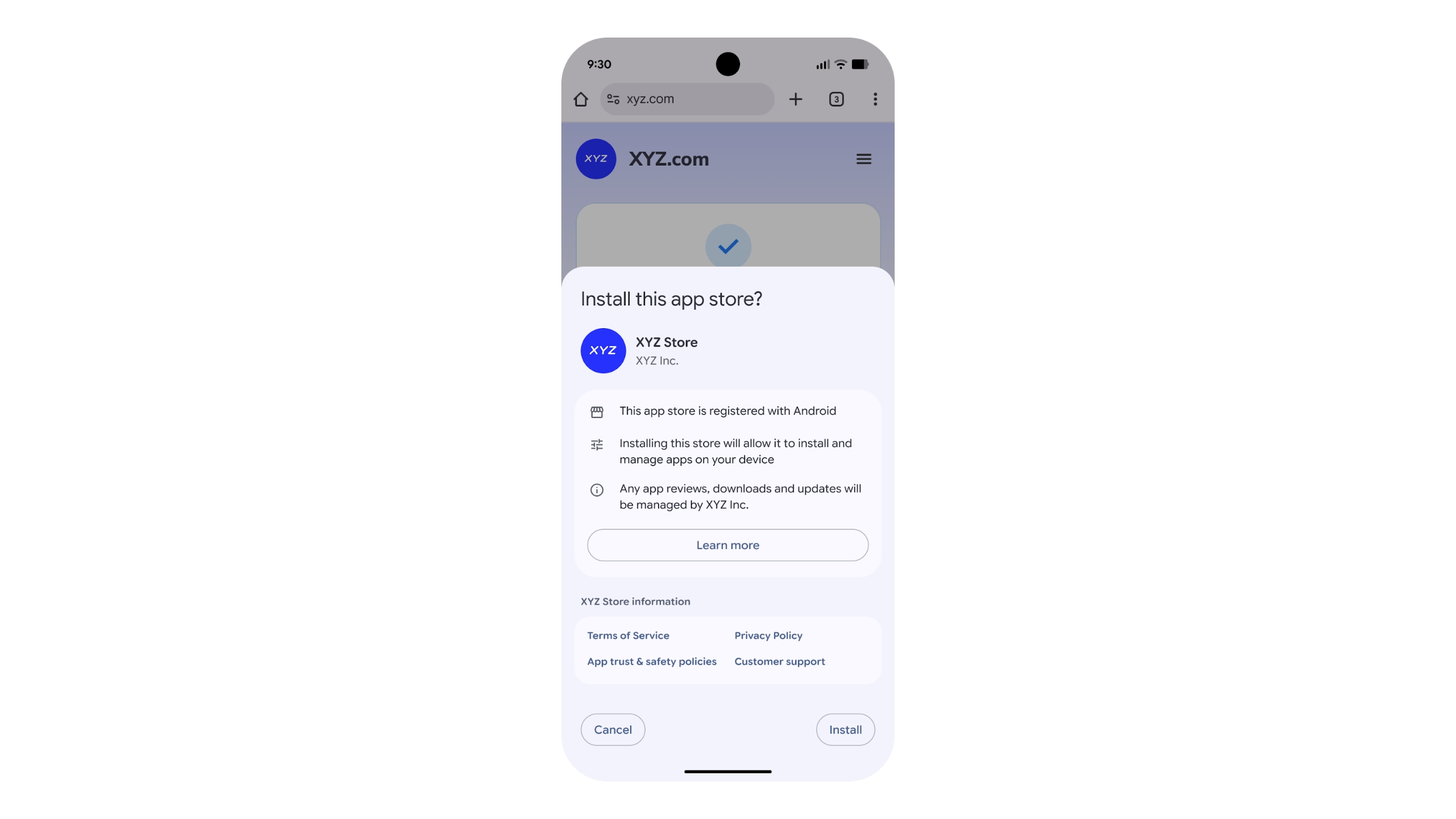
Epic is ultimately interested in getting people to use the mobile version of its Epic Games Store, and Google’s announcement also includes details on how third-party app stores can come to Android. Third-party app stores will be able to apply to the company's new "Registered App Stores" program to see if they meet "certain quality and safety benchmarks." If they do, they'll be able to take advantage of a streamlined installation interface in Android. Participating in the program is optional, and users will still be able to sideload alternative app stores that aren't part of the program, but Google clearly has a preference. Changes the company plans to make to sideloading later in 2026 could deliberately make the process more difficult, which might force developers to apply to Google’s program.
App stores approved by the Registered App Stores program get a simpler installation interface.
Google
Given the scale of the changes, not all of Google's tweaks will be available everywhere at the same time. Google says that its updated fee structure will come to the EEA, the UK and the US by June 30, Australia by September 30, Korea and Japan by December 31 and the entire world by September 30, 2027. Meanwhile, the company's updated Google Play Games Level Up program and new App Experience program will launch in the EEA, the UK, the US and Australia on September 30, before hitting the remaining regions alongside the updated fee structure. For any developers interested in offering their own app store, Google says it'll launch its Registered App Stores program "with a version of a major Android release" before the end of the year. According to the company, the program will be available in other regions first before it comes to the US.
Google has made changes to how it collects app store fees in the past, the most significant being in 2021, when it lowered its cut to 15 percent on the first $1 million developers earn, and 15 percent on subscriptions. The difference here is that the regulatory scrutiny brought about by Epic's lawsuit against Google and Apple seems to be a key motivator for its changes. Well, that, and an entirely separate business deal the company made with Epic. Google and Epic's settlement served as the basis for these changes, but The Verge reported in January that the companies also agreed to an $800 million joint partnership around product development and Google using Epic's "core technology." Letting developers keep more of their money is ultimately good, but it's a business decision Google felt comfortable making, which likely means it has its own share of upsides.
This article originally appeared on Engadget at https://www.engadget.com/apps/google-ends-its-30-percent-app-store-fee-and-welcomes-third-party-app-stores-185248647.html?src=rss
At the start of February, OpenAI upgraded its Codex coding app to give it the ability to manage multiple AI agents. At the same time, it released a standalone macOS app. If you've been patiently waiting for Windows to get that same treatment, OpenAI just released a dedicated Codex app for Microsoft's operating system.
Like its macOS counterpart, the software allows you to coordinate multiple coding agents to work on the same task. There's also support for automations to streamline repetitive tasks like bug testing. To help users get started, Codex includes a dedicated "Skills" section. Skills bundle together instructions, resources and scripts the software can use to connect agents to specific tools and workflows. OpenAI has also included native sandboxing to help make Windows developers feel at home.
Codex is available to ChatGPT Free, Go, Plus and Pro users. If you decide to give the app a try, know that your session history is saved to your OpenAI account, meaning you can start coding on Mac and then move to Windows without losing your work.
This article originally appeared on Engadget at https://www.engadget.com/ai/openai-brings-its-codex-coding-app-to-windows-195345429.html?src=rss
Google has announced that with the help of AI, it blocked 1.75 million apps that violated its policies in 2025, significantly down from 2.36 million in 2024. The lower numbers this year, it said, are because its "AI-powered, multi-layer protections" are deterring bad actors from even trying to publish bad apps.
Google said it now runs more than 10,000 safety checks on every app and continues to recheck them after they're published. Its use of the latest generative AI models helps human reviewers discover malicious patterns more quickly, it added. The company also blocked 160 million spam ratings, preventing an average 0.5-star rating drop for apps targeted by review bombing. Finally, Google stopped 255,000 apps from gaining excessive access to sensitive user data in 2025, down from 1.3 million the year before.
Meanwhile, Google Play Protect, the company's Android defense system, sniffed out over 27 million new malicious apps, either warning users or preventing them from running. The company added that Play Protect's enhanced fraud protection now covers 2.8 billion Android devices in 185 markets and blocked 266 million risky "side-loading" installation attempts.
"Initiatives like developer verification, mandatory pre-review checks, and testing requirements have raised the bar for the Google Play ecosystem, significantly reducing the paths for bad actors to enter," the company said its blog. "This year, we’ll continue to invest in AI-driven defenses to stay ahead of emerging threats and equip Android developers with the tools they need to build apps safely."
Google has steadfastly justified its relatively high fees on app purchases and subscriptions by touting its investments in app safety. However, its Play store has been under pressure from regulators in Europe and other regions that claim it amounts to a monopoly. Last year, the company changed its fee structure for developers using alternative payment channels, but EU regulators recently claimed the company still isn't complying with Digital Markets Act regulations.
This article originally appeared on Engadget at https://www.engadget.com/apps/google-play-used-ai-to-help-block-175-million-bad-apps-in-2025-102208054.html?src=rss
Meta is shutting down the standalone Messenger website, according to a company help page. The website will disappear in April, though web users will still be able to send and receive messages within Facebook.
"After messenger.com goes away, you will be automatically redirected to use facebook.com/messages for messaging on a computer," the help page reads. "You can continue your conversations there or on the Messenger mobile app."
Users will be able to restore their chat history after switching to the app by entering a PIN number. This is the same PIN that was used to initially create a backup on Messenger. It can be reset for those who simply don't have the bandwidth to remember yet another six-digit code.
This comes just a few months after Meta shut down Messenger's standalone desktop apps. At that time, Meta directed existing users to Facebook to continue using the service and not the dedicated Messenger website. In other words, the writing has likely been on the wall since October.
Messenger has had a long and storied history. The platform first launched as Facebook Chat all the way back in 2008. Facebook Messenger became a standalone app in 2011. The company has long-tried to make Messenger a thing outside of Facebook. It removed messaging capabilities from the main Facebook app in 2014 and began directing users to the Messenger app. Meta began reintegrating Messenger back into the Facebook app in 2023 and now here we are.
This article originally appeared on Engadget at https://www.engadget.com/apps/meta-is-shuttering-messengers-standalone-website-which-is-a-thing-that-exists-191808134.html?src=rss
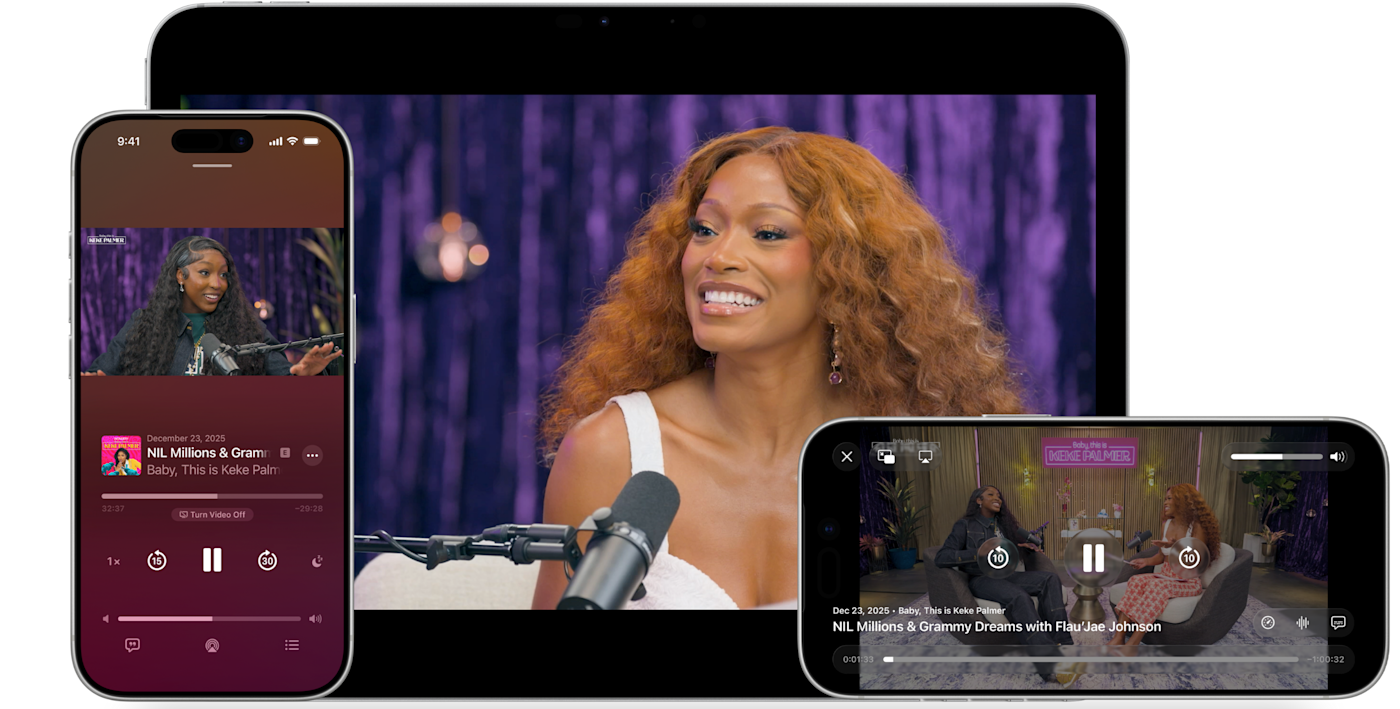
This provides several benefits for the end user. It lets people switch seamlessly between watching and listening, in addition to offering a horizontal full display option. It'll also make both video and audio streams available to download for offline viewing. This wasn't possible with the previous streaming method, which pulled content from an RSS-like feed. RSS is still available as a distribution option, but HLS definitely brings some advantages
The technology integrates picture-in-picture for multitasking on products like the iPad. Finally, the updated app will automatically adjust the picture quality to ensure smooth playback in various network conditions, including both Wi-Fi and cellular.
The update will be available on most platforms, including iOS, iPadOS, visionOS and the web. It's in beta right now, but the company plans a major rollout this spring as part of the upcoming 26.4 operating systems.
This article originally appeared on Engadget at https://www.engadget.com/apps/apples-podcasts-app-now-supports-http-live-streaming-video-technology-182605460.html?src=rss
Apple has steadily expanded home screen customization on the iPhone over the past few years, and iOS 26 continues that trend with more visual control over app icons. Building on the changes introduced in iOS 18, the latest update lets you resize icons, remove app labels, apply system-wide color tints and make icons translucent using Apple’s new Liquid Glass design language.
Most of these options live in one place: the Customize menu, which appears after entering edit mode on the home screen. While iOS still doesn’t allow total freeform icon placement or third-party icon packs without shortcuts, the tools Apple provides are now flexible enough to dramatically change how an iPhone looks and feels. This guide walks through how to customize app icons and layouts using the options available in iOS 26, with a focus on icon size, color, appearance and arrangement.
How to customize your iPhone home screen
All home screen customization starts the same way.
Go to the Home Screen.
Touch and hold an empty area of the Home Screen background until the apps begin to jiggle.
Tap Edit in the top left corner, then select Customize from the menu.
A customization panel appears along the bottom of the screen. Changes made here apply across all home screen pages at once, rather than on a per-page basis.
From the Customize menu, you can:
Adjust icon size
Change appearance (e.g., Dark)
Make icons translucent with a clear look
Add a color tint to icons and widgets
How to make app icons larger and remove labels
One of the simplest changes in iOS 26 is also one of the most visually impactful. From the Customize menu, tap the icon showing two app squares of different sizes. This switches the home screen to Large App Icons mode.
When large icons are enabled, app labels disappear entirely and the icons themselves expand to fill more of the grid. This creates a cleaner look and makes apps easier to tap, particularly on iPhone models with larger screens. The tradeoff is that fewer icons fit on each screen and spacing between rows becomes more pronounced.
To revert to standard icons with labels, repeat the steps and tap the same button again.
How to change the appearance of app icons
iOS 26 offers four icon appearance styles: Default, Dark, Clear and Tinted. These options are available from the top row of the Customize panel. From the Customize panel, you can tap the sun icon across all options in the top left-hand corner to toggle wallpaper dimming. This generally makes app icons and labels easier to read.
The Default option keeps icons looking as the developers intended, with no system-wide color or transparency applied.
Selecting Dark applies a darker background to supported app icons and widgets. Apple’s own apps fully support this mode, and some third-party apps do as well, though many retain their original colors. When Dark is enabled, iOS can also dim the wallpaper slightly, which may help reduce power usage on OLED displays.
The Clear option enables translucency across all apps on the Home Screen. This removes all color but retains app labels. The layered, frosted-glass effect changes depending on the background image. Clear icons can be paired with Light, Dark or Auto styles using the options along the bottom of the Customize panel.
Tinted mode allows all supported app icons and widgets to take on a single color scheme. After selecting Tinted, color and saturation sliders appear at the bottom of the screen. Adjusting these changes the hue applied across icons, creating a uniform look that can range from subtle pastels to high-contrast monochrome themes.
If you want a specific color from your iPhone’s wallpaper, select the eyedropper tool, then tap and hold while dragging the cursor across the screen until you land on your chosen color. Like the Clear option, you’ll be able to select from Light, Dark or Auto when adjusting the Tinted settings.
The Auto option allows icons to switch between light and dark appearances based on system-wide light or dark mode.
How to arrange apps around the home screen
App placement works the same way it did before iOS 26, but the visual changes introduced by larger icons and spacing make layout choices more noticeable.
Apps can be rearranged by accessing an empty space on the Home Screen, then tapping and holding until the apps start jiggling. From here you can drag icons to new positions. The grid remains fixed, meaning icons cannot overlap or be placed freely, but there is more flexibility in how empty space is used.
Icons can be clustered toward the bottom of the screen, aligned to one side or arranged to frame a wallpaper. With large icons enabled, the gap between the dock and the first row of apps becomes more pronounced, but it cannot be filled with additional icons.
Changes apply across all home screen pages, so reorganizing one page does not affect icon size or appearance on another.
What iOS 26 still doesn’t allow
Despite expanded customization, some long-standing limitations remain. iOS 26 does not support per-app icon color selection, custom icon packs without shortcuts or freeform icon placement outside the grid. Icon appearance settings apply globally, not per page or per app.
Widgets, lock screen customization and focus mode filters add additional layers of personalization, but those tools sit outside the scope of the home screen Edit menu.
iOS 26 gives iPhone users more control over the look of their home screen than ever before, even if Apple’s approach remains structured. By combining icon resizing, appearance modes and careful app arrangement, it’s possible to create a layout that feels cleaner, more personal and easier to use without relying on workarounds.
This article originally appeared on Engadget at https://www.engadget.com/mobile/smartphones/how-to-customize-your-iphone-home-screen-with-ios-26-130000798.html?src=rss
Apple plans to allow third-party voice-controlled AI apps in CarPlay, Bloomberg reports. Siri is the default voice assistant for things like controlling music and looking up directions, but future AI apps in CarPlay could handle the complicated, open-ended requests Siri can't answer.
The expanded support would let developers like OpenAI or Google offer versions of their ChatGPT and Gemini apps for CarPlay. Similar functionality is possible just by connecting a smartphone to a car over Bluetooth and using an AI app's voice mode, but CarPlay support would presumably make the process a little more seamless.
Not so seamless that it replaces Siri, however. Bloomberg writes that these third-party apps won't be able to replace the Siri button in the CarPlay interface or use their own wake words ("Hey Google," etc.). Instead, anyone who wants to spend a long drive talking to Gemini will have to open the app first. That could cut down on the utility of using one of these apps, but Apple presumably wants to get Siri to a place where CarPlay users prefer it as their in-car assistant anyway.
Apple and Google recently announced that Gemini would power future versions of Siri and Apple Foundation Models, the AI models underpinning Apple Intelligence. The delayed, updated version of Siri Apple introduced alongside Apple Intelligence in 2024 is supposed to be able to take actions on user's behalf, work across apps and understand the context of what's on screen, all things Gemini can currently do. Reports suggest Apple wants to eventually use Google's Gemini models to transform Siri into a proper conversational chatbot, too. That future version of the voice assistant could be right at home in CarPlay.
This article originally appeared on Engadget at https://www.engadget.com/transportation/apple-will-reportedly-allow-third-party-ai-assistants-in-carplay-213432646.html?src=rss
Fitbit's founders have a new startup. Two years after leaving Google, James Park and Eric Friedman announced a new platform that shifts the focus from the individual to the family. They say the Luffu mobile app "uses AI quietly in the background" to collect and organize family health information.
"At Fitbit, we focused on personal health — but after Fitbit, health for me became bigger than just thinking about myself," Park said in a press release. The app is particularly focused on the "CEO of the family" — the person who manages appointments, prescriptions and other health-related tasks.
But the definition of family isn't limited to parents raising children. The company sees its tool as especially valuable for caregivers in their 40s and 50s who may be managing the needs of both aging parents and kids. It even tracks pets' health habits.
"We're managing care across three generations — kids at home, busy parents in the middle, and my dad in his 80s who's living with diabetes and still wants to stay fiercely independent," Friedman wrote. "And the moments that matter most are often the most chaotic: a late-night fever, a sudden urgent care visit, a doctor asking questions you can't answer quickly because the details are scattered."
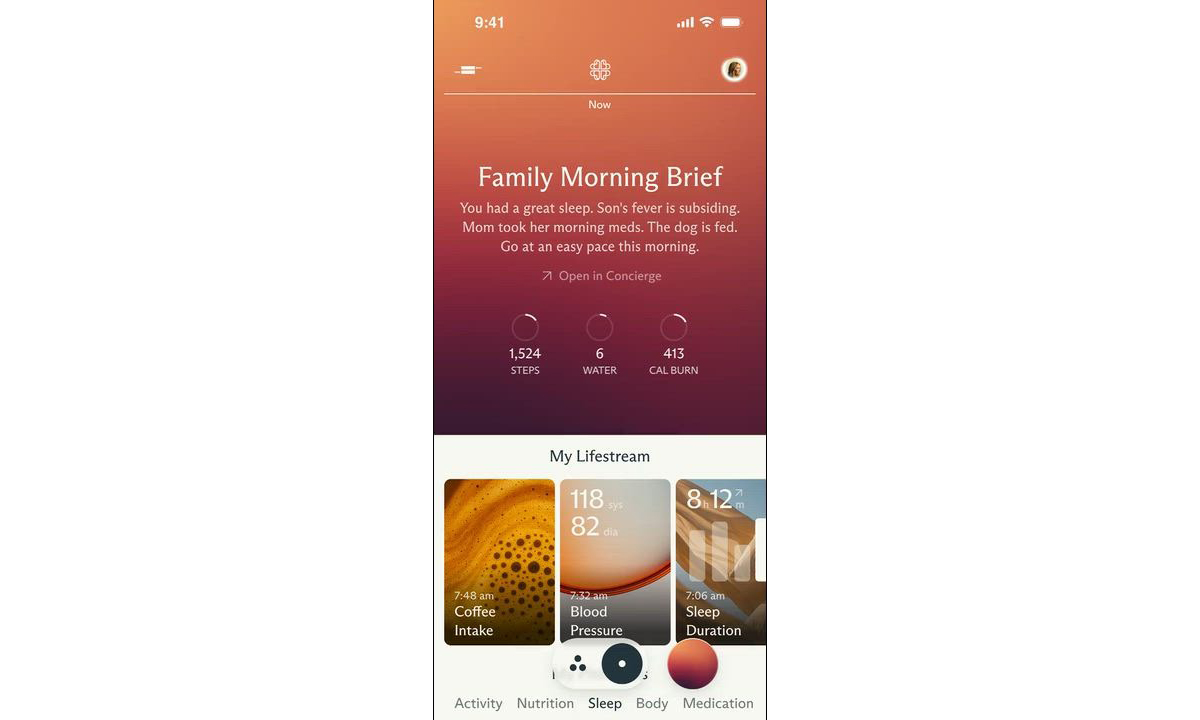
The app's AI includes a Morning Brief that recaps everyone's health.
Luffu
The company claims the app's AI "isn't a chatbot layer." Rather, it serves as a "guardian" — proactively monitoring for changes silently in the background. The AI then provides insights and triggers alerts when something is out of whack. You can also ask the app health data questions using plain language (so, there is some kind of chatbot) and share data with family members.
The company clearly wants to make entering data as easy as possible. Luffu allows family members to log info using voice, text or photos. It integrates with health platforms such as Apple Health and Fitbit. And the company eventually wants to expand into a hardware ecosystem — presumably, devices that make health data collection even easier.
Speaking of data collection, Luffu says, "Users are always in control of exactly what is shared, with whom, and privacy and security are paramount for all family data." In addition, the company told Axios that users can choose whether their data is used to train its AI. On the other hand, Big Tech has repeatedly shown that its most egregious data-collection practices are always wrapped in comforting language. So, at the very least, I'd take their pitch with grains of salt and, most importantly, make sure each family member knows exactly what they're consenting to. After all, this is a for-profit company, and we don’t yet know its monetization strategy.
Luffu is currently taking waitlist sign-ups for a forthcoming limited public beta. You can learn more and sign up for the waitlist on the company website.
Update, February 3, 2026, 1:14PM ET: This story has been updated to note that the Luffu public beta hasn’t started yet, but you can sign up for a waitlist to eventually get access when it starts.
This article originally appeared on Engadget at https://www.engadget.com/mobile/fitbit-founders-launch-luffu-a-way-to-integrate-your-familys-health-data-173251994.html?src=rss

 Anmelden