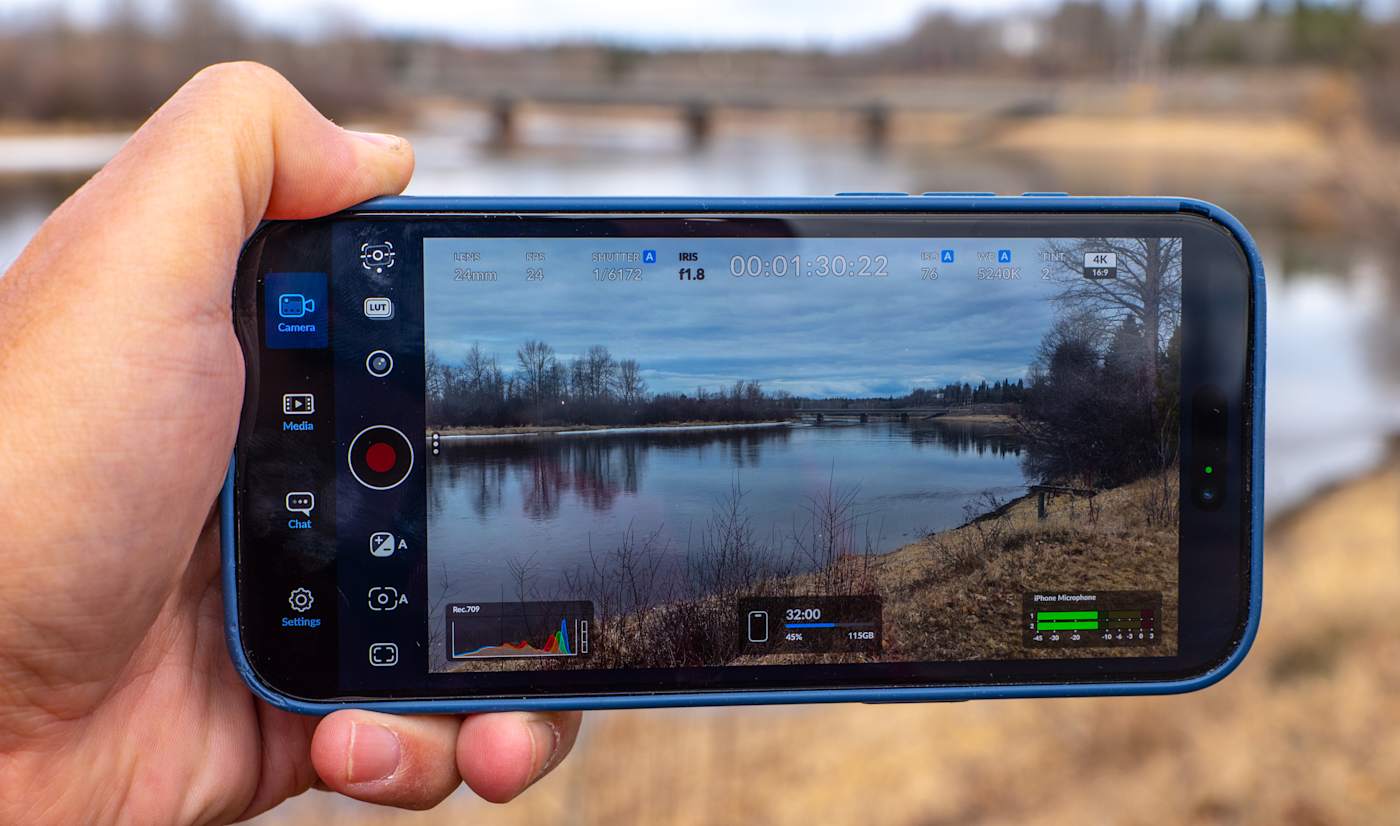
Blackmagic Camera is one of the more powerful third-party smartphone camera apps available and it's now even more useful for solo creators. Blackmagic Design just announced that the latest iOS version 3.3 now supports Apple Watch, letting you control the app and monitor video remotely from your wrist. It also includes ATEM camera control so you can use your iPhone as a live studio camera.
With the new Camera Apple Watch companion app, you can remotely control and monitor your iPhone from anywhere within Wi-Fi range. It lets you start and stop recording, control zoom and adjust settings like frame rate, shutter speed (angle), white balance and ISO with a tap. You can also see a view of your video for framing control, though a Watch screen is probably a bit too small to accurately check focus.
The Watch app will benefit solo creators who want to mount their iPhone on a tripod to record standup or vlogging activities. To set it up, you install the Watch app through your iPhone and it will automatically connect and sync to your device.
Use your iPhone as a broadcast camera? Sure, why not
Blackmagic Design
The other key feature is iPhone control from Blackmagic's ATEM Mini switcher used by streamers and broadcasters. To use it, you need the $420 Blackmagic Camera ProDock that gives your iPhone 17 Pro or iPhone 17 Pro Max an HDMI output, timecode, USB-C and other ports. Blackmagic Camera now lets you connect a single HDMI cable from the ProDock to an ATEM Mini switcher, then adjust settings, trigger recording, focus and zoom. It also offers a DaVinci primary color corrector so you can match and create digital film looks during live production.
Finally, Camera now supports Blackmagic's "Focus and Zoom Demand" controls (a knob and handle) designed for broadcast cameras. When those controls and an iPhone 17 Pro/Pro Max are connected via USB-C to a ProDock as shown above, you can zoom and focus Camera app video without taking your hands off the tripod handles. Together with the ATEM feature, it lets you use an iPhone as a full broadcast camera, which looks slightly weird but is pretty cool.
On top of those features, Blackmagic Design also added ProRes RAW stabilization and general bug fixes and improvements. Blackmagic Camera for iOS 3.3 is available now as a free download from the Apple App Store.
This article originally appeared on Engadget at https://www.engadget.com/apps/blackmagic-camera-for-ios-now-has-a-companion-watch-app-194529980.html?src=rss
Spotify has a new look today for listeners on tablets. The streaming service’s updated tablet UI now provides adaptive orientation, switching between portrait and landscape layouts rather than simply resizing the interface when changing how the device is held.
Spotify's tablet app now sports a collapsible sidebar so listeners can take advantage of their larger screen space when watching a music video or podcast. Parallel browsing lets you continue to scroll through the app while a video or lyrics are in the sidebar, and the "switch to video" toggle has been made more prominent.
The new design had appeared for some users earlier this year during tests. The final version is rolling out today for both iPad and Android devices.
This article originally appeared on Engadget at https://www.engadget.com/entertainment/music/spotify-debuts-a-new-ui-just-for-tablets-130000533.html?src=rss
To that end, the earbuds integrate with Razer's proprietary HyperSpeed 2.4GHz streaming platform, which allows for "gaming-grade lag-free" audio. This works with plenty of devices, including smartphones, tablets, PCs, the Steam Deck, the PS5 and more. The earbuds can also connect via Bluetooth for devices that don't support Wi-Fi-based streaming audio.
The charging case includes a dongle that plugs into devices via USB-C, which doubles as a wireless transmitter. Razer promises that users can quickly switch between Wi-Fi and Bluetooth audio, which would be useful when going from a PC to, say, a smartphone to listen to music.
These earbuds include improved ANC, when compared to the previous generation. The battery here lasts for 40 hours, with the earbuds getting 10 hours per charge and the case offering four charges.
Razer
The case can charge via USB-C, which means it charges as the transmitter is being used to stream audio. However, the dongle can also work on its own without the charging case. The earbuds also support THX spatial audio on PCs.
Razer's Hammerhead V3 HyperSpeed gaming earbuds are available right now and cost $130. The almost identically-named Hammerhead V3 X HyperSpeed earbuds run $100 and connect via Bluetooth 5.3 instead of Bluetooth 6.0, with a slightly reduced battery life.
This article originally appeared on Engadget at https://www.engadget.com/audio/headphones/razer-just-released-some-new-gaming-earbuds-with-low-latency-and-fast-switching-between-devices-172907717.html?src=rss
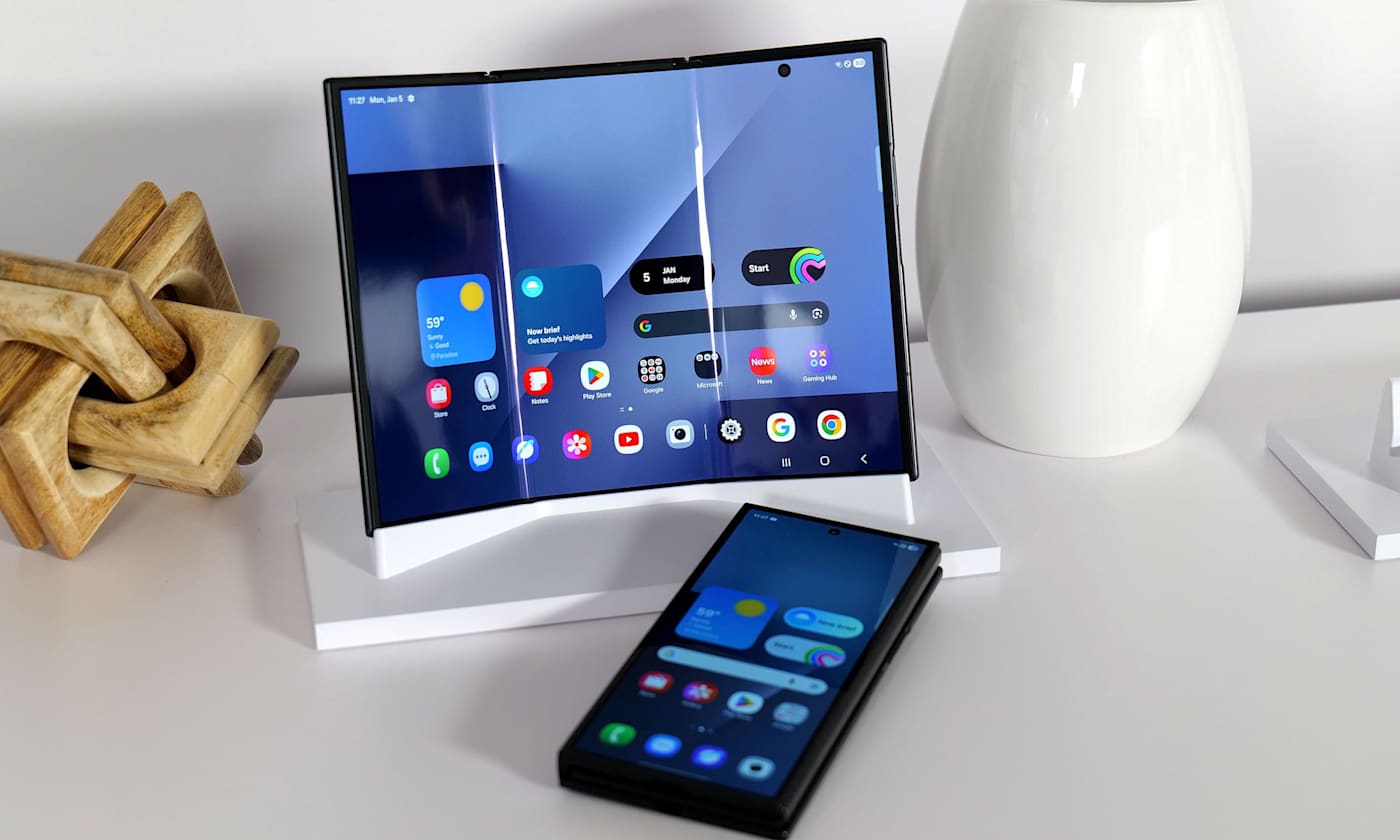
If you missed your chance to pay Samsung $2,900 for a phone earlier this year, we have great news for you. Android Police reported that what may be the final shipment of the Samsung Galaxy Z TriFold will be arriving in the US on April 10. The unique foldable was discontinued a mere three months after it first went on sale, and it seems like Samsung is clearing out whatever inventory it has left. So if you have a spare $3,000 that you're just desperate to get rid of, bookmark the TriFold's page where Samsung has a countdown ticking away.
All jokes aside, our hands-on time with the TriFold at CES 2026 revealed a pretty snazzy device that managed to strike a decent balance between size and heft. But perhaps unsurprisingly for a phone with such an intricate design and high price tag, the company didn't appear to have any intention to make the TriFold widely available. Samsung may have sold out each batch of the smartphone that went to retail, but the device didn't offer much in the way of profit, according to reports in South Korean newspaper Dong-A Ilbo.
This article originally appeared on Engadget at https://www.engadget.com/mobile/smartphones/youll-have-one-more-chance-to-buy-samsungs-pricey-galaxy-z-trifold-this-friday-225222969.html?src=rss
If you’re using an older Kindle, you may want to check what year it was released. Amazon has sent out emails to some of its users, with a warning that it’s discontinuing support for Kindle ereaders and Fire tables released in 2012 or earlier. You can still read books you’ve already downloaded on those devices, but you’ll no longer be able to purchase, borrow or download new ones, starting on May 20, 2026. In addition, if the device has an issue that can only be solved by a factory reset, doing so will brick it. Deregestering it will also render it unusable. On Kindle Fire devices, users won’t be able to purchase or download content anymore, but other services would remain functional.
The affected models include the very first Kindle, Kindle 2, Kindle DX, Kindle Keyboard, Kindle 4, Kindle Touch, Kindle 5 and the first version of Kindle Paperwhite. We’ve asked Amazon why it decided to cut off support for those models, and the company told us: “These models have been supported for at least 14 years — some as long as 18 years — but technology has come a long way in that time…”
Amazon also told Engadget that this only affects approximately 3 percent of its current users, whom it’s now urging to upgrade. In its email, it gives them a promo code for 20 percent off select Kindle devices, as well as ebook credits if they purchase a new model by June 20. “Our newer Kindle devices bring meaningful improvements in screen quality, performance and accessibility — and you'll have access to your complete Kindle library and the Kindle Store,” the company wrote.
Update 04/08/26 8:23AM ET: Added information we received from Amazon.
This article originally appeared on Engadget at https://www.engadget.com/mobile/amazon-is-cutting-off-support-for-older-kindles-115653205.html?src=rss
Insta360, the company best known for its action cameras, just released the Snap selfie screen. It's a small display that connects via USB-C and sits on the back of your phone, helping you to use your rear camera for higher resolution vlogging or selfies.
The 3.5-inch touchscreen allows you to adjust camera settings like zoom and focus and frame your selfies before you take them. The company has also released a model it co-developed with the beauty tech brand AMIRO that offers a built-in light with multiple color temperatures and brightness levels. The standard Snap costs $79.99, while the version with the light runs $89.99.
If you search "selfie screen" on Amazon, you'll see that this isn't a brand-new product space, but you'll also find that the most popular results are wireless screens. Insta360 claims that its USB-C-connected solution offers a more stable and lower latency feed.
The Snap is 6.8mm thick, a hair thinner than an iPhone 17, and attaches magnetically to the back of MagSafe-compatible iPhones. Insta360 says there is an included magnetic ring for other devices and that Snap supports Android phones that offer DisplayPort Alt Mode, a screen-mirroring function. Insta360 says Snap is compatible with all the major third-party camera and social media apps to make capturing and posting easier.
Phones like the iPhone 17 and Galaxy S25 feature rear cameras that offer roughly three to five times the resolution of their front cameras, or in the case of the Galaxy S25 Ultra, about 16 times as much. So, unless smartphone manufacturers start investing more heavily in front-facing cameras, Snap could find a market among creators and social media aficionados.
This article originally appeared on Engadget at https://www.engadget.com/mobile/insta360-releases-usb-c-selfie-screen-its-calling-snap-120001741.html?src=rss
Apple has run into "more issues than expected" with its foldable iPhone that may set back its release, according to Nikkei. The engineering problems reportedly cropped up during the device's early test production phase and may delay first shipments by months, according to multiple sources briefed on the matter. However, a separate report in Bloomberg refutes the gist of Nikkei's claims.
"The current situation could put the mass production timeline at risk," one of Nikkei's sources said. "April will mark a crucial stage of the engineering verification test, and this month till early may is extremely critical." Component suppliers have supposedly been notified that the foldable iPhone's production schedule will be delayed, and Apple is working to address the problems.
In a separate article inBloomberg, however, the usually reliable Apple reporter Mark Gurman wrote that the device is still on track for a September 2026 release. "The company is scheduled to introduce the foldable model in September alongside the iPhone 18 Pro and Pro Max, said the people, who asked not to be identified because the plans haven’t been announced," according to the report.
The complexity of the foldable iPhone's display and other components may "limit initial supply for several weeks," but Apple plans to put it on sale at the same time or shortly after the other non-foldable devices, Gurman wrote. That said, the timing isn't final and issues could still crop up ahead of production. Engadget has reached out to Apple, but so far the company has declined to comment on either the Bloomberg or Nikkei reports.
A foldable iPhone has been rumored since 2017, and Apple's biggest rival, Samsung, released its first one back in 2019. According to multiple sources, Apple was aiming to launch its debut foldable iPhone in fall 2026 alongside the iPhone 18. However, as we detailed in an explainer last month, "the project could slip into 2027 if Apple runs into manufacturing or durability issues, particularly around the hinge or display."
Apple was reportedly prioritizing the foldable iPhone and other premium models for its September event this year due to constrained supplies of components like memory chips. "Apple and the supply chain are working under a pressured timeline and the current solutions are not enough to completely solve the engineering challenge... more time is needed," Nikkei's source stated.
The problems reportedly arose during Apple's production verification tests. That's the fourth of six steps the company's new products must go through before shipping, prior to the key pilot production and mass production phases. Since the foldable would be an all-new design, it would likely need to pass each stage with flying colors before proceeding to the next.
Though likely to account for less than 10 percent of iPhone production, the foldable will be a key product for Apple designed to boost interest in iPhones across its range. Apple reportedly plans to produce seven to eight million of the devices initially, Nikkei reported. Apple has yet to announce the device.
Update April 7, 2026 at 3:02 PM ET: The article has been updated with information from Bloomberg's Mark Gurman stating that the foldable iPhone is still on schedule for a September 2026 launch.
This article originally appeared on Engadget at https://www.engadget.com/mobile/smartphones/apples-foldable-iphone-may-be-delayed-due-to-engineering-snags-073813890.html?src=rss
SHENZHEN, CHINA - MARCH 24: A delivery worker carrying takeout walks while looking at a smartphone past an Apple Store featuring an iPhone 17 advertisement inside a shopping mall on March 24, 2026 in Shenzhen, Guangdong province, China. Apple continues to promote its latest smartphone lineup in China as competition in the consumer electronics market remains intense alongside the growth of app-based delivery services. (Photo by Cheng Xin/Getty Images)
Apple already announced a lot of new devices in 2026 and we’ve been busy reviewing them all. In this installment of our bi-weekly roundup, we revisit the MacBook Neo, iPhone 17e and more, in addition to the “regular” Galaxy S26 and Dell XPS 16. There’s even more than those gadget to catch up on, so sit back, relax and cozy up to some fresh reviews.
Apple MacBook Neo
The main attraction for Apple’s early device deluge was the $599 MacBook Neo. The company is finally giving us something we’ve been begging for: a low-cost Mac laptop that’s good enough for most people. “It's a $599 computer that can handle basic workloads just fine, all the while looking like one of the company's more expensive notebooks,” senior reporter Devindra Hardawar said. “Most importantly, it delivers more speed, a brighter screen and an overall better user experience than any competing $600 Windows PC.”
Apple iPhone 17e
The MacBook Neo wasn’t the only affordable device Apple announced recently. The company also debuted the iPhone 17e, which is also $599 and offers an economical choice for iOS devotees. “The name “iPhone” carries its own premium, and the iPhone 17e is a solid entry-level handset for those who need a basic, no-frills path into the Apple ecosystem,” managing editor Cherlynn Low said.
The rest of the new Apple gear
The remainder of the new Apple devices were primarily chip upgrades. The company added the M4 to the iPad Air, which deputy editor Nathan Ingraham still argues is the best Apple tablet overall. Apple also put the M5 chip inside the MacBook Air and the M5 Pro and M5 Max silicon in the MacBook Pro,. Our staff maintains that those two laptops are among the best choices in their respective categories.
We also tested Apple’s claims on the Studio Display XDR, where we discovered the high price could be worth it for pros who need supreme color accuracy and high brightness.
Samsung Galaxy S26
The Galaxy S26 Ultra may get the bulk of the attention in Samsung’s 2026 lineup thus far, but the “regular” S26 is capable in its own right. However, it’s time for bigger updates on this model. “There's nothing wrong with this safe, solid Android phone, but you could pick up last year's S25 and get an experience that's 99 percent the same for $99 less,” UK bureau chief Mat Smith said.
Dell XPS 16 (2026)
Dell pulled a 180 after nixing its XPS brand last year. Enter the XPS 16. Thankfully, the first devices after the fiasco show an expected return to form, albeit with one issue. “My one complaint is that I wish Dell would bring back the chiclet-style keyboards we got on models from the early 2020s,” senior reporter Sam Rutherford said. “Though as long as the company can release updated software to fix the ghosting issues I've encountered, what's on there now is more than good enough.”
But wait, there’s more
If portable projectors are more your speed, contributing reporter Steve Dent put the Soundcore Nebula P1i through its paces. Mat also spent some time with the Nothing Phone 4a Pro, which is undoubtedly the most uniquely designed handset we’ve tested this year. Lastly, Sam used an upgraded version of Belkin’s Switch 2 charging case to keep his gaming handheld safe and topped up in transit.
This article originally appeared on Engadget at https://www.engadget.com/engadget-review-recap-lots-of-apple-devices-galaxy-s26-dell-xps-16-and-more-120000820.html?src=rss
Amazon is reportedly planning to re-enter the smartphone market more than 10 years after its last attempt. According to a Reutersreport, the mysterious phone is internally codenamed "Transformer" and is being developed by the company’s devices and services unit.
There isn’t a whole lot to go on right now, but it probably won’t surprise many to learn that the phone will likely lean heavily on AI. According to Reuters’ sources, Alexa functionality would be a core part of the experience, but Amazon wouldn’t necessarily build a custom OS around its voice assistant. The phone would make buying products on Amazon and using services like Prime Music and Prime Video "easier than ever," and may bypass traditional app stores.
Reuters reports that the Transformer project is being led by the recently established ZeroOne, an Amazon devices unit headed up by ex-Microsoft executive and Xbox co-founder J Allard, who was also one of the creators of Zune. Allard joined Amazon last year to lead a "a special projects team dedicated to inventing breakthrough consumer product categories."
The development team has reportedly considered launching both a traditional smartphone and a so-called "dumbphone," which would presumably strip away anything that needlessly distracted you from the Amazon empire. Reuters’ anonymous sources suggest the latter could help combat screen addiction by offering fewer features.
ZeroOne is apparently inspired by the ultra-minimalist Light Phone, suggesting that Amazon might be reluctant to take on the flagship devices of Apple and Samsung. The report adds that the Transformer phone could even be positioned as a secondary handset.
This, of course, would not be Amazon’s first crack at the smartphone business. The company launched the Fire Phone in 2014, an ambitious and interesting device that ultimately failed to tempt people away from the more established smartphone ecosystems. It’s widely remembered as perhaps the company’s biggest hardware misstep.
With analysts forecasting an unprecedented decline in the smartphone market in 2026, now seems like a risky time for Amazon to try again, and Reuters was unable to determine exactly how much the company has committed to the Transformer project. Sources also wouldn’t rule out it being scrapped altogether if the company’s priorities suddenly shifted.
This article originally appeared on Engadget at https://www.engadget.com/mobile/amazon-is-reportedly-working-on-a-new-phone-built-around-alexa-142244500.html?src=rss
Nothing takes a different tack with its phone series. For the second time in a row, its midrange entry-level A-series smartphones debuted ahead of its next flagship device. The company has even warned that we won’t be getting the Nothing Phone 4 until next year. Until then, the Phone 4a Pro is here to make an impact, with a more restrained design, a less obtrusive camera bump and specs that beat out last year’s Nothing Phone 3 — all for $499. In 2026, Nothing is truly aiming to dethrone the Pixel 10a.
Hardware
Mat Smith for Engadget
It’s a new look. That’s often the case with Nothing’s smartphones as the company typically reimagines or rejigs what you can see through the clear back panel. This year, however, Nothing is making bigger changes: this is its first metal (aluminum) unibody phone.
With a new periscope telephoto camera design, the jarringly thick camera bump of last year’s Phone 3a Pro is thankfully gone, resulting in a slice of smartphone that feels — and to some, looks — more premium and more refined than Nothing’s “flagship” Phone 3.
However, compared to the Nothing phones that came before, it also feels muted, and a little safe. The playfulness of Nothing has been hemmed in a little. You might prefer it, but I’m not sure I do.
Those identifiable Nothing design flourishes — red details, visible screens, lots and lots of circles — are now squeezed into a camera panel. This oblong area with curved corners houses a trio of cameras, a “Now Recording” red light and a tweaked Glyph Matrix, which we last saw on the Nothing Phone 3.
This new Glyph Matrix is bigger and brighter, but at a lower “resolution,” that’s made of 137 mini-LEDs. That’s fewer than the Nothing Phone 3’s 489-strong dot-matrix, but the LEDs here are 100 percent brighter. So bright, in fact, that I had to turn them down to their lowest brightness when I was using them.The 4a Pro, however, lacks the rear button on the Phone 3 that lets you cycle through Glyph functions. Does this mean the company has made it easy to switch between Glyph toys and notifications in the phone’s UI? Sadly not.
You can dip into the Glyph options through the main settings menu, but to change what the Glyph displays is hidden in a sub-tab. I also noticed that the offering of “toys” was limited, with fewer items than even the Nothing Phone 3 had at launch. Hopefully, this will expand once the phone officially launches.
The 4a Pro packs a bigger screen than the company’s flagship, with a 6.83-inch AMOLED screen running at 1.5K resolution. It also has a higher refresh rate than the 6.67-inch Phone 3. And on top of that, the Phone 4a Pro’s display has a peak brightness of 5,000 nits, making it Nothing’s brightest smartphone yet.
I’ve handled so many phones over the last four weeks that it’s often hard to discern the difference between brighter displays. Fortunately, I have the Nothing Phone 3 (and 3a Pro) to compare against the Phone 4a Pro. It’s noticeably brighter, and as we slowly get into sunnier weather, a smartphone that’s easier to read outdoors is always very welcome.
The Phone 4a Pro also has improved IP65 water and dust resistance, while Nothing says it's 42 percent more bend-resistant than the Phone 3a Pro as well. It’s also almost 0.5mm thinner, if you ignore the camera bump for those measurements. Factor that in and the Phone 4a Pro is almost 1.5mm thinner than its predecessor. This design change also makes Nothing’s newest phone feel far less top-heavy than the 3a Pro. Regardless of the aesthetic changes, this is unmistakably refined hardware.
Cameras
Mat Smith for Engadget
Besides the streamlined camera unit, with a new tetraprism periscopic lens that takes up less space, the Phone 4a Pro has improved imaging capabilities (almost) across the board. The new 50-megapixel periscope telephoto lens (which Nothing says also uses less power) has a 3.5x optical zoom, plus computational photography magic that can now crank it up to a (mostly unusable) 140x hybrid zoom.
The main 50MP sensor also features a bigger sensor for improved low-light performance. With an f/1.88 lens though, it doesn’t quite match the Phone 3’s main camera (f/1.68), both on paper and in practice. The array is rounded out with an 8MP ultrawide camera, which sounds like the weakest link, but I rarely use the ultrawide cameras on any phone aside from review testing. Oddly, the selfie camera is a technical downgrade in resolution, with a 32MP sensor on the 4a Pro, down from 50MP on the 3a Pro.
Mat Smith for Engadget
One new addition was co-developed by Google. Ultra XDR blends Android’s native HDR processing with Nothing’s own approach, capturing 13 RAW frames at different exposures and combining them to deliver greater dynamic range and detail. However, as proof of how new they are, your Ultra XDR images can’t be shared as easily. They do work with Google Photos and Instagram, at least. If it’s any consolation, Ultra XDR so far doesn’t seem hugely far away from typical HDR capture. I’ll keep testing the cameras and if I figure out where it really shines, I’ll update this review.
Mat Smith for Engadget
If one thing disappoints on the 4a Pro, it’s recording video. Switching between zoom levels will often completely derail exposure settings. Even if you record on a single camera at the same focal length, exposure levels seem extremely sensitive and struggle to stay locked. Footage is often muddy and low-light performance isn’t great, even if using the Ultra XDR video mode. You aren’t forced to endure this with the Pixel 10a, but then again, there’s no zoom on Google’s mid-range phone — just a lossless crop. In more forgiving lighting, video is adequate, but quality drops off beyond the 3.5x optical zoom. Still, the versatility and quality of the still images from both the main camera and the telephoto lens put it above every other smartphone at this price.
Performance and software
The Phone 4a Pro is now powered by a more capable processor: Qualcomm’s Snapdragon 7 Gen 4. Nothing claims that, in addition to its own on-device optimizations, it improved CPU performance by 27 percent, GPU performance by 30 percent and AI performance by 65 percent compared to the Phone 3a series.
There’s certainly a big difference in performance while gaming. While the 3a series struggled with more complex games, the 4a Pro kept up with Red Dead Redemption and Diablo Immortal. It’s not the most polished interpretation of Decard Cain and the lands of Sanctuary, but it's responsive and playable, even at 60 fps, with only a few frame drops.
The Phone 4a has a 5,080mAh battery, roughly equivalent to its predecessor. It supports up to 50W fast charging, a tad faster than the Pixel 10a, though it lacks wireless charging support, unlike Google’s midranger. It’s one of the few signs that this isn’t Nothing’s “true” flagship, even if it looks the part.
I was pleasantly surprised by the battery life, too. Typically, phones are getting increasingly bigger batteries, but as I mentioned, that’s not the case here.. However, the 4a Pro lasted 24 hours in our battery rundown test, five hours more than last year’s model.
The Phone 4a Pro has all the software features either present or teased in older Nothing Phones. Essential Search is a system-wide search that can find terms in messages, files and the rest of your phone. There’s also a new Breathing Break widget; we definitely need that in 2026.
Essential Memory is Nothing’s name for its background algorithms and analysis, scrutinizing your phone’s contents as well as whatever’s saved in Essential Space. Nothing has added cloud storage for Space, aimed at devoted upgraders, meaning everything you saved on older compatible Nothing phones can be transferred over. Sure, it’s a little niche, but it was an early frustration while testing the Phone 3 after the 3a series. If, for some reason, you have to reset your device, keeping everything in Space backed up elsewhere is a boon.
Mat Smith for Engadget
Also, while it’s technically a hardware tweak, Nothing has also moved the Essential Key to the left edge of the phone, making it far less likely to be triggered when you’re adjusting the volume and more in line with other phones and my own smartphone muscle memory.
One caveat from previous Nothing devices remains. The company says it will deliver three years of Android updates and an additional three years of security patches. Compare that to Samsung’s seven years of Android updates for this year’s S26 series (and Google’s Pixel 10a), and you can see how it falls short.
Wrap-up
The Phone 4a Pro punches well above its $499 price tag. Nothing has successfully refined its hardware into a more premium, all-metal unibody, losing the jarring camera bump of its predecessor in favor of a sleek design that houses a genuinely impressive camera. The improved camera versatility, coupled with its class-leading 24-hour battery life and a more capable processor, makes this a serious threat to the Pixel 10a.
However, some of Nothing's signature playfulness has been dialed back. The Glyph Matrix, while brighter, is lower-resolution and its “toys” are disappointingly limited at launch. The lack of wireless charging is another nod to its midrange status.
Nothing’s Phone 4a Pro is a device with a clear identity, delivering on the essentials for half the price of many rivals.
This article originally appeared on Engadget at https://www.engadget.com/mobile/smartphones/nothing-phone-4a-pro-review-glyph-matrix-130042005.html?src=rss
There was once a time in which many people couldn't wait to toss their smartphone aside every two years (and sometimes even more frequently) in order to get the latest model as soon as it hit shelves. But that world has faded for the most part now as shoppers demand devices that last for years so they can hold on to them for longer. And when the time finally comes to upgrade, many are being more conscientious about what happens to their old gadgets.
You may want to trade in your smartphone or sell it when you're ready to upgrade; either option can keep your device out of a landfill in addition to scoring you some extra cash. There are also options to recycle part or all of your phone if it's too old to make a trade-in worthwhile. Whatever path you choose, there are important steps to take to prepare a phone you're about to get rid of. These instructions apply to any model you might have, including both iPhones and Android phones. Here's what you need to know.
Back up your data
Let's start with a very important reminder to do regular backups for all of your gear, not just your phone. It's a task you should keep up with routinely even when you aren't about to recycle or trade-in a device.
Most hardware manufacturers have an automatic cloud backup system, but you'll like your new phone a lot less if it doesn't have your full, up-to-date library of contacts, photos and other information. This is the time to manually back everything up with all of your latest data.
Also, before you get any further into the process, make sure that you know the critical details for your phone and the main accounts associated with it. Halfway through is the worst time to lose access to your device because you can't remember your username or password.
Unpair wireless accessories
Most people connect their phone to many other gadgets via Bluetooth. There are obvious ones, like smartwatches and wireless headphones, but you might also have your phone paired with something like a car stereo or a portable speaker. All of them should be unpaired from the phone you're about to trade in.
If you use your phone in two-factor authentication for sensitive accounts, you'll want to make sure that you disconnect the device from those services, too.
Log out of apps and services
Next, you'll sign out of the device's cloud-based service. For iPhone owners, that's iCloud, and on Android, it's the Google suite. This will avoid any confusion with your new device. You'll also want to turn off Find My on iPhones or Find My Device on Android phones. iPhone users should also deregister iMessage on their old iPhone, particularly if they’re moving to a non-Apple smartphone. These steps might seem unnecessary when you'll end up wiping your device entirely, but you don't want to risk having your personal information accidentally made available to whoever might get your phone next.
Also, if you are under a plan that protects your phone, such as Apple Care or Preferred Care, you can usually cancel that coverage early. You'll get a refund on any unexpired coverage, and given how expensive gadgets can be now, it's worth getting that money back if you can.
Swap to the new device
At this point, your to-do list will vary. If you're planning to trade up to a newer model from the same manufacturer and you already have your new phone, then you'll want to transfer your data before moving on to wiping your old phone. Either in the store or on your own, in most cases you can wirelessly migrate your data from the old device to the new one.
If you're changing lanes between the Apple and Google universes, you can also do most data swapping yourself. There's a Google Play app called Move to iOS and one in the App Store called Android Switch that can walk you through the process. Just be sure that your device meets the requirements to use those programs.
However, if you aren't immediately setting up a new device, then you can skip this and move on to the next phase.
Factory reset your old device
Once you double-check that you have everything backed up (seriously, don't take chances on this), then it's time to perform a factory reset. This will remove all of your data and apps, and bring the phone back to its original state. It’s ideal to do this reset as the final step of trading in, selling or recycling a device.
Whatever phone model you have, the reset option will be in the Settings app. It will commonly be nested under a tab like General or About, or you can search “reset” within Settings to find exactly where it is on your device.
Remove any accessories
This might seem obvious, but right before handing off your phone, make sure that you remove any accessories. Cases, grips and screen protectors should stay with you, not with the phone when it goes to its new home.
This article originally appeared on Engadget at https://www.engadget.com/mobile/smartphones/how-to-prepare-your-phone-for-trade-in-120000724.html?src=rss
While both sport very similar designs, the Pixel 8a (left) has a slightly smaller 6.1-inch screen with larger bezels than the standard Pixel 8 (right).
Oppo is back with another high-spec foldable phone you may never see outside a tech journalist's hands. The Find N6 is its new, sub-9mm device that is headed to Asian markets and, for now, not many other places. That means no US or European availability. So why write about it? With its build quality, hardware specs and camera array, not only is it a very good phone, but it's also proof that another device maker can go toe-to-toe with Samsung’s dominance in flagship foldable phones.
Hardware
Image by Mat Smith for Engadget
Oppo is obsessed with the foldable crease. More than me, more than most of you, more than it should, probably. A focus of its presentation last month in London detailed all the effort put into its “zero-feel crease.” The idea is that you can’t really feel where the device folds, with 3D liquid printing and laser scanning used to fill the hinge's surface precisely. The company says this reduces hinge height variance from 0.2mm to only 0.05mm.
Oppo has improved the glass used on the foldable display, and according to TÜV Rheinland testing (again), the Find N6 reduces long-term crease formation by up to 82 percent compared to last year’s Oppo model. It apparently takes a lot of engineering to make a foldable that looks pristine for longer. It’s definitely still early days, but after a few weeks of use, the crease does seem perceptibly shallower than that of other devices, especially the older Find N5. However, there is still a crease. You might not feel it as much, but you can see it.
Despite that particular obsession, it’s another incredibly thin foldable, measuring 8.93mm (0.35 inches) thick. That means, folded, it seems roughly equivalent to most typical smartphone form factors. For reference, the iPhone 17 Pro is 8.75mm (0.34 inches) thick. Even with its slim profile, it also offers improved protection with IP59 certification against dust and water. The new foldable also picks up a new custom hardware button, like the Find X9, which can be assigned to launch the camera, switch sound profiles and other quick action settings.
The screens are the same size and resolution as its predecessor: a 6.62-inch front display and an 8.12-inch inner screen. There have been notable improvements here, too. Peak brightness has been punched up to 3,500 nits on the front screen and 2,500 nits on the foldable screen, making them brighter than on Oppo’s last foldable, but behind Motorola’s latest, most luminous foldable.
The Find N6 also has another custom 7-core Snapdragon 8 Elite Gen 5 processor — the flagship processor of the moment. The more impressive spec may be the battery: a huge 6,000mAh Silicon-Carbon power pack. That’s 400mAh more than the Find N5 and 1,600mAh more than the ZFold 7. And it goes and goes: Doing a battery rundown test on the front display playing non-stop video lasted just shy of 30 hours, while using the bigger internal screen still hit 24 hours.
Another area where it bests Samsung is in charge speeds, supporting up to 80W SUPERVOOC wired charging through Oppo’s proprietary adapter and up to 55W with other high-wattage chargers. There’s also 50W AIRVOOC wireless charging — again, only if you have Oppo’s particular flavor of wireless charger, which I do not. Sadly, there are no Qi2/PixelSnap/MagSafe docking magnets.
The cameras
Image by Mat Smith for Engadget
Oppo has made major improvements to the cameras with several features showcased on the Find X9, now making their way to its foldables. There's a new 200-megapixel main camera with an f/1.8 lens and a new 50MP ultrawide camera that lets in 50 percent more light. The telephoto camera captures 50MP images, with 3X periscope optical zoom and telemacro focus up to 10cm away. All three cameras also support 4K 60 fps Dolby Vision video capture, with the main sensor also capable of 120 fps recording.
Image by Mat Smith for Engadget
Oppo’s new foldable has cameras that rival those of Samsung's Galaxy Z Fold series. The addition of the high-resolution 200MP main sensor adds more detail to images and more versatility, too. The company continues to collaborate with Hasselblad on camera hardware and software. A new Hi-Res mode that captures stills using the full pixel count of each sensor, while other shooting modes from previous devices are still here. That includes the Hasselblad Master Mode, with full control over the camera settings and the iconic XPAN mode for 65:24 panoramic stills and video.
While I was already impressed by Oppo’s recent Find X9, the Find N6 still surprised me. It’s versatile, consistent, and it’s almost the best foldable camera phone — if only its telephoto matched the Pixel 10 Pro Fold’s 5x zoom.
Software
Image by Mat Smith for Engadget
When it comes to multitasking, the Find N6 really wants to deliver, even if the end result is a little messy. You can run a full-screen app, while three Free-Flow Windows each run a different app or web page, all concurrently. Every window is interactive and it almost immediately gave me a stress headache. Oppo has baked in a system of swipes and pinches to aid navigation, but I’d argue that even an 8.1-inch screen isn’t enough for all those windows. Still, for the true power user, there is a lot to tap into. If you’re the kind of person who bounces between work chats in Slack, your calendar and umpteen Chrome tabs — this phone is aimed at you.
Oppo wasn’t done with the productivity bonafides. It’s added a new stylus to its foldable series, which comes with its own holster/case that attaches to the back of the Find N6. In most instances, this would make a chunky foldable too bulky, but the base phone is so slim that it's passable. The case also serves as a charging cradle that can recharge the stylus via reverse wireless charging. I’m not a huge stylus user, but for those who miss the S Pen, this is an option if you live in a country where it’s being sold.
The stylus, officially called the Oppo AI Pen (hate that name), has a button to summon an onscreen palette of tools and features. Double-pressing the button switches between writing and erasing, which is pretty handy. Screen-off note-taking will apparently arrive in a later software update.
Oppo is also continuing to bridge ecosystems with iPhone Connect, which adds AirDrop-style file sharing to Apple phones. Remote PC control is still a cute feature, making the Find N6 into a tiny pocketable PC, if you’re willing to work on your laptop through a tiny screen.
Wrap-up
Image by Mat Smith for Engadget
It’s another impressive foldable from Oppo, one that sadly most folks will never be able to buy. What’s stopping Oppo from testing the waters outside of Asia? The Find N6 is an incredibly powerful, technically impressive device. What is Oppo afraid of?
The foldable will arrive in both silver and orange, although the latter is a little more muted than I’d hoped. For now, Oppo is launching the Find N6 on March 20 in China, Japan, Malaysia, Thailand and other Asian territories. The company just announced that prices will start at ¥9999 in China (approximately $1,450), with 12GB of RAM and 256GB of storage.
This article originally appeared on Engadget at https://www.engadget.com/mobile/smartphones/oppos-find-n6-might-be-the-foldable-of-your-dreams-131036055.html?src=rss
Replacing a smartphone every two years is partially why billions of phones go into landfills each year. If stacked flat atop one another, that many handsets would reach farther than the ISS. But we’ve become accustomed to that 24-month time frame because wireless carriers often push an upgrade on biennial contracts, and many smaller phone makers only offer software support for two years. But now, with longer software commitments from major manufacturers, along with growing right-to-repair legislation, many newer phones can stay in our pockets for closer to seven trips around the sun. Here’s how you can extend the lifespan of your smartphone and avoid shelling out hundreds before it’s absolutely necessary.
How to make your smartphone last longer
Amy Skorheim for Engadget
Use a case
It’s a flashy move to carry a naked phone around, but the chances of a handset making it through a tumble go up dramatically when you employ extra protection. We recommend a few in our guide to iPhone cases. In my family, we’ve been happy with Mous cases. Though we’ve never subjected our phones to the brutality seen in the company’s ads, I can say that these cases have seen my partner’s aging Samsung Galaxy through some pretty gnarly spills and I credit the cases for getting my iPhone 11 to 2025 in working condition.
Take care of the built-in battery (or use a power bank)
Since a phone’s battery is often the first thing to show signs of age, it’s worth it to follow recommendations for extending its lifespan. Lithium-ion batteries don’t perform well in heat and you should avoid charging them if it’s hotter than 95 degrees — doing so can degrade the battery quickly and even cause them to malfunction. They’ll tolerate cold weather better, but can get sluggish when things get too chilly.
If you’re storing a phone for a while, it’s best to do so with the battery at half charge, rather than full or empty. In fact, Li-ion cells last longer when they spend less time being either completely discharged or full — that’s why battery optimization features in iPhones and Pixel phones delay overnight charging to 100 percent until about an hour before you typically grab your mobile. And while it’s sometimes necessary to charge a battery quickly, a slower charging method when speed isn’t critical will put less stress on the ionic components and help extend the cell’s life.
But over time, any battery will eventually wear down. And if you’re traveling, relying heavily on navigation or using the phone as a hotspot, you might need more juice to get through a day. We recommend many options in our best power banks guide but the battery I grab most often is the Anker Laptop Power Bank. It’s got built-in USB-C cables and delivers enough charge to give any device (including laptops, extra hours of life). But for something smaller, I like the reliability of Statik’s semi-solid state MagSafe battery.
If you really want to give your phone a new lease on life, a new internal battery could be the ticket. For Pixel phones, you can go through Google’s official channel for either a walk-in or mail-in repair, you can look for an authorized repair partner or you can pick the DIY route with iFixit’s Pixel repair kits and instructions.
For iPhones, you can start with Apple’s official page, go through Best Buy or other authorized third-parties, or try iFixit’s methods. Samsung also has an in-house option but both iFixit and Best Buy ended their repair relationships with Samsung in 2024. Depending where you go and the model of your phone, the price for a new battery and installation will likely run you between $60 and $150 — still far less than ditching your handset for something brand new.
Clean up your phone’s storage
Most advice on how to declutter your phone and make it run faster centers on one thing: freeing up space. Your phone’s OS will likely have suggestions for clearing up storage space, like automatically offloading unused apps or deleting year-old messages. You can also do things manually by deleting any apps you don’t use. Next, consider the photos and videos you’re storing locally and either opt to pay for cloud storage or transfer the files to a computer or an external backup device. You can also consider getting rid of any music and movies you may have downloaded for offline use, and deleting old messages and large attachments. A good rule is to keep your storage at around 80 percent capacity. Once you’ve deleted and transferred what you can, restart your phone to give it a chance to clear up its temporary memory.
Why you can (and should) extend the life of your smartphone
Photo by Sam Rutherford/Engadget
The e-waste stream grows each year and doesn't do great things for human or planetary health. Smartphone companies are offering better and more consistent trade-in deals, but even some electronic recycling has its faults. Simply hanging onto a device instead of opting for a new one is the most efficient way of cutting back on a phone's environmental impact — plus it'll save you money.
While every giant phone maker would like you to believe that upgrading annually is critical, it’s worth noting that new generations of phones often bear strong resemblance to the prior year’s model. Engadget editors see this time and again with the countless smartphones they review — there’s a new button, a few new AI tricks, but the technology generally doesn’t leap forward each year to create something wildly different than what came before.
With only minor hardware upgrades, the more exciting new features come via over-the-air software updates. Starting with the release of the Pixel 8 in 2023, Google promised security and software updates for a full seven years. So those who buy a Pixel 10 in 2026 could still be using the same phone in 2033. Samsung’s Galaxy S26 has the same length of promised support. Apple committed to five years of support to comply with EU regulations, but iPhones were already known for their extended support — when iOS 26 came out, support was cut for the iPhone XR and earlier, but that meant the 2018 models had enjoyed around seven years of updates from launch.
When Apple launched the iPhone 15, the company doubled its estimation for the handset’s battery life saying a handset should retain 80 percent of the original full charge after 1,000 cycles. And Apple said the placement of the larger battery in the iPhone 16 makes replacing it easier. Overall, battery technology has improved in capacity over the years, but longevity hasn’t gone up across the board, as a study by PhoneArena makes clear.
More advancements in battery life spans may be on the horizon particularly as the EV industry grows, which also relies on lithium-ion cells. For now, declining battery health is usually the most noticeable issue affecting older phones. In 2023, the European Council of the European Union adopted new guidelines for battery-powered devices, which includes a mandate to allow consumers to “easily remove and replace” batteries. That won’t go into effect until 2027, and there will be plenty of interpretation as to what “easily” means. But EU mandates are what made Apple finally ditch Lightning ports on iPhones in favor of USB-C, so this could eventually be a step towards (once again) having smartphones with swappable batteries.
Right-to-repair bills have been passed or introduced in all 50 states. Some of these laws have already gone into effect, and will require manufacturers to do things like providing repair tools and documentation, and selling components for a certain number of years after the last new model for higher priced devices.
Currently, a number of phones have decent repairability scores, according to the online repair community iFixit (The FairPhone 6 gets the highest marks.) Until more companies start making it easier to fix things ourselves, authorized repair is an option, while self-repair remains an option for the more industrious.
This article originally appeared on Engadget at https://www.engadget.com/mobile/smartphones/how-to-make-your-smartphone-last-longer-120014817.html?src=rss
The Galaxy S25 Ultra supports up to 45-watt wired charging. Unfortunately, because it doesn't have magnets inside, it doesn't work with Qi2 accessories natively without help from a case.
There are many E Ink tablets out there, but most of them are basically digital notebooks. They are great for reading and handwriting notes, but not so great for doing all of that regular tablet stuff like checking emails and doomscrolling. Boox, however, has released a number of E Ink tablets that can access the Google Play Store, opening up users to the wide world of traditional smartphone apps.
The company's latest product is a refresh of the Go 10.3 tablet, called the Go 10.3 Lumi. This introduces plenty of new features and, as the name suggests, one is a front light. The tablet has been designed for both natural sunlight and low-light environments. The previous model was great, but it turns into a useless paperweight without access to ambient light.
Boox
Despite the front-facing light, the Go 10.3 Lumi is still lighter than its predecessor, at 12.8 ounces. It's also on the thinner side, with a 4.8mm profile.
The basic specs are similar to the Go tablet, with an octa-core processor, 4GB of RAM and 64GB of internal storage. It runs on Android 15, which is a massive improvement for both security and access to apps. The previous iteration ran on Android 12, and Google stopped officially supporting that OS last year. That means no more critical security updates.
In addition to beefed up security, Boox promises the upgrade to Android 15 offers users improved memory management, better multitasking and smoother UI interactions. E Ink devices can be sluggish so I'm all for anything that speeds things up.
It integrates with external keyboards and boasts integrated speakers, which will certainly come in handy when navigating apps downloaded from the Play Store. Despite the screen technology, this is an Android tablet. It should be able to run just about any app available.
However, the E Ink technology will likely run into hiccups with video-based apps and games. It's just not made for that. This could be a great little gadget for emails and text-based social media, but not for something like TikTok. It should be able to handle non-animated games just fine, like crossword puzzles and stuff like that.
Boox says the tablet gets "substantial battery life" and has been "optimized for extended usage cycles." The company hasn't announced detailed battery specs, but did say people "can work all day without looming battery anxiety." E Ink devices tend to last a good while, so I'm not worried about that.
The Boox Go 10.3 Lumi is available to order right now and costs $450. If you want to save a few bucks and have no interest in a front light, there's a stripped down version that also runs Android 15 but costs $420.
This article originally appeared on Engadget at https://www.engadget.com/mobile/tablets/booxs-new-go-e-ink-tablet-includes-a-10-inch-display-and-runs-android-15-020009621.html?src=rss
Samsung will reportedly end Galaxy Z TriFold sales in South Korea on March 17, three months after the device went on sale, according to South Korean newspaper Dong-A Ilbo. Samsung has not yet confirmed the report, but Engadget has reached out for comment. In the US, where the TriFold arrived in January, the phone will remain available until existing inventory runs out. A unit at retail (if you can find it) will run you almost $3,000.
Samsung seemingly never intended the model for mass production. It sold the device in small batches through its website, with each selling out within minutes. Samsung reportedly moved roughly 3,000 units across the first two allotments and did not send review units to the media.
Industry sources told Dong-A Ilbo that the TriFold was a technology showcase rather than a revenue-generating product. Rising costs of components like DRAM and NAND flash have left virtually no profit margin on the device. In South Korea, the phone briefly traded for nearly three times its retail price on the secondary market.
In Engadget's limited time with the TriFold, the device felt solid, despite not having been built for a true production run. The original Galaxy Fold had to be delayed in 2019 after multiple review units sent to the press broke within days.
This article originally appeared on Engadget at https://www.engadget.com/mobile/smartphones/samsung-ends-galaxy-z-trifold-sales-three-months-after-launch-182903503.html?src=rss
Now that Apple is designing and engineering its own silicon, the updates come fast. It’s been less than two years since the company released the M2-powered iPad Air and we’re already on our third iPad Air iteration, one with the M4 inside. That’s the same chip that was inside the iPad Pro in 2024.
That’s one way of expressing how powerful 2025's iPad Air now is – and it remains a step above the base iPad in most ways. However, there’s room for improvement. Apple has stuck with the same display for another year. The 11-inch iPad Air that Nathan Ingraham reviewed seems to have has the same screen in 2026 as it did when the first no-Home button iPad Air was released in late 2020. (And that’s the one I’m still using!) Also, why still no FaceID?
Qualcomm, which bought microcontroller board manufacturer Arduino last year, just announced a new single-board computer that marries AI with robotics. The Ventuno Q is more sophisticated (and expensive) than Arduino's usual AIO boards, thanks to the Dragonwing IQ8 processor that includes an 8-core ARM Cortex CPU, Adreno Arm Cortex A623 GPU and Hexagon Tensor NPU that can reach up ot 40 TOPs. It also pacs in Arduino App Lab, with pre-trained AI models including LLMs, VLMs, gesture recognition and object tracking, all running offline.
Siri's ongoing AI overhaul could be to blame for the wait.
Bloomberg’s Mark Gurman is back with the latest rumors on new Apple hardware and the company’s continued Siri woes. His sources say that Apple is expected to postpone its smart home display until later in 2026, possibly September, when it often introduces another barrage of new gadgets. The hardware has reportedly been finished for months, but the AI-centric overhaul of Siri is still not done.
Dell’s revamped XPS 14 is more powerful than ever. The XPS series has long been a favorite at Engadget, and this one’s lightweight and features a gorgeous OLED screen. However, Dell’s keyboard this year has a baffling flaw: its keyboard. It somehow forces you to type more slowly to log each key press. And this isn’t a capacitive touchscreen or anything complicated. According to Dell, “a small batch of early XPS units” have these quick typing issues. They also say the issue is currently resolved and doesn’t affect XPS units shipping now. We’ll be checking once a firmware update, meant to fix the issue, lands.
Mark Gurman at Bloomberg is back with the latest rumors about what's afoot with Apple's future plans, and how its ongoing difficulties with artificial intelligence seem to be creating further delays for its next wave of product launches. His sources say that Apple is expected to postpone the debut of its smart home display until later in 2026, likely September when it often introduces new gadgets. Although the hardware has reportedly been finished for months, this delay is being credited to the company's AI-centric overhaul of Siri still not being complete.
The device, internally known as J490, has been one of Apple's many poorly-kept secrets. Rumors about a HomePod smart speaker coupled with a screen first emerged back in 2022 and have resurfaced from time to time in the interim, often with promises that the device's arrival was imminent. The latest claims anticipated that the official announcement was coming this spring, possibly as soon as this month. However, appears to Apple once again be hamstrung by an AI strategy that has left it scrambling to catch up to other industry leaders.
Apple has been working to incorporate more AI capabilities into Siri for more than a year as part of its Apple Intelligence package. Gurman reports that the new timeline from Apple aims to have the revamp completed for the launch of the iPhone 18 Pro, which is also expected for September. Apple may unveil this long-awaited Siri-as-chatbot during its WWDC keynote in the summer before it shows up in any devices.
This article originally appeared on Engadget at https://www.engadget.com/home/smart-home/apple-reportedly-delays-its-planned-smart-display-launch-to-fall-194539082.html?src=rss
Perhaps one of the most surprising things about the Apple Silicon era is how quickly Apple now updates its products. Take the iPad Air, for example. It’s been less than two years since the company released the M2-powered iPad Air in 11- and 13-inch sizes. We’re already on our third iPad Air iteration, one with the M4 inside. That’s the same chip that was inside the iPad Pro that was unveiled alongside that M2-powered Air in 2024. (The Pro was updated with an M5 last fall.)
Just as I said a year ago when Apple unveiled the iPad Air M3, this latest model doesn’t fundamentally change the formula. The Air is a notable step up over the basic iPad, with a more powerful processor, more RAM, a better display and superior accessories like the Apple Pencil Pro and Magic Keyboard. The Air line is also the only way to get a 13-inch iPad without spending $1,300 or more.
But without more substantial updates this year, I find myself less enthused by it than I was when the 13-inch model M2 model arrived in 2024. That’s primarily because Apple has stuck with the same display for another year. As best I can tell, the 11-inch iPad Air that I’m reviewing has the same screen in 2026 as it did when the redesigned version with no Home button was released in late 2020. Other features that feel like they should be table stakes at this point, like Face ID, are also restricted to iPads that cost at least $1,000. For better or worse, the Air is a very mature product with few surprises. But on the other hand, if you have an iPad older than the 2024 refresh, the iPad Air M4 will provide a solid performance improvement.
Apple's iPad Air M4 and the Magic Keyboard accessory.
Nathan Ingraham for Engadget
The M4 still has power to spare
Before we start answering existential questions, though, let’s quickly recap what’s new with the iPad Air. It still starts at $599 for an 11-inch version with 128GB of storage; the 13-inch models starts at $799. The one I tested came in an extremely light purple color with 1TB of storage and 5G connectivity and costs $1,249. Seriously Apple, don’t be afraid of putting a little more saturation in these colors next time! As mentioned, the iPad Air now has a more powerful M4 chip as well as 50 percent more system memory (12GB, up from 8GB on last year’s model). If you’re coming from an iPad older than the 2024 model, you’ll likely notice solid performance gains, and the M4 is so performant that I imagine this iPad will be more than powerful enough for years to come.
It looks purple-ish in the right light, I swear.
Nathan Ingraham for Engadget
I ran some Geekbench 6 benchmarks to quantify the difference between the iPad Air M4 and last year’s M3 model — unsurprisingly, the biggest gains came in the GPU. Single-core and multi-core scores were 23 percent and 12 percent higher, respectively. But the GPU score was a whopping 39 percent higher with the M4 compared to the M3. Don’t get me wrong, the single-core and multi-core performance improvements the M4 offers are impressive. But tasks that hit the GPU hard, like gaming and AI (of course) should see notable improvements.
In practice, the iPad Air M4 feels quite similar to the M3 model. That’s due in large part to my relatively modest workflow. I jump between numerous apps all day, but none of them are exactly taxing to a chip like the M4. My day mostly consists of Slack, Google Docs, a ton of Safari tabs, utilities like Messages and Todoist, constant streaming music and other lightweight apps like Gmail and Trello. But if you’re coming from an M1 iPad Air, the M4 should feel significantly faster for almost everything you do.
Apple's iPad Air M4 playing the video game 'Control.'
Nathan Ingraham for Engadget
Unsurprisingly, the iPad Air flies through games from the App Store as well. I tried my usual more casual fare like Balatro, Mini Motorways and Powerwash Simulator from Apple Arcade and those were all quite smooth. But I wanted to push things a bit more, so I downloaded Resident Evil 2 as well as a pre-release build of Control Ultimate Edition which is slated to hit iOS in the coming months. Both games looked and played great, with highly detailed environments and pretty quick action that didn’t slow the iPad Air down in the least. I could tell the graphics aren’t as sharp as on my PS5, but both games were impressive considering they’re running on extremely portable hardware with no fans.
I also tried some generative AI apps, even though that’s not really something I’m interested in. For apps like Apple’s own Image Playground, the M4 is extremely speedy. It ripped through my goofy queries (an orange kitten dressed up like an astronaut) in a matter of seconds. When I compared it to the iPad Pro M5, the Air barely lagged behind it. However, the M4 couldn’t quite keep up with more advanced image generation tools. The Draw Things iPad app lets you download and run a host of local models to create images, and the M4 definitely couldn’t keep up with the M5. The iPad Pro M5 was typically more than twice as fast as the Air. We already knew the M5 was an AI beast, so I’m not knocking the Air for its performance at all — it’s just worth knowing that if you really want to push the envelope, you’ll probably be better off with an iPad Pro.
Apple's iPad Air M4, Apple Pencil Pro and Magic Keyboard.
Nathan Ingraham for Engadget
The other main change is Apple’s in-house networking chips are on board here. The N1 covers Wi-Fi 7, Bluetooth 6 and Thread, while the C1X handles cellular connectivity if you buy a 5G-capable model. Again, this doesn’t change the experience of using the iPad Air in any major way, but having the newest Wi-Fi and Bluetooth protocols on board is good for future usage, regardless of who built the chip. In my testing, the C1X on Verizon’s 5G network was extremely fast around the suburbs of Boston and didn’t seem any slower (or any faster) than other devices I have running on the same carrier. That’s fine, as other Apple devices I’ve tried with the C1X (like the iPad Pro) are solid and reliable, which is the most important thing.
A very familiar experience
Other than these new chips, the iPad Air is identical to the last two models I’ve reviewed. (This year, Apple sent an 11-inch Air M4 to review, while the last two were the newer 13-inch. But other than the larger screen, those tablets are the same.) Same screen, same cameras, same 10-hour estimated battery life, same USB-C 3 port. Naturally, it supports the $129 Pencil Pro that Apple introduced alongside it in 2024, and it works with the revamped Magic Keyboard Apple released last year. That keyboard remains quite expensive at $269 ($319 for the 13-inch model), but for me it’s a must-buy accessory if I want to use my iPad for any “real work.” The Pencil, on the other hand, is not something I personally need, but it’s an excellent tool for anyone interested in visual art or written notes. There are a plethora of excellent apps in both categories, and the iPad app ecosystem at large remains unmatched.
Battery life also hits what I’d expect out of an iPad. I don’t get 10 hours the way that I test it — I used the iPad Air as my main machine, all day for several days. In that scenario, I got between seven and eight hours of battery life. That’s more than enough that I’d take it with me for half a day or more and not worry about charging, but not so long that I’d be totally comfortable without a charger for much longer. In a more casual, mixed-use setup, most iPads get closer to the 10-hour mark and I expect that’ll be the case here as well. Of course, if you’re playing games, editing videos or doing heavier generative AI tasks, expect battery life to drop noticeably.
I’d be remiss if I didn’t quickly mention iPadOS 26, which arrived last fall. It runs on iPad Air models all the way back to 2019, so it’s not a reason alone to upgrade. But, it improved the multitasking experience on iPads to a significant degree. It still feels native to the iPad, but there are so many Mac-like flourishes that it’s a lot easier for me to use as my main computer now. That said, it really shines on larger-screen iPads; the 11-inch model still feels best to me when running an app fullscreen or two apps side-by-side feels most comfortable to me.
Apple's iPad Air M4 and Magic Keyboard.
Nathan Ingraham for Engadget
My major lament for the iPad Air remains the screen. Apple’s LCD Retina display still looks great in a vacuum — it’s a lovely standard screen, with bright colors and sharp text. But Apple’s continued insistence on gatekeeping a screen with a higher refresh rate for iPads that cost $1000 or more gets more frustrating every year. It bothers me less on a product like the MacBook Air. But with an iPad, you’re literally touching and interacting with that screen as the main interface. Having the fluidity of a 120Hz refresh rate simply makes everything feel more responsive to your touch.
The consolation is that even Apple’s standard displays still feel very smooth, so unless you’re directly comparing an iPad Air to an iPad Pro you likely won’t notice the difference. I mostly forgot about it in my time reviewing this device, only reminded of it when I went back to the iPad Pro.
I also wish that Apple would implement more advanced display tech. Last year, I imagined that the mini-LED display used in the iPad Pro in 2021 and 2022 would be a great step up for the Air. It wouldn’t be as good as the tremendous OLED screen in the iPad Pro, but it would still offer HDR and significantly increased brightness and contrast. Alas, we’re stuck with a plain old LCD again this year. Again, that’s mostly fine, but playing games like Control made me wish for more contrast, and movies do not have nearly the same visual pop on the Air as they do on the Pro.
Apple's iPad Air M4.
Nathan Ingraham for Engadget
Wrap-up
If it’s not obvious, I very much wish that Apple would bring some of its more advanced technology to the iPad Air. But at this point, I have to accept that the Air is what it is. In the same way that the MacBook Air hasn’t changed substantially since the M2 model arrived in 2022, the same goes for the iPad Air. Both products still have displays that haven’t been cutting edge for years, and that’s just the way it is.
Once I started comparing the iPad Air to its Mac counterpart, my negative feeling mostly subsided. I think the MacBook Air is a great laptop and wouldn’t hesitate to recommend it to many people. Sure, its screen isn’t cutting edge, but it’s good enough for its target audience. And the many positives that it has outweigh a few places where Apple cut corners. The same can be said for the iPad Air.
The iPad Air offers a lot of important upgrades over the basic $349 iPad, which is saddled with the A16 chip from 2022. The Air will be a better performer for much longer, and other niceties like a better screen and accessory support are worth considering. And it doesn’t threaten the iPad Pro, which costs $400 more; between its screen, improved performance, superior industrial design and numerous other small benefits, it’s pretty easy to see what you get for your money in all cases.
So while I wish Apple would push the envelope with the iPad Air and give me something that feels more like a Pro-lite, I understand why it hasn't yet. The iPad Air isn’t an exciting gadget at this point, but I still think it’s the best iPad for most people.
This article originally appeared on Engadget at https://www.engadget.com/mobile/tablets/ipad-air-m4-review-still-apples-best-overall-tablet-with-a-few-caveats-130000409.html?src=rss
By introducing the iPhone 17e just a year after the iPhone 16e, Apple is closing some gaps. Before, the company would only roll out a new entry-level iPhone every few years, with the iPhone 5c (2013), iPhone XR (2018) and iPhone SE (2016, 2020, 2022) all having two to four years between their releases. But Apple is getting into an annual groove now, and having renamed the device to integrate better with the rest of the iPhone lineup, Apple is making a clear statement: It cares about the midrange now.
With the current state of global economics, Apple’s focus on lower cost devices like the iPhone 17e and newly launched MacBook Neo is timely. Most people probably don’t make full use of the high-powered machines in their pockets and on their laps, and might be reconsidering whether they need to spend as much money on the Pros and the Airs of Apple’s product lineup. At $599, the iPhone 17e is about half the price of an iPhone 17 Pro or the iPhone Air. It’s $200 cheaper than the base iPhone 17, too.
Since I reviewed the iPhone 16e last year, I’ve been using it as a work phone, mostly for Slack, email and light editing in Docs. The way I see it, most people considering the iPhone 17e are likely in a similar situation — either thinking of getting a supplementary device or looking for a good enough phone for a child or other dependent. For this review, I’ve tried to cover most of those scenarios whether it be a person that would spend most of their phone time on social media and games like a teenager or someone that’s largely using it for administrative work purposes. I mostly want to answer this question: If you’re getting your first iPhone or buying one for someone else, should you get the iPhone 17e or the iPhone 17?
iPhone 17e vs iPhone 16e, for testing’s sake
It’s very clear from Apple’s website that it doesn’t want you comparing the iPhone 17e to the iPhone 16e. The company doesn't allow you to do so in the comparison tool on the iPhone 17e product page, limiting you to the iPhone 11, iPhone 12 and the iPhone SE (second and third generations). Sure, I understand that no one is really thinking about getting an iPhone 17e after just buying the 16e last year. But for the purposes of this review, it makes sense for me to shout out what’s new from the previous generation. The most significant additions this year are the A19 chip, double the storage, improved Portrait photography and MagSafe with faster wireless charging. Oh, and a new pink color option, adding an ever so subtle splash of color to the previously monochromatic lineup.
The A19 chip is supposed to make AI processes faster, thanks to the neural accelerators in its GPU. In my testing so far, the difference has been negligible at best. Initially I was seeing the iPhone 17e perform slower than the 16e, but after a software update, the iPhone 17e caught up. In Apple Intelligence-powered tools like Cleanup, the iPhone 17e was a split second faster at identifying unwanted objects in photos and erasing them than the 16e. If you’ve just received your iPhone 17e and run into issues where image generation or cleanup is slow or stalling, give it a day or so for the software to stabilize.
Oddly, in some side-by-side Image Playground testing, the iPhone 17e and iPhone 16e were neck and neck. Sometimes, the iPhone 16e was faster. Occasionally, the iPhone 17e was ahead. I’ll continue to keep an eye on how both phones do here, as it could still be due to some early software issues, but for now the improvements from the A19’s GPU seem to be hit or miss.
The pink iPhone 17e and the white iPhone 16e held up in one palm in front of a red brick wall.
Cherlynn Low for Engadget
Improved portraits on the iPhone 17e
Of all the improvements to the iPhone 17e, to me, one of the most important is in portraits. In my review of the iPhone 16e, I said that the majority of my grievances with the single camera setup was the fact that Apple ended up using an older version of Portrait mode.
That version was much more limited and didn’t allow for applying a background blur to pictures of non-human subjects. This time, Apple borrowed the algorithms it developed for the iPhone Air for the iPhone 17e’s rear and front cameras. This not only delivers a general improvement to portraits, with better segmentation and a more natural-looking bokeh effect, but also allows for depth information to be captured when applicable. For instance, when a person, cat or dog is detected, the iPhone 17e will automatically capture depth information so you can apply a blur after the picture is taken, even if you didn’t use Portrait mode initially.
Importantly, these “next-gen portraits” also allow you to edit the level of blur and change up the focal point of the picture after you’ve taken the shot. In some photos of my neighbor’s grumpy shih-poo, I was shocked that my colleagues actually preferred the samples I shared from the iPhone 16e over the ones from the iPhone 17e. But their critique was fair: the newer phone blurred out Oreo’s tail, keeping only his face in focus. I was able to address this by going into the editing tools and dragging the slider for aperture to bring more of the dog into focus. I also played around and tapped on Oreo’s tail to make it clear, and the iPhone 17e blurred up his face instead.
Two photo samples side by side, featuring a dog on a blue leash staring up into the camera.
Cherlynn Low for Engadget
When using Portrait mode to photograph people, the iPhone 17e did indeed deliver more pleasant bokeh than its predecessor. In pictures of my friend Brenda Stolyar, with the “depth” or aperture set to f/4.5 across both devices, there was more softness in the brick wall behind her on the new phone. I was slightly confused since it seemed like the older iPhone actually delivered a sharper picture, until I realized it was actually just softer bokeh.
For those coming from older phones like the iPhone 11, 12 or SE, the addition of next-gen portraits should feel like a major step up. Even when compared to the iPhone 16e, the fact that I was now able to apply the effect on photos of food and other inanimate objects with no faces made me happier. It makes the camera more versatile, and feels like a noteworthy update that makes your photos feel more modern.
But that is definitely because I like pictures with the artificial depth of field effect. If you don’t care for bokeh and really only want a phone’s cameras to be good enough to snap pictures of menus or receipts, for instance, the 17e’s improvements here won’t mean much.
MagSafe and wireless charging
The rear of the iPhone 17e catches the light in front of a stone wall.
Cherlynn Low for Engadget
What might matter more, then, is this generation’s wireless charging speeds. While the iPhone 16e could only support up to 7.5W, the iPhone 17e goes up to 15W (with adapters of 20W or higher) and also works with MagSafe accessories. I can’t imagine anyone considering a new iPhone 17e already has magnetic cases or stands, but if you decide to invest in those accessories, you’ll find them convenient and satisfying.
I placed both models on my wireless charging stand — the 17e snapped on and started charging, while the 16e clattered helplessly off the stand. I placed it on the charging pad at the base instead and noted how much power each of them gained in 15 minutes. The improvement is clear: the iPhone 17e went up by 16 percent (30 percent to 46 percent), while the 16e only gained 3 percent (69 percent to just 72 percent).
Beyond the numbers, what this means is that when you’re in a pinch and trying to quickly top up your phone on, say, a wireless charger you found at a cafe, you won’t need to sit around as long with the iPhone 17e. For those of you that simply leave your phone on a stand overnight, this is less likely to meaningfully impact you.
There are a few other updates that I haven’t really tested in this review, like the improved durability with Ceramic Shield 2 on the iPhone 17e’s screen. The new display also has a treatment that is supposed to reduce glare, and considering the week of wonderfully gloomy weather we’ve had here in New York, this isn’t something I’ve truly had a chance to evaluate. Also, while I do appreciate the doubled storage, which is sure to please the media hoarders among us, I will say I’ve already been served warnings about my iCloud storage running out. It still feels like something else Apple might need to address, but for newcomers to the iOS world, the higher base storage is absolutely a positive.
Elsewhere, there are virtually no differences between the iPhone 17e and iPhone 16e. They have the same size displays with the same resolution, brightness, refresh rate, contrast ratio and color gamuts. Both are rated IP68 for dust and water resistance, and have similar battery lives (up to 26 hours of video playback, according to Apple). They also have the exact same dimensions of 5.78 x 2.82 x 0.31 inches, although the iPhone 17e does weigh a whole 2 grams (0.8 ounces) more than the 16e, which is almost definitely attributable to the addition of MagSafe. Unless you have weighing scales for hands, though, this difference is negligible.
An iPhone 17e held up in front of a tree trunk.
Cherlynn Low for Engadget
Should you get the iPhone 17e or the iPhone 17?
Where you might find more meaningful distinctions is when comparing the iPhone 17e to the iPhone 17. For $200 more, you’ll get longer battery life and slightly better performance thanks to one more GPU core. The iPhone 17 also has a larger, sharper and brighter display that’s 6.3-inches, with higher refresh rates and a full-screen design incorporating the Dynamic Island. It also supports the Always On Display and has an 18MP front camera with the Center Stage feature that allows for easy switching between landscape and vertical orientations in your selfies without having to rotate your phone.
In fact, the camera upgrades alone on the iPhone 17 might be worth the money. On top of getting the additional ultrawide camera, you’ll also gain the dedicated camera control button on the right edge, the latest generation of Photographic Styles, support for macro photography, Cinematic mode and Dual Capture in videos as well as spatial and macro recording capabilities. It also comes with sensor-shift optical image stabilization, which is more advanced than the OIS on the iPhone 17e. Rounding out that long list of differences is higher recharge speeds (with compatible chargers) and Apple’s second-generation Ultra Wideband chip for more precise Find My support. The iPhone 17 also offers dual-frequency GPS and works with the latest standards in connectivity, like Thread, Wi-Fi 7 and Bluetooth 6 (whereas the iPhone 17e only gets to Wi-Fi 6 and Bluetooth 5.3).
Sure, the iPhone 17 is slightly taller and heavier, but considering all the bonuses and the extra camera, that feels like a tradeoff that is more than fair. It’s a lot more advanced for $200, and feels like a better starter phone than the iPhone 17e. But if your budget is tight and camera performance isn’t a priority, you’ll get a great experience from Apple’s latest.
The iPhone 17e held up in mid-air in front of some red foliage.
Cherlynn Low for Engadget
Wrap-up
In 2026, it feels like Apple has done the impossible. It’s managed to serve up multiple iPhones at various price points with enough meaningful differentiations to justify each tier. Meanwhile, each iPhone 17 in the full lineup is a capable and satisfying device for its price. Upgrading to the iPhone 17e from the iPhone 11, 12 or SE will certainly feel significant, although getting almost any current-gen phone will feel modern compared to those.
In fact, if you’re platform agnostic and wouldn’t mind an Android device, there are options out there with significantly superior screens and cameras. The Pixel 10a, for instance, offers a larger display with a 120Hz refresh rate and a dual-camera system all for $100 less. With Apple seeming to be setting its sights on the midrange market, it should seriously consider stepping up in those two areas in the next e-series iPhone.
But of course, the name “iPhone” carries its own premium, and the iPhone 17e is a solid entry-level handset for those who need a basic, no-frills path into the Apple ecosystem.
This article originally appeared on Engadget at https://www.engadget.com/mobile/smartphones/iphone-17e-review-the-economical-choice-130000647.html?src=rss
There could be even more 3D-printed Apple products coming in the future. According to Bloomberg's Mark Gurman, Apple is exploring ways to 3D print aluminum to make the manufacturing processes for iPhones and Apple Watches more efficient.
Gurman reported that this new production process could specifically change how Apple makes its watch casings as well as iPhone enclosures. It's not the first time Apple has tapped into 3D printing, since both the Apple Watch Ultra 3 and Series 11 were partially built with 3D-printed titanium that's 100 percent recycled. More recently, Apple used its 3D printing process to create the titanium USB-C port for the iPhone Air, which was touted as thinner, stronger and more environmentally friendly.
While Apple is reportedly only looking into 3D-printed aluminum right now, it could possibly result in an overall cheaper manufacturing process and lower starting prices for iPhones. Looking at Apple's just-announced MacBook Neo, the company introduced a new manufacturing process that saves on the amount of aluminum used, helping to achieve the $599 starting price for its latest entry-level laptop. Like the colorful MacBook Neo, Gurman also reported that Apple is planning to use a "refreshed color palette" for its iMac reveal later this year.
This article originally appeared on Engadget at https://www.engadget.com/mobile/smartphones/apple-is-reportedly-looking-into-3d-printing-aluminum-iphones-and-apple-watches-163721491.html?src=rss

 Anmelden