Shazam is now available within ChatGPT, if you don’t want to launch the music discovery app on your phone for, well, reasons. You will have to link the Shazam app with the chatbot first from its Apps page, after which you can summon it in-chat to identify whatever song is playing. To summon Shazam in-chat, you can use prompts like “Shazam, what’s playing?” or “Shazam, what is this song?”
A box will pop up that you can tap on to launch the music discovery service, which will then listen to the tune playing. ChatGPT will display the song’s name, artist and artwork, along with the option to save the song to Shazam. Take note that the feature will work within ChatGPT even if you don’t have the music discovery app downloaded on your device, which does make it useful if you’re using a phone with full memory. The Shazam integration has started rolling out globally within ChatGPT on iOS, Android and the web.
This article originally appeared on Engadget at https://www.engadget.com/apps/you-can-now-use-chatgpt-to-open-shazam-instead-of-just-opening-shazam-114000363.html?src=rss
Google is officially doing away with its 30 percent cut of Play Store transactions, and rolling out changes to how third-party app stores and alternate billing systems will be handled by Android. Some of these tweaks were proposed as part of the settlement the company reached with Epic in November 2025, but rather than wait for final judicial approval, Google is committing to revamping Android and the Play Store publicly.
The biggest change is to how Google will collect fees from developers publishing apps on Android. Rather than take its standard 30 percent cut of in-app purchases through the Play Store, Google is lowering its cut to 20 percent, and in some cases 15 percent for new installs of apps from developers participating in its new App Experience program or updated Google Play Games Level Up program. Those changes extend to subscriptions, too, where the company’s cut is lowering to 10 percent. For Google’s billing system, the company says developers in the UK, US, or European Economic Area (EEA) will now be charged a five percent fee and "a market-specific rate" in other regions. Of course, for anyone trying to avoid those fees, using alternatives to Google's billing system is getting easier.
Google says that developers will be able to offer alternative billing systems alongside its own or "guide users outside of their app to their own websites for purchases." The setup, as described by Google, appears to be more permissive than what Apple settled on in 2025. For iOS apps on the App Store, developers interested in avoiding Apple's fees can only direct customers to alternative payment methods on the web through in-app links. Allowing for these outside transactions is part of what prompted Epic to bring Fortnite back to the App Store in the US in May 2025. The developer added the app back to the Play Store in the US in December of that year, and Epic CEO Tim Sweeney shared alongside today's changes that Fortnite will soon be available in Google's app store globally.
Fortnite will return to Google Play Store worldwide soon. Epic Games Store continues supporting Android worldwide alongside Windows and Mac, and installation on Android will become much easier later in 2026.
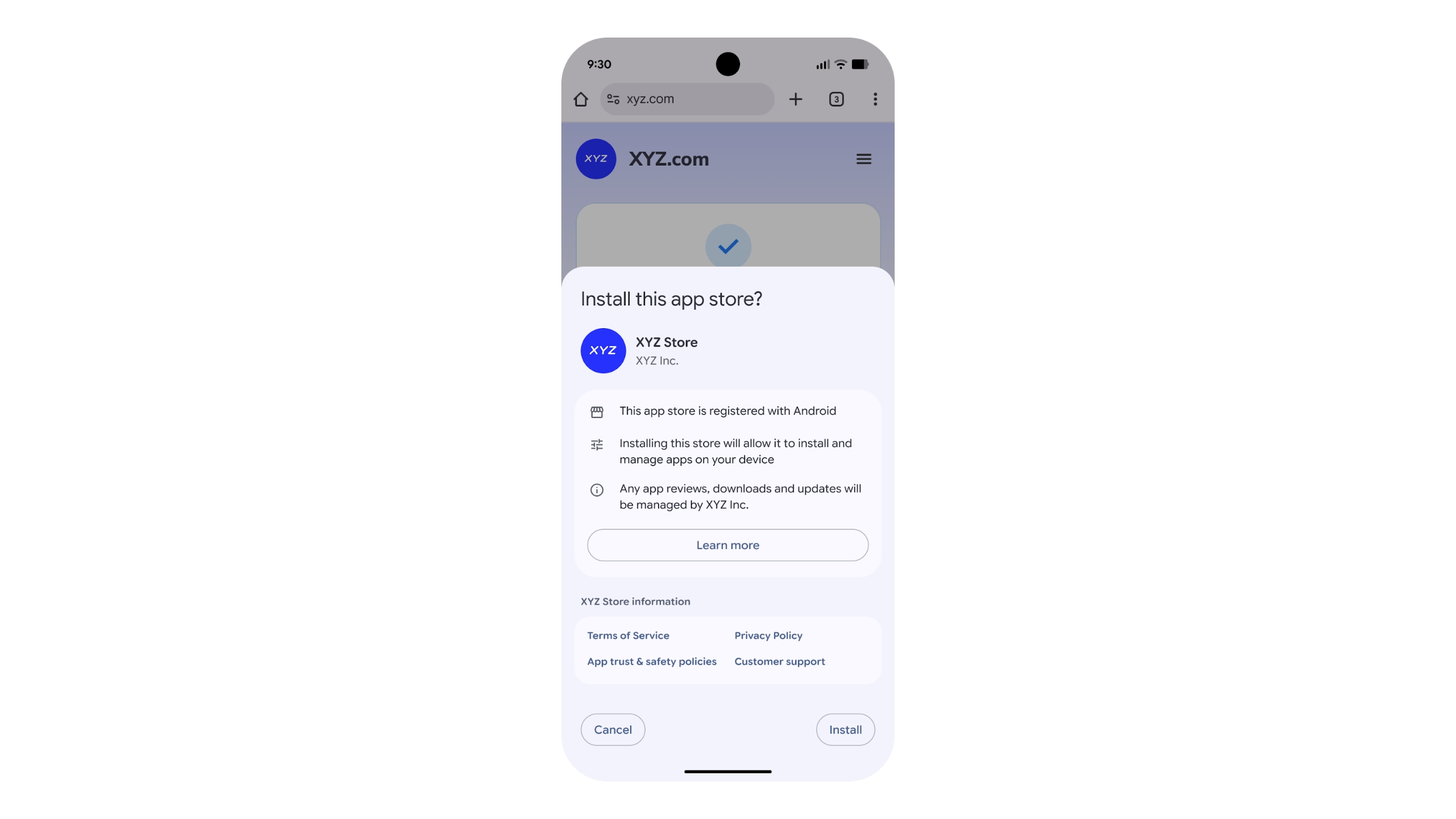
Epic is ultimately interested in getting people to use the mobile version of its Epic Games Store, and Google’s announcement also includes details on how third-party app stores can come to Android. Third-party app stores will be able to apply to the company's new "Registered App Stores" program to see if they meet "certain quality and safety benchmarks." If they do, they'll be able to take advantage of a streamlined installation interface in Android. Participating in the program is optional, and users will still be able to sideload alternative app stores that aren't part of the program, but Google clearly has a preference. Changes the company plans to make to sideloading later in 2026 could deliberately make the process more difficult, which might force developers to apply to Google’s program.
App stores approved by the Registered App Stores program get a simpler installation interface.
Google
Given the scale of the changes, not all of Google's tweaks will be available everywhere at the same time. Google says that its updated fee structure will come to the EEA, the UK and the US by June 30, Australia by September 30, Korea and Japan by December 31 and the entire world by September 30, 2027. Meanwhile, the company's updated Google Play Games Level Up program and new App Experience program will launch in the EEA, the UK, the US and Australia on September 30, before hitting the remaining regions alongside the updated fee structure. For any developers interested in offering their own app store, Google says it'll launch its Registered App Stores program "with a version of a major Android release" before the end of the year. According to the company, the program will be available in other regions first before it comes to the US.
Google has made changes to how it collects app store fees in the past, the most significant being in 2021, when it lowered its cut to 15 percent on the first $1 million developers earn, and 15 percent on subscriptions. The difference here is that the regulatory scrutiny brought about by Epic's lawsuit against Google and Apple seems to be a key motivator for its changes. Well, that, and an entirely separate business deal the company made with Epic. Google and Epic's settlement served as the basis for these changes, but The Verge reported in January that the companies also agreed to an $800 million joint partnership around product development and Google using Epic's "core technology." Letting developers keep more of their money is ultimately good, but it's a business decision Google felt comfortable making, which likely means it has its own share of upsides.
This article originally appeared on Engadget at https://www.engadget.com/apps/google-ends-its-30-percent-app-store-fee-and-welcomes-third-party-app-stores-185248647.html?src=rss
At the start of February, OpenAI upgraded its Codex coding app to give it the ability to manage multiple AI agents. At the same time, it released a standalone macOS app. If you've been patiently waiting for Windows to get that same treatment, OpenAI just released a dedicated Codex app for Microsoft's operating system.
Like its macOS counterpart, the software allows you to coordinate multiple coding agents to work on the same task. There's also support for automations to streamline repetitive tasks like bug testing. To help users get started, Codex includes a dedicated "Skills" section. Skills bundle together instructions, resources and scripts the software can use to connect agents to specific tools and workflows. OpenAI has also included native sandboxing to help make Windows developers feel at home.
Codex is available to ChatGPT Free, Go, Plus and Pro users. If you decide to give the app a try, know that your session history is saved to your OpenAI account, meaning you can start coding on Mac and then move to Windows without losing your work.
This article originally appeared on Engadget at https://www.engadget.com/ai/openai-brings-its-codex-coding-app-to-windows-195345429.html?src=rss
Google has announced that with the help of AI, it blocked 1.75 million apps that violated its policies in 2025, significantly down from 2.36 million in 2024. The lower numbers this year, it said, are because its "AI-powered, multi-layer protections" are deterring bad actors from even trying to publish bad apps.
Google said it now runs more than 10,000 safety checks on every app and continues to recheck them after they're published. Its use of the latest generative AI models helps human reviewers discover malicious patterns more quickly, it added. The company also blocked 160 million spam ratings, preventing an average 0.5-star rating drop for apps targeted by review bombing. Finally, Google stopped 255,000 apps from gaining excessive access to sensitive user data in 2025, down from 1.3 million the year before.
Meanwhile, Google Play Protect, the company's Android defense system, sniffed out over 27 million new malicious apps, either warning users or preventing them from running. The company added that Play Protect's enhanced fraud protection now covers 2.8 billion Android devices in 185 markets and blocked 266 million risky "side-loading" installation attempts.
"Initiatives like developer verification, mandatory pre-review checks, and testing requirements have raised the bar for the Google Play ecosystem, significantly reducing the paths for bad actors to enter," the company said its blog. "This year, we’ll continue to invest in AI-driven defenses to stay ahead of emerging threats and equip Android developers with the tools they need to build apps safely."
Google has steadfastly justified its relatively high fees on app purchases and subscriptions by touting its investments in app safety. However, its Play store has been under pressure from regulators in Europe and other regions that claim it amounts to a monopoly. Last year, the company changed its fee structure for developers using alternative payment channels, but EU regulators recently claimed the company still isn't complying with Digital Markets Act regulations.
This article originally appeared on Engadget at https://www.engadget.com/apps/google-play-used-ai-to-help-block-175-million-bad-apps-in-2025-102208054.html?src=rss
Meta is shutting down the standalone Messenger website, according to a company help page. The website will disappear in April, though web users will still be able to send and receive messages within Facebook.
"After messenger.com goes away, you will be automatically redirected to use facebook.com/messages for messaging on a computer," the help page reads. "You can continue your conversations there or on the Messenger mobile app."
Users will be able to restore their chat history after switching to the app by entering a PIN number. This is the same PIN that was used to initially create a backup on Messenger. It can be reset for those who simply don't have the bandwidth to remember yet another six-digit code.
This comes just a few months after Meta shut down Messenger's standalone desktop apps. At that time, Meta directed existing users to Facebook to continue using the service and not the dedicated Messenger website. In other words, the writing has likely been on the wall since October.
Messenger has had a long and storied history. The platform first launched as Facebook Chat all the way back in 2008. Facebook Messenger became a standalone app in 2011. The company has long-tried to make Messenger a thing outside of Facebook. It removed messaging capabilities from the main Facebook app in 2014 and began directing users to the Messenger app. Meta began reintegrating Messenger back into the Facebook app in 2023 and now here we are.
This article originally appeared on Engadget at https://www.engadget.com/apps/meta-is-shuttering-messengers-standalone-website-which-is-a-thing-that-exists-191808134.html?src=rss
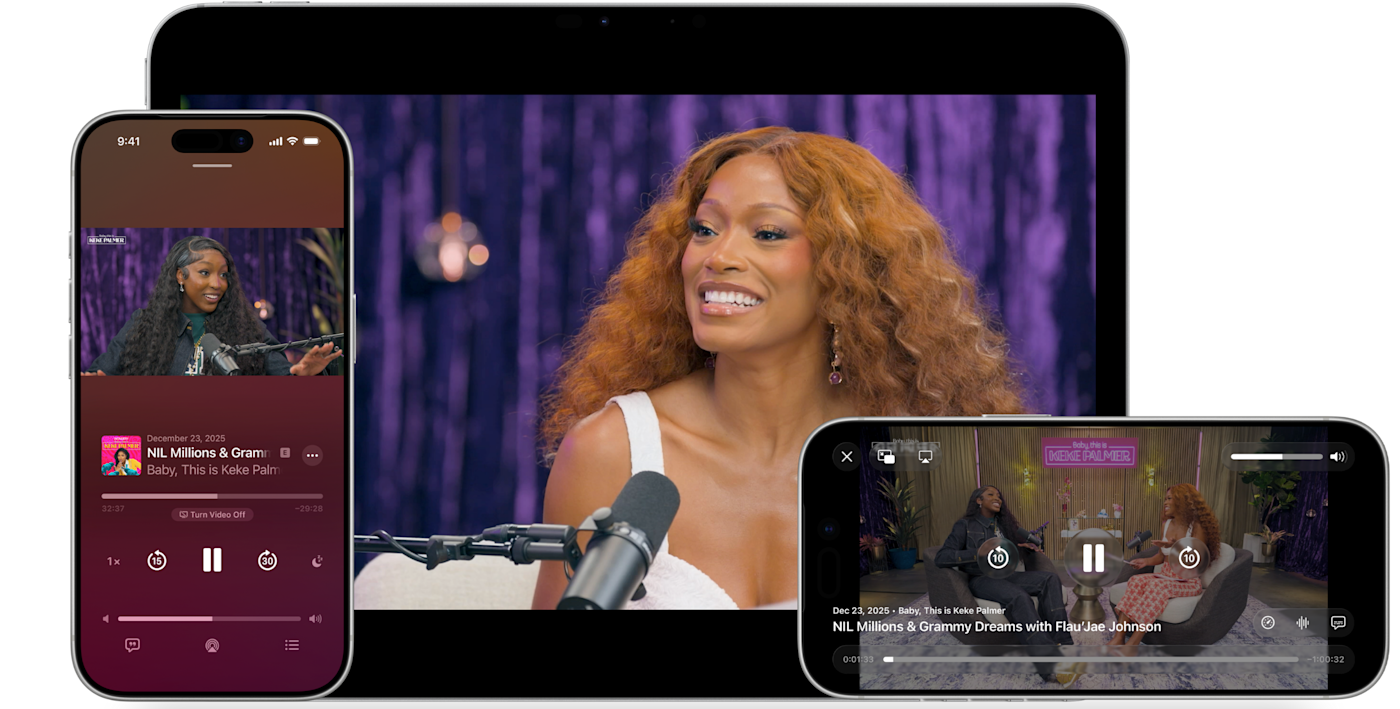
This provides several benefits for the end user. It lets people switch seamlessly between watching and listening, in addition to offering a horizontal full display option. It'll also make both video and audio streams available to download for offline viewing. This wasn't possible with the previous streaming method, which pulled content from an RSS-like feed. RSS is still available as a distribution option, but HLS definitely brings some advantages
The technology integrates picture-in-picture for multitasking on products like the iPad. Finally, the updated app will automatically adjust the picture quality to ensure smooth playback in various network conditions, including both Wi-Fi and cellular.
The update will be available on most platforms, including iOS, iPadOS, visionOS and the web. It's in beta right now, but the company plans a major rollout this spring as part of the upcoming 26.4 operating systems.
This article originally appeared on Engadget at https://www.engadget.com/apps/apples-podcasts-app-now-supports-http-live-streaming-video-technology-182605460.html?src=rss
Apple has steadily expanded home screen customization on the iPhone over the past few years, and iOS 26 continues that trend with more visual control over app icons. Building on the changes introduced in iOS 18, the latest update lets you resize icons, remove app labels, apply system-wide color tints and make icons translucent using Apple’s new Liquid Glass design language.
Most of these options live in one place: the Customize menu, which appears after entering edit mode on the home screen. While iOS still doesn’t allow total freeform icon placement or third-party icon packs without shortcuts, the tools Apple provides are now flexible enough to dramatically change how an iPhone looks and feels. This guide walks through how to customize app icons and layouts using the options available in iOS 26, with a focus on icon size, color, appearance and arrangement.
How to customize your iPhone home screen
All home screen customization starts the same way.
Go to the Home Screen.
Touch and hold an empty area of the Home Screen background until the apps begin to jiggle.
Tap Edit in the top left corner, then select Customize from the menu.
A customization panel appears along the bottom of the screen. Changes made here apply across all home screen pages at once, rather than on a per-page basis.
From the Customize menu, you can:
Adjust icon size
Change appearance (e.g., Dark)
Make icons translucent with a clear look
Add a color tint to icons and widgets
How to make app icons larger and remove labels
One of the simplest changes in iOS 26 is also one of the most visually impactful. From the Customize menu, tap the icon showing two app squares of different sizes. This switches the home screen to Large App Icons mode.
When large icons are enabled, app labels disappear entirely and the icons themselves expand to fill more of the grid. This creates a cleaner look and makes apps easier to tap, particularly on iPhone models with larger screens. The tradeoff is that fewer icons fit on each screen and spacing between rows becomes more pronounced.
To revert to standard icons with labels, repeat the steps and tap the same button again.
How to change the appearance of app icons
iOS 26 offers four icon appearance styles: Default, Dark, Clear and Tinted. These options are available from the top row of the Customize panel. From the Customize panel, you can tap the sun icon across all options in the top left-hand corner to toggle wallpaper dimming. This generally makes app icons and labels easier to read.
The Default option keeps icons looking as the developers intended, with no system-wide color or transparency applied.
Selecting Dark applies a darker background to supported app icons and widgets. Apple’s own apps fully support this mode, and some third-party apps do as well, though many retain their original colors. When Dark is enabled, iOS can also dim the wallpaper slightly, which may help reduce power usage on OLED displays.
The Clear option enables translucency across all apps on the Home Screen. This removes all color but retains app labels. The layered, frosted-glass effect changes depending on the background image. Clear icons can be paired with Light, Dark or Auto styles using the options along the bottom of the Customize panel.
Tinted mode allows all supported app icons and widgets to take on a single color scheme. After selecting Tinted, color and saturation sliders appear at the bottom of the screen. Adjusting these changes the hue applied across icons, creating a uniform look that can range from subtle pastels to high-contrast monochrome themes.
If you want a specific color from your iPhone’s wallpaper, select the eyedropper tool, then tap and hold while dragging the cursor across the screen until you land on your chosen color. Like the Clear option, you’ll be able to select from Light, Dark or Auto when adjusting the Tinted settings.
The Auto option allows icons to switch between light and dark appearances based on system-wide light or dark mode.
How to arrange apps around the home screen
App placement works the same way it did before iOS 26, but the visual changes introduced by larger icons and spacing make layout choices more noticeable.
Apps can be rearranged by accessing an empty space on the Home Screen, then tapping and holding until the apps start jiggling. From here you can drag icons to new positions. The grid remains fixed, meaning icons cannot overlap or be placed freely, but there is more flexibility in how empty space is used.
Icons can be clustered toward the bottom of the screen, aligned to one side or arranged to frame a wallpaper. With large icons enabled, the gap between the dock and the first row of apps becomes more pronounced, but it cannot be filled with additional icons.
Changes apply across all home screen pages, so reorganizing one page does not affect icon size or appearance on another.
What iOS 26 still doesn’t allow
Despite expanded customization, some long-standing limitations remain. iOS 26 does not support per-app icon color selection, custom icon packs without shortcuts or freeform icon placement outside the grid. Icon appearance settings apply globally, not per page or per app.
Widgets, lock screen customization and focus mode filters add additional layers of personalization, but those tools sit outside the scope of the home screen Edit menu.
iOS 26 gives iPhone users more control over the look of their home screen than ever before, even if Apple’s approach remains structured. By combining icon resizing, appearance modes and careful app arrangement, it’s possible to create a layout that feels cleaner, more personal and easier to use without relying on workarounds.
This article originally appeared on Engadget at https://www.engadget.com/mobile/smartphones/how-to-customize-your-iphone-home-screen-with-ios-26-130000798.html?src=rss
Apple plans to allow third-party voice-controlled AI apps in CarPlay, Bloomberg reports. Siri is the default voice assistant for things like controlling music and looking up directions, but future AI apps in CarPlay could handle the complicated, open-ended requests Siri can't answer.
The expanded support would let developers like OpenAI or Google offer versions of their ChatGPT and Gemini apps for CarPlay. Similar functionality is possible just by connecting a smartphone to a car over Bluetooth and using an AI app's voice mode, but CarPlay support would presumably make the process a little more seamless.
Not so seamless that it replaces Siri, however. Bloomberg writes that these third-party apps won't be able to replace the Siri button in the CarPlay interface or use their own wake words ("Hey Google," etc.). Instead, anyone who wants to spend a long drive talking to Gemini will have to open the app first. That could cut down on the utility of using one of these apps, but Apple presumably wants to get Siri to a place where CarPlay users prefer it as their in-car assistant anyway.
Apple and Google recently announced that Gemini would power future versions of Siri and Apple Foundation Models, the AI models underpinning Apple Intelligence. The delayed, updated version of Siri Apple introduced alongside Apple Intelligence in 2024 is supposed to be able to take actions on user's behalf, work across apps and understand the context of what's on screen, all things Gemini can currently do. Reports suggest Apple wants to eventually use Google's Gemini models to transform Siri into a proper conversational chatbot, too. That future version of the voice assistant could be right at home in CarPlay.
This article originally appeared on Engadget at https://www.engadget.com/transportation/apple-will-reportedly-allow-third-party-ai-assistants-in-carplay-213432646.html?src=rss
Fitbit's founders have a new startup. Two years after leaving Google, James Park and Eric Friedman announced a new platform that shifts the focus from the individual to the family. They say the Luffu mobile app "uses AI quietly in the background" to collect and organize family health information.
"At Fitbit, we focused on personal health — but after Fitbit, health for me became bigger than just thinking about myself," Park said in a press release. The app is particularly focused on the "CEO of the family" — the person who manages appointments, prescriptions and other health-related tasks.
But the definition of family isn't limited to parents raising children. The company sees its tool as especially valuable for caregivers in their 40s and 50s who may be managing the needs of both aging parents and kids. It even tracks pets' health habits.
"We're managing care across three generations — kids at home, busy parents in the middle, and my dad in his 80s who's living with diabetes and still wants to stay fiercely independent," Friedman wrote. "And the moments that matter most are often the most chaotic: a late-night fever, a sudden urgent care visit, a doctor asking questions you can't answer quickly because the details are scattered."
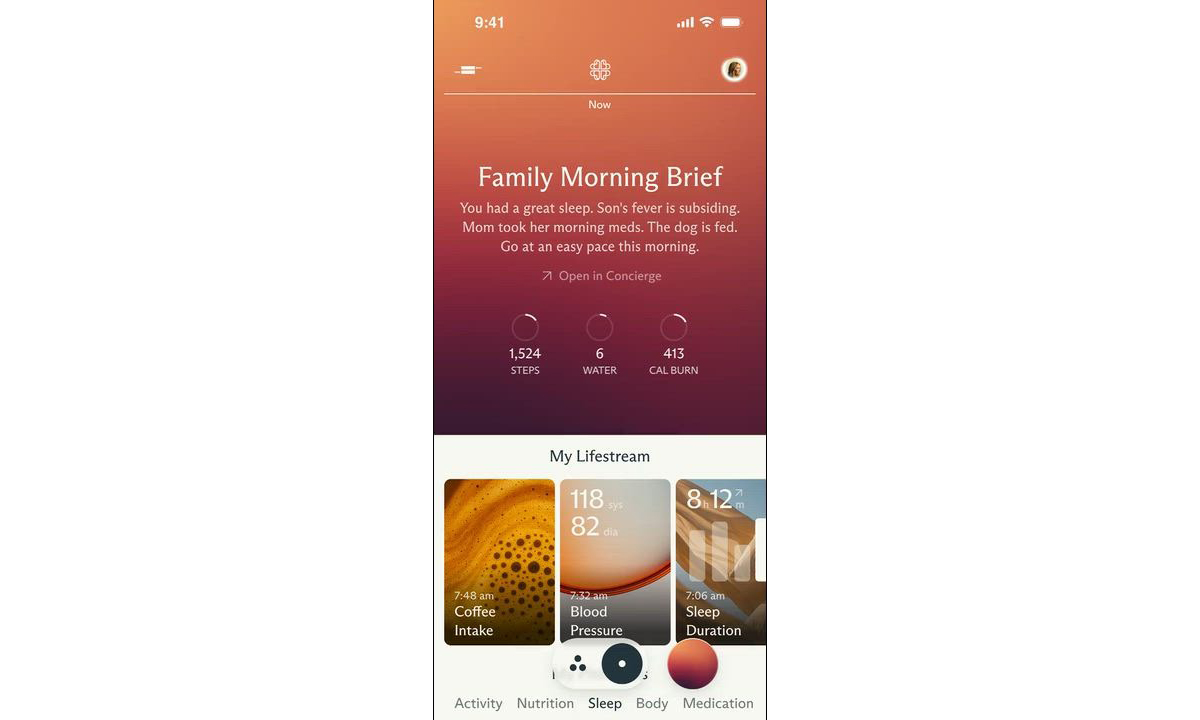
The app's AI includes a Morning Brief that recaps everyone's health.
Luffu
The company claims the app's AI "isn't a chatbot layer." Rather, it serves as a "guardian" — proactively monitoring for changes silently in the background. The AI then provides insights and triggers alerts when something is out of whack. You can also ask the app health data questions using plain language (so, there is some kind of chatbot) and share data with family members.
The company clearly wants to make entering data as easy as possible. Luffu allows family members to log info using voice, text or photos. It integrates with health platforms such as Apple Health and Fitbit. And the company eventually wants to expand into a hardware ecosystem — presumably, devices that make health data collection even easier.
Speaking of data collection, Luffu says, "Users are always in control of exactly what is shared, with whom, and privacy and security are paramount for all family data." In addition, the company told Axios that users can choose whether their data is used to train its AI. On the other hand, Big Tech has repeatedly shown that its most egregious data-collection practices are always wrapped in comforting language. So, at the very least, I'd take their pitch with grains of salt and, most importantly, make sure each family member knows exactly what they're consenting to. After all, this is a for-profit company, and we don’t yet know its monetization strategy.
Luffu is currently taking waitlist sign-ups for a forthcoming limited public beta. You can learn more and sign up for the waitlist on the company website.
Update, February 3, 2026, 1:14PM ET: This story has been updated to note that the Luffu public beta hasn’t started yet, but you can sign up for a waitlist to eventually get access when it starts.
This article originally appeared on Engadget at https://www.engadget.com/mobile/fitbit-founders-launch-luffu-a-way-to-integrate-your-familys-health-data-173251994.html?src=rss
As a former Mint user, I had to find a new budgeting app not too long ago. Intuit, parent company of Mint, shut down the service in March 2024, and prompted users to transition to its other financial app, Credit Karma. However, after testing Credit Karma myself, I found it to be a poor Mint replacement — that meant I needed to branch out and look elsewhere for a trusted app to track all of my financial accounts, monitor my credit score, follow a monthly spending plan and set goals like building a rainy-day fund and paying down my mortgage faster.
I tried out Mint's top competitors in the hopes that I'd be able to find a new budgeting app that could handle all of my financial needs. Hopefully my journey can help you find the best budgeting app for you and your money as well.
Best budget apps of 2026
Other budgeting apps we tested
PocketGuard
PocketGuard used to be a solid free budget tracker, but the company has since limited its “free” version to just a free seven-day trial. Now, you’ll have to choose between two plans once the trial is over: a $13 monthly plan or a $75 annual plan. When I first tested it, I found it to be more restricted than NerdWallet, but still a decent option. The main overview screen shows you your net worth, total assets and debts; net income and total spending for the month; upcoming bills; a handy reminder of when your next paycheck lands; any debt payoff plan you have; and any goals. Like some other apps, including Quicken Simplifi, PocketGuard promotes an “after bills” approach, where you enter all of your recurring bills, and then PocketGuard shows you what’s left, and that’s what you’re supposed to be budgeting: your disposable income.
Although PocketGuard’s UI is easy enough to understand, it lacks polish. The “accounts” tab is a little busy, and doesn’t show totals for categories like cash or investments. Seemingly small details like weirdly phrased or punctuated copy occasionally make the app feel janky. More than once, it prompted me to update the app when no updates were available. The web version, meanwhile, feels like the mobile app blown up to a larger format and doesn’t take advantage of the extra screen real estate. Ultimately, now that the free tier is gone, it just doesn’t present the same value proposition as it once did.
How we test budgeting apps
Before I dove in and started testing out budgeting apps, I had to do some research. To find a list of apps to try out, I consulted trusty ol’ Google (and even trustier Reddit); read reviews of popular apps on the App Store; and also asked friends and colleagues what budget tracking apps (or other budgeting methods) they might be using for money management. Some of the apps I found were free and these, of course, show loads of ads (excuse me, “offers”) to stay in business. But most of the available apps require paid subscriptions, with prices typically topping out around $100 a year, or $15 a month. (Spoiler: My top pick is cheaper than that.)
All of the services I chose to test needed to do several things: import all of your account data into one place; offer budgeting tools; and track your spending, net worth and credit score. Except where noted, all of these apps are available for iOS, Android and on the web.
Once I had my shortlist of six apps, I got to work setting them up. For the sake of thoroughly testing these apps, I made a point of adding every account to every budgeting app, no matter how small or immaterial the balance. What ensued was a veritable Groundhog Day of two-factor authentication. Just hours of entering passwords and one-time passcodes, for the same banks half a dozen times over. Hopefully, you only have to do this once.
Budgeting app FAQs
What is Plaid and how does it work?
Each of the apps I tested uses the same underlying network, called Plaid, to pull in financial data, so it’s worth explaining what it is and how it works. Plaid was founded as a fintech startup in 2013 and is today the industry standard in connecting banks with third-party apps. Plaid works with over 12,000 financial institutions across the US, Canada and Europe. Additionally, more than 8,000 third-party apps and services rely on Plaid, the company claims.
To be clear, you don’t need a dedicated Plaid app to use it; the technology is baked into a wide array of apps, including all of the budgeting apps listed in this guide. Once you find the “add an account” option in whichever one you’re using, you’ll see a menu of commonly used banks. There’s also a search field you can use to look yours up directly. Once you find yours, you’ll be prompted to enter your login credentials. If you have two-factor authentication set up, you’ll need to enter a one-time passcode as well.
As the middleman, Plaid is a passthrough for information that may include your account balances, transaction history, account type and routing or account number. Plaid uses encryption, and says it has a policy of not selling or renting customer data to other companies. However, I would not be doing my job if I didn’t note that in 2022 Plaid was forced to pay $58 million to consumers in a class action suit for collecting “more financial data than was needed.” As part of the settlement, Plaid was compelled to change some of its business practices.
In a statement provided to Engadget, a Plaid spokesperson said the company continues to deny the allegations underpinning the lawsuit and that “the crux of the non-financial terms in the settlement are focused on us accelerating workstreams already underway related to giving people more transparency into Plaid’s role in connecting their accounts, and ensuring that our workstreams around data minimization remain on track.”
Why did Mint shut down?
When parent company Intuit announced in December 2023 that it would shut down Mint, it did not provide a reason why it made the decision to do so. It did say that Mint's millions of users would be funneled over to its other finance app, Credit Karma. "Credit Karma is thrilled to invite all Minters to continue their financial journey on Credit Karma, where they will have access to Credit Karma’s suite of features, products, tools and services, including some of Mint’s most popular features," Mint wrote on its product blog. In our testing, we found that Credit Karma isn't an exact replacement for Mint — so if you're still looking for a Mint alternative, you have some decent options.
What about Rocket Money?
Rocket Money is another free financial app that tracks spending and supports things like balance alerts and account linking. If you pay for the premium tier, the service can also help you cancel unwanted subscriptions. We did not test it for this guide, but we'll consider it in future updates.
This article originally appeared on Engadget at https://www.engadget.com/apps/best-budgeting-apps-120036303.html?src=rss
Patreon creators will need to make some changes soon, thanks to Apple. On Wednesday, Patreon said Apple has renewed its requirement that all Patreon creators must move to subscription billing. The deadline to do so is November 1, 2026.
Patreon's blog post announcing the change made it clear that it had no other choice. "We strongly disagree with this decision," the company wrote. "Creators need consistency and clarity in order to build healthy, long-term businesses. Instead, creators using legacy billing will now have to endure the whiplash of another policy reversal — the third such change from Apple in the past 18 months."
Up to this point, Patreon’s billing model has operated in a gray area, allowing its creators to charge fans outside the App Store without paying Apple’s fees. When the issue first surfaced, TechCrunchdescribed it as stemming from how paid content was accessed (only some creators offered content that could be consumed in-app). On Wednesday, a Patreon representative described the gray area as being “because Apple’s In-App Purchase system doesn’t support some of Patreon’s longstanding billing models.”
But now Apple has reimposed its subscription mandate, eliminating the gray area. "We know that Apple is serious about enforcing this mandate," Patreon wrote. "Late last year, they blocked a Patreon app update and made it clear that in order to remain in the App Store, we have to comply with their billing requirement. Because millions of fans use iOS as their primary way to access Patreon and connect with creators, having our app blocked — or not available in the App Store at all — isn't an option."
Patreon’s "whiplash" description isn't hyperbole. Apple first announced the mandate in 2024. At that time, the deadline for all Patreon creators to make the switch was set to November 2025 — one that Patreon grudgingly accepted. But according to the company, Apple told it last May that the original 2025 deadline was no longer in effect. Now, it appears to have reversed that again.
If there's a silver lining, TechCrunchnotes that only 4 percent of Patreon creators are using the affected (legacy) billing models. And fans can still bypass Apple's fees on iOS by joining via their iPhone's web browser. Patreon has much more detail for creators in its announcement post.
DAVOS, SWITZERLAND - JANUARY 21: U.S. President Donald Trump (R) speaks to Apple CEO Tim Cook (L) as he attends a reception for business leaders (Photo by Chip Somodevilla/Getty Images)
To top it all off, Tim Cook decided that Saturday — the day Alex Pretti was shot and killed by federal agents — would be a good time to attend the screening of Melania at the White House. He even posed for a selfie with accused rapist Brett Ratner, the film’s director.
Update, January 28, 2026, 5:22 PM ET: This story has been updated to clarify how the Patreon app operated in a gray area before Apple’s changes.
This article originally appeared on Engadget at https://www.engadget.com/big-tech/patreon-creators-have-to-switch-to-subscription-billing-by-november-thanks-to-apple-203759852.html?src=rss
TikTok's newly formed US entity is off to a very bumpy start. As the app continues to face technical issues affecting the recommendation algorithm, view counts and other features, TikTok is also seeing a wave of frustrated users uninstalling it, according to new data.
Analytics firm Sensor Tower, which tracks downloads and other app store-related metrics, told CNBC that there has been a 150 percent rise in uninstalls of the TikTok app in the United States compared with the last three months. An analyst at Sensor Tower told Engadget that TikTok's US daily active users (DAUs) have increased about 2 percent in the same time period, and are flat week-over-week. TikTok has blamed a power outage at a data center for “multiple bugs,” including those affecting view counts and load times. The company hasn't said when users can expect a fix.
At the same time, an independent app called UpScrolled has seen a surge in interest over the last few days. The app is currently the ninth most-downloaded app in the US App Store and the second most popular social app (Meta's Threads is currently in the number one spot for social apps). The app has also reached the top five in the UK and Australian app stores. In the United States, its sudden popularity seems to be closely tied to recent changes at TikTok.
UpScrolled has seen 41,000 total downloads between Thursday (the day the US joint venture was formalized) and Saturday, according to estimates from App Figures. The app, which was first released last June, has been downloaded about 140,000 times between Apple and Google's app stores, according to App Figures. Prior to last Thursday, the app was averaging less than 500 downloads a day, according to the company. The rapid increase in downloads has apparently caused some issues for the company which asked users to "bear with us" on Monday.
Well, this is new... You showed up so fast our servers tapped out. Frustrating? Yes. Emotional? Also yes. We're a tiny team building what Big Tech stopped being. Right now we're scaling on caffeine to keep up with what YOU started. Bear with us. We're on it. pic.twitter.com/OAlYcN6t5q
Created by an Australian developer, UpScrolled looks a bit like Instagram. Users can share photos and shortform videos. The app defaults to a chronological "following" feed, though it does also recommend content to users. The app is "privately funded by its founder, Issam Hijazi, together with a small group of individual investors who share our mission and values," according to an FAQ on UpScrolled's website. It currently has no ads, though the company says it "probably" will in the future.
This isn't the first time turmoil at TikTok has benefitted a previously little-known app. Chinese app RedNote briefly became the top app in the United States early last year as TikTok faced a potential ban. RedNote's popularity proved to be short-lived, though, as the 2025 TikTok "ban" ended up lasting only a couple of hours.
But with new owners at TikTok and growing frustration over technical issues with the app, there could be an opportunity for a new shortform video service that's not controlled by a huge corporation. And that's what UpScrolled seems to be betting on. "Too often, users are left uncertain about whether their voices will be heard or quietly suppressed," the company writes on its website. "UpScrolled changes that by ensuring every post has a fair chance to be seen, creating an environment that is authentic, unfiltered, and equitable for all."
Update, January 26, 2026, 4:28PM PT: This post was updated to reflect the latest details from TikTok about the ongoing issues affecting the US version of the app.
This article originally appeared on Engadget at https://www.engadget.com/social-media/people-are-uninstalling-tiktok-and-downloading-an-indie-competitor-233345222.html?src=rss
More ads are coming to App Store search results starting in March, Apple shared on an advertising help page. The company first said that it would increase the number of App Store ads last month, and this new rollout of search ads will begin on Tuesday, March 3, according to a developer email viewed by MacRumors.
"Search is the way most people find and download apps on the App Store, with nearly 65 percent of downloads happening directly after a search," Apple says. "To help give advertisers more opportunities to drive downloads from search results, Apple Ads will introduce additional ads across search queries." Up until this point, ads for related apps have appeared at the top of search results, but now they'll also appear "further down in search results," according to Apple.
App Store activity makes up a significant portion of what Apple calls its "services" business. The company makes money on every App Store transaction, whether it's an app download or an in-app purchase, and increasingly, by selling ad space to companies looking to reach users. App Store ads are hardly new, but the number of ads has steadily increased over the years. Apple added ads to the Today tab in 2022 — a space that's already home to editorial curation that doubles as marketing — and in 2025, Bloomberg reported the company planned to bring ads to Apple Maps.
Apple's decision to rebrand its advertising business from Apple Search Ads to Apple Ads in April 2025 was maybe the best indication that the company was interested in expanding the number of places it would help partners try and reach customers. And it makes sense: the company's billions of devices, each pre-installed with default apps, are some of the most valuable real estate it owns.
This article originally appeared on Engadget at https://www.engadget.com/apps/apple-will-begin-showing-more-app-store-ads-starting-in-march-192031226.html?src=rss
It was only 16 months ago that Substack expanded into live video. Since then, it's become a widely adopted medium on the platform, including by its ever-growing list of cable news expats. Now, the company has decided it's ready for a bigger screen. Starting today, you can install a new Substack TV app on Apple TV and Google TV devices.
Substack describes the app's initial launch as focusing on "reliable, high-quality viewing" for the platform's long-form videos. It centers around video posts and livestreams from the creators and publications you follow. There's also a "For You" section that combines those videos with algorithmic recommendations. And you can browse dedicated pages for each channel.
Viewing access aligns with your subscription level. So, if a channel restricts videos to paying subscribers on Substack’s mobile app and website, the same paywall applies here. However, the company says it's working on adding previews of paid content for free subscribers. It also plans to add audio posts, search, improved discovery and separate sections for different shows within a single publication.
At least one of those legacy media expats who moved to Substack is optimistic about the feature. "This is a game-changing moment for the rise of independent media," former CNN anchor Jim Acosta wrote in the announcement post. "Substack has proven that legacy media consumers are not only searching for fresh alternatives; they are finding them."
Based on the comments in Substack’s announcement, some of the platform’s die-hards are less enthusiastic than Acosta. “File this under – thing we didn’t ask for,” Ashli Pollard wrote. “This is not YouTube,” a commenter named Dustin added. “Elevate the written word.” I personally don’t see any harm in another way to watch the videos Substack already hosts. (Its newsletters aren’t going anywhere.) But given how Big Tech companies tend to pivot further toward the most en vogue (and profitable) medium of the day, I can see why purists feel the need to dig in their heels.
Regardless, you can find the Substack TV app by searching for its name in the tvOS App Store or the Apps section on Google and Android TV devices. You can sign in by scanning a QR code with your phone.
This article originally appeared on Engadget at https://www.engadget.com/entertainment/streaming/substack-now-has-a-tv-app-195408592.html?src=rss
Snapchat is updating its parental control features to give parents more detailed information about who their kids are connecting with in the app and which features they use the most. The app's Family Center already gives parents visibility into their child's friend list, but it will now surface contextual details when a new friend is added.
For example, the feature could highlight that the two share mutual friends or have each other's contact info saved in their phones. It could also indicate that they are classmates if both users have joined the same in-app “community.” If the two have no commonalities, then that could be a sign for a parent to "start a productive conversation," Snap says.
The company has long been criticized for making it too easy for teenagers to talk to strangers. The issue has come up in safety-related lawsuits, including an ongoing case brought by New Mexico's Attorney General. Snap says that adding additional "trust signals" to its parental control features "make it easier for parents to understand new connections and have greater confidence that their teen is chatting with someone they know in real life."
The update is also adding more granular stats about how exactly teens are spending their time in the app. Family Center's screen time dashboard now includes a breakdown of how much of their time spent in the app is in its messaging, camera, map or shortform video features. It will still be up to parents to decide what, if any, limits they want to put on their teens. But at a time when there's increasing conversation around banning teens from social media entirely, having access to more stats could better help parents understand their kids' relationship with Snapchat.
This article originally appeared on Engadget at https://www.engadget.com/social-media/snapchat-gives-parents-more-info-on-who-their-kids-are-talking-to-120000077.html?src=rss

 Anmelden