
❌

Normale Ansicht

Empfangen — 25. September 2026 ⏭ MacRumors: Mac News and Rumors - All Stories

What's Gone in macOS Golden Gate and What's Next in macOS 28

With macOS Golden Gate, Apple phased out several legacy features and services, cutting support for older devices and accessories. More cuts are coming in macOS 28 as Apple continues to root out lingering Intel features.


Here's everything that's been dropped.

  • Support for Intel Macs - ‌macOS Golden Gate‌ is the first version of macOS that runs only on Apple silicon Macs. Intel Macs can't run it and are limited to macOS Tahoe. Apple still plans to offer security updates through fall 2028.

  • Boot Camp Assistant - Since ‌macOS Golden Gate‌ doesn't run on Intel Macs, it doesn't support Boot Camp. Apple silicon Macs require virtualization software like Parallels or VMware Fusion to run Windows.

  • Rosetta 2 (Temporarily) - Upgrading to ‌macOS Golden Gate‌ removes Rosetta, but if you have an app installed that requires it, you can reinstall it. ‌macOS Golden Gate‌ is the last version of macOS that will have full Rosetta support.

  • Apple Filing Protocol - Apple deprecated AFP back in macOS Sequoia 15.5, and there is no AFP client at all in ‌macOS Golden Gate‌.

  • Time Capsule Backups - With no support for AFP, Time Capsule no longer works with Macs running ‌macOS Golden Gate‌. Time Capsule requires AFP or SMBv1, but Time Machine backups now use the SMBv2 or SMBv3 protocol.

  • AirPort Utility - AirPort Utility is no longer included when you install ‌macOS Golden Gate‌. If you had the app before updating, you can still use it, but Apple makes no guarantee that it still works. AirPort Utility lets users manage AirPort base stations like the AirPort Extreme and AirPort Express.


macOS 28, which is expected in fall 2027, will largely drop support for Rosetta 2. Most apps that rely on Rosetta will not open on Macs running macOS 28, though Apple is making an exception for some legacy games that are unmaintained.

In ‌macOS Golden Gate‌, you'll see a warning when using any app that relies on Rosetta, so you're aware that the app won't continue to work in the future without a developer update. You can also see which apps are affected by going to Settings > General > About > Intel-Based Apps and then clicking on Details.
Related Roundup: macOS Golden Gate
Related Forum: macOS Golden Gate

This article, "What's Gone in macOS Golden Gate and What's Next in macOS 28" first appeared on MacRumors.com

Discuss this article in our forums

  •  

TestFlight App Gets New iOS 27 Features

Apple today updated its TestFlight app for iOS, iPadOS, macOS, and visionOS to version 4.4.0, adding support for features introduced in the latest software updates and products.


TestFlight for iPhone supports landscape orientation ahead of the iPhone Duo's October launch, though the option is available on all iPhones. TestFlight can now be resized when using iPhone Mirroring on a Mac running macOS 27 with an iPhone running iOS 27.

Apple says the update also includes unspecified stability improvements and bug fixes.
Related Roundups: iOS 27, iPadOS 27
Related Forum: iOS 27

This article, "TestFlight App Gets New iOS 27 Features" first appeared on MacRumors.com

Discuss this article in our forums

  •  

Google Photos Wardrobe Feature Comes to iOS

Google today said its digital wardrobe option is available in the Google Photos iOS app in the U.S., India, and Brazil.


Google first announced the feature back in April, but it was limited to Android users until now. The wardrobe option uses AI to pull images of clothing from the Google ‌Photos‌ library, organizing them into a digital closet.


Users can put items together to create outfits and virtually try them on.

The app shows clothing items in a new Wardrobe section in the Collections tab. Clothing can also be viewed in specific categories like tops or bottoms. Items of clothing can be mixed and matched, and the results can be shared with friends or saved to a moodboard.

Google ‌Photos‌ is also getting 15 new templates for Remix, a feature that uses AI to transform images.
Tags: Google, Photos

This article, "Google Photos Wardrobe Feature Comes to iOS" first appeared on MacRumors.com

Discuss this article in our forums

  •  

Apple Music to Host Free Head Trip Festival Livestream

Apple Music is teaming up with Goldenvoice to livestream the Head Trip music festival that's taking place in Indio, California, on October 10 and 11.


Head Trip will feature Calvin Harris, Fisher with Chris Lake, Peggy Gou with Four Tet, Swedish House Mafia, Skrillex, Dom Dolla with Kettama, and more. Tickets to the in-person event started at $499 but have sold out, and only passes starting at $589 are available now.

HEAD TRIP. LIVE FROM INDIO. OCTOBER 10 + 11.

WATCH THE LIVESTREAM ON APPLE MUSIC. https://t.co/puQ6MSRbxA pic.twitter.com/1cAMs0xYHP

— Apple Music (@AppleMusic) September 24, 2026

Music fans who don't want to pay that much or travel to the California desert can instead watch the livestream for free through ‌Apple Music‌.
"Head Trip brings together an extraordinary lineup of artists who are shaping dance and electronic music culture right now," says Stephen Campbell, Global Head of Dance, Electronic Music & DJ Mixes at Apple Music. "Our goal at Apple Music has always been to bring fans closer to the artists, scenes, and dance floors driving this culture forward. Teaming up with Goldenvoice on Head Trip gives us an incredible opportunity to take the energy of this one-of-a-kind festival beyond Indio, giving fans around the world the chance to experience these performances on Apple Music."

Sets from the main stage of the event will be livestreamed across both days of the festival, according to Digital Music News. More information about Head Trip can be found on the festival website.
This article, "Apple Music to Host Free Head Trip Festival Livestream" first appeared on MacRumors.com

Discuss this article in our forums

  •  

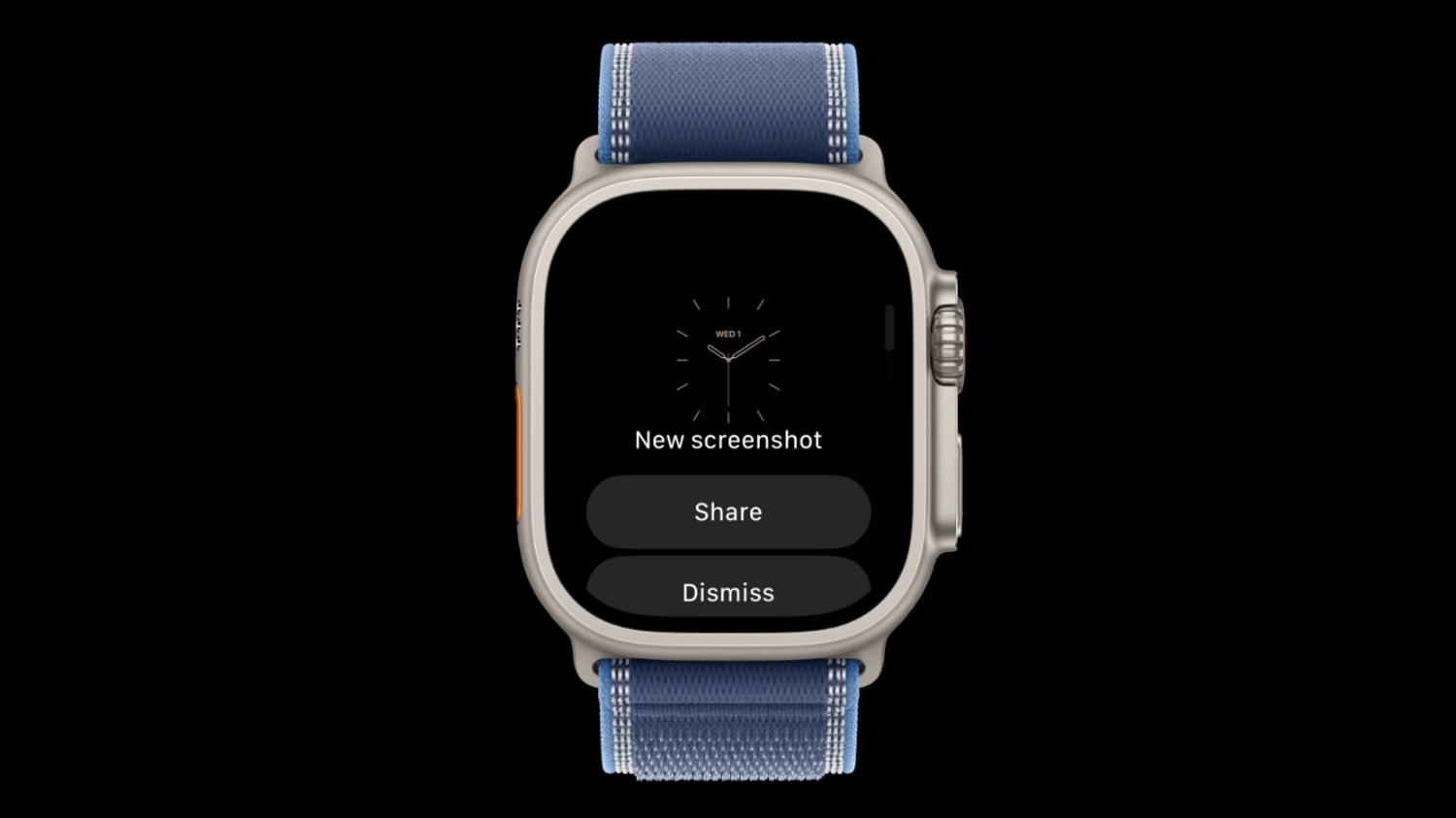
watchOS 27.2 Code Hints at iPhone-Style Screenshot Previews

watchOS 27.2 could introduce a feature that lets Apple Watch screenshots be previewed with options to share or delete, similar to how screenshots work on the iPhone.


Signs of the feature were found in watchOS 27.2 by code explorer pdfu. The option is hidden behind a feature flag that's not enabled, but it could be introduced in a later watchOS 27.2 beta.

A new screenshot experience is coming to Apple Watch, inspired by iPhone.

Hidden behind a feature flag in watchOS 27.2, it lets you preview, share, or delete a screenshot right after taking it. pic.twitter.com/MT5wmDjRnq

— pdfu (@itspdfu) September 24, 2026

Right now, taking a screenshot on the Apple Watch sends it directly to the iPhone Photos app with no confirmation screen. It's easy to accidentally take a screenshot since it only requires pressing the Digital Crown and side button at the same time.

On the iPhone, taking a screenshot shows either a full-screen preview or a thumbnail preview depending on your settings, but both options let you save, share, or delete the screenshot with a couple taps.

Screenshots on Apple Watch are disabled by default but can be turned on through the Settings app on the watch or the Apple Watch app on iPhone. An option to save or delete screenshots would add more control than a simple on or off toggle.
Related Roundups: watchOS 26, watchOS 27
Related Forum: Apple Watch

This article, "watchOS 27.2 Code Hints at iPhone-Style Screenshot Previews" first appeared on MacRumors.com

Discuss this article in our forums
  •  

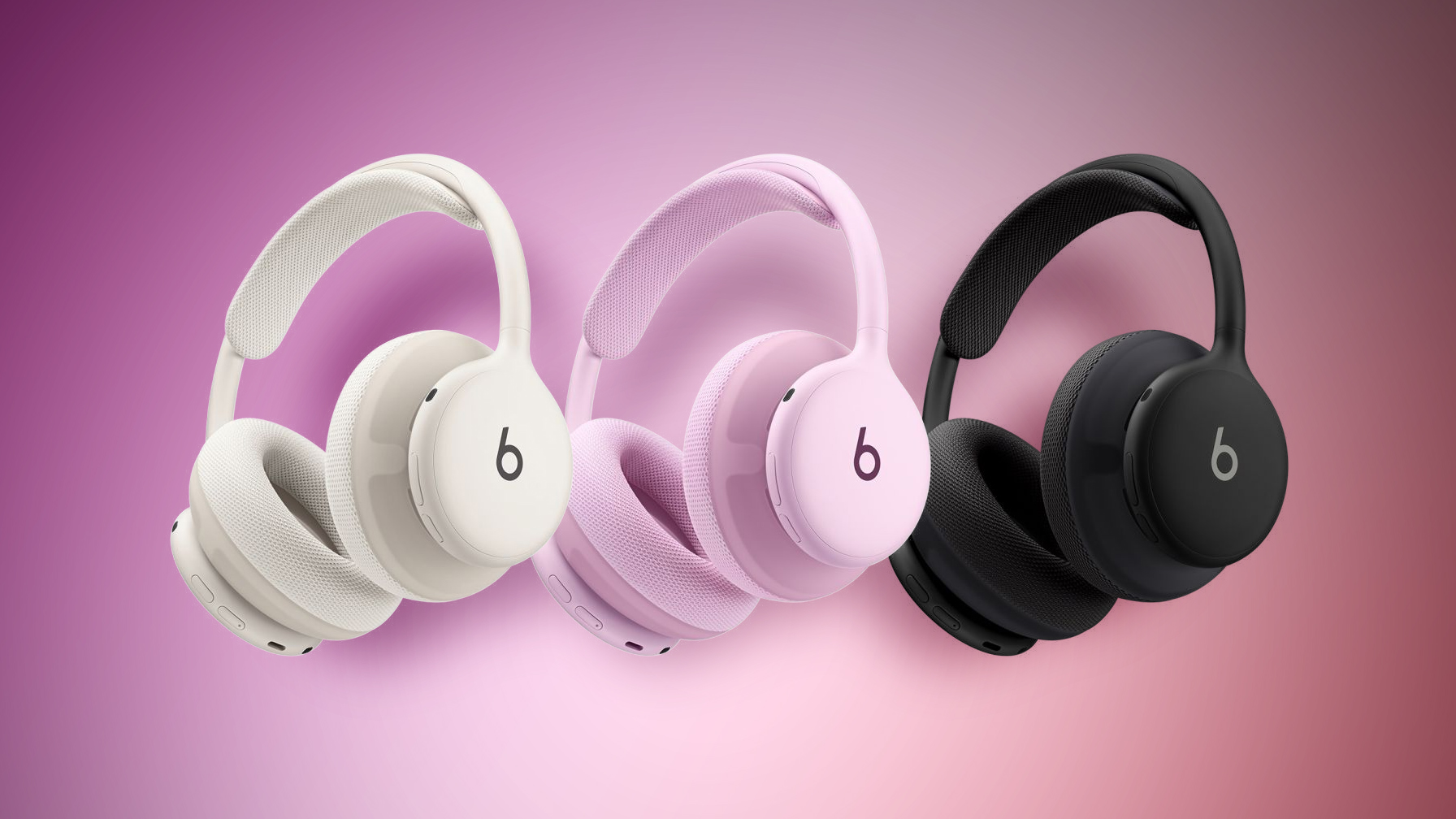
Beats 360 Headphones Now Available in Apple Stores

The new Beats 360 headphones are available for purchase at many Apple Stores around the world as of today. Retailers like Best Buy and Target also have some stock available in stores.


Apple's Beats brand announced the headphones earlier this week after teasing them for several months. The Beats 360 are over-ear headphones with a design similar to the AirPods Max and interchangeable ear cushions so you can swap colors.

Compared with the Beats Studio Pro, the Beats 360 have up to 1.75x more noise cancellation and improved sound quality. Features like Personalized Spatial Audio, Transparency mode, and Adaptive EQ are supported, as are fast pairing and automatic device switching. They have IPX4 sweat and water resistance, making them suitable for the gym.

The Beats 360 work with two kinds of cushions. The Performance Knit memory foam cushions are breathable and meant for working out, while the UltraPlush cushions have a softer, more pillowy feel. The Beats 360 ship with the Performance Knit cushions, and the UltraPlush can be purchased separately.

Beats 360 are priced at $349.99, and for a limited time, Apple is selling add-on ear cushions for a discounted $9.99 price through October 31. Headphone colors include Black, Cloud, Pink, and Sky. The Performance Knit cushions come in Black, Cloud, Pink, Sky, Navy, and Volt, while the UltraPlush come in Black and Cloud.
Tag: Beats

This article, "Beats 360 Headphones Now Available in Apple Stores" first appeared on MacRumors.com

Discuss this article in our forums
  •  

Apple Shares New Video Promoting iOS 27 Parental Controls

Apple today shared a video promoting the new parental control features it added in iOS 27.


Apple says Child Accounts are easier to set up in ‌iOS 27‌ and more intuitive to use. Improved controls allow parents to choose the types of apps children have access to, while Ask to Buy lets kids request new apps and games.

Ask to Browse gives parents a way to block or allow the websites children visit in Safari, plus parents can decide who kids can call and message. Communication Safety in Messages and FaceTime detects and blocks both violence and nudity in images and videos.

Time Allowances and Schedules let parents customize what children can access by the day, hour, and activity, with options to limit apps during school hours. There are one-tap controls to pause access entirely during family events like dinnertime or allow unlimited screen time.

Apple's updated parental controls come as the company deals with regulatory pressure over child safety in countries like the UK, U.S., and Australia. The UK has called for device-level controls that keep kids from viewing and sharing inappropriate images, while the U.S. Kids Internet and Digital Safety Act is now in the Senate. Australia has already prohibited children under 16 from creating accounts on certain social media apps.

Apple's new child safety features became available on September 14 with the launch of ‌iOS 27‌, iPadOS 27, and macOS Golden Gate. Every device in a Family Sharing group needs to be running the latest software for the Screen Time update to work.
Related Roundups: iOS 27, iPadOS 27
Related Forum: iOS 27

This article, "Apple Shares New Video Promoting iOS 27 Parental Controls" first appeared on MacRumors.com

Discuss this article in our forums

  •  

ChatGPT in Siri 'Persistently Underperforming,' Says OpenAI

OpenAI saw disappointing results working with Apple to integrate ChatGPT in Siri, according to court documents filed [PDF] in its ongoing legal fight with Elon Musk's company SpaceXAI (xAI at the time the lawsuit was filed).


Apple added ChatGPT to ‌Siri‌ in December 2024, but users had to go through a multistep opt-in process, which added a layer of friction. By January 2025, OpenAI said the integration was "off to a slow start" and the company cut its forecast for the number of incremental logged-in weekly active users that it expected to get from the partnership.

Much of the filing is redacted, but OpenAI said that by the time Musk's companies filed an antitrust lawsuit against Apple and OpenAI, "it was clear that Apple's integration of ChatGPT was dramatically underperforming." In a later section of the filing, OpenAI said again that the Apple integration was "persistently underperforming," leading to a March 2026 conversation between Apple and OpenAI that is redacted.

OpenAI asked Apple for a two-year exclusivity period, but Apple refused. The agreement between the two companies explicitly said the deal was non-exclusive and Apple had the right to "integrate products or services that provide the same or similar functionality as [ChatGPT]." Apple told OpenAI that it planned to integrate one provider and then add more, and it made similar statements publicly when announcing the feature. Apple also signed a deal with Google, and Apple's newest models are based on Gemini.

OpenAI's filing disputes many of the claims in the xAI lawsuit. Musk alleged OpenAI and Apple had an exclusive deal and that the agreement harmed xAI's growth and customer acquisition. OpenAI says the contract proves there was no exclusive deal, and even if there were, xAI can't prove harm because the ChatGPT ‌Siri‌ integration just didn't draw many new ChatGPT users.
Even if the Court assumes that Apple users who elect to use ChatGPT through Apple Intelligence are foreclosed from OpenAI's rivals (which they are not), the amount of foreclosure caused by the Agreement is indisputably de minimis. While Plaintiffs' experts declined to calculate foreclosure shares, OpenAI's expert, Dr. Catherine Tucker, calculated the share of GenAI consumers who accessed ChatGPT through Apple Intelligence across multiple metrics using the same data and market definition relied upon by Plaintiffs' experts. On these assumptions, Dr. Tucker found foreclosure shares of [REDACTED] across all metrics, consistent with OpenAI's internal view that Apple Intelligence saw minimal usage.

Musk's companies dropped their claims against Apple earlier this month, leaving OpenAI as the sole defendant in the lawsuit. OpenAI's filing asks the court to toss out xAI's claims prior to the trial planned for January 2027.
This article, "ChatGPT in Siri 'Persistently Underperforming,' Says OpenAI" first appeared on MacRumors.com

Discuss this article in our forums
  •  

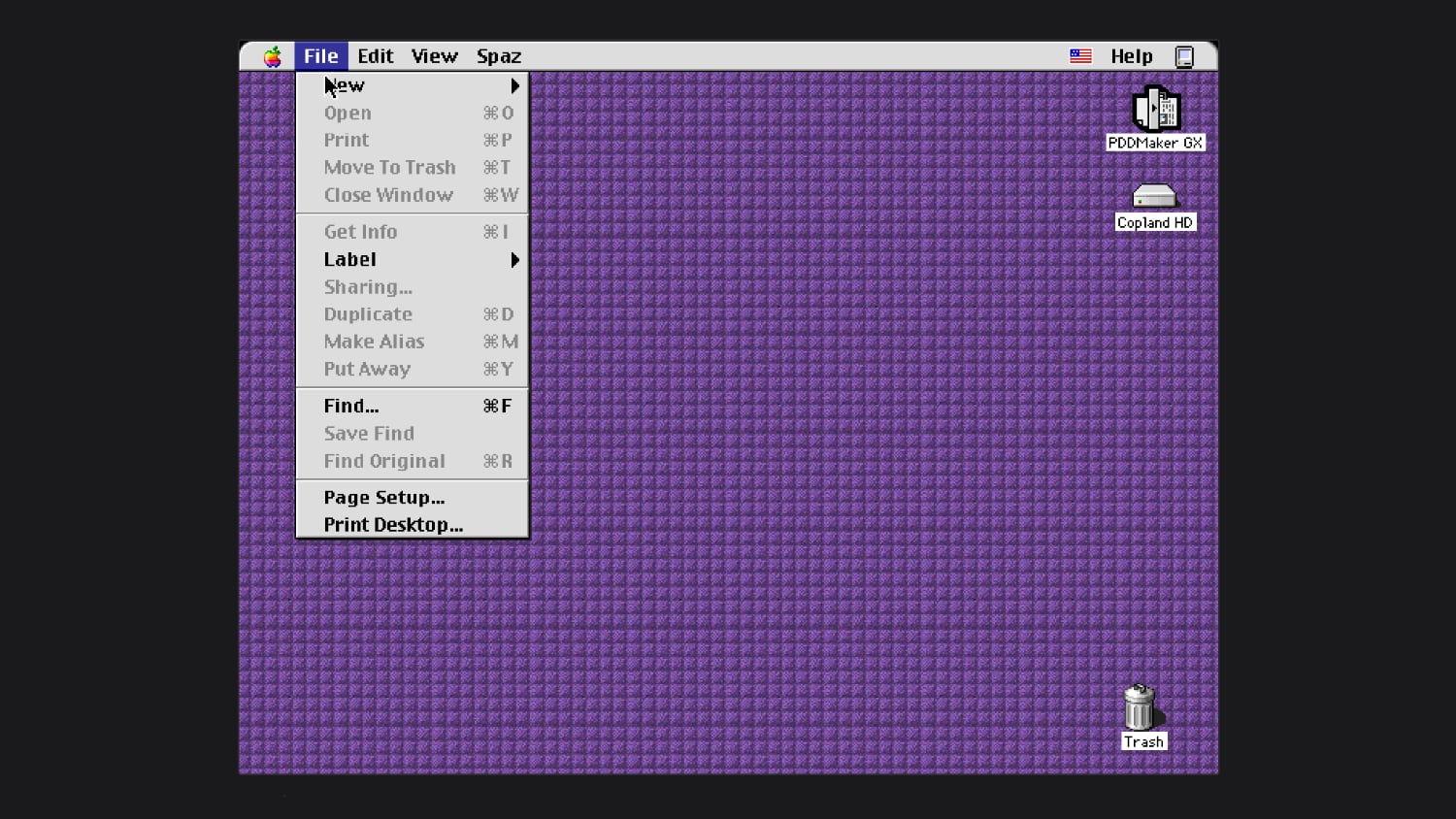
You Can Now Try Apple's Unreleased Copland OS in Your Browser

In the mid–1990s, Apple worked on an operating system called Copland, which was announced but never commercially released because of project management issues and feature creep. Parts of Copland were eventually included in Mac OS 7.6 and Mac OS 8, but it was so problematic as a whole that Apple nixed it before it was finished.


Michael Steil, who works to reverse engineer vintage hardware and software, was recently able to get Copland running in emulation. He modified the open-source Power Mac emulator DingusPPC, and he said it took 11 patches to get Copland up and running. He has a browser version of Copland you can try on his website, and shared the patches needed to boot Copland.

During Copland's development, Apple released three beta versions. The last beta was D11E4, which is what Steil got to work. He said Copland is "notoriously hard to run on real hardware," and wasn't previously available in emulation.

After Apple canceled Copland in August 1996, it looked outside the company for a new operating system. That led to the purchase of NeXT in 1997 and the return of Steve Jobs. NeXTSTEP, NeXT's operating system, was the precursor to Mac OS X.
This article, "You Can Now Try Apple's Unreleased Copland OS in Your Browser" first appeared on MacRumors.com

Discuss this article in our forums

  •  

Apple Releases watchOS 27.0.1 With Fix for Restart Bug

Apple today released watchOS 27.0.1, a minor update to the watchOS 27 operating system that came out last week. The update is limited to the Apple Watch Series 12 and Apple Watch Ultra 4.


watchOS 27.0.1 can be downloaded through the Settings app on the watch or the Apple Watch app on a connected iPhone. Software can only be installed when the Apple Watch is on the charger and has over 50 percent battery.

Apple's release notes say the update fixes bugs, including an issue that could cause the Apple Watch to restart unexpectedly.
Related Roundups: watchOS 26, watchOS 27
Related Forum: Apple Watch

This article, "Apple Releases watchOS 27.0.1 With Fix for Restart Bug" first appeared on MacRumors.com

Discuss this article in our forums
  •  
Empfangen — 10. September 2026 ⏭ MacRumors: Mac News and Rumors - All Stories

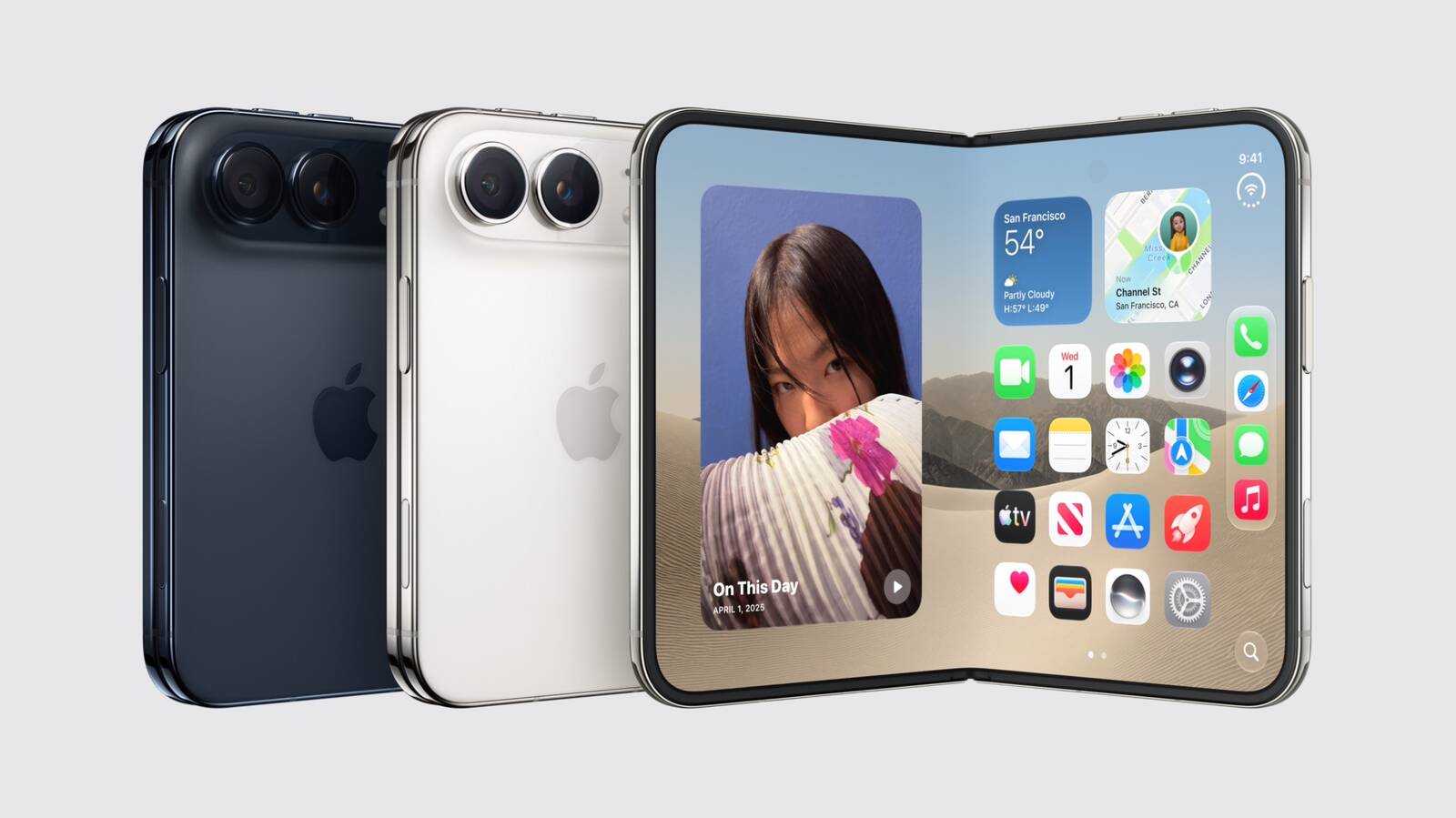
Hands-On With the iPhone Duo: The Crease is Still There, But Barely

After today's iPhone event, Apple invited members of the media to test out the new iPhone Duo. We were able to take a look, and we have some initial thoughts to share.


The ‌iPhone Duo‌ is priced starting at $1,999, and it feels like it. This is a premium device that's thin, but feels sturdy. The outer display is 5.4 inches, so it's smaller than the iPhone 18 Pro when it's closed, but the inner display is 7.6 inches.

Apple used a nano-texture polymer for the inside display, and the material cuts glare but also reduces the visibility of the crease. The display layer has a micro lens texture written pixel by pixel using maskless laser lithography for a perceptually flat, matte surface. It does indeed minimize the look and feel of the fold in the middle of the ‌iPhone Duo‌.

You can still see the crease and it's visible in certain lighting, but Apple did a better job than Samsung at hiding it. Of course, foldable creases can become more visible as a device folds and unfolds, so it will be interesting to see how the ‌iPhone Duo‌ holds up over time. Apple says there are viscoelastic adhesives that let the layers glide over each other, so that might help.

There's no visible camera cutout on the inner display of the ‌iPhone Duo‌, because Apple put it under the screen. It's invisible on a lighter screen, but when the display is darker, you can see the camera area somewhat.

Apple knew software would be important, and apps adapt well to the new form factor. The main controls are on the side of the displays and there's a new vertical dock. The status bar tucks in the corner, which makes sense for a foldable, and everything is where you want it for one-handed use.

You can run two apps side by side, or two instances of the same app (like two Safari pages), but there's no option to resize them. They each take up one half of the display. Two apps can be locked together as a pair so they launch together in the future and you can swipe over to other apps.

Apps work when the ‌iPhone Duo‌ is open, closed, and half-folded too. You can prop the ‌iPhone Duo‌ up and controls will move to the bottom of the display. iOS can adapt to the orientation and angle of the device, and it slides content away from the crease to make sure everything is easy to tap regardless of position. Audio also tunes automatically based on position.

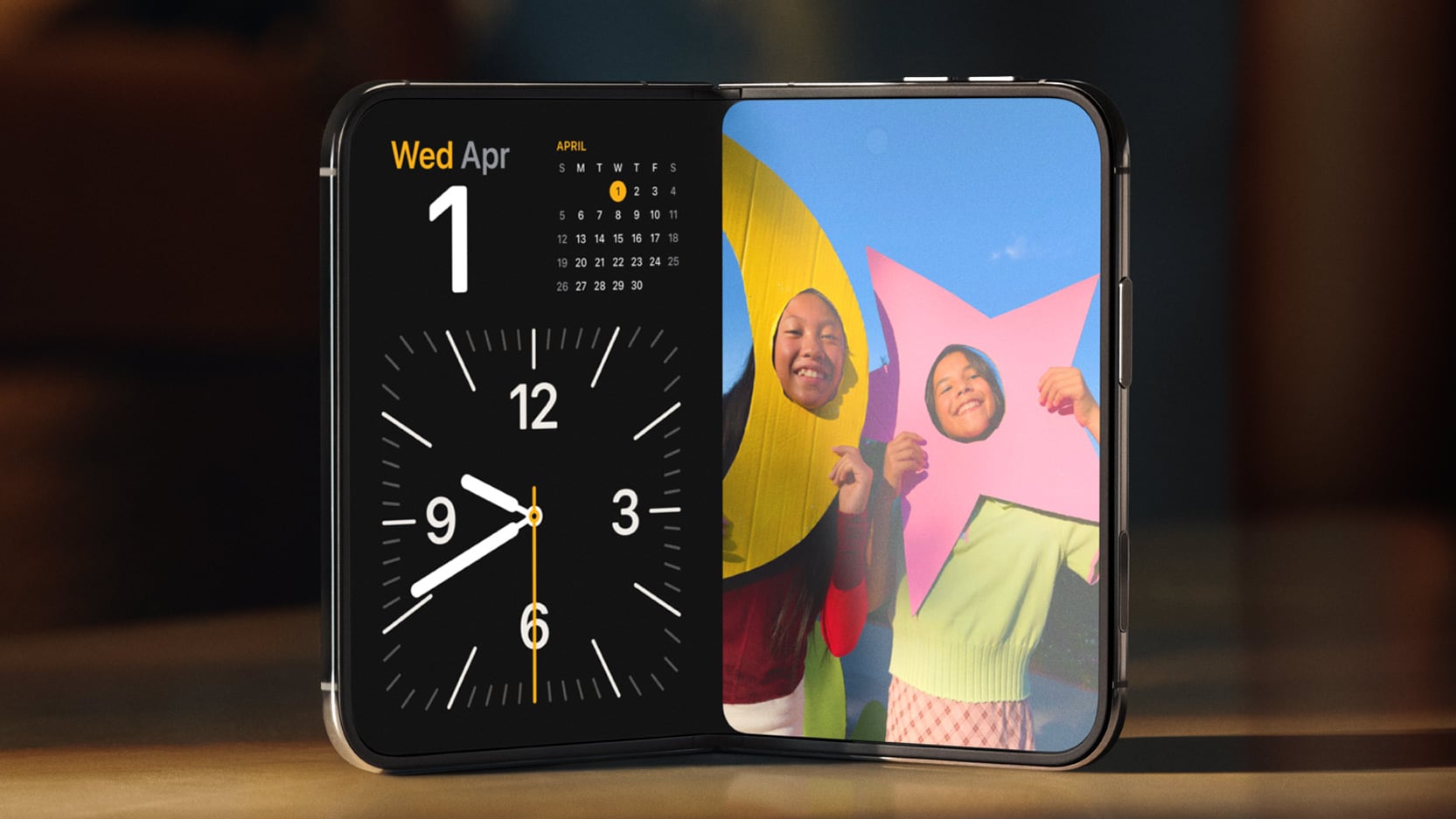
StandBy works even when the ‌iPhone Duo‌ isn't charging. You just need to fold the Duo in half in a tent orientation and you'll see widgets, music, calendar, weather, and more. It works as a bedside clock too, and there's even a new glow alarm clock feature.

There are only two cameras in the ‌iPhone Duo‌. It has a 48MP Fusion Main camera and a 48MP Ultra Wide camera, but no Telephoto camera. There is 2x zoom, but that's just a cropped-in view from the Main camera. The outer display front camera is 12MP.

You can do some unique things with the ‌iPhone Duo‌'s camera setup. Apple added 4K Dolby Vision time lapses, a feature that works well with the ‌iPhone Duo‌ since it can prop itself up for longer shots. A Smart Take option uses AI to capture a shot when everyone is in frame, so you can set it up, run over to get in a group photo, and have the iPhone automatically take a picture. The outer display can show Peanuts animations to get children to smile (Kid Cue), and when you're taking a photo of someone, they can see themselves on the outer display and give you feedback on the shot setup (Duo Preview). FaceTime can also use both displays and someone can join a ‌FaceTime‌ call with you using the outer display camera, so you don't have to crowd together in one camera (‌FaceTime‌ Duo).

The ‌iPhone Duo‌ has the same A20 Pro chip as the ‌iPhone 18 Pro‌, and Apple's new C2 modem that's faster and more efficient than the C1X. The C2 supports mmWave 5G speeds in the United States.

The $1,999 starting price is for 256GB storage. You can get up to 2TB, but that option will cost you $3,199. ‌iPhone Duo‌ pre-orders start on Friday, October 16, with a launch to follow on October 23.
Related Roundup: iPhone Duo

This article, "Hands-On With the iPhone Duo: The Crease is Still There, But Barely" first appeared on MacRumors.com

Discuss this article in our forums
  •  

Everything Apple Announced at the September 2026 Event

Apple's "Surprise and Shine" event took place today, and the company introduced the iPhone 18 Pro and Pro Max, the new foldable iPhone Duo, new Apple Watch models, and AirPods 5. It took Apple over an hour to announce everything, but we have an 11-minute recap for those who want a quick but detailed overview of everything.


Our full event coverage is below with more information on all of today's announcements.

iPhone Duo


iPhone 18 Pro and Pro Max


Apple Watch Series 12 and Ultra 4


AirPods 5


Software


Other News


The Apple Watch Series 12, Apple Watch Ultra 4, and AirPods 5 are available for pre-order today. Pre-orders for the ‌iPhone 18 Pro‌ and ‌iPhone 18 Pro‌ Max will begin on Saturday, September 12 at 5:00 a.m. Pacific Time. The new devices will launch on September 18.

Pre-orders for the ‌iPhone Duo‌ will start on October 16, with a launch to follow on October 23.
This article, "Everything Apple Announced at the September 2026 Event" first appeared on MacRumors.com

Discuss this article in our forums
  •  

iPhone Duo is Dust-Tight With IP68 Rating, Unlike Samsung's Galaxy Z Fold8

The iPhone Duo has an IP68 dust and water resistance rating, beating Samsung and tying Google.


Samsung's latest Galaxy Z Fold8 models have an IP48 dust and water resistance rating, which means they aren't able to hold up to dust as well. Google's Pixel 11 Pro Fold also has an IP68 rating.

IP6X for dust means the ‌iPhone Duo‌ is "dust-tight" and no dust is able to get in. The IPX8 rating for water means it is protected from water deeper than 1 meter. Apple says the device can handle a maximum depth of 6 meters for up to 30 minutes. IP68 is the same dust and water resistance rating as other iPhones, and dust matters because it can get into the hinges of foldables and cause damage.

Apple warns that water and dust resistance "are not permanent conditions," and resistance can decrease as a result of normal wear. iFixit will likely do a teardown on the ‌iPhone Duo‌, and we'll see how it holds up to dust.

The ‌iPhone Duo‌ has other durability features, including a titanium frame, titanium hinge cover, and 10-layer display.
Related Roundup: iPhone Duo

This article, "iPhone Duo is Dust-Tight With IP68 Rating, Unlike Samsung's Galaxy Z Fold8" first appeared on MacRumors.com

Discuss this article in our forums
  •  

iOS 27's 'iPhone Handoff' Feature Limited to T-Mobile and Deutsche Telekom at Launch

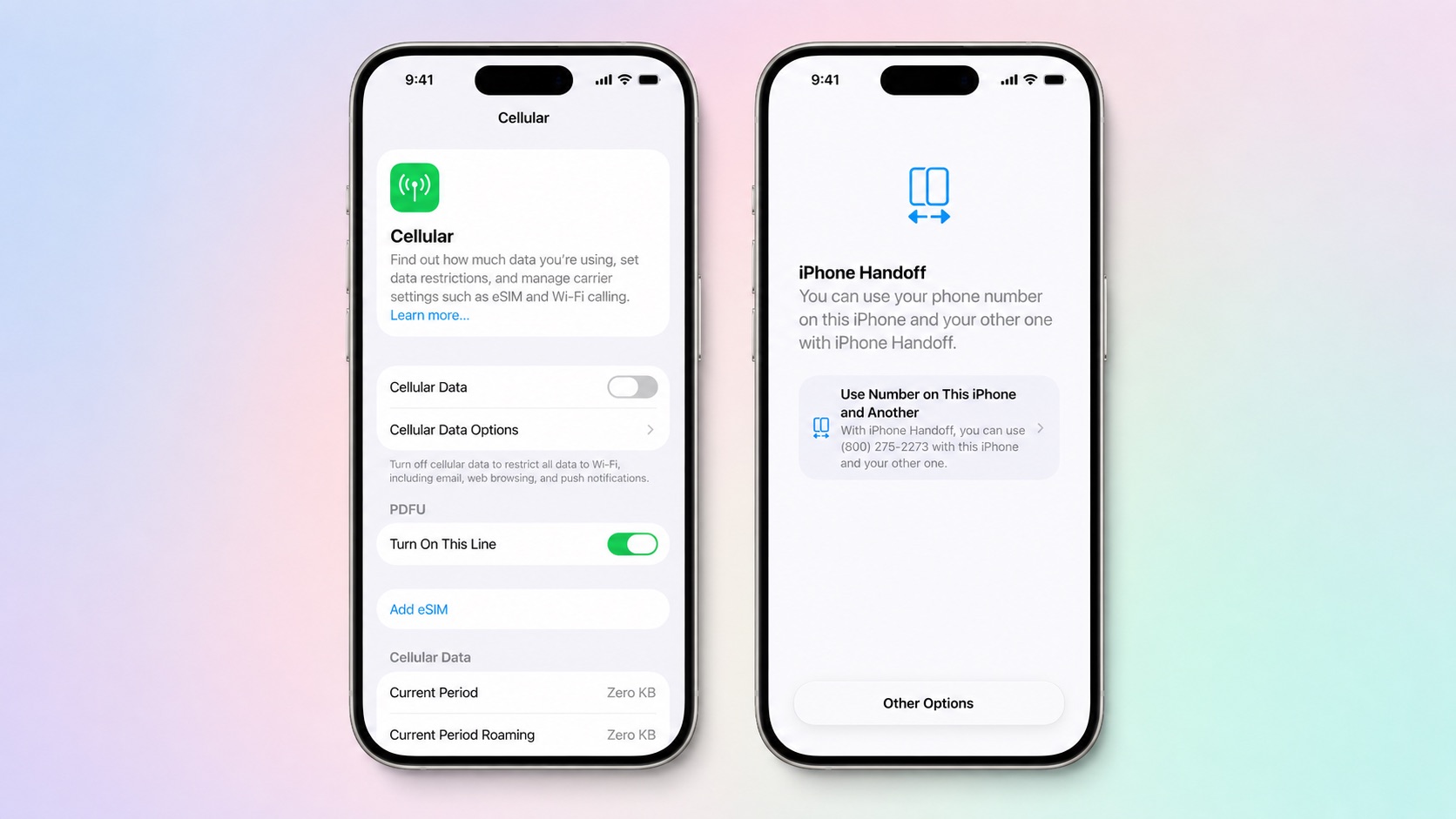
Apple is adding a new iPhone Handoff feature in iOS 27 that will let you use the same number on two iPhones and swap between them as needed. iPhone Handoff requires carrier support, and Apple says there may be carrier fees when setting it up.


The new iPhone Handoff option was mentioned at today's event and in the iPhone Duo press release, and it turns out it's going to be limited at launch. Apple says it will only be available on T-Mobile in the U.S. and Deutsche Telekom in Germany when ‌iOS 27‌ comes out.

To use iPhone Handoff, you need two iPhones running ‌iOS 27‌ or later that are connected to Wi-Fi and signed into the same Apple account with FaceTime, iMessage, and Messages in iCloud turned on.

iPhone Handoff can be enabled during new iPhone setup, or in the Settings app. When you set up a new iPhone, you can make your current iPhone your secondary iPhone.

With iPhone Handoff enabled, one iPhone is the main iPhone and the other iPhone is the secondary iPhone that shares the same number. Some carrier services like Call Forwarding, Caller ID, and account management can only be managed on the main iPhone. iPhone Handoff also does not swap your Apple Watch from one iPhone to another.

Moving between a main iPhone and secondary iPhone happens automatically when you unlock one of the devices. Apple says your phone number will automatically become active, and you'll see the message "Switched to this iPhone" to confirm.

A phone number can only be active on one iPhone at a time when using iPhone Handoff. Payment cards in the Wallet app and car keys can work across both iPhones, but Apple warns some Wallet items like transit passes, IDs, or corporate badges might only work on one iPhone at a time.

iPhone Handoff works with Dual SIM as long as both eSIMs are from carriers that support iPhone Handoff. Both eSIMs will switch together simultaneously when you unlock your iPhone. Each eSIM has to be set up separately.

Once set up, iPhone Handoff remains activated until you contact your carrier to turn it off. More information can be found in Apple's support document for the feature.

‌iOS 27‌ is set to launch on Monday, September 14. T-Mobile has not announced iPhone Handoff pricing.
Related Roundups: iOS 27, iPadOS 27

This article, "iOS 27's 'iPhone Handoff' Feature Limited to T-Mobile and Deutsche Telekom at Launch" first appeared on MacRumors.com

Discuss this article in our forums
  •  

Apple Explains What's Inside the iPhone Duo's Folding Screen

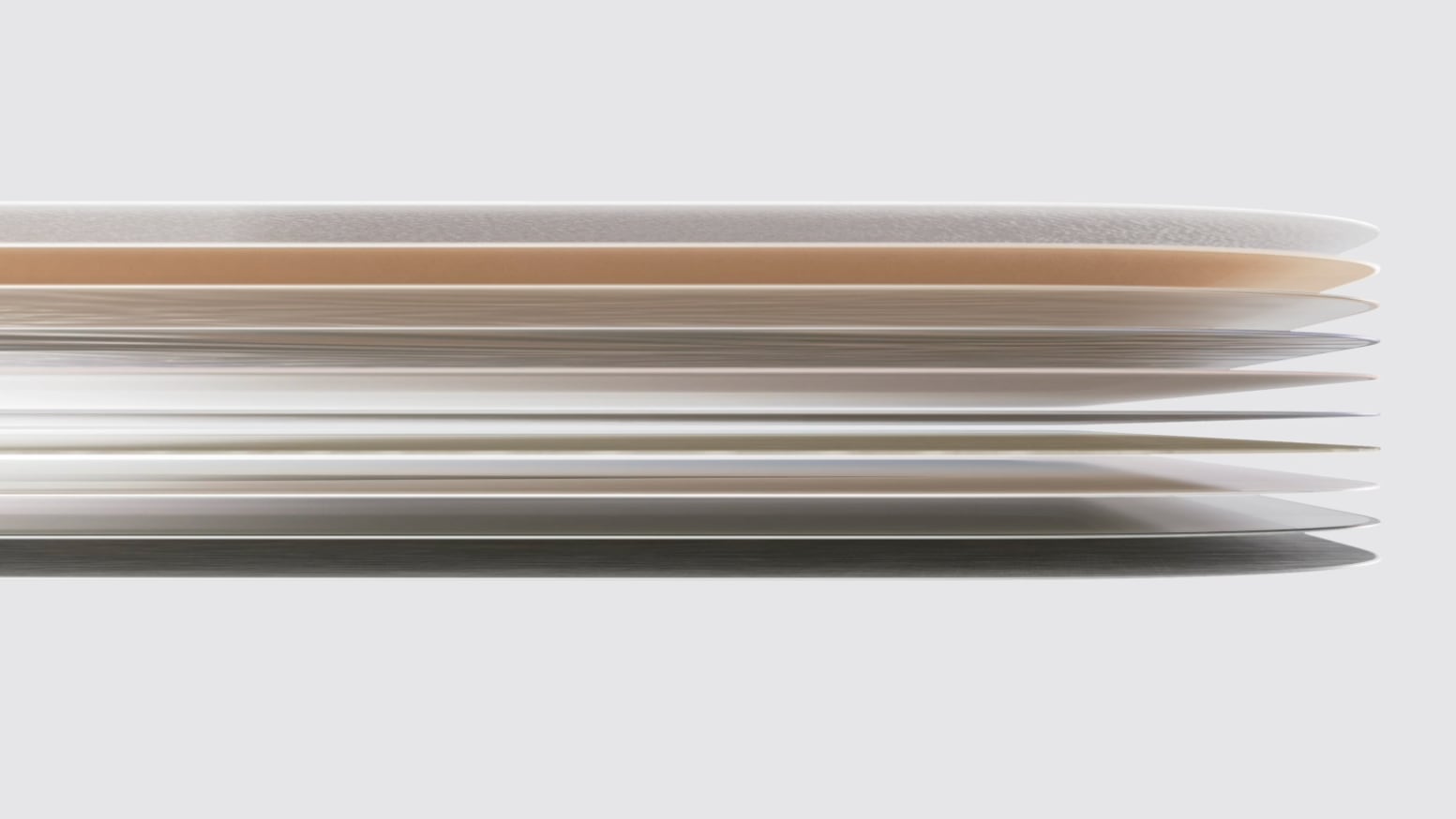
The iPhone Duo's inner display uses a complicated, multi-layer structure that Apple says will hold up to wear and tear.


There are 10 ultrathin layers in total, including a nano-textured cover layer made from a custom polymer that Apple says is up to 40 percent stiffer than "other materials used in the industry," which presumably means other foldable devices.

Apple added high-strength glass above and below the folding display panel, along with a titanium plate at the bottom of the stack. Custom adhesives "allow the layers to glide past one another like the pages of a book, relieving bend stress," according to Apple.

The exterior nano-texture layer's finish is meant to reduce glare and minimize the visibility of the crease, and a scratch-resistant coating covers the nano-texture layer.

The outer display is protected by Ceramic Shield 2 like the iPhone 18 Pro models, while the back of the iPhone has Ceramic Shield. The inner display gets the custom polymer cover instead of Ceramic Shield.

Both of the ‌iPhone Duo‌'s displays support ProMotion, Always-On, and True Tone, and offer 3,000 nits of peak outdoor brightness.
Related Roundup: iPhone Duo

This article, "Apple Explains What's Inside the iPhone Duo's Folding Screen" first appeared on MacRumors.com

Discuss this article in our forums
  •  

iPhone Duo Beats iPhone Air as Apple's Thinnest iPhone, But Only When Open

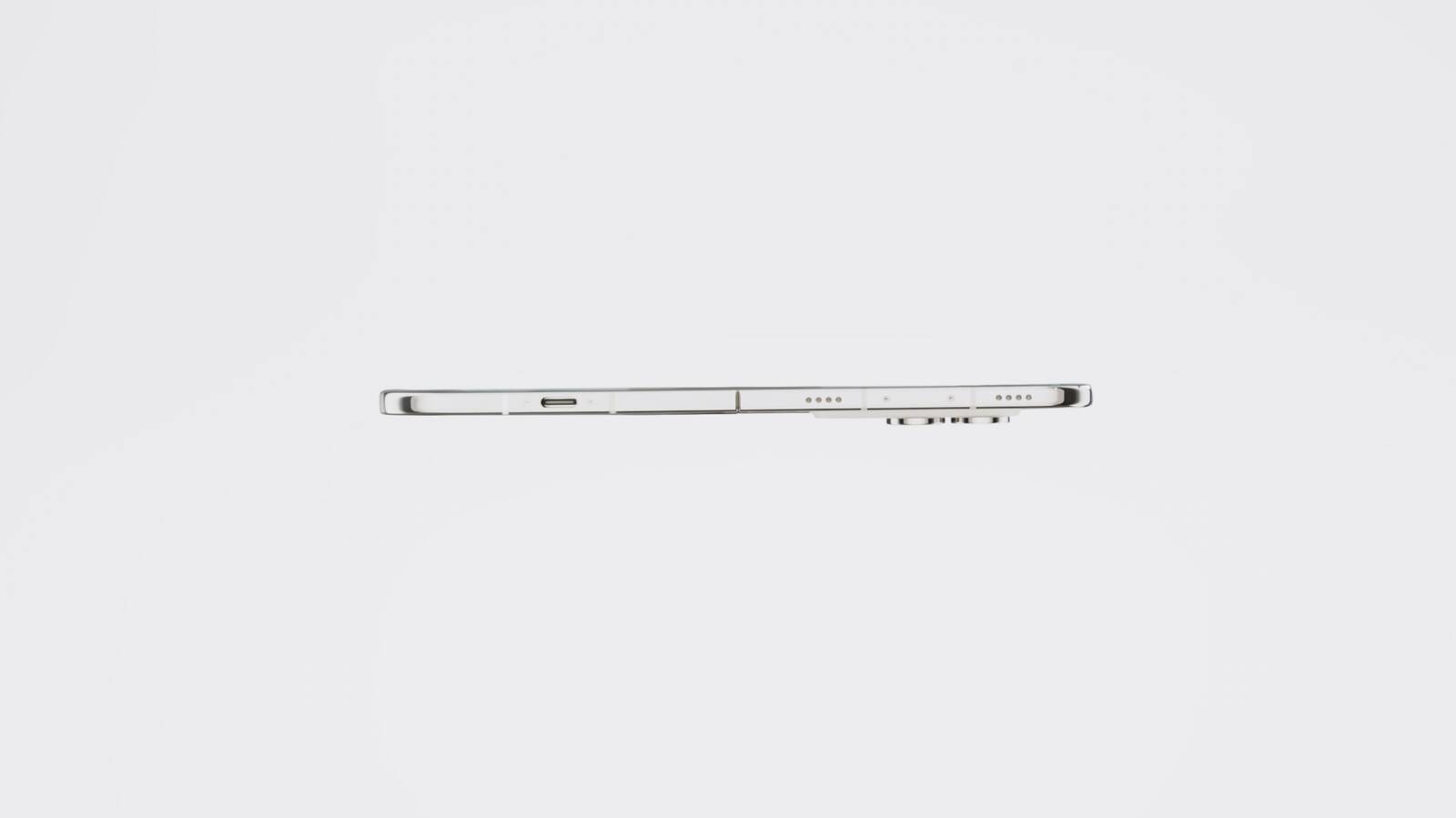
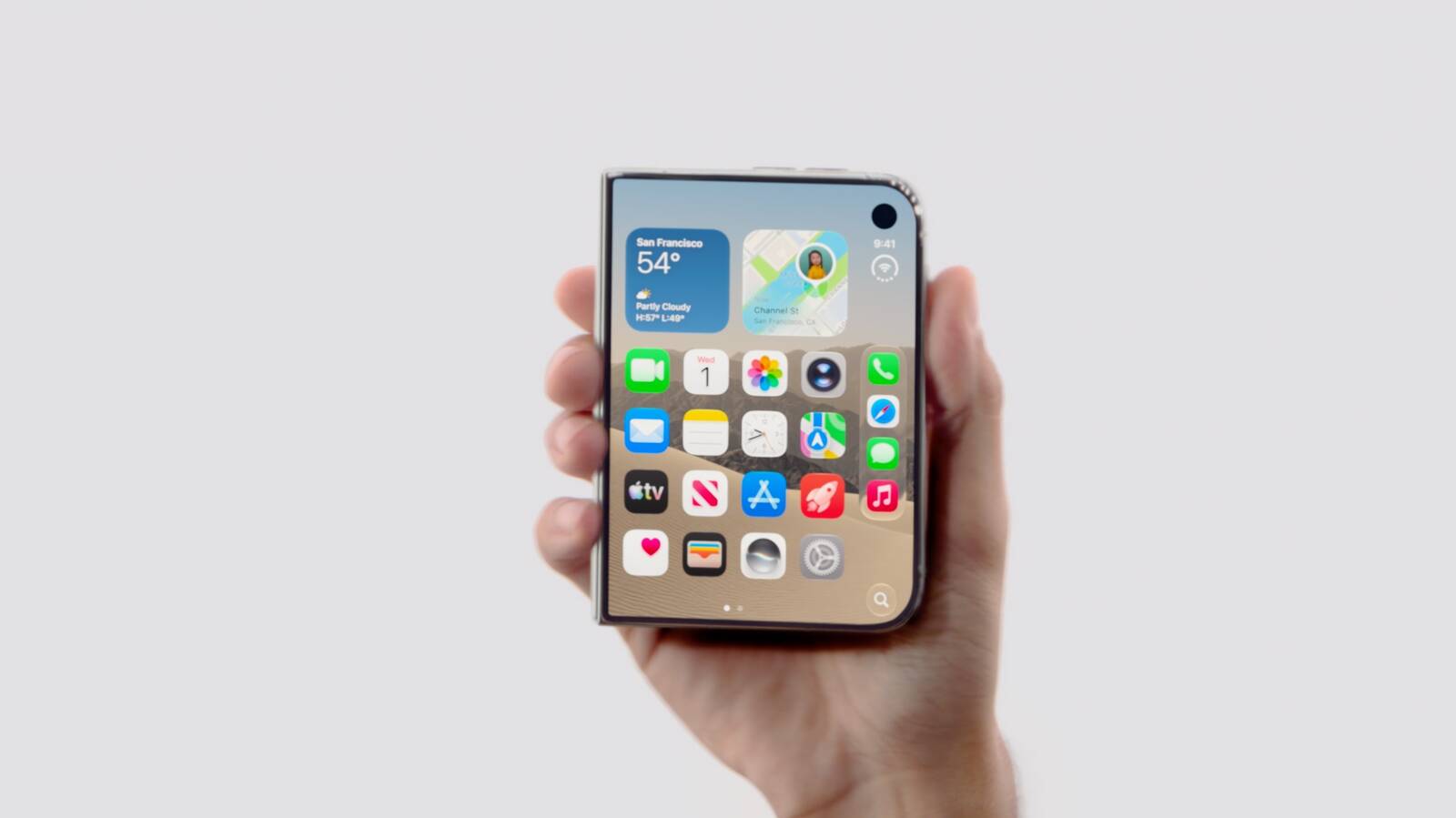
The new foldable iPhone Duo is the "thinnest iPhone ever," according to Apple. When unfolded, the device is 5.2mm thick, making it 0.4mm thinner than the 5.6mm iPhone Air.


Rumors suggested it could be as thin as 4.5mm when unfolded, similar to Samsung's Galaxy Z Fold8, but it didn't end up that thin. At 5.2mm, it's just a little bit thicker than the 5.1mm 13-inch iPad Pro, which is Apple's thinnest device.

When folded, the ‌iPhone Duo‌ is 11.3mm thick. For comparison, the iPhone 17 Pro Max and iPhone 18 Pro Max are both 8.75mm thick.

The ‌iPhone Duo‌ is also Apple's heaviest iPhone to date at 254 grams, which is five grams heavier than the 249-gram ‌iPhone 18 Pro‌ Max. It has a 7.6-inch inner display when it's open and a 5.4-inch outer display when it's closed, and it has a short, wide design.

Pre-orders for the ‌iPhone Duo‌ begin on October 16 ahead of an October 23 launch date.
Related Roundups: iPhone Air, iPhone Duo
Buyer's Guide: iPhone Air (Neutral)

This article, "iPhone Duo Beats iPhone Air as Apple's Thinnest iPhone, But Only When Open" first appeared on MacRumors.com

Discuss this article in our forums
  •  

Here's What Apple Says About the iPhone Duo's Crease

Ahead of the launch of the foldable iPhone Duo, rumors suggested Apple was focused on eliminating the crease between the device's two displays. All foldables have a visible crease, and it often becomes easier to see over time from constant folding and unfolding.


On the ‌iPhone Duo‌ product page, one of Apple's FAQs concerns the crease. "Does the inner display of ‌iPhone Duo‌ show a crease where it folds?" reads the question.

Apple's response says the display is "wonderfully flat and smooth," but it doesn't say there's no crease at all and actually skirts the question it asks.
iPhone Duo features a wonderfully flat and smooth inner display with custom nano-texture finish technology to reduce glare and reflections for an uninterrupted viewing experience. The optically clear adhesives let the display layers glide as the screen folds, minimizing stress and crease.

In the press release for the device, Apple says that the Duo's nano-texture display is meant to minimize the visibility of the crease.
A premium nano-texture finish reduces glare and reflections, creating a matte surface that minimizes crease visibility and feels great to touch.

Apple does not list a fold cycle count anywhere in its press release or on its website, but it does say the hinge offers "smooth, balanced resistance for long-lasting reliability." Apple also says the hinge has more than 100 components, while the ‌iPhone Duo‌ has support ribs and a titanium panel under the display.

Apple competitor Samsung does list fold cycles for its foldable devices. The new Galaxy Z Fold8, which has the same general shape as the ‌iPhone Duo‌, is rated for 500,000 folds.

The ‌iPhone Duo‌ is set to launch on October 23, with pre-orders starting on October 16.
Related Roundup: iPhone Duo

This article, "Here's What Apple Says About the iPhone Duo's Crease" first appeared on MacRumors.com

Discuss this article in our forums
  •  

iPhone Duo Will Ship With iOS 27.1, Hinting at Update's Release Date

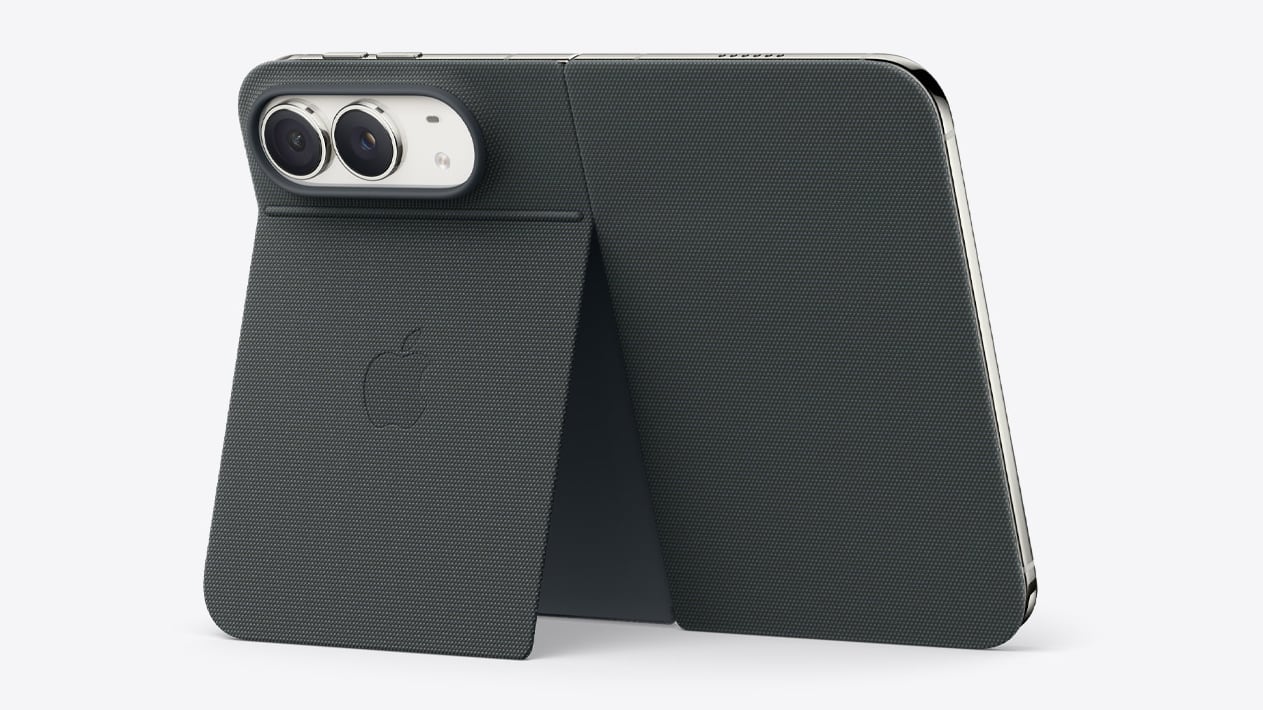
Apple says the iPhone Duo will ship with iOS 27.1 when it launches this October, which gives us a hint at when the first major iOS 27 update will come out.


The ‌iPhone Duo‌ will be available on October 23, so iOS 27.1 should be released shortly before that date. Last year, iOS 26.1 didn't come out until November 3, but we're expecting iOS 27.1 about two weeks earlier.

iOS 27.1 will include updated app layouts built for the ‌iPhone Duo‌'s dual displays and its new vertical dock.

The iPhone 18 Pro models will ship with ‌iOS 27‌ and are set to launch on September 18, so the ‌iPhone Duo‌ is coming just over a month later. ‌iOS 27‌ will launch on September 14.

Apple will accept pre-orders for the ‌iPhone Duo‌ on October 16, a week ahead of the October 23 launch.
Related Roundups: iOS 27, iPadOS 27, iPhone Duo

This article, "iPhone Duo Will Ship With iOS 27.1, Hinting at Update's Release Date" first appeared on MacRumors.com

Discuss this article in our forums

  •  

iPhone Duo Only Works With the $79 USB-C Apple Pencil, Not the Apple Pencil Pro

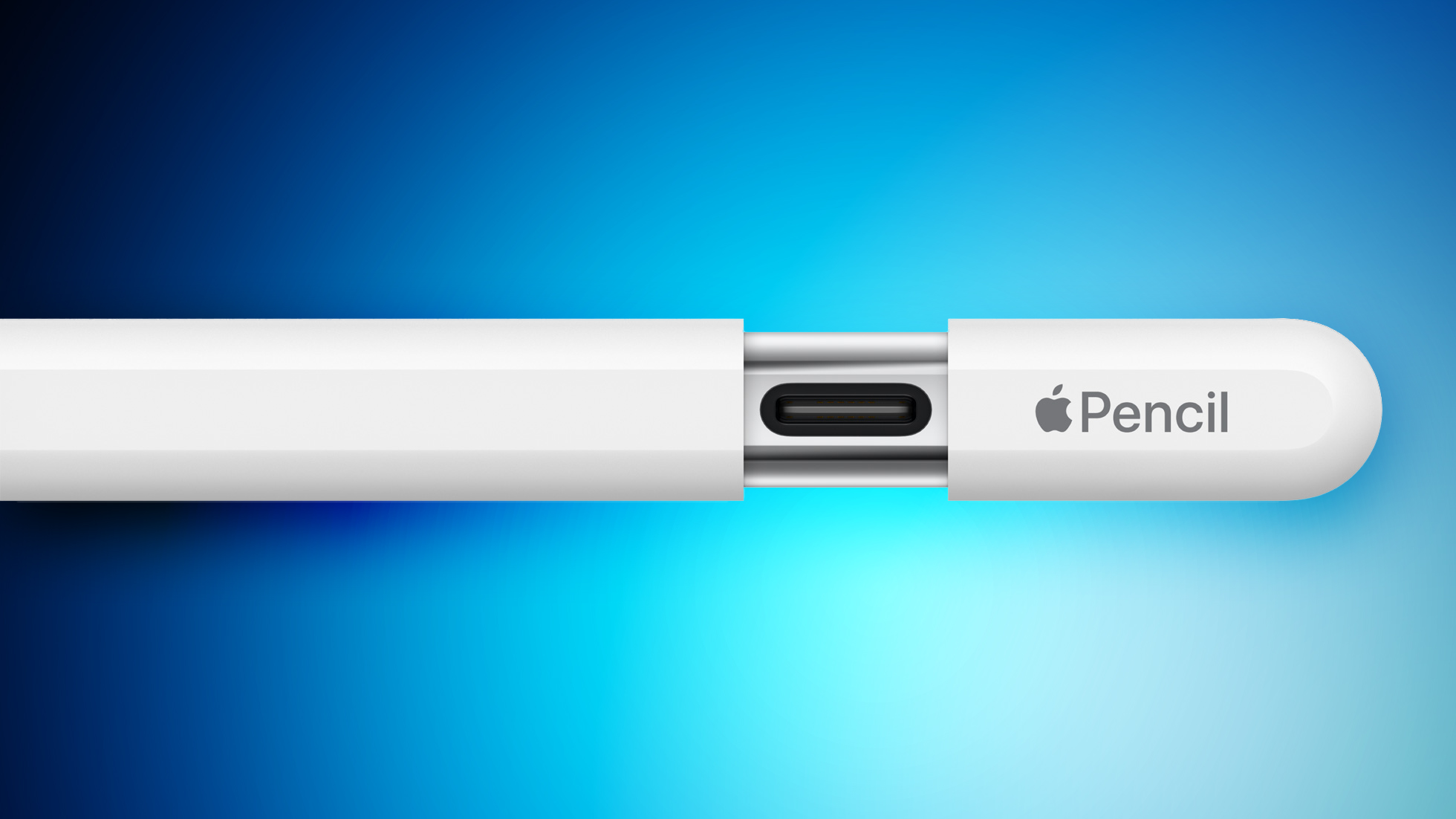
The iPhone Duo will work with the Apple Pencil, but support is limited. Apple says that you need the ‌Apple Pencil‌ with USB-C for the ‌iPhone Duo‌, so if you have the ‌Apple Pencil‌ Pro, you may be out of luck.


It's likely the ‌iPhone Duo‌ doesn't support the ‌Apple Pencil‌ Pro because there's no magnetic surface for charging the pencil. The ‌Apple Pencil‌ Pro charges magnetically when connected to a compatible iPad, while the ‌Apple Pencil‌ with USB-C charges with a USB-C port hidden behind a sliding cap.

The ‌Apple Pencil‌ with USB-C does not support pressure sensitivity, double-tap, barrel roll, haptic feedback, squeeze, or Find My, but it does have tilt sensitivity. Apple charges $79 for the ‌Apple Pencil‌ with USB-C and $129 for the ‌Apple Pencil‌ Pro.

Apple says that an ‌Apple Pencil‌ will work with both the inner and outer ‌iPhone Duo‌ displays. It's the first iPhone that works with ‌Apple Pencil‌.

‌Apple Pencil‌ support won't be available right when the ‌iPhone Duo‌ launches, and Apple says it's coming later this year.

The ‌iPhone Duo‌ will launch on October 23, with pre-orders beginning on October 16.
Related Roundup: iPhone Duo
Related Forum: iPad Accessories

This article, "iPhone Duo Only Works With the $79 USB-C Apple Pencil, Not the Apple Pencil Pro" first appeared on MacRumors.com

Discuss this article in our forums

  •  

iPhone Duo Doesn't Have an Action Button

The iPhone Duo does not include an Action Button, according to the device's technical specifications page. The page's diagram highlights volume up/down buttons at the top, Camera Control and side buttons on the right side, a USB-C port at the bottom, and microphones and speakers at the top and bottom.


On the iPhone 18 Pro models and earlier, the Action Button is located on the left side of the iPhone right above the volume up/down buttons.

The Action Button is a customizable button that can be assigned one of several actions. It can do things like activate Silent mode (the default), set a Focus, turn on the Flashlight, record a Voice Memo, activate Visual Intelligence, or run a Shortcut.

Apple introduced the Action Button with the iPhone 15 Pro, and all iPhones released since then have included the feature. The ‌iPhone Duo‌ is the first iPhone that has no option for a physical mute toggle. Silent mode will need to be turned on via Control Center.

The side button on the ‌iPhone Duo‌ includes Touch ID for unlocking the device, because it does not support Face ID. There's also a separate Camera Control button for launching the camera and capturing photos.
Related Roundup: iPhone Duo

This article, "iPhone Duo Doesn't Have an Action Button" first appeared on MacRumors.com

Discuss this article in our forums

  •  
❌