Apple just announced the MacBook Neo, a 13-inch laptop offering the full macOS experience for just $599. It is the machine, I’m sure, plenty of the company’s fans have been clamoring for since the dawn of the netbook. I’m equally sure its specs have enough drawbacks to ensure there are still plenty of customers for the more expensive Macbooks; the same cannot be said of the iPad Air.
If you’re looking for a machine that you can actually use meaningfully, the Neo has the Air beat. It has two USB-C ports, 16-hour battery life, a real keyboard, trackpad and the ability to run macOS with proper multitasking. $599 won’t even get you an iPad Air with a keyboard and trackpad, which costs you an extra $270.
Of course, the MacBook Neo is sandbagged in all of the ways Apple will always sandbag a cheaper product. But I do think the company has been smart enough to ensure the base model, which I’m sure will sell a crazy amount, is enough of a computer to matter. The A18 Pro chip will run a lot slower than Apple’s M-Series silicon but raw performance isn’t the big issue. After all, if you're buying this machine as Apple's version of a Chromebook, you’re not going to be compressing 55GB Final Cut Pro files here. This is a machine for light work, the sort of stuff the iPad was always meant to enable, but has never quite been able to.
Apple knows how its A-series chip stack up against low-end laptop CPUs. Given the differences in OS, it’s impossible to make a real comparison yet, but in synthetic benchmarks the A18 Pro outperformed the Intel Core i3-1315U found in plenty of low-end laptops, including the Framework 12. And the A18 Pro only needs 8W to run, compared to the 15W Intel requires, which helps maintain that lovely long battery life. Even with just 8GB RAM, if it can run macOS and its applications at an acceptable level, then you know it’ll go down beautifully with its intended audience.
As an aside, it’s worth saying the Neo’s intended audience is decidedly not the sort of folks who will quibble about the limited USB bandwidth the machine offers. As Devindra Hardawar said last week, the target market for this machine is the same people who bought Walmart’s MacBook Air M1. He also made the point — rightly — that macOS remains unburdened with all of the awful AI features which are making Windows use an increasingly less enjoyable experience. Even so, if you are quibbling about such specs, it’s not as if the iPad Air, with its one USB-C port, offers a meaningful improvement.
I've always hoped and wished the iPad would mature enough to bridge the gap between the tablet and the laptop, but it never did. What Apple did to solve the issue in the end was to just make a laptop as affordable as a tablet.
This article originally appeared on Engadget at https://www.engadget.com/computing/laptops/well-there-goes-any-reason-to-buy-an-ipad-air-165754581.html?src=rss
We’re at the start of another one of those weeks where Apple announces one or two of its lesser products each day. The first pair to break cover is the iPhone 17e and iPad Air M4, with more due to drop as the calendar rolls forward. The iPhone 17e is by far the more interesting gadget, especially as the price remained the same as for the iPhone 16e. Apple is charging $599 for the 17e, even though the base model storage has doubled to a very welcome 256GB.
The 17e also gains several features that were held back from the equivalent budget handset last year. The most notable is perhaps the addition of MagSafe at Qi2 speeds, enabling users to wirelessly charge their device at 15W. Keen-eyed spec-list nerds will also spot Apple’s C1X proprietary wireless chip, which offers comparable speed to the Qualcomm models it will eventually replace, but with far better power efficiency.
The iPad Air, by comparison, is the very model of a modern major iterative spec revision to keep it up to date. The M3 has been upgraded to an M4, and it’ll get the same home grown wireless chips (N1 and C1X), blessing it with Wi-Fi 7 compatibility. Apple is also adding some more RAM to the iPad Air, boosting it from 8GB to 12GB, but without adding any more digits to the price.
As someone who’s still clinging on to an iPhone 14, the generous storage and low cost of the iPhone 17e is intriguing. And it’s a far more attractive package than whatever Apple was trying to offer with the iPhone Air.
Lenovo rocked up to MWC to show off a concept laptop with hot-swappable components, letting users push around their keyboard and displays at will. The company says you can set up the hardware on your desk to suit your needs at any given time. So, if you need a standard laptop, you can do that, or you can put a second display where your keyboard should go and use your keyboard wirelessly. Sadly, it’s a concept, so while you can purr at Lenovo’s engineering prowess you can’t hand it any of your cash to properly own this thing.
Honor made its usual full-court press at MWC, but the star of its own show was the Robot Phone, due to launch later this year. It’s a smartphone with its own articulating camera gimbal which can move around in response to its user’s commands. The Morning After’s own Mat Smith says it’s able to shake and nod its, uh, “head,” and can even dance along to music. And that’s before you get to its real function to, you know, take photos and stuff.
The combined ParaSkyWarDisco would serve 200 million subscribers.
Paramount Sky CEO David Ellison has outlined his vision for his latest toy, Warner Brothers Discovery. He told investors both companies would merge their streaming services, giving it a global audience of around 200 million subscribers. Ellison also pledged to give HBO operational independence, hopefully meaning it won’t be staffed entirely by patronage appointees.
MWC is such a big show it would be impossible to cover everything we’ve reported on in a single newsletter. But, thankfully, we’ve built a roundup of the most important things for you to peruse, especially all of the biggest phones that you aren’t as likely to see on store shelves in the US.
Honor launched the Magic V5 in August 2025 and yet its successor is being announced just seven months later. Speak to Honor’s representatives, and you can imply that it’s racing to push the envelope against both its real competition (Samsung) and its anticipated one (Apple). With so little time between launches, you’ll be unsurprised to learn that little has changed. The only other real reason this device has been pushed out so swiftly is because it’ll help Honor retain the title of making the world’s thinnest foldable. I’ll leave you to decide if you think that’s a valid enough reason to release a whole new smartphone so soon.
Last year, just one of the four Magic V5 colorways measured in at 8.8mm folded and 4.1mm open while the rest clocked in at 9mm and 4.2mm respectively. This year Honor is marking its own homework with a similarly generous spirit, with the white version of the Magic V6 measuring 8.75mm folded and 4.0mm open. The black, gold and red colorways will have to settle for the indignity of measuring 9mm folded and 4.1mm open. Now, I appreciate the engineering savvy necessary to make a device this slim, but this push for more thinness needs to stop. Last year’s Magic V5 crossed the millimeters-wide rubicon from slender to dainty, to the point where, while holding it, I was worried about how durable it was. After all, foldables are regularly put through mechanical stresses that regular phones never have to deal with in normal duty.
Honor says the phone is well built to withstand the rigors of normal life, including a scratch-resistant display cover. The screen is impact-resistant, there’s a far stronger hinge and it’s rated for IP68 and IP69 dust and water resistance. Claims that, I’m sure, will be tested to its limits by sceptical reviewers when the device goes on sale. The company has also been scraping away at the V6’s weight, with the white model weighing in at 219 grams, while the other three colorways are 224 grams. That’s lighter than an iPhone 17 Pro Max (233 grams), and you can bet Honor mentioned that fact in its briefings to the press more than once.
Honor has also seen fit to make some massive design changes to the inside of the V6 to help shrink many of its components. This redesigned internal structure includes a new antenna, speaker chamber, vibration motor, NFC module, SIM card slot and USB-C housing. All of the space vacated by those components has been filled by a new 6,660mAh battery with 25 percent silicon content. Honor says you should expect to be able to play a video on the primary display for 24 hours with that beefy battery.
It’s worth noting only the international version is equipped with this 6,660mAh cell, while the China-only variant gets an even better model. Honor said its domestic edition will have a CATL-manufactured battery with 32 percent silicon content and a rated capacity of more than 7,000mAh.
Honor
“And when Alexander saw the breadth of his domain he wept, seeing as he had no more worlds to conquer.” The quote comes from Die Hard — although it’s an urban myth that film coined the phrase entirely — but the sentiment applies to much of the rest of this handset. The rest of the spec sheet is more or less the same as found on the Magic V5, which itself was a modest revision of its predecessor. Essentially, there aren’t too many more worlds to conquer even at the highest end of smartphone components, so grab your weepin’ tissues.
Dab at the corners of your eyes when you see the cameras are more or less identical both in the main setup and for selfies. There are two 50-megapixel lenses paired with a 64-megapixel telephoto, and up front on both the cover and internal display, there’s a 20-megapixel f/2.2 selfie lens.
You’ll find similarly-meager fare in the list of changes made to the displays, since the primary screen remains the same size and resolution as before. The bezels on the cover screen have been trimmed, so it now measures in at 6.52-inches, up from the 6.43-inch on the V5. But in most of the other ways in which it matters, you’ll find that here it’s business as usual.
The V5 shipped with a Snapdragon 8 Elite, 16GB RAM and 512GB storage, and that was plenty fast enough. The V6 can boast that it’s the first foldable to ship with a Snapdragon 8 Elite Gen 5 (paired with 16GB RAM and 512GB storage). While it is an upgrade on the older SoC, it’s not transformative. Let’s be honest, it’s hard not to see Honor’s desire to shuffle a new handset out the door with some marketing claims comes at the cost of any meaningful substance.
On the software side, it’s business as usual, although one thing caught my eye enough to be worth comment. At several points during Honor’s briefing, the company went hard on the idea that its devices play wonderfully well with Apple’s. If you install Honor Connect onto your iPhone and Mac, you’ll be able to share files, extend your desktop and even control your AirPods. This was something the company has been pushing for a while now, but it surprised me how much it was brought up here.
On one hand, it makes sense that any would-be Apple challenger would offer a friendly way in for iPhone diehards. Tell them that your Android handset will integrate with your existing devices and then hope to show them what you’ve got to offer. On the other, if you’re so eager to tag your gear onto another company’s ecosystem, it doesn’t suggest a lot of confidence in your own. Especially when you’re marketing your pricey, ultra-premium flagship foldable as “an ideal macOS companion” in your own marketing materials. Still, being able to use the V6 as an extended display for your Mac is a cool idea, no matter the broader narrative.
At first blush, Honor’s Magic V6 looks like a phone that exists to satisfy a marketing demand rather than out of necessity. (I’m sure someone will point out that’s the case for a lot of new phones these days, but I’m sure you take my meaning.) To stay ahead of its rivals, it’s nipped and tucked every corner of this phone to within an inch of its life, and the end result is more or less the same handset we saw less than a year ago. That’s not to say it’s a bad phone, the V5 was a lovely piece of kit, but I can’t help but wonder if holding this device back until Honor had more meaningful improvements wouldn’t have been better.
At the time of publication, Honor hasn’t shared pricing and availability information, which we will update here when it’s announced.
This article originally appeared on Engadget at https://www.engadget.com/mobile/smartphones/honors-magic-v6-doesnt-have-a-new-rabbit-to-pull-out-of-its-hat-130048729.html?src=rss
If there’s one thing that stops people using their smart rings over the long term, it’s the battery life. After all, they’re so unobtrusive, it’s easy to forget to drop it on the charging plate every few days. It doesn’t take long for your pricey gadget to become little more than a very expensive piece of jewelry. It’s one of many maladies Ultrahuman is looking to address with the advent of its new Pro, a smart ring boasting up to 15 days of battery life. It even ships with a fancy battery case, which itself includes enough power to last it 45 days, making it easier to keep re-charged on the go.
Ultrahuman Ring Pro hasn’t just got a far bigger battery, it’s been re-engineered from the ground up. The company’s Bhuvan Srinivasan explained the older hardware had been pushed to its limit, especially in terms of the data it could process. Consequently, the Pro is equipped with a dual core processor with on-device machine learning to better crunch the numbers your body is throwing out. Its memory has also been increased, holding up to 250 days of data before it needs to sync with your smartphone. As well as improvements to durability, the new ring is also easier to cut apart in the hopefully rare event your finger, or its battery, begins to swell.
Ultrahuman
I’ll admit, having seen a prototype Pro Charger in person back in January, that it’s the prettiest way to re-juice a smart ring I’ve ever seen. Whereas Samsung and Oura have both opted for discreet, ring box-style hardware, Ultrahuman made something designed to sit on your nightstand. It’s not taking up space just for show, either, since it includes the aforementioned battery, LED charge indicator, speaker and haptics. It’s also got the ability to diagnose and address firmware issues to eliminate worries around firmware issues bricking devices.
Ultrahuman
At the same time, Ultrahuman is pulling the covers off Jade, its new “real time biointelligence AI.” The company promises Jade will be able to “pull real-time actionable insights, and even start breathwork or trigger Afib detection.” Jade is expected to get new features over time, with some examples being ordering good, changing your room temperature or flagging potential health issues. The idea is that Jade will keep a constant eye on your health, pulling in data from the ring, M1 continuous glucose monitor and environmental stats from your Ultrahuman Home.
Naturally, we’ll be getting in the Pro to test and will give our opinions on how effective all of this is when we’ve spent a month or two actually using it. But if you’d rather not wait and you’re based outside the US, you can pre-order the Ultrahuman Ring Pro right now, for $479, with shipments beginning in March. If you already have an Ultrahuman Ring, you can also get a trade-in deal to help cut the cost of the new model.
This article originally appeared on Engadget at https://www.engadget.com/wearables/ultrahumans-new-pro-ring-comes-with-15-days-battery-life-120038820.html?src=rss
If your Wi-Fi struggles to reach every corner of your house, it’s probably not your internet plan that’s the problem. A single router can only do so much, especially in larger spaces or homes with thick walls. That’s where the best mesh Wi-Fi system comes in, replacing one overworked router with a Wi-Fi mesh network designed to deliver high-speed coverage across your entire home.
A whole home mesh Wi-Fi setup uses multiple nodes that act as shared access points, spreading your connection more evenly and reducing slowdowns as you move from room to room. Compared to basic range extenders, mesh systems handle traffic more intelligently, balance bandwidth between devices and usually offer easy setup through companion apps. Many support dual-band Wi-Fi and newer standards, making them better suited for households full of phones, laptops, TVs and smart home devices.
We’ve tested today’s leading mesh systems to see which ones actually deliver consistent speeds and reliable coverage. Whether you’re trying to eliminate dead zones in a small apartment or blanket a large, multi-floor house with fast, stable Wi-Fi, these are the mesh systems worth considering.
Best mesh Wi-Fi systems for 2026
What to look for in a mesh Wi-Fi system
Linksys’ CEO Jonathan Bettino told Engadget why mesh systems are an “advancement in Wi-Fi technology” over buying a single point router. With one transmitter, the signal can degrade the further away from the router you go, or the local environment isn’t ideal. “You can have a small [home], but there’s thick walls [...] or things in the way that just interfere with your wireless signal,” he said.
Historically, the solution to a home’s Wi-Fi dead zone was to buy Wi-Fi range extenders but Bettino said the hardware has both a “terrible user experience” and one of the highest return rates of any consumer electronics product. Mesh Wi-Fi, by comparison, offers “multiple nodes that can be placed anywhere in your home,” says Bettino, each acting as an access point that works together as part of a whole home mesh Wi-Fi system.
Rather than having one main router in your home, having a “router in every room” is the biggest selling point for mesh Wi-Fi given how reliant we all are on the internet. Each node is in constant contact with each other, broadcasting a single, seamless network to all of your connected devices. There’s no separate network for the 2.4GHz and 5GHz bands, just a single name that you connect to.
It’s a good time to buy a mesh Wi-Fi system since the latest standard, Wi-Fi 6E, represents a big leap in the technology. Matt MacPherson, Cisco's Chief Technology Officer for Wireless, said Wi-Fi 6E is a big “inflection point,” using much more of the wireless spectrum than its predecessors. “If you’re using that spectrum with a Wi-Fi 6 [device],” he said, “you’re going to get significant gains [in speed.]”
MacPherson added Wi-Fi 6E will likely “carry you for a long time” thanks to the fact its “top throughputs now typically exceed what people can actually connect their home to.” In short, with a top theoretical per-stream speed of 1.2 Gbps, Wi-Fi 6E is fast enough to outrun all but the fastest internet service.
What do all these Wi-Fi numbers and letters mean?
I’m sorry folks, we need to get boringly technical for one paragraph, but I promise you it’s worth it.
Wi-Fi is governed by International Standard IEEE 802.11, and every few years a letter gets added onto that name when the technology evolves and improves. Until 2019, routers were sold under their IEEE name, leaving users to pick through the word soup of a product labeled 802.11 b/g/a/n/ac and so on.
Mercifully, wiser heads opted to rebrand the letters as numbers, so rather than 802.11 b/g/a/n/ac, we have Wi-Fi 1, 2, 3 4 and 5. Right now, we’re in the middle of one of those Wi-Fi generations, with most of the gear on sale right now supporting either Wi-Fi 6 or Wi-Fi 6E.
What’s the difference between Wi-Fi 6 and Wi-Fi 6E?
Wi-Fi uses chunks of the radio frequency spectrum, with Wi-Fi 6 using the 2.4GHz and 5GHz bands to pump data around. In fact, back in the old days, it was likely your home router would offer you the choice of the 2.4GHz or the 5GHz network, as separate bands to access. These days, all of the spectrums are tied together as one thing, and Wi-Fi 6E has the added ability to use the 6GHz band as well. That’s a big chunk of extra wireless real estate that isn’t as cluttered up as the 2.4 and 5GHz bands.
You’re going to talk about wireless frequencies now, aren’t you.
Each Wi-Fi band had tradeoffs, because the slower radio frequencies have greater range but less speed. 2.4GHz signals will travel a long way in your home but aren’t quick, while 6GHz is blisteringly fast but can be defeated by a sturdy brick wall. A lot of Wi-Fi-enabled gear you own, like smart home products, only use the 2.4GHz band because the range is better and it’s a lot cheaper. But it means that the band is also overcrowded and slow, making it great for your doorbell and robovac, but lackluster for Twitch streaming.
So, what am I looking for?
Right now, the market is full of mature Wi-Fi 6 and 6E devices, and most new systems available to buy are capable of taking advantage of the faster speeds they offer. This guide focuses on Wi-Fi 6E gear since it’s what we think it’s more than enough to satisfy almost everyone’s at-home Wi-Fi needs.
What about Wi-Fi 7?
We’re now seeing the first generation of Wi-Fi 7 devices available to buy, but we don’t recommend you do so immediately. The Wi-Fi 7 standard is still so new that there’s little to no reason for you to rush out and buy one for your home. The hardware is tremendously expensive and while Wi-Fi 7 will, eventually, offer some great benefits over 6E, it’s not as transformative an upgrade as 6E. Not to mention, Wi-Fi 7 is so new that almost none of your home’s devices will be able to take advantage of its big-ticket features. I’d estimate you won’t need to worry about upgrading to Wi-Fi 7 for at least five years, if not longer.
Range and speed
All Wi-Fi routers boast a theoretical broadcast range and a theoretical top speed, and in some cases external antennas to boost signal directionality — but these figures don’t mean much. After all, manufacturers can’t control your ISP’s real speed, the materials and layout of your home or where you put your Wi-Fi gear. Raw speed isn’t everything, either, and you likely need less peak speed than your provider advertises. What matters more is consistent bandwidth and stable performance throughout your entire home. After all, Netflix needs just 15 Mbps to push a single 4K video stream to your home. As cool as it is to say you’ve got all these hundreds of Mbps, factors like latency and reliability are far more crucial to a happy internet life. And unless you have Gigabit internet that can reach speeds of up to 1 Gbps, you won’t need a mesh router that offers that spec.
Backhaul
Mesh Wi-Fi systems work by connecting every hardware node to a single wireless network, letting them all communicate with each other. Imagine four people in a busy, noisy restaurant all trying to order their dinner from a weary staff member, all at once. Now imagine, while this is going on, that four more people at that same table are also trying to tell a funny anecdote. It’s no surprise that it might take a long time for the right information to reach its intended destination.
To combat this, higher-end mesh routers offer dedicated wireless backhaul, allowing nodes to communicate without eating into the high-speed bandwidth your devices rely on. So rather than everyone talking at once in the same space, the conversations are essentially separated, reducing the invisible clutter in the air. Because there’s less confusing cross-chatter, everything moves faster, offering a significant performance boost to those systems.
Connectivity
These days, even your washing machine can have a wireless connection, but that doesn’t mean you should ignore the joys of wired internet. No matter how fast Wi-Fi is, a hard line will always be faster, and wired connections can significantly improve Wi-Fi mesh network performance when used for backhaul. Plenty of routers can also use these hard connections as backhaul, eliminating further wireless clutter.
It’s convenient for spread-out systems and power users, but it will mean running more wires through your home. The most common standard is Cat 5e, or gigabit ethernet which, unsurprisingly, has a top speed of 1 Gigabit per second (Gbps). Since Ethernet cables are backward compatible, you should be able to easily find one that works with your system. However, to get the most out of your mesh routers, it’s worth investing in an Ethernet cable that meets the standard your router uses — if it’s Cat 5e, use a Cat 5e cable. You can check your router’s specs via the manufacturer’s website to be sure.
Flexibility and scalability
Mesh routers enable you to add (or subtract) modules from your home network to suit your needs. D-Link’s Alan Jones said users should “check how scalable the prospective product is” before you buy. This sense of scale doesn’t just apply to the number of nodes on the network, but how many simultaneous connections it can handle.
It’s also worth looking at ASUS’ AiMesh products, which can combine mesh Wi-Fi gear and its standard “spider” Wi-Fi routers. If you’ve got a tricky part of your home, you can bolt on an ultra-power standalone Wi-Fi router to a compatible mesh.
Placement
Mesh networks replace one big piece of hardware with a series of identical nodes that you scatter around your home, each acting as a shared access point to maintain coverage throughout the entire home. You connect one to your modem (usually over ethernet), and then scatter the rest around the place for the best coverage. A good rule of thumb is to place each node no more than two rooms away from the last one, rather than sticking them at the far ends of your home.
Bear in mind, every physical obstacle between a Wi-Fi node, its siblings and your devices will hurt your overall performance. You should aim to place them, at the very least, at waist height on furniture in open air, without too many obstructions. The reason many mesh Wi-Fi products are designed to look like an inoffensive white doodad is so you don’t feel compelled to hide them behind your TV.
Other mesh Wi-Fi router systems we tested
Amazon Eero Pro 7
Eero built its reputation on easy to use yet powerful mesh systems that offer a lot of good in a relatively small and affordable package. Setup is effortless, the app running things is clean and simple, and you get the added benefit of backwards compatibility with older hardware. Sadly, the issue with every Eero system is that so many basic management features, like parental controls, are paywalled behind the company’s Eero Plus subscription for $100 a year.
Amazon Eero 6E
Eero Pro 6E is an “easy” device, the sort a total novice can set up on their own and thrive with for years on end. There’s little brainwork required to get things set up, and the app has a clean UI with plenty of hand-holding. But, as with the Eero Pro 7, the fact that so many basic management tools are paywalled irks me, especially since you can get plenty of them for free with Google’s rival offering.
Netgear Orbi 960
The Orbi 96T0 (RBKE963) is Netgear’s flagship mesh Wi-Fi product, which the company calls the “world’s most powerful Wi-Fi 6E system.” It’s also one of the most expensive consumer-level kits on the market, setting you back $1,499.99 for a three pack. It's a fantastic piece of gear, but it's worth saying that the subset of people who could, would or should buy it remains far smaller than you might expect. Ultimately, I feel that if you’re paying luxury prices, you should expect a luxury product. There were plenty of times during testing that I went looking for a feature that was either only available via the web client, or behind a paywall. While, yes, much of your cash is going to the superlative hardware, but for this sort of money, the fact you have to pay extra for some table-stakes features is insulting. If you’re looking for a new Wi-Fi system and aren’t prepared to spend almost $1,500, it’s worth considering our other top picks for the best Wi-Fi routers and mesh systems.
How we test Wi-Fi routers
My home covers around 2,200 square feet across three stories with the office on the third floor. It’s relatively long and thin, with the living room at the front of the house, the kitchen at the back and the three bedrooms on the first floor. Its age means there are a lot of solid brick walls, old-school lathe and plaster as well as aluminum foil-backed insulation boards to help with energy efficiency. There are two major Wi-Fi dead zones in the house: The bathroom and the third bedroom behind it, since there’s lots of old and new pipework in the walls and floors.
For mesh routers with two nodes, I place the first in my living room, connected via ethernet to my cable modem with the second on the first floor landing in the (ostensible) center of the house. For three-node sets, the third goes in my kitchen, which I’ve found is the optimal layout to get the bulk of my house covered in Wi-Fi. Fundamentally, my home poses enough challenges that if it succeeds here, it stands a very good chance of succeeding in your place.
Each mesh is judged on ease of setup, Wi-Fi coverage, reliability, speed and any additional features that it advertises. I look at how user-friendly each companion app is from the perspective of a novice rather than an expert given you shouldn’t need to be a network engineer to do this sort of thing. Tests I do include checking for dead zones, moving from room to room to measure consistency of connectivity and streaming multiple videos at once to replicate common usage patterns.
Mesh Wi-Fi system FAQs
This is the section of our mesh Wi-Fi buyer’s guide where we talk about the stuff that most people just glide past. If you’re not familiar with technology, it can be intimidating if people talk about these things as if you’re expected to already know. So here’s a very simple, very basic rundown of some of the stuff you might have missed in very basic terms.
What’s the difference between a Wi-Fi router and a mesh router?
A Wi-Fi router is a box that usually sits close to wherever the internet comes into your home and pumps out information over radio waves. A mesh router, meanwhile, is a set of smaller devices, one of which sits next to your internet connection while the rest are scattered around your home. A single Wi-Fi router is great if your home is small, your needs aren’t too demanding, or if your home doesn’t have many radio-blocking obstructions that mean those signals can’t reach every corner of your home. But, much like standing next to a radio transmitter and then walking away from it in a straight line, after a while, the signal will degrade.
That’s the problem a mesh system is designed to solve, since it will take the signal from your modem and pump to the other mesh devices, known as nodes, in your home. That way, instead of having one big router in one part of your home, you have several small ones that ensure you have good Wi-Fi connectivity all over. It also helps ensure that there’s no risk of dropping your connection as you move around — a mesh router system makes it easy to, for instance, walk from room to room watching Netflix and know you won’t miss a single frame.
What's the difference between a Wi-Fi extender and a mesh system?
Oh boy. Wi-Fi extenders, or repeaters, are small devices designed to push Wi-Fi a little further than your Wi-Fi router can stretch. They’re cheap, compact and often come in the form of little boxes that sit on your plug sockets with the hope of pushing Wi-Fi to a signal-sparse corner of your home. They are, and I can’t put this delicately enough, often a big pile of rubbish and are often not worth your time. Especially since the price of mesh routers has fallen to within most people’s budgets.
What is a wireless backhaul?
As we explained above, mesh Wi-Fi systems work by connecting every hardware node to a single wireless network, letting them all communicate with each other. Imagine four people in a busy, noisy restaurant all trying to order their dinner from a weary staff member, all at once. Now imagine, while this is going on, that four more people at that same table are also trying to tell a funny anecdote. It’s no surprise that it might take a long time for the right information to reach its intended destination.
To combat this, higher-end mesh routers offer dedicated wireless backhaul; a slice of the spectrum for node-to-node communication. So rather than everyone talking at once in the same space, the conversations are essentially separated, reducing the invisible clutter in the air. Because there’s less confusing cross-chatter, everything moves faster, offering a significant performance boost to those systems.
Is it better to hard wire instead of using a mesh Wi-Fi system?
This is a great question that doesn’t have a simple answer.
It is (almost) always preferable to connect devices with a wire, in this case Ethernet, than to use Wi-Fi. The speeds are faster, it’s more reliable and your data is less vulnerable to the slings and arrows of the laws of physics. Hell, I spent about a year trying to work out how to build an iPhone to Ethernet connector back in the bad old days of Wi-Fi.
But your ability to do so depends on your level of DIY skills and / or how much money you want to spend on contractors. Wiring your home for Ethernet if you don’t have the infrastructure already can be a costly and time-consuming process. Particularly if you don’t want ugly wires running along your baseboards and under your carpets or across your hardwood floors.
If you’re building your own home or can do some serious DIY, then hard wiring is a fantastic thing to have. It goes wonderfully hand-in-glove with mesh networks too, since you’ll be able to hook up your nodes to the network for even better speeds.
But if I’m honest, advances in Wi-Fi technology mean I’d only go for hard wiring if I really believed I needed the sort of speed it offers. Unless you’re a Twitch streamer running your own 24/7 content studio, it’s probably overkill.
When we started renovating our 140-year-old home, I had Ethernet installed in the living room, the master and second bedroom and in my office, all at the front of the house. I can’t use it for my mesh since I’d need to put the wiring through the middle of the house. If I ever had the wiring done again, I would do so as I know I’ll instantly see a meaningful improvement in both my connection speed and reliability. But I wouldn’t spend several thousand pounds to have it done just for the sake of it.
This article originally appeared on Engadget at https://www.engadget.com/home/smart-home/best-mesh-wifi-system-130028701.html?src=rss
At every CES I’ve ever been to, there’s been one or two gadgets promising to boost your mental health. In recent years, the number of companies making forays into this space has grown, and will likely continue to do so in the future. Could it be, much like the number of people wearing heart-monitoring wearables today, everyone will be strapping an EEG to their skulls a decade or so down the line? It’s more likely than you think, so it’s worth asking what these devices are good for, what benefit they could bring, and where does the science end and the hype begin.
An Electroencephalogram (EEG) is a clinical tool to monitor the electrical activity of our brains. Put very simply, our minds are constantly moving ions around, and when they reach the scalp, it’s possible to measure those ions. By placing electrodes on the scalp, you can record the changes in voltages pushed out by our brains more or less in real time. These voltages are commonly grouped into categories, which are often described as brain waves. Each one represents a different state of mind: Gamma (hard thinking), Beta (anxious or active), Alpha (relaxed), Theta (creative, or dreaming) and Delta (asleep).
Professor Karl Friston at University College London is one of the world’s most influential neuroscientists and an expert in brain imaging. He explained that these technologies can be used to diagnose issues both in the structure and function of the brain. And while there are many technologies which can look at how our brains work, “we’re a long way away from understanding the brain like we understand the heart.” Broadly speaking, EEGs are a fairly simple tool for looking at how our minds work, but they have one benefit over more complex methods such as fMRI (functional Magnetic Resonance Imaging), since they work in real time.
Consumer-use EEGs are nothing new — in 2011 I tested the Zeo Mobile, a small device which you stuck to your forehead and wore overnight. It monitored how well you slept and sounded an alarm when you were at the top of a sleep cycle, so you woke up pretty easily. It worked well but with one downside: It’s hard to sleep with a hard plastic puck stuck to your forehead.
EEGs are more recently used as part of brain computer interfaces, or for neurofeedback tools to help you calibrate the quality of your meditation. InteraXon, for instance, makes the Muse headbands which will monitor your brain waves, telling you when you shift states. Last year, EEG startup Neurable partnered with Master & Dynamic to launch the MW75S Neuro, a pair of high-end headphones designed to track your focus levels. When your attention starts to wane, the system will alert you, advising you to take a rest with the hope of alleviating burnout.
Neurable
Daniel Cooper for Engadget
At CES this year, Neurable announced a partnership with HP’s gaming arm HyperX to produce EEG headsets with specific benefits for gamers. As gamers are looking for any way to improve their performance, the company has developed algorithms and training programs to help. You might already know that being in a place of high stress isn’t great for your concentration and focus. Consequently, Neurable research scientist Dr. Alicia Howell-Munson walked me through a system that encourages you to reach a state of calm focus with demonstrable improvements in reaction time and accuracy. It’s a system that was initially designed in partnership with Singapore’s Air Force to help ensure pilots remain in a state of calm focus.
I sat through this demo myself, initially testing my skills in Aimlabs (a tool people use to test their reflexes) where my accuracy and reaction times were measured. Then, while wearing Neurable’s headset, I had to practice focusing my attention on a galaxy of dots, the greater my focus, the slower and closer together the dots got. That wasn’t an easy process, and it took me nearly five minutes to reach the point where I could push all of the dots to coalesce into a single point on the screen. But, when I had, I retook the shooting gallery, and saw dramatic spikes in my performance. My accuracy increased from 91.3 to 99.1 percent, while my reaction time fell from 623ms to 532ms.
Neurable HyperX headset
Daniel Cooper for Engadget
Neurable believes that its systems, which are designed to integrate with any manufacturer’s gear, has the potential to dramatically increase a person’s brain health and productivity. For instance, by taking a break when a person’s focus started to wane, they were able to bounce back and function for far longer than if they’d simply pushed harder. Similarly, the company can advise on your cognitive speed and brain age and guide you toward making healthy choices. The company says that this isn’t just about wellness, either, as being able to identify loss of focus is vital, for instance, to help reduce auto accidents when truck drivers feel fatigued.
Co-founder Adam Molnar explained that the benefits of this technology compound over time, so the more practice a user has in finding that mental state of calm focus, the easier it will be to maintain it for longer. CEO Ramses Alcaide added the company’s aim is to enable people to visualize the often invisible symptoms of cognitive stress to ensure they’re looking after themselves. He added that one thing that separates Neurable from other companies is that it’s looking at far finer-grain detail from its EEG data.
MyWaves
Daniel Cooper for Engadget
There are plenty of companies at CES that are using EEGs for more specific goals, such as MyWaves. It uses an EEG as part of its broader offering to use sound patterns to make it easier to go to sleep. It sells you a pricey forehead-worn EEG which you wear for a few nights over the course of a year. From there, the system produces a half hour audio file that will mirror the pattern of your delta brainwaves. It claims that, if you listen to the track before you go to bed, the experience of hearing your delta waves will help you fall asleep faster and experience more REM sleep.
And there are plenty of companies which are building EEGs for you to wear to keep an eye on your mental health. Brain-Life, for instance, showed off an early prototype of Focus+, a headband EEG with a companion app that can offer feedback on your cognitive load. It can also tell you how long you can sustain your attention and how well your mind relaxes and recovers. The company didn’t have details on when the hardware would be available or how much it cost, as it’s still early days.
BrainEULink.
Daniel Cooper for Engadget
There is broad potential to use an EEG as a brain computer interface, such as the one worked on by Braineulink. That company has combined an EEG with an AR headset to enable people to interact with the world just with their brains. For instance, in a demonstration in the show floor at CES, I was able to turn a light on and off by “focusing” on it, although it’s hard to know how useful that would be in, for instance, creating an assistive device for folks with limited mobility. Like Brain-Life, it’s early days, and so there’s no product that we can point to, but it’s clear we’re going to see more startups looking to enter this world.
Brain-Life
Daniel Cooper for Engadget
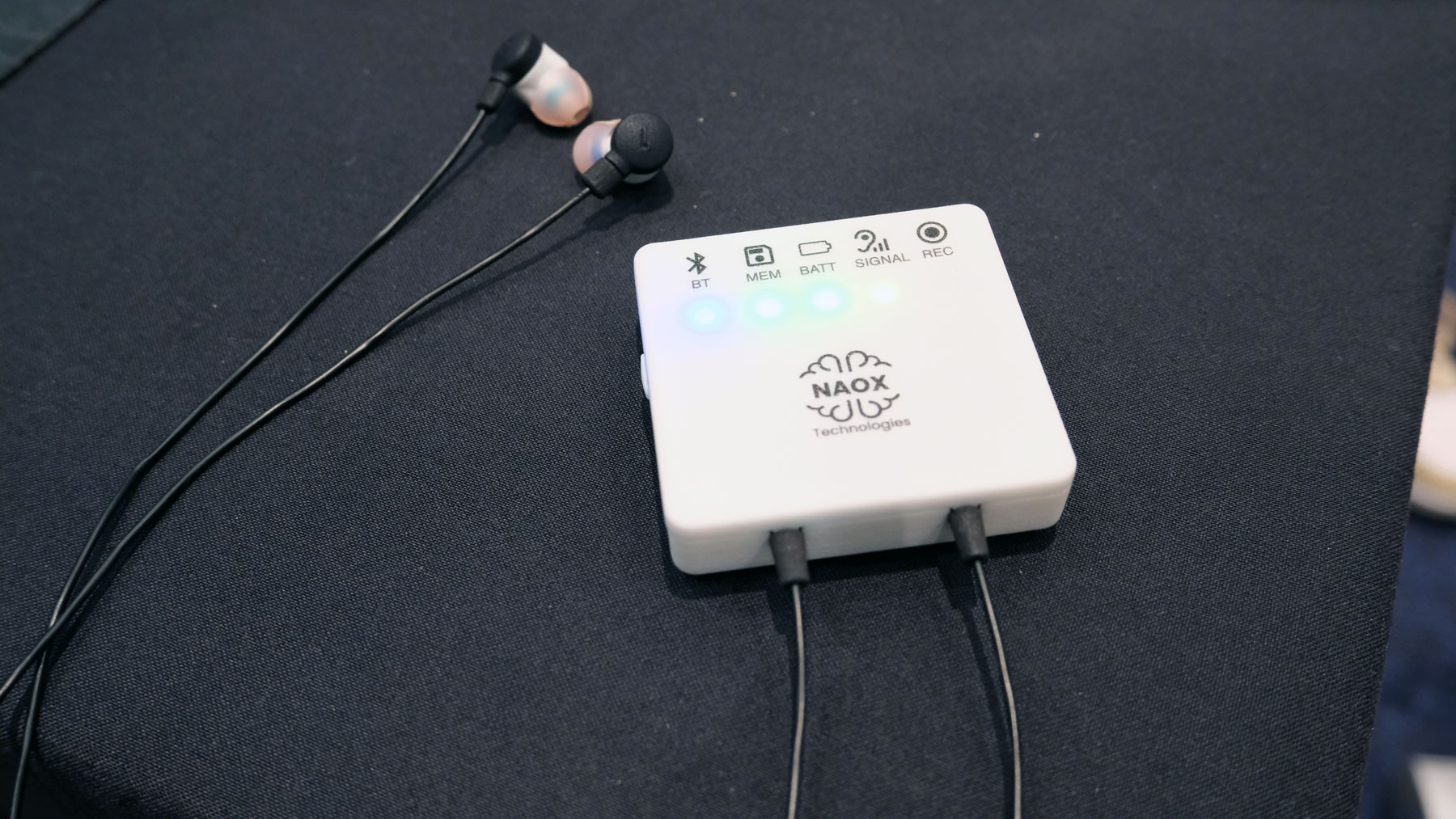
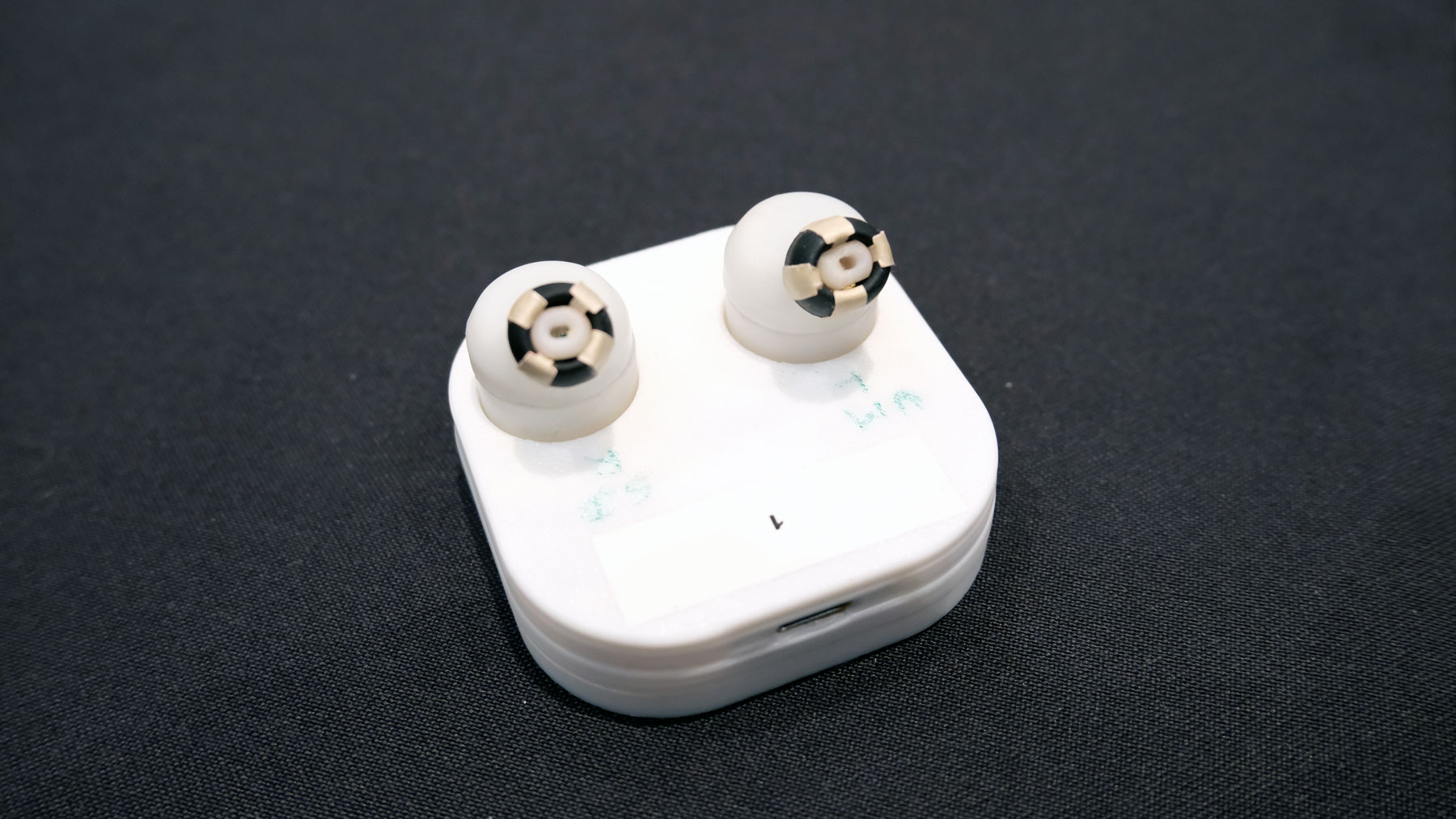
As EEGs become more commonplace, it’s likely they’ll be packaged in smaller devices which fit more seamlessly into our lives. One such example is NAOX, a French startup which has built a wearable, clinical-grade EEG into a pair of earbuds for the sort of longitudinal testing required to diagnose conditions like epilepsy. But the company is also planning on incorporating the technology into a pair of true wireless earbuds.These headphones won’t be arriving until the end of 2026, but Naox says the tech is small enough that it can be integrated with other companies earbuds. Consequently, it’s certainly plausible we could see plenty of earbuds that will keep an eye on our brain health as a side hustle.
Naox
Daniel Cooper for Engadget
NAOX was co-founded by Dr. Michel Le Van Quyen who, at a talk in London in December 2025, talked about the rationale for creating an in-ear ECG. Essentially, he was looking to build a brain equivalent to the Apple Watch’s continuous heart rate monitoring (and ECG). I was curious about the science behind an ear-mounted EEG given they commonly use the scalp. Professor Friston said that an ear-mounted EEG is potentially more useful as “you can get slightly closer to the sources of activity.” And that it makes a lot of sense for a consumer-grade EEG to be added to wireless earbuds given their utility in practices like meditation.
Naox's prototype TWS earbuds sensors.
Daniel Cooper for Engadget
One downside of the proliferation of wearable EEGs is that it could lead users to jump to the wrong conclusions about their mental health. For instance, if someone is to be diagnosed with a condition such as epilepsy, they need to undergo a 24-hour perambulatory EEG. As Professor Friston explained, the recording of that 24 hour EEG would be “carefully scrutinized by experts who are able to run a differential diagnosis ... to specify what further investigations are required.” He, like a lot of clinicians, is concerned about ill-informed consumers using these devices to make medical interventions without consulting a professional.
Friston added that people shouldn’t expect wearable EEGs to be magic bullets for their brain health or cognition. He said the best way for a consumer to approach them is by treating them with the same level of reverence as a household thermometer. “Are thermometers useful in managing the wellness of my children?, Yes,” he explained, “can your thermometer tell you what particular virus you have? Absolutely not.” “In the context of well-being and to augment or validate practices such as mindfulness and meditation, they can be fun and useful quantitative devices.” But, fundamentally, that is all he feels they can be, especially right now.
This article originally appeared on Engadget at https://www.engadget.com/wearables/the-ces-companies-hoping-your-brain-is-the-next-big-thing-in-computing-175048601.html?src=rss
LG opened CES 2026 by outlining its vision to reduce the physical effort and mental burden of life. Buy enough of the devices it’s presently working on and you’ll exist in an environment of “ambient care,” coddled by the machinery in your home. It sounds positively utopian: When the sensors in your bed know you’ve not slept well and are getting a cold, a robot will wake you with a glass of freshly squeezed orange juice. When you’re in a rush to get to work, the robot will make you a sandwich for you to eat on the go, sparing you the effort of making it yourself. The more I roamed the halls of the show after that, the more I couldn’t help feeling uneasy about what so many companies here were pitching. To me, the vision of the future on show here is equal parts solitary and infantilized.
There’s obvious reasons for this: AI swallowed the tech industry’s oxygen, sapping any chance of innovation in consumer hardware. The advent of Panther Lake is a win for Intel, but it’s not going to enable dramatic changes in how people work with their PCs on a daily basis. The US policy shift away from EVs and toward fossil fuel-powered vehicles, too, means that the big names in auto manufacture have similarly shied away from the show. That left CES full of various robotics startups offering early visions of humanoid robots designed to work on production lines, take care of your home and replace your pet. I saw more than a few stands where booth attendants were pretending to delight in teaching their wheeled robot pets to play fetch. At least, I hope they were pretending.
I’m painfully aware of how many devices felt like they were only a hop, skip and a jump away from the Sharper Image catalog. Gadgets that are designed to fill some perceived hole in your life that won’t actually make things better or easier in the long run. I’m leery about denigrating assistive technology that offers a vital lifeline to people with accessibility needs. I’m also leery about knocking devices that may enable people to keep working despite wrestling with long term injuries — I've got one eye on the raft of exoskeletons exhibited at the show which might help me work in the garden despite the weakness in my lower back. But I’m also not quite sold on how many toilet computers, massage chairs and scootcases we all need in our daily lives.
There’s also the elephant in the room that many of these innovations seem intent on acting as a replacement, substitute or supplement for real interaction. Robotic panda bears scuttling around your home to save you the effort of caring for a real flesh-and-blood pet. Holographic AI waifus that will obsequiously respond to whatever you ask of it with nothing but flattery and agreement. The sheer volume of AI Labubus operating as friend, enemy, companion or a combination of all the above. Cuddly home robots that are little more than a tablet on a moveable base that’ll keep your kids entertained so you don’t have to. Yes, I’m being unfair, but sometimes shows like this make me sound like someone’s grandpa angrily insisting you darn kids get off your screens.
I feel some of these gadgets are specifically designed to enable a degree of detachment from our own bodies. We’re spending so much time getting dopamine from our devices that we’re no longer able to pay attention to how our bodies are feeling. In LG’s vision of the future, moving around for ourselves and making our own food is a thing of the past, which will, surely, put a dent in our physical and mental health. We lose the ability to connect with the people around us because we’ve spent too long being flattered by our AI lackeys. We need a machine to monitor the food we eat and the crap we excrete because we’re not willing to pay attention to what we’re doing. Much in the same way that AI encourages us to take shortcuts rather than enjoy the process of being creative, the rest of the tech industry seemingly wants us to shortcut the fundamentals of life.
This article originally appeared on Engadget at https://www.engadget.com/ces-2026-offered-a-lonely-vision-of-the-future-160000993.html?src=rss
If you’re off-roading, it’s a neat idea to use your engine to top up your battery, which prompted Bluetti to launch the Charger. You could hook it to your alternator and draw off energy as you drove to make sure you turned up to your campsite with full batteries. But if you’re also toting around solar panels on your roof, then it’s a shame you can’t also use that power to top up. This omission is what prompted Bluetti to turn up to CES 2026 with the Charger 2, which will take power from your engine and your solar panels at the same time.
Bluetti says the Charger 2’s dual-input architecture will accept 600W from the panels, 800W from the engine. All of that power will charge your batteries significantly faster than the first model, claiming it’s 13 times faster than a standard car charger. In addition, Charger 2 can manage more than one Bluetti power station and expansion batteries, should your power needs stretch. And the system is smart enough to know where the energy is coming from, managing the sources based on their availability. Plus, you can use it to jump start your engine should you need the help.
If you’re a Charger 1 owner and want to upgrade, it’s fairly painless to drop the old unit out in favor of its replacement. It uses the same cabling, so you can just hook the new model to your existing wires without having to get your fingers greasy. To reward that loyalty, the company will sell you an upgrade for $99, at least through February 7.
As for everyone else, you’ll be able to pick up the Charger 2 for $349 through February 7, at which point the price leaps to $499.
This article originally appeared on Engadget at https://www.engadget.com/general/bluettis-charger-2-uses-solar-and-engine-power-to-charge-your-portable-battery-230000270.html?src=rss
I’m no psychologist, but I get a sense Segway turned up to CES 2026 with something to prove after last year. Certainly, it’s gone out of its way to prove its micromobility bona fides with the press, who perhaps were a bit too sniffy that scooter people were launching an e-bike. This year, Segway’s not just launching two more mainstream e-bikes, but an electric dirt bike, all of which are crammed with the sort of tech that might just make everyone halt their sniffiness.
First up, there’s the Myon, a chunky step-through with a decent-sized pannier rack for folks who want to go far and carry a bit of luggage as they go. That’s hardly an eye-catching proposition given so many e-bikes fit within the same template, but Segway is hoping its tech will make a difference here. Myon is equipped with electronic gear shifting (tied to a Shimano CUES chain drivetrain), electronic motor optimization and the company’s proprietary Intelligent Ride System.
The latter, along with Segway(TM) TurboTuned(TM) will automatically optimize motor and battery performance while under way. The company adds that the bike’s built-in gyros, cadence and torque sensors will meter out performance according to road conditions. So if you’re going up hill, the power will gently increase before you have to think about it. Additionally, if you stop at the lights, the system won’t just turn on the power to whatever you’ve set it at as soon as it senses the tiniest ounce of pressure on the pedal, removing the jerky start action you see in other bikes.
Segway’s broader pitch is that its bikes will also feature a whole host of smart features, including integration with Apple’s Find My network, GPS tracking, remote locking, integration with your health and fitness app of choice, and smartphone pairing.
Muxi
Segway
Muxi (pronounced moo-shee) is a more interesting piece of hardware, since it’s been built like a longtail cargo bike, but with the long tail chopped off. Even so, the focus is on cargo, with the bike getting an optional passenger seat with foot pegs, and an optional middle basket. Plus, the bike comes with a beverage cup holder (although given it has a direct drive motor, I’m not sure I’d want to cruise around at low speed while trying to sip my morning latte). To ensure you don’t struggle with your load, the bike comes with Hill Start Assist, Hill Descent Control, regenerative braking and traction control. Plus the aforementioned suite of added value features, like Find My integration, remote locking, GPS and the app integrations.
Rounding out the announcements is the Xaber (say-br) 300, an electric dirt bike geared toward off-roading. It has three power modes, letting you learn on the equivalent of a 150cc engine, then dialing that up to 200cc, before topping out at 300cc. If you still want a greater sense of control, you can activate an electronic clutch, and if you want to cede more of it to the bike, you can set the maximum wheelie angle. If you want to enjoy all of that dirt bikin’ action, it’ll set you back $5,300 when it arrives.
As for Myon, it’s available to buy today from Segway’s official site and via its dealer network, priced at $2,000. Muxi will be available through those same channels in March, setting you back $1,700.
This article originally appeared on Engadget at https://www.engadget.com/transportation/segway-launches-two-more-e-bikes-at-ces-130000152.html?src=rss

 Anmelden