
❌

Lese-Ansicht

Apple Releases Third Public Betas of iOS 27.2 and macOS Golden Gate 27.2

Apple today seeded the third betas of iOS 27.2, iPadOS 27.2, macOS Golden Gate 27.2, and watchOS 27.2. The software comes a few hours after Apple provided the betas to developers.

To get the new betas, you can sign up on Apple's beta testing website. After you're signed up, the betas can be installed through the Software Update section in the Settings app on each device.

iOS 27.2 includes the redesigned Health app that Apple introduced at its September iPhone event. It features new Insights and Longevity tabs with more insight into health and fitness data. There's also a Health Age feature that uses your metrics to determine your fitness age vs. your actual age.

In the Apple TV app, there are new profile options, and Siri AI is now available in French, Japanese, Korean, Portuguese, and Spanish.

There are a few other features in the updates, which are listed in our iOS 27.2 guide.
Related Roundups: iOS 27, iPadOS 27, macOS Golden Gate
Related Forums: iOS 27, macOS Golden Gate

This article, "Apple Releases Third Public Betas of iOS 27.2 and macOS Golden Gate 27.2" first appeared on MacRumors.com

Discuss this article in our forums

  •  

Apple Seeds Fourth macOS Golden Gate 27.2 Beta to Developers

Apple is testing the next macOS Golden Gate update, and developers can download the fourth ‌macOS Golden Gate‌ 27.2 beta. The fourth beta comes a week after Apple released the third beta.


Registered developers can download ‌macOS Golden Gate‌ 27.2 by opening up the System Settings app, clicking on General, selecting Software Update, and opting into ‌macOS Golden Gate‌ betas.

‌macOS Golden Gate‌ 27.2 introduces Siri AI in new languages and includes new brightness and volume sliders.

We're expecting ‌macOS Golden Gate‌ 27.2 to launch toward the end of October.
Related Roundup: macOS Golden Gate
Related Forum: macOS Golden Gate

This article, "Apple Seeds Fourth macOS Golden Gate 27.2 Beta to Developers" first appeared on MacRumors.com

Discuss this article in our forums

  •  

macOS 27.2 Further Hints at MacBook With Touch-Enabled OLED Display

The latest macOS 27.2 beta released this week further hints at the long-rumored MacBook with a touchscreen, which is expected to be unveiled by next month.


Specifically, when you click and hold on an app icon in the Dock on the third developer beta of macOS 27.2, the icon gets a little bit larger. A similar animation occurs when you long press on an iOS or iPadOS app, so the fact that the animation now extends to macOS could be another subtle clue that a touch-enabled MacBook is coming.

The new animation can be seen in videos shared by @madeby_ldt and @craigapplecom.

macOS 27.2 beta 3 introduces a new long-press animation for Dock icons, hinting at the upcoming touchscreen MacBook Pro https://t.co/4zfZOxy8MO

— ldt (@madeby_ldt) October 5, 2026


The latest macOS 27.2 beta added other new touch gestures as well, so it seems pretty clear that Apple is gearing up for the first touch-enabled Macs. In particular, Apple reportedly plans to release new higher-end, higher-priced 14-inch and 16-inch MacBook Pro or "MacBook Ultra" models with touchscreens in October or November.

In addition to a touch-enabled OLED display, these Macs are expected to feature M5 Pro and M5 Max chips, a thinner-and-lighter design, a Dynamic Island, and potentially Apple's C1X or C2 modem for built-in cellular connectivity.
Related Roundups: MacBook Pro, macOS Golden Gate
Tag: OLED
Buyer's Guide: MacBook Pro (Caution)

This article, "macOS 27.2 Further Hints at MacBook With Touch-Enabled OLED Display" first appeared on MacRumors.com

Discuss this article in our forums

  •  

Apple Releases Second Public Betas of iOS 27.2 and macOS Golden Gate 27.2

Apple today seeded the second betas of iOS 27.2, iPadOS 27.2, macOS Golden Gate 27.2, tvOS 27.2, and watchOS 27.2. The software comes a day after Apple provided the third betas to developers.


To get the new betas, you can sign up on Apple's beta testing website. After you're signed up, the betas can be installed through the Software Update section in the Settings app on each device.

iOS 27.2 includes the redesigned Health app that Apple introduced at its September iPhone event. It features new Insights and Longevity tabs with more insight into health and fitness data. There's also a Health Age feature that uses your metrics to determine your fitness age vs. your actual age.

In the Apple TV app, there are new profile options, and Siri AI is now available in French, Japanese, Korean, Portuguese, and Spanish.

There are a few other features in the updates, which are listed in our iOS 27.2 guide.
Related Roundups: iOS 27, iPadOS 27, macOS Golden Gate
Related Forums: iOS 27, macOS Golden Gate

This article, "Apple Releases Second Public Betas of iOS 27.2 and macOS Golden Gate 27.2" first appeared on MacRumors.com

Discuss this article in our forums

  •  

How to Check Your Mac's Manufacture Date in macOS 27

If you installed macOS 27 Golden Gate, here's a way to find out when your Mac was manufactured. Apple has restored access to information that effectively disappeared when it randomized its serial numbers a few years ago.


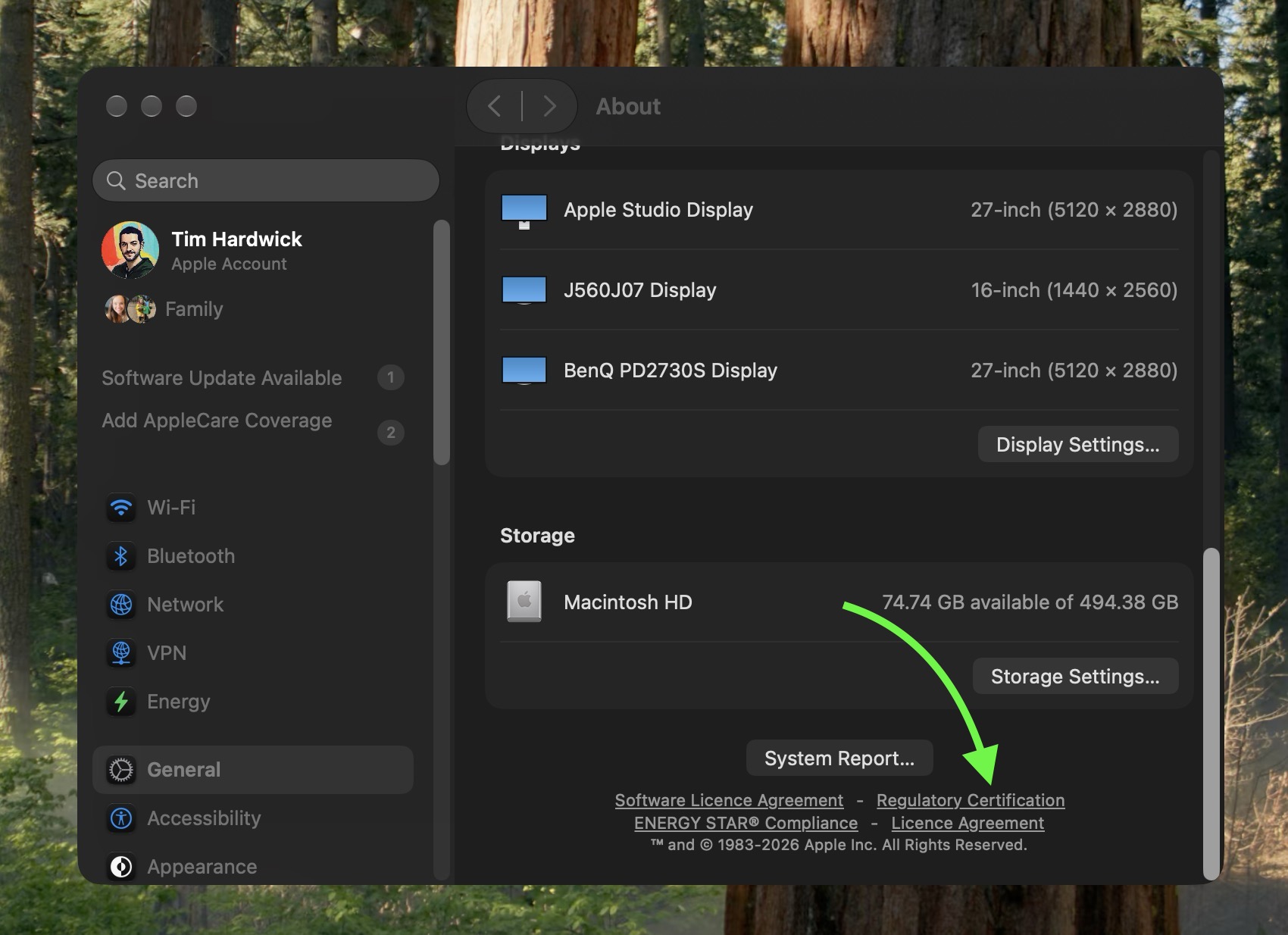
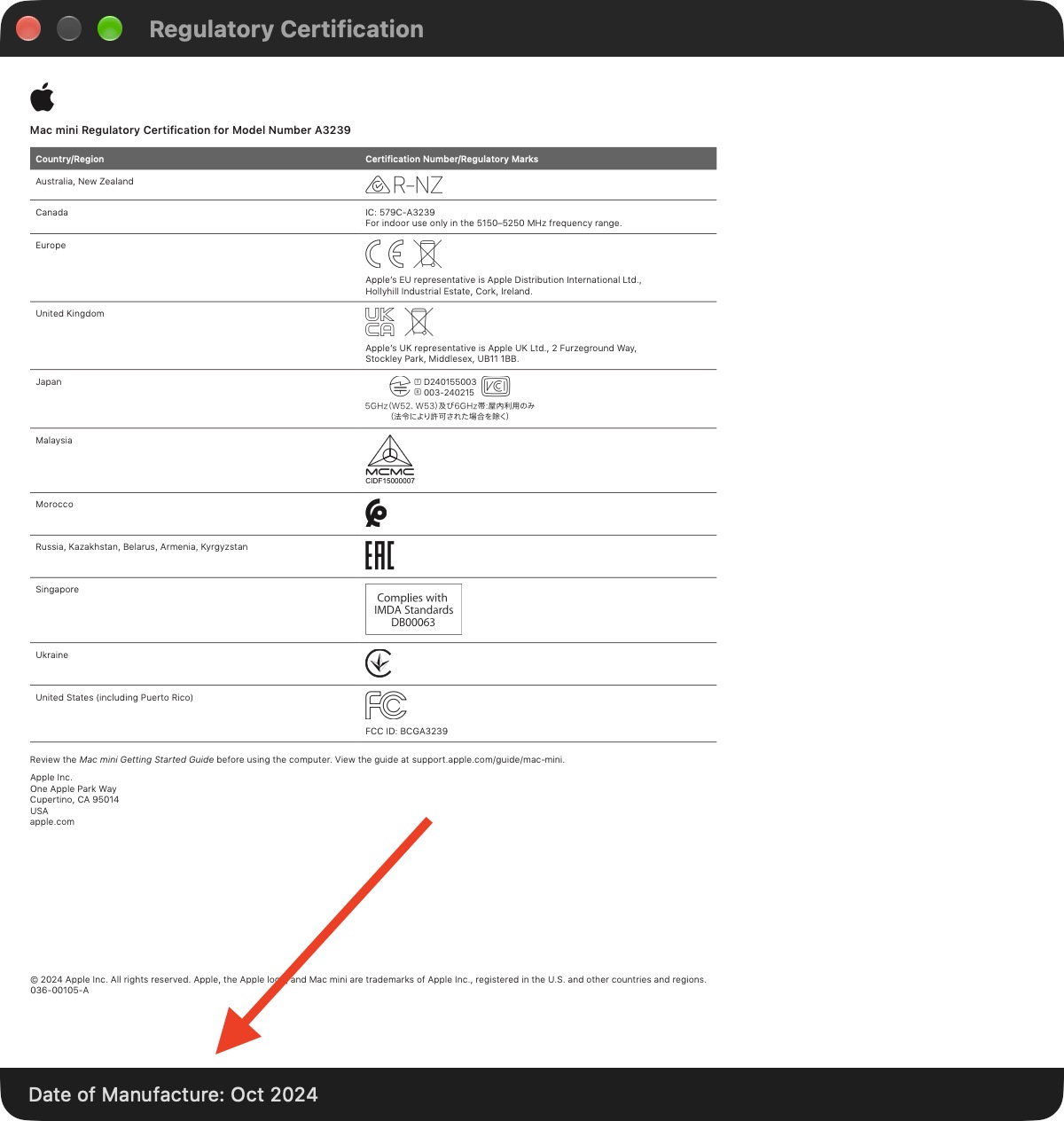
On your Mac, go to System Settings ➝ General ➝ About, then click "Regulatory Certification" under the System Report button. The certificate will show with a new "Date of Manufacture" field at the bottom.

You used to be able to decode the serial number on an Apple device to find out when and where it was made. That changed in 2021, when Apple began adopting randomized serial numbers without encoded manufacturing details.

That left owners of newer Macs with no similarly straightforward way to determine when their machine was made – until macOS 27 arrived.


The spot was made by MacRumors forum member pdfu. Another forum member said that the displayed date they saw on their certificate corresponded to their Mac's logic board rather than the date the complete machine was assembled. That logic board had been replaced though, suggesting that's where the date of manufacture is stored.

The regulatory certification first appeared during the macOS 27 beta cycle and it hasn't, to our knowledge, been highlighted by Apple.
Related Roundup: macOS Golden Gate
Related Forum: macOS Golden Gate

This article, "How to Check Your Mac's Manufacture Date in macOS 27" first appeared on MacRumors.com

Discuss this article in our forums
  •  

What's Gone in macOS Golden Gate and What's Next in macOS 28

With macOS Golden Gate, Apple phased out several legacy features and services, cutting support for older devices and accessories. More cuts are coming in macOS 28 as Apple continues to root out lingering Intel features.


Here's everything that's been dropped.

  • Support for Intel Macs - ‌macOS Golden Gate‌ is the first version of macOS that runs only on Apple silicon Macs. Intel Macs can't run it and are limited to macOS Tahoe. Apple still plans to offer security updates through fall 2028.

  • Boot Camp Assistant - Since ‌macOS Golden Gate‌ doesn't run on Intel Macs, it doesn't support Boot Camp. Apple silicon Macs require virtualization software like Parallels or VMware Fusion to run Windows.

  • Rosetta 2 (Temporarily) - Upgrading to ‌macOS Golden Gate‌ removes Rosetta, but if you have an app installed that requires it, you can reinstall it. ‌macOS Golden Gate‌ is the last version of macOS that will have full Rosetta support.

  • Apple Filing Protocol - Apple deprecated AFP back in macOS Sequoia 15.5, and there is no AFP client at all in ‌macOS Golden Gate‌.

  • Time Capsule Backups - With no support for AFP, Time Capsule no longer works with Macs running ‌macOS Golden Gate‌. Time Capsule requires AFP or SMBv1, but Time Machine backups now use the SMBv2 or SMBv3 protocol.

  • AirPort Utility - AirPort Utility is no longer included when you install ‌macOS Golden Gate‌. If you had the app before updating, you can still use it, but Apple makes no guarantee that it still works. AirPort Utility lets users manage AirPort base stations like the AirPort Extreme and AirPort Express.


macOS 28, which is expected in fall 2027, will largely drop support for Rosetta 2. Most apps that rely on Rosetta will not open on Macs running macOS 28, though Apple is making an exception for some legacy games that are unmaintained.

In ‌macOS Golden Gate‌, you'll see a warning when using any app that relies on Rosetta, so you're aware that the app won't continue to work in the future without a developer update. You can also see which apps are affected by going to Settings > General > About > Intel-Based Apps and then clicking on Details.
Related Roundup: macOS Golden Gate
Related Forum: macOS Golden Gate

This article, "What's Gone in macOS Golden Gate and What's Next in macOS 28" first appeared on MacRumors.com

Discuss this article in our forums
  •  
❌