❌

Lese-Ansicht

JBL Live 780NC and 680NC review: Great leaps, greater missteps

JBL introduced two new headphones to its Live series lineup and both are fighting to live up to expectations. Don’t get me wrong, the JBL Live 780NC and 680NC are both a solid set of cans, but in a sea of noise-cancelling headphones, one of them definitely has more appeal. The biggest differences between these two headphones are the over-ear and on-ear cups, and surprisingly, their audio quality. Let’s get into what does and doesn’t make them so special.

Design and comfort

Outside of varying colors and cup sizes, the JBL Live 780NC and 680NC look practically identical. They have these hockey puck-looking ear cups that are divided from the leatherette pads. The design looks like someone’s idea of headphones from 10 years ago. It’s not necessarily a bad thing, but it feels a bit clunky. Despite that, the metal hinge and leatherette band are more pleasantly minimalist. The cups also fold up neatly in a heart shape so you can slot them easily in the included bag.

There’s a dedicated volume rocker on the left ear cup while the right holds room for a USB Type-C port, the active noise cancelling (ANC) button and a combo power/Bluetooth switch (yes, it’s a switch, not a button). Meanwhile, you get all of the touch controls available on the right cup of each set of headphones.

Both headphones felt a little uncomfortable to wear at first, but it usually takes time for me to get used to new cans. After spending several hours each with them, they eventually grew on me. They’re both a bit snug, but neither one left me aching at the end of the day. I felt more relief when taking off the 680NC because of the added pressure of on-ear cups, but I’m also not used to the on-ear design.

Seamless customizable features
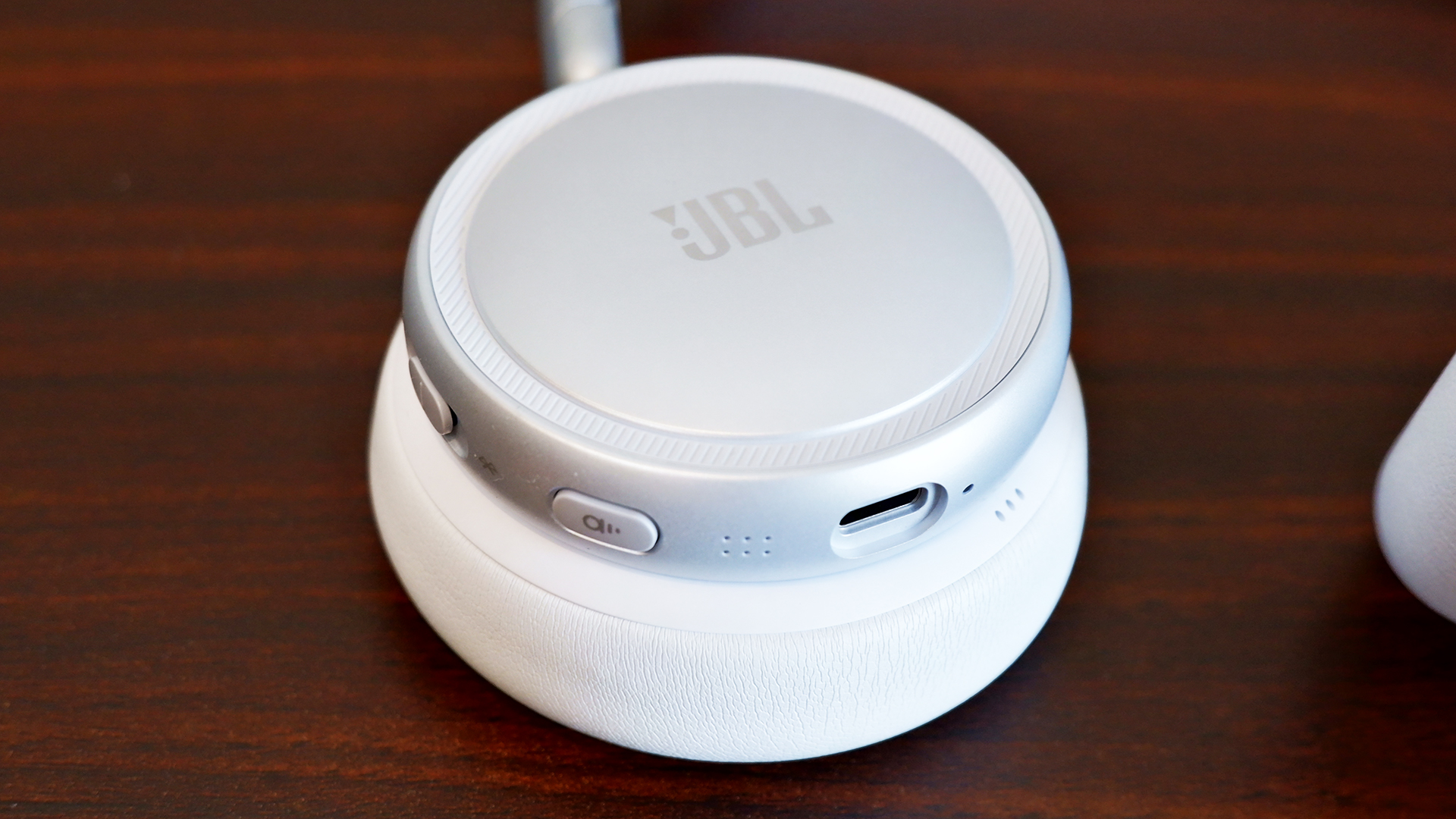
The ANC button and USB-C port on the Live 680NC
Rami Tabari for Engadget

Despite the near $100 price gap, you get the same set of features for the JBL Live 780NC and 680NC, all wrapped up in the JBL Headphones app. It’s easy to set up and you don’t even need to make an account. 

The first thing you might want to do is hop over to the settings and add the “disable ANC” function to the rotation. Out of the box, you can either switch between ANC or Ambient mode on the headphones, which is super frustrating — I shouldn’t need an app to enable a basic action. Most headphones these days allow you to cycle between ANC, Ambient mode and off (neither). 

At the very least, the app offers a thorough suite of features. You can adjust the strength of the ANC and Ambient modes. Enabling Adaptive ANC allows automatic noise cancellation changes  based on the surrounding noise level, while Personal Sound Amplification makes everything around you sound louder than normal. The latter was incredibly helpful in writing this very headphone review, ironically, as I had to keep an ear out for my child potentially committing a crime (kidding… mostly).

The JBL Live 780NC and 680NC are packed with the features I’d expect from a pair of premium headphones. They offer 360-degree spatial sound, an adaptive EQ, Auracast, automatic pausing and simultaneous Bluetooth connections with automatic switching. 

You can also customize all of the controls, from the ANC Button to the Touch Panel, which includes two call shortcuts and four general shortcuts, one of which is already dedicated to native voice assistants like Bixby and Siri. You do need to put a little more pressure than you might expect in order for the touch controls to activate, though. This is a bit of a learning curve, so it would’ve been nice if it was more sensitive.

Sound quality
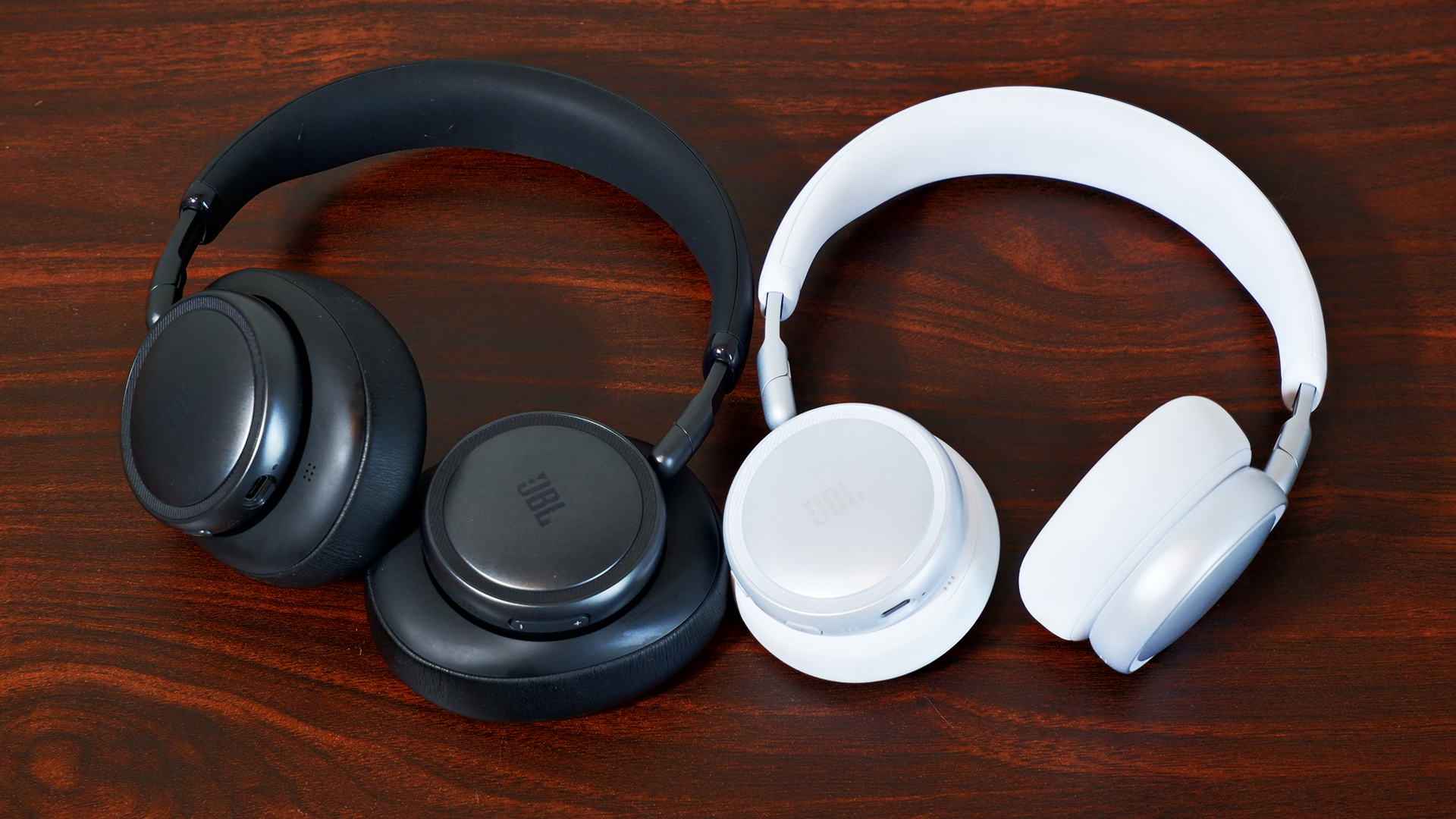
The Live 780NC (left) and Live 680NC (right)
Rami Tabari for Engadget

The JBL Live 780NC and 680NC both feature 40mm neodymium drivers, but they offer completely different soundstages. With the 680NC, I noticed the bass hit a lot harder during the DanDaDan soundtrack, but vocals and string instruments weren’t as crisp or bright as they were with the 780NC. I had a similar experience while schmoozing my way through everyday objects in Date Everything!, where vocals seemed more distant with the 680NC. However, when playing Helldivers 2, 680NC captured the bassy intensity of an explosive-intergalactic space war. 

Continuing to run through tracks like JVKE’s “her” and “Radio” by Bershy, I noticed a common theme amongst the headphones. The 680NC’s soundstage was narrow and bassy, while the 780NC was wide and hollow. Both reproduced one half of a great couple, but unfortunately, they’re currently separated and seeking lives of their own. No, but seriously, the audio quality on both of them is still decent individually. I can distinguish each instrument from each other, so they aren’t getting muddied in the mix. But I don’t think the 780NC is worth the extra $90 on sound quality alone, since you’re trading one issue for another.

ANC

The ANC system is slightly different in the JBL Live 780NC and 680NC. The former features six microphones that detect and monitor ambient noise while the latter is outfitted with four microphones. 

What difference does that actually make, though? Well… not much, at least not practically. If you stuck them in a lab and crunched the numbers, there might be, but in my testing using the JBL Live 780NC and 680NC as everyday headphones, there’s virtually no difference outside of the passive noise isolation you get from over-ear design.

My dog is quite the yapper, so I happened to test the ANC against her with both headphones, and they managed to block out most of her bark, but not all (she is quite loud). Unless you’re actively listening to something, it won’t kill all the sound around you — when everything was quiet, I still heard my fan running in the background. As a passenger, the car’s road noise and the other cars around me faded mostly into the background, but they were still present (when not actively listening to music).

Ambient modes for both headphones kept me alert while walking outside, and while checking to make sure nothing chaotic was happening in my home. I could clearly hear the ruckus my child and dog were causing in the next room, and I got even more of it when I turned up the Sound Amplification.

As I mentioned above, the most annoying thing about the ANC and Ambient mode systems is that you cannot disable both of them at the same time (out of the box); you need the app in order to make the “off” option available via the ANC button.

Calls and voice quality
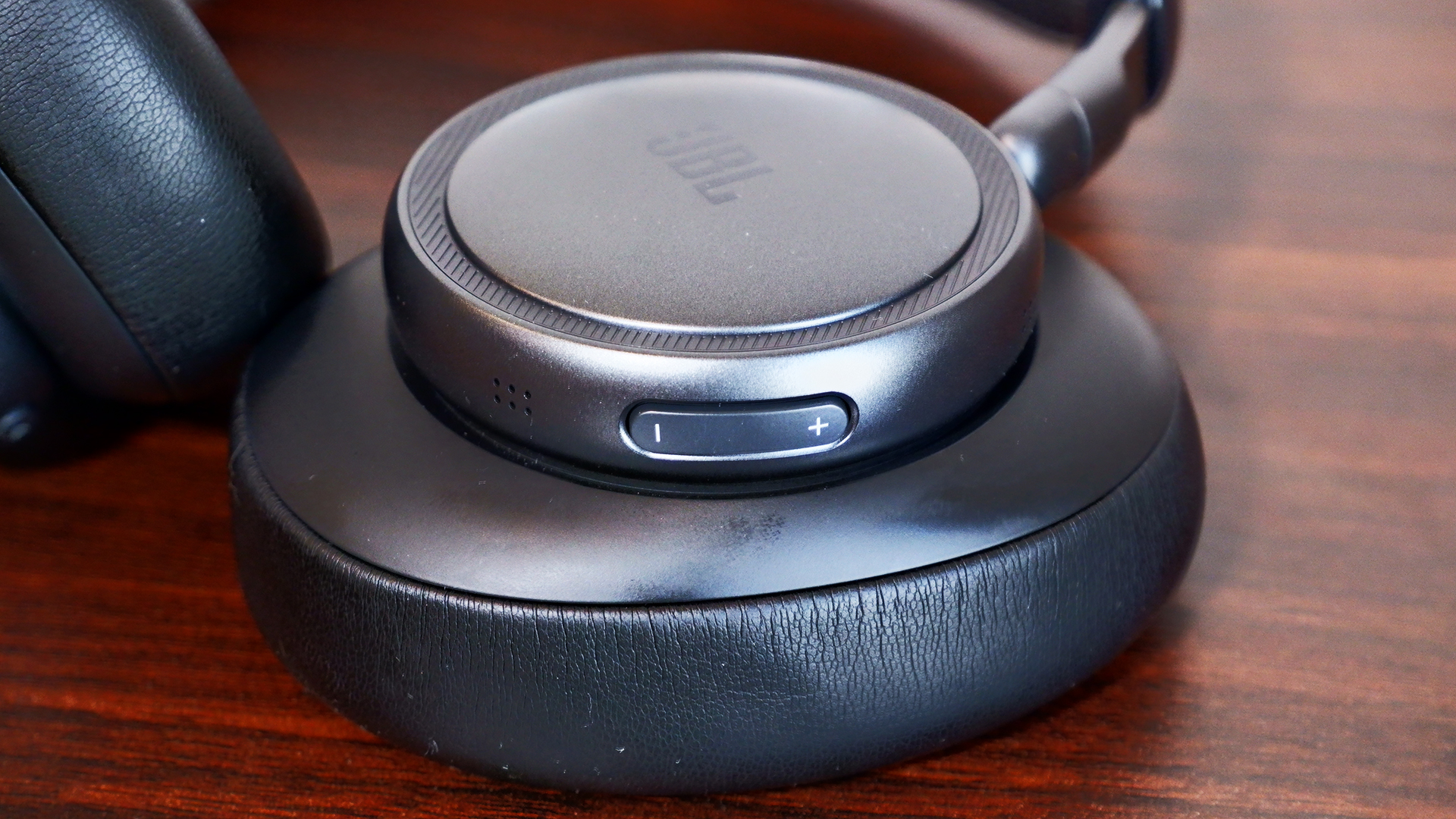
The volume rocker on the JBL Live 780NC
Rami Tabari for Engadget

JBL wasn’t lying about calls: Both the JBL Live 780NC and 680NC were great at cancelling out the noise from my surroundings, whether it was busy traffic or me blasting music on my desk. The microphone picked up little things here and there, but it blocked out most background distractions. The problem, however, is the overall microphone quality.

Microphones on both sets were pretty rough. My voice sounded like it was underwater or in another room entirely. And while the microphones were able to cancel out the noise in the background, I noticed that it made me a little more muddied, like it was also cancelling out some of my voice as well. This is likely due to the signal processing to block background noise. My friend said, “You sound like you’re fighting an ocean.” If you’re looking for a great caller, these ain’t it.

Battery life

With a full battery, I didn’t have to charge the JBL Live 780NC or 680NC for the week I tested them. That’s with a combination of ANC on and off, as well as using them to chat with friends. JBL rates both headphones with the same battery life: 80 hours with ANC off (33 hours of talk time) and 50 hours with ANC on (28 hours of talk time). Those numbers lined up with my testing considering how long they lasted. Charging the headphones from empty does take two hours, though.

The competition

If you want a solid pair of over-ear ANC headphones in this price range, I’d recommend the Sony WH-CH720N. The ANC struggles a bit, but the headphones are much cheaper than the 780NC and offer great sound quality. It’s the best option if you want to save some money.

However, if you’re looking for alternative on-ear ANC headphones, you’ll be hard pressed to find premium competitors to the JBL 680NC. On-ear headphones tend to land in the mid-range or budget class. The JBL 680NC aren’t the best pair of headphones out there, but they’re good for what they are in those categories.

Wrap-up 
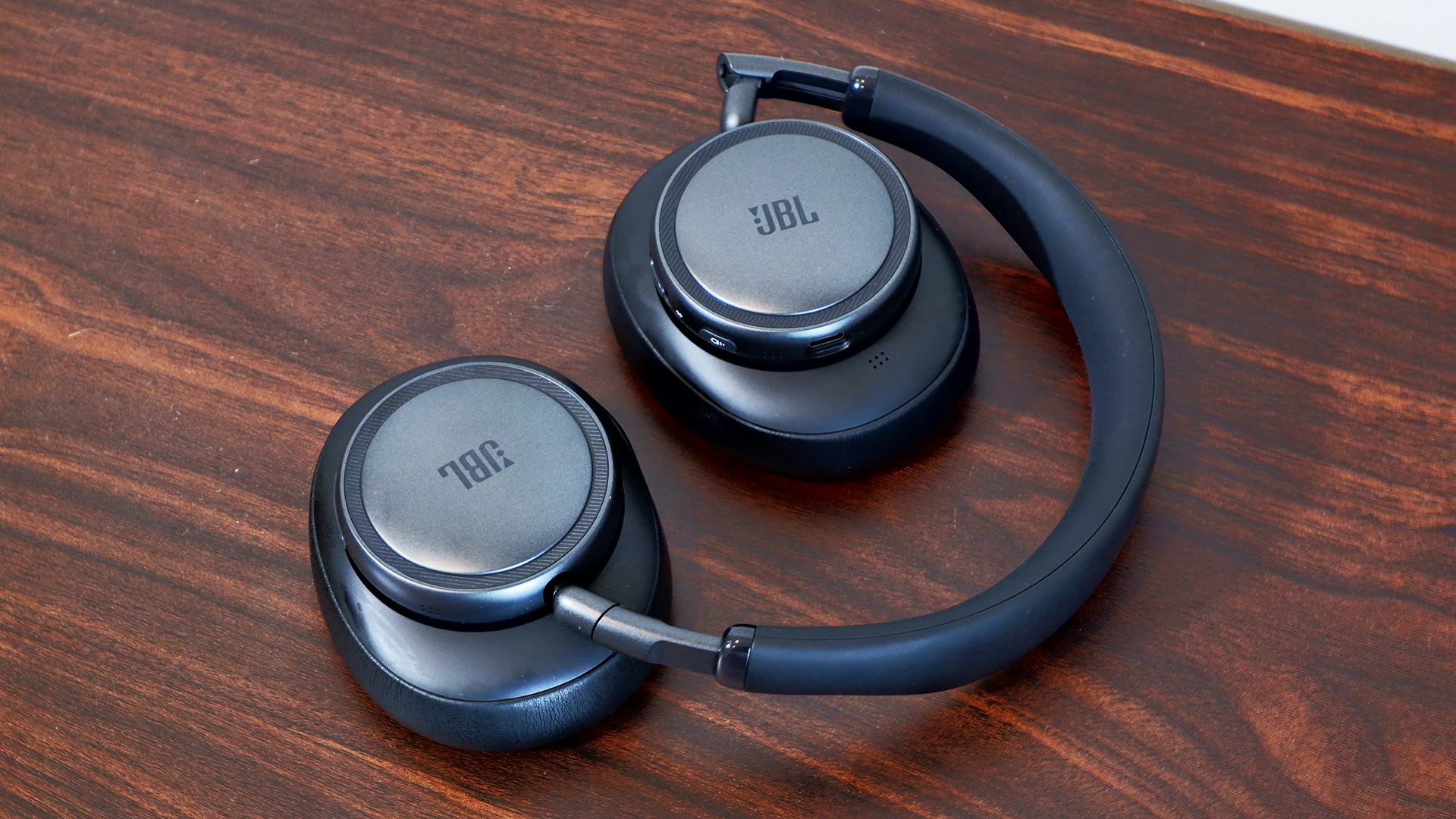
Both of the new Live models fold for easy storage
Rami Tabari for Engadget

To bass or not to bass? That’s one of the few questions you’ll need to ask yourself when choosing between the JBL Live 780NC and 680NC. Of course, on-ear and over-ear designs appeal to different consumers, but the fact is that the former sounds hollow and the latter is more bass-heavy. Both headphones are comfortable and offer great ANC and features.

Overall, however, the JBL Live 780NC falls in the middle of the overcrowded market for noise-cancelling wireless headphones, while the 680NC stands just tall enough to make you want to take a closer look. On a sale, I’d say you could grab either of these cans and be satisfied, but at their full price, I’d be wary. If you twist my arm, I could make an argument for the 680NC because there aren’t enough on-ear noise-cancelling headphones available these days.

This article originally appeared on Engadget at https://www.engadget.com/audio/headphones/jbl-live-780nc-and-680nc-review-great-leaps-greater-missteps-120000508.html?src=rss

©
  •  

iPad Air M4 vs. iPad Air M3: The few new things in Apple's midrange tablet

The iPad Air, the middle child in Apple’s tablet lineup, has been upgraded to the M4 chip with increased RAM and… Well, there’s not a whole lot else if I’m being honest. At the very least, the new iPad Air M4 models remain at the same price as the iPad Air M3, with the 11-inch version starting at $599 and the 13-inch at $799. I would give Apple more credit if it had increased the starting storage or added literally anything else.

If you put them side by side, you might not be able to tell the difference, but this upgrade would benefit creatives and professionals more than anything. There’s a significant performance bump from the M3 to the M4, and the increased RAM is doing a lot of work, especially if you’re taking advantage of Apple Intelligence.

If you’re using an M1-powered iPad Air or something even older, though, the new iPad Air M4 should be a compelling upgrade. Pre-orders start at 9:15AM ET on March 4, with the units arriving a week later. We expect full reviews will be published by then. But in the meantime, let’s dive into what the performance gains might look like and what we’re missing out on in this year’s iteration of the iPad Air.

iPad Air M4 vs. iPad Air M3: Performance and battery life

The most significant difference between the two iPad Air generations is their chipsets. The latest iPad Air launches with the M4 chip versus its predecessor’s M3 chip, and it gets a bump in RAM from 8GB to 12GB.

I don’t give much fanfare to incremental chip increases because the performance gain is usually minimal. However, the M4 is up to 30 percent faster than the M3, according to Apple. That might be noticeable to even casual users, especially as the years go on and iPadOS becomes more demanding. For power users, it’ll mean more demanding work like video editing will be noticeably quicker.

For those in need of the fastest internet speeds, the new iPad Air is also equipped with Apple’s N1 chip, which enables Wi-Fi 7 and Bluetooth 6, the latest connectivity technology. However, I really don’t imagine the average user needing up to 46 gigabits per second of internet speed compared to the iPad M3’s 9.6 Gbps on Wi-Fi 6. If you do, you’re in the tax bracket for an iPad Pro.

Now, despite the increase in speeds, the battery life between the M4 and M3 models remains the same. Apple claims all four models get up to 10 hours of battery life surfing the web on Wi-Fi or watching video (up to 9 hours on cellular). No complaints here.

iPad Air M4 vs. iPad Air M3: Design, display, audio and cameras

For better or worse, we’re not getting any changes in any of these departments, which is why I’m lumping them together.

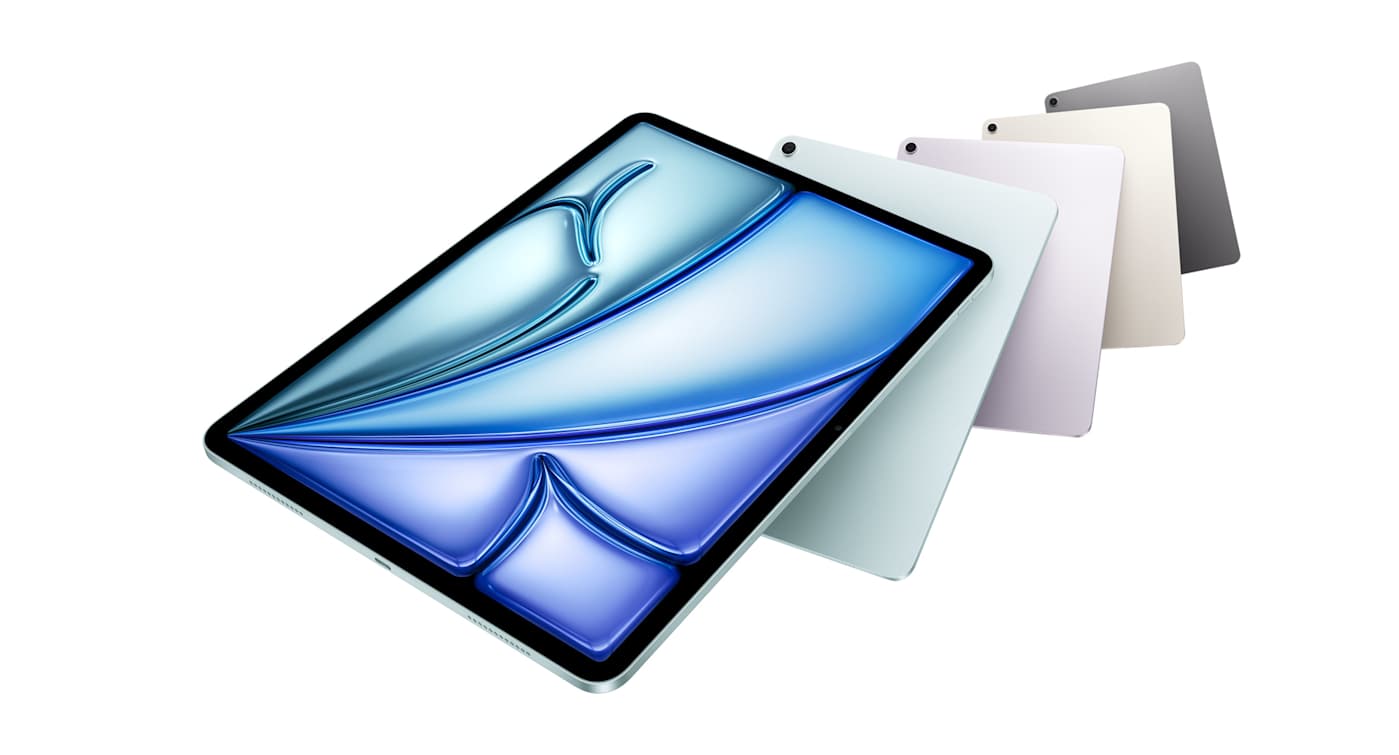
The iPad Air comes in blue, purple, beige and gray. The 11-inch option measures 9.74 x 7.02 x 0.24 inches and the 13 comes in at 11.04 x 8.46 x 0.24 inches. As their names suggest, they’re both rather light, at 1.01 pounds (1.02 pounds for M4) and 1.36 pounds, respectively. My only wish was that we got new colors that popped a bit more.

Then there’s the displays. All four versions of the iPad Airs sport a Liquid Retina LED display at 264 ppi. The 11-inch supports a 2,360 x 1,640 resolution with a peak brightness of 500 nits, while the 13-inch offers a 2,732 x 2,048 resolution at 600 nits. It would’ve been nice to see an OLED or even Mini-LED panel make its way to the iPad Air, which could’ve made the screen more vivid and vibrant. But it’s more disappointing that we’re stuck at 60Hz unlike the Pro models that offer 120Hz, making their visual experience smoother.

Both products feature landscape stereo speakers. The iPad Air M3’s audio quality couldn’t live up to the iPad Pro, so I doubt the M4 model will.

You won’t catch me taking photos with an iPad, but for those of you who do, the iPad Air M4 features the same 12MP cameras on the front and back as its predecessor.

iPadOS 26, Apple Intelligence and Apple accessories

Nothing huge is happening to iPadOS or the Apple accessories in the iPad Air refresh. The revamped Magic Keyboard from last year still works with these new models, as does the Apple Pencil Pro. iPadOS 26, released last fall, was a major update but will still be familiar enough to anyone who has used an iPad before. The new iPad Air M4 is getting a significant boost in AI processing speeds, though, thanks to its new chip and 50 percent increase in RAM. However, unless you’re an AI power user, you probably won’t notice a difference there.

All that said, if your love language is spreadsheets, the full specs are helpfully laid out below:

iPad Air M4 vs. iPad Air M3: Specs at a glance

Spec

iPad Air M4

iPad Air M3

Price

$599 (11-inch), $799 (13-inch)

$599 (11-inch), $799 (13-inch)

Processor

M4

M3

Display

11-inch: Liquid Retina, 2,360 x 1,640, LED display at 264 ppi

13-inch: Liquid Retina, 2,732 x 2,048, LED display at 264 ppi

11-inch: Liquid Retina, 2,360 x 1,640, LED display at 264 ppi

13-inch: Liquid Retina, 2,732 x 2,048, LED display at 264 ppi

RAM

12GB

8GB

Storage

128GB, 256GB, 512GB, 1TB

128GB, 256GB, 512GB, 1TB

Battery

Up to 10 hours (Wi-Fi), 9 hours (Cellular model)

Up to 10 hours (Wi-Fi), 9 hours (Cellular model)

Cameras

12MP Wide (rear), 12MP Center Stage (front)

12MP Wide (rear), 12MP Center Stage (front)

Apple accessories

Apple Pencil Pro, Apple Pencil, Magic Keyboard Folio

Apple Pencil Pro, Apple Pencil, Magic Keyboard Folio

Dimensions

11-inch: 9.74 x 7.02 x 0.24 inches

13-inch: 11.04 x 8.46 x 0.24 inches

11-inch: 9.74 x 7.02 x 0.24 inches

13-inch: 11.04 x 8.46 x 0.24 inches

Weight

11-inch: 1.02 pounds

13-inch: 1.36 pounds

11-inch: 1.01 pounds

13-inch: 1.36 pounds

This article originally appeared on Engadget at https://www.engadget.com/mobile/tablets/ipad-air-m4-vs-ipad-air-m3-the-few-new-things-in-apples-midrange-tablet-182701520.html?src=rss

©

  •  

iPhone 17e vs. iPhone 16e: What's new on Apple's latest $599 handset

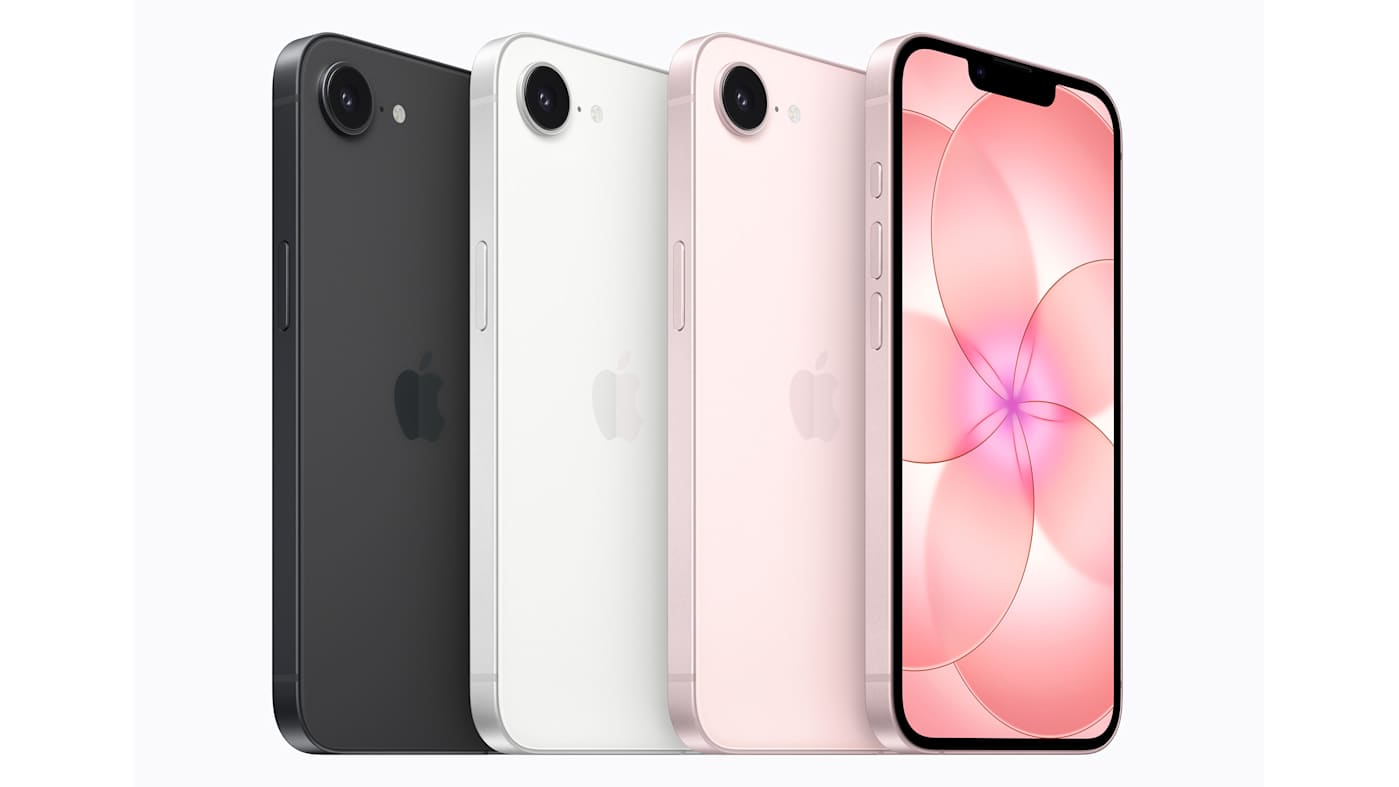
Apple’s most affordable iPhone just got an upgrade, but how does the new iPhone 17e compare to the iPhone 16e? Well, thankfully the price remains the same at $599, which is good news in our current economic climate. An immediate difference you might notice is that one of them now comes in a third color: pink. That’s at least one win for me because I am all for putting more color into tech.

There are a few differences under the hood as well, namely that the iPhone 17e is arriving with the A19 chip and double the storage. We’ve already seen what’s possible with an A19 chip in the standard iPhone 17 — it’s not a super exciting upgrade, but it is a boost nonetheless.

Pre-orders start at 9:15AM ET on March 4, and while we work on a full review, let’s take a deeper dive into what has changed on this year’s model and what that might mean in the real world.

iPhone 17e vs. iPhone 16e: Design and display

Of course, the biggest difference in the design for the iPhone 17e is the shiny new pink color. I’ve long complained about how many major tech companies stick to the safety of black, white or gray colorways. Thankfully, the iPhone 17e’s pink hue is a departure from that approach. It’s also an understated shade that’s elegant, compared to the typically brighter and louder tones reserved for cheap(er) phones.

Both the iPhone 17e and iPhone 16e measure 5.78 x 2.82 x 0.31 inches. However, the iPhone 17e did get a bit heavier at 5.96 ounces compared to the iPhone 16e’s 5.88 ounces. It’s very unlikely you’ll notice the 0.08 ounce difference, though. (And if you do, you have a gift.)

In terms of durability, the iPhone 17e is outfitted with Ceramic Shield 2, which is a glass face that Apple said is three times more scratch-resistant than the iPhone 16e’s original Ceramic Shield. Ideally, it’ll survive falls to the ground (within reason) and spare you a scratched up display from casual wear and tear.

There doesn’t seem to be any change in the display — whether that be in its brightness or color rendering capability — but that isn’t too shocking. Both the iPhone 17e and iPhone 16e feature a 6.1-inch Super Retina XDR OLED panel with a 1,200-nit peak brightness. That’s bright enough to combat the ambient glare from the sun, so you should be able to read it outside relatively easily. They’re also specced out with a 2,532 x 1,170 resolution at 460 ppi — meaning text and lines will be clean and sharp.

iPhone 17e vs. iPhone 16e: Cameras

I didn’t expect a huge bump in camera technology, especially if Apple intended to keep the price the same. We’ve got upgrades in other categories for sure, but it would’ve been nice to see an extra camera on the back. Like the iPhone 16e, the iPhone 17e is kitted out with Apple’s 48-megapixel Fusion 2-in-1 camera with a 12MP 2x Telephoto setting. You also get digital zoom up to 10x. Take a look at our iPhone 16e review to see exactly what that looks like in practice, but to sum up our experience: it’s solid.

There’s a great level of detail and vibrancy, but like I said, it’s limited. Without a potential ultrawide camera, you cannot capture as much of your surroundings because you’re not getting that 0.5x zoom option. 

One major upgrade, however, is that the iPhone 17e is now capable of recognizing dogs and cats in Portrait mode. It also saves depth information so you can turn regularly captured photos into portraits after the fact. This might be a noteworthy upgrade, considering the iPhone 16e struggled in Portrait mode, incapable of capturing non-human faces and objects.

There’s also the 12MP TrueDepth camera on the front, which we didn’t have many complaints about, and don’t expect to disappoint on the iPhone 17e.

iPhone 17e vs. iPhone 16e: Processor, battery life and charging

Apart from the color, the biggest differences between the iPhone 17e and iPhone 16e is their starting storage and overall performance. The new iPhone is packed with an A19 chip, while the latter comes with an A18 chip.

Yes, you’re getting a performance bump with the A19 chip, but casual users are unlikely to feel the difference. If you’re a power user trying to get the most out of an affordable iPhone and want to get crunchy about it, there’s roughly a 5 percent difference in CPU speed and over 10 percent in GPU performance (according to CPU Monkey).

Despite that bump, the battery life hasn’t changed. With both devices, Apple says you’re getting up to 26 hours of video playback and up to 21 hours streamed. The company doesn’t typically share specifics on battery sizes, but GSMArena is reporting that both models come with a 4,005mAh battery. What has changed, however, is being able to receive double the wattage from wireless charging. The iPhone 17e can now take up to 15W for Qi2 fast wireless charging — compared to 7.5W from the Qi support on the iPhone 16e.

iOS 26 and Apple Intelligence

At a glance, there does not seem to be any difference in what the iPhone 16e and iPhone 17e offer in terms of iOS and Apple Intelligence capability. However, it’s relevant to note that you will likely get better performance out of the iPhone 17e with regards to AI features because of its superior A19 chip.

In case you wanted to do the numbers comparison yourself, we’ve compiled a nifty table here so you can eyeball them with ease. But for a sense of how the iPhone 17e holds up in the real world and whether it’s worth the money, stay tuned for our full review.

iPhone 17e vs. iPhone 16e: Specs at a glance

Spec

iPhone 17e

iPhone 16e

Price

$599

$599

Processor

A19 chip

A18 chip

Display

Super Retina XDR, 6.1‑inch, 2,532 x 1,170, OLED display at 460 ppi

Super Retina XDR, 6.1‑inch, 2,532 x 1,170, OLED display at 460 ppi

RAM

8GB

8GB

Storage

256GB, 512GB

128GB, 256GB, 512GB

Wireless charging

Up to 15W

Up to 7.5W

Rear camera

2-in-1 camera — 48MP Fusion main, 12MP 2x Telephoto, digital zoom up to 10x

2-in-1 camera — 48MP Fusion main, 12MP 2x Telephoto, digital zoom up to 10x

Front camera

12MP selfie cam

12MP selfie cam

SIM

Dual SIM (two active eSIMs)

Dual SIM (two active eSIMs)

Connectivity

Wi-Fi 6E, Bluetooth v5.3, NFC

Wi-Fi 6E, Bluetooth v5.3, NFC

OS

Launched with iOS 26

Launched with iOS 18

This article originally appeared on Engadget at https://www.engadget.com/mobile/iphone-17e-vs-iphone-16e-whats-new-on-apples-latest-599-handset-162009364.html?src=rss

©

  •  
❌