❌

Lese-Ansicht

Samsung Galaxy S26 vs. Galaxy S25: What’s changed and which one should you buy?

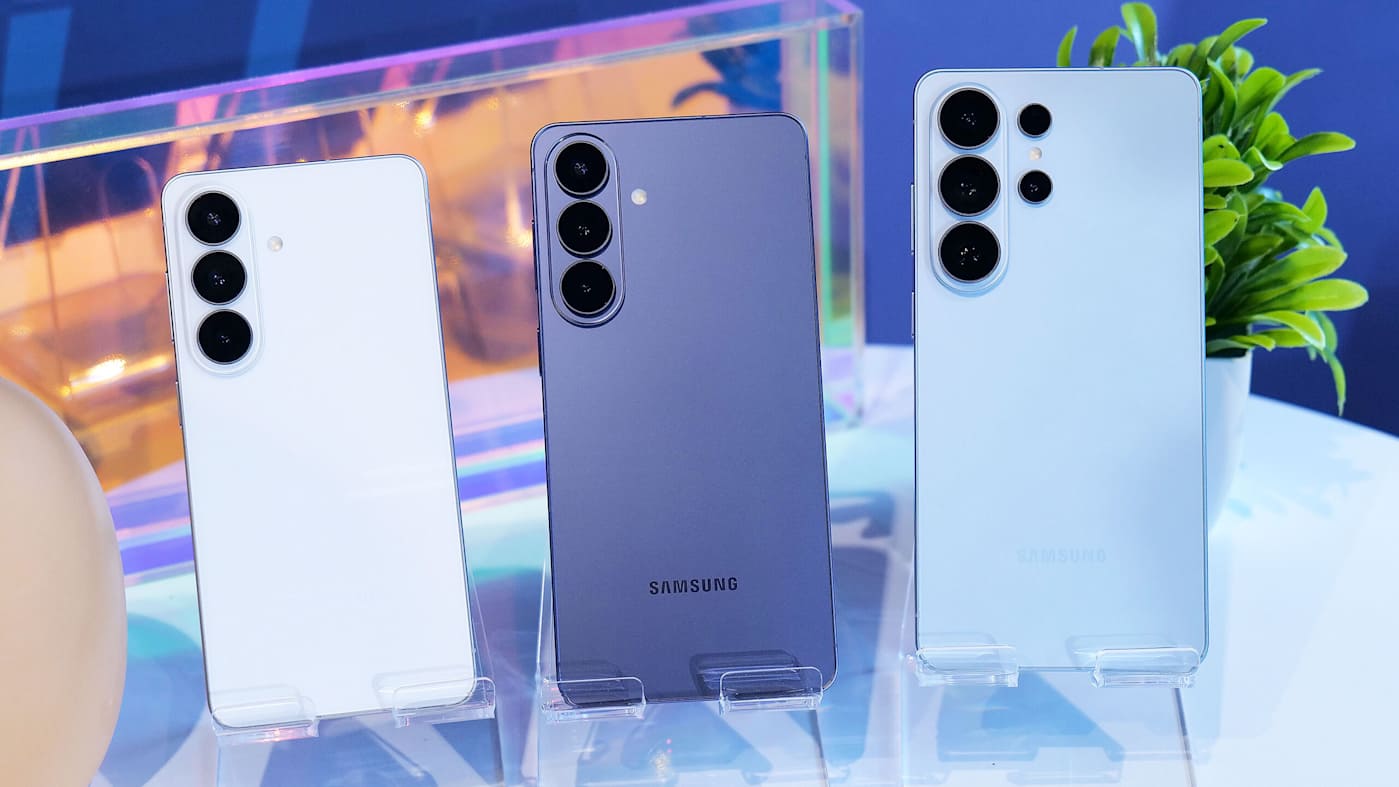
Following Samsung’s Unpacked event, the Samsung Galaxy S26 is available for pre-order, and it looks very familiar. That is not necessarily a bad thing. Like recent updates in the Galaxy S line, Samsung is refining its flagship rather than dramatically reinventing it.

Both phones share a lot of core DNA, including compact designs, high-refresh AMOLED displays and similar camera hardware. The S26 does introduce a handful of meaningful updates, however, including a slightly larger battery and newer software out of the box. Those changes also come with a higher starting price: the Galaxy S26 begins at $899.99 compared to the S25’s $799.99 launch price. The entry model now includes 256GB of storage instead of the S25’s base 128GB. Here's how the Galaxy S26 compares with last year’s Galaxy S25 on paper and whether the newer model is worth your attention.

Galaxy S26 vs. Galaxy S25: Design, display and performance

Physically, the Galaxy S26 stays very close to the design Samsung established with the S25. You still get a compact handset with flat edges, an aluminum frame and IP68 water and dust resistance. The overall look and feel should be immediately familiar to anyone who used last year’s phone.

The display story is similarly steady. Both phones use Samsung’s Dynamic AMOLED 2X panels with adaptive refresh rates up to 120Hz, and the S25 is rated for peak brightness of up to 2,600 nits. In everyday use, whether you are scrolling, gaming or watching video, the viewing experience should feel broadly similar between the two devices.

Under the hood, the Galaxy S25 is powered globally by Qualcomm’s Snapdragon 8 Elite for Galaxy chipset paired with 12GB of RAM. The Galaxy S26 continues to target flagship-class performance. While Samsung has made internal refinements, overall speed should remain firmly in high-end territory for routine tasks, multitasking and mobile gaming.

On the software front, the S25 launched with Android 15 and One UI 7, while the Galaxy S26 ships with a newer version of Samsung’s software out of the box. As usual, the older model is expected to receive updates over time, which may narrow the long-term software gap.

Galaxy S26 vs. Galaxy S25: Cameras

Samsung has not dramatically reshuffled the base Galaxy camera hardware. The Galaxy S25 features a triple-camera setup built around a 50-megapixel main sensor, a 12MP ultrawide and a 10MP telephoto with 3x optical zoom, along with a 12MP front camera.

The Galaxy S26 largely sticks with the same proven approach, which suggests image quality should remain broadly consistent in good lighting. As is often the case with Samsung’s year-to-year updates, any meaningful gains are likely to come from image processing improvements rather than brand-new sensors.

For most people, that means the S26 should deliver the punchy, reliable photos Samsung flagships are known for, but Galaxy S25 owners should not expect a dramatic leap in camera hardware.

Galaxy S26 vs. Galaxy S25: Battery life and charging

Battery capacity is one area where the Galaxy S26 makes a measurable change. The Galaxy S25 uses a 4,000mAh battery, while the Galaxy S26 increases that to 4,300mAh. That modest bump should translate into slightly longer endurance in day-to-day use, though real-world gains will depend on efficiency improvements and individual usage patterns.

Charging speeds remain largely unchanged. The Galaxy S25 supports up to 25W wired charging, up to 15W wireless charging and 4.5W reverse wireless charging, and the Galaxy S26 stays in the same general range.

Galaxy S26 vs. Galaxy S25: Software and AI

This year, Samsung is putting more emphasis on Galaxy AI, even on the base Galaxy S26. While many of the headline features are aimed at the Ultra and Plus models, the standard S26 still picks up several practical upgrades.

One of the more useful additions is Document Scan, which uses AI to clean up scans by automatically removing distortions, fingers and creases. It can also bundle multiple images into a single PDF, making it easier to digitize receipts, notes or forms without extra editing.

Samsung is also expanding its proactive assistant features. Now Brief becomes more personalized on the S26, surfacing reminders and updates based on your activity throughout the day, while the new Now Nudge system can suggest relevant content at the right moment. For example, if someone asks for photos from a recent trip, the phone can proactively surface matching images from your gallery instead of making you search manually.

Search is getting smarter as well. Circle to Search with Google now supports enhanced multi-object recognition, allowing you to identify several items in an image at once. Samsung is also upgrading Bixby into a more conversational assistant, and the S26 supports third-party agents such as Gemini and Perplexity for handling more complex, multi-step tasks through voice commands.

Security and privacy features are expanding in the background too. The Galaxy S26 introduces AI-powered Call Screening to summarize unknown callers, along with new Privacy Alerts that warn when apps request sensitive permissions. Samsung is also extending its post-quantum cryptography protections deeper into the system, backed by the company’s Knox security platform and seven years of promised security updates.

Galaxy S26 vs. Galaxy S25: How to choose

If you already own a Galaxy S25, the Galaxy S26 looks like a fairly iterative update. The core experience, including performance, display quality and camera hardware, remains very similar.

The main tangible upgrade is the slightly larger battery, along with newer software out of the box. For most S25 owners, that alone probably is not a compelling reason to upgrade. However, if you are coming from an older Galaxy phone or buying fresh, the Galaxy S26 is the more future-proof pick simply because it starts one generation ahead in Samsung’s update cycle and packs the larger battery.

As usual with Samsung’s yearly refreshes, the real decision may come down to pricing and discounts. If the Galaxy S25 sees significant price cuts, it could remain the better value. But at similar prices, the Galaxy S26 is the safer long-term buy.

Galaxy S26 vs. Galaxy S25: Specs at a glance

Specs

Samsung Galaxy S26

Samsung Galaxy S25

Price (MSRP)

$899.99

$799.99 (128GB), $859.99 (256GB)

Dimensions

5.88 x 2.82 x 0.28 inches

5.78 x 2.78 x 0.28 inches

Weight

5.9 ounces

5.7 ounces

Screen size

6.3 inches (FHD+)

6.2 inches (FHD+)

Screen resolution

2,340 x 1,080

2,340 x 1,080

Screen type

Dynamic AMOLED 2X, 120Hz adaptive refresh (1–120Hz), Up to 2,600 nits peak brightness, Corning Gorilla Glass Victus 3

Dynamic AMOLED 2X, 120Hz adaptive refresh (1–120Hz), Up to 2,600 nits peak brightness, Corning Gorilla Glass Victus 2

SoC

Snapdragon 8 Elite Gen 5 for Galaxy

Snapdragon 8 Elite for Galaxy

RAM

12GB

12GB

Battery

4,300mAh

4,000mAh

Charging

Up to 25W (wired), 15W (wireless)

Up to 25W (wired), 15W (wireless)

Storage

256GB, 512GB

128GB, 256GB

Rear camera

50MP main, 12MP ultrawide, 10MP 3x telephoto

50MP main, 12MP ultrawide, 10MP 3x telephoto

Front camera

12MP

12MP

Video capture

Up to 4K 60fps, 8K 30fps

Up to 4K 60fps, 8K 30fps

Water and dust resistance rating

IP68

IP68

Wi-Fi

Wi-Fi 7

Wi-Fi 7

Bluetooth

Bluetooth 6.0

Bluetooth 5.4

OS

Android 16 with One UI 8.5

Android 15 with One UI 7

Colors and finish

Cobalt Violet, White, Black, Sky Blue, Pink Gold*, Silver Shadow* (*Samsung.com exclusive)

Navy, Icyblue, Mint, Silver Shadow, Blueblack*, Coralred*, Pinkgold* (*Samsung.com exclusive)

This article originally appeared on Engadget at https://www.engadget.com/mobile/smartphones/samsung-galaxy-s26-vs-galaxy-s25-whats-changed-and-which-one-should-you-buy-181515367.html?src=rss

©

© Sam Rutherford for Engadget

Samsung Galaxy S26
  •  

Samsung Galaxy S26 vs. S26+ vs. S26 Ultra: Comparing the three new phones

Samsung has officially unveiled the Galaxy S26, Galaxy S26+ and Galaxy S26 Ultra, and the company is once again leaning heavily on AI, camera upgrades and refined hardware to move the lineup forward. While the overall design remains familiar, there are some meaningful differences between the three models, particularly when it comes to display tech, charging speeds and camera hardware.

Across the board, the S26 family is powered by Qualcomm’s Snapdragon 8 Elite Gen 5 for Galaxy chip and runs Android 16 with One UI 8.5. Samsung is also doubling down on Galaxy AI features like Now Brief, Now Nudge and upgraded Circle to Search, positioning the new phones as more proactive assistants than before.

As usual, though, the Ultra model is where Samsung is pushing the envelope the furthest. It gains the most advanced camera system, faster wired and wireless charging and the company’s new built-in Privacy Display tech. Pre-orders are available now, with official sales starting on March 11. If you’re trying to decide which model makes the most sense for your needs (and budget), here’s how the three devices stack up on paper.

Samsung Galaxy S26 vs. S26+ vs. S26 Ultra: Specs compared

Specs

Samsung Galaxy S26

Samsung Galaxy S26+

Samsung Galaxy S26 Ultra

Price (MSRP)

$899.99

$1,099.99

$1,299.99

Dimensions

71.7 x 149.6 x 7.2 mm

71.7 x 149.6 x 7.2 mm

78.1 x 163.6 x 7.9 mm

Weight

167g

190g

214g

Screen size

6.3 inches (FHD+)

6.7 inches (QHD+)

6.9 inches (QHD+)

Screen resolution

2340 x 1080

3120 x 1440

3120 x 1440

Screen type

Dynamic AMOLED 2X, 120Hz adaptive refresh (1–120Hz), Up to 2,600 nits peak brightness

Dynamic AMOLED 2X, 120Hz adaptive refresh (1–120Hz), Up to 2,600 nits peak brightness

Dynamic AMOLED 2X, 120Hz adaptive refresh (1–120Hz), Up to 2,600 nits peak brightness

SoC

Snapdragon 8 Elite Gen 5 for Galaxy

Snapdragon 8 Elite Gen 5 for Galaxy

Snapdragon 8 Elite Gen 5 for Galaxy

RAM

12GB

12GB

12GB or 16GB

Battery

4,300 mAh

4,300 mAh

5,000 mAh

Charging

25W (wired), 15W (wireless)

45W (wired), 20W (wireless)

60W (wired), 25W (wireless)

Storage

256/512GB

256/512GB

256/512GB, 1TB

Rear camera

50MP main, 12MP ultrawide, 10MP 3x telephoto

50MP main, 12MP ultrawide, 10MP 3x telephoto

200MP main, 50MP ultrawide, 10MP 3x telephoto, 50MP 5x periscope telephoto

Front camera

12MP

12MP

12MP

Video capture

Up to 4K 60fps, 8K 30fps

Up to 4K 60fps, 8K 30fps

Up to 4K 120fps, 8K 30fps

Water and dust resistance rating

IP68

IP68

IP68

Wi-Fi

Wi-Fi 7

Wi-Fi 7

Wi-Fi 7

Bluetooth

Bluetooth 6.0

Bluetooth 6.0

Bluetooth 6.0

OS

Android 16 with One UI 8.5

Android 16 with One UI 8.5

Android 16 with One UI 8.5

Colors and finish

Cobalt Violet, White, Black, and Sky Blue / Pink Gold and Silver Shadow (Samsung exclusive)

Cobalt Violet, White, Black, and Sky Blue / Pink Gold and Silver Shadow (Samsung exclusive)

Cobalt Violet, White, Black, and Sky Blue / Pink Gold and Silver Shadow (Samsung exclusive)

This article originally appeared on Engadget at https://www.engadget.com/mobile/smartphones/samsung-galaxy-s26-vs-s26-vs-s26-ultra-comparing-the-three-new-phones-181047172.html?src=rss

©

© Sam Rutherford for Engadget

Samsung Galaxy S26 series smartphones
  •  

Google Pixel 10a vs. Pixel 9a: What's changed and which one should you buy?

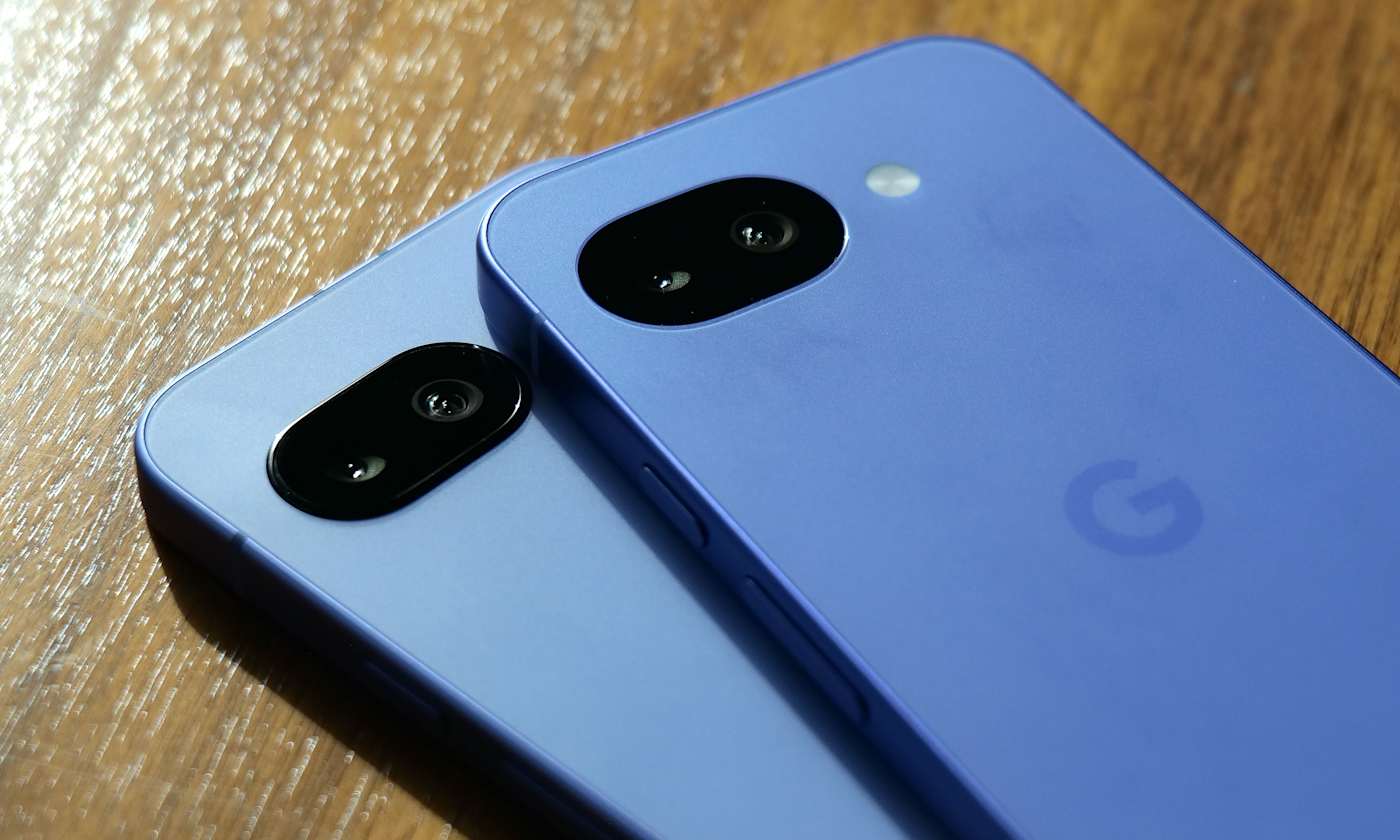
Now that pre-orders are open for the Google Pixel 10a, it’s time to see how it stacks up against last year’s Pixel 9a. At first glance, the two phones look very similar, and that’s not a bad thing. Google hasn’t tried to reinvent its budget-friendly formula this year, sticking to the same compact design, clean software experience and camera-first approach that made the 9a such a good value.

Both phones share a lot in common, including 120Hz OLED displays, Google’s Tensor G4 chip, strong computational photography and seven years of OS and security updates. The actual differences are more incremental, including a moderately brighter, tougher display, improved Extreme Battery Saver longevity, slightly faster wireless charging and the addition of Satellite SOS. Importantly, Google is keeping the starting price the same as before, with both phones coming in at $499.

On paper, the Pixel 10a doesn’t dramatically rethink what an affordable Pixel should be, but it does offer meaningful upgrades for the same price. While we wait for a review unit to evaluate the Pixel 10a's day-to-day performance, here's a quick comparison of the spec sheets of the two devices to see what the new model brings.

Pixel 10a vs Pixel 9a: Design and display

There’s very little separating these two on performance. Both the Pixel 9a and Pixel 10a run Google’s Tensor G4 chip with 8GB of RAM and the same storage options, so day-to-day speed should feel virtually identical. The Pixel 10a ships with Android 16 out of the box, though the 9a can be updated to the same version.

Off the bat, the Pixel 10a doesn’t look dramatically different from the Pixel 9a, and that appears to be intentional. Google is sticking with the same compact, no-frills approach from the last few A-series Pixels, so you’re still getting a 6.3-inch OLED panel with a smooth 60–120Hz refresh rate and a clean, understated aesthetic. 

The meaningful changes show up once you dig into the display specs. The Pixel 10a upgrades the cover glass from Corning Gorilla Glass 3 to Gorilla Glass 7i, which should offer better durability against drops and scratches over time. Brightness also gets a noticeable bump. The 9a topped out at 1,800 nits for HDR content and 2,700 nits at peak, while the 10a pushes that to 2,000 nits for HDR and up to 3,000 nits at peak brightness. In practice, that should make the Pixel 10a easier to read outdoors and a bit punchier when watching HDR video.

Contrast is improved as well. The Pixel 10a’s panel is rated at a contrast ratio of more than 2,000,000:1, doubling the already respectable figure on the Pixel 9a. That won’t radically change how the phone looks day to day, but it should translate to deeper blacks and slightly more depth in darker scenes, especially when streaming video or browsing photos at night.

Pixel 10a vs Pixel 9a: Cameras

On paper, the Pixel 10a’s camera hardware looks very familiar. Like the Pixel 9a, it uses a 48-megapixel main camera paired with a 13MP ultra-wide, and there’s no dedicated telephoto lens. Image quality, color science and low-light performance should therefore be similar between the two.

Where the Pixel 10a pulls ahead is in software features. Google has added a few camera tools that aren’t available on the Pixel 9a, even though the underlying hardware hasn’t changed much. One of those is Camera Coach, which debuted on last year’s Pixel 10 series and offers on-screen tips to help you frame shots better or adjust how you’re holding the phone. The Pixel 10a also gains Macro Focus, allowing you to get much closer to small subjects like plants or textures. In our Pixel 9a review, we found the phone could capture solid close-up detail, but locking focus could be finicky at times, so a more dedicated macro mode should make those shots easier to nail.

Finally, there’s Auto Best Take, which automatically picks the best expressions from a burst of photos and combines them into a single image. The feature debuted on Google’s Pixel 10 lineup last year, and it’s especially handy for group shots where someone always seems to blink at the wrong moment. By bringing it to the 10a, Google is extending one of its more genuinely practical AI camera tricks to a cheaper phone.

Battery life and charging

Both the Pixel 9a and Pixel 10a use a 5,100mAh battery and support the same 23W wired charging speeds. Where the Pixel 10a does pull ahead slightly is wireless charging. The Pixel 9a tops out at 7.5W, while the Pixel 10a supports wireless charging at up to 10W when used with Qi-certified Extended Power Profile (EPP) chargers, which are designed to deliver faster wireless power than basic Qi pads. The difference isn’t dramatic, but the Pixel 10a should charge a bit quicker on a compatible wireless stand when you’re in a pinch.

You’ll also get some extra hours in dire situations. When you activate Extreme Battery Saver, the Pixel 9a is rated for up to 100 hours, while the Pixel 10a extends that to up to 120 hours. 

The Pixel 10a gets Satellite SOS

The biggest safety-related upgrade on the Pixel 10a is the addition of Satellite SOS. Because it uses a newer modem compared to the Pixel 9a’s Exynos Modem 5300, it is capable of tapping satellite networks when necessary. This allows the phone to contact emergency services when you’re outside of cellular or Wi-Fi coverage, which can be genuinely useful if you spend time hiking, traveling or driving in remote areas.

If you already own a Pixel 9a, there doesn’t appear to be a huge reason to upgrade. Day-to-day performance may feel almost identical, since both phones use the same Tensor G4 chip, the same amount of RAM and very similar camera hardware.

That said, the Pixel 10a does make a stronger case for first-time buyers or anyone upgrading from an older Pixel. The biggest differentiator, though, is Satellite SOS — it’s the one feature the Pixel 9a simply can’t match due to hardware limitations. At the same $499 starting price, the Pixel 10a is, on paper, the better long-term buy if you’re choosing between the two today. 

Google Pixel 10a vs. Google Pixel 9a: Specs at a glance

Spec

Google Pixel 10a

Google Pixel 9a

Price

$499

$499

Processor

Google Tensor G4, Titan M2 coprocessor

Google Tensor G4, Titan M2 coprocessor

Display

6.3-inch Actua display, 1080 x 2424 pOLED at 422.2 PPI, Gorilla Glass 7i

6.3-inch Actua display, 1080 x 2424 pOLED at 422.2 PPI, Corning Gorilla Glass 3

RAM

8GB

8GB

Storage

128GB, 256GB

128GB, 256GB

Battery

5,100mAh

5,100mAh

Wireless charging

Up to 10W

Up to 7.5W

Rear camera

48MP wide, 13MP ultrawide, Super Res Zoom up to 8x

48MP wide, 13MP ultrawide, Super Res Zoom up to 8x

Front camera

13MP selfie cam

13MP selfie cam

SIM

Dual SIM (single nano SIM, eSIM)

Dual SIM (single nano SIM, eSIM)

Connectivity

Wi-Fi 6E, Bluetooth v6, NFC

Wi-Fi 6E, Bluetooth v5.3, NFC

OS

Launch with Android 16

Launch with Android 15

This article originally appeared on Engadget at https://www.engadget.com/mobile/smartphones/google-pixel-10a-vs-pixel-9a-whats-changed-and-which-one-should-you-buy-150000786.html?src=rss

©

  •  

New users can get one year of access to Monarch Money for 50 percent off

A good budgeting app can make it much easier to see where your money is actually going, and one of our top picks is 50 percent off right now. Monarch Money is running a deal for new users that cuts the price of its annual plan in half. With the code MONARCHVIP, you’ll pay $50 for one year of access instead of the usual $100.

We’ve recommended Monarch before for its deep customization options and robust financial planning tools. It supports unlimited account connections, investment tracking and shared budgets, making it a solid option if you want a detailed look at your finances or plan alongside a partner. It also features prominently in our roundup of the best budgeting apps, where it stood out for its depth and flexibility.

Monarch Money is the kind of budgeting app that can feel a little overwhelming at first, especially when you’re setting up categories, rules and recurring transactions. There’s a bit of a learning curve, and some of the finer details are easier to manage on the web than in the mobile app. But once you’re past that initial setup, it starts to make a lot more sense and becomes a powerful tool for keeping tabs on your finances.

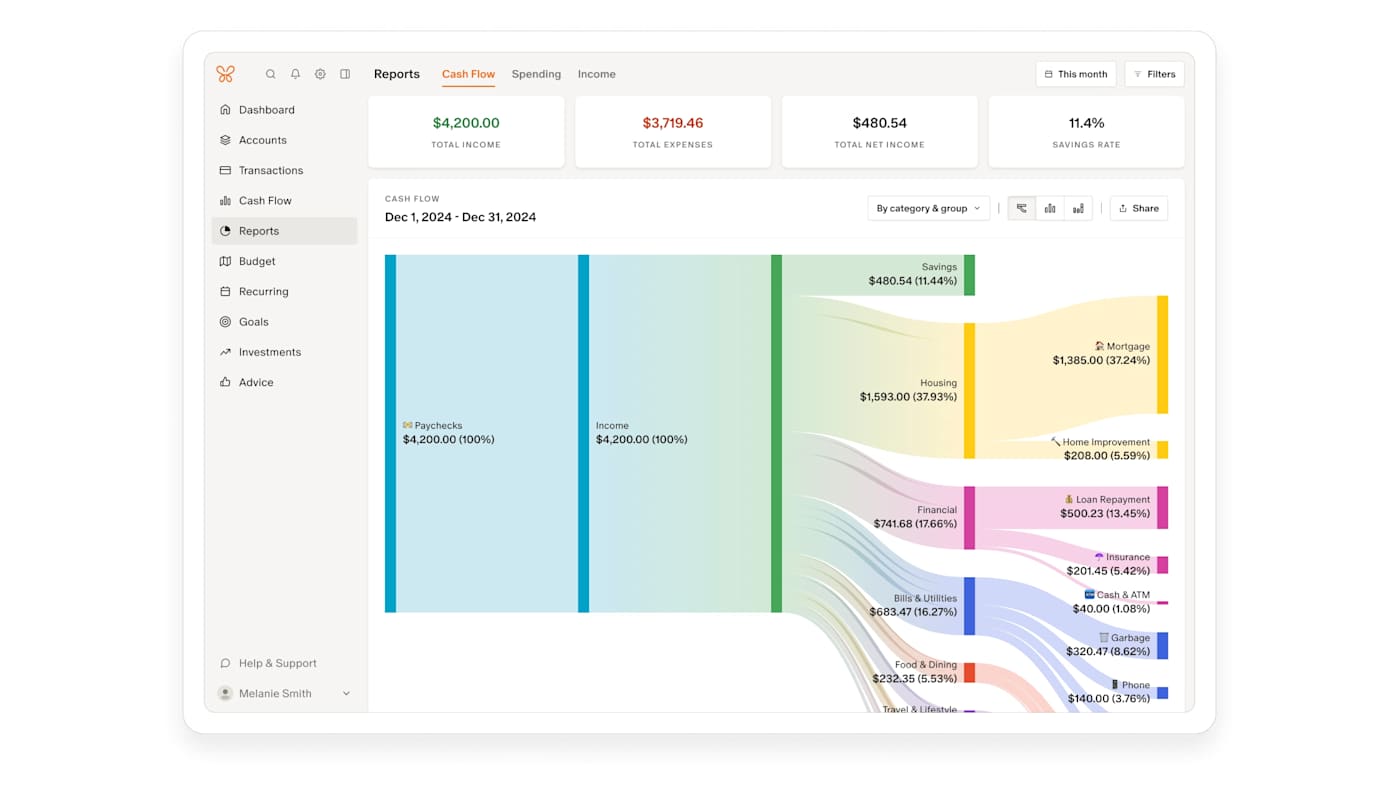
Where Monarch Money really shines is in the level of detail it offers. It’s built for people who want a clear, structured view of their money, not just a running list of transactions. In the budgeting section, you can see budgets versus actual spending by category, along with forecasts by month or by year. Recurring expenses can also be defined using more than just merchant names, which helps keep things accurate with less manual cleanup.

Beyond day-to-day budgeting, Monarch does a good job of showing the bigger picture. It includes visual reports and charts that make it easier to spot trends over time, plus tools for tracking net worth, investments and financial goals. Monarch can even factor in non-cash assets like your home or vehicle, pulling in estimates automatically so they appear alongside your accounts.

All of that depth won’t be for everyone, but if you’re willing to spend a little time getting set up, Monarch Money offers a lot of control and insight. With the current deal bringing the price down to $50 for a full year, it’s a solid opportunity to try one of our favorite budgeting apps at a discount of 50 percent off and see if it fits how you like to manage your money.

This article originally appeared on Engadget at https://www.engadget.com/deals/new-users-can-get-one-year-of-access-to-monarch-money-for-50-percent-off-120000143.html?src=rss

©

  •  

How to customize your iPhone home screen with iOS 26

Apple has steadily expanded home screen customization on the iPhone over the past few years, and iOS 26 continues that trend with more visual control over app icons. Building on the changes introduced in iOS 18, the latest update lets you resize icons, remove app labels, apply system-wide color tints and make icons translucent using Apple’s new Liquid Glass design language.

Most of these options live in one place: the Customize menu, which appears after entering edit mode on the home screen. While iOS still doesn’t allow total freeform icon placement or third-party icon packs without shortcuts, the tools Apple provides are now flexible enough to dramatically change how an iPhone looks and feels. This guide walks through how to customize app icons and layouts using the options available in iOS 26, with a focus on icon size, color, appearance and arrangement.

How to customize your iPhone home screen

All home screen customization starts the same way.

  1. Go to the Home Screen.

  2. Touch and hold an empty area of the Home Screen background until the apps begin to jiggle.

  3. Tap Edit in the top left corner, then select Customize from the menu.

A customization panel appears along the bottom of the screen. Changes made here apply across all home screen pages at once, rather than on a per-page basis.

From the Customize menu, you can:

  • Adjust icon size

  • Change appearance (e.g., Dark)

  • Make icons translucent with a clear look

  • Add a color tint to icons and widgets

How to make app icons larger and remove labels

One of the simplest changes in iOS 26 is also one of the most visually impactful. From the Customize menu, tap the icon showing two app squares of different sizes. This switches the home screen to Large App Icons mode.

When large icons are enabled, app labels disappear entirely and the icons themselves expand to fill more of the grid. This creates a cleaner look and makes apps easier to tap, particularly on iPhone models with larger screens. The tradeoff is that fewer icons fit on each screen and spacing between rows becomes more pronounced.

To revert to standard icons with labels, repeat the steps and tap the same button again.

undefined

How to change the appearance of app icons

iOS 26 offers four icon appearance styles: Default, Dark, Clear and Tinted. These options are available from the top row of the Customize panel. From the Customize panel, you can tap the sun icon across all options in the top left-hand corner to toggle wallpaper dimming. This generally makes app icons and labels easier to read. 

The Default option keeps icons looking as the developers intended, with no system-wide color or transparency applied.

Selecting Dark applies a darker background to supported app icons and widgets. Apple’s own apps fully support this mode, and some third-party apps do as well, though many retain their original colors. When Dark is enabled, iOS can also dim the wallpaper slightly, which may help reduce power usage on OLED displays.

The Clear option enables translucency across all apps on the Home Screen. This removes all color but retains app labels. The layered, frosted-glass effect changes depending on the background image. Clear icons can be paired with Light, Dark or Auto styles using the options along the bottom of the Customize panel.

Tinted mode allows all supported app icons and widgets to take on a single color scheme. After selecting Tinted, color and saturation sliders appear at the bottom of the screen. Adjusting these changes the hue applied across icons, creating a uniform look that can range from subtle pastels to high-contrast monochrome themes.

If you want a specific color from your iPhone’s wallpaper, select the eyedropper tool, then tap and hold while dragging the cursor across the screen until you land on your chosen color. Like the Clear option, you’ll be able to select from Light, Dark or Auto when adjusting the Tinted settings.

The Auto option allows icons to switch between light and dark appearances based on system-wide light or dark mode.

How to arrange apps around the home screen

App placement works the same way it did before iOS 26, but the visual changes introduced by larger icons and spacing make layout choices more noticeable.

Apps can be rearranged by accessing an empty space on the Home Screen, then tapping and holding until the apps start jiggling. From here you can drag icons to new positions. The grid remains fixed, meaning icons cannot overlap or be placed freely, but there is more flexibility in how empty space is used.

Icons can be clustered toward the bottom of the screen, aligned to one side or arranged to frame a wallpaper. With large icons enabled, the gap between the dock and the first row of apps becomes more pronounced, but it cannot be filled with additional icons.

Changes apply across all home screen pages, so reorganizing one page does not affect icon size or appearance on another.

What iOS 26 still doesn’t allow

Despite expanded customization, some long-standing limitations remain. iOS 26 does not support per-app icon color selection, custom icon packs without shortcuts or freeform icon placement outside the grid. Icon appearance settings apply globally, not per page or per app.

Widgets, lock screen customization and focus mode filters add additional layers of personalization, but those tools sit outside the scope of the home screen Edit menu.

iOS 26 gives iPhone users more control over the look of their home screen than ever before, even if Apple’s approach remains structured. By combining icon resizing, appearance modes and careful app arrangement, it’s possible to create a layout that feels cleaner, more personal and easier to use without relying on workarounds.

This article originally appeared on Engadget at https://www.engadget.com/mobile/smartphones/how-to-customize-your-iphone-home-screen-with-ios-26-130000798.html?src=rss

©

  •  

Surfshark VPN is offering up to 87 percent off two-year plans

Surfshark’s One plan is heavily discounted right now, with an 87-percent discount on the two-year package, plus three extra months. The promo price comes out to $2.29 per month, or $62 for the first 27 months.

We’ve generally liked Surfshark as a straightforward, speedy service for everyday use, and it’s one of the picks in our guide to the best VPNs. In our Surfshark review, we found it delivered excellent speeds overall and reliably unblocked Netflix across most of our test servers, which makes this long-term deal worth a look if you want a VPN deal that also includes extras like antivirus, breach alerts and private search.

In our Surfshark review, the VPN stood out for its excellent performance and approachable design, especially for people who want strong protection without constantly tweaking settings. During testing, it delivered some of the fastest speeds we’ve seen from a major VPN, with average download speeds dropping by just over five percent worldwide. Upload speeds also held up well, making it a solid option for streaming, browsing and everyday use. We gave Surfshark an overall score of 87 out of 100 and called it one of the best VPNs for casual users.

This deal focuses on the Surfshark One plan, which bundles the VPN with a suite of extra security tools. In addition to the VPN itself, you get Alternative ID for masking your email and personal details, antivirus protection, breach monitoring through Surfshark Alert and a private search engine. It also supports unlimited simultaneous device connections, so you can protect all of your devices with a single subscription.

Right now, the Surfshark One plan is discounted by 86 percent, bringing the price down to $67 total for two years plus three extra months. That works out to $2.49 per month for the first 27 months, billed upfront, with a 30-day money-back guarantee if you change your mind. 

If you want to compare it against other top services before committing, you can also check out our full Surfshark VPN review and our best VPN guide to see how it stacks up. We’ll be keeping our best VPN deals roundup updated regularly, too.

This article originally appeared on Engadget at https://www.engadget.com/deals/surfshark-vpn-is-offering-up-to-87-percent-off-two-year-plans-123000279.html?src=rss

©

  •  

MasterClass deal: It's the last day to get 50 percent off subscriptions

MasterClass has dropped the price of its annual memberships by 50 percent, making it a more affordable way to explore its full library of courses across cooking, business, photography, writing and more. With the discount applied, you’ll spend $10 per month when billed annually for the Premium tier, with lower-cost Standard and Plus options available depending on how many devices you want to use at once and whether you need offline viewing.

There are more than 200 classes on MasterClass now, and many are led by big names at the top of their fields. Depending on your interests, you might pick up cooking tips from Gordon Ramsay, learn storytelling from Margaret Atwood, explore business strategy with Richard Branson or get insights into performance and mindset from athletes and entertainers. The catalog spans everything from film and TV to wellness, music, science, leadership and photography, so it’s easy to dip in and find something that holds your attention.

Over the years, MasterClass has expanded into a broad learning platform that feels like part streaming service and part educational library. The catalog spans categories like food, film, music, wellness, sports and entrepreneurship, with lessons designed to be short and easy to follow. Since every plan includes access to the full course library, the choice mostly comes down to convenience. The Standard tier supports one device and doesn’t include offline mode, the Plus plan allows streaming on two devices with downloads, and the Premium tier increases that to six devices with offline access as well.

Classes are structured to be approachable whether you want to learn a new skill or just explore a topic out of curiosity. Lessons are broken into bite-sized segments, so it’s easy to watch one or two at a time on a commute or in the evening. Members also get access to a global community, occasional newsletters and the ability to switch between video and audio listening on supported classes.

If you’ve been considering trying MasterClass, this deal makes it a more affordable way to see if it works for you. A subscription can also double as a thoughtful gift, which is one reason it has appeared in Engadget’s roundup of the best subscription gifts to send to loved ones. With the current 50 percent discount applied across all tiers, it’s a relatively low-cost way to get access to a large library of professionally produced courses that you can watch at your own pace throughout the year.

This article originally appeared on Engadget at https://www.engadget.com/deals/masterclass-deal-its-the-last-day-to-get-50-percent-off-subscriptions-130500234.html?src=rss

©

  •  

How to set up an AirTag

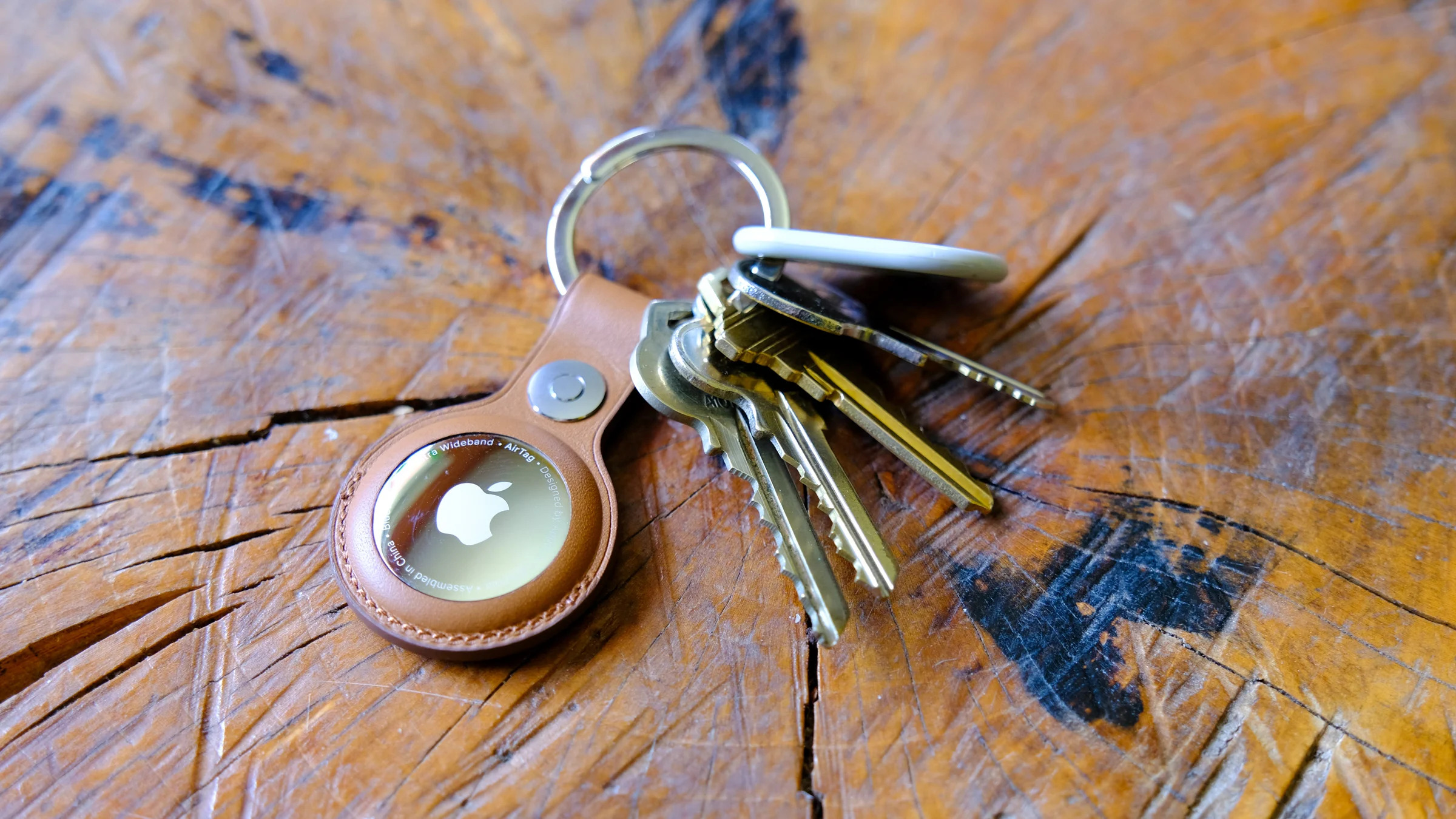
Apple’s AirTag makes it easy to keep tabs on everyday items like keys, bags and luggage using the Find My network. Setup is quick, requires no tools and takes just a minute or two as long as you have a compatible iPhone or iPad. Once paired, your AirTag quietly works in the background to help you locate misplaced belongings. This guide walks through how to set up an AirTag, how to name it so you can easily identify what it’s attached to and what to do if setup doesn’t go as planned.

What you need before setting up an AirTag

Before you begin, make sure you have the following:

  • An iPhone or iPad signed in to your Apple Account

  • Bluetooth enabled on that device

  • Location Services enabled

  • iOS or iPadOS 14.5 or later (AirTag 2nd generation requires iOS or iPadOS 26.2.1 or later)

  • A stable Wi-Fi or cellular connection

You’ll also want to ensure iCloud Keychain is enabled and that your Apple Account setup is fully completed in Settings.

How to set up an AirTag using your iPhone or iPad

The easiest way to set up an AirTag is directly through the on-screen setup prompt.

  1. Remove the plastic tab from your AirTag to activate the battery.

  2. Hold the AirTag near your unlocked iPhone or iPad.

  3. When the setup animation appears, tap Connect.

  4. Choose a category for your AirTag, such as Keys, Backpack or Luggage. If you select Custom Name, you can type your own label and choose an emoji.

  5. Tap Continue to link the AirTag to your Apple Account.

  6. Tap Done to finish setup.

Once completed, the AirTag will appear under the Items tab in the Find My app. If you’re setting up multiple AirTags, make sure only one is near your device at a time. If more than one is detected, a notification will appear saying “More than one AirTag detected”. If this happens, move the others farther away and try again.

How to add an AirTag using the Find My app

If the setup animation doesn’t appear automatically, you can add an AirTag manually through Find My.

  1. Open the Find My app on your iPhone or iPad.

  2. Tap the Items tab.

  3. Tap the Add button.

  4. Select Add AirTag or Other Item (if you’re adding a compatible FindMy Network accessory).

  5. Follow the on-screen instructions to complete setup.

You can add up to 32 items in Find My, including AirTags, shared items and compatible accessories. If you’ve reached the limit, you’ll need to remove an item before adding a new one.

What to do if your AirTag won’t connect

If setup fails or the pairing animation disappears, try the following steps:

  1. Lock your iPhone or iPad, unlock it again and wait about 15 seconds for the animation to reappear.

  2. Make sure Bluetooth and Location Services are turned on in Settings.

  3. Check that Find My has permission to use Precise Location.

  4. Ensure you’re signed in to your Apple Account and iCloud Keychain is enabled.

  5. Verify your device is running the latest version of iOS or iPadOS (iOS or iPadOS 26.2.1 or later).

If the AirTag still won’t connect, the battery may need replacing. AirTags use a standard CR2032 coin cell battery, and swapping it only takes a minute. If issues persist after replacing the battery, you may need to reset the AirTag and try setup again.

How to name and label your AirTag

Naming your AirTag makes it much easier to identify when you’re tracking multiple items. During setup, Apple offers preset labels like Keys or Backpack, but you can customize these at any time.

To rename an AirTag after setup:

  1. Open the Find My app.

  2. Tap Items and select your AirTag.

  3. Tap Add Name or Rename Item.

  4. Choose a preset label or select Custom Name.

  5. Optionally add an emoji for quick visual identification.

Clear labels are especially helpful if you use AirTags for travel, work gear or shared household items.

Apple AirTag
Apple AirTag
Engadget

Attaching your AirTag to everyday items

AirTags don’t have built-in clips or adhesive, so you’ll usually need an accessory to attach one securely. Depending on how you plan to use it, that could mean a key ring, luggage tag, wallet insert or bike mount.

If you’re unsure which style works best, Engadget has rounded up the best Apple AirTag accessories, covering options for keys, bags, wallets and more. Choosing the right accessory helps ensure your AirTag stays attached and works the way you expect.

Wrap-up

After setup, your AirTag will automatically update its location using Apple’s Find My network. You can view its last known location, play a sound to help locate it nearby or use Precision Finding on supported iPhones to guide you directly to it. With just a few minutes of setup and a clear label, an AirTag can become a reliable way to keep track of important belongings, whether you’re at home or on the move.

This article originally appeared on Engadget at https://www.engadget.com/computing/accessories/how-to-set-up-an-airtag-120000789.html?src=rss

©

  •  

Proton VPN two-year subscriptions are 70 percent off right now

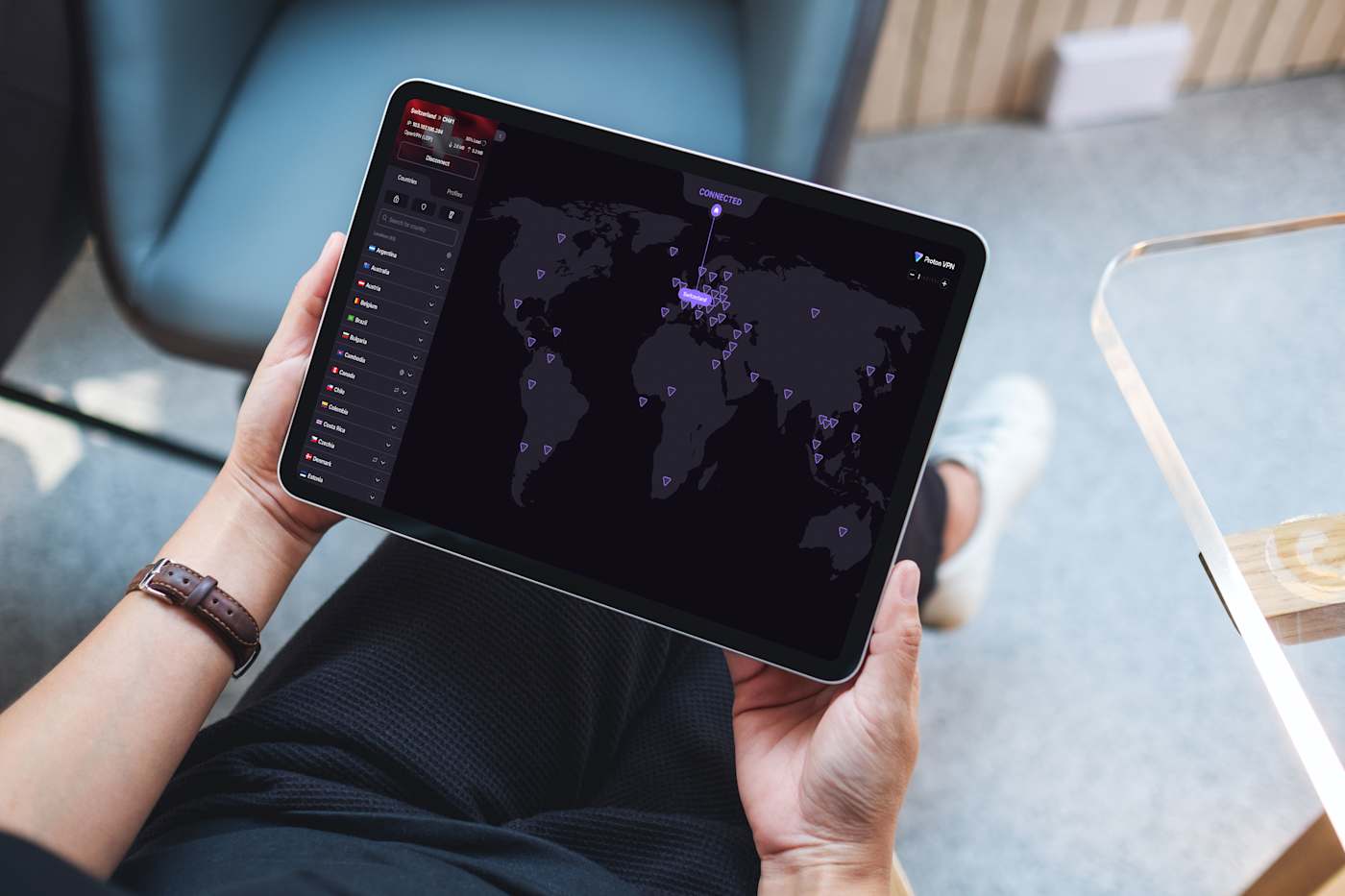
Proton VPN is running a solid deal right now, dropping its two-year Proton VPN Plus plan to $2.99 per month. That works out to $72 billed upfront for the first 24 months, which represents a 70 percent discount compared to its regular pricing. 

We’ve rated Proton VPN highly thanks to its strong privacy credentials, transparent nonprofit backing and consistently fast performance. It’s one of the services we recommend in our guide to the best VPNs, and this deal also shows up alongside other standout offers in our ongoing roundup of the best VPN deals. It’s a good option if you’re looking to lock in long-term protection at a lower monthly cost.

In our Proton VPN review, the service impressed us with consistently fast performance and strong privacy protections. We measured average download speeds at 88 percent of our unprotected connection and upload speeds at 98 percent, which is more than enough for 4K streaming, gaming and torrenting. It also unblocked Netflix in every region we tested, and while its Mac and iOS apps aren’t quite as polished as the Windows and Android versions, the service is still easy to install and largely set-it-and-forget-it across platforms. We gave Proton VPN a score of 90 out of 100.

Proton VPN Plus is the company’s premium tier and includes access to its full server network, which now spans more than 15,000 servers across 120-plus countries. A single subscription covers up to 10 devices at once and unlocks features like NetShield ad and malware blocking, Secure Core “double hop” connections, split tunneling, custom DNS controls and priority customer support. Proton VPN Plus also supports fast P2P traffic on nearly all paid servers and includes VPN Accelerator, which helps maintain high speeds over long-distance connections.

Right now, Proton VPN Plus is discounted to $2.99 per month when you commit to two years, billed as $72 upfront for the first 24 months. After that, the plan renews annually at $83.88. That’s a 70 percent discount compared to the standard monthly rate. As with Proton’s other paid plans, the subscription comes with a 30-day money-back guarantee, so you can try it risk-free if you’re not ready to lock in long term.

This article originally appeared on Engadget at https://www.engadget.com/deals/proton-vpn-two-year-subscriptions-are-70-percent-off-right-now-123000972.html?src=rss

©

  •  

iPhone Fold rumors: Everything we know right now, including the leaked design, upgrades, price and more

Apple still hasn’t revealed a foldable iPhone, but the steady drip of leaks suggests the project is moving closer to reality. Over the past few months, analysts and supply-chain watchers have continued to fill in key details, with most reports still pointing to a launch sometime in the second half of 2026. While Apple hasn’t confirmed anything publicly, the overall picture is starting to look more consistent.

As always, plans for unreleased Apple hardware can change at any time. Features may shift, timelines can slip and some prototypes may never ship. Even so, recent reporting gives us the clearest sense yet of how Apple’s first foldable could take shape and where it might fit in the broader iPhone lineup.

Below, we’ve rounded up the most credible rumors so far, and we’ll keep this guide updated as new details emerge.

When could the iPhone Fold launch?

Rumors of a foldable iPhone date back as far as 2017, but more recent reporting suggests Apple has finally locked onto a realistic window. Most sources now point to fall 2026, likely alongside the iPhone 18 lineup, with some supply-chain hints suggesting mass production could begin in mid-2026 if development stays on track.

Mark Gurman has gone back and forth on timing, initially suggesting Apple could launch “as early as 2026,” before later writing that the device would ship at the end of 2026 and sell primarily in 2027. Analyst Ming-Chi Kuo has also repeatedly cited the second half of 2026 as Apple’s target.

Some reports still claim the project could slip into 2027 if Apple runs into manufacturing or durability issues, particularly around the hinge or display. Given Apple’s history of delaying products that it feels aren’t ready, that remains a real possibility.

What will the iPhone Fold look like?

Current consensus suggests Apple has settled on a book-style foldable design, similar to Samsung’s Galaxy Z Fold series, rather than a clamshell flip phone.

When unfolded, the iPhone Fold is expected to resemble a small tablet like the iPad mini (8.3 inches). Based on the rumor mill, though, the iPhone Fold may be a touch smaller, with an internal display measuring around 7.7 to 7.8 inches. When closed, it should function like a conventional smartphone, with an outer display in the 5.5-inch range.

CAD leaks and alleged case-maker molds suggest the device may be shorter and wider than a standard iPhone when folded, creating a squarer footprint that better matches the aspect ratio of the inner display. Several reports have also pointed to the iPhone Air as a potential preview of Apple’s foldable design work, with its unusually thin chassis widely interpreted as a look at what one half of a future foldable iPhone could resemble.

If that theory holds, it could help explain the Fold’s rumored dimensions. Thickness is expected to land around 4.5 to 4.8mm when unfolded, according to analyst Ming-Chi Kuo, putting it in a similar range to the iPhone Air, and roughly 9 to 9.5mm when folded, depending on the final hinge design and internal layering.

iPhone 17 Pro, iPhone Air
Engadget

Display and the crease question

The display is arguably the biggest challenge for any foldable phone, and it’s an area where Apple appears to have invested years of development.

Multiple reports say Apple will rely on Samsung Display as its primary supplier. At CES 2026, Samsung showcased a new crease-less foldable OLED panel, which several sources — including Bloomberg — suggested could be the same technology Apple plans to use.

According to these reports, the panel combines a flexible OLED with a laser-drilled metal support plate that disperses stress when folding. The goal is a display with a nearly invisible crease, something Apple reportedly considers essential before entering the foldable market.

If Apple does use this panel, it would mark a notable improvement over current foldables, which still show visible creasing under certain lighting conditions.

Cameras and biometrics

Camera rumors suggest Apple is planning a four-camera setup. That may include:

  • Two rear cameras (main and ultra-wide, both rumored at 48MP)

  • One punch-hole camera on the outer display

  • One under-display camera on the inner screen

Several sources claim Apple will avoid Face ID entirely on the iPhone Fold. Instead, it’s expected to rely on Touch ID built into the power button, similar to recent iPad models. This would allow Apple to keep both displays free of notches or Dynamic Island cutouts.

Under-display camera technology has historically produced lower image quality, but a rumored 24MP sensor would be a significant step up compared to existing foldables, which typically use much lower-resolution sensors.

iPhone Fold’s hinge and materials

The hinge is another area where Apple may diverge from competitors. Multiple reports claim Apple will use Liquidmetal, which is a long-standing trade name for a metallic glass alloy the company has previously used in smaller components. While often referred to as “liquid metal” or “Liquid Metal” in reports, Liquidmetal is the branding Apple has historically associated with the material.

Liquidmetal is said to be stronger and more resistant to deformation than titanium, while remaining relatively lightweight. If accurate, this could help improve long-term durability and reduce wear on the foldable display.

Leaks from Jon Prosser also reference a metal plate beneath the display that works in tandem with the hinge to minimize creasing — a claim that aligns with reporting from Korean and Chinese supply-chain sources.

Battery and other components 

Battery life is another potential differentiator. According to Ming-Chi Kuo and multiple Asian supply-chain reports, Apple is testing high-density battery cells in the 5,000 to 5,800mAh range.

That would make it the largest battery ever used in an iPhone, and competitive with (or larger than) batteries in current Android foldables. The device is also expected to use a future A-series chip and Apple’s in-house modem, with some reports pointing specifically to a next-generation C2 modem as part of Apple’s broader push to reduce reliance on Qualcomm.

Price

None of this will come cheap, that’s for certain. Nearly every report agrees that the iPhone Fold will be Apple’s most expensive iPhone ever.

Estimates currently place the price between $2,000 and $2,500 in the US. Bloomberg has said the price will be “at least $2,000,” while other analysts have narrowed the likely range to around $2,100 and $2,300. That positions the iPhone Fold well above the iPhone Pro Max and closer to Apple’s high-end Macs and iPads.

Despite years of rumors, there’s still plenty that remains unclear. Apple hasn’t confirmed the name “iPhone Fold,” final dimensions, software features or how iOS would adapt to a folding form factor. Durability, repairability and long-term reliability are also open questions. For now, the safest assumption is that Apple is taking its time and that many of these details could still change before launch.

This article originally appeared on Engadget at https://www.engadget.com/mobile/smartphones/iphone-fold-rumors-everything-we-know-right-now-including-the-leaked-design-upgrades-price-and-more-130000733.html?src=rss

©

  •  

Apple Creator Studio is now available for $13 per month: What's included and what it means for creators

Services have been a huge part of Apple’s business for the past several years — to the tune of tens of billions of dollars in revenue last year alone. Now, with the new Apple Creator Studio bundle, the company is leaning harder into the professional creative software space.

Apple Creator Studio packages a bunch of the company’s pro apps into a single subscription service that you can pay monthly or yearly for. It’s officially available starting January 28, and includes a one-month free trial. The key shift is that some of these apps are now subscription-only on iPad, even as Apple continues to offer one-time purchases on the Mac – albeit with slightly different feature offerings. Here’s everything you need to know about Apple Creator Studio and the programs it includes.

What Apple Creator Studio includes

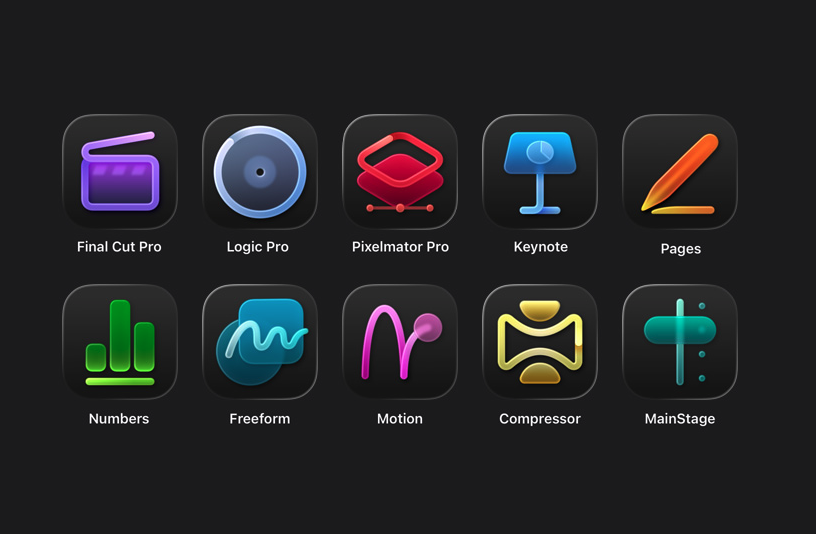
At its core, Apple Creator Studio gives subscribers access to Apple’s professional video, music and imaging apps. The bundle includes Final Cut Pro, Logic Pro, Pixelmator Pro, Motion, Compressor and MainStage. Pixelmator Pro (which Apple acquired in late 2024) is also coming to iPad for the first time, with a touch-optimized interface and Apple Pencil support.

A Creator Studio subscription also unlocks premium content and features inside Apple’s productivity apps. Keynote, Pages and Numbers remain free, but subscribers get access to premium templates and themes, plus a new Content Hub with Apple-curated photos, graphics and illustrations. Similar paid features are coming to Freeform later this year, the company says.

Apple is also using the bundle to introduce new “intelligence” features across several apps. In Final Cut Pro, the new Beat Detection feature can analyze a music track and show a beat grid so you can line edits up to the rhythm. The app is also getting tools like transcript search and visual search designed to make it easier to find moments across footage.

Logic Pro is gaining new AI-assisted Session Players and workflow features on Mac and iPad. Pixelmator Pro continues to rely heavily on machine learning for tasks like background removal, image repair and image upscaling. Note that some of these features require an Apple Intelligence-capable device.

Which devices are supported

Apple Creator Studio works across multiple Apple platforms, though not every app is available everywhere.

On the Mac, subscribers get access to all six apps: Final Cut Pro, Logic Pro, Pixelmator Pro, Motion, Compressor and MainStage.

On the iPad, Final Cut Pro, Logic Pro and Pixelmator Pro are included. Motion, Compressor and MainStage remain Mac-only.

On the iPhone, Creator Studio does not include full versions of Final Cut Pro, Logic Pro or Pixelmator Pro. Instead, it unlocks premium features and content inside Keynote, Pages and Numbers, and eventually Freeform.

Apple says the best experience is on macOS 26, iPadOS 26 and iOS 26 or later, with individual app requirements varying by device and chip. 

Apple Creator Studio apps
Apple

Pricing and subscription options

Apple Creator Studio costs $12.99 per month or $129 per year, and new subscribers can try the service free for one month. College students and educators get a steep discount: the education plan costs $2.99 per month or $29.99 per year, and it also comes with a one-month free trial.

A standard subscription can be shared with up to five other people using Family Sharing, allowing six users total. Education subscriptions are limited to individual use and cannot be shared. Apple is also offering three free months of Creator Studio to customers who purchase a qualifying new Mac or iPad around launch.

But Creator Studio isn’t the only way you can access most of these apps. Apple says all of the major apps included in Creator Studio will continue to be available as one-time purchases on the Mac App Store.

Final Cut Pro remains priced at $299.99, Logic Pro at $199.99, Pixelmator Pro at $49.99, Motion at $49.99, Compressor at $49.99 and MainStage at $29.99. Users who already own these apps can keep using them and re-download them from the App Store as usual.

On the iPad, however, things are different. Final Cut Pro, Logic Pro and Pixelmator Pro for iPad are only available through the Creator Studio subscription. There is no standalone purchase option for those apps on iPadOS.

Keynote, Pages, Numbers and Freeform remain free for everyone to download and use. Apple says those apps will continue receiving updates, including the upcoming visual design changes tied to iOS 26 and iPadOS 26.

Without a Creator Studio subscription, you can still create, edit and collaborate in those apps. What you will not get are the paid templates, Content Hub assets and certain intelligence features.

What happens to your projects if you cancel

Apple says projects and content you create with an active subscription remain licensed as part of your original work.

Final Cut Pro, Logic Pro and Pixelmator Pro projects remain on your devices and can be copied or shared elsewhere. But you will need an active subscription to open or edit projects in those paid apps.

Keynote, Pages, Numbers and Freeform documents remain editable without a subscription. However, you will not be able to make new edits that rely on paid features once your subscription ends.

Other information about the Apple Creator Studio app bundle

Apple Creator Studio also comes with some immediate trade-offs. Alongside the bundle, Apple confirmed that the older Pixelmator app for iPhone and iPad, now described as Pixelmator Classic, will no longer receive updates. Apple says it will remain functional, but development is shifting to Pixelmator Pro, including the new iPad version included with Creator Studio.

But don't expect the standalone versions of the apps to maintain feature parity with their Creator Studio counterparts. Per Apple's FAQ, "The Apple Creator Studio version of Pixelmator Pro includes access to the Warp Tool feature," which implies that feature isn't present on the standalone version. 

More broadly, the bundle puts Apple more directly in competition with Adobe and other subscription-focused creative platforms, especially for people who are looking for a lower monthly entry point. At the same time, Apple is keeping one-time purchases on the table for Mac users, even as iPad access moves behind a subscription.

Apple Creator Studio will be available January 28. Whether it makes sense will likely come down to which device you work on and whether you would otherwise pay upfront for one or more of Apple’s pro apps.

This article originally appeared on Engadget at https://www.engadget.com/apps/apple-creator-studio-is-now-available-for-13-per-month-whats-included-and-what-it-means-for-creators-130000475.html?src=rss

©

  •  

CES 2026 Day 3: The most interesting tech that's still on the show floor

Even as CES 2026 wraps up soon, there’s no shortage of standout hardware hiding in plain sight. From genuinely quieter yard tools to ultra-light EVs and companion robots that want to remember your family, Day 3 was all about tech that felt a little more considered — and in some cases, refreshingly practical.

If you can’t get enough of CES, be sure to check out our picks for best of CES 2026, which highlights the most impressive new tech we’ve seen in Las Vegas. We’ve also rounded up the CES gadgets you can buy right now if you’re itching to place an order, along with a look at the weirdest tech at CES 2026, because it wouldn’t be CES without a few delightfully unhinged ideas.

Tone Outdoors T1 leaf blower

Tone Outdoors T1
Tone Outdoors T1
Billy Steele for Engadget

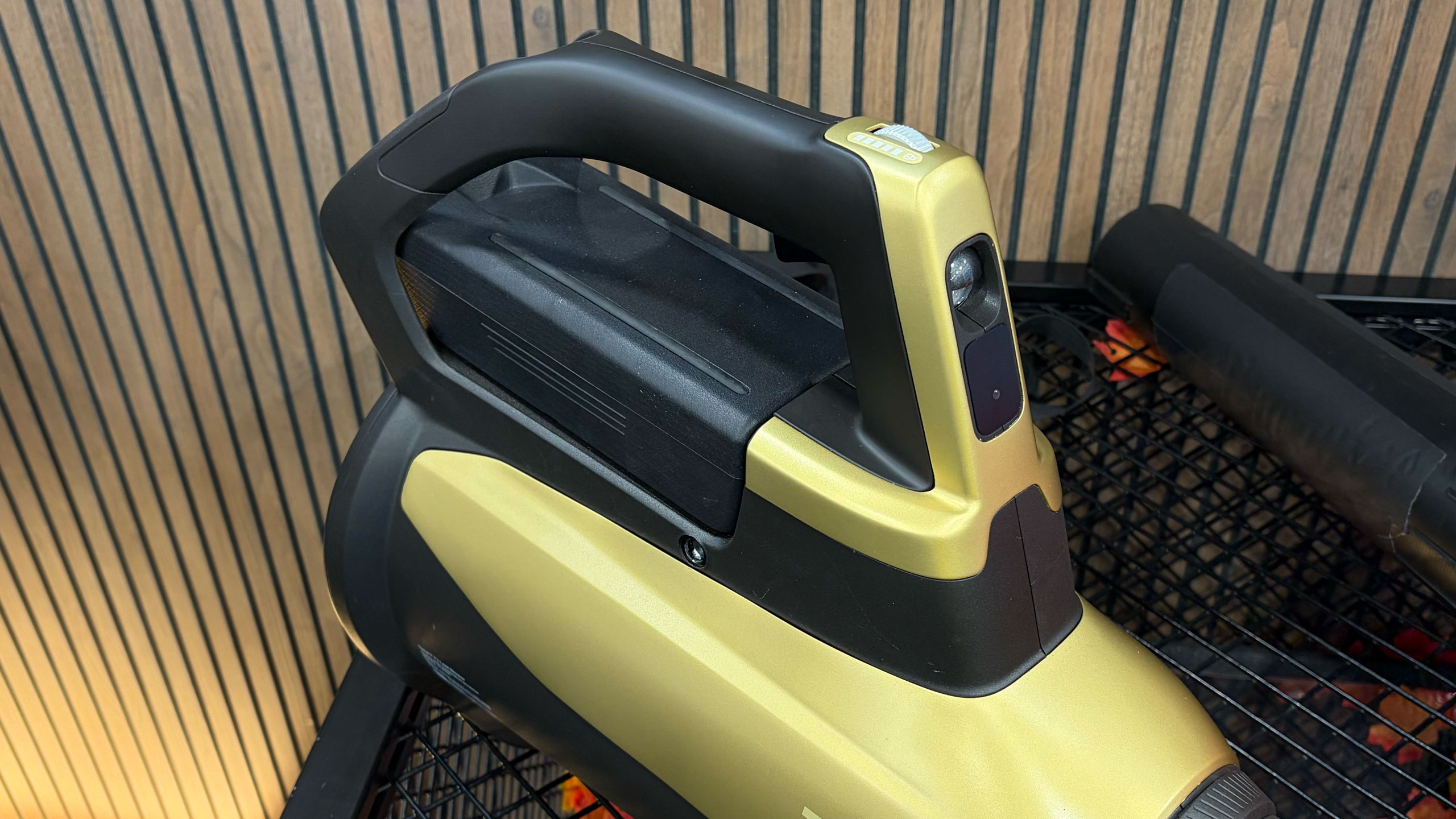
The Tone Outdoors T1 leaf blower is one of the rare CES gadgets that makes an immediate, obvious impression — mostly because it’s shockingly quiet. Whisper Aero’s aerospace-derived motor redesign delivers 880 CFM of airflow at around 52 decibels, which we could confirm even amid the noise of the show floor. It also runs up to 50 minutes in Eco mode, supports a forthcoming battery backpack and even includes an LED for nighttime cleanup. Pre-orders are open now for $599, with shipping expected in September.

GE Profile Smart Fridge

Finally! A reasonably sized fridge screen.
Sam Rutherford for Engadget
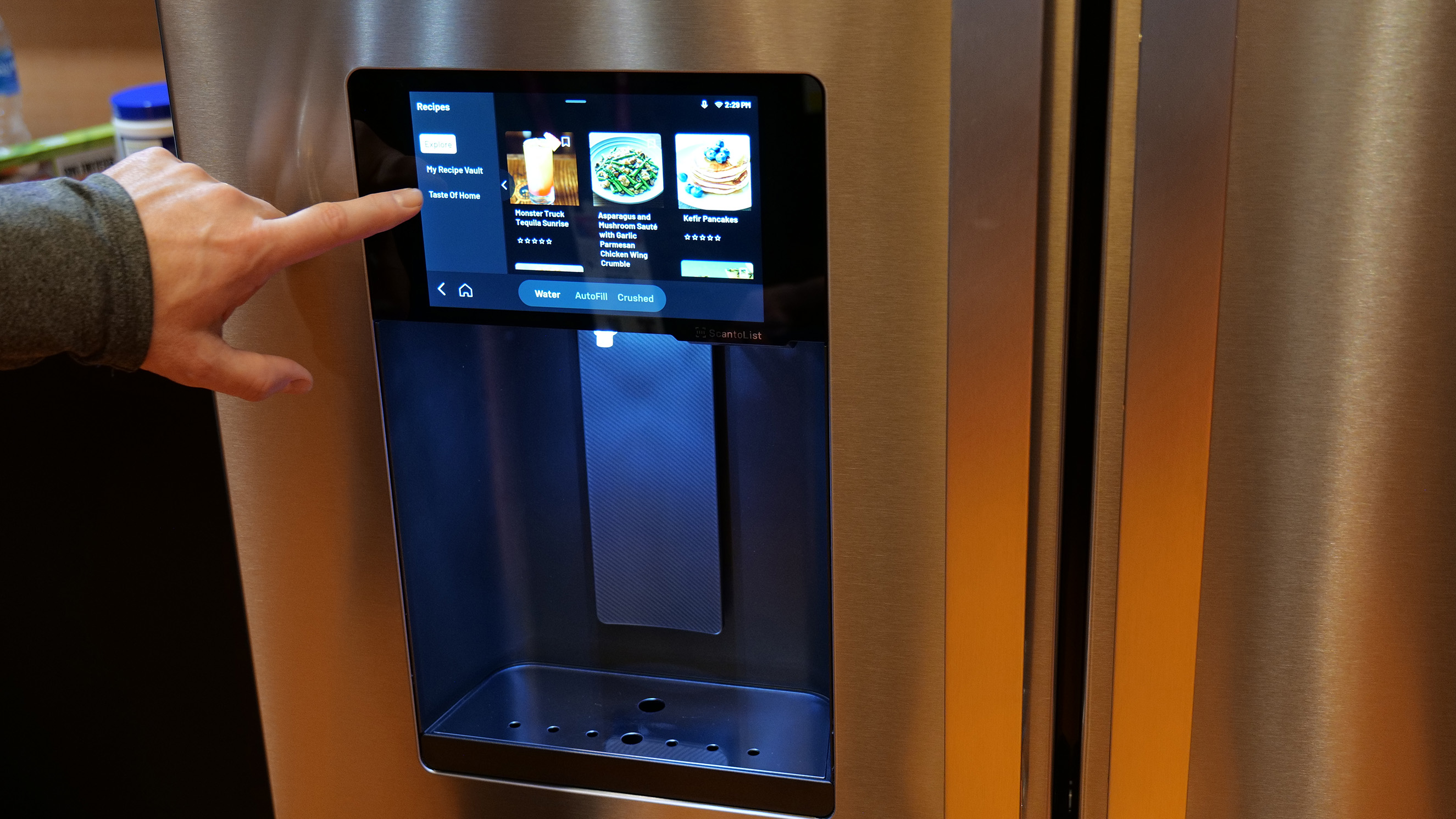
The GE Profile Smart Fridge is the first smart fridge we’ve seen that feels like it was designed around real problems instead of just slapping a massive screen on the door. GE’s AI assistant can answer practical questions like where your water filter is, scan groceries via a built-in barcode reader and keep tabs on produce with a crisper drawer camera. The eight-inch display feels refreshingly restrained, while integrations with Instacart and recipe suggestions add utility. It launches in March for $4,899, and for once, we’re genuinely curious what it would be like to live with it.

Longbow Motors Speedster EV

Longbow Motors Speedster
Billy Steele for Engadget

Longbow Motors brought one of the most emotionally compelling EVs we’ve seen to CES, and it’s unapologetically minimalist. The Speedster uses in-wheel motors from Donut Labs to hit a jaw-dropping curb weight of just 2,200 pounds, lighter than a Miata. Its stripped-back interior, mystery shift lever and exposed motors feel like a direct rejection of touchscreen-heavy modern cars. It’s wildly expensive at just under $100,000, but also one of the few EVs here that got us excited to drive.

OlloBot companion robot

A robot with eyes on top of a screen showing a smile.
Cheyenne MacDonald for Engadget

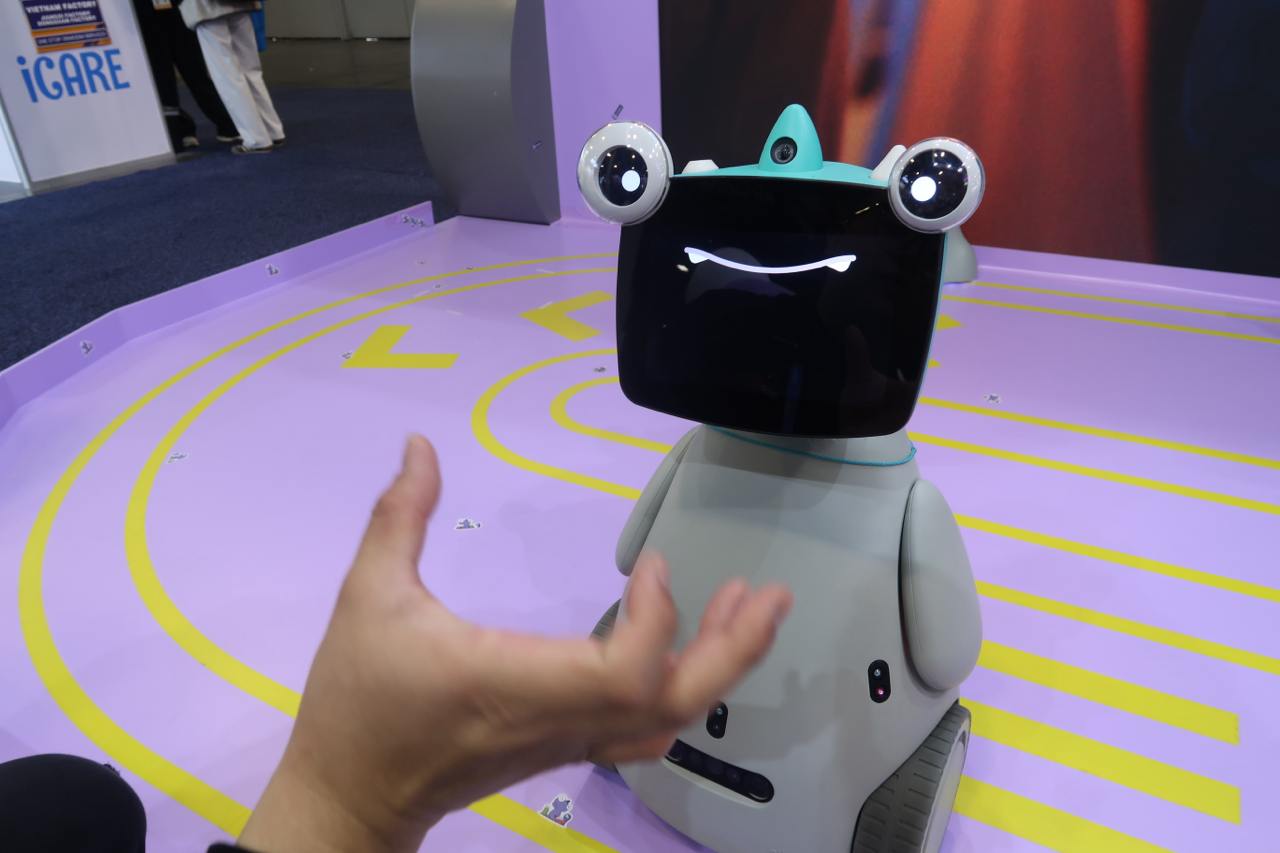
OlloBot might win the award for most charmingly strange robot on the show floor. Designed as a family “cyber pet,” it responds to voice and touch, develops a personality over time and stores all its memories locally in a removable heart-shaped module. The robot can help find lost items, make calls and eventually control Matter smart home devices. A Kickstarter is planned for summer, with pricing starting around $1,000.

Bluetti Charger 2

Image demonstrating the setup for Bluetti's Charger 2
Here's how the Bluetti Charger 2 would work with dual charging sources.
Bluetti

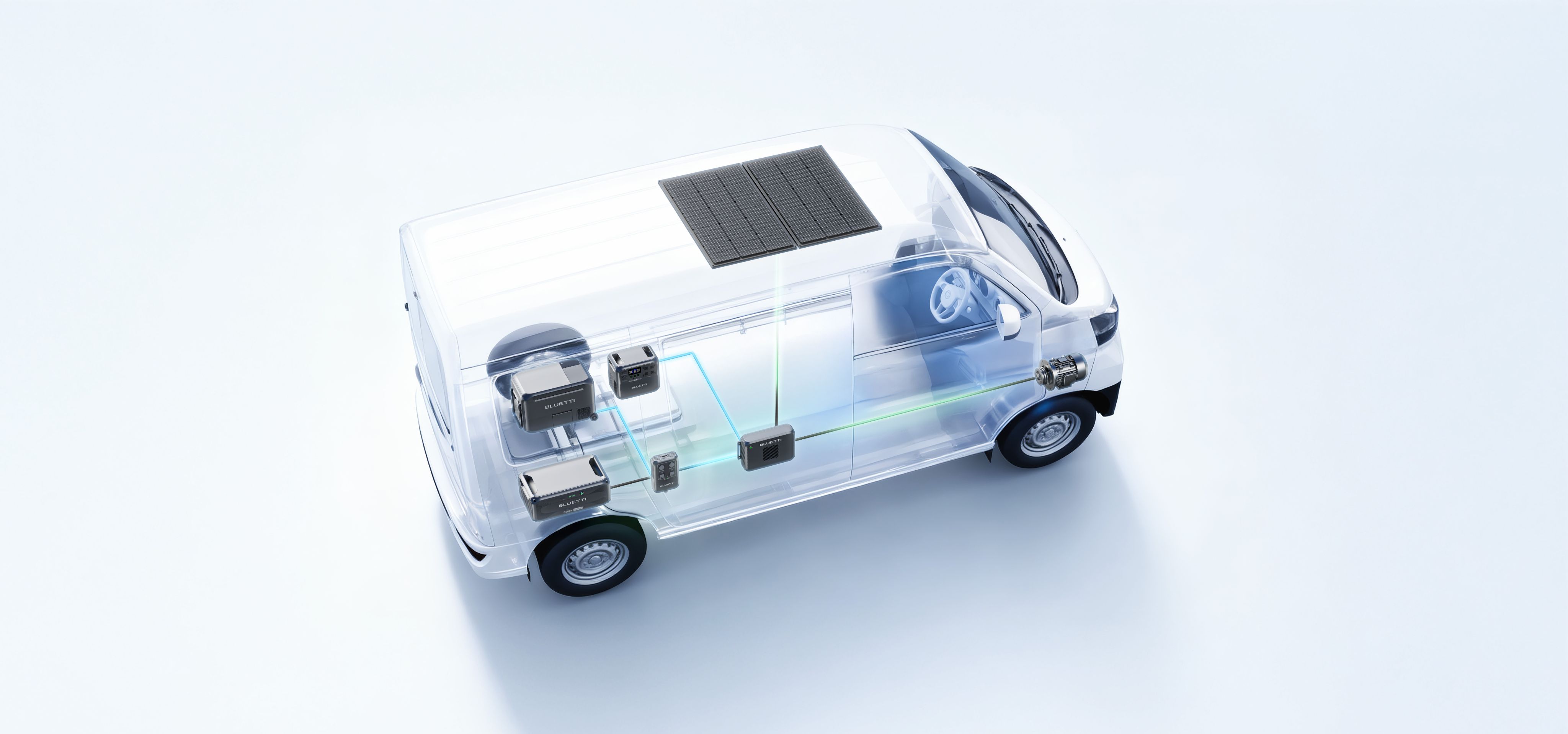
Bluetti’s Charger 2 fixes a very specific but real problem for off-grid users: charging from your engine and solar panels at the same time. The dual-input system supports up to 600W from solar and 800W from an alternator, dramatically speeding up battery top-ups. It also works with multiple Bluetti power stations and can even jump-start your vehicle in a pinch. Early pricing is $349 through February 7, after which it jumps to $499.

CES is ending, but we’ve got more stories to tell

The CES show floor will soon be closing down, but Engadget still has a lot of stories in our pipeline. As the crowds thin out, we’re continuing to surface the tech that actually stands out — whether it’s solving everyday annoyances or simply doing something bold and different. Stay tuned to our CES 2026 hub for more hands-ons, deep dives and final takeaways even after CES 2026 comes to a close at the end of this week.

This article originally appeared on Engadget at https://www.engadget.com/big-tech/ces-2026-day-3-the-most-interesting-tech-thats-still-on-the-show-floor-134724231.html?src=rss

©

  •  

19 CES gadgets you can buy right now

CES 2026 is nearly over and it’s been a fruitful one with a lot of new, weird and impressive tech. But you don’t have to wait until later this year to get your hands on some of the things announced this week in Las Vegas. A surprising number of gadgets are up for pre-order, if not outright available to buy already, from chargers and docks to projectors, keyboards and smart home gear. CES remains a place for companies to showcase concepts and big ideas, but these are the gadgets that have real prices and real order buttons as of today. Check out all of the CES 2026 gadgets you can buy right now below.

This article originally appeared on Engadget at https://www.engadget.com/19-ces-gadgets-you-can-buy-right-now-164325541.html?src=rss

©

  •  

CES 2026 Day 2: All of the coolest tech we saw on the show floor during the second day

CES 2026’s second day was all about hands on time with new tech. From Lego’s most ambitious play experiment yet to assistive mobility tech, smart home ideas that actually feel affordable and robots that might one day fold your laundry, here’s what stood out most on January 7.

Lego Smart Play

Lego Star Wars Smart Play: Luke's Red Five X-Wing
Nathan Ingraham for Engadget

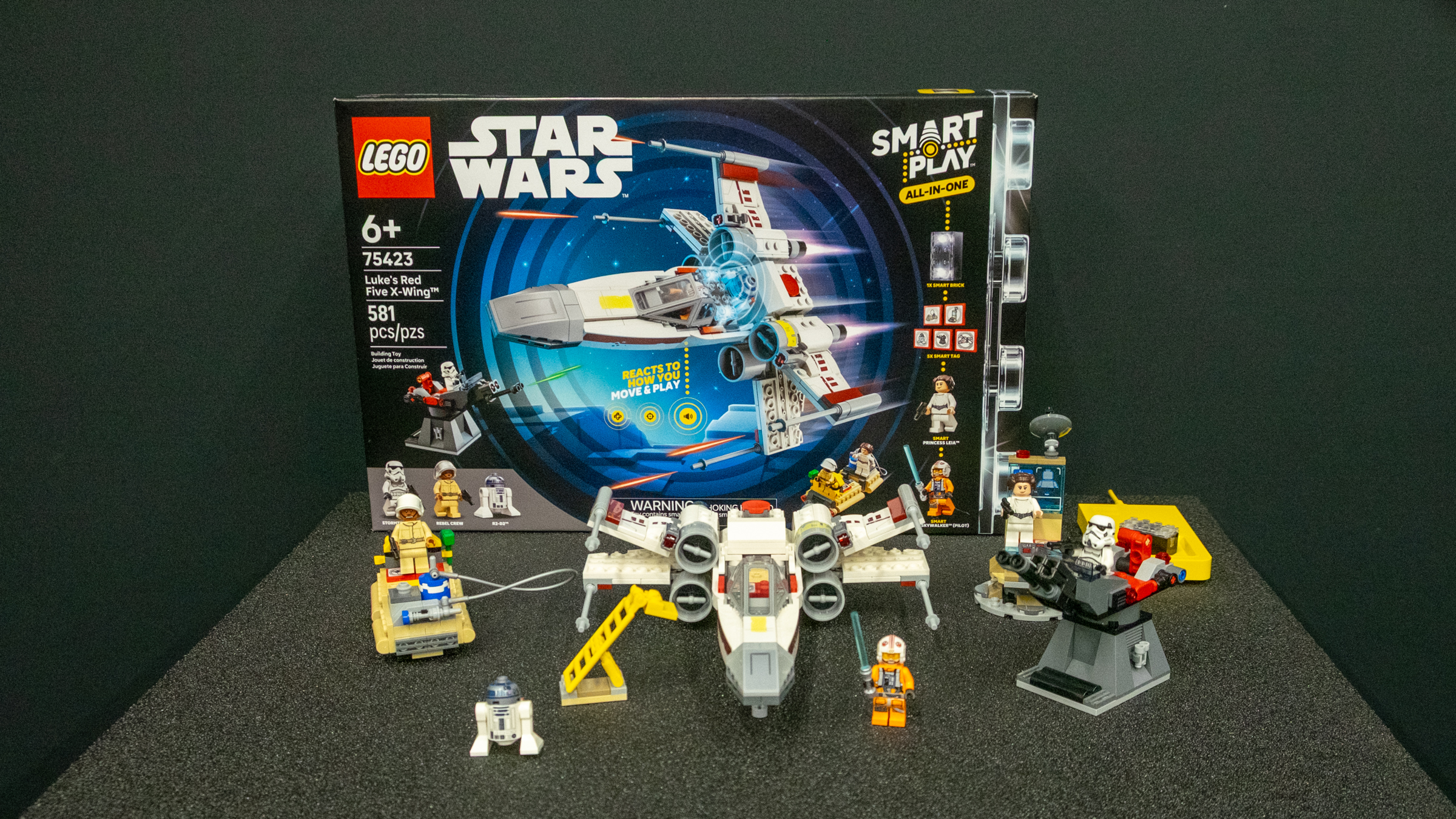
LEGO’s new Smart Play system feels far more compelling in person than it did on stage. The Smart Brick, combined with Smart Tags and Smart Minifigures, responds dynamically to movement, proximity and context, triggering sounds and interactions without screens or apps. Seeing kids physically act out Star Wars battles while the bricks reacted in real time made it clear this is designed first and foremost for active social play, not digital distraction.

WheelMove

A man sits in a manual wheelchair with an add-on attached that gives it a large central front wheel and raises the casters off the ground
Cheyenne MacDonald for Engadget

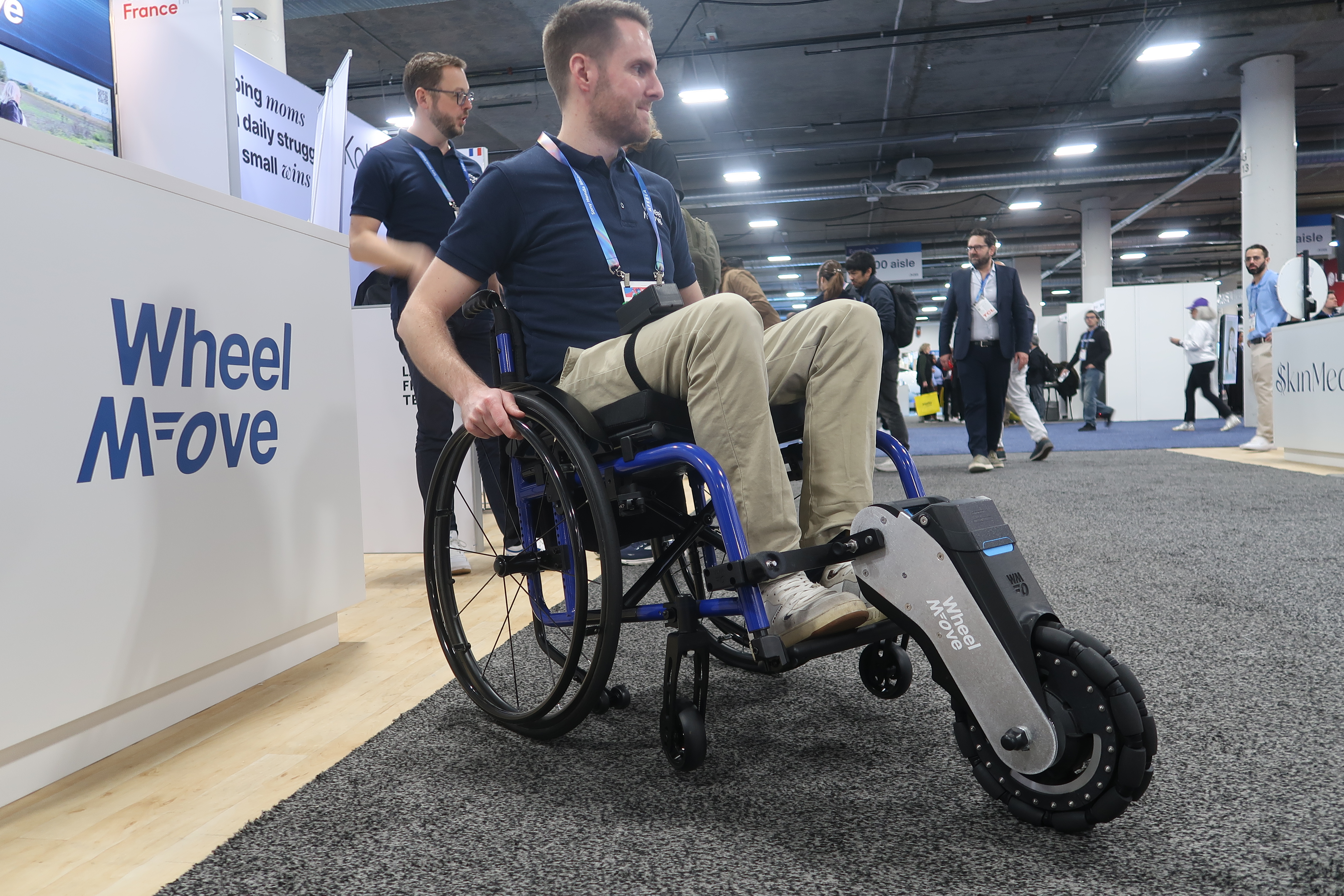
WheelMove’s motorized wheelchair attachment is compact, surprisingly quick to install and genuinely empowering in action. The add-on lifts a chair’s front wheels and adds powered assistance, making grass, cobblestones and slopes far easier to navigate. After seeing it demonstrated on uneven surfaces, it’s easy to imagine this opening up spaces that would otherwise be exhausting or inaccessible for manual wheelchair users.

Throne

Image of the Throne Toilet Computer perched on the side of a toilet.
Daniel Cooper for Engadget

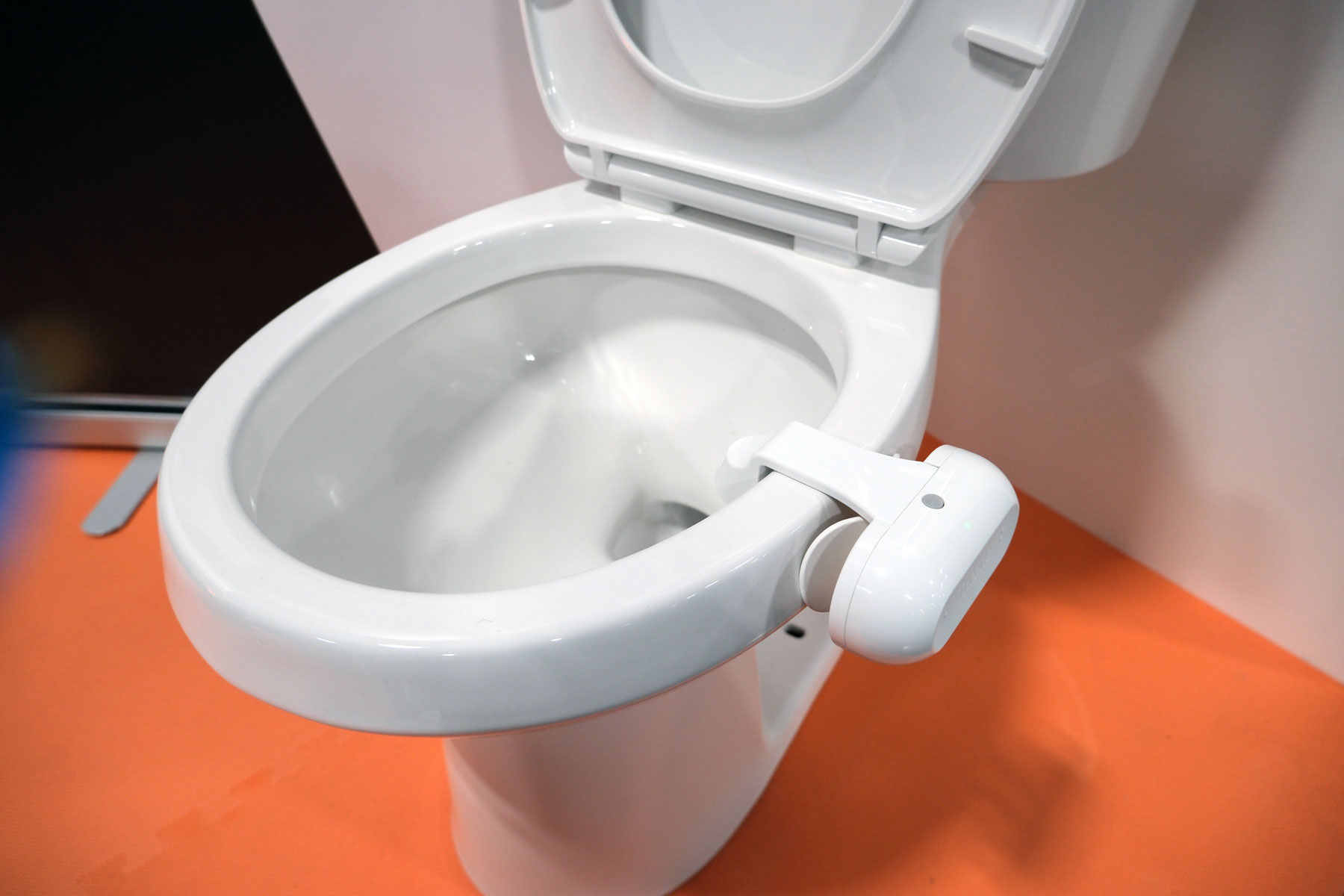
Throne’s toilet-mounted health tracker is exactly as strange as it sounds, but it’s also thoughtfully designed. Using computer vision to analyze bowel movements and urination, the device aims to establish a personal baseline and flag changes over time, with gut health and GLP-1 users firmly in mind. It’s too early to judge accuracy, but seeing it in person made it feel less gimmicky and more like a niche wellness tool worth testing.

IKEA smart home gear

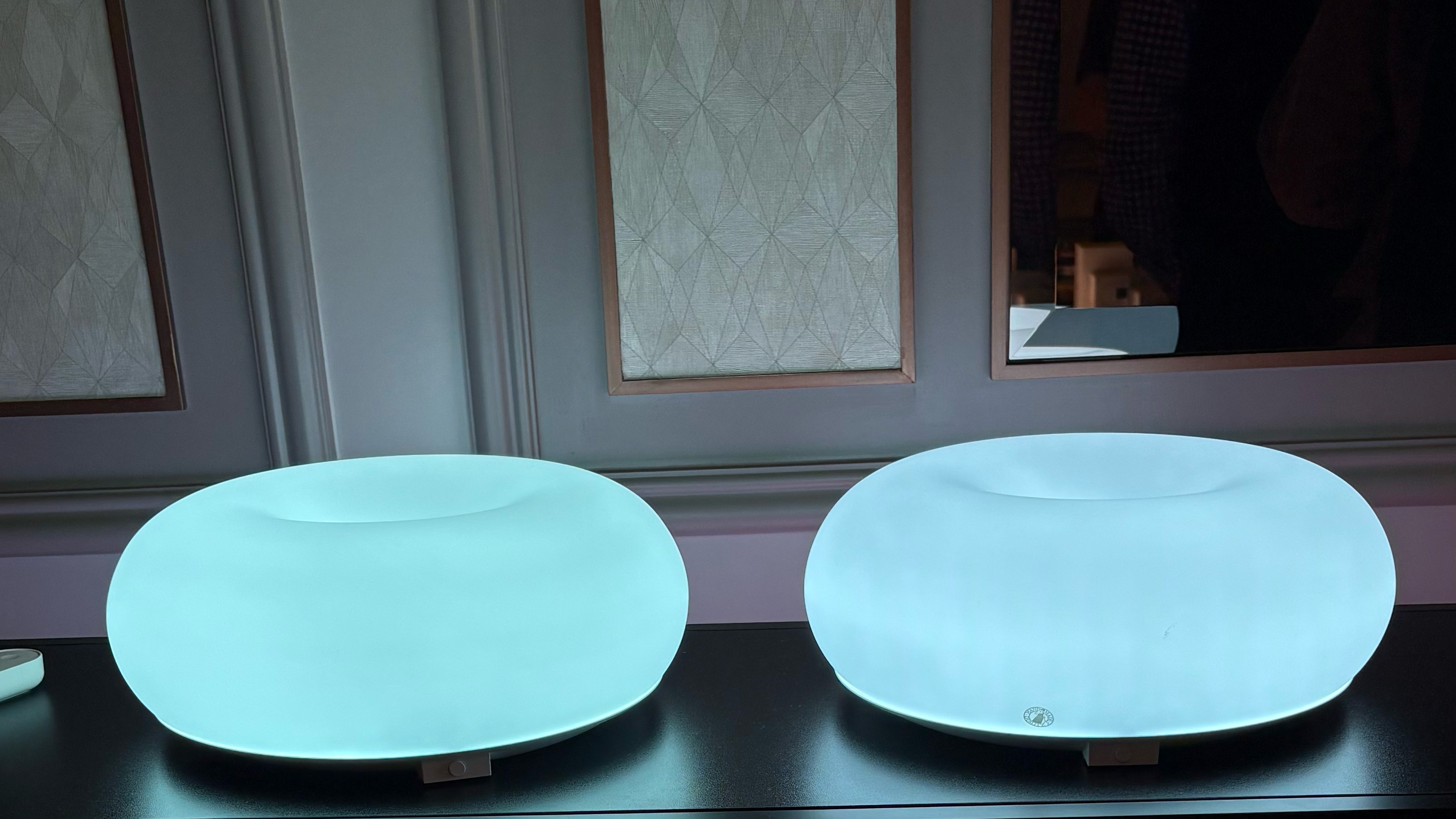
The popular VARMBLIXT donut lamp is now smart.
Amy Skorheim for Engadget

IKEA’s first CES appearance leaned heavily into what it does best: simple, affordable design. The new Matter-compatible smart home range includes bulbs, plugs, remotes and sensors priced low enough to make smart homes feel accessible again. Standouts like the magnetically mounted BILREA remote and playful TEKLAN lamps showed that IKEA hasn’t sacrificed charm in its push toward interoperability.

SwitchBot

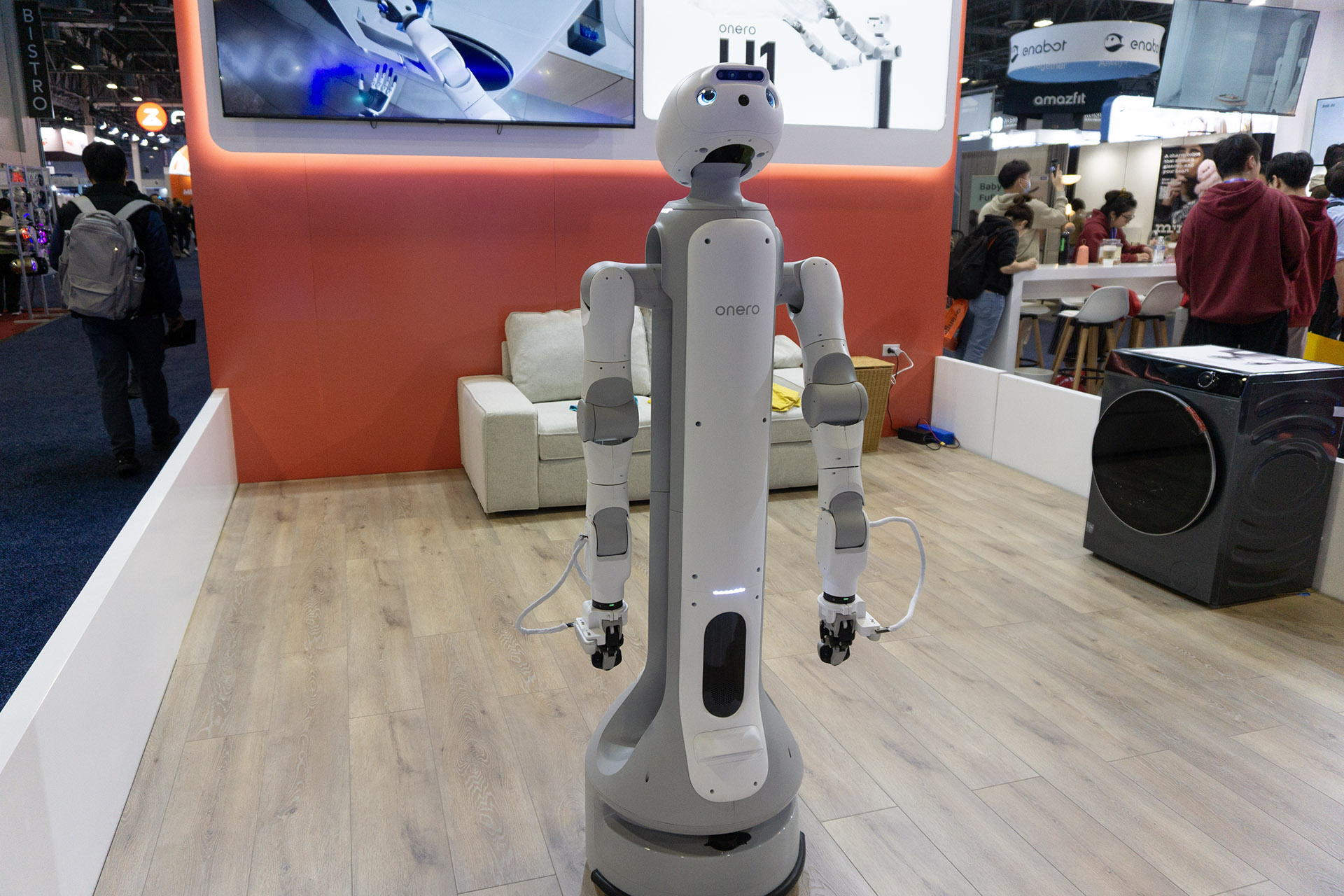
Switchbot's Onero H1.
Karissa Bell for Engadget

SwitchBot’s Onero H1 was one of the most intriguing robots on the show floor because it’s meant to ship this year. The wheeled humanoid robot uses articulated arms and onboard AI to perform household chores, like loading a washing machine, albeit at a deliberate pace. Watching it work made the case that speed matters less than reliability when a robot can handle tasks while you’re not home.

Eyebot vision testing

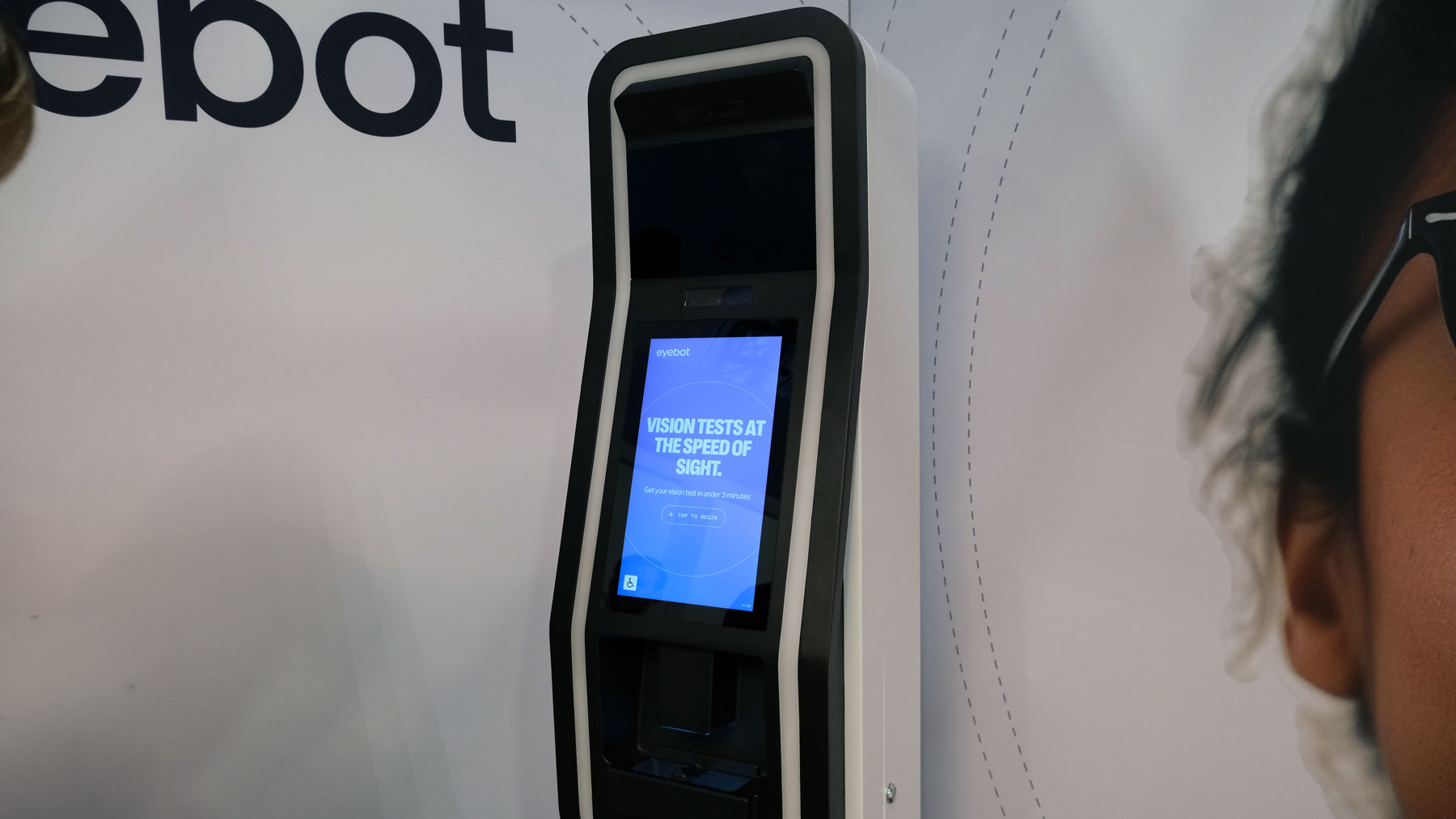
Image of the Eyebot Kiosk
Daniel Cooper for Engadget

Eyebot’s self-service vision testing kiosk turns a 20-minute optometrist visit into a process that takes just a few minutes. The test is guided by a large touchscreen and reviewed remotely by a licensed eye doctor, striking a balance between automation and oversight. After comparing results with a recent traditional exam, the accuracy felt reassuring, even if it doesn’t replace full eye health screenings.

Dephy Sidekick sneakers

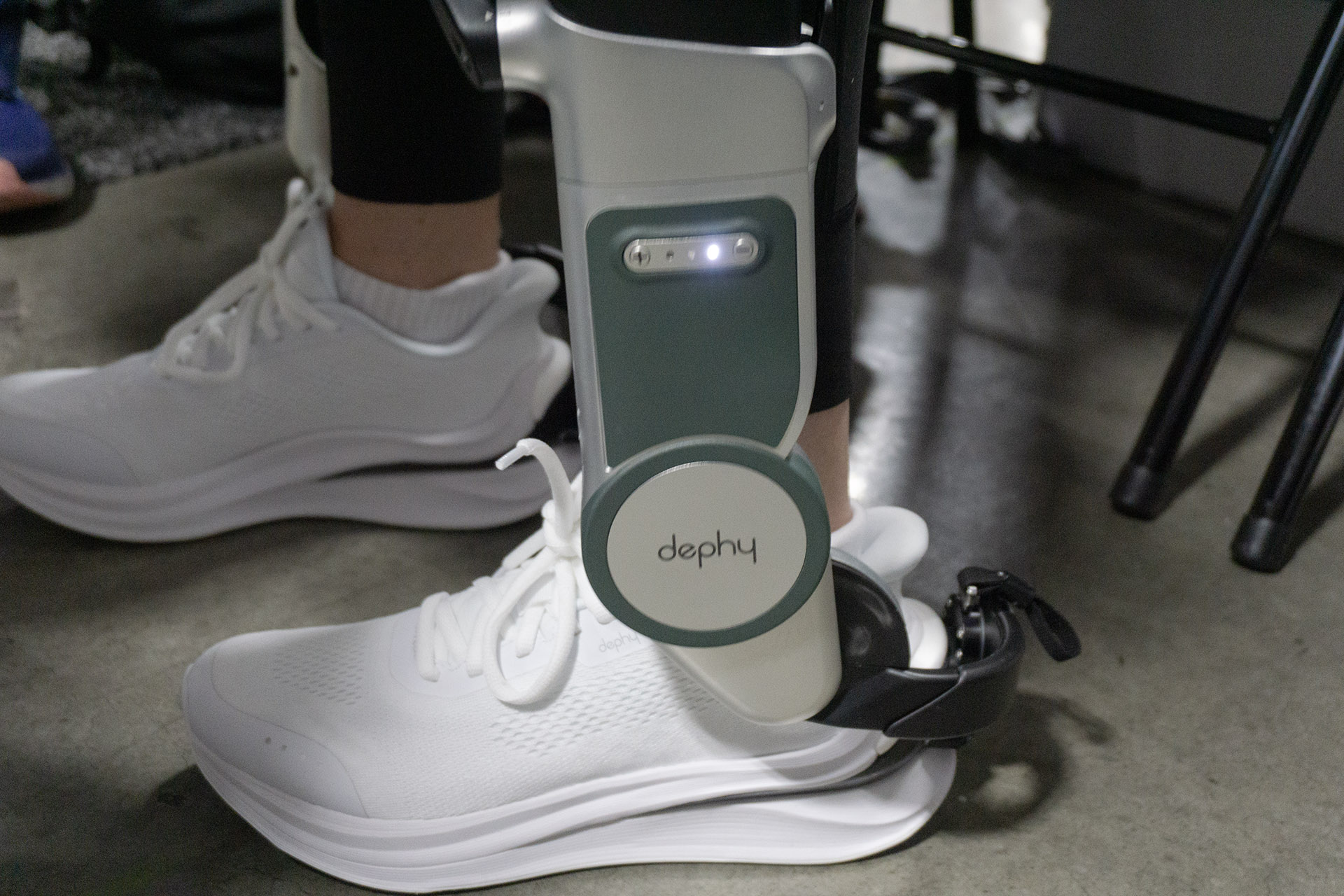
Dephy's Sidekick, which the company describes as "footwear."
Karissa Bell for Engadget

Dephy’s Sidekick robotic sneakers deliver a subtle but noticeable boost with each step. The ankle-mounted exoskeleton adapts to your gait, and walking with it feels bouncy rather than overpowering, especially at lower assist levels. It’s not for everyone, but after hours on the CES floor, the idea of powered help for people with limited mobility started to make a lot of sense.

Klipsch headphones

Klipsch Atlas HP-1
Klipsch Atlas HP-1
Billy Steele for Engadget

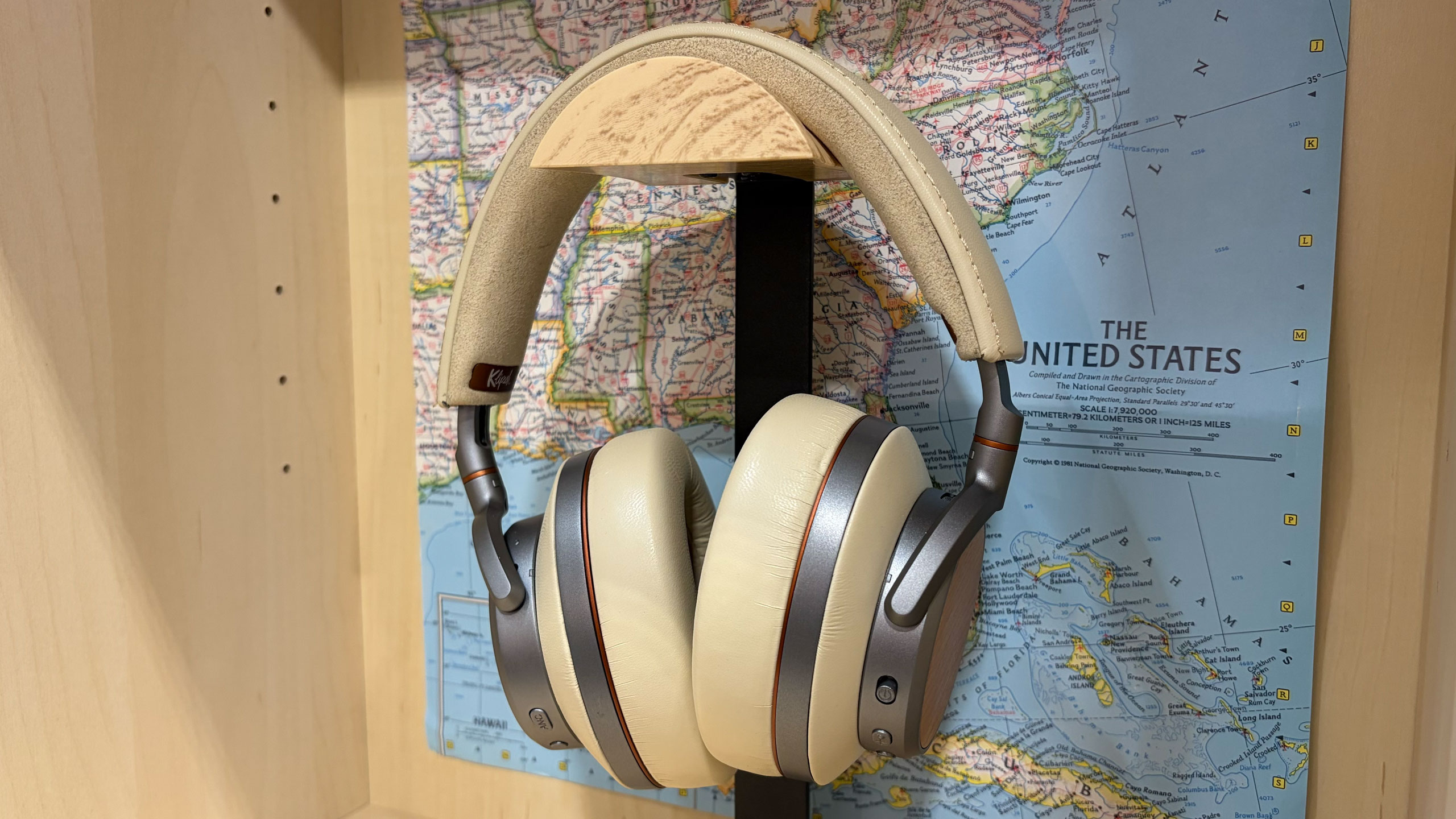
Klipsch’s return to headphones starts strong with the Atlas HP-1. The wireless ANC model looks premium, borrows familiar design cues and delivers the brand’s warm, balanced sound in early demos. Pricing is still unknown, but based on build quality and audio alone, these feel positioned firmly at the high end.

Clear Drop

The Clear Drop soft plastics compactor next to a pile of the bricks it produces.
Amy Skorheim for Engadget

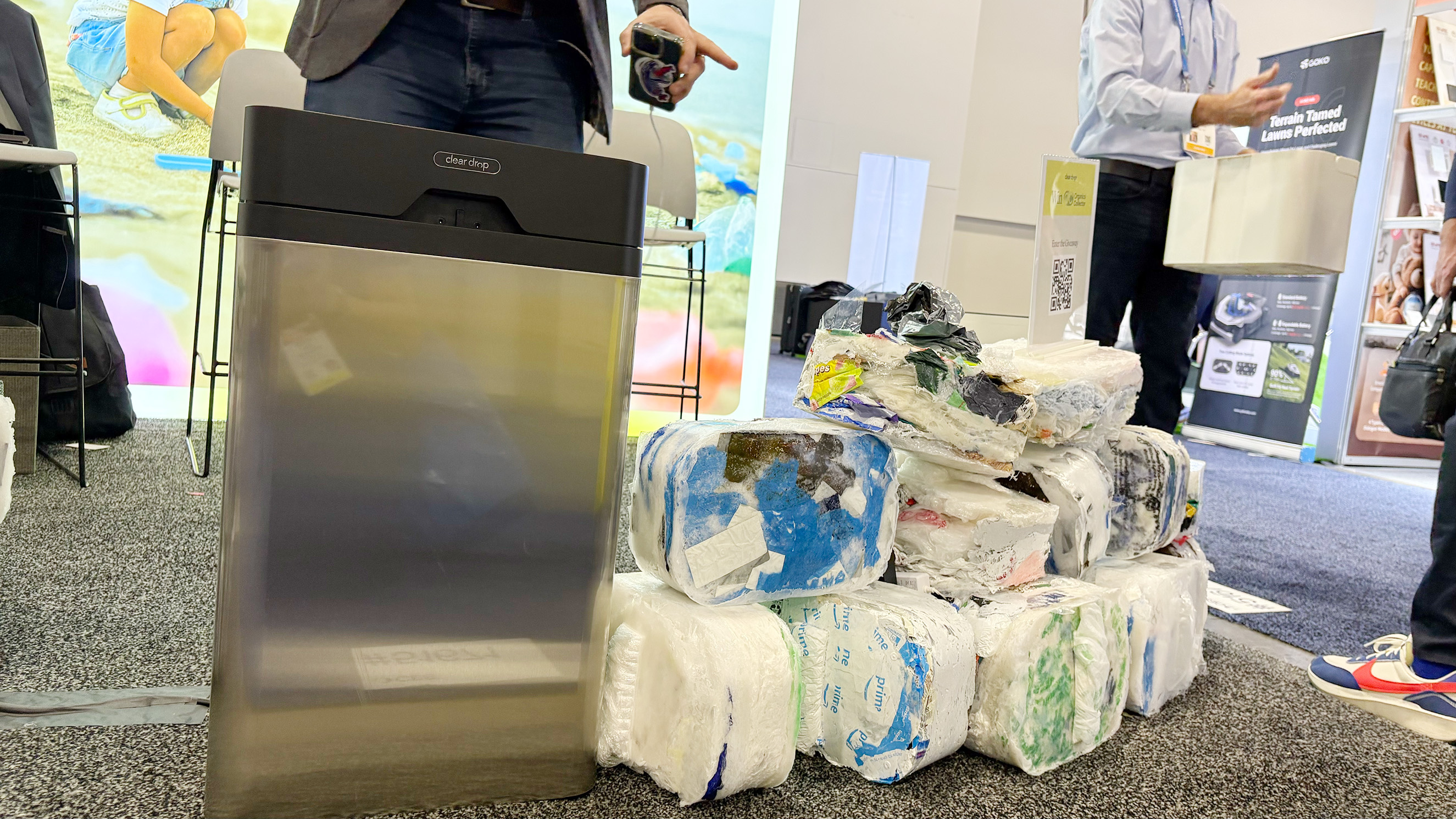
Clear Drop’s home plastic compactor tackles a real recycling problem most households face. The machine takes bags and wraps them into dense bricks that can be shipped to partner recycling facilities, and watching it swallow soft plastics was oddly satisfying. It’s expensive and not perfect, but it’s one of the more practical attempts at dealing with waste outside municipal systems.

Nosh cooking robot

Nosh
Nosh
Daniel Cooper for Engadget

Nosh is an AI cooking robot designed for low-effort, sauce-heavy meals like soups, curries and pasta. Multiple ingredient trays allow you to prep meals ahead of time, then slide them in when you’re ready to eat. It’s not replacing real cooking anytime soon, but as an alternative to microwaved meals, it’s more appealing than expected.

Day two leaned heavily toward tech you could physically interact with, whether that meant flying Lego ships through the air, watching a robot load laundry or testing a vision exam in a kiosk. With more show-floor time still ahead, we’ll be back with additional hands-ons, impressions and daily recaps as CES 2026 continues.

This article originally appeared on Engadget at https://www.engadget.com/big-tech/ces-2026-day-2-all-of-the-coolest-tech-we-saw-on-the-show-floor-during-the-second-day-134608348.html?src=rss

©

  •  

The weirdest tech we've seen at CES 2026 so far

CES is a launchpad for serious tech, but it’s also where companies proudly unveil devices that make you stop mid-scroll and whisper, “Wait, this is real?” We’ve been keeping a running list of the strangest, funniest and most unexpectedly compelling gadgets we’ve spotted in Las Vegas, from bathroom computers to robots that look like they escaped a Pixar pitch meeting.

Also, be sure to check out our list of the best CES tech we saw this year at the show.

Dreame Cyber X robot vacuum

Dreame Cyber X
Dreame Cyber X
Engadget

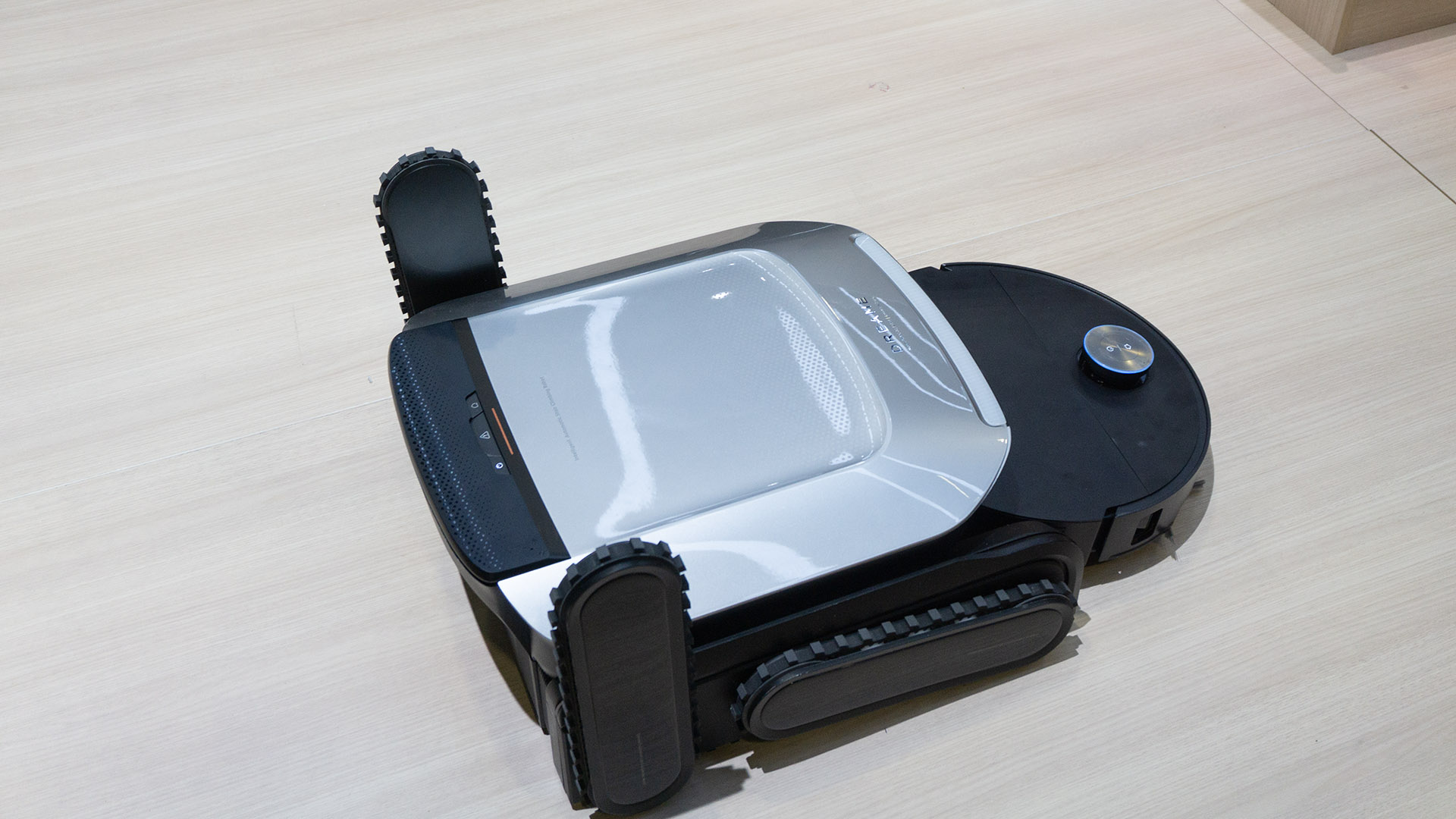
Robot vacuums can be a little unsettling already, but Dreame’s Cyber X takes it up a level by sprouting chunky treaded “legs” and hauling itself up a full staircase like a tiny cleaning tank. In person, it navigated both up and down with surprising confidence, using its treads horizontally rather than actually stepping. The vacuum itself docks inside the climbing rig, so it’s more about getting your bot to the next floor than scrubbing the stairs, which still feels like a fair trade if you hate hauling appliances around.

OlloBot

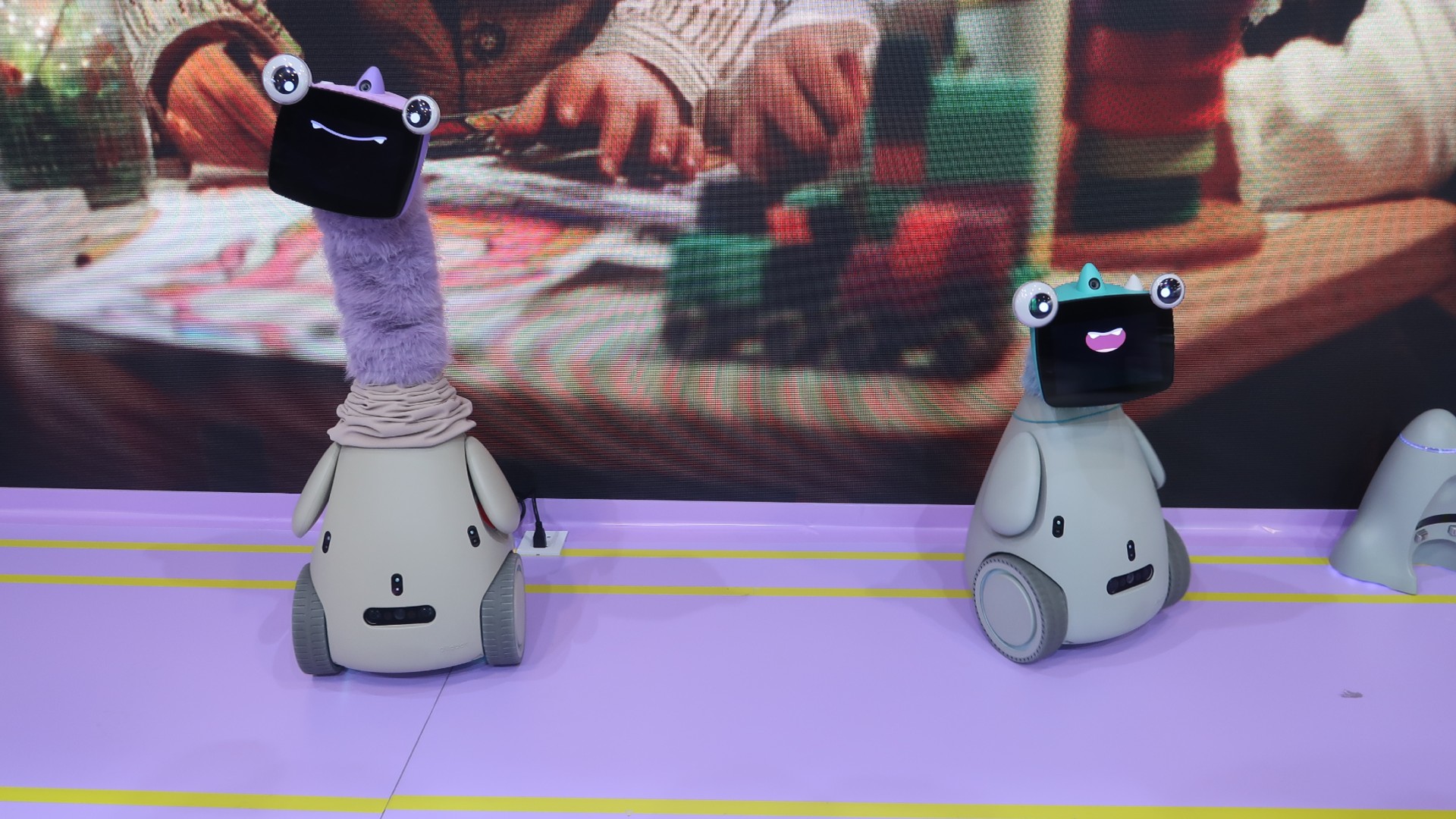
Two OlloBots — one with a long furry purple neck, making it about two feet taller than the other — are pictured on a light purple floor, in front of a screen displaying a closeup of a child playing with blocks.

CES loves a companion robot, but OlloBot might be the first one we’ve met that’s part cyber pet, part penguin, part ET and somehow comes with a warm, furry, telescoping neck. Its “face” is basically a tablet for expressions, photos and messages, and it’s meant to evolve a personality over time based on how your household interacts with it. Bonus: its memories live in a removable heart-shaped module, so if the body breaks, you can (theoretically) transplant your robot’s soul into a new shell.

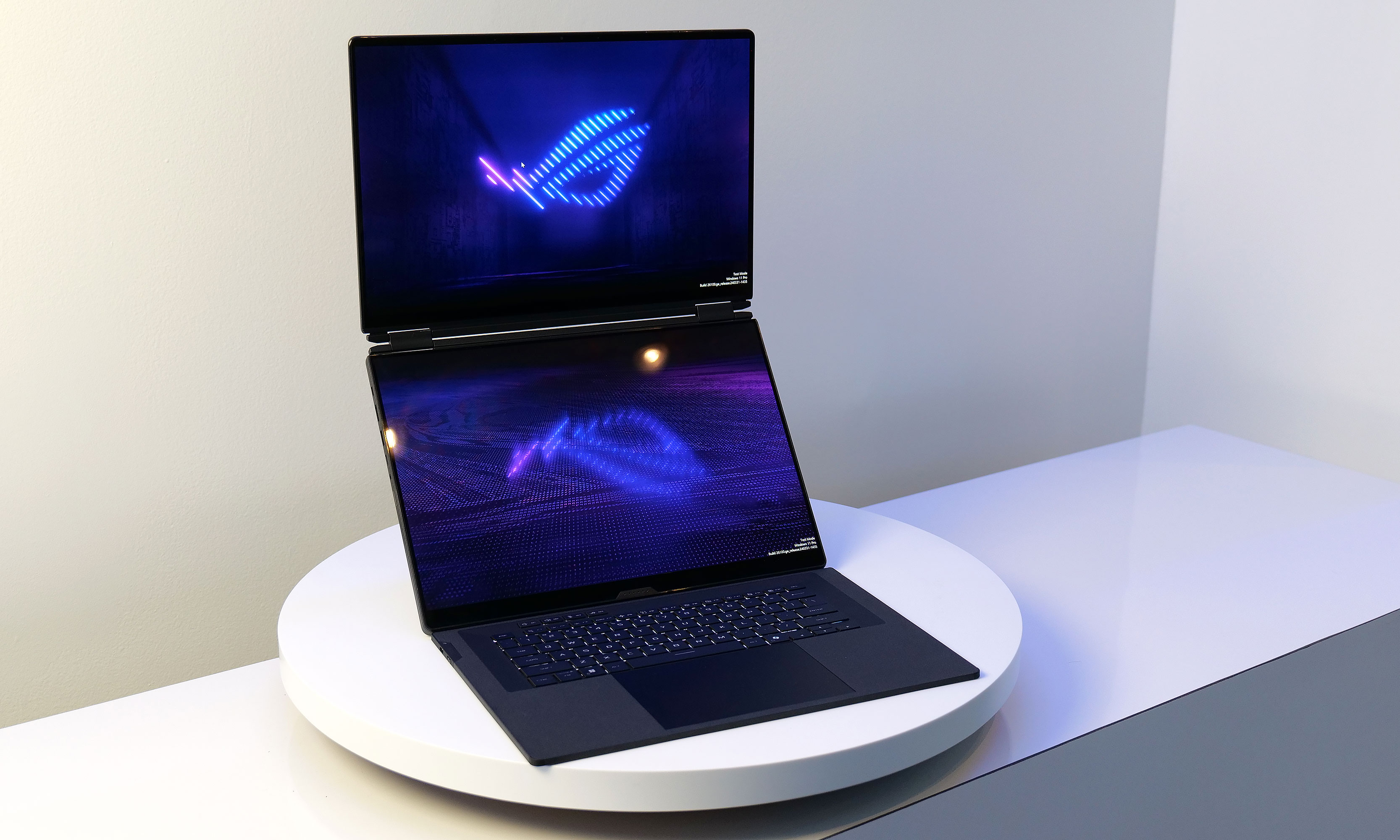
ASUS ROG Zephyrus Duo

On top of having two displays, the Zephyrus Duo's screens also feature excellent brightness at up to 1,100 nits.

Dual screens on a laptop aren’t new, but ASUS cramming two 16-inch OLED panels into a gaming notebook is the kind of chaotic CES energy we respect. The Zephyrus Duo uses a detachable keyboard and a built-in kickstand so you can stack screens, spread out, or generally arrange your portable battle station however you like. It’s hefty, it’s ambitious and it almost certainly won’t be cheap — but if you’ve ever wanted your gaming rig to moonlight as a two-screen creator setup, this is the loudest possible way to do it.

Throne toilet computer

Image of the Throne Toilet Computer perched on the side of a toilet.
The Throne device perched on the side of a toilet.
Daniel Cooper for Engadget

Throne is a toilet-mounted computer that uses cameras and microphones to analyze your bowel movements, which is a sentence we did not expect to type this week. Designed to establish a personal “baseline” for your bathroom habits, it aims to flag changes that could indicate digestive or metabolic issues, including for people on GLP-1 drugs. We can’t speak to its effectiveness yet… but if knowledge is power, this thing might know way too much.

Vivoo Hygienic FlowPad smart menstrual pad

Image of Vivoo's FlowPad
Vivoo's FlowPad
Vivoo

Vivoo looked at at-home health tracking and decided the bathroom was still underutilized. Alongside its clip-on smart toilet that analyzes your hydration by literally monitoring your pee, the company also unveiled a menstrual pad infused with microfluidics that can track fertility and hormone markers once you scan it with your phone. It’s a bold reminder that CES 2026 is fully committed to quantifying everything — even the stuff we’d rather not discuss over brunch.

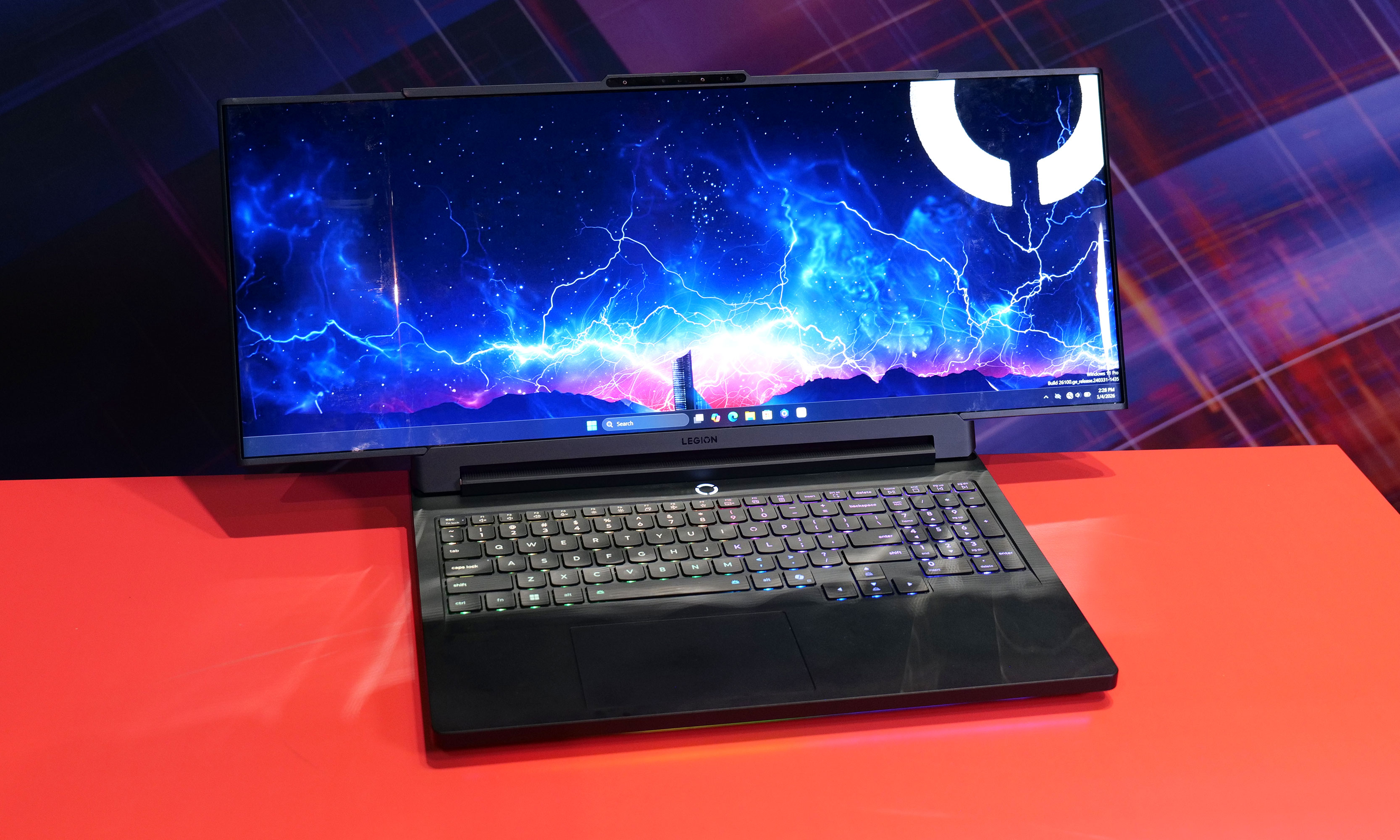
Lenovo Legion Pro Rollable

While it normally has a 16-inch display, the Lenovo Legion Pro Rollable concept's screen can expand up to 23.8 inches across.
Sam Rutherford for Engadget
Lenovo’s Legion Pro Rollable is what happens when a gaming laptop decides it wants to be a widescreen monitor mid-match. Its 16-inch display can physically expand sideways into ultra-wide formats, turning flight sims and racing games into full cockpit experiences at the press of a couple of keys. It’s impractical, faintly ridiculous and absolutely the kind of CES concept we hope survives long enough to escape the demo floor.

Lenovo ThinkBook XD Rollable

With its XD Rollable concept, Lenovo took the Thinkbook Plus Gen 6's basic design and made it even more futuristic by allowing its flexible display to wrap around onto its lid.
Sam Rutherford for Engadget

If the Legion Pro Rollable is excessive, the ThinkBook XD Rollable is philosophically confusing. Its flexible display doesn’t just grow taller, it wraps over the lid to create a “world-facing” screen for people sitting across from you, which feels either futuristic or deeply unnecessary depending on your mood and situation (maybe this is the perfect device for hotel check-ins and other points of sale?). Still, it’s a gorgeous piece of hardware theater and proof Lenovo is determined to roll screens onto every surface it can reach.

OhDoki Handy 2 Pro

Image of The Handy 2 and Handy 2 Pro
Daniel Cooper for Engadget

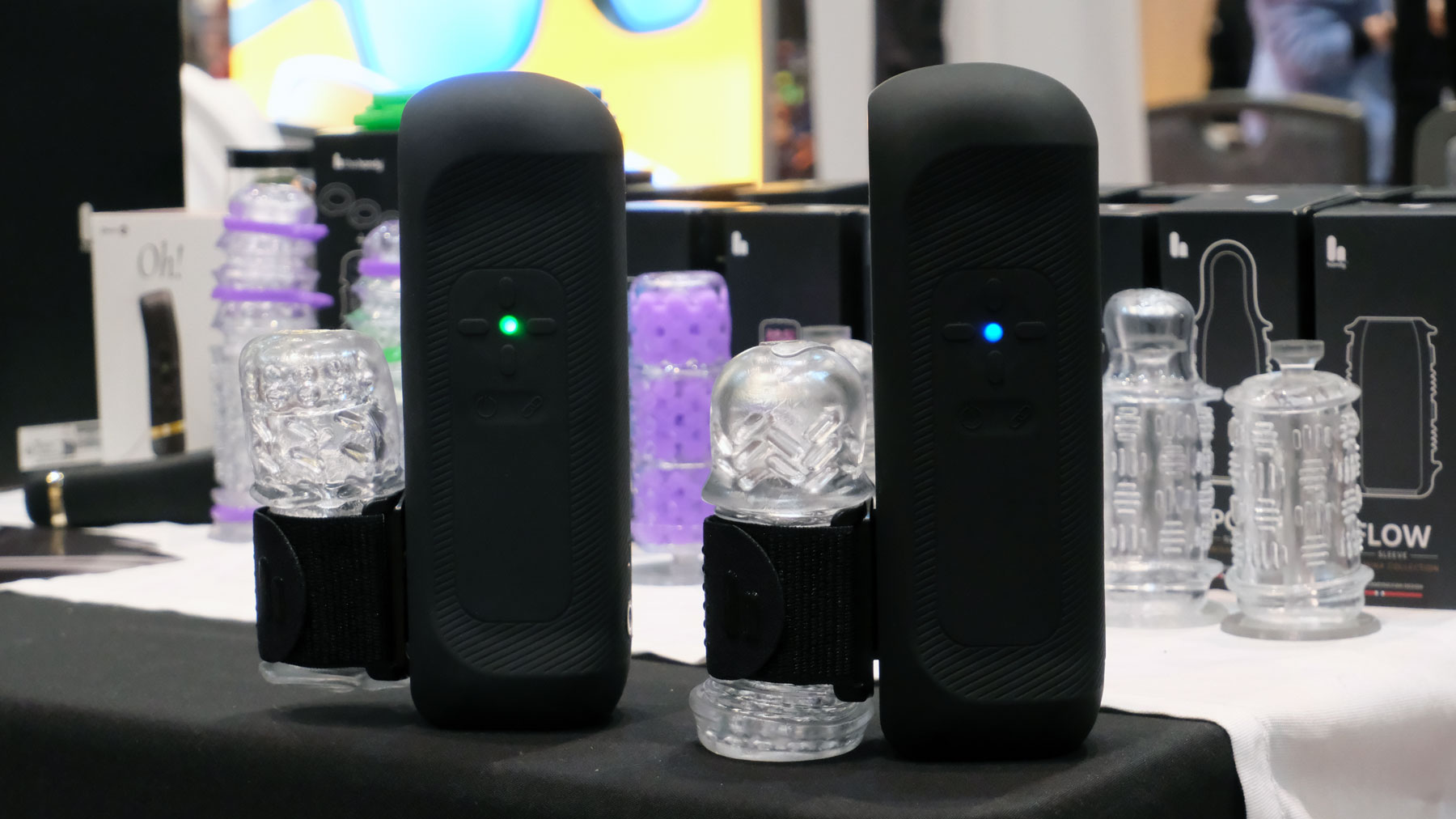
OhDoki’s Handy 2 Pro arrived at CES with one clear message: more power, fewer limits and absolutely no chill. The upgraded sex toy model cranks battery life up to five hours and unlocks a Turbo mode so aggressive it was described as “overclocked,” which is not a term we expected to hear in this category. It can also charge your phone, because apparently even pleasure tech needs to justify itself with productivity.

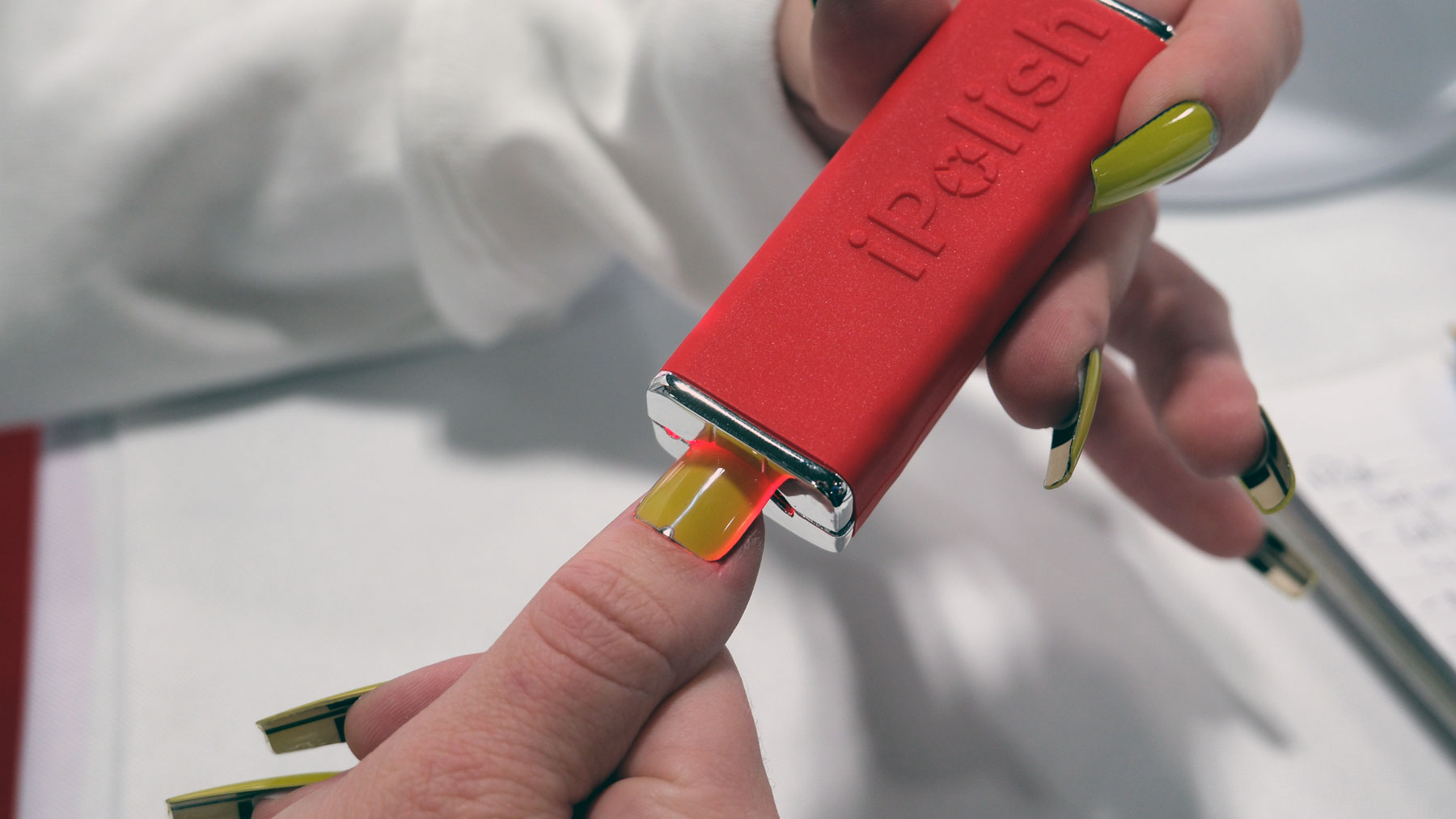
iPolish

iPolish
iPolish
Daniel Cooper for Engadget

iPolish finally made Total Recall nail tech real, minus the dystopia and Schwarzenegger. These press-on acrylic nails use an electric charge to switch between hundreds of colors in seconds, letting you change your manicure as often as your outfit. It’s delightfully impractical, surprisingly affordable and the most convincing argument yet for treating your nails like a customizable display.

Hisense S6 FollowMe display

Hisense S6 FollowMe display
Hisense

Despite the name, Hisense’s FollowMe doesn’t actually follow you at all. It’s a 32-inch 4K smart display on wheels that you manually drag from room to room, delivering strong TV-and-VCR-on-a-cart energy, just with Wi-Fi 6, a built-in camera, far-field mics and a 10-hour battery. It won’t judge you, chase you or demand attention, which might make it one of the least emotionally exhausting smart displays at CES.

GE Profile Smart Fridge

Finally! A reasonably sized fridge screen.
Sam Rutherford for Engadget
If you’ve ever bought a “just in case” bag of spinach and discovered three more at home, GE’s latest smart fridge wants to be your grocery reality check. A camera in the crisper records what’s inside, while a built-in barcode scanner in the water dispenser can add items to your shopping list with a quick wave, no app fumbling required. The AI bits are mostly there to answer practical questions like “Where’s my water filter?” which is the most convincing argument we’ve heard for putting a voice assistant on a fridge.

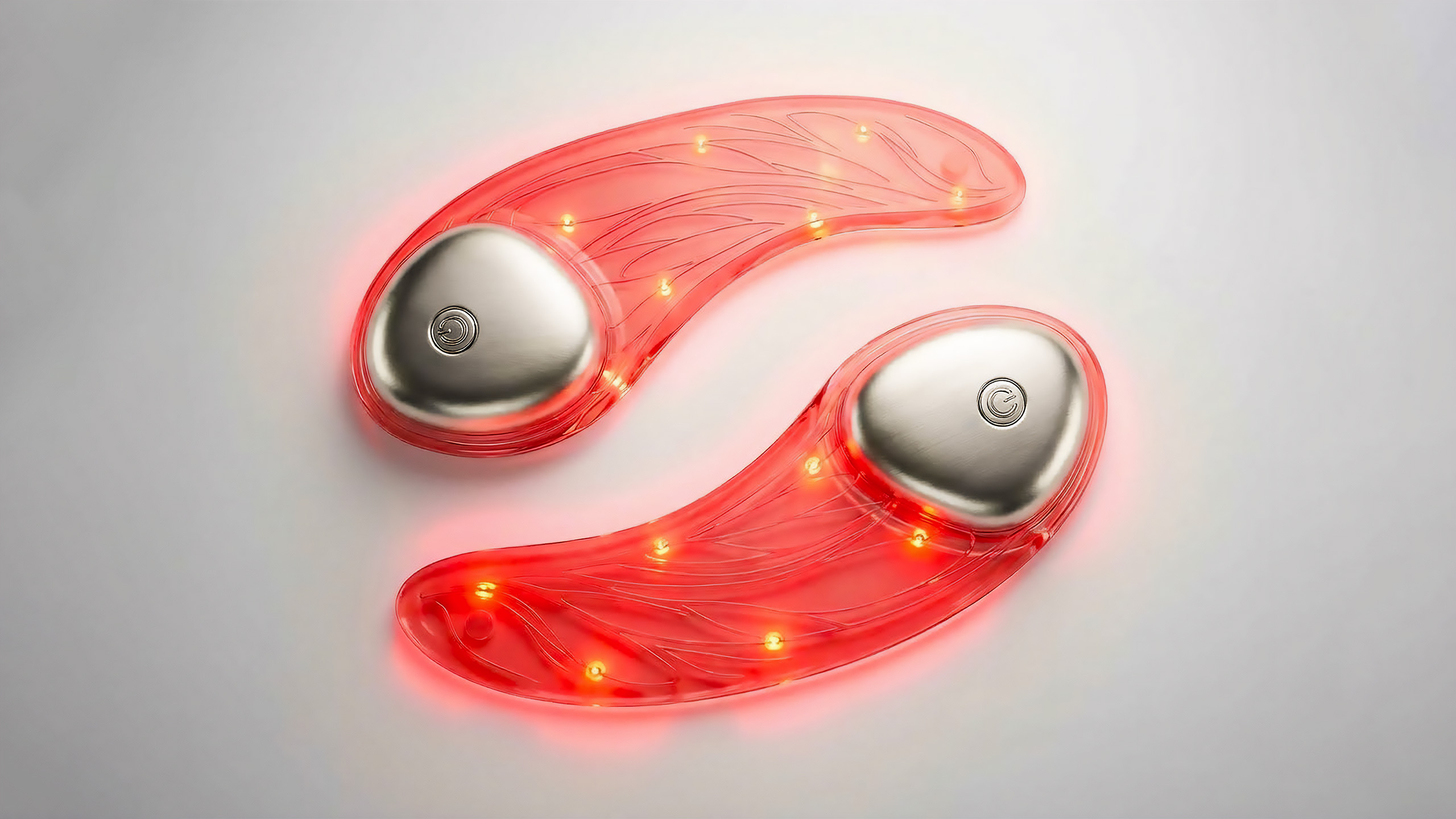
L’Oréal LED eye mask

A pair of transparent eye masks with wires and bulbs inside them.
L'Oréal

L’Oréal’s beauty tech lineup includes an LED eye mask that looks delightfully ridiculous in the best way: ultra-thin, semi-transparent silicone with visible microcircuitry that makes it feel like sci-fi skincare. The company says it precisely controls red and near-infrared wavelengths in 10-minute sessions, and it’s working on a companion serum so your skin doesn’t feel like it’s been left out to dry.

This article originally appeared on Engadget at https://www.engadget.com/the-weirdest-tech-weve-seen-at-ces-2026-so-far-134056504.html?src=rss

©

  •  
❌