Cash App, the banking and payments app run by Block, has added support for parent-managed kids accounts. The new accounts include key benefits from the service's normal account, with an eye towards teaching financial literacy to younger users ages 6 to 12. Cash App first allowed teenage users on its platform in 2021.
As part of the "expanded Cash App Families experience," eligible legal guardians and parents can create managed accounts that offer "a dedicated place on the platform to send allowances, set aside savings, and track spending for their child, kickstarting their path to financial independence," Cash App says. Adults managing these accounts will be able to set up recurring transfers, see how their child is spending and do things like lock their child's account to prevent transactions. Kids will get a custom debit card and the ability to receive payments from up to five trusted accounts, though notably they won't be able to access Cash App itself.
Today, we're launching Cash App accounts for kids age 6-12. Parents manage the accounts. Kids get to learn about safety, start saving for goals, and design and use their own debit card.
Cash App says managed accounts are designed for kids 6 through 12. Once those kids turn 13, Cash App says parents will be able to choose to convert their account to a "sponsored account" to unlock more features, like the ability to send and receive payments, invest in stocks or trade crypto. Those sponsored accounts are technically still monitored and controlled by a parent or legal guardian, but they do give 13-year-olds more control over how they use their money.
A parent-managed account for kids is not a new idea in the fintech space, though Cash App is trying to reach a younger audience than some of its competitors. Venmo rolled out access to its payment platform to teens between the ages of 13 to 17 in 2023. Separately, both Apple and Google also offer their own kids accounts in Google Wallet and Apple Cash Family.
This article originally appeared on Engadget at https://www.engadget.com/apps/cash-app-now-supports-accounts-for-kids-6-12-210651025.html?src=rss
A good budgeting app can make it much easier to see where your money is actually going, and one of our top picks is 50 percent off right now. Monarch Money is running a deal for new users that cuts the price of its annual plan in half. With the code MONARCHVIP, you’ll pay $50 for one year of access instead of the usual $100.
We’ve recommended Monarch before for its deep customization options and robust financial planning tools. It supports unlimited account connections, investment tracking and shared budgets, making it a solid option if you want a detailed look at your finances or plan alongside a partner. It also features prominently in our roundup of the best budgeting apps, where it stood out for its depth and flexibility.
Monarch Money is the kind of budgeting app that can feel a little overwhelming at first, especially when you’re setting up categories, rules and recurring transactions. There’s a bit of a learning curve, and some of the finer details are easier to manage on the web than in the mobile app. But once you’re past that initial setup, it starts to make a lot more sense and becomes a powerful tool for keeping tabs on your finances.
Where Monarch Money really shines is in the level of detail it offers. It’s built for people who want a clear, structured view of their money, not just a running list of transactions. In the budgeting section, you can see budgets versus actual spending by category, along with forecasts by month or by year. Recurring expenses can also be defined using more than just merchant names, which helps keep things accurate with less manual cleanup.
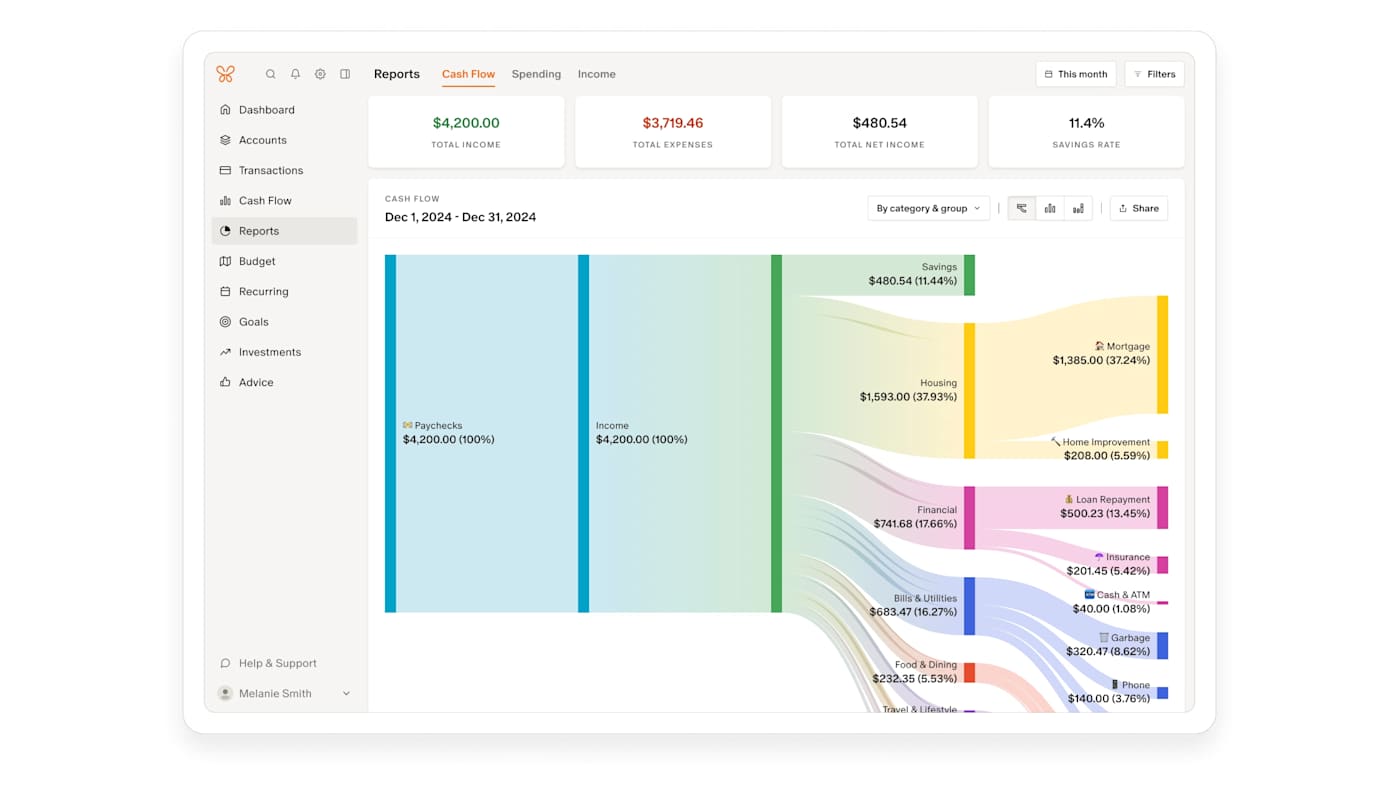
Beyond day-to-day budgeting, Monarch does a good job of showing the bigger picture. It includes visual reports and charts that make it easier to spot trends over time, plus tools for tracking net worth, investments and financial goals. Monarch can even factor in non-cash assets like your home or vehicle, pulling in estimates automatically so they appear alongside your accounts.
All of that depth won’t be for everyone, but if you’re willing to spend a little time getting set up, Monarch Money offers a lot of control and insight. With the current deal bringing the price down to $50 for a full year, it’s a solid opportunity to try one of our favorite budgeting apps at a discount of 50 percent off and see if it fits how you like to manage your money.
This article originally appeared on Engadget at https://www.engadget.com/deals/new-users-can-get-one-year-of-access-to-monarch-money-for-50-percent-off-120000143.html?src=rss
As a former Mint user, I had to find a new budgeting app not too long ago. Intuit, parent company of Mint, shut down the service in March 2024, and prompted users to transition to its other financial app, Credit Karma. However, after testing Credit Karma myself, I found it to be a poor Mint replacement — that meant I needed to branch out and look elsewhere for a trusted app to track all of my financial accounts, monitor my credit score, follow a monthly spending plan and set goals like building a rainy-day fund and paying down my mortgage faster.
I tried out Mint's top competitors in the hopes that I'd be able to find a new budgeting app that could handle all of my financial needs. Hopefully my journey can help you find the best budgeting app for you and your money as well.
Best budget apps of 2026
Other budgeting apps we tested
PocketGuard
PocketGuard used to be a solid free budget tracker, but the company has since limited its “free” version to just a free seven-day trial. Now, you’ll have to choose between two plans once the trial is over: a $13 monthly plan or a $75 annual plan. When I first tested it, I found it to be more restricted than NerdWallet, but still a decent option. The main overview screen shows you your net worth, total assets and debts; net income and total spending for the month; upcoming bills; a handy reminder of when your next paycheck lands; any debt payoff plan you have; and any goals. Like some other apps, including Quicken Simplifi, PocketGuard promotes an “after bills” approach, where you enter all of your recurring bills, and then PocketGuard shows you what’s left, and that’s what you’re supposed to be budgeting: your disposable income.
Although PocketGuard’s UI is easy enough to understand, it lacks polish. The “accounts” tab is a little busy, and doesn’t show totals for categories like cash or investments. Seemingly small details like weirdly phrased or punctuated copy occasionally make the app feel janky. More than once, it prompted me to update the app when no updates were available. The web version, meanwhile, feels like the mobile app blown up to a larger format and doesn’t take advantage of the extra screen real estate. Ultimately, now that the free tier is gone, it just doesn’t present the same value proposition as it once did.
How we test budgeting apps
Before I dove in and started testing out budgeting apps, I had to do some research. To find a list of apps to try out, I consulted trusty ol’ Google (and even trustier Reddit); read reviews of popular apps on the App Store; and also asked friends and colleagues what budget tracking apps (or other budgeting methods) they might be using for money management. Some of the apps I found were free and these, of course, show loads of ads (excuse me, “offers”) to stay in business. But most of the available apps require paid subscriptions, with prices typically topping out around $100 a year, or $15 a month. (Spoiler: My top pick is cheaper than that.)
All of the services I chose to test needed to do several things: import all of your account data into one place; offer budgeting tools; and track your spending, net worth and credit score. Except where noted, all of these apps are available for iOS, Android and on the web.
Once I had my shortlist of six apps, I got to work setting them up. For the sake of thoroughly testing these apps, I made a point of adding every account to every budgeting app, no matter how small or immaterial the balance. What ensued was a veritable Groundhog Day of two-factor authentication. Just hours of entering passwords and one-time passcodes, for the same banks half a dozen times over. Hopefully, you only have to do this once.
Budgeting app FAQs
What is Plaid and how does it work?
Each of the apps I tested uses the same underlying network, called Plaid, to pull in financial data, so it’s worth explaining what it is and how it works. Plaid was founded as a fintech startup in 2013 and is today the industry standard in connecting banks with third-party apps. Plaid works with over 12,000 financial institutions across the US, Canada and Europe. Additionally, more than 8,000 third-party apps and services rely on Plaid, the company claims.
To be clear, you don’t need a dedicated Plaid app to use it; the technology is baked into a wide array of apps, including all of the budgeting apps listed in this guide. Once you find the “add an account” option in whichever one you’re using, you’ll see a menu of commonly used banks. There’s also a search field you can use to look yours up directly. Once you find yours, you’ll be prompted to enter your login credentials. If you have two-factor authentication set up, you’ll need to enter a one-time passcode as well.
As the middleman, Plaid is a passthrough for information that may include your account balances, transaction history, account type and routing or account number. Plaid uses encryption, and says it has a policy of not selling or renting customer data to other companies. However, I would not be doing my job if I didn’t note that in 2022 Plaid was forced to pay $58 million to consumers in a class action suit for collecting “more financial data than was needed.” As part of the settlement, Plaid was compelled to change some of its business practices.
In a statement provided to Engadget, a Plaid spokesperson said the company continues to deny the allegations underpinning the lawsuit and that “the crux of the non-financial terms in the settlement are focused on us accelerating workstreams already underway related to giving people more transparency into Plaid’s role in connecting their accounts, and ensuring that our workstreams around data minimization remain on track.”
Why did Mint shut down?
When parent company Intuit announced in December 2023 that it would shut down Mint, it did not provide a reason why it made the decision to do so. It did say that Mint's millions of users would be funneled over to its other finance app, Credit Karma. "Credit Karma is thrilled to invite all Minters to continue their financial journey on Credit Karma, where they will have access to Credit Karma’s suite of features, products, tools and services, including some of Mint’s most popular features," Mint wrote on its product blog. In our testing, we found that Credit Karma isn't an exact replacement for Mint — so if you're still looking for a Mint alternative, you have some decent options.
What about Rocket Money?
Rocket Money is another free financial app that tracks spending and supports things like balance alerts and account linking. If you pay for the premium tier, the service can also help you cancel unwanted subscriptions. We did not test it for this guide, but we'll consider it in future updates.
This article originally appeared on Engadget at https://www.engadget.com/apps/best-budgeting-apps-120036303.html?src=rss
The start of the new year is a great time to get your finances in order, and a good budgeting app can help with that. Instead of laboring over a spreadsheet, you can try one of our favorite budgeting apps for less than usual. Monarch Money is running a sale that gives new users 50 percent off one year of the service, bringing the final cost down to just $50. Just use the code NEWYEAR2026 at checkout to get the discount.
Monarch Money makes for a capable and detailed budgeting companion. You can use the service via apps for iOS, Android, iPadOS or the web, and Monarch also offers a Chrome extension that can sync your Amazon and Target transactions and automatically categorize them. Like other budgeting apps, Monarch Money lets you connect multiple financial accounts and track your money based on where you spend it over time. Monarch offers two different approaches to tracking budgeting (flexible and category budgeting) depending on what fits your life best, and the ability to add a budget widget on your phone so you can know how you're tracking that month.
How budgeting apps turn your raw transactions into visuals you can understand at a glance is one of the big things that differentiates one app from another, and Monarch Money offers multiple graphs and charts to look at for things like spending, investments or categories of your choice based on how you've labelled your expenses. The app can also monitor the spending of you and your partner all in one place, to make it easier to plan together.
The main drawbacks Engadget found in testing Monarch Money were the app's learning curve, and the differences in features (and bugginess) between Monarch's web and mobile versions. Still, for 50 percent off, the Monarch Money is well worth experimenting with if you're trying to save money in 2026, especially if you want to do it collaboratively with a partner.
This article originally appeared on Engadget at https://www.engadget.com/deals/monarch-money-deal-new-users-get-one-year-of-access-for-only-50-204507285.html?src=rss

 Anmelden