❌

Normale Ansicht

Anthropic now has a design assistant too

In hindsight, I suppose it was only a matter of time after Anthropic made Claude capable of generating charts and diagrams that the company would then begin offering a more robust image editor. Now, a little more than a month after that release, Anthropic has announced Claude Design, a new research preview that allows subscribers to use Claude to generate designs, prototypes, slides and more.  

"Claude Design gives designers room to explore widely and everyone else a way to produce visual work," Anthropic says of its newest product. As with its previous forays into image generation, the company isn't calling this, well, an image generator. Instead, Anthropic describes Opus 4.7, the system powering the app, as its most capable vision model to date. In other words, you won't be using Claude Design to whip up a picture of a cat in space eating a lasagna.  

As you might expect, every project in Claude Design starts with a prompt. From there, Anthropic notes users can refine Claude's outputs through conversation, inline comments and direct edits. Like Adobe's recently announced AI assistant, Claude will also generate custom sliders that correspond to specific elements in a design, which the user can push and pull to modify those elements. For instance, in the screenshot below, you can see how Claude has tweaked the interface to allow the user to adjust the glow and density of arcs it used to illustrate a connected network.
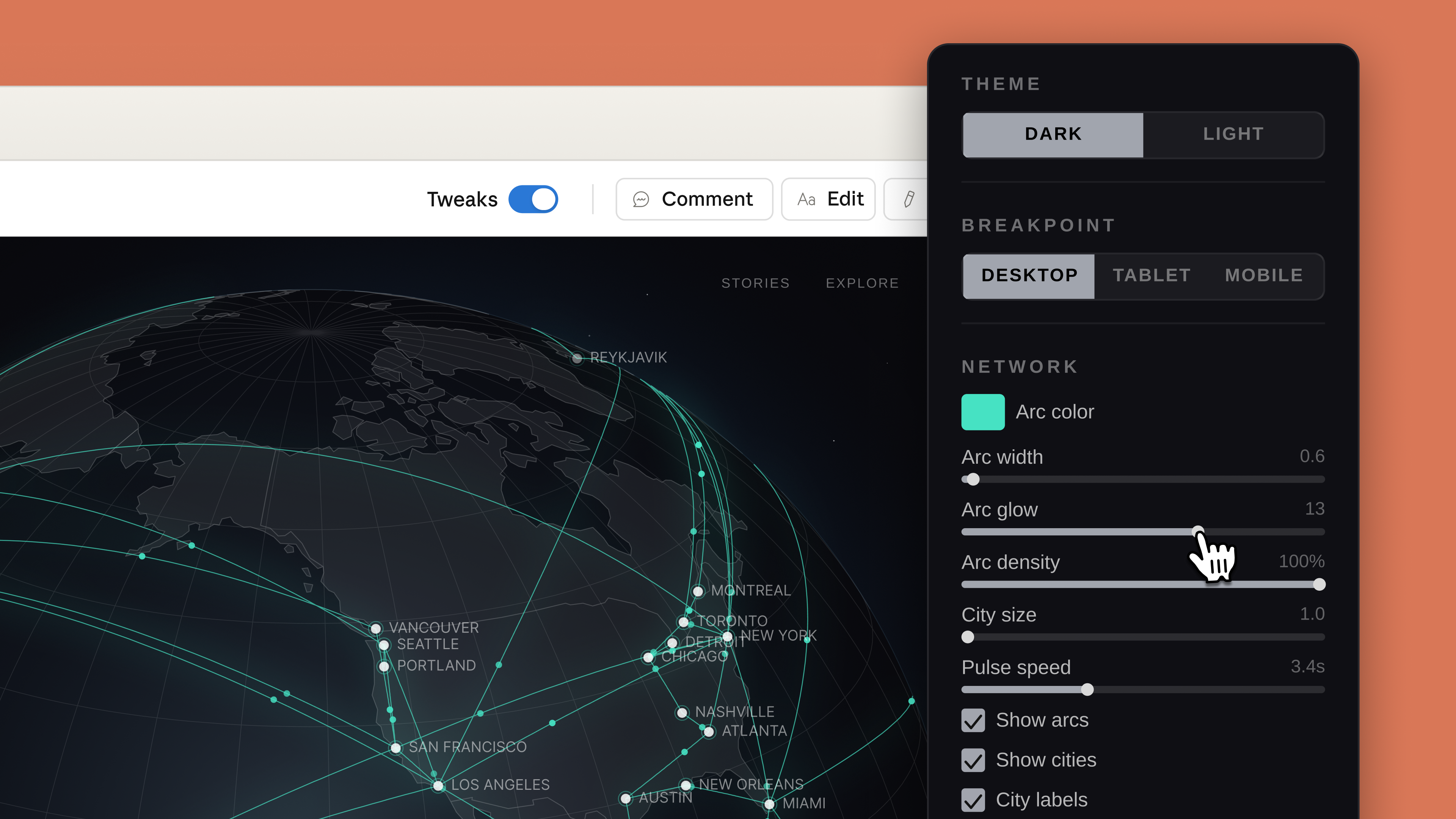
Claude Design will generate custom sliders you can use to adjust specific visual elements.
Anthropic

Anthropic has also built an onboarding process that allows Claude to build an internal visual language after reading your organization's codebase and existing design documents. "Every project after that uses your colors, typography, and comments automatically," according to the company. Outside of text prompts, there's also support for image and document uploads, and Anthropic has even included a web capture tool so enterprise customers can snapshot elements from their company's website. There's also built-in sharing, and you can export a design directly to Claude Code. In the coming weeks, Anthropic has promised to make it easier to build integrations with its new app. 

Claude Design arrives in the same week that both Adobe and Canva released their own visual AI assistants. If Anthropic is preparing to eat Canva’s lunch, it's doing so in a strange way given that you can export your Claude Design projects to Canva. If you want to try the new app for yourself, it's available as part of Anthropic's Pro, Max, Team and Enterprise subscriptions, with usage running up against your usage limits.

This article originally appeared on Engadget at https://www.engadget.com/ai/anthropic-now-has-a-design-assistant-too-150000903.html?src=rss

©

  •  

Perplexity brings its Personal Computer AI assistant to Mac

Perplexity has just released Personal Computer. The software, which is available starting today for Mac, builds on the multi-model orchestration capabilities the company debuted with Perplexity Computer at the end of February. Like Claude Cowork (and, as of today, OpenAI Codex too), it's a suite of computer use agents that can work with your files, apps, connectors and the web to complete complex and "even continuous workflows." 

Perplexity suggests a few different use cases for Personal Computer, starting with the obvious. “You can ask Personal Computer to read your to-do list,” the company states. “In fact, you can ask it to DO your to-do list." It explains you can open the Notes app on your Mac, ask Personal Computer for help and the system will reason how to best assist you. In the process of tackling that task, it can work across all your files, as well as apps like Apple Messages. When needed, it will also employ multiple agents to complete a request. Like Anthropic did with Claude Cowork, Perplexity says you can also use its software to organize messy folders so files feature sensible names and there's an easy-to-understand structure to everything.

You can prompt Personal Computer with your voice, and you can even initiate and manage tasks from your phone. Perplexity says the app creates files in a secure sandbox, and any actions it takes are auditable and reversible. "A system that acts on your behalf needs to be useful and legible. It should feel like a team you manage, not a rogue employee with keys to your most important data," the company said.   

Personal Computer for Mac is available starting today, beginning with Max subscribers. Perplexity said it would bring the app to its other users soon, prioritizing those who joined the waitlist for the experience. 

This article originally appeared on Engadget at https://www.engadget.com/ai/perplexity-brings-its-personal-computer-ai-assistant-to-mac-202045969.html?src=rss

©

  •  

OpenAI's latest Codex update builds the groundwork for its upcoming super app

Last month, following reporting from The Wall Street Journal, OpenAI confirmed it was working on a desktop super app that would combine ChatGPT, its Codex coding agent and Atlas web browser into one cohesive experience. OpenAI is not releasing that application today. Instead, it's pushing out a major update to Codex that significantly expands what that software can do. However, the new release offers a glimpse of what OpenAI hopes to build with its latest effort.  

"We're building the super app out in the open," said Thibault Sottiaux, the head of Codex, during a press briefing held by OpenAI. "This release is about developers. In the future, we will broaden it up to a wider audience." Until then, the latest version of Codex offers developers multi-purpose AI agents that can work across a "larger surface area," while being more proactive. In practice, that translates to a host of new capabilities, starting with computer use. 

The agents inside of Codex can interact with other apps on your PC. When prompting one of OpenAI's models, you can name a specific program or let it determine the best application for the job. Computer use is available in competing apps like Claude Cowork, but where OpenAI believes Codex offers an edge in that department is in the "secret sauce" it built to allow an agent to run an app without bogging down your entire system, so the two of you can work in tandem. At the same time, OpenAI is releasing 111 new plugins for Codex that combine skills, app integrations and model context protocol server connections to give Codex more ways to gather context and use the tools developers depend on for their work.

The company has also added a built-in browser, with a commenting system that allows you to prompt Codex to make tweaks to specific parts of a webpage or web app you're building. In the demo OpenAI showed, one member of the Codex team used this tool to instruct Codex to change the margins on a graph so that the y axis wasn't cut off. Complementing this is built-in image generation. Codex can use gpt-image-1.5 to create product concepts, mockups, frontend designs and even assets for simple games. It also allows Codex to use screenshots to verify it's on the right track with a user request.   

With today's update, OpenAI is also previewing a pair of memory features. The first allows Codex to recall context from previous tasks to inform how it goes about future prompts. According to OpenAI, with time, this will allow Codex to complete requests faster and to a higher standard. The app will also use the context it's gathered to suggest proactive actions. For example, at the start of your day, it might suggest you respond to a comment a coworker left on a Google Doc draft you wrote. 

If you want to try the updated Codex for yourself, OpenAI is starting to roll out the new version to desktop app users who are logged in with their ChatGPT account. Computer use is available to macOS users first, with availability for people in the EU and UK to follow soon. Similarly, Brits and Europeans will need to wait to try the memory features OpenAI has built into Codex.  

This article originally appeared on Engadget at https://www.engadget.com/ai/openais-latest-codex-update-builds-the-groundwork-for-its-upcoming-super-app-170000019.html?src=rss

©

  •  

Google Chrome makes it easier to wrangle different tabs in AI Mode

Love 'em or hate 'em, no modern browser is complete without robust tab support, and so too would it seem Google's AI Mode. Starting today, the company is rolling out an update to users in the US that makes the tool better at interacting and understanding tabs. 

To start, the next time you use AI Mode on Chrome for desktop and click on a link, the chatbot will open a new side-by-side interface that allows you to both browse the new webpage and ask questions of AI Mode. The connection allows the chatbot to maintain the context of the search that brought you to that website in the first place. 

For instance, say you're looking for a new coffee maker to buy for your apartment. After AI Mode finds a handful of different models for you to compare, you can click on one to go to the manufacturer's website and ask additional questions of the chatbot like "how easy is this to clean?" Thanks to the expanded context window, you don't need to refer to the specific name of the model.   

Meanwhile, if you have an existing tab or group of tabs that you'd like AI Mode to factor into a new search, you can do that now too. From the redesigned Plus menu, just click the new option that's there. While you're in the Plus menu, you can also prompt AI Mode to consider other materials, including images and PDFs, alongside any relevant tabs.   

In testing, Google says users found the integration translated to less tab switching, and made it easier to focus. Mike Torres, vice-president of product for Chrome, said the new features represent a broader effort by Google to bring practical AI capabilities to its web browser. Torres added the company would soon bring today's updates to more places around the world.

This article originally appeared on Engadget at https://www.engadget.com/ai/google-chrome-makes-it-easier-to-wrangle-different-tabs-in-ai-mode-170000914.html?src=rss

©

  •  

Canva starts previewing a more powerful version of its AI assistant

Adobe isn't the only company releasing a new AI assistant this week. Ahead of its Create event in Los Angeles today, Canva announced Canva AI 2.0. Building on its existing AI assistant, the company is billing the release as its most significant update since the platform first launched in 2013, and the culmination of years of investment to build its own foundational design models. 

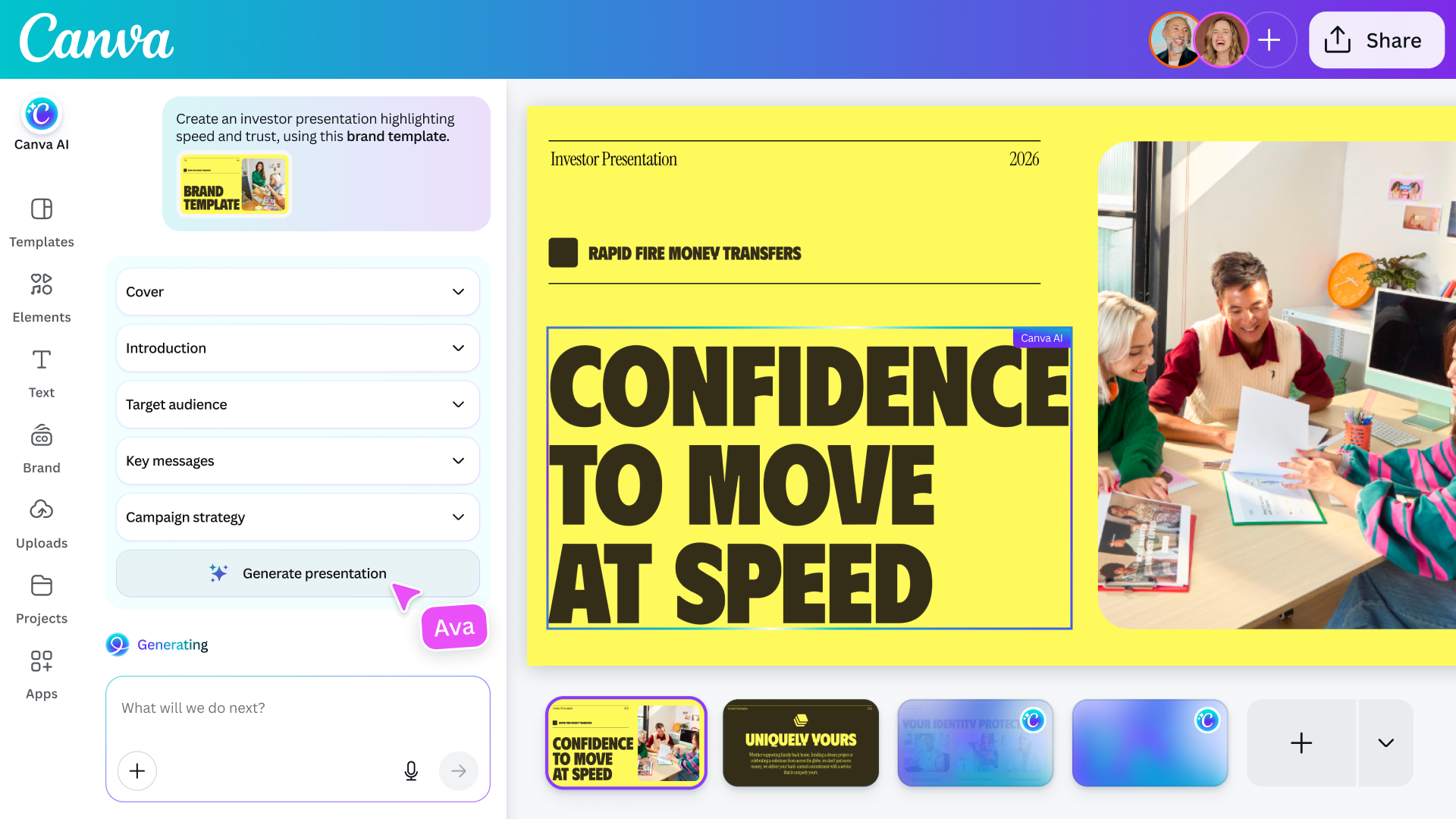
As you might imagine, it all starts with a conversational interface that allows you to describe an idea or goal and the system will start generating a design to match. Under the hood, there's a new orchestration layer that allows the model to use all of Canva's disparate tools to accomplish complex, multi-step tasks. For instance, the company suggests you could use Canva AI to create a multi-channel advertising campaign, and the software will generate everything you need to get that off the ground. 

For brands, Canva AI 2.0 can adapt to their design needs.
Canva

If edits are required, the company says Canva AI avoids one of the pitfalls of many other image generation models. It's possible to edit every visual element the system generates, just like if they were created with a traditional image editor. As a result, you can do things like swap out images and tweak fonts without affecting any other part of a design. To bring everything together, Canva has built persistent memory into the tool. The more you use Canva AI, the better the system will get at applying your personal taste and style to future generations. According to the company, it also has a context window that is long enough to maintain coherence until you arrive at a final design.    

Alongside those enhancements, Canva is adding support for new workflows that expand what you can do with its software, starting with connections that allow its models to pull data from other apps, including Notion, Slack, Zoom, Gmail, Google Calendar and more. Users can also schedule tasks for Canva AI to complete in the background, and the company has even baked in deep research capabilities into the tool.

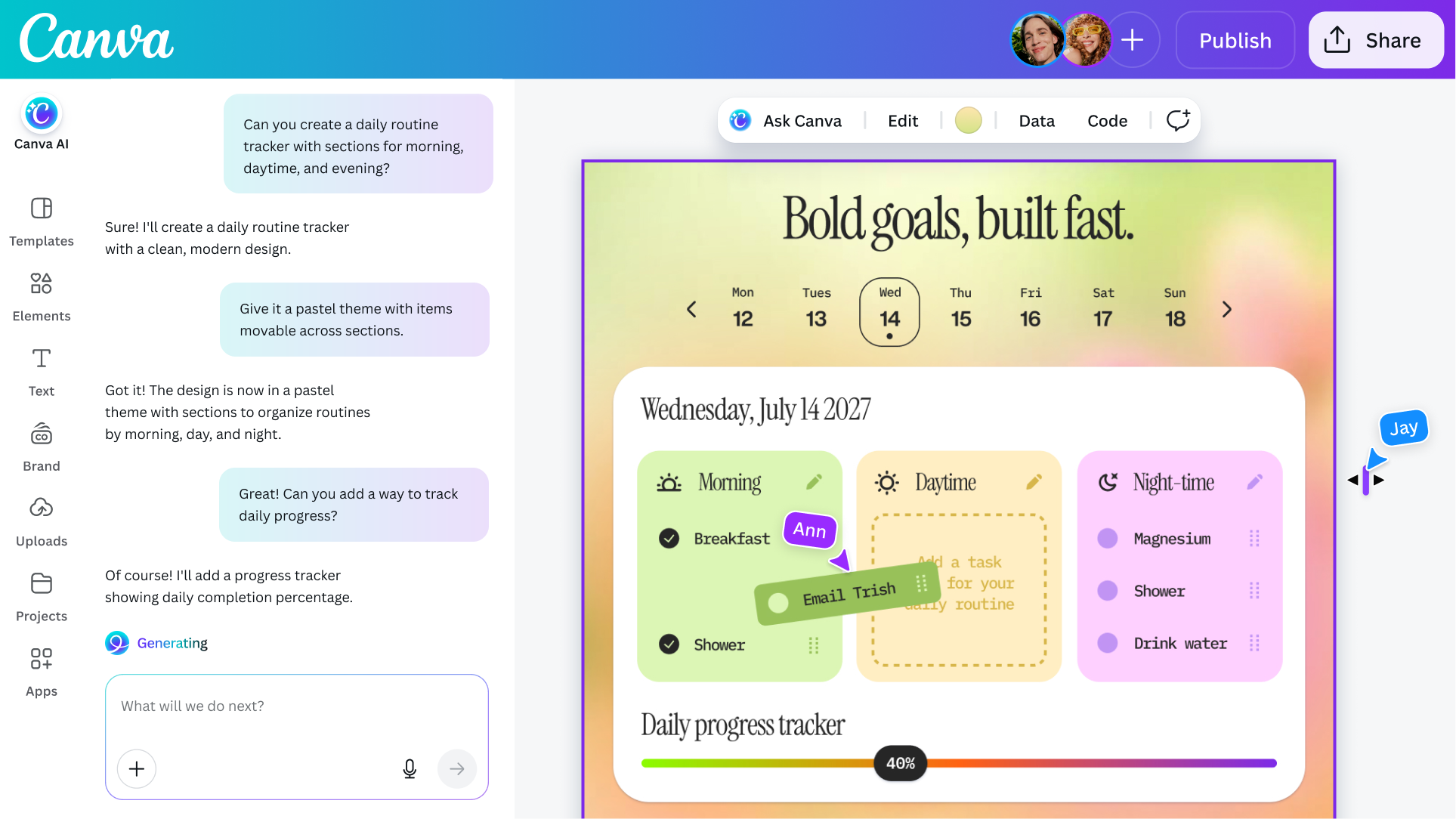
The coding function Canva previously offered has been upgraded to include support for HTML imports, allowing users to bring any HTML file or AI-generated experience into Canva's visual editor to tweak the design of it without breaking things. For brands, the company is also offering a tool that can process their visual identity and apply it to new and existing designs.   

Canva's updated coding agent now support HTML imports.
Canva

As a casual observer, it might seem like Canva is trend chasing, but Danny Wu, the company's head of AI, argues the new AI tools represent a natural evolution for Canva. "This is something we've been dreaming of and working towards for quite a while," he tells Engadget. "Even before ChatGPT was a thing, we were thinking, 'what if we don't have a template that matches your needs?' … So I wouldn't describe this as a pivot or shift, we've been wanting to offer these kinds of capabilities all along as part of our mission to make design simple."

If you want to give Canva's new tools a try for yourself, Canva AI 2.0 is available as a research preview starting today. The first 1 million people who visit the Canva website will get first access, with availability gradually expanding to more users over the coming weeks. As before, access to Canva’s AI features remains included in the company’s free offering, though it’s also introducing a new AI Pass add-on that significantly increases rate limits for users.

This article originally appeared on Engadget at https://www.engadget.com/ai/canva-starts-previewing-a-more-powerful-version-of-its-ai-assistant-130000966.html?src=rss

©

  •  
❌