Stepping into VR is about more than strapping on a headset and loading a game. The best VR headsets today are gateways to fully realized experiences, whether that’s gaming, fitness, creative work or simply spending time inside a richly rendered virtual world. As the hardware has improved, so has the sense of presence, with sharper displays, wider fields of view and tracking systems that make movement feel more natural and responsive. The result is VR that feels less like a novelty and more like a platform you can actually spend time in.
That said, not every headset is built for the same function. Some prioritize ease of use and standalone play, while others demand a powerful PC in exchange for higher fidelity. Compatibility also matters more than ever, especially as VR begins to overlap with mixed reality and early smart glasses experiments. Whether you want a simple way to explore virtual spaces or a high-end rig that pushes immersion as far as possible, this guide breaks down the best VR headsets you can buy in 2026 and explains who each one is really for.
I tend to judge candidates for the best VR headset on a few basic criteria: Ergonomics, immersion and controls. It's not that hard to shove a mobile display into a plastic headset and strap some cheap elastic headbands onto it. But it takes real design skill to craft something that's well balanced, includes a supportive headstrap, and doesn't feel uncomfortable after 30 minutes.
My test for ergonomics is fairly simple: How long can I wear a headset until I start to feel discomfort? For the most ergonomic devices, like the Quest 3, that could easily be an hour or two. But heavier PC hardware often feels cumbersome after just 15 minutes — you won’t find those kinds of devices in our list of the best VR headsets.
Immersion, meanwhile, comes from having high resolution screens with fast refresh rates, like a 120Hz refresh rate, helping users feel fully present inside a virtual world. Field of view is also a major element, as it describes how well VR screens can cover what you see. A narrow FOV makes it feel like you're peering through a pair of binoculars, which limits your sense of “presence.” The best VR headsets aim for a wider field of view, helping virtual environments feel more natural and fully surround you.
A wide field of view, on the other hand, can make it seem like you’re actually flying over the globe in Google Earth. We look at a few popular video games, like Superhot, Beat Saber and Pistol Whip, on every headset to judge how immersed we feel and how enjoyable the gaming experience is overall.
The best controllers fit naturally in your hands and offer accurate tracking. The industry has basically adopted the design of Meta’s excellent touch controllers, but we're also seeing intriguing leaps forward like Valve's finger tracking gamepads. We judge controllers based on how easy they are to hold, how they hold up to sweaty gameplay sessions and how easily headsets can track their position in space.
However, it’s important to look at a virtual reality headset’s specs as a whole, including compatibility with your existing hardware and the kind of experiences you plan to use it for. Depending on what you’re looking for in yourVR headset, you’ll want to consider factors like your PC’s CPU and graphics card if you plan to use the headset to play the best VR games. You might not need a super powerful PC, but you should check the minimum requirements for the headset you’re looking to purchase. If you’re not looking to invest in a VR headset solely for gaming, features like head tracking allow you to explore your environment just by simply moving your head in the simulator. This often results in a more immersive and realistic experience.
Other VR headsets we’ve tested
HTC Vive Focus Vision
The Vive Focus Vision is a sleek premium standalone VR headset that can also deliver solid PC VR. But it’s also running aging hardware, it’s riddled with software issues and it’s expensive compared to the Meta Quest 3.
Meta Quest Pro
As great as the Meta Quest 3 is, the Quest 2 is still a very good entry-level VR headset, and it’s worth considering if it’s on sale below its current $250 list price. The Meta Quest Pro, on the the hand, is an expensive boondoggle best ignored.
HTC Vive Pro 2
Outside of Meta’s hardware, the HTC Vive Pro 2 remains a fantastic PC headset, but it’s far more expensive than the Valve Index, which is more comfortable and offers better audio.
VR headset FAQs
How do VR headsets work?
At the most basic level, a VR headset is simply a high quality screen that you’re holding up to your face. For a wired headset, the actual work of rendering a game is done on either a PC or game console. For completely wireless devices, like the Meta Quest 3, that work is handled right on the headset. They rely on either external sensors, or sensors built into the headsets, to map your physical space. While you can use a traditional gamepad or keyboard and mouse in VR, they typically use motion tracking controllers to immerse you in their 3D environments.
What VR headset is best for full body tracking?
While we’re still waiting for a truly great haptic VR bodysuit to arrive, you can still achieve accurate body tracking with most Steam VR-compatible PC headsets. The Valve Index and HTC Vive Pro 2 both rely on room-tracking sensors that can map your body more effectively than the built-in sensors on competitors. You can also add HTC Vive Trackers to wrist and leg straps, as well as belts, for even better coverage. The Meta Quest 3 doesn’t have any easy body tracking solutions, but you can add Vive trackers when it’s plugged into your PC to mimic a Steam VR headset.
Only a few experiences, like VRChat, take advantage of full body tracking at the moment. Currently there aren’t any body tracking solutions for the PlayStation VR and VR2, but we’re intrigued by the company’s Mocopi body trackers, which were really announced in Japan.
What VR headsets are better than Oculus?
Oculus is the previous name for Meta’s VR hardware. Currently, Meta only supports the Quest 3, Quest 3S and Quest Pro, all of which are wireless headsets. As we explain above, PC VR headsets can generally achieve better quality virtual reality, since they rely on more powerful graphics hardware.
What VR headsets work with Xbox?
Currently, Microsoft’s Xbox consoles don’t support any VR headsets.
Recent updates
November 2025: Updated to include the Apple Vision Pro M5.
April 2025: Updated to include review scores for our top picks, where applicable.
November 2024: Added the HTC Vive Focus Vision to the "others we tested" section.
October 2024: Updated our "best cheap VR headset" top pick to be the Meta Quest 3S.
This article originally appeared on Engadget at https://www.engadget.com/ar-vr/best-vr-headsets-140012529.html?src=rss
One of the toughest parts of any new computer build or upgrade is finding the right video card. In a gaming PC, the GPU is easily the most important part, and you can limit your experience by going with the wrong model. The buying process can be frustrating, especially right now with memory shortages leading to higher prices. In this guide, we'll help you navigate the market and find the right GPU for your needs.
It's all about the games
The first question to ask yourself is what kind of games do you want to play. Competitive shooters like Valorant, Overwatch and Marvel Rivals were designed to run on older hardware. As such, even entry-level GPUs like the GeForce RTX 5060 can push those games at 120 frames per second and above at 1080p (more on why that's important in a moment).
By contrast, if you want to play modern, single-player games with ray tracing and other graphical extras, you'll need a more powerful GPU. Just how much more powerful will depend on the resolution of your monitor.
A 1440p or QHD monitor has 78 percent more pixels than a 1080p screen, and a 4K display has more than twice as many pixels as a QHD panel. In short, running a game at 4K, especially at anything above 60 frames per second, is demanding, and most GPUs will need to use upscaling techniques like NVIDIA's Deep Learning Super Sampling (DLSS) and AMD's FidelityFX Super Resolution (FSR) to push new games at high refresh rates.
On the subject of resolution, it doesn't make sense to spend a lot of money on a 4K monitor only to pair it with an inexpensive GPU. That's a recipe for a bad experience. As you're shopping for a new video card, you should think about the resolution and frame rate you want to play your games. If you're in the market for both a GPU and display, be sure to check out our guide to the best gaming monitors.
If your budget allows, a good bet is to buy a midrange card that can comfortably render all but the most demanding games at 1440p and at least 144 frames per second. Put another way, you want a GPU that can saturate a monitor at its native resolution and refresh rate in as many games as possible. That will give you the smoothest possible experience in terms of motion clarity, and allow you to dabble in both competitive shooters and the latest single-player games as the mood strikes you.
Photo by Devindra Hardawar/Engadget
NVIDIA vs AMD and Intel
One of the confusing aspects of the GPU industry are all the players involved. What you need to know is that there are three main players: AMD, Intel and NVIDIA. They design the cards you can buy, but delegate the manufacturing of them to so-called add-in board (AIB) partners like ASUS, XFX, Gigabyte and others.
As you can imagine, this creates some headaches. The most annoying of which is that AMD, Intel and NVIDIA will often set recommended prices for their graphic cards, only for their partners to sell their versions of those GPUs for more than the manufacturer's suggested retail price (MSRP). For example, NVIDIA's website lists the RTX 5070 with a starting price of $549. On Newegg, there are no new 5070s listed at that price. The only models anywhere close to $549 are refurbished and open box specials. If you want one that comes sealed, that will cost you at least $630.
As for what company you should buy your new GPU from, before 2025, NVIDIA was the undisputed king of the market. Specific GeForce cards may have not offered the best rasterization performance in their price range, but between their performance in games with ray tracing and the fact NVIDIA was ahead on features like DLSS, an RTX GPU was a safe bet.
However, with this year's RTX 50 series release (and excluding models like the RTX 5080 and 5090 where there's no competition), it's safe to say NVIDIA missed the mark this generation. If you're in the market for an entry- or mid-level GPU, AMD and Intel offer better value, with cards that come with enough VRAM for now and into the future. That said, there are still a few reasons you might consider an NVIDIA GPU, starting with ray tracing.
Ray tracing
For decades, developers have used rasterization techniques to approximate how light behaves in the real world, and the results have been commendable. But if you know what to look for, it's easy to see where the illusion falls apart. For that reason, real-time ray tracing has been a goal of industry for years, and in 2018 it became a reality with NVIDIA's first RTX cards.
In some games, effects like ray-traced reflections and global illumination are transformational. Unfortunately, those features are expensive to run, often coming at a significant frame rate drop without upscaling. Since ray tracing was optional in many games before 2025, you could save money by buying an AMD GPU. For example, even if the RX 7800 XT was worse at ray tracing than the RTX 4070, the former was often cheaper to buy, had more onboard VRAM and offered as good or better rasterization performance in many games.
However, you can't ignore ray tracing performance anymore. We're starting to see releases like Doom: The Dark Ages where the tech is an integral part of a game's rendering pipeline, and more are likely to follow in the future. Thankfully, AMD's newest cards are much better in that regard, though you'll still get an edge running an NVIDIA model. For that reason, if ray tracing is important to you, NVIDIA cards are still the way to go.
Refresh rates and frame rates
If you're new to the world of PC gaming, it can be tricky to wrap your head around refresh rates. In short, the higher the refresh rate of a monitor, the more times it can update the image it displays on screen every second, thereby producing a smoother moving picture.
For example, moving elements on a monitor with a 240Hz refresh rate will look better than on one with a 120Hz refresh rate. However, that's dependent on your GPU being able to consistently render a game at the appropriate frame rates. In the case of a 120Hz monitor, you want a GPU with enough headroom to drive most games at 120 fps. Realistically, most video cards won't be able to achieve that in every game, but it's a good baseline to aim for when shopping for a new GPU.
Frame generation
Since the release of NVIDIA's RTX 40-series GPU, the company has offered a feature called frame generation. As the name suggests, it allows NVIDIA's latest video cards to generate an additional frame for every frame they render normally. With the 50-series, NVIDIA has since begun offering multi-frame generation, which gives those GPUs the ability to generate up to three additional frames for every rendered frame. AMD has its own take on the tech, as does Intel, though NVIDIA's offering is considered superior to both due to how it handles frame pacing.
Frame generation is nice to have, but it's not the silver bullet it might seem. Enabling it will increase system latency, reducing how responsive your games feel. Somewhat unintuitively, high-end GPUs also benefit more from the tech than their entry-level counterparts since they can naturally render more frames. For that reason, it's best to think of frame generation as a way to get the most out of a high refresh rate display.
Upscaling and latency
I've mentioned DLSS a few times already. Alongside FSR and Intel XeSS, DLSS is an example of what's known as an image reconstruction technology. More and more, native rendering is going out of fashion in game design. With ray tracing and other modern effects enabled, even the most powerful GPUs can struggle to render a game at 1440p or 4K and a playable framerate. That’s why many developers will turn to DLSS, FSR or XeSS to eke out additional performance by upscaling a lower resolution image to QHD or UHD.
Upscaling in games is nothing new. For example, the PS4 Pro used a checkerboard technique to output games in 4K. What’s different now is how modern GPUs go about it. With DLSS, NVIDIA pioneered an approach that uses machine learning to recreate an image at a higher resolution, and in the process, addressed some of the pitfalls of past upscaling methods. If you're sensitive to these sorts of things, there's still blur and shimmer with DLSS, FSR and XeSS, but it's much less pronounced and can lead to significant performance gains.
To DLSS, NVIDIA later added single and multi-frame generation. DLSS is only available on NVIDIA cards, and following the recent release of DLSS 4.5, widely considered to offer the best image quality. That's another reason why you might choose an NVIDIA card over one of its competitors.
However, if you decide to go with an AMD GPU, don't feel like you're missing out. The company recently released FSR 4. While it's not quite on par with DLSS 4 and 4.5 in terms of support and image quality, it's a major leap over FSR 3 and FSR 2.
While on the subject of DLSS, I'll also mention NVIDIA Reflex. It's a latency-reducing technology NVIDIA introduced in 2020. AMD has its own version called Radeon Anti-Lag, but here again Team Green has a slight edge. If you're serious about competitive games, Reflex can significantly reduce input lag, which will make it easier to nail your shots in Counter-Strike 2, Valorant and other shooters.
Driver support
Previously, one of the reasons to pick an NVIDIA GPU over the competition was the company's solid track record of driver support. With one of the company's video cards, you were less likely to run into stability issues and games failing to launch. At the start of 2025, NVIDIA's drivers were abysmal, but the company has since corrected course.
VRAM
As you're comparing different GPUs, especially those in the same tier, pay close attention to the amount of VRAM they offer. Many modern games will eat up as much VRAM as a GPU can offer, and if your card has a low amount, such as 8GB, you're likely to run into a performance bottleneck.
If your budget allows for it, always go for the model with more VRAM. Consider, for instance, the difference between the $379 RTX 5060 Ti 8GB and $429 RTX 5060 Ti 16GB. Spending an extra $50 is going to be a lot for some people, but it's the difference between a card that is only adequate for many recent releases and one that will last you for a few years. In many cases, more VRAM is better.
A slight caveat to this is when comparing models that have different memory bandwidths. A GPU that can access more of its memory faster can outperform one with more memory, even if it has less of it outright. Here, you'll want to read reviews of the models you're comparing to see how they perform in different games.
Size and power draw
Modern GPUs are big. Most new cards will take up at least two PCI slots on the back of your motherboard. They can also vary dramatically in length, depending on the number of fans the AIB has added to cool the PCB. To be safe, be sure to check the length of the card you want to buy against the maximum clearance listed by your case manufacturer. If you have a radiator at the front of your case, you will also need to factor the size of that in your measurements. The last thing you want is to buy a card that doesn't fit in your case.
Lastly, be sure to check the recommended power supply for the card you want. As a rule of thumb, unless you know what you're doing, it's best to just stick with the manufacturer's recommendation. For instance, NVIDIA suggests pairing the RTX 5070 Ti with a 750 watt PSU. So if you're currently running a 650 watt unit, you'll need to factor in the price of a PSU upgrade with your new GPU.
Devindra Hardawar for Engadget
Should you buy a used GPU?
It depends. If you can find a deal on an old RTX 40 series GPU, then yes. NVIDIA's RTX 50 series don't offer greatly improved performance over their predecessors, and with most models selling for more than their suggested retail price, it's not the best time to buy a new NVIDIA card.
That said, I suspect finding a good deal on a used GPU will be difficult. Most people will know the value of what they have, and considering the current market, will probably try to get as much as they can for their old card.
You may find better deals on older AMD and Intel GPUs, but I think you're better off spending more now on a new model from one of those companies since the generational gains offered by their latest cards are much more impressive. Simply put, the 9070 XT and B580 are two of the best cards you can buy right now.
Anything older than a card from NVIDIA's 40 series or AMD's RX 6000 family is not worth considering. Unless your budget is extremely tight or you mostly play older games, you're much better off spending more to buy a new card that will last you longer.
When is a good time to buy a new GPU?
If you've read up to this point, you're probably wondering if it's even worth buying a GPU right now. The answer is (unsurprisingly) complicated. There are a handful of great cards like the Radeon RX 9060 XT and 9070 that are absolutely worth it. The problem is finding any GPU at a price approaching those set by AMD, Intel or NVIDIA.
The AI boom, and in particular actions by OpenAI, have led to memory shortages. In turn, those shortages have caused the price of consumer GPUs, SSDs and RAM kits to skyrocket in recent months. As of our latest update to this guide, some models like the GeForce RTX 5070 Ti are selling for hundreds of dollars above MSPR.
As such, if you own a relatively recent GPU, you're probably best off trying to hold onto your current card until things settle down. But if your GPU isn't cutting it anymore, you face a difficult decision: overpay now, or wait and potentially pay even more later.
To make that decision easier, I've been maintaining a separate guide that lists a selection of GPU models you can buy close to MSPR. My goal is to update that article at least once per month, so be sure to check often.
Best GPUs for 2026: Engadget ecommendations
Entry-level (1080p)
As we mentioned above, if you're only aiming to play basic competitive shooters like Valorant and Overwatch 2 in 1080p, an entry-level GPU may be all you need. While 1080p isn't an ideal resolution when it comes to sharpness, many gamers prefer it since it's easier to reach higher framerates. And it also helps that 1080p gaming monitors, like the AOC 24G15N 24-inch we recommend, tend to offer speedy refresh rates for between $100 and $200. When you're zipping through matches, you likely won't have time to take a breath and appreciate the detail from higher resolutions.
Here are our recommendations for entry-level video cards:
AMD Radeon RX 9060 XT 8GB: Surprisingly enough, you can actually find this AMD GPU for $300. While you'll have to live with 8GB of RAM, that's more than enough for 1080p gaming, and it also has the benefit of DLSS 4 upscaling.
AMD Radeon RX 7600: While it's a last-gen card, the RX 7600 is still powerful enough to handle basic shooters.
Midrange (1440p)
While entry-level cards can dabble with 1440p gaming, it's worth stepping up to something a bit more powerful if you actually want to achieve higher refresh rates. For most gamers, 1440p is the best balance between sharpness and high frame rates. It looks noticeably better than 1080p, and doesn't require the horsepower overhead of 4K. (And there's a good chance you won't really see a visual difference with the jump to 4K.)
Here are our recommendations for midrange GPUs:
NVIDIA RTX 5060 Ti: Forget the disappointing RTX 5070, the 5060 Ti delivers excellent 1080p and 1440p performance. And best of all, you can still find it under $500. (Read our NVIDIA RTX 5060 Ti review.)
AMD Radeon RX 9060 XT 16GB: A step up from the 8GB model we recommend above. The 16GB 9060 XT offers excellent performance across many of the latest games, and is less expensive than the 5060 Ti.
AMD Radeon RX 9070: AMD surprised us all with the Radeon RX 9070 and 9070 XT, two midrange cards that offered similar power to and more VRAM than NVIDIA's more expensive cards. While you won't see the RX 9070 for its $550 launch price today, you can still snag one for a slight premium at $650. (Check out our AMD Radeon RX 9070 and 9070 XT review.)
High-end (4K)
If you want the most of what modern PC games have to offer, including 4K and all of the benefits of ray tracing, then be ready to spend big bucks on a high-end GPU. If you're going this route, though, be sure you're also gaming on a high-end monitor that befits these powerful GPUs.
Here are our recommendations for premium GPUs:
NVIDIA RTX 5070 Ti: The RTX 5070 Ti surprised me with excellent 4K gaming performance for a launch price that was well below the RTX 5080. It's the best overall NVIDIA card if you want to play in 4K at 120Hz or beyond, but it's also the hardest to find at MSRP. (Check out our NVIDIA RTX 5070 Ti review.)
NVIDIA RTX 5080: If the RTX 5070 Ti isn't enough for you, the RTX 5080's additional power and 24GB of VRAM should suit your fancy. Just be prepared to pay around $1,500 for it, a 50 percent jump from its $999 launch price.
This article originally appeared on Engadget at https://www.engadget.com/gaming/pc/how-to-buy-a-gpu-160100017.html?src=rss
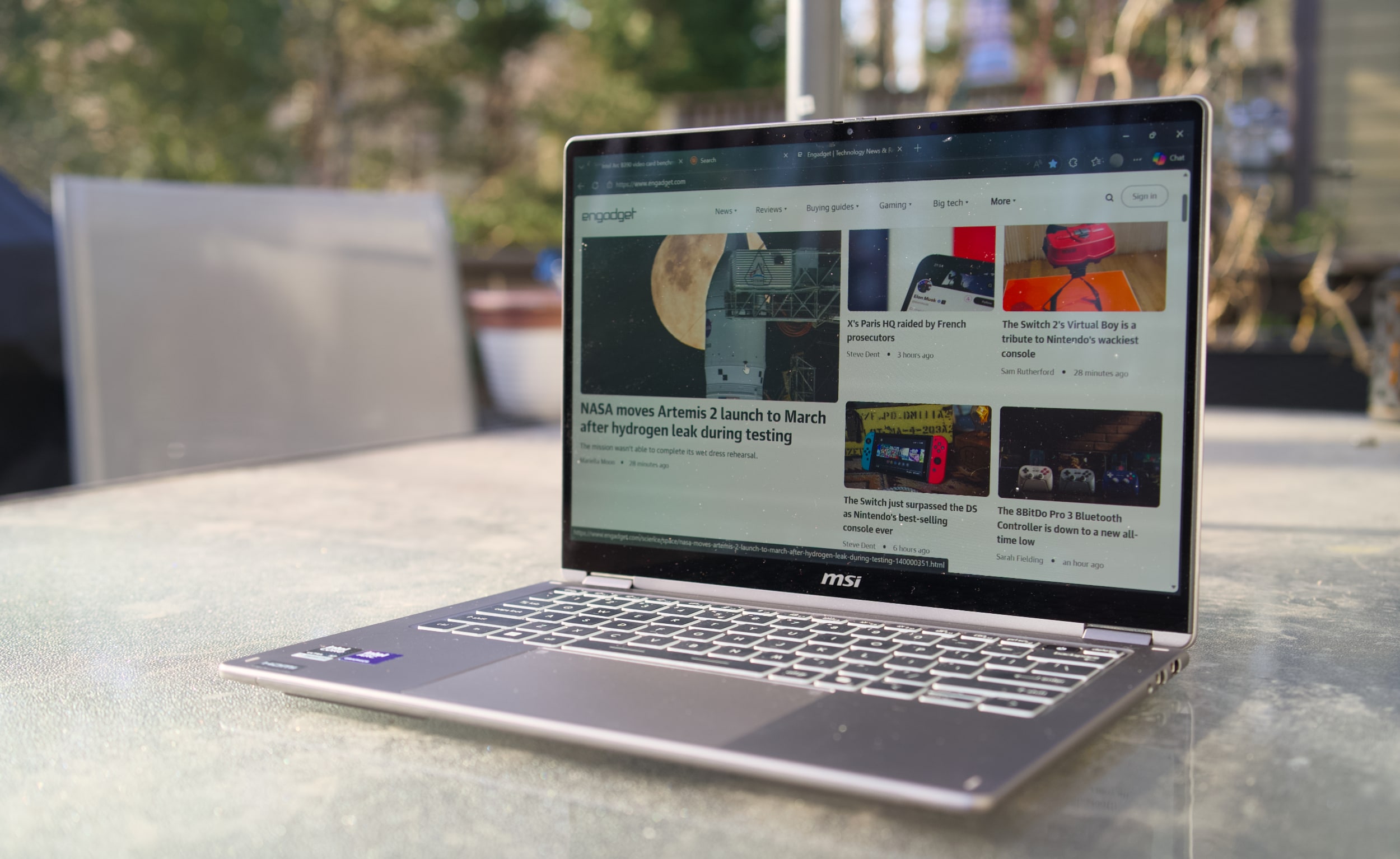
MSI Prestige 14 Flip AI+ is a surprisingly powerful ultraportable held back by a clunky trackpad. It's a shame, really, because it's very well-designed and thanks to Intel’s Panther Lake CPU, it can even run games like Arc Raiders without breaking a sweat. It also has more ports than most thin and light machines, its OLED screen is great for productivity work and at three pounds it's easy to carry around all day. But curse its mechanical trackpad — why does it even exist when Apple, Microsoft and others have been able to implement excellent haptic touchpads for years? Come on now.
Hardware
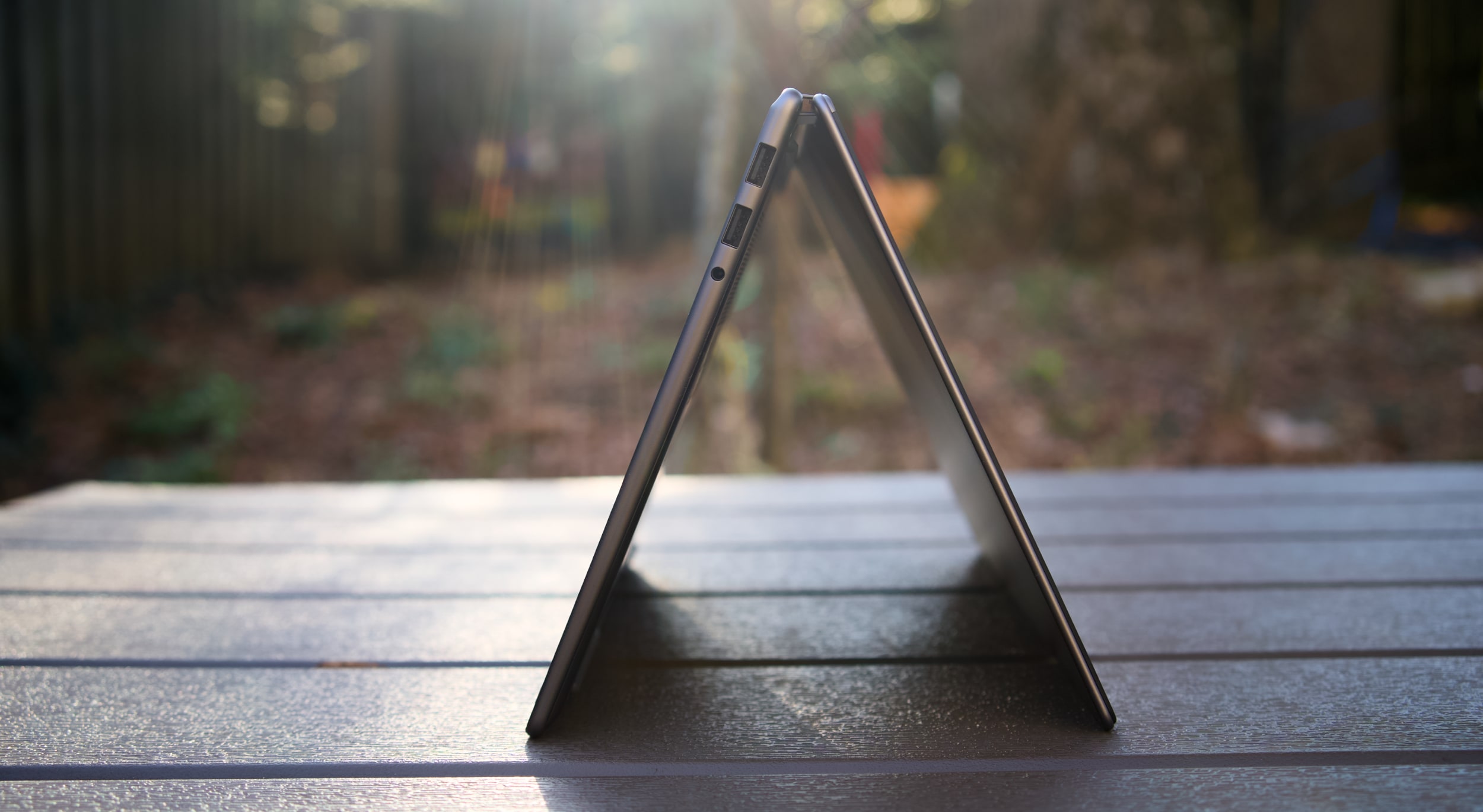
With its grey case, subdued design and somewhat chunky bezels, the MSI Prestige 14 Flip AI+ doesn't exactly make a striking impression. From afar, you can tell it's certainly thin, and it's also clear that MSI made the most of its slim case by shoving in two USB-A ports, two USB-C connections, a single HDMI port and a headphone jack. It would have been nice to have some sort of SD card slot too, but at least the Prestige 14 can connect to older accessories, monitors and TVs without a USB-C hub.
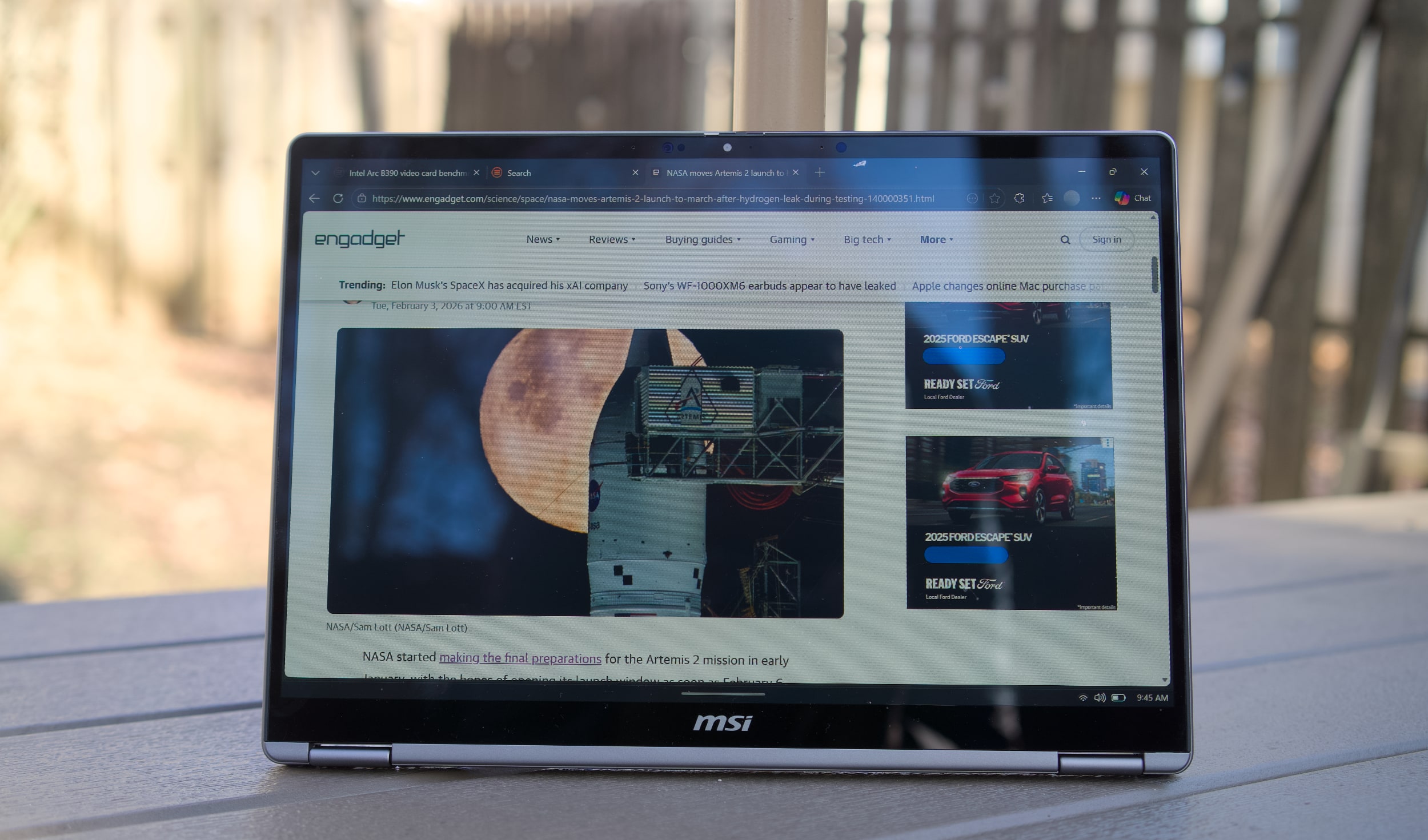
Once you pick it up, though, the Prestige 14's three-pound frame feels downright remarkable. It's just a tad heavier than the 2.7-pound MacBook Air, but its screen size directly competes with the 3.4- to 3.6-pound 14-inchMacBook Pro. The "Flip" in its name also means it’s versatile, with the ability to rotate its screen into a tablet mode, or a variety of tent configurations.
What makes the MSI Prestige 14 Flip AI+ truly interesting is its Intel Core Ultra X7 358H processor, which features 16 cores and a maximum speed of 4.8GHz. Specifically, it features four P-cores for speedy performance, eight efficient E-cores and four low-power E-cores. The Ultra X7 is also one of the new Panther Lake chips with gobs of graphics power in Intel's Arc B390 GPU, giving them far more gaming chops than previous ultraportable chips. The laptop also sports 32GB of RAM, which is the ideal amount for serious productivity work, and a roomy 1TB SSD.
MSI Prestige 14 Flip AI+
Devindra Hardawar for Engadget
The Prestige 14's stylus-friendly 14-inch OLED screen helps to distract from its mundane case design, with the typical deep black levels and excellent contrast I appreciate from OLED, together with bold 100 percent DCI-P3 color coverage. It makes just about everything look great, though I wish MSI offered more than a 60Hz refresh rate — a 90Hz or 120Hz screen would make scrolling through web pages look far smoother.
And speaking of the stylus, that’s tucked away at the bottom of the Prestige 14. I didn’t find it particularly useful for notetaking, but for those who do it’s easy to stow away. It’s just too thin for extended handwriting, and anyone doing serious notetaking or digital art would be better off with a larger stylus or dedicated drawing pad.
MSI Prestige 14 Flip AI+ in tent mode
Devindra Hardawar for Engadget
In-use: A stealth performer
After seeing a relatively slim Lenovo Panther Lake laptop reaching 190 fps in Battlefield 6, using only Intel's built-in Arc B390 GPU, I was eager to see how that new hardware would perform in the real world. Simply put, the MSI Prestige 14 Flip AI+ didn't disappoint. It scored 10,169 points in PCMark 10, the highest score we've seen yet on a Windows PC.
And yes, that includes plenty of powerful gaming systems like the Alienware 16 Area 51 (8,245 points) and the Razer Blade 18 (7,703), both of which were running Intel's last-gen Core Ultra 9 275HX chip. Of course, those systems have faster GPUs, like NVIDIA's RTX 5080, but PCMark 10 doesn't lean too heavily on graphics performance. The Prestige 14 edged close to the M5 MacBook Pro in Geekbench 6's multi-threaded CPU test, scoring 16,633 points compared to Apple's 18,003. But the MacBook Pro reigned supreme in the single-threaded test, scoring 4,310 points compared to the MSI's 2,864.
When it came to games, the Prestige 14 reached a surprisingly high 80-95 fps in Arc Raiders while playing in 1080p with medium graphics settings, as well as AMD's FSR3 upscaling and 2x frame generation. Without those AMD features, Arc Raiders ran at 45-50 fps, which is still respectable for an ultraportable. To my surprise, Intel's XeSS upscaling technology wasn't available in Arc Raiders during my testing, but there's a good chance that tool would eke out even more performance. (I've asked Intel about XeSS's omission, and will update when I hear back.)
In Cyberpunk 2077, The Prestige 14 hit 35 fpswhile playing in 1080p with default settings. Flipping on Intel's XeSS frame generation bumped that to 45 fps. If you're used to the 30 fps performance of consoles, those numbers are still vaguely playable, but they certainly fall short of the 60 fps PC players typically look for. It's best to think of the MSI Prestige 14 Flip AI+ as a laptop where you can play games sometimes, perhaps while you're away from your gaming desktop. It's certainly not a replacement for a dedicated gaming laptop.
For more prosaic productivity tasks, like juggling dozens of browser tabs and editing large images, the Prestige 14 didn't break a sweat. Its healthy 32GB of RAM gave it plenty of breathing room for multi-tasking, and unlike other ultraportables, I didn't notice any serious performance dips while running on battery. On that note, the Prestige 14 also lasted a whopping 22 hours and 15 minutes in PCMark 10's battery benchmark. That's the highest figure we've ever seen from a laptop, and it's a promising sign of what we can expect from other Panther Lake systems.
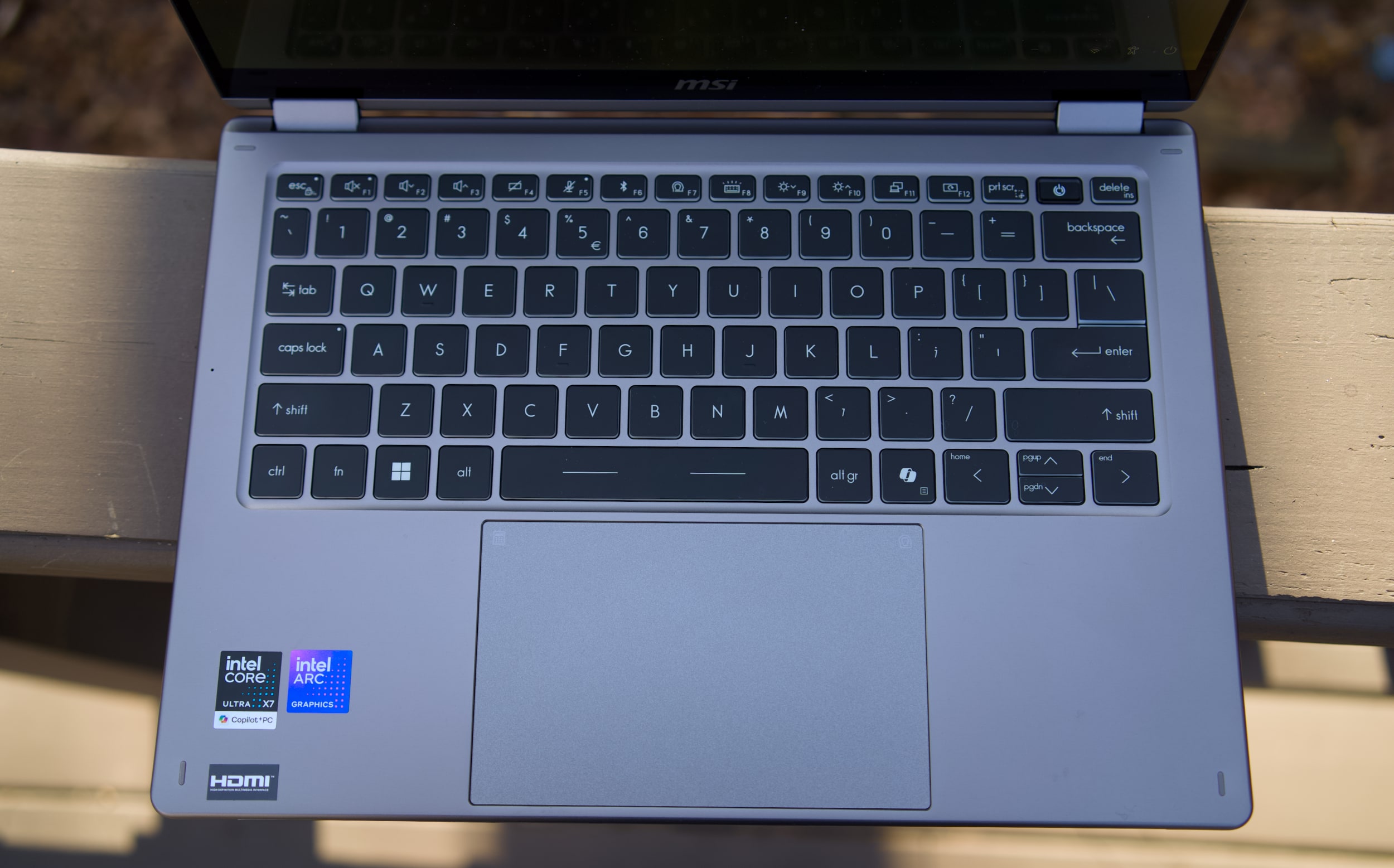
MSI Prestige 14 Flip AI+ keyboard and trackpad
Devindra Hardawar for Engadget
While there's clearly plenty to love about the MSI Prestige 14 Flip AI+, I was less impressed with its mechanical trackpad and keyboard. Perhaps I've been spoiled by the more responsive haptic trackpads from the competition, but the Prestige 14's old-school trackpad kept slowing me down with missed clicks and other annoyances. The laptop's keyboard felt similarly cheap, with a lack of depth and comfort that I've come to expect from other ultraportables in the $1,299 price range. Even after hours of testing, I had a hard time typing on the Prestige 14 at full speed without errors. It's a shame that MSI gets so much right, but is hindered by these weak components.
MSI Prestige 14 Flip AI+ in tablet mode
Devindra Hardawar for Engadget
Should you buy the MSI Prestige 14 Flip AI+?
As one of the earliest Panther Lake laptops on the market, the $1,299 Prestige 14 Flip AI+ is a solid machine, if you're willing to overlook its touchpad flaws. More than anything though, the Prestige 14 makes me excited to see what other PC makers offer with Intel's new chips. It's taken a while, but now Intel finally has some decent competition against Apple's M-series hardware. The era of gaming with ultralight machines is finally here.
This article originally appeared on Engadget at https://www.engadget.com/computing/laptops/msi-prestige-14-flip-ai-review-an-ultraportable-for-arc-raiders-thanks-to-intels-panther-lake-160000606.html?src=rss

 Anmelden