
 Anmelden
Apple Creator Studio is now available for $13 per month: What's included and what it means for creators
Services have been a huge part of Apple’s business for the past several years — to the tune of tens of billions of dollars in revenue last year alone. Now, with the new Apple Creator Studio bundle, the company is leaning harder into the professional creative software space.
Apple Creator Studio packages a bunch of the company’s pro apps into a single subscription service that you can pay monthly or yearly for. It’s officially available starting January 28, and includes a one-month free trial. The key shift is that some of these apps are now subscription-only on iPad, even as Apple continues to offer one-time purchases on the Mac – albeit with slightly different feature offerings. Here’s everything you need to know about Apple Creator Studio and the programs it includes.
What Apple Creator Studio includes
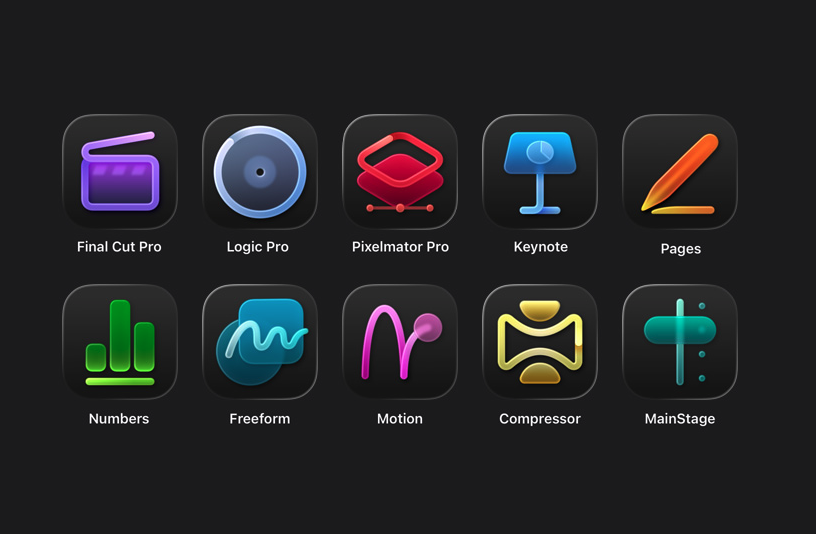
At its core, Apple Creator Studio gives subscribers access to Apple’s professional video, music and imaging apps. The bundle includes Final Cut Pro, Logic Pro, Pixelmator Pro, Motion, Compressor and MainStage. Pixelmator Pro (which Apple acquired in late 2024) is also coming to iPad for the first time, with a touch-optimized interface and Apple Pencil support.
A Creator Studio subscription also unlocks premium content and features inside Apple’s productivity apps. Keynote, Pages and Numbers remain free, but subscribers get access to premium templates and themes, plus a new Content Hub with Apple-curated photos, graphics and illustrations. Similar paid features are coming to Freeform later this year, the company says.
Apple is also using the bundle to introduce new “intelligence” features across several apps. In Final Cut Pro, the new Beat Detection feature can analyze a music track and show a beat grid so you can line edits up to the rhythm. The app is also getting tools like transcript search and visual search designed to make it easier to find moments across footage.
Logic Pro is gaining new AI-assisted Session Players and workflow features on Mac and iPad. Pixelmator Pro continues to rely heavily on machine learning for tasks like background removal, image repair and image upscaling. Note that some of these features require an Apple Intelligence-capable device.
Which devices are supported
Apple Creator Studio works across multiple Apple platforms, though not every app is available everywhere.
On the Mac, subscribers get access to all six apps: Final Cut Pro, Logic Pro, Pixelmator Pro, Motion, Compressor and MainStage.
On the iPad, Final Cut Pro, Logic Pro and Pixelmator Pro are included. Motion, Compressor and MainStage remain Mac-only.
On the iPhone, Creator Studio does not include full versions of Final Cut Pro, Logic Pro or Pixelmator Pro. Instead, it unlocks premium features and content inside Keynote, Pages and Numbers, and eventually Freeform.
Apple says the best experience is on macOS 26, iPadOS 26 and iOS 26 or later, with individual app requirements varying by device and chip.
Pricing and subscription options
Apple Creator Studio costs $12.99 per month or $129 per year, and new subscribers can try the service free for one month. College students and educators get a steep discount: the education plan costs $2.99 per month or $29.99 per year, and it also comes with a one-month free trial.
A standard subscription can be shared with up to five other people using Family Sharing, allowing six users total. Education subscriptions are limited to individual use and cannot be shared. Apple is also offering three free months of Creator Studio to customers who purchase a qualifying new Mac or iPad around launch.
But Creator Studio isn’t the only way you can access most of these apps. Apple says all of the major apps included in Creator Studio will continue to be available as one-time purchases on the Mac App Store.
Final Cut Pro remains priced at $299.99, Logic Pro at $199.99, Pixelmator Pro at $49.99, Motion at $49.99, Compressor at $49.99 and MainStage at $29.99. Users who already own these apps can keep using them and re-download them from the App Store as usual.
On the iPad, however, things are different. Final Cut Pro, Logic Pro and Pixelmator Pro for iPad are only available through the Creator Studio subscription. There is no standalone purchase option for those apps on iPadOS.
Keynote, Pages, Numbers and Freeform remain free for everyone to download and use. Apple says those apps will continue receiving updates, including the upcoming visual design changes tied to iOS 26 and iPadOS 26.
Without a Creator Studio subscription, you can still create, edit and collaborate in those apps. What you will not get are the paid templates, Content Hub assets and certain intelligence features.
What happens to your projects if you cancel
Apple says projects and content you create with an active subscription remain licensed as part of your original work.
Final Cut Pro, Logic Pro and Pixelmator Pro projects remain on your devices and can be copied or shared elsewhere. But you will need an active subscription to open or edit projects in those paid apps.
Keynote, Pages, Numbers and Freeform documents remain editable without a subscription. However, you will not be able to make new edits that rely on paid features once your subscription ends.
Other information about the Apple Creator Studio app bundle
Apple Creator Studio also comes with some immediate trade-offs. Alongside the bundle, Apple confirmed that the older Pixelmator app for iPhone and iPad, now described as Pixelmator Classic, will no longer receive updates. Apple says it will remain functional, but development is shifting to Pixelmator Pro, including the new iPad version included with Creator Studio.
But don't expect the standalone versions of the apps to maintain feature parity with their Creator Studio counterparts. Per Apple's FAQ, "The Apple Creator Studio version of Pixelmator Pro includes access to the Warp Tool feature," which implies that feature isn't present on the standalone version.
More broadly, the bundle puts Apple more directly in competition with Adobe and other subscription-focused creative platforms, especially for people who are looking for a lower monthly entry point. At the same time, Apple is keeping one-time purchases on the table for Mac users, even as iPad access moves behind a subscription.
Apple Creator Studio will be available January 28. Whether it makes sense will likely come down to which device you work on and whether you would otherwise pay upfront for one or more of Apple’s pro apps.

©


