❌

Normale Ansicht

How to use Workout Buddy with Apple Watch and iOS 26

Apple’s iOS 26 and watchOS 26 introduced a new fitness companion called Workout Buddy. This feature uses Apple Intelligence to provide spoken feedback during workouts and give motivation based on your activity history. Workout Buddy analyzes your pace, heart rate, distance and other metrics to deliver real-time encouragement and performance insights directly through connected Bluetooth headphones. It works in conjunction with the Workout app on Apple Watch and is partially controlled through the Fitness app on iPhone. This guide walks you through everything needed to set up and use Workout Buddy effectively during workouts.

What Workout Buddy does

It’s important to note that Workout Buddy is not a full coaching program. Instead, it adds to your workout with spoken cues that reflect how your session is going. Workout Buddy can remind you of your weekly activity totals, alert you to personal bests or performance milestones and provide an overview when you’re finished. It is designed to feel like a supportive training partner rather than a strict coach.

The feature operates in English by default and uses a text-to-speech model trained on voices from Apple Fitness+ trainers. It is available for a subset of workout types, including running, walking, cycling, high-intensity interval training (HIIT) and strength training. It requires on-device Apple Intelligence, which means you’ll need to keep one of the latest iPhones running updated software nearby during workouts. 

Supported models include iPhone 15 Pro, iPhone 15 Pro Max and any iPhone 16 model. You’ll also need an Apple Watch running watchOS 26.  

Requirements before you begin

Before Workout Buddy appears in your Fitness app or Workout app you must ensure a few things are in place. First, your Apple Watch must be running watchOS 26 or later and paired to an iPhone with iOS 26 installed. Second, your iPhone must be capable of on-device Apple Intelligence, meaning you must own one of the supported iPhone models we mentioned above and have Apple Intelligence enabled in the phone’s settings.

You’ll also need Bluetooth headphones paired with either your iPhone or your Apple Watch. Workout Buddy’s audio feedback cannot play through the watch speaker so headphones are essential. Lastly, your device language must be set to English, at least initially. If any of these things are missing, the option to enable Workout Buddy may not appear.

How to turn on Workout Buddy from iPhone

While much of the interaction with Workout Buddy happens on Apple Watch during workouts, you can enable it and choose voice options from the Fitness app on iPhone.

Open the Fitness app on your iPhone and tap the Workout tab at the bottom. Scroll through the list of workout types until you find one you plan to use with Workout Buddy. Tap the waveform bubble icon associated with that workout. This will bring up settings where you can turn on Workout Buddy. Flip the toggle to enable it and choose a voice from the available options. Once you have selected a voice, close that screen and your choice is saved. When you start this workout type on Apple Watch, Workout Buddy will activate.

Enabling Workout Buddy for a workout type on iPhone means you do not need to toggle it on separately on Apple Watch each time for that specific workout. However, you may still adjust it from the watch interface for more granular control.

How to turn on Workout Buddy on Apple Watch

To use Workout Buddy during a session, open the Workout app on your Apple Watch. Turn the Digital Crown to scroll through and select the workout you want to do, such as Outdoor Run, Outdoor Walk, Outdoor Cycle, HIIT or Strength Training. If you want to see all available workouts, tap the Add button at the bottom.

Once the workout type is selected, look for the Alerts button on screen. Tap Alerts then scroll until you see Workout Buddy. Tap Workout Buddy and flip the switch to on. You will then be asked to choose a voice if one is not already selected on your iPhone. After selecting the voice, return to the previous screen and tap Start. Workout Buddy will begin working as soon as the workout does.

Using Workout Buddy during a workout

Once you start an exercise on your Watch or iPhone, Workout Buddy will speak to you through your connected headphones. The feedback is designed to be encouraging and relevant to your pace, performance or milestones. It may mention your current progress toward activity goals, pace, splits, personal bests or other highlights from your fitness data. At the end of your session Workout Buddy will offer a summary of key metrics like duration distance and calorie burn.

While a workout is active, you can temporarily mute the audio if you need silence. On Apple Watch during the session, swipe right to reveal controls then tap Mute. This pauses Workout Buddy’s spoken commentary without disabling the feature entirely.

Customizing and managing Workout Buddy settings

Workout Buddy is enabled on a per-workout-type basis. If you prefer voice feedback for running but silence for strength training, you can enable it for one and leave it off for the other. The Fitness app on iPhone allows you to set a default voice preference for each workout type. On Apple Watch you can quickly toggle the feature on or off before starting a session.

If Workout Buddy does not appear as an option for a particular workout type, you may need to check compatibility. Apple’s documentation indicates that only certain types* are supported initially and that the option will not appear for unsupported workouts.

*Apple Watch SE (2nd generation), Apple Watch SE 3, Apple Watch Series 6, Apple Watch Series 7, Apple Watch Series 8, Apple Watch Series 9, Apple Watch Series 10, Apple Watch Series 11, Apple Watch Ultra, Apple Watch Ultra 2, Apple Watch Ultra 3

Troubleshooting common issues

If Workout Buddy fails to activate make sure your devices meet the requirements outlined above. Confirm that your iPhone with Apple Intelligence is nearby and that Bluetooth headphones are connected. If audio feedback is missing, ensure headphones are paired correctly and that the language is set to English. Some users have reported that if the headphones are paired only to the Watch rather than the iPhone, it can interfere with feedback. Switching to the iPhone often resolves that issue.

For workout types where Workout Buddy previously worked but suddenly does not appear, you may try toggling the feature off and on again in the Fitness app or rebooting both devices. In rare cases removing and re-adding the workout type on Apple Watch can refresh the settings.

This article originally appeared on Engadget at https://www.engadget.com/wearables/how-to-use-workout-buddy-with-apple-watch-and-ios-26-130000922.html?src=rss

©

  •  

The best GPS running watches for 2026

Having the right GPS watch on your wrist whether you’re going for your first ever run or your umpteenth run can make all the difference. The best GPS running watches not only keep track of how far you’ve run, but they track pace and other real-time metrics, advanced training features to help you hit your goals and, of course, precise distance measurements. Some models even provide offline maps for navigation, sleep tracking, recovery insights, and smart features that “regular” smartwatches do.

For those who need extra durability and lasting battery life, higher-end sport watches — like some of the best Garmin watches — are built to handle intense workouts, harsh weather and long runs. If you're training for a marathon, triathlon or just want a multisport option that can keep up with your lifestyle, these watches have the tech to support you.

With so many options available, from entry-level models to the best running watches packed with advanced running metrics, it can be tricky to find the right fit. That’s why we’ve rounded up our top picks to help you choose the perfect GPS watch for your training needs.

Best GPS running watches for 2026

Other GPS running watches we tested

Polar Pacer Pro

The Polar Pacer Pro looked and felt quite similar to our top pick, and it mapped my outdoor runs accurately. However, Polar’s companion app is leagues behind Garmin’s with a confusing interface and a design that feels very much stuck in the past. It’s also $100 more expensive than our top pick.

Amazfit Cheetah Pro

The Amazfit Cheetah Pro tracked my outdoor runs accurately and Zepp’s companion app has a coaching feature much like Garmin’s adaptive training plans that can outline a routine for you to complete in preparation for a race or to achieve a specific goal. My biggest issue with it was that its touchscreen wasn’t very responsive — it took multiple hard taps on the display to wake it, and often the raise-to-wake feature didn’t work, leaving me staring at a dark screen.

What to consider before buying a GPS running watch

GPS speed and accuracy

The most important thing for a GPS running watch to have is fast, accurate GPS tracking. That might seem obvious, but it’s quite easy to get distracted by all of the other smart features most of these devices have. Since most of them can be worn all day long as standard sport watches, there’s a lot of (possibly unnecessary) fluff that looks good on paper but won’t mean much if the core purpose if the device is left unfulfilled. To that end, I paid particular attention to how long it took each device’s built-in GPS tracking to grab my location before a run, if it ever lost my spot and the accuracy of the generated maps. Also, the device should be smart enough to let you start tracking a run while the GPS looks for your location.

Workout profiles and trackable metrics

You may not be able to suss out GPS accuracy just by looking at a spec sheet (that’s where this guide can help), but you can check for features like supported workout profiles. That’s something you’ll want to look into, even if your one and only activity is running. Check to make sure the best running watches you’re considering support all the kinds of running activities you like to do (outdoor runs, treadmill runs, etc) and any other workouts you may want to track with it.

Most fitness wearables today aren’t one-trick ponies; you’ll find a healthy number of trackable exercise modes on any sport watch worth its salt. That said, the number of workout profiles can be directly proportional to a device’s price: the higher-end the product, chances are the more specific, precise workouts it can monitor.

In a similar vein, you’ll want to check the trackable metrics of any watch you’re considering before you buy. Since we’re talking about the best GPS running watches, most will be able to track the basics like distance, heart rate and pace, and those are bare minimums. Some watches can monitor additional stats like speed, cadence, stride length, advanced running dynamics, aerobic and anaerobic training effect, intensity minutes and more. If you’re already a serious runner who trains for multiple races each year, or if you're a trail runner who needs elevation and navigation features, you’ll want to dig into the spec sheet of the watch you’re considering to make sure it can track all of your most necessary metrics.

Size and weight

It’s worth checking out a watch’s case size and weight before going all-in on one. GPS running watches, and standard smartwatches as well, can have a few different sizes to choose from so you’ll want to make sure you’re getting the best fit for your wrist. I have a smaller wrist, so I tend to avoid extra-large cases (anything over 42mm or so), especially if I intend on wearing the device all day long as my main timepiece. Weight, on the other hand, is a little less controllable, but typically smaller case sizes will save you a few grams in overall weight.

For those who need durability, particularly trail runners or those tackling extreme conditions, devices like Garmin watches offer rugged builds that can handle rough terrain, impact, and extreme weather.

Battery life

Unlike regular smartwatches, GPS running watches have two types of battery life you’ll need to consider: with GPS turned on and in “smartwatch” mode. The former is more important than the latter because most GPS running watches have stellar battery life when used just as a smart timepiece. You can expect to get multiple days on a single charge, with some surviving more than two weeks (with all day and night wear) before they need a recharge.

Battery life with GPS turned on will be much shorter by comparison, but any GPS running watch worth its salt should give you at least 10-15 hours of life with the GPS being used continuously. The more you’re willing to spend, the higher that number typically gets, with some GPS running watches lasting for 40 hours while tracking your location.

This article originally appeared on Engadget at https://www.engadget.com/wearables/best-gps-running-watch-141513957.html?src=rss

©

© Valentina Palladino for Engadget

Best GPS running watches
  •  

The best fitness trackers for 2026

If you're looking to get fit, sleep better or just keep a closer eye on your health, a fitness wearable is a great place to start. Whether you're into intense workouts or just want to hit your step goal each day, the best fitness trackers available today can offer loads of helpful features, from sleep tracking and resting heart rate monitoring to built-in GPS and stress tracking. Some are even subtle enough to wear 24/7, like smart rings, while others double as stylish smartwatches.

There are great options out there for beginners as well as more advanced users, and the variety of features means there’s something for every lifestyle and budget. In this guide, we’ll walk you through the best fitness trackers you can buy right now, and explain who each one is best suited for.

Best fitness trackers for 2026

What do fitness trackers do best?

The answer seems simple: Fitness wearables are best at monitoring exercise, be it a 10-minute walk around the block or that half marathon you’ve been diligently training for. Obviously, smartwatches can help you reach your fitness goals too, but there are some areas where fitness bands and smart rings have proven to be the best buy: focus, design, better battery life, durability and price.

When I say “focus,” I’m alluding to the fact that fitness trackers are made to track activity well; anything else is extra. They often don’t have the bells and whistles that smartwatches do, which could distract from their advanced health tracking abilities — things like all-day resting heart rate monitoring, stress tracking, and even detailed sleep tracker insights. They also tend to have fewer sensors and internal components, which keeps them smaller and lighter. Fitness trackers are also a better option for those who just want a less conspicuous gadget on their wrists all day.

Battery life tends to be better on fitness trackers, too. While most smartwatches last one to two days on a single charge, fitness bands offer between five and seven days of battery life — and that’s with all-day and all-night use even with sleep tracking features enabled. Many fitness trackers also slot nicely into your existing ecosystem, syncing seamlessly with your smartphone, other fitness apps and cloud storage to keep all your data in one place.

When it comes to price point, there’s no competition. Most worthwhile smartwatches start at $175 to $200, but you can get a solid smart band starting at $70. That makes them a great entry point for beginners who want to track their progress without committing to a full smartwatch. Yes, more expensive bands and smart rings exist (and we recommend a few here), but you’ll find more options under $150 in the fitness tracker space than in the smartwatch space.

When to get a smartwatch instead

If you need a bit more from your wearable and don’t want to be limited to a fitness or activity tracker, a smartwatch may be the best buy for you. There are things like on-watch apps, alerts and even more robust fitness features that smartwatches have and the best fitness trackers don’t. You can use one to control smart home appliances, set timers and reminders, check weather reports and more. Some smartwatches let you choose which apps you want to receive alerts from, and the options go beyond just call and text notifications. Just make sure your smartwatch is compatible with your Android or iPhone, however, before purchasing, as not all of them work with both operating systems.

But the extra fitness features are arguably the most important thing to think about when deciding between a fitness tracker and a smartwatch. The latter devices tend to be larger, giving them more space for things like GPS, barometers, onboard music storage and more. While you can find built-in GPS on select fitness trackers, it’s not common.

If you’re someone who’s seriously training — say for a race or an endurance challenge — a dedicated running watch may be worth considering. These often provide more in-depth cardio analytics, recovery insights, and real-time pace data that go beyond what standard trackers can deliver.

Other fitness trackers we've tested

Fitbit Inspire 3

The Fitbit Inspire 3 strips out all the luxury features from the Charge 6 and keeps only the essential tracking features. You won’t get built-in GPS tracking or Fitbit Pay or Spotify control but you do get solid activity tracking, automatic workout detection, smartphone alerts and plenty more. The updated version has a sleeker design and includes a color touch display and connected GPS, the latter of which lets you track pace and distance while you run or bike outside while you have your phone with you. When compared to the Charge 6, the Inspire 3 is more fashionable, too. Its interchangeable bands let you switch up the look and feel of your tracker whenever you want, and it’s slim enough to blend in with other jewelry you might be wearing. We were also impressed by its multi-day battery life: Fitbit promises up to 10 days on a single charge, and that checked out for us. After four days of round-the-clock use, the Inspire 3 still had 66 percent battery left to go.

Fitness tracker FAQs

How long do fitness tracker batteries last?

The battery life of fitness trackers can vary depending on the model and its features. On average, most fitness trackers last between five to seven days on a single charge. Basic models with limited features could stretch up to 10 days or more. However, more advanced trackers with features like continuous heart rate monitoring, GPS, or always-on displays may need recharging after one to three days. If you're using GPS or streaming music through your fitness tracker, you'll find that this drains the battery faster. By using these features less, or turning them off, you'll extend battery life. 

This article originally appeared on Engadget at https://www.engadget.com/wearables/best-fitness-trackers-133053484.html?src=rss

©

© Fitbit / Engadget

Best fitness trackers
  •  

These robotic sneakers gave me a surprising boost at CES

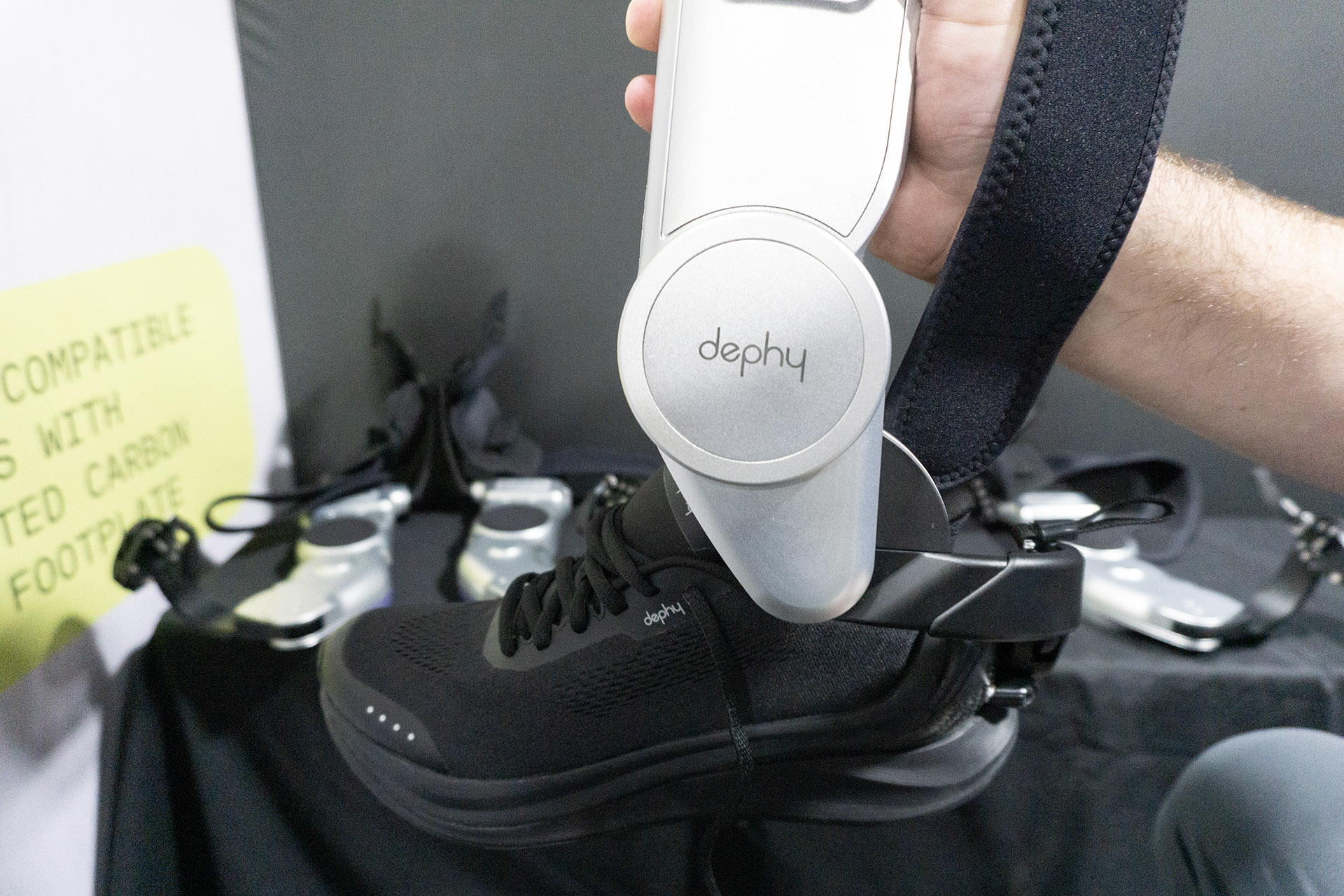
I'll admit that I've always kind of taken walking for granted. Other than a knee injury more than a decade ago, my ability to walk long distances has largely been limited only by my own choices. That's not the case for everyone, though. And robotics company Dephy has created a pair of robotic sneakers, called the Sidekick, that are meant to help people who want to walk more than their bodies might otherwise be capable of.

The system consists of two parts: an ankle-worn exoskeleton and a special pair of sneakers that attach to it. The exoskeleton hooks onto the back of the shoe and is secured with a strap around your calf. The battery powered device is equipped with sensors that can detect and adapt to the wearer's gait in order to deliver an extra "boost" with each step. 

The whole setup is pricey, at $4,500, but Dephy is betting that people who have "personal range anxiety" might be willing to pay for the extra confidence the Sidekick can provide. "This is a device that's kind of like [having] an extra calf muscle," Dephy CEO Luke Mooney told me. 

The Sidekick.
The Sidekick.
Karissa Bell for Engadget

I was able to take the Sidekick for a spin around the CES showfloor and it was a truly surprising sensation. The best way I can describe walking with the Sidekick powered on is that with every step forward there's a noticeable upward push from under your heel. It wasn't enough to throw me off balance, but it did feel a bit strange.

The Sidekick has adjustable power levels based on how much help you might need. At the highest level, it definitely felt unnecessarily pushy. The lower levels were still noticeable but felt less disruptive. I just felt… bouncy. Later, when Mooney turned off the power entirely, I noticed that my feet felt weirdly heavy in a way they hadn't just a few minutes before. 

Mooney was quick to tell me that I'm not Dephy's target demographic. "A lot of times people who are fit, or like athletes, actually struggle to adopt to the technology because their body's so in tune with how they move," he said. "Whereas folks who are not as physically active and fit, their body's ready to accept help."

The company's technology will be used in products more focused on athletic performance, however. Dephy has partnered with Nike on its upcoming robotic sneaker currently known as Project Amplify. Mooney declined to share details on the collaboration, but the shoemaker has claimed that some early testers have been able to improve their mile times by two minutes. 

I tried the Sidekick early in the day. Several hours later, though, when I was walking between the Las Vegas Conventions Center halls for the third or fourth time, I started thinking about those robotic sneakers again. I was getting close to 10,000 steps and hadn't sat down for hours. My feet were sore. I remembered that strange, bouncy boost and thought it sounded kind of nice.

This article originally appeared on Engadget at https://www.engadget.com/wearables/these-robotic-sneakers-gave-me-a-surprising-boost-at-ces-174500005.html?src=rss

©

  •  
❌