When OpenAI released GPT-5.4 at the start of March, the company said the new model was designed primarily for professional work like programming and data analysis. Now OpenAI is launching GPT-5.4 mini and nano, and while it is once again highlighting the usefulness of these new systems for tasks like coding, one of the new models is available to Free and Go users. What's more, that model, GPT-5.4 mini, even offers performance that approaches GPT-5.4 in a handful of areas.
As a Free or Go user, you can access 5.4 mini by selecting "Thinking" from ChatGPT's plus menu. For paid users, the model is the new fallback for when you've hit your rate limit with 5.4 proper. OpenAI says 5.4 mini offers better performance than GPT-5.0 mini in a few different key areas, including reasoning, multimodal understanding and tool use. That means 5.4 mini is better at parsing non-text inputs such as images and audio, and has a more nuanced understanding of how to do things like search the web. It does all of this while running more than twice as fast as its predecessor.
As for GPT-5.4 nano, OpenAI says it's ideal for tasks such as data classification and extraction where speed and cost-efficiency are top of mind. If you're a ChatGPT user, you won't find the new model in the chatbot. Instead, OpenAI is making it only available through its API service. The company envisions developers using more advanced models to delegate tasks to AI agents running GPT-5.4 nano, and that's reflected in the cost of the new model, which OpenAI has priced starting at $0.20 per million input tokens.
This article originally appeared on Engadget at https://www.engadget.com/ai/gpt-54-mini-brings-some-of-the-smarts-of-openais-latest-model-to-chatgpt-free-and-go-users-170000585.html?src=rss
At the start of the year, Google introduced Personal Intelligence, a Gemini feature that allows the chatbot to pull information from the user's other Google apps and services to generate personalized responses. After making the feature first available to Google AI Pro and Ultra subscribers, the company is expanding availability to more users in the US.
Google is kicking off the expansion with AI Mode. Starting today, anyone in the US can enable Personal Intelligence inside of the company's dedicated search chatbot. To enable the feature, tap on your profile, select Search personalization, followed by Connected Content Apps. From there, select Connect Workspace and Google Photos.
In the coming weeks, Google will start rolling out Personal Intelligence to free users of the Gemini app in the US, with international availability to follow thereafter. The company plans to do the same with Gemini in Chrome, where personalization will first roll out to users in the US before becoming available in other countries.
Google suggests a few different use cases for Gemini personalization inside of AI Mode, the Gemini app and Chrome. For instance, say you turn to AI mode for help with planning an upcoming trip. Instead of generating a generic itinerary, the chatbot will pull information from your apps to suggest something more tailored to your interests. It can also help you with troubleshooting in cases where you can’t remember the exact make or model of a device you’re trying to fix, as long as there are some hints to its origin contained inside of your Gmail account.
In each case, Personal Intelligence is disabled by default. Gemini will not personalize its responses unless you enable the new feature. Additionally, personalization is only available to personal accounts and not for Workspace business, enterprise and education users.
This article originally appeared on Engadget at https://www.engadget.com/ai/google-makes-gemini-personalization-available-to-free-users-160000581.html?src=rss
OpenAI's forthcoming "adult mode" will allow users to engage in lewd conversations with ChatGPT, but not use the chatbot to generate explicit images, audio or video. In response to reporting from The Wall Street Journal, an OpenAI spokesperson characterized the upcoming release as capable of producing smut rather than pornography.
OpenAI CEO Sam Altman first floated the idea of allowing people to use ChatGPT for erotica last October, saying the company wanted to "treat adult users like adults." OpenAI originally planned to release adult mode at the start of 2026. Since then, the company has pushed back the feature a handful of times, with the most recent delay coming at the start of March so that OpenAI could "focus on work that is a higher priority for more users."
Through The Journal's reporting, we're learning OpenAI forged ahead with work on adult mode despite reservations from its council on wellbeing and AI. The group of eight researchers and experts were reportedly unanimous in warning the company AI-generated erotica could lead to people developing an unhealthy emotional dependence on ChatGPT, and that underage users would almost certainly find ways to access the feature. According to The Journal, one council member, citing cases where people have taken their own lives after becoming attached to ChatGPT, said the company was at risk of creating a "sexy suicide coach."
Those concerns appear to have been well-founded. At one point, the company's age verification technology was misidentifying underage users as adults about 12 percent of the time, according to The Journal. At OpenAI's scale, with around 100 million teens using ChatGPT every week, that error rate would have translated to millions of minors accessing erotic chats. OpenAI told The Journal its prediction algorithm performs to industry standards, adding no such system will ever be completely foolproof.
This article originally appeared on Engadget at https://www.engadget.com/ai/openais-adult-mode-reportedly-wont-generate-pornographic-audio-images-or-video-150744035.html?src=rss
OpenAI is rolling out new interactive responses in ChatGPT it says are designed to make the chatbot more useful for learners. Starting today, ChatGPT will generate dynamic visuals when you ask it to explain select scientific and mathematical concepts, including the Pythagorean theorem, Coulomb's law and lens equations. When ChatGPT responds with an interactive visual, you'll be able to tweak any variables and the equation itself, allowing you to see how those changes affect the solution.
With today's release, OpenAI says ChatGPT will respond with interactive visuals when asked about more than 70 concepts, with support for additional topics to come down the line. The visuals are available to all ChatGPT users, regardless of subscription status. However, OpenAI notes high school- and college-aged students are likely to get the most out of the new feature.
ChatGPT explains Ohm's law.
OpenAI
The more interactive responses from ChatGPT follow the release of Study Mode last summer. Released in response to the sheer amount of students using chatbots to complete their coursework, that feature guides the user toward finding an answer themselves, rather than provide an outright solution. "This is just the beginning," OpenAI says of its latest feature. "Over time, we plan to expand interactive learning with additional subjects and continue building tools that strengthen learning with ChatGPT."
This article originally appeared on Engadget at https://www.engadget.com/ai/chatgpt-will-now-generate-interactive-visuals-to-help-you-with-math-and-science-concepts-170000520.html?src=rss
At the start of February, OpenAI upgraded its Codex coding app to give it the ability to manage multiple AI agents. At the same time, it released a standalone macOS app. If you've been patiently waiting for Windows to get that same treatment, OpenAI just released a dedicated Codex app for Microsoft's operating system.
Like its macOS counterpart, the software allows you to coordinate multiple coding agents to work on the same task. There's also support for automations to streamline repetitive tasks like bug testing. To help users get started, Codex includes a dedicated "Skills" section. Skills bundle together instructions, resources and scripts the software can use to connect agents to specific tools and workflows. OpenAI has also included native sandboxing to help make Windows developers feel at home.
Codex is available to ChatGPT Free, Go, Plus and Pro users. If you decide to give the app a try, know that your session history is saved to your OpenAI account, meaning you can start coding on Mac and then move to Windows without losing your work.
This article originally appeared on Engadget at https://www.engadget.com/ai/openai-brings-its-codex-coding-app-to-windows-195345429.html?src=rss
Over the past few years, Google's A-series Pixel phones have consistently been some of the best midrange phones you can buy. But with the AI boom causing memory shortages and the price of consumer electronics to rise, including smartphones, affordable devices like the Pixel 10a are more important than ever. Thankfully, Google's new phone still represents great value, even if it doesn't come with many upgrades.
Design and display
As before, the Pixel 10a has a 6.3-inch 120Hz P-OLED display.
Igor Bonifacic for Engadget
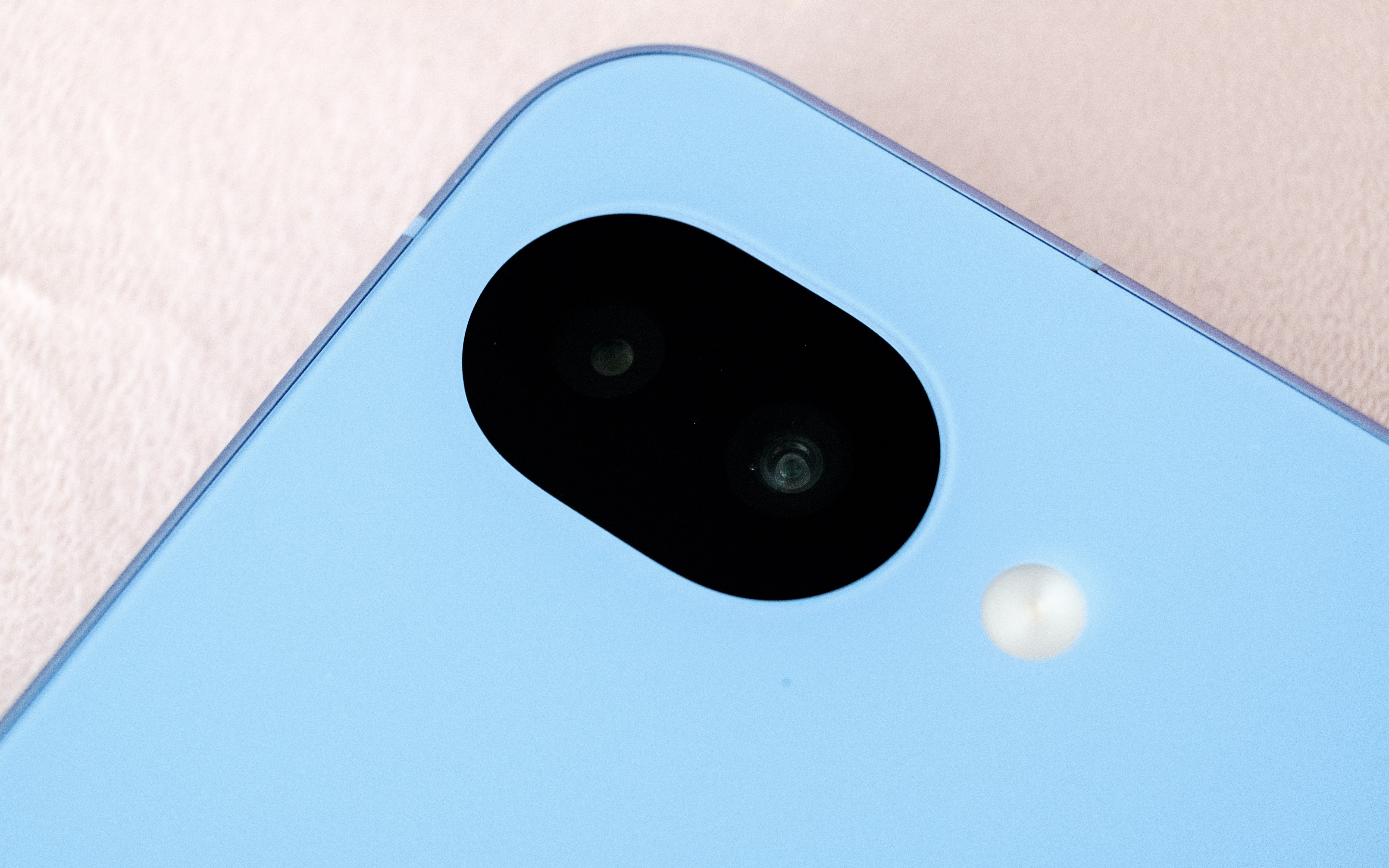
The story of the Pixel 10a is one of small changes, so let’s start with the outside. The phone is available in four colors: lavender (pictured), berry, fog and obsidian. Photos don't do the lavender color justice. In person, the light refracts beautifully off the surface of the aluminum frame and composite back. The back of the phone also has a pleasing matte finish that made the 10a feel secure in my hand. Another nice touch is that Google shaved down the camera module further, so that the 10a can now lie completely flat. As before, the entire phone is rated IP68-certified against dust and water. For DIY enthusiasts, Google has said it redesigned the 10a's internals to make it easier to repair. Hooray for that.
Beyond those changes, the 10a has a brighter 120Hz P-OLED screen that offers up to 3,000 nits of brightness, up from 2,700 on the 9a. The display also offers better protection against scratches and drops thanks to Google's decision to switch to Gorilla Glass 7i for the screen coating. Despite the minimal changes, there's not much to complain about here. The 10a's screen is fast, responsive and vibrant. The on-screen fingerprint sensor is also in an easy-to-reach spot toward the middle of the phone. After reviewing severalbigphones in recent months, it was also nice to go back to a handset with a sensible 6.3-inch footprint.
Performance and battery
The speakers on the Pixel 10a could be stronger and more defined.
Igor Bonifacic for Engadget
I've been spoiled recently by phones like the OnePlus 15R, which offers a 7,400mAh battery and 55 watt charging out of the box. By that metric, the Pixel 10a, with its 5,100mAh battery, leaves something to be desired. Putting the phone through Engadget's video rundown test, it ran for 28 hours before the battery died, which is exactly where the Pixel 9a landed last year. However, that score means the 10a is thoroughly middle of the pack when it comes to battery life. I can also see battery life becoming a concern as the phone ages. While that's true of every phone, the 10a's smaller battery makes that more of a pressing concern since you'll be charging the phone more often and therefore degrading the battery faster.
Google has improved wired charging speeds, with the new phone capable of charging at 30 watts, up from 23-watts with the 9a. You'll need to provide a compatible power adapter though; the Pixel 10a doesn't come with one inside the box. With a 30 watt charger, the 10a's battery went from dead to about 50 percent in under 45 minutes. A full charge takes approximately an hour and 45 minutes. Again, not great, but serviceable.
Another disappointment is that the Pixel 10a doesn't support Google's new Pixelsnap standard. Wireless charging is faster on the new phone (it's now rated at 10 watts, up from five), but without a compatible third-party case, a charging puck won't magnetically align with the back of the 10a. It's not a dealbreaker, but Pixelsnap would have been a great addition.
The 10a has the same chipset Google used on the Pixel 9a, the Tensor G4, and the company has once again gone with 8GB of RAM. Other midrange phones like Samsung Galaxy S25 FE offer faster chips, but they also cost more. Moreover, I didn't feel like the 10a was worse for running on old silicon. The new 120Hz display does a lot to make the new phone feel snappy, and Google's in-house Android skin feels responsive as ever.
The 10a also does a commendable job of keeping heat in check. I sat down to play Diablo Immortaland even after an hour of playtime, the phone was still cool to the touch despite running the game at high settings and 60 frames per second.
Cameras
This time around, the Pixel 10a has a camera module that's flush with its body.
Igor Bonifacic for Engadget
The 10a comes with the same camera package as its predecessor. On the back, you get a 48-megapixel main camera with an f/1.7 lens that offers optical image stabilization and phase detection autofocus. Complementing it is a 13MP ultrawide with a 120-degree field of view. For selfies, you get a 13MP camera with an f/2.2 lens. As ever, Google's software is doing most of the heavy lifting here. That includes a pair of new features, Camera Coach and Auto Best Take, that debuted with the Pixel 10 series.
Camera Coach, like the name suggests, uses AI to analyze the scene you're about to capture, and offers tips on how to best compose and light the shot. It will also suggest the best camera mode for the job. While I can see how this tool could be useful, I found the fact it relies on a cloud model made it too slow for some situations. For example, when I used Camera Coach to help me snap a photo of my cat, a sassy tortoiseshell, she walked away by the time the 10a got a response from Google's servers. In more static scenes, Camera Coach is more useful, but much of photography is about capturing a fleeting moment in time, so its utility is limited.
Auto Best Take solves a problem I'm sure we've all experienced. You go to take a group portrait, and snap multiple frames to ensure everyone looks good, only to end up without a single usable shot. With Auto Best Take, Google promises to combine similar group photos so that everyone looks their best. This feature works as advertised.
Outside of those features, the 10a offers a predictably great camera experience. The phone consistently produces photos that are sharp with great natural colors. That said, I did miss having a telephoto camera, as you can see from the photos I shot during a recent Cat Power concert in Toronto. Given the 10a only costs $500, it's hard to fault Google for not including one.
Software
The Pixel 10a's side button can both activate Gemini and the phone's camera.
Igor Bonifacic for Engadget
Out of the box, the 10a comes with Android 16. Like all of Google's recent Pixel devices, the company has promised to support the 10a for an industry-leading seven years with software updates and security patches. The company's pledge includes Pixel Drops, which often bring new software features. One feature Google has brought over from the more expensive Pixel 10 line is Satellite SOS, which allows you to call for help during emergencies, even when your phone can't connect to a cellular network. Outside of a demo designed to make users aware of the feature, I wasn't able to test Satellite SOS (thankfully).
Notably, the 10a is still missing Google's Screenshots app. That's unfortunate since it's one of the more useful Pixel exclusives, making it easier to organize all your online clippings. Other AI features such as Gemini Live and Circle to Search are accounted for, and as useful ever.
Wrap-up
Overall, the Pixel 10a is a great phone, though I would have loved to see more year-over-year upgrades.
Igor Bonifacic for Engadget
The Pixel 10a is a tricky phone to grade. On the one hand, part of me wants to dock points because Google has added so few updates. On the other, the 10a is still a great phone for $500, and at a time when consumer electronics are becoming more expensive by the day, the fact it hasn't gone up in price is a small miracle. Even if Google is partly responsible for the current memory crunch, the company's hardware division has delivered an affordable device that’s still worth recommending. The Pixel 10a is still the phone to beat in the $500 range.
This article originally appeared on Engadget at https://www.engadget.com/mobile/smartphones/google-pixel-10a-review-small-changes-but-still-great-value-173026779.html?src=rss
Anthropic is bringing another paid feature to Claude's free tier. The next time you chat with Claude, you'll have the option to have it reference your previous conversation to inform its outputs. Anthropic first made its chatbot capable of remembering past interactions last August, before giving it the ability to compartmentalize memories in the fall. Making memory a free feature is well-timed; earlier today Anthropic made it easier for users to import their past conversations with a competing chatbot to Claude. If after enabling memory you decide to turn it off, you can either pause the feature, preserving Claude’s memories for use down the road, or completely delete them so they’re not saved on Anthropic’s servers.
Claude is enjoying new-found popularity, having recently jumped to the number one spot in the App Store's free app charts. This comes while Anthropic is engaged in a high-stakes contract dispute with the US government over AI safeguards. On Friday, US Defense Secretary Pete Hegseth labeled the company a "supply chain risk" after it refused to sign a contract that would allow the Pentagon to use Anthropic models for mass surveillance against Americans and in fully autonomous weapons. Following Hegseth's announcement, Anthropic vowed to challenge the designation. As of right now, we’re waiting to see how things play out, and what it might mean for Anthropic.
This article originally appeared on Engadget at https://www.engadget.com/ai/anthropic-brings-memory-to-claudes-free-plan-220729070.html?src=rss
President Donald Trump has ordered all US government agencies to stop using Claude and other Anthropic services, escalating an already volatile feud between the Department of Defense and company over AI safeguards. Taking to Truth Social on Friday afternoon, the president said there would be a six-month phase out period for federal agencies, including the Defense Department, to migrate off of Anthropic's products.
“The Leftwing nut jobs at Anthropic have made a DISASTROUS MISTAKE trying to STRONG-ARM the Department of War, and force them to obey their Terms of Service instead of our Constitution,” the president wrote. “Anthropic better get their act together, and be helpful during this phase out period, or I will use the Full Power of the Presidency to make them comply, with major civil and criminal consequences to follow.”
Before today, US Defense Secretary Pete Hegseth had threatened to label Anthropic a “supply chain risk” if it did not agree to withdraw safeguards that insist Claude not be used for mass surveillance against Americans or in fully autonomous weapons. In a post on X published after President Trump’s statement, Hegseth said he was “directing the Department of War to designate Anthropic a Supply-Chain Risk to National Security. Effective immediately, no contractor, supplier, or partner that does business with the United States military may conduct any commercial activity with Anthropic.”
Anthropic did not immediately respond to Engadget's comment request. Earlier in the day, a spokesperson for the company said the contract Anthropic received after CEO Dario Amodei outlined Anthropic's position made “virtually no progress” on preventing the outlined misuses.
"New language framed as a compromise was paired with legalese that would allow those safeguards to be disregarded at will. Despite DOW's recent public statements, these narrow safeguards have been the crux of our negotiations for months," the spokesperson said. "We remain ready to continue talks and committed to operational continuity for the Department and America's warfighters."
Advocacy groups like the Center for Democracy and Technology (CDT) quickly came out against the president’s threats. “This action sets a dangerous precedent. It chills private companies’ ability to engage frankly with the government about appropriate uses of their technology, which is especially important in national security settings that so often have reduced public visibility,” said CDT President and CEO Alexandra Givens, in a statement shared with Engadget. “These threats undermine the integrity of the innovation ecosystem, distort market incentives and normalize an expansive view of executive power that should worry Americans all across the political spectrum.”
For now, it appears the AI industry is united behind Anthropic. On Friday, hundreds of Google and OpenAI employees signed an open letter urging their companies to stand in "solidarity" with the lab. According to an internal memo seen by Axios, OpenAI CEO Sam Altman said the ChatGPT maker would draw the same red line as Anthropic.
In a blog post published late on Friday, Anthropic vowed to “challenge any supply chain risk designation in court,” and assured its customers that only work related to the Defense Department would be affected. The company's full statement is available here, an excerpt is below:
Designating Anthropic as a supply chain risk would be an unprecedented action—one historically reserved for US adversaries, never before publicly applied to an American company. We are deeply saddened by these developments. As the first frontier AI company to deploy models in the US government’s classified networks, Anthropic has supported American warfighters since June 2024 and has every intention of continuing to do so.
We believe this designation would both be legally unsound and set a dangerous precedent for any American company that negotiates with the government.
No amount of intimidation or punishment from the Department of War will change our position on mass domestic surveillance or fully autonomous weapons. We will challenge any supply chain risk designation in court.
Update, February 27, 9PM ET: This story was updated twice after publish. First at 6PM ET to include a link to and quotes from Hegseth about the designation of Anthropic as a supply chain risk. Later, a quote from Anthropic was added, along with a link to the company’s blog post on the subject.
This article originally appeared on Engadget at https://www.engadget.com/ai/trump-orders-federal-agencies-to-drop-anthropic-services-amid-pentagon-feud-222029306.html?src=rss
NASA is making major changes to its Artemis Moon program. On Friday, Administrator Jared Isaacman announced the space agency would carry out an additional flight in 2027 to test commercial lunar landers from SpaceX and/or Blue Origin. The new mission will take the place of Artemis 3, which previously would have seen NASA attempt to land on the Moon for the first time since 1972. The flight will also see the agency test a new spacesuit made by Axiom Space.
As part of the new plan, the redesigned Artemis 3 mission will give NASA the chance to test at least one lander in the relative safety of low Earth orbit. NASA will attempt to return humans to the Moon during Artemis 4 sometime in 2028, with the potential for another mission as early as later that same year. Per CBS News, the decision comes after NASA's Aerospace Safety Advisory Plan said the agency's existing mission plan was too risky.
"NASA must standardize its approach, increase flight rate safely, and execute on the President’s national space policy. With credible competition from our greatest geopolitical adversary increasing by the day, we need to move faster, eliminate delays, and achieve our objectives," said Isaacman. "Standardizing vehicle configuration, increasing flight rate and progressing through objectives in a logical, phased approach, is how we achieved the near-impossible in 1969 and it is how we will do it again."
The change of plan also comes as Artemis 2 has faced multiple delays in recent months. The Space Launch System (SLS) heavy-lift rocket has, once again, proven to be temperamental. NASA had planned to launch Artemis 2 in early February, but pushed the flight back after it caught a hydrogen leak during a fueling test. More recently, NASA delayed the mission to give its engineers time to fix a helium pressurization issue in the upper stage of the SLS. At the earliest, the mission can now get underway on April 1.
This article originally appeared on Engadget at https://www.engadget.com/science/nasa-overhauls-artemis-program-delaying-moon-landing-to-2028-164255318.html?src=rss
To coincide with the release of Samsung's new Galaxy S26 family of phones, Google is pushing out a small but meaningful update to Circle to Search. As a reminder, Circle to Search allows you to carry out a Google Search from almost anywhere on your phone. Just tap and hold your device's home button, and then circle the passage or image you want to know more about.
With previous iterations of Circle to Search, the tool's underlying AI system was limited to searching against a single object in an image. Now, thanks to Gemini 3, it can scan and identify multiple objects at the same time. Naturally, Google is quick to point out the boon this represents for shopaholics. If you see a fit you like on Instagram, you can circle an entire person and the tool will attempt to find a match for each item they're wearing, including any shoes and accessories. At the same time, Google has made it easier to see how those clothes might look on you by bringing its virtual try on feature directly inside of Circle to Search.
The benefits of the new model aren't only limited to shopping queries. Building on a search technique Google debuted with AI Mode, Circle to Search can now also reason through the relationship between different objects in an image. So say you see a photo of a coral reef and want to know how all the different pictured fish live together, Circle to Search will not only be able to identify the different species shown but also explain how they coexist with one another.
Google is bringing the new and improved Circle to Search to Galaxy S26 and Pixel 10 phones first before rolling it out to more Android devices soon.
This article originally appeared on Engadget at https://www.engadget.com/mobile/smartphones/googles-circle-to-search-can-now-identify-multiple-objects-in-an-image-180000385.html?src=rss
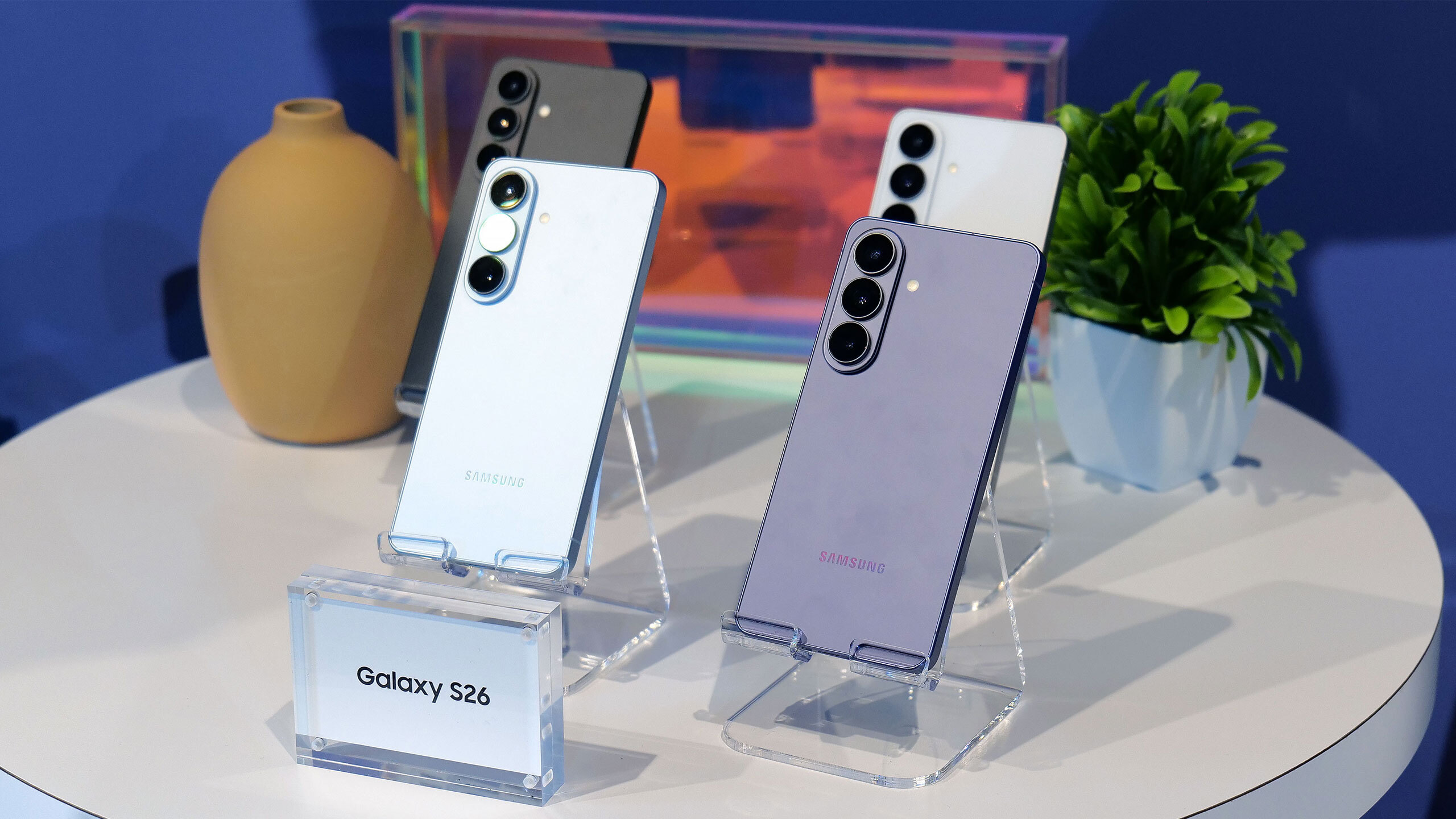
The wait is over. At its Unpacked event today, Samsung took the wraps off its new S26 family of phones. Unlike the S26 Ultra, the S26 and S26+ represent mostly iterative updates. Samsung has tweaked the design of the two devices, making it so they share the same rounded corners of their more expensive sibling. Additionally, the S26 has a slightly larger 6.3-inch AMOLED display and a higher capacity 4,300mAh battery inside. As for the S26+, it still has a 6.7-inch screen and 4,900mAh battery.
Like in years past, Samsung is depending on new and expanded software capabilities rather than updated hardware to give the S26 and S26+'s cameras an edge over the competition. As before, both phones feature a 50-megapixel main camera, a 12MP ultra-wide and a 10MP telephoto with 3x optical zoom. For selfies, they’re equipped a 12MP front-facing camera.
The company says its new Object Aware Engine will allow the front-facing cameras to deliver more pleasing portrait mode shots, with better rendering of skin tones and hair textures. For videos, Samsung has updated its Super Steady tech, making it capable of maintaining a 360-degree horizontal lock. The upgraded feature should make it easier to maintain a consistent level horizon while trying to record a video of a moving child or pet. A new feature named Auto Framing uses a machine learning algorithm to automatically tighten the frame while filming 4K and 8K clips.
The S26 will be available in six different colorways, with the four pictured here available in store.
Sam Rutherford for Engadget
And if you're a Snapdragon fan, you can rest easy. While some pre-release reports suggested Samsung was planning to use its new flagship Exynos chipset across the entire S26 line, North American and Japanese variants of the S26 and S26+ will once again ship with Qualcomm silicon instead. Specifically, the two phones come specced with the speedy Snapdragon 8 Elite Gen 5, which debuted alongside the OnePlus 15 in November 2025. It will be interesting to see how the new Exynos 2600 compares with its Snapdragon counterpart; the former is the world's first 2nm chipset.
Over on the software front, Samsung has upgraded its suite of AI features. For instance, the company has made Now Brief capable of pulling from a wider variety of apps to generate more comprehensive daily summaries. Similarly, the company's handy Auto Eraser feature now works across streaming services like Netflix, allowing you to make it easier to hear dialogue in a greater variety of videos.
The two phones will retail for $899 and $1,099, making them both $100 more expensive than their predecessors. They come standard with 12GB of RAM and 256GB of storage. Samsung will also offer 512GB variants, alongside six different colorways of each phone. In-store, you'll find the S26 and S26+ in purple, blue, black and white, with silver and rose gold being online exclusives. Pre-orders open today, with general availability to follow on March 11.
This article originally appeared on Engadget at https://www.engadget.com/mobile/smartphones/samsungs-s26-and-s26-offer-familiar-designs-snapdragon-8-gen-5-chips-and-new-software-features-180000224.html?src=rss
Outfitting a kitchen can get expensive fast, but you don’t need high-end appliances or flashy tools to cook more efficiently. Some of the best kitchen gadgets are simple, affordable gadgets that quietly make everyday tasks easier — whether that’s prepping ingredients, measuring accurately or keeping your workspace organized. These are the kinds of tools you reach for again and again, not one-off purchases that end up buried in a drawer.
This guide focuses on inexpensive kitchen gadgets that punch above their price, including practical prep tools, durable measuring essentials and compact helpers that save time without taking up much space. None of them are strictly necessary, but all can streamline your routine and make cooking at home feel a little less like work.
Best cheap kitchen gadgets for 2026
This article originally appeared on Engadget at https://www.engadget.com/home/kitchen-tech/best-cheap-kitchen-gadgets-130049897.html?src=rss
At the start of the month, Elon Musk announced that two of his companies — SpaceX and xAI — were merging, and would jointly launch a constellation of 1 million satellites to operate as orbital data centers. Musk's reputation might suggest otherwise, but according to experts, such a plan isn't a complete fantasy. However, if executed at the scale suggested, some of them believe it would have devastating effects on the environment and the sustainability of low Earth Earth orbit.
Musk and others argue that putting data centers in space is practical given how much more efficient solar panels are away from Earth's atmosphere. In space, there are no clouds or weather events to obscure the sun, and in the correct orbit, solar panels can collect sunlight through much of the day. In combination with declining rocket launch costs and the price of powering AI data centers on Earth, Musk has said that within three years space will be the cheapest way to generate AI compute power.
Ahead of the billionaire's announcement, SpaceX filed an eight-page application with the Federal Communications Commission detailing his plan. The company hopes to deposit the satellites in this massive cluster in altitudes ranging between 500km and 2000km. They would communicate with one another and SpaceX's Starlink constellation using laser "optical links." Those Starlink satellites would then transmit inference requests to and from Earth. To power the entire effort, SpaceX has proposed putting the new constellation in sun-synchronous orbit, meaning the spacecraft would fly along the dividing line that separates the day and night sides of the planet.
What a data center would endure in orbit
Almost immediately the plan was greeted with skepticism. How would SpaceX, for instance, cool millions of GPUs in space? At first glance, that might seem like a weird point to get hung up on — much of space being around -450 Fahrenheit — but the reality is more complicated. In the near vacuum of space, the only way to dissipate heat is to slowly radiate it out, and in direct sunlight, objects can easily overheat. As one commenter on Hacker News succinctly put it, "a satellite is, if nothing else, a fantastic thermos."
Scott Manley, who, before he created one of the most popular space-focused channels on YouTube, was a software engineer and studied computational physics and astronomy, argues SpaceX has already solved that problem at a smaller scale with Starlink. He points to the company's latest V3 model, which has about 30 square meters of solar panels. "They have a bunch of electronics in the middle, which are taking that power and doing stuff with it. Now, some of that power is being beamed away as radio waves, but there's a lot of thermal power that's being generated and then having to be dissipated. So they already have a platform that's running electronics off of power, and so it's not a massive leap to turn into something doing compute."
The larger V3 @Starlink satellites that will deploy from Starship will bring gigabit connectivity to users and are designed to add 60 Tera-bits-per-second of downlink capacity to the Starlink network.
Kevin Hicks, a former NASA systems engineer who worked on the Curiosity rover mission, is more skeptical. "Satellites with the primary goal of processing large amounts of compute requests would generate more heat than pretty much any other type of satellite," he said. "Cooling them is another aspect of the design which is theoretically possible but would require a ton of extra work and complexity, and I have doubts about the durability of such a cooling system."
What about radiation then? There's a reason NASA relies on ancient hardware like the PowerPC 750 CPU found inside the Perseverance rover: Older chips feature larger transistors, making them more resilient to bit flips — errors in processing caused most often by cosmic radiation — that might scramble a computation. "Binary ones and zeroes are about the presence or absence of electrons, and the amount of charge required to represent a 'one' goes down as the transistors get smaller and smaller," explains Benjamin Lee, professor of computer and information science at the University of Pennsylvania. Space is full of energized particles traveling at incredible velocities, and the latest GPUs are built on the smallest, most advanced processing nodes to create transistor-dense silicon. Not a great combination.
"My concern about radiation is that we don't know how many bit flips will occur when you deploy the most advanced chips and hundreds of gigabytes of memory up there," said Professor Lee, pointing to preliminary research by Google on the subject. As part of Project Suncatcher, its own effort to explore the viability of space-based data centers, the company put one of its Trillium TPUs in front of a proton beam to bombard it with radiation. It found the silicon was "surprisingly radiation-hard for space applications."
While those results were promising, Professor Lee points out we just don't know how resilient GPUs are to radiation at this scale. "Even though modern computer architectures can detect and sometimes correct for those errors, having to do that again and again will slow down or add overhead to space-based computation," he said.
Space engineer Andrew McCalip, who's done a deep dive on the economics of orbital data centers, is more optimistic, pointing to the natural resilience of AI models. "They don't require 100 percent perfect error-free runs. They're inherently very noisy, very stochastic," he explains, adding that part of the training for modern AI systems involves "injecting random noise into different layers."
Even if SpaceX could harden its GPUs against radiation, the company would still lose satellites to GPUs that break down. If you know anything about data centers here on Earth, it's that they require constant maintenance. Components like SSDs and GPUs die all the time. Musk has claimed SpaceX's AI satellites would require "little" in the way of operating or maintenance costs. That's only true if you accept the narrowest possible interpretation of what maintaining a fleet of AI satellites would entail.
"I think that there's no case in which repair makes sense. It's a fly till you die scenario," says McCalip. From an economic perspective, McCalip argues the projected death rate of GPUs in space represents "one of the biggest uncertainties" of the orbital data center model. McCalip's put that number at nine percent on the basis of a study Meta published following the release of its Llama 3 model (which, incidentally, measured hardware failures on Earth.) But the reality is no one knows what the attrition rate of those chips will be until they're in space.
Orbital data centers also likely wouldn't be a direct replacement for their terrestrial counterparts. SpaceX's application specifically mentions inference as the primary use case for its new constellation. Inference is the practical side of running an AI system. It sees a model apply its learning to data it hasn't seen before, like a prompt you write in ChatGPT, to make predictions and generate content. In other words, AI models would still need to be trained on Earth, and it's not clear that the process could be offloaded to a constellation of satellites. "My initial thinking is that computations that require a lot of coordination, like AI training, may end up being tricky to get right at scale up there," says Professor Lee.
Kessler syndrome
In 1978, a pair of NASA scientists proposed a scenario where low Earth orbit could become so dense with space junk that collisions between those objects would begin to cascade. That scenario is known as Kessler syndrome.
One estimate from satellite tracking website Orbiting Now puts the number of objects in orbit around the planet at approximately 15,600. Another estimate from NASA suggests there are 45,000 human-made objects orbiting Earth. No matter the number, what's currently in orbit represents a fraction of the 1 million additional satellites Musk wants to launch.
According to Aaron Boley, professor of physics and astronomy at the University of British Columbia and co-director of the Outer Space Institute, forward-looking modeling of Earth's orbit above 700 kilometers — where part of SpaceX's proposed cluster would live — suggests that area of space is already showing signs of Kessler syndrome.
While it takes less time for debris to clear in low Earth orbit, Professor Boley says there's already enough material in that region of space where there could be a cascading effect from a major collision. Debris could, in a worst case scenario, take a decade to clear up. In turn, that could lead to disruptions in global communications, climate monitoring missions and more.
"You could get to the point where you're just launching material in, and you could ask yourself how many satellites can I afford to lose? Can you reconstitute your constellation faster than you're losing parts of it because of debris?" says Boley. "That's a horrible future in terms of the environmental perspective" In particular, it would limit opportunities for humans to fly into low Earth orbit. "Could you operate in it? Yeah, but it would come with higher and higher costs," adds Boley.
"The entire world is struggling with the problem of how we safely fly multiple mega constellations," says Richard DalBello, who previously ran the Traffic Coordination System for Space (TraCSS) at the US Department of Commerce. Right now, there is no common global space situational awareness (SSA) system, and government and satellite operators are using uncoordinated national and commercial systems that are likely producing different results. At the start of the year, SpaceX lowered the orbit of thousands of Starlink satellites after one of them nearly collided with a Chinese satellite.
SpaceX has its own in-house SSA system called Stargaze, which it uses to fly its more than 7,000 Starlink satellites. According to DalBello, competing operators can receive SSA data from SpaceX, but to do so they must share their satellite position information. “Assuming data sharing, it is likely Stargaze can make an important contribution to spaceflight safety" says DalBello. “SpaceX is likely to have success with US and other commercial operators, but without the assistance of the federal government, other governments — particularly China — will likely be unwilling to share their satellite and SSA data."
According to DalBello, the Biden administration was unable to make meaningful progress on the next-generation TraCSS system, in part because Congress was initially reluctant to fund the program. Meanwhile, the current Trump administration hasn't shown interest in advancing the work that began during the president's first term.
Even if the regulatory situation suddenly changes and the world's governments agree on an international SSA system, SpaceX launching 1 million satellites along the day-night terminator would see the company effectively monopolize one of the Earth's most valuable and important orbits. Professor Boley argues we should view our planet's orbits as a resource that belongs to everyone. "Every time you put a satellite up, you use part of that resource. Now someone else can't use it."
And as Hicks points out, even a single cascade of colliding satellites would prevent that space from being used for scientific endeavors. "You would have to wait years for that debris to slowly come back into the atmosphere and burn up. In the meantime, that debris is taking up space that could be used for climate monitoring missions or any other types of missions that governments want to launch."
A blow to the atmosphere
Separately, the constant churn of Starship launches and re-entry of dead satellites would have a potentially dire impact on our planet's atmosphere. "We're not prepared for it," Boley flatly says of the latter. "We're not prepared for what's happening now, and what's happening now is already potentially bad."
According to Musk's "basic math," SpaceX could add 100 gigawatts of AI compute capacity annually by launching a million tons of satellite per year. McCalip estimates a 100-gigawatt buildout alone would necessitate about 25,000 Starship flights.
Many of the metals found in satellites, including aluminum, magnesium and lithium, in combination with the exhaust rockets release into the atmosphere, can have complicated effects on the health of the planet. For instance, they can affect polar cloud formations, which in turn can facilitate ozone layer destruction through the chemical reactions that occur on their surfaces. According to Boley, the problem is we just don't know how severe those environmental factors could become at the scale Musk has proposed, and SpaceX has provided us with precious few details on its mitigation plans. All it has said is that its plan would "achieve transformative cost and energy efficiency while significantly reducing the environmental impact associated with terrestrial data centers."
Even if SpaceX could and does go out its way to mitigate the atmospheric effects of constant rocket flights, those spacecraft still need to be manufactured here on Earth. At one of his previous roles, Hicks studied rocket emissions and found the supply chains needed to build them produce an "order of magnitude" more carbon emissions than the rockets themselves.
SpaceX plans to fly its new satellites in a sun-synchronous orbit, meaning for much of the year, they'll be sunlit. Each new Starlink generation has been larger and heavier than the one before it, with SpaceX stating in a recent filing that its upcoming V3 model could weigh up to 2,000 kilograms, up from the 575 kilograms of the V2 Mini Optimized. While we don't know the exact dimensions of the company's still-hypothetical AI satellites, they will almost certainly be bigger than their Starlink counterparts.
SpaceX has done more than most space operators to reduce the brightness of its satellites, but Professor Boley says he expects that this new constellation will be "strikingly bright" when moving through the night sky. In aggregate, he estimates they will almost certainly be harmful to scientific research here on Earth, limiting what terrestrial observatories can see.
"You're going to see them with the naked eye. You're going to see them with cameras. It's going to be like living near an airport where you see all these things flying over just after sunset and the next couple of hours after sunset," says Manley. "I don't know if I want to have my entire sunset be just a band of satellites constantly shooting overhead."
There are good reasons to make some spacecraft capable of doing AI inference. For instance, Professor Lee suggests it would make orbital imaging satellites more useful, as those spacecraft could do on-site analysis, instead of sending high-resolution files over long distances, saving time in the process. But the dose, as they say, makes the poison.
"There's a lot of excitement about the many possibilities that can be brought to society and humanity through continued access to space, but the promise of prosperity is not permission to be reckless," he says. "At this moment, we're allowing that excitement to overtake that more measured progression [...] those impacts don't just impact outer space but Earth as well."
This article originally appeared on Engadget at https://www.engadget.com/ai/orbital-ai-data-centers-could-work-but-they-might-ruin-earth-in-the-process-170000099.html?src=rss
Volume two of the Metal Gear Solid: Master Collection will arrive on August 27, publisher Konami announced today during Sony’s latest State of Play presentation. The bundle will feature 2008’s Metal Gear Solid 4: Guns of the Patriots, the HD remaster of 2010’s Metal Gear Solid: Peace Walker and a selection of bonus content, including Metal Gear: Ghost Babel, which was originally released for Game Boy Color in 2000. All told, that’s a smaller selection of games than Konami made available with Vol. 1 of the Master Collection, but Metal Gear fans will be excited nonetheless, if only for the fact it will mark the first time MGS4 will be officially playable on a platform other than the PlayStation 3.
That it has taken Konami nearly two decades to release the conclusion of Solid Snake’s story on more systems has to do with the nature of the game as a PS3 exclusive. MGS4 took extensive advantage of the console’s unique Cell architecture, a fact that made it difficult (and expensive) proposition to port to more recent x86-based systems. In recent years, it’s been possible to emulate the game on a powerful PC, but not everyone has that kind of hardware.
Metal Gear Solid: Master Collection Vol.2 will be available on PS5, Xbox Series X/S, PC, Nintendo Switch and Nintendo Switch 2.
Update, February 12, 6:30PM ET: This story was updated after publish to add details about Metal Gear Solid: Master Collection Vol.2’s launch platforms.
This article originally appeared on Engadget at https://www.engadget.com/gaming/playstation/the-next-metal-gear-solid-remaster-collection-arrives-this-summer-231711005.html?src=rss
One of the toughest parts of any new computer build or upgrade is finding the right video card. In a gaming PC, the GPU is easily the most important part, and you can limit your experience by going with the wrong model. The buying process can be frustrating, especially right now with memory shortages leading to higher prices. In this guide, we'll help you navigate the market and find the right GPU for your needs.
It's all about the games
The first question to ask yourself is what kind of games do you want to play. Competitive shooters like Valorant, Overwatch and Marvel Rivals were designed to run on older hardware. As such, even entry-level GPUs like the GeForce RTX 5060 can push those games at 120 frames per second and above at 1080p (more on why that's important in a moment).
By contrast, if you want to play modern, single-player games with ray tracing and other graphical extras, you'll need a more powerful GPU. Just how much more powerful will depend on the resolution of your monitor.
A 1440p or QHD monitor has 78 percent more pixels than a 1080p screen, and a 4K display has more than twice as many pixels as a QHD panel. In short, running a game at 4K, especially at anything above 60 frames per second, is demanding, and most GPUs will need to use upscaling techniques like NVIDIA's Deep Learning Super Sampling (DLSS) and AMD's FidelityFX Super Resolution (FSR) to push new games at high refresh rates.
On the subject of resolution, it doesn't make sense to spend a lot of money on a 4K monitor only to pair it with an inexpensive GPU. That's a recipe for a bad experience. As you're shopping for a new video card, you should think about the resolution and frame rate you want to play your games. If you're in the market for both a GPU and display, be sure to check out our guide to the best gaming monitors.
If your budget allows, a good bet is to buy a midrange card that can comfortably render all but the most demanding games at 1440p and at least 144 frames per second. Put another way, you want a GPU that can saturate a monitor at its native resolution and refresh rate in as many games as possible. That will give you the smoothest possible experience in terms of motion clarity, and allow you to dabble in both competitive shooters and the latest single-player games as the mood strikes you.
Photo by Devindra Hardawar/Engadget
NVIDIA vs AMD and Intel
One of the confusing aspects of the GPU industry are all the players involved. What you need to know is that there are three main players: AMD, Intel and NVIDIA. They design the cards you can buy, but delegate the manufacturing of them to so-called add-in board (AIB) partners like ASUS, XFX, Gigabyte and others.
As you can imagine, this creates some headaches. The most annoying of which is that AMD, Intel and NVIDIA will often set recommended prices for their graphic cards, only for their partners to sell their versions of those GPUs for more than the manufacturer's suggested retail price (MSRP). For example, NVIDIA's website lists the RTX 5070 with a starting price of $549. On Newegg, there are no new 5070s listed at that price. The only models anywhere close to $549 are refurbished and open box specials. If you want one that comes sealed, that will cost you at least $630.
As for what company you should buy your new GPU from, before 2025, NVIDIA was the undisputed king of the market. Specific GeForce cards may have not offered the best rasterization performance in their price range, but between their performance in games with ray tracing and the fact NVIDIA was ahead on features like DLSS, an RTX GPU was a safe bet.
However, with this year's RTX 50 series release (and excluding models like the RTX 5080 and 5090 where there's no competition), it's safe to say NVIDIA missed the mark this generation. If you're in the market for an entry- or mid-level GPU, AMD and Intel offer better value, with cards that come with enough VRAM for now and into the future. That said, there are still a few reasons you might consider an NVIDIA GPU, starting with ray tracing.
Ray tracing
For decades, developers have used rasterization techniques to approximate how light behaves in the real world, and the results have been commendable. But if you know what to look for, it's easy to see where the illusion falls apart. For that reason, real-time ray tracing has been a goal of industry for years, and in 2018 it became a reality with NVIDIA's first RTX cards.
In some games, effects like ray-traced reflections and global illumination are transformational. Unfortunately, those features are expensive to run, often coming at a significant frame rate drop without upscaling. Since ray tracing was optional in many games before 2025, you could save money by buying an AMD GPU. For example, even if the RX 7800 XT was worse at ray tracing than the RTX 4070, the former was often cheaper to buy, had more onboard VRAM and offered as good or better rasterization performance in many games.
However, you can't ignore ray tracing performance anymore. We're starting to see releases like Doom: The Dark Ages where the tech is an integral part of a game's rendering pipeline, and more are likely to follow in the future. Thankfully, AMD's newest cards are much better in that regard, though you'll still get an edge running an NVIDIA model. For that reason, if ray tracing is important to you, NVIDIA cards are still the way to go.
Refresh rates and frame rates
If you're new to the world of PC gaming, it can be tricky to wrap your head around refresh rates. In short, the higher the refresh rate of a monitor, the more times it can update the image it displays on screen every second, thereby producing a smoother moving picture.
For example, moving elements on a monitor with a 240Hz refresh rate will look better than on one with a 120Hz refresh rate. However, that's dependent on your GPU being able to consistently render a game at the appropriate frame rates. In the case of a 120Hz monitor, you want a GPU with enough headroom to drive most games at 120 fps. Realistically, most video cards won't be able to achieve that in every game, but it's a good baseline to aim for when shopping for a new GPU.
Frame generation
Since the release of NVIDIA's RTX 40-series GPU, the company has offered a feature called frame generation. As the name suggests, it allows NVIDIA's latest video cards to generate an additional frame for every frame they render normally. With the 50-series, NVIDIA has since begun offering multi-frame generation, which gives those GPUs the ability to generate up to three additional frames for every rendered frame. AMD has its own take on the tech, as does Intel, though NVIDIA's offering is considered superior to both due to how it handles frame pacing.
Frame generation is nice to have, but it's not the silver bullet it might seem. Enabling it will increase system latency, reducing how responsive your games feel. Somewhat unintuitively, high-end GPUs also benefit more from the tech than their entry-level counterparts since they can naturally render more frames. For that reason, it's best to think of frame generation as a way to get the most out of a high refresh rate display.
Upscaling and latency
I've mentioned DLSS a few times already. Alongside FSR and Intel XeSS, DLSS is an example of what's known as an image reconstruction technology. More and more, native rendering is going out of fashion in game design. With ray tracing and other modern effects enabled, even the most powerful GPUs can struggle to render a game at 1440p or 4K and a playable framerate. That’s why many developers will turn to DLSS, FSR or XeSS to eke out additional performance by upscaling a lower resolution image to QHD or UHD.
Upscaling in games is nothing new. For example, the PS4 Pro used a checkerboard technique to output games in 4K. What’s different now is how modern GPUs go about it. With DLSS, NVIDIA pioneered an approach that uses machine learning to recreate an image at a higher resolution, and in the process, addressed some of the pitfalls of past upscaling methods. If you're sensitive to these sorts of things, there's still blur and shimmer with DLSS, FSR and XeSS, but it's much less pronounced and can lead to significant performance gains.
To DLSS, NVIDIA later added single and multi-frame generation. DLSS is only available on NVIDIA cards, and following the recent release of DLSS 4.5, widely considered to offer the best image quality. That's another reason why you might choose an NVIDIA card over one of its competitors.
However, if you decide to go with an AMD GPU, don't feel like you're missing out. The company recently released FSR 4. While it's not quite on par with DLSS 4 and 4.5 in terms of support and image quality, it's a major leap over FSR 3 and FSR 2.
While on the subject of DLSS, I'll also mention NVIDIA Reflex. It's a latency-reducing technology NVIDIA introduced in 2020. AMD has its own version called Radeon Anti-Lag, but here again Team Green has a slight edge. If you're serious about competitive games, Reflex can significantly reduce input lag, which will make it easier to nail your shots in Counter-Strike 2, Valorant and other shooters.
Driver support
Previously, one of the reasons to pick an NVIDIA GPU over the competition was the company's solid track record of driver support. With one of the company's video cards, you were less likely to run into stability issues and games failing to launch. At the start of 2025, NVIDIA's drivers were abysmal, but the company has since corrected course.
VRAM
As you're comparing different GPUs, especially those in the same tier, pay close attention to the amount of VRAM they offer. Many modern games will eat up as much VRAM as a GPU can offer, and if your card has a low amount, such as 8GB, you're likely to run into a performance bottleneck.
If your budget allows for it, always go for the model with more VRAM. Consider, for instance, the difference between the $379 RTX 5060 Ti 8GB and $429 RTX 5060 Ti 16GB. Spending an extra $50 is going to be a lot for some people, but it's the difference between a card that is only adequate for many recent releases and one that will last you for a few years. In many cases, more VRAM is better.
A slight caveat to this is when comparing models that have different memory bandwidths. A GPU that can access more of its memory faster can outperform one with more memory, even if it has less of it outright. Here, you'll want to read reviews of the models you're comparing to see how they perform in different games.
Size and power draw
Modern GPUs are big. Most new cards will take up at least two PCI slots on the back of your motherboard. They can also vary dramatically in length, depending on the number of fans the AIB has added to cool the PCB. To be safe, be sure to check the length of the card you want to buy against the maximum clearance listed by your case manufacturer. If you have a radiator at the front of your case, you will also need to factor the size of that in your measurements. The last thing you want is to buy a card that doesn't fit in your case.
Lastly, be sure to check the recommended power supply for the card you want. As a rule of thumb, unless you know what you're doing, it's best to just stick with the manufacturer's recommendation. For instance, NVIDIA suggests pairing the RTX 5070 Ti with a 750 watt PSU. So if you're currently running a 650 watt unit, you'll need to factor in the price of a PSU upgrade with your new GPU.
Devindra Hardawar for Engadget
Should you buy a used GPU?
It depends. If you can find a deal on an old RTX 40 series GPU, then yes. NVIDIA's RTX 50 series don't offer greatly improved performance over their predecessors, and with most models selling for more than their suggested retail price, it's not the best time to buy a new NVIDIA card.
That said, I suspect finding a good deal on a used GPU will be difficult. Most people will know the value of what they have, and considering the current market, will probably try to get as much as they can for their old card.
You may find better deals on older AMD and Intel GPUs, but I think you're better off spending more now on a new model from one of those companies since the generational gains offered by their latest cards are much more impressive. Simply put, the 9070 XT and B580 are two of the best cards you can buy right now.
Anything older than a card from NVIDIA's 40 series or AMD's RX 6000 family is not worth considering. Unless your budget is extremely tight or you mostly play older games, you're much better off spending more to buy a new card that will last you longer.
When is a good time to buy a new GPU?
If you've read up to this point, you're probably wondering if it's even worth buying a GPU right now. The answer is (unsurprisingly) complicated. There are a handful of great cards like the Radeon RX 9060 XT and 9070 that are absolutely worth it. The problem is finding any GPU at a price approaching those set by AMD, Intel or NVIDIA.
The AI boom, and in particular actions by OpenAI, have led to memory shortages. In turn, those shortages have caused the price of consumer GPUs, SSDs and RAM kits to skyrocket in recent months. As of our latest update to this guide, some models like the GeForce RTX 5070 Ti are selling for hundreds of dollars above MSPR.
As such, if you own a relatively recent GPU, you're probably best off trying to hold onto your current card until things settle down. But if your GPU isn't cutting it anymore, you face a difficult decision: overpay now, or wait and potentially pay even more later.
To make that decision easier, I've been maintaining a separate guide that lists a selection of GPU models you can buy close to MSPR. My goal is to update that article at least once per month, so be sure to check often.
Best GPUs for 2026: Engadget ecommendations
Entry-level (1080p)
As we mentioned above, if you're only aiming to play basic competitive shooters like Valorant and Overwatch 2 in 1080p, an entry-level GPU may be all you need. While 1080p isn't an ideal resolution when it comes to sharpness, many gamers prefer it since it's easier to reach higher framerates. And it also helps that 1080p gaming monitors, like the AOC 24G15N 24-inch we recommend, tend to offer speedy refresh rates for between $100 and $200. When you're zipping through matches, you likely won't have time to take a breath and appreciate the detail from higher resolutions.
Here are our recommendations for entry-level video cards:
AMD Radeon RX 9060 XT 8GB: Surprisingly enough, you can actually find this AMD GPU for $300. While you'll have to live with 8GB of RAM, that's more than enough for 1080p gaming, and it also has the benefit of DLSS 4 upscaling.
AMD Radeon RX 7600: While it's a last-gen card, the RX 7600 is still powerful enough to handle basic shooters.
Midrange (1440p)
While entry-level cards can dabble with 1440p gaming, it's worth stepping up to something a bit more powerful if you actually want to achieve higher refresh rates. For most gamers, 1440p is the best balance between sharpness and high frame rates. It looks noticeably better than 1080p, and doesn't require the horsepower overhead of 4K. (And there's a good chance you won't really see a visual difference with the jump to 4K.)
Here are our recommendations for midrange GPUs:
NVIDIA RTX 5060 Ti: Forget the disappointing RTX 5070, the 5060 Ti delivers excellent 1080p and 1440p performance. And best of all, you can still find it under $500. (Read our NVIDIA RTX 5060 Ti review.)
AMD Radeon RX 9060 XT 16GB: A step up from the 8GB model we recommend above. The 16GB 9060 XT offers excellent performance across many of the latest games, and is less expensive than the 5060 Ti.
AMD Radeon RX 9070: AMD surprised us all with the Radeon RX 9070 and 9070 XT, two midrange cards that offered similar power to and more VRAM than NVIDIA's more expensive cards. While you won't see the RX 9070 for its $550 launch price today, you can still snag one for a slight premium at $650. (Check out our AMD Radeon RX 9070 and 9070 XT review.)
High-end (4K)
If you want the most of what modern PC games have to offer, including 4K and all of the benefits of ray tracing, then be ready to spend big bucks on a high-end GPU. If you're going this route, though, be sure you're also gaming on a high-end monitor that befits these powerful GPUs.
Here are our recommendations for premium GPUs:
NVIDIA RTX 5070 Ti: The RTX 5070 Ti surprised me with excellent 4K gaming performance for a launch price that was well below the RTX 5080. It's the best overall NVIDIA card if you want to play in 4K at 120Hz or beyond, but it's also the hardest to find at MSRP. (Check out our NVIDIA RTX 5070 Ti review.)
NVIDIA RTX 5080: If the RTX 5070 Ti isn't enough for you, the RTX 5080's additional power and 24GB of VRAM should suit your fancy. Just be prepared to pay around $1,500 for it, a 50 percent jump from its $999 launch price.
This article originally appeared on Engadget at https://www.engadget.com/gaming/pc/how-to-buy-a-gpu-160100017.html?src=rss
Apple has just released Xcode 26.3, and it's a big step forward in terms of the company's support of coding agents. The new release expands on the AI features the company introduced with Xcode 26 at WWDC 2025 to give systems like Claude and ChatGPT more robust access to its in-house IDE.
With the update, Apple says Claude and OpenAI's Codex "can search documentation, explore file structures, update project settings, and verify their work visually by capturing Xcode Previews and iterating through builds and fixes." This is in contrast to earlier releases of Xcode 26 where those same agents were limited in what they could see of a developer's Xcode environment, restricting their utility. According to Apple, the change will give users tools they can use to streamline their processes and work more efficiently than before.
Developers can add Claude and Codex to their Xcode terminal from the Intelligence section of the app's setting menu. Once a provider is selected, the interface allows users to also pick their preferred model. So if you like the outputs of say GPT 5.1 over GPT 5.2, you can use the older system.
The tighter integration with Claude and Codex was made possible by Model Context Protocol (MCP) servers Apple has deployed. MCP is a technology Anthropic debuted in fall 2024 to make it easier for large language models like Claude to share data with third-party tools and systems. Since its introduction, MCP has become an industry standard — with OpenAI, for instance, adopting the protocol last year to facilitate its own set of connections.
Apple says it worked directly with Anthropic and OpenAI to optimize token usage through Xcode, but the company’s adoption of MCP means developers will be able to add any coding agent that supports the protocol to their terminal in the future. Xcode 26.3 is available to download for all members of the Apple Developer Program starting today, with the Mac Store availability “coming soon.”
This article originally appeared on Engadget at https://www.engadget.com/ai/apple-just-made-xcode-better-for-vibe-coding-195653049.html?src=rss
Since 2021, NASA's Perseverance rover has achieved a number of historic milestones, including sending back the first audio recordings from Mars. Now, nearly five years after landing on the Red Planet, it just achieved another feat. This past December, Perseverance successfully completed a route through a section of the Jezero crater plotted by Anthropic's Claude chatbot, marking the first time NASA has used a large language model to pilot the car-sized robot.
Between December 8 and 10, Perseverance drove approximately 400 meters (about 437 yards) through a field of rocks on the Martian surface mapped out by Claude. As you might imagine, using an AI model to plot a course for Perseverance wasn't as simple as inputting a single prompt.
As NASA explains, routing Perseverance is no easy task, even for a human. "Every rover drive needs to be carefully planned, lest the machine slide, tip, spin its wheels, or get beached," NASA said. "So ever since the rover landed, its human operators have painstakingly laid out waypoints — they call it a 'breadcrumb trail' — for it to follow, using a combination of images taken from space and the rover’s onboard cameras."
To get Claude to complete the task, NASA had to first provide Claude Code, Anthropic's programming agent, with the "years" of contextual data from the rover before the model could begin writing a route for Perseverance. Claude then went about the mapping process methodically, stringing together waypoints from ten-meter segments it would later critique and iterate on.
This being NASA we're talking about, engineers from the agency's Jet Propulsion Laboratory (JPL) made sure to double check the model's work before sending it to Perseverance. The JPL team ran Claude's waypoints through a simulation they use every day to confirm the accuracy of commands sent to the rover. In the end, NASA says it only had to make "minor changes" to Claude's route, with one tweak coming as a result of the fact the team had access to ground-level images Claude hadn't seen in its planning process.
"The engineers estimate that using Claude in this way will cut the route-planning time in half, and make the journeys more consistent," NASA said. "Less time spent doing tedious manual planning — and less time spent training — allows the rover’s operators to fit in even more drives, collect even more scientific data, and do even more analysis. It means, in short, that we’ll learn much more about Mars."
While the productivity gains offered by AI are often overstated, in the case of NASA, any tool that could allow its scientists to be more efficient is sure to be welcome. Over the summer, the agency lost about 4,000 employees – accounting for about 20 percent of its workforce – due to Trump administration cuts. Going into 2026, the president had proposed gutting the agency's science budget by nearly half before Congress ultimately rejected that plan in early January. Still, even with its funding preserved just below 2025 levels, the agency has a tough road ahead. It's being asked to return to the Moon with less than half the workforce it had during the height of the Apollo program.
For Anthropic, meanwhile, this is a major feat. You may recall last spring Claude couldn't even beat Pokémon Red. In less than a year, the company's models have gone from struggling to navigate a simple 8-bit Game Boy game to successfully plotting a course for a rover on a distant planet. NASA is excited about the possibility of future collaborations, saying "autonomous AI systems could help probes explore ever more distant parts of the solar system."
This article originally appeared on Engadget at https://www.engadget.com/ai/nasa-used-claude-to-plot-a-route-for-its-perseverance-rover-on-mars-203150701.html?src=rss
This past summer, Google DeepMind debuted Genie 3. It’s what’s known as a world world, an AI system capable of generating images and reacting as the user moves through the environment the software is simulating. At the time, DeepMind positioned Genie 3 as a tool for training AI agents. Now, it’s making the model available to people outside of Google to try with Project Genie.
To start, you’ll need Google’s $250 per month AI Ultra plan to check out Project Genie. You’ll also need to live in the US and be 18 years or older. At launch, Project Genie offers three different modes of interaction: World Sketching, exploration and remixing. The first sees Google’s Nano Banana Pro model generating the source image Genie 3 will use to create the world you will later explore. At this stage, you can describe your character, define the camera perspective — be it first-person, third-person or isometric — and how you want to explore the world Genie 3 is about to generate. Before you can jump into the model’s creation, Nano Banana Pro will “sketch” what you’re about to see so you can make tweaks. It’s also possible to write your own prompts for worlds others have used Genie to generate.
One thing to keep in mind is that Genie 3 is not a game engine. While its outputs can look game-like, and it can simulate physical interactions, there aren’t traditional game mechanics here. Generations are also limited to 60 seconds, as is the presentation, which is capped at 24 frames per second and 720p. Still, if you’re an AI Ultra subscriber, this is a cool opportunity to see the bleeding edge of what DeepMind has been working over the past couple of years.
This article originally appeared on Engadget at https://www.engadget.com/ai/googles-project-genie-lets-you-create-your-own-3d-interactive-worlds-183646428.html?src=rss
The first of the new features is a sidebar. Available to all Gemini in Chrome users, the interface allows you to chat with Gemini and keep a conversation going across multiple tabs. Google suggests the sidebar is useful for multitaskers. "Our testers have been using it for all sorts of things: comparing options across too-many-tabs, summarizing product reviews across different sites, and helping find time for events in even the most chaotic of calendars," the company writes.
Now you can access Nano Banana, Google's in-house image generator, directly from Chrome. No need to go to the Gemini app.
Google
The sidebar is also where you access the second new feature Google is adding to Chrome. Following its successful rollout within the Gemini app, Nano Banana, Google's in-house image generator, is available directly inside of the browser. With the addition, you won't need to open a new tab when you want Gemini to make you an AI image. You also won't need to download and upload a file when you want Gemini to edit an existing image for you. Instead, you can complete both of those tasks from any of your open tabs, thanks to the new sidebar.
Looking forward, Google plans to bring Personal Intelligence, which debuted inside of the Gemini app at the start of January, to Chrome in the coming months. Once the feature arrives, it will allow the browser to remember past conversations you've had with Gemini. In turn, Google says this will lead to a more personalized Chrome. "Personal Intelligence in Chrome transforms the browsing experience from a general purpose tool into a trusted partner that understands you and provides relevant, proactive, and context-aware assistance," the company said.
In the meantime, Gemini in Chrome already supports Google's Connected Apps feature, which allows the assistant to pull information from the company's other services, including Gmail and Calendar. During a press briefing, a Google employee demoed this feature by asking Gemini to pull up the dates of when their children would be on March break. Without telling the assistant where to look, Gemini sourced the correct time frame from the employee's email inbox.
A new sidebar interface allows Chrome users to access Gemini from any of their open tabs.
Google
Last but not least, Google is previewing a new auto browse feature inside of Chrome. In the demo the company showed, an employee asked Gemini to find and buy them the same winter jacket they bought a few seasons ago. The assistant first drafted a plan outlining how best to tackle the request. It reasoned the best place to start was with a search of the employee's email inbox to determine the correct model and size of jacket. It then went shopping.
While Gemini was working on this task, the employee was free to continue browsing in Chrome. At several points in the process, the assistant would stop before continuing to obtain the employee's permission to move forward. For instance, it paused when it needed login credentials, and again when it needed a credit card number to complete the purchase.
Judging from the demo, it will probably take you less time to do your online shopping and other browser tasks on your own. Google suggests the feature will appeal to those who are creatures of habit. Say you often order the same produce from a grocery delivery service every week, Gemini can automate the ordering. Plus, the feature is in preview, so early testers probably won't be too put off by Gemini's slow pace. In any case, Google AI Pro and Ultra subscribers in the US can try auto browse starting today.
This article originally appeared on Engadget at https://www.engadget.com/ai/google-brings-its-nano-banana-image-generator-to-chrome-180000104.html?src=rss
OpenAI is releasing a new app called Prism today, and it hopes it does for science what coding agents like Claude Code and its own Codex platform have done for programming.
Prism builds on Crixet, a cloud-based LaTeX platform the company is announcing it acquired today. For the uninitiated, LaTeX is a typesetting system for formatting scientific documents and journals. Nearly the entire scientific community relies on LaTeX, but it can make some tasks, such as drawing diagrams through TikZ commands, time-consuming to do. Beyond that, LaTeX is just one of the software tools a scientist might turn to when preparing to publish their research.
That's where Prism comes into the picture. Like Crixet before it, the app offers robust LaTeX editing and a built-in AI assistant. Where previously it was Crixet's own Chirp agent, now it's GPT-5.2 Thinking. OpenAI's model can help with more than just formatting journals — in a press demo, an OpenAI employee used it to find and incorporate scientific literature that was relevant to the paper they were working on, with GPT-5.2 automating the process of writing the bibliography.
"None of this absolves the scientist of the responsibility to verify that their references are correct, but it can certainly speed up the process," said Kevin Weil, vice president of science for OpenAI, when asked during the demo the possibility of ChatGPT generating fake citations.
"We're conscious that, as AI becomes more capable, there are concerns around volume, quality and trust in the scientific community," he later added. "Our view is that the right response is not to keep AI at arm's length or let it operate invisibly in the background; it's to integrate it directly into scientific workflows in ways that preserve accountability and keep researchers in control."
Later in the same demo, the OpenAI employee used Prism to generate a lesson plan for a graduate course on general relativity, as well as a set of problems for students to solve. OpenAI envisions these features helping scientists and professors spend less time on the more tedious tasks in their professions.
Prism is available to anyone with a personal ChatGPT account. It includes support for unlimited projects and collaborators. OpenAI plans to bring the software to organizations on ChatGPT Business, Team, Enterprise and Education plans soon. Crixet won’t be offered separately.
This article originally appeared on Engadget at https://www.engadget.com/ai/openai-releases-prism-a-claude-code-like-app-for-scientific-research-180000454.html?src=rss

 Anmelden