“MacBook Neo” appears to be the name of Apple’s long-rumored cheap MacBook, based on a regulatory posting on Apple’s website, MacRumors reports. The gaffe was quickly removed from Apple’s site (pour one out for the poor soul who posted it). Previous rumors didn’t attach a name to the low-cost MacBook — I figured Apple would just revive the clean and simple “MacBook” branding. The name MacBook Neo sounds like something we’d see from ASUS or Acer, it’s just trying a bit too hard to seem cool.
To recap, Apple is expected to unveil its first low-cost MacBook laptop tomorrow (and personally, I think it has a good shot at peeling away disgruntled Windows users). It’s rumored to be powered by one of the company’s A-series mobile chips, instead of the M-series hardware in its laptops and desktops so far. Apple reportedly isn’t skimping on the case — it’s expected to be all metal, except with plenty more colors than the company’s existing lineup. In many ways, the MacBook Neo sounds like a revival of Apple’s cute and colorful iBook laptops, except for far less money than those machines, with no handle for toting around.
Apple kicked off its week of spring announcements with the iPhone 17e and iPad Air M4 yesterday, both of which are relatively modest upgrades. (Still, it’s nice to have MagSafe on the iPhone 17e.) This morning, Apple unveiled the MacBook Air M5 and MacBook Pro M5 Pro/Max systems, both of which are slightly more expensive than the previous models. We also got a new addition to Apple’s monitor lineup with the 5K MiniLED Studio Display XDR. Along with the MacBook Neo, we may also see an upgraded Mac Studio desktop announced tomorrow.
This article originally appeared on Engadget at https://www.engadget.com/computing/laptops/apples-cheap-macbook-could-be-called-the-macbook-neo-153800133.html?src=rss
The Xbox Series X and Series S are built for fast load times, smooth performance and expansive game libraries, but the right accessories can make a noticeable difference in how you play day to day. From storage solutions that help you manage growing installs to headsets that make it easier to catch subtle audio cues, the best Xbox accessories are about removing friction and improving comfort as much as boosting immersion.
Whether you’re setting up a new console or refining an existing setup, there’s a wide range of add-ons worth considering. Many accessories designed for previous Xbox generations still work with Microsoft’s current hardware, which makes it easier to upgrade gradually rather than all at once. We’ve tested and selected the best Xbox Series X and Series S accessories to help you get more out of your console, no matter how or where you play.
Best Xbox accessories for 2026
This article originally appeared on Engadget at https://www.engadget.com/gaming/xbox/best-xbox-series-x-series-s-accessories-140035165.html?src=rss
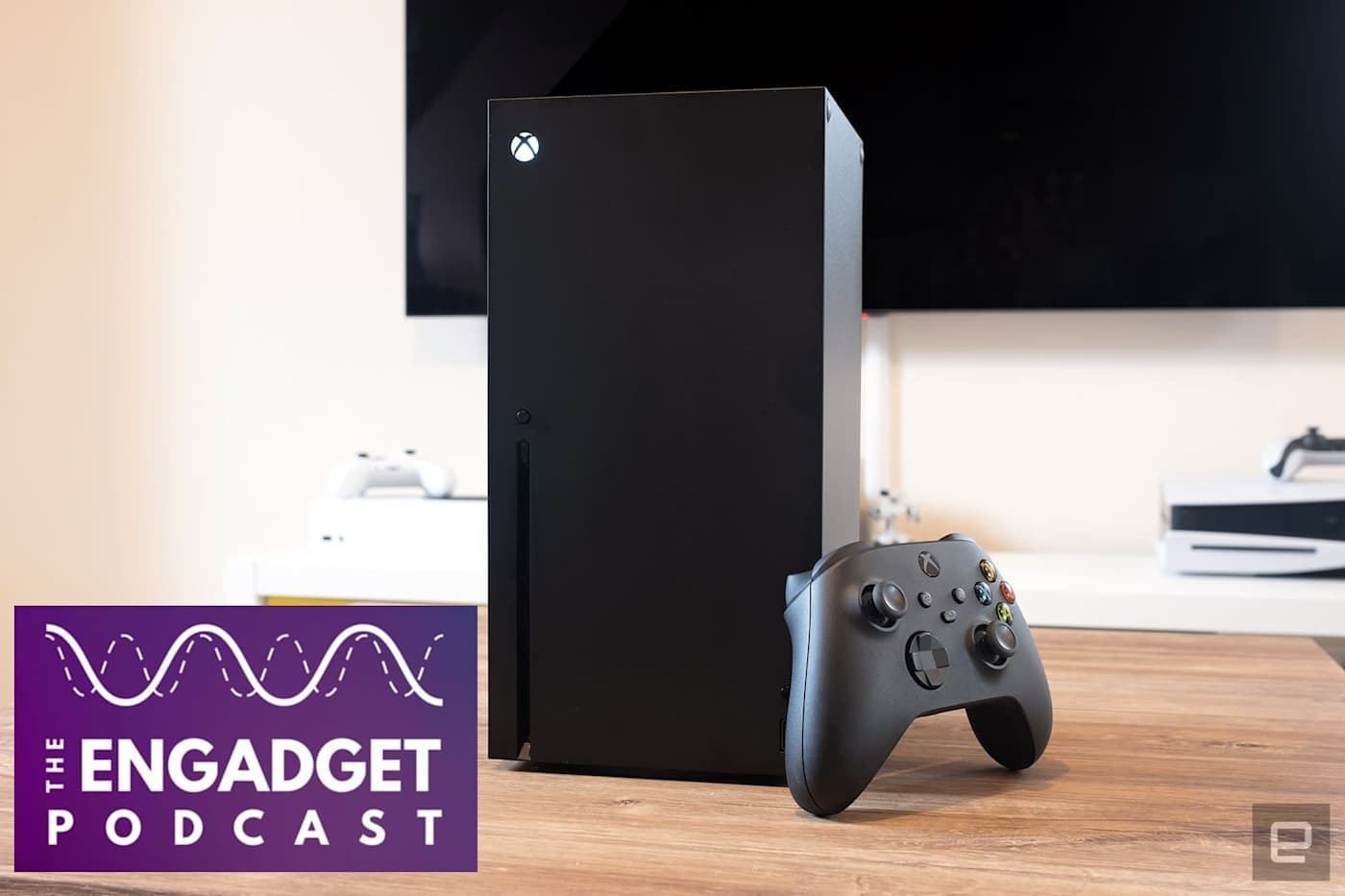
This week, we're diving into the big changes at Xbox and what it all means for Microsoft's gaming future. Phil Spencer, the longtime face of Xbox, announced he's retiring last week. He'll be replaced by Microsoft's former CoreAI CEO Asha Sharma, instead of his longtime deputy Sarah Bond, who plans to leave the company. Will this change actually help the beleaguered Xbox division, or is it another example of Microsoft shoving AI into everything?
Also, Samsung held its latest Unpacked event this week to announce its new Galaxy S26 family. They look pretty much the same as last year, but the Ultra model includes a unique privacy feature that can instantly make the screen unreadable to bystanders. It's one of those features we expect to see in every phone eventually.
Xbox leadership falls apart. what happens next with Phil Spencer and Sarah Bond out? – 1:53
Samsung Unpacked: Privacy display on the S26 Ultra looks amazing – 27:27
U.S. Defense leadership gives Anthropic a Friday deadline to let it use Claude as it sees fit – 42:38
MrBeast editor accused of insider trading on Kalshi – 50:40
Discord delays age verification program after user revolt – 54:09
Around Engadget – 1:04:04
Working on – 1:05:16
Pop culture picks – 1:08:21
Credits
Hosts: Devindra Hardawar and Igor Bonifacic Producer: Ben Ellman Music: Dale North and Terrence O’Brien
This article originally appeared on Engadget at https://www.engadget.com/gaming/xbox/engadget-podcast-xboxs-leadership-shakeup-and-samsungs-galaxy-s26-150000180.html?src=rss
The MacBook is coming back — or at least, that's what the rumors claim. Next week, Apple is expected to announce a colorful, low-cost, non-Air, non-Pro MacBook powered by one of its mobile processors. By avoiding its pricier M-series chips, Apple may reportedly be able to reach a low $699 or $799 price for the MacBook. The $999 MacBook Air is the cheapest laptop on the company's website right now, but Apple also sold the older M1 MacBook Air at Walmart for $700 in 2024, which later went down to $650 last year.
That Walmart deal was a smart way for Apple to test out the viability of cheaper MacBooks without building an entirely new product. But now the M1 Air’s design looks seriously dated, and the company also needs to move beyond the six-year-old M1 chip. It's time to get serious about delivering a true low-cost Apple laptop.
There's another compelling reason to bring back a cheaper MacBook: It's the perfect way to court disgruntled Windows users, something Apple hasn't really done since its "Get A Mac" ads from the mid-2000s. I figure the unbridled success of the iPhone and iPad made Apple focus less on directly competing with Windows. The sleek designs of the 2011-2015 era MacBook Air and Pros were their main selling points, but Apple's push towards USB-C-only machines and unreliable butterfly keyboards later made it clear it wasn't totally focused on Macs.
But now Microsoft is distracted by AI — it's been pushing Copilot and AI features for years, instead of improving the Windows experience with more useful upgrades. Recent talk of agentic AI capabilities, which would let Copilot handle tasks for you automatically, also sparked plenty of criticism from Windows users. And with all of the focus on AI, Microsoft has also released some disastrous Windows updates over the last year, which have bricked OS installations. So, Apple, why not make a direct play for Windows users?
Last year, I covered why it's a great time to jump ship from Windows to Mac, and I haven't been able to let go of that idea since. Apple's M-series chips are shockingly fast and efficient, and its hardware tends to be more durable than typical PC fare. Rumors point to Apple developing a new aluminum case for the low-cost MacBook, so it will likely feel more polished than a typical sub-$1,000 Windows laptop. macOS has also avoided the bloat that's plagued Windows for years — you can turn off Apple Intelligence with two clicks if you want to, and there aren't any annoying ads to deal with.
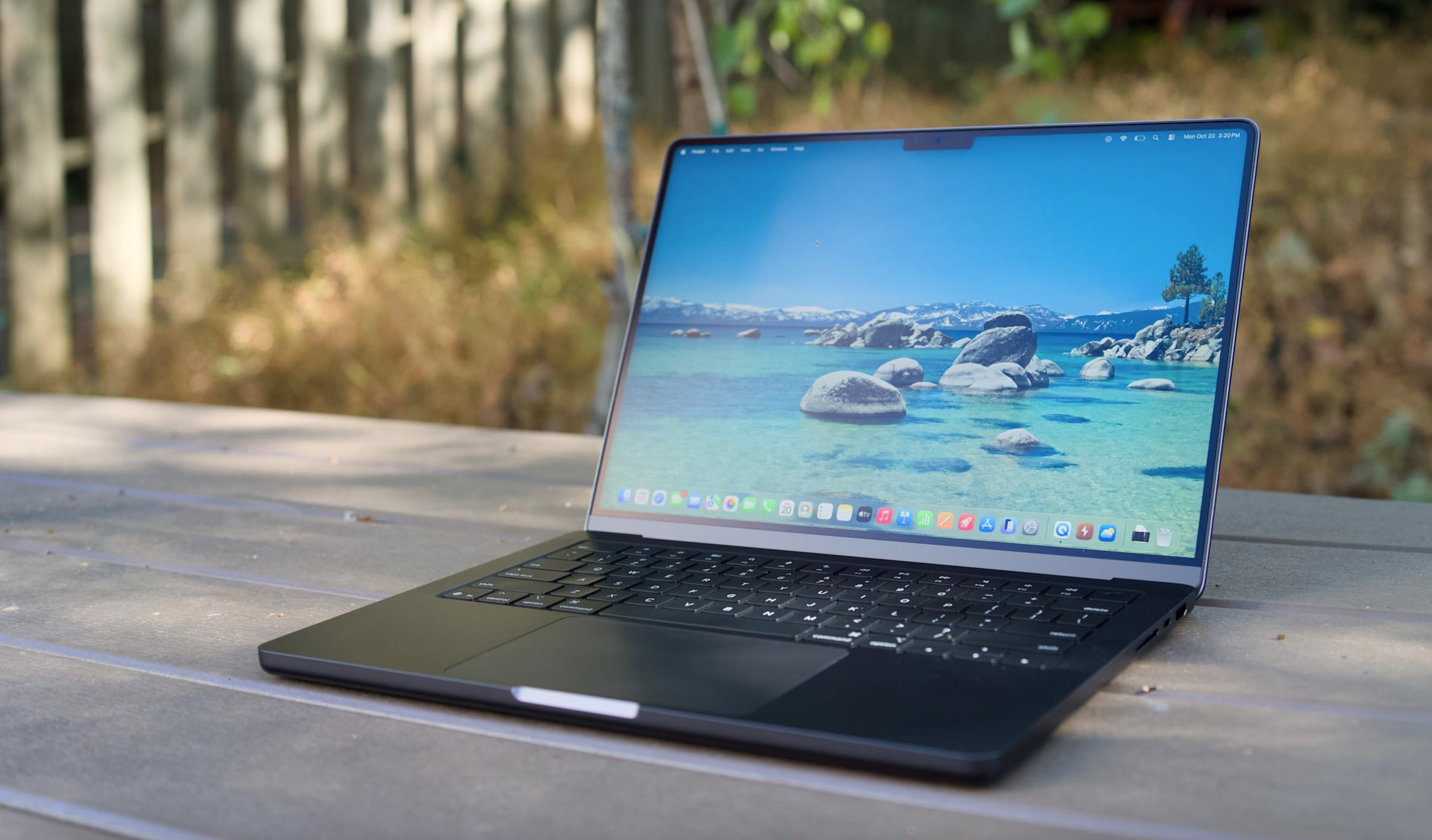
A MacBook Air M5 on a table.
Devindra Hardawar for Engadget
And while it used to be a pain to transition from Windows to Mac, it’s far easier these days, especially if you mainly rely on web apps. It also wouldn't be tough for Apple to make short tutorials to help Windows users get their bearings with the macOS basics, like installing apps and juggling app windows. Apple could also make a play for iPhone owners using Windows, who may not be aware of the many ways iOS and macOS are integrated. iPhone mirroring may be a huge draw on its own.
Rumors also suggest the upcoming MacBook might use the A18 Pro from the iPhone 16 Pro, a chip that benchmarks faster than the M1. Even if it only has six cores, making it slower for heavy workloads than the M2, an A18 Pro-powered MacBook would still be more than enough power for basic productivity work. Not everyone needs the surprising amount of GPU power in the MacBook Air — especially if downgrading means they can save $200 to $300.
I'm not saying any of this through any sort of Apple-loving bias. I typically use a MacBook Pro for work, but I'm a Windows user at heart. Windows was my gateway to computing in the '90s, back when Macs were far more expensive than PCs. These days, I spend more time on my Windows desktop making podcasts, playing PC games and bumming around the internet than I do working on Macs.
And yet, it’s hard to deny everything Apple is doing right today — the only thing it’s missing is an inexpensive laptop entry. A $699 or $799 MacBook simply makes sense. And for many Windows users, it’ll be just the escape from Microsoft they need.
This article originally appeared on Engadget at https://www.engadget.com/computing/laptops/a-cheap-macbook-is-the-perfect-way-for-apple-to-win-over-windows-users-130000045.html?src=rss
This week, Meta CEO Mark Zuckerberg testified in a landmark social media trial, claiming the company only wanted to make Instagram "useful" and not addictive. In this episode, we chat about Zuck's testimony and the potential implications of this trial for social media companies. Also, we dive into the latest effects of the RAMaggedon RAM shortage, including a potential PlayStation 6 delay and a dire future for practically every consumer electronics company.
Mark Zuckerberg testifies that Instagram was meant to be “useful,” not addictive in social media addiction trial – 1:27
Meta reportedly plans to launch a smartwatch later this year – 13:23
The RAMageddon will likely kill some small consumer electronics companies – 15:54
Apple could unveil a MacBook, new M5 Pro chip, and iPhone 17e at March 4th event – 26:26
Google’s Pixel 10a arrives on March 5 – 32:17
Email leaked to 404 media suggests Ring had plans to use its Search Party function for wider surveillance – 34:48
Listener mail – 45:14
Working on – 48:40
Pop culture picks – 49:04
Credits
Host: Devindra Hardawar Producer: Ben Ellman Music: Dale North and Terrence O’Brien
This article originally appeared on Engadget at https://www.engadget.com/ai/engadget-podcast-instagram-on-trial-and-the-ramaggedon-rages-on-131526178.html?src=rss
You've seen this movie before: A disheveled man (Sam Rockwell) busts into a restaurant, threatening to blow up the joint unless a crew of people joins him. Like Groundhog Day, he's been through this countless times before, and he immediately starts recounting otherwise unknowable details to convince the diner patrons. Like 12 Monkeys, he's from the future — the timely twist in Good Luck, Have Fun, Don't Die is that, rather than a world-ending virus, he needs help preventing a humanity-ending AI from being born.
Good Luck is more of a primal scream than a thoughtful articulation about where everything went wrong. There's a bit of "old man yells at cloud" energy here (director Gore Verbinski is 61, and screenwriter Matthew Robinson is 47), but it fits the film's satirical tone. Looking around at the world today, who doesn't wish they could warn their past selves about the tech industry and the new ruling class it helped breed.
Rockwell's character eventually wrangles a ragtag crew of future saviors: Mark and Janet (Michael Pena and Zazie Beetz), a married couple of high school teachers; Susan (Juno Temple), a distraught mother; and Ingrid (Haley Lu Richardson), a sad woman wearing a princess dress. There's also Asim Chaudhry's Scott, who mostly serves as comic relief, but doesn't get any real backstory like the others.
Good Luck wastes no time fleshing out its present near-dystopia in episodic chapters. It turns out Mark and Janet are also on the run from smartphone-obsessed high schoolers, who spend their days scrolling through endless TikTok-like feeds. Susan is forced to confront a horrific situation around her son (I won't get into specifics here, but it's a distinctly American phenomenon). And Ingrid is literally allergic to Wi-Fi and smart devices, which makes it hard to fit into the modern world.
Each of these scenarios play out like mini Black Mirror episodes. Everything is heightened to the absurd, and all the problems can be traced back to unchecked technological encroachment and capitalism. Nothing subtle there. The glimpses of an apocalyptic future are even less so — all we see are destroyed cities, people trapped in VR headsets (which place them in an AI-generated reality) and robots hunting down anti-AI humans.
Sam Rockwell in Good Luck, Have Fun, Don't Die.
Briarcliff Entertainment
Good Luck is at its best when it's simply having fun. As Rockwell and crew make their way to their final destination — a child who is about to invent true AI — they encounter pig-faced assassins, Stepford-esque parents and an adorably horrific kaiju. Even when faced with half-baked scripts, Verbinski always manages to impress visually (think back to the creepiness of TheRing, or the wildly entertaining set pieces in Pirates of the Caribbean). That's as true as ever here, where the final scene evokes the hyper-tech chaos of Akira.
As much as Good Luck, Have Fun, Don’t Die, evokes classic sci-fi, it still can’t hold a candle to the sheer terror of seeing AI unleash a nuclear bomb in Terminator 2. And despite its zanines, it doesn’t reach the madcap heights of Gilliam’s Brazil or 12 Monkeys. But if you’re sick of having AI products shoved down your throat, and you think the notion of “true AI” is a farce, it’s a fun way to channel your rage.
This article originally appeared on Engadget at https://www.engadget.com/entertainment/tv-movies/good-luck-have-fun-dont-die-rails-against-ai-in-style-154437854.html?src=rss
Apple’s Vision Pro is a curious product — it initially wowed me two years ago, but it was hard to ignore that the visionOS platform felt incomplete without dedicated apps for YouTube and Netflix. Well, it seems that Google has finally decided to take the Vision Pro seriously, as it’s launching a YouTube app on the platform today. Previously, you could only view YouTube videos via Safari, or through third-party apps like Tubular Pro.
According to an Apple representative, the YouTube Vision Pro app features every video on on the service, including shorts, 360, 3D and VR 180 content. I haven’t tried it myself yet, but it certainly couldn’t be worse than trying to navigate through YouTube’s desktop app via finger gestures. Now that Google is spinning up its Android XR ecosystem, the company probably couldn’t avoid the Vision Pro for long. And don’t forget, we may also see a cheaper Vision Air next year.
Your move, Netflix.
This article originally appeared on Engadget at https://www.engadget.com/ar-vr/apple-vision-pro-finally-gets-a-youtube-app-today-170000886.html?src=rss
If you haven't heard, there's now a social network for AI: Moltbook, a site that purportedly features AI agents talking to each other. That includes OpenClaw, a personal AI agent (formerly called Clawdbot and Moltbot) that's open source and free for anyone to run on their systems. In this episode, Devindra and Senior Reporter Karissa Bell discuss the rise of these services, and the potential future that AI agents may have for all of us.
Anthropic reinforces its commitment against ads with Super Bowl ad spots – 19:32
SpaceX acquires xAI and plans for a mega IPO – 27:08
Alexa + rolls out free for all Amazon Prime subscribers – 33:36
Around Engadget: Reviews of the New AirTag and Switch Virtual Boy – 44:12
Working on – 46:34
Pop culture picks – 49:24
Credits
Hosts: Devindra Hardawar and Karissa Bell Producer: Ben Ellman Music: Dale North and Terrence O’Brien
This article originally appeared on Engadget at https://www.engadget.com/ai/engadget-podcast-so-theres-a-social-network-for-ai-agents-now-133000813.html?src=rss
Stepping into VR is about more than strapping on a headset and loading a game. The best VR headsets today are gateways to fully realized experiences, whether that’s gaming, fitness, creative work or simply spending time inside a richly rendered virtual world. As the hardware has improved, so has the sense of presence, with sharper displays, wider fields of view and tracking systems that make movement feel more natural and responsive. The result is VR that feels less like a novelty and more like a platform you can actually spend time in.
That said, not every headset is built for the same function. Some prioritize ease of use and standalone play, while others demand a powerful PC in exchange for higher fidelity. Compatibility also matters more than ever, especially as VR begins to overlap with mixed reality and early smart glasses experiments. Whether you want a simple way to explore virtual spaces or a high-end rig that pushes immersion as far as possible, this guide breaks down the best VR headsets you can buy in 2026 and explains who each one is really for.
I tend to judge candidates for the best VR headset on a few basic criteria: Ergonomics, immersion and controls. It's not that hard to shove a mobile display into a plastic headset and strap some cheap elastic headbands onto it. But it takes real design skill to craft something that's well balanced, includes a supportive headstrap, and doesn't feel uncomfortable after 30 minutes.
My test for ergonomics is fairly simple: How long can I wear a headset until I start to feel discomfort? For the most ergonomic devices, like the Quest 3, that could easily be an hour or two. But heavier PC hardware often feels cumbersome after just 15 minutes — you won’t find those kinds of devices in our list of the best VR headsets.
Immersion, meanwhile, comes from having high resolution screens with fast refresh rates, like a 120Hz refresh rate, helping users feel fully present inside a virtual world. Field of view is also a major element, as it describes how well VR screens can cover what you see. A narrow FOV makes it feel like you're peering through a pair of binoculars, which limits your sense of “presence.” The best VR headsets aim for a wider field of view, helping virtual environments feel more natural and fully surround you.
A wide field of view, on the other hand, can make it seem like you’re actually flying over the globe in Google Earth. We look at a few popular video games, like Superhot, Beat Saber and Pistol Whip, on every headset to judge how immersed we feel and how enjoyable the gaming experience is overall.
The best controllers fit naturally in your hands and offer accurate tracking. The industry has basically adopted the design of Meta’s excellent touch controllers, but we're also seeing intriguing leaps forward like Valve's finger tracking gamepads. We judge controllers based on how easy they are to hold, how they hold up to sweaty gameplay sessions and how easily headsets can track their position in space.
However, it’s important to look at a virtual reality headset’s specs as a whole, including compatibility with your existing hardware and the kind of experiences you plan to use it for. Depending on what you’re looking for in yourVR headset, you’ll want to consider factors like your PC’s CPU and graphics card if you plan to use the headset to play the best VR games. You might not need a super powerful PC, but you should check the minimum requirements for the headset you’re looking to purchase. If you’re not looking to invest in a VR headset solely for gaming, features like head tracking allow you to explore your environment just by simply moving your head in the simulator. This often results in a more immersive and realistic experience.
Other VR headsets we’ve tested
HTC Vive Focus Vision
The Vive Focus Vision is a sleek premium standalone VR headset that can also deliver solid PC VR. But it’s also running aging hardware, it’s riddled with software issues and it’s expensive compared to the Meta Quest 3.
Meta Quest Pro
As great as the Meta Quest 3 is, the Quest 2 is still a very good entry-level VR headset, and it’s worth considering if it’s on sale below its current $250 list price. The Meta Quest Pro, on the the hand, is an expensive boondoggle best ignored.
HTC Vive Pro 2
Outside of Meta’s hardware, the HTC Vive Pro 2 remains a fantastic PC headset, but it’s far more expensive than the Valve Index, which is more comfortable and offers better audio.
VR headset FAQs
How do VR headsets work?
At the most basic level, a VR headset is simply a high quality screen that you’re holding up to your face. For a wired headset, the actual work of rendering a game is done on either a PC or game console. For completely wireless devices, like the Meta Quest 3, that work is handled right on the headset. They rely on either external sensors, or sensors built into the headsets, to map your physical space. While you can use a traditional gamepad or keyboard and mouse in VR, they typically use motion tracking controllers to immerse you in their 3D environments.
What VR headset is best for full body tracking?
While we’re still waiting for a truly great haptic VR bodysuit to arrive, you can still achieve accurate body tracking with most Steam VR-compatible PC headsets. The Valve Index and HTC Vive Pro 2 both rely on room-tracking sensors that can map your body more effectively than the built-in sensors on competitors. You can also add HTC Vive Trackers to wrist and leg straps, as well as belts, for even better coverage. The Meta Quest 3 doesn’t have any easy body tracking solutions, but you can add Vive trackers when it’s plugged into your PC to mimic a Steam VR headset.
Only a few experiences, like VRChat, take advantage of full body tracking at the moment. Currently there aren’t any body tracking solutions for the PlayStation VR and VR2, but we’re intrigued by the company’s Mocopi body trackers, which were really announced in Japan.
What VR headsets are better than Oculus?
Oculus is the previous name for Meta’s VR hardware. Currently, Meta only supports the Quest 3, Quest 3S and Quest Pro, all of which are wireless headsets. As we explain above, PC VR headsets can generally achieve better quality virtual reality, since they rely on more powerful graphics hardware.
What VR headsets work with Xbox?
Currently, Microsoft’s Xbox consoles don’t support any VR headsets.
Recent updates
November 2025: Updated to include the Apple Vision Pro M5.
April 2025: Updated to include review scores for our top picks, where applicable.
November 2024: Added the HTC Vive Focus Vision to the "others we tested" section.
October 2024: Updated our "best cheap VR headset" top pick to be the Meta Quest 3S.
This article originally appeared on Engadget at https://www.engadget.com/ar-vr/best-vr-headsets-140012529.html?src=rss
MSI Prestige 14 Flip AI+ is a surprisingly powerful ultraportable held back by a clunky trackpad. It's a shame, really, because it's very well-designed and thanks to Intel’s Panther Lake CPU, it can even run games like Arc Raiders without breaking a sweat. It also has more ports than most thin and light machines, its OLED screen is great for productivity work and at three pounds it's easy to carry around all day. But curse its mechanical trackpad — why does it even exist when Apple, Microsoft and others have been able to implement excellent haptic touchpads for years? Come on now.
Hardware
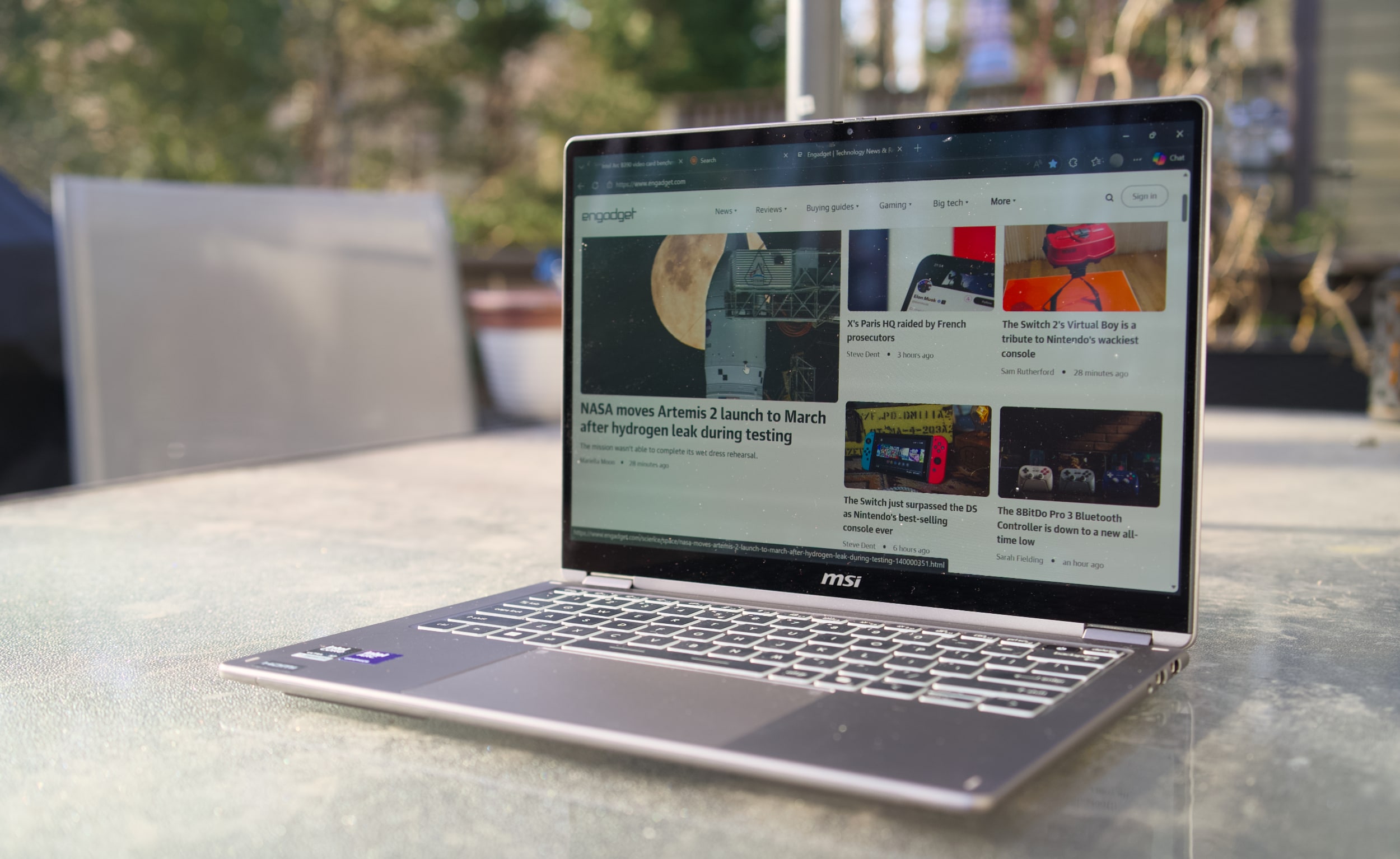
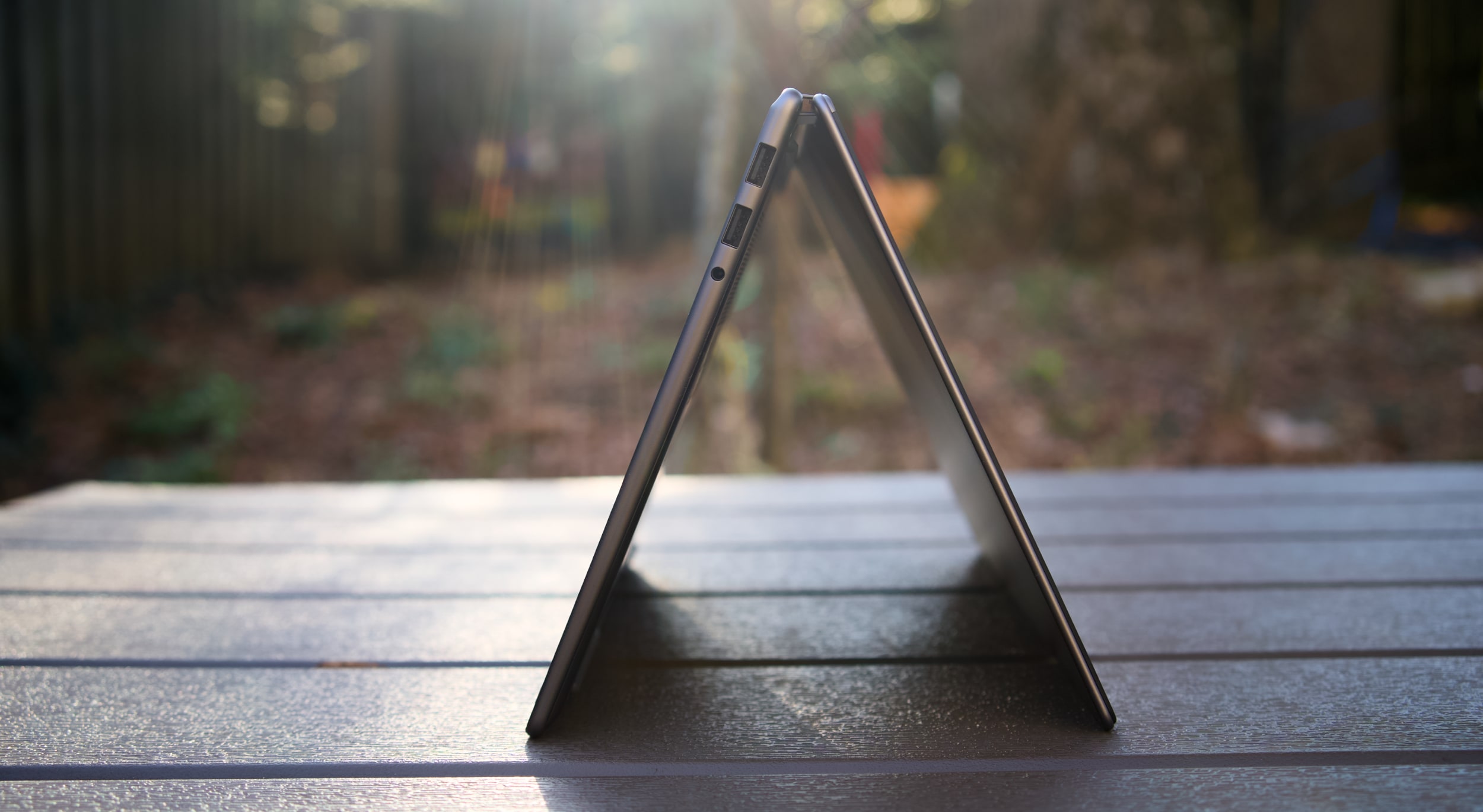
With its grey case, subdued design and somewhat chunky bezels, the MSI Prestige 14 Flip AI+ doesn't exactly make a striking impression. From afar, you can tell it's certainly thin, and it's also clear that MSI made the most of its slim case by shoving in two USB-A ports, two USB-C connections, a single HDMI port and a headphone jack. It would have been nice to have some sort of SD card slot too, but at least the Prestige 14 can connect to older accessories, monitors and TVs without a USB-C hub.
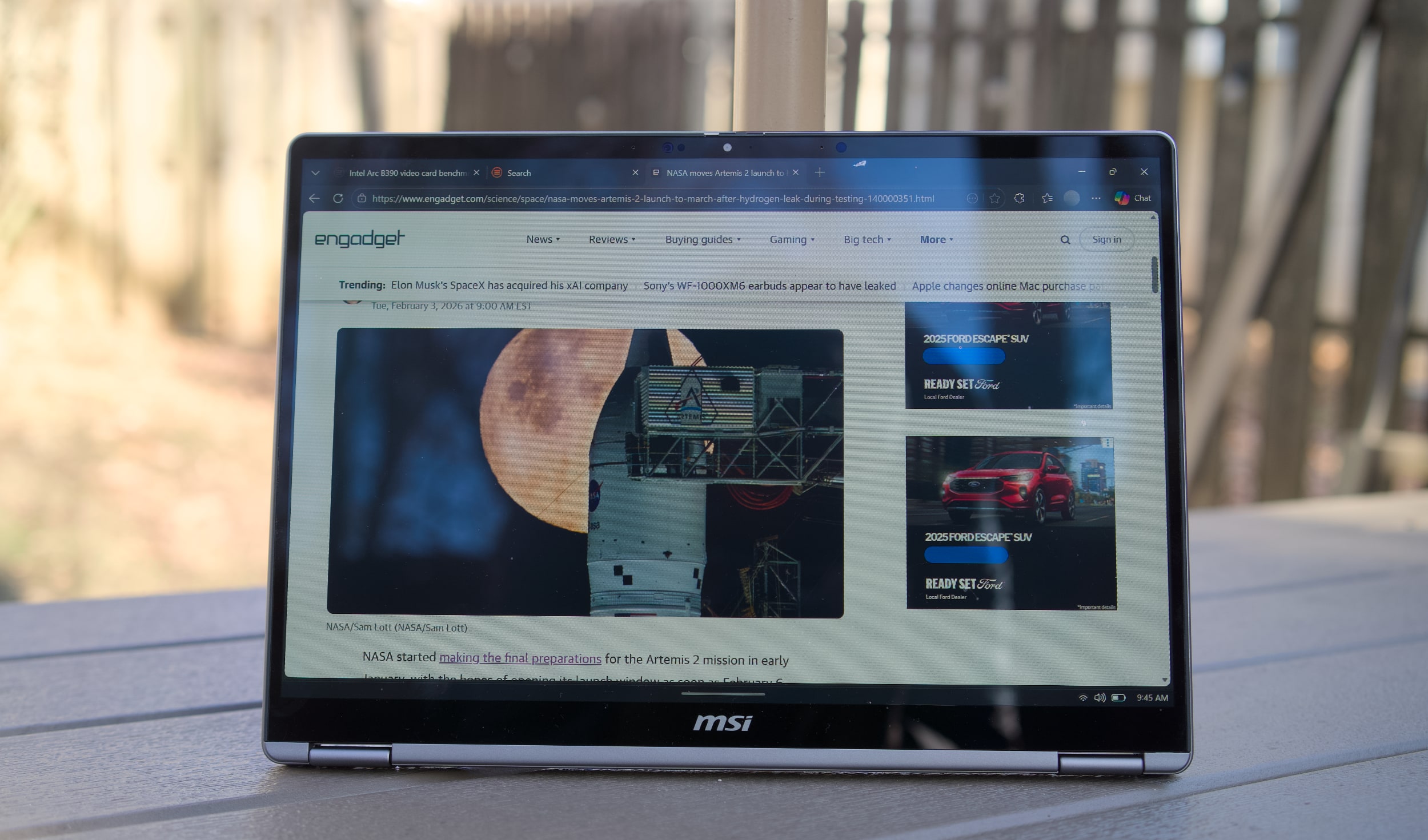
Once you pick it up, though, the Prestige 14's three-pound frame feels downright remarkable. It's just a tad heavier than the 2.7-pound MacBook Air, but its screen size directly competes with the 3.4- to 3.6-pound 14-inchMacBook Pro. The "Flip" in its name also means it’s versatile, with the ability to rotate its screen into a tablet mode, or a variety of tent configurations.
What makes the MSI Prestige 14 Flip AI+ truly interesting is its Intel Core Ultra X7 358H processor, which features 16 cores and a maximum speed of 4.8GHz. Specifically, it features four P-cores for speedy performance, eight efficient E-cores and four low-power E-cores. The Ultra X7 is also one of the new Panther Lake chips with gobs of graphics power in Intel's Arc B390 GPU, giving them far more gaming chops than previous ultraportable chips. The laptop also sports 32GB of RAM, which is the ideal amount for serious productivity work, and a roomy 1TB SSD.
MSI Prestige 14 Flip AI+
Devindra Hardawar for Engadget
The Prestige 14's stylus-friendly 14-inch OLED screen helps to distract from its mundane case design, with the typical deep black levels and excellent contrast I appreciate from OLED, together with bold 100 percent DCI-P3 color coverage. It makes just about everything look great, though I wish MSI offered more than a 60Hz refresh rate — a 90Hz or 120Hz screen would make scrolling through web pages look far smoother.
And speaking of the stylus, that’s tucked away at the bottom of the Prestige 14. I didn’t find it particularly useful for notetaking, but for those who do it’s easy to stow away. It’s just too thin for extended handwriting, and anyone doing serious notetaking or digital art would be better off with a larger stylus or dedicated drawing pad.
MSI Prestige 14 Flip AI+ in tent mode
Devindra Hardawar for Engadget
In-use: A stealth performer
After seeing a relatively slim Lenovo Panther Lake laptop reaching 190 fps in Battlefield 6, using only Intel's built-in Arc B390 GPU, I was eager to see how that new hardware would perform in the real world. Simply put, the MSI Prestige 14 Flip AI+ didn't disappoint. It scored 10,169 points in PCMark 10, the highest score we've seen yet on a Windows PC.
And yes, that includes plenty of powerful gaming systems like the Alienware 16 Area 51 (8,245 points) and the Razer Blade 18 (7,703), both of which were running Intel's last-gen Core Ultra 9 275HX chip. Of course, those systems have faster GPUs, like NVIDIA's RTX 5080, but PCMark 10 doesn't lean too heavily on graphics performance. The Prestige 14 edged close to the M5 MacBook Pro in Geekbench 6's multi-threaded CPU test, scoring 16,633 points compared to Apple's 18,003. But the MacBook Pro reigned supreme in the single-threaded test, scoring 4,310 points compared to the MSI's 2,864.
When it came to games, the Prestige 14 reached a surprisingly high 80-95 fps in Arc Raiders while playing in 1080p with medium graphics settings, as well as AMD's FSR3 upscaling and 2x frame generation. Without those AMD features, Arc Raiders ran at 45-50 fps, which is still respectable for an ultraportable. To my surprise, Intel's XeSS upscaling technology wasn't available in Arc Raiders during my testing, but there's a good chance that tool would eke out even more performance. (I've asked Intel about XeSS's omission, and will update when I hear back.)
In Cyberpunk 2077, The Prestige 14 hit 35 fpswhile playing in 1080p with default settings. Flipping on Intel's XeSS frame generation bumped that to 45 fps. If you're used to the 30 fps performance of consoles, those numbers are still vaguely playable, but they certainly fall short of the 60 fps PC players typically look for. It's best to think of the MSI Prestige 14 Flip AI+ as a laptop where you can play games sometimes, perhaps while you're away from your gaming desktop. It's certainly not a replacement for a dedicated gaming laptop.
For more prosaic productivity tasks, like juggling dozens of browser tabs and editing large images, the Prestige 14 didn't break a sweat. Its healthy 32GB of RAM gave it plenty of breathing room for multi-tasking, and unlike other ultraportables, I didn't notice any serious performance dips while running on battery. On that note, the Prestige 14 also lasted a whopping 22 hours and 15 minutes in PCMark 10's battery benchmark. That's the highest figure we've ever seen from a laptop, and it's a promising sign of what we can expect from other Panther Lake systems.
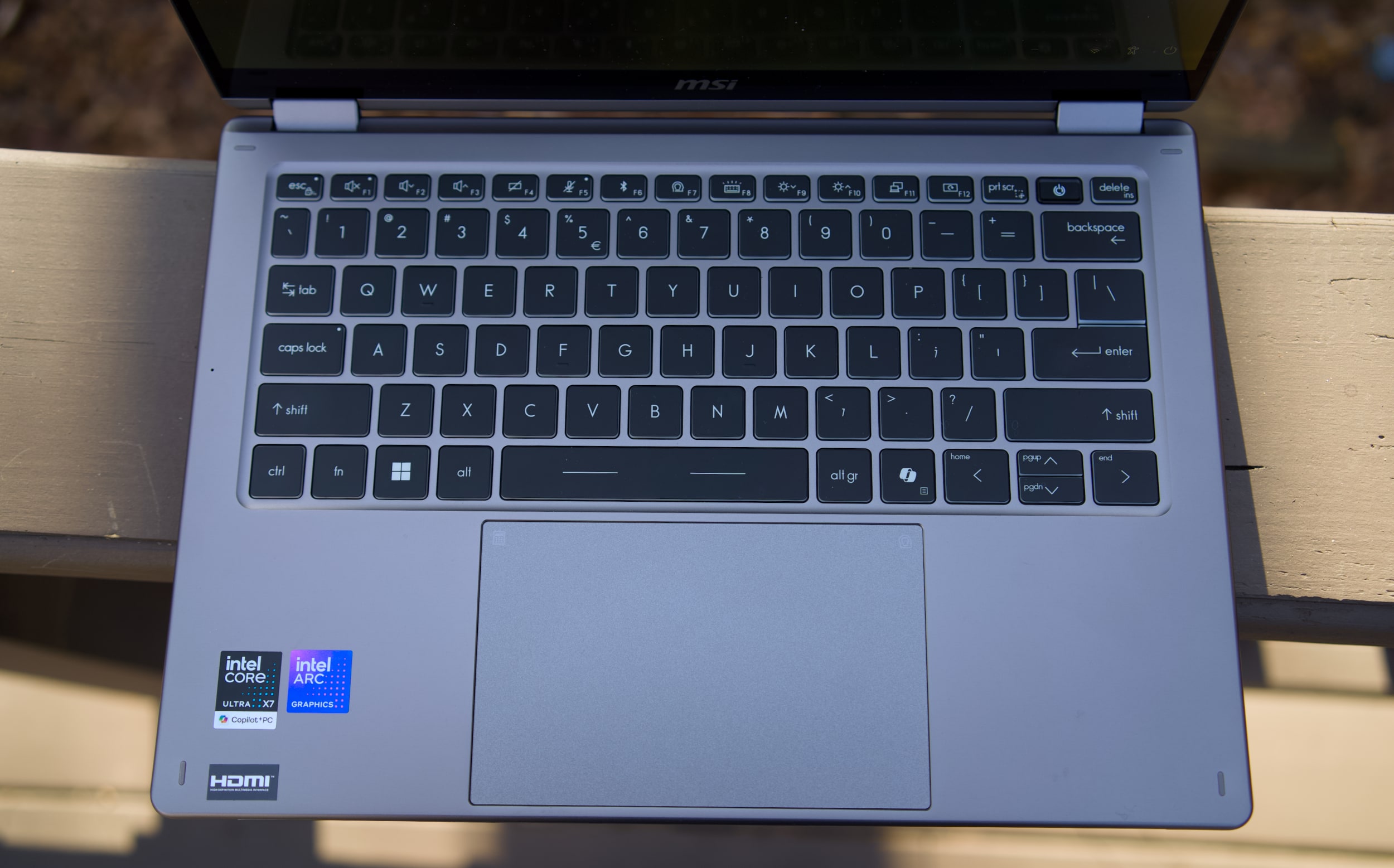
MSI Prestige 14 Flip AI+ keyboard and trackpad
Devindra Hardawar for Engadget
While there's clearly plenty to love about the MSI Prestige 14 Flip AI+, I was less impressed with its mechanical trackpad and keyboard. Perhaps I've been spoiled by the more responsive haptic trackpads from the competition, but the Prestige 14's old-school trackpad kept slowing me down with missed clicks and other annoyances. The laptop's keyboard felt similarly cheap, with a lack of depth and comfort that I've come to expect from other ultraportables in the $1,299 price range. Even after hours of testing, I had a hard time typing on the Prestige 14 at full speed without errors. It's a shame that MSI gets so much right, but is hindered by these weak components.
MSI Prestige 14 Flip AI+ in tablet mode
Devindra Hardawar for Engadget
Should you buy the MSI Prestige 14 Flip AI+?
As one of the earliest Panther Lake laptops on the market, the $1,299 Prestige 14 Flip AI+ is a solid machine, if you're willing to overlook its touchpad flaws. More than anything though, the Prestige 14 makes me excited to see what other PC makers offer with Intel's new chips. It's taken a while, but now Intel finally has some decent competition against Apple's M-series hardware. The era of gaming with ultralight machines is finally here.
This article originally appeared on Engadget at https://www.engadget.com/computing/laptops/msi-prestige-14-flip-ai-review-an-ultraportable-for-arc-raiders-thanks-to-intels-panther-lake-160000606.html?src=rss
The Sundance documentary Ghost in the Machine boldly declares that the pursuit of artificial intelligence, and Silicon Valley itself, is rooted in eugenics.
Director Valerie Veatch makes the case that the rise of techno-fascism from the likes of Elon Musk and Peter Thiel is a feature, not a bug. That may sound hyperbolic, but Ghost in the Machine, which is built around interviews with philosophers, AI researchers, historians and computer scientists, leaves little room for doubt.
But even I was surprised to learn that we can trace the impact of eugenics in tech all the way back to Karl Pearson, the mathematician who pioneered the field of statistics, and who also spent his life trying to quantify the differences between races. (Guess who he believed was superior.) His legacy was continued by William Shockley, a co-creator of the transistor, an avowed white supremacist who spent his later years espousing (now debunked) theories around IQ and racial differences.
An early robot toy.
Valerie Veatch for "Ghost in the Machine"
As a Stanford engineering professor, Shockley fostered a culture of prioritizing white men over women and minorities, which ultimately shaped the way Silicon Valley looks today. His line of thinking could have had an influence on John McCarthy, the Stanford researcher who coined the term “artificial intelligence” in 1955,
Through its many interviews, which include the likes of AI researcher Dr. Emily Bender, historian Becca Lewis and media theorist Douglass Rushkoff, Ghost in the Machine paints the rise of AI as a fascistic project that aims to demean humans and establish the techno-elite as our de facto rulers. Given how much our lives are already dominated by gadgets and social networks from companies that have pioneered addictive engagement over user safety, it's easy to imagine history repeating itself with AI.
Ghost in the Machine doesn't leave any room for considering potential benefits around AI, which could lead proponents of the technology to dismiss it as a hit-job. But we're currently at the apex of the AI hype cycle, after Big Tech has invested hundreds of billions of dollars on this technology, and after it has spent years shoving it down our throats without proving why it’s actually useful to many people. AI should be able to withstand a bit of criticism.
This article originally appeared on Engadget at https://www.engadget.com/entertainment/tv-movies/sundance-doc-ghost-in-the-machine-draws-a-damning-line-between-ai-and-eugenics-180613367.html?src=rss
Somehow, we live in a world where people can bet on practically anything using sites like Polymarket and Kalshi. In this episode, Devindra and Engadget Senior Reporter Karissa Bell dive into the world of prediction markets. How did we get here? And is endless betting having an effect on the real world? Also, we chat about the new American version of TikTok, which stumbled during its first weekend with a litany of errors and reported censorship.
Who’s going to buy the Samsung Galaxy Z Tri-fold for $2900? – 1:18
Tesla is killing off the Model X and S lines to focus on its Optimus robot moonshot – 6:46
Amazon plans to cut 16,000 jobs and close its grocery stores in another round of restructuring – 10:45
Most of the UK will lose access to Pornhub in a fight over age verification and privacy – 21:16
Internal messages from Meta about Instagram being ‘a drug’ for teens could be bombshell evidence at trial – 26:59
What are prediction markets and why are they suddenly so popular? – 32:11
As TikTok US stumbles, users ask ‘is it server problems or censorship?’ – 46:55
Around Engadget – 59:11
Pop culture picks – 1:01:23
Credits
Hosts: Devindra Hardawar and Karissa Bell Producer: Ben Ellman Music: Dale North and Terrence O’Brien
This article originally appeared on Engadget at https://www.engadget.com/general/engadget-podcast-what-do-prediction-markets-like-kalshi-cost-us-143113799.html?src=rss
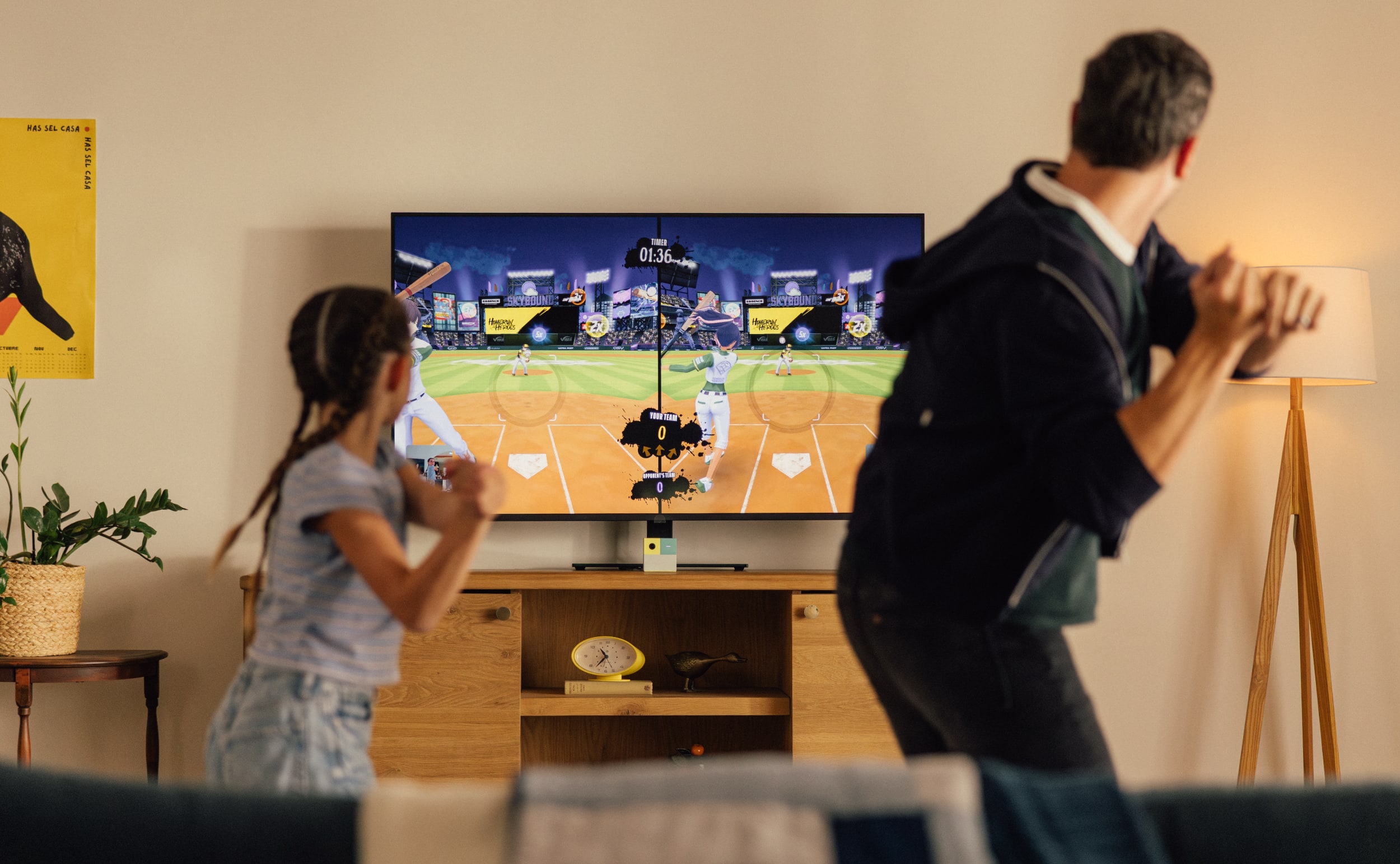
It's the year 2026 and the hottest game in my living room is Fruit Ninja. No, I'm not in the midst of an ill-advised retro mobile gaming kick. Instead, my family and I have been jumping around and slicing flying fruit in our living room using the Nex Playground. It's a tiny gaming system built entirely around Kinect-like games. With its camera and onboard computer vision processing, the $249 Nex Playground can track up to four players as effectively as Microsoft's clunky old Xbox motion tracker. Simply put, the dream of the Kinect, as well as Nintendo's Wii, lives on in the Nex Playground.
I'll admit, I was skeptical about Nex making a dent in the console arena. It's tough for new companies with no hardware experience to steal any limelight away from entrenched competitors like Sony, Nintendo and Microsoft. But the Nex Playground's simplicity, accurate motion tracking and library of kid-friendly titles (including the likes of Peppa Pig and Bluey) has made it a hit among families. The company says it sold 650,000 units last year, which might not sound like much, but it was enough to beat the beleagured Xbox last November.
Honestly, I'm just happy it gets my kids off the couch. I do my best to limit screen time with them, but as someone who has fond memories planted in front of my TV playing endless hours of SNES games, I also leave some room for my kids to explore tech and media on their own. I love the way Minecraft's near-limitless creative potential has unleashed my daughter's imagination, but I also want her to move more, especially in these winter months when we can't easily go outside.
Even though the Nex Playground is another screen-based activity, the sheer variety of games to play keeps my kids entertained and it helps them break a sweat. The console’s version of Fruit Ninja is similar to that game's VR forays, where you have to stand up and make an effort to swipe your arms. You're not just dragging your fingers across a screen. Go Keeper gamifies the role of a soccer goalkeeper, which leads to my kids jumping all over our family room to block and catch stray balls. And we all love having mini-dance parties with Starri, which has you swinging your arms and dodging obstacles, similar to VR titles like Beat Saber and Synth Riders.
In addition to those three games, the Nex Playground comes with Party Fowl, a collection of mini games, as well as its own spin on Whack-a-mole. If you want more games, you have to subscribe to the Nex Play Pass for $89 a year or $49 for three months. The company also offers a $29 Sports Pack at Target stores, which includes tennis, basketball and bowling games. Beyond those options, though, there's no other way to add new titles to the Playground. You can't buy anything individually, and since the entire platform is digital, there's also no market for cheap used games like you'd find for consoles.
Nex's subscription model is undoubtedly the Playground's biggest flaw, especially given the system’s $249 price. Instead of being an expensive console that you buy once (like an Xbox), and then occasionally purchase new titles for, the Playground is an ongoing commitment constantly calling for your wallet. To the company's credit, the device doesn't feature any ads or in-app purchases.
Nex Playground
Nex
"Ultimately, we would like to establish that long-term relationship ... we want to serve your family consistently with new content, and new updates all year round," Nex CEO David Lee said in an interview on the Engadget Podcast. He noted that the company added twenty new games to its subscription over the last two years, as well as 40 game updates over the last year. Similar to Xbox's Game Pass, the goal is to maintain the Nex Play Pass's value over time.
You could argue the Nex Play Pass's steep price isn't as bad as the $15 to $30 per child that indoor activity centers charge. Those godforsaken places only distract kids for a few hours at a time, and visiting one also comes with the risk of contracting exotic childhood illnesses. Theoretically, the Nex Playground could be something you turn to whenever you need to work out restless energy from your kids. And if that means parents could get a bit more sleep on the weekend, or just a few minutes to themselves for a cup of coffee, all of a sudden $89 a year doesn't seem so bad.
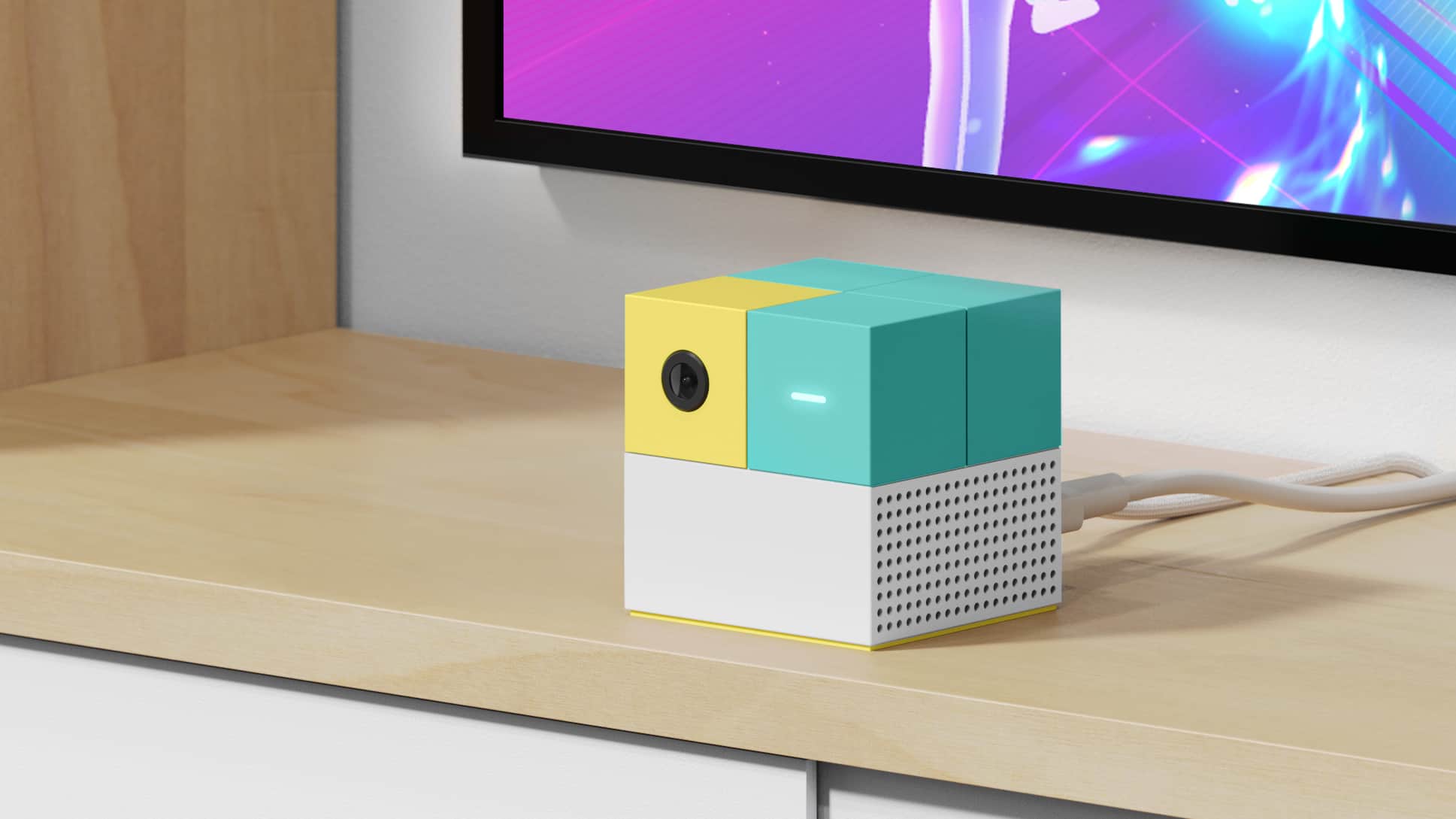
I'm also impressed by the Nex Playground's hardware and software, both of which are far more polished than I'd expect from a new hardware company. The device itself is a pastel-colored plastic box with a camera on the front (and a cute lens cover). You just have to plug it into power and an HDMI port, slap some batteries in the remote (which looks like an elongated Roku remote) and connect to Wi-Fi. It took a few minutes for the Playground to update the first time I turned it on, and I also had to create a Nex account using my phone.
Once that initial setup phase was over, it took another five minutes to download the initial batch of five games to the Playground via my gigabit connection. That timing entirely depends on your internet setup — I've seen reports of it taking up to 30 minutes to install the Nex's core games. I was also able to download the entire Play Pass library of titles in 35 minutes, but it could take a few hours on slower connections. Thankfully, those downloads happen in the background, so you can play other titles while waiting for new ones to install.
Another plus? Once you've downloaded the games, you can play them entirely offline. That makes it easier to grab the Playground and bring it on vacation, or to a friend's house, than it is to travel with other consoles. As long as you can reach a TV's inputs, have nearby power and clear out around six feet of space, you can play the Playground.
Nex Playground
Nex
Nex's long experience developing motion-tracked games and experiences is a major reason why the Playground is so successful. The company previously created Homecourt, an app for tracking your basketball skills, as well as Active Arcade, a collection of Playground-like minigames for iOS devices. Lee admitted that it’s tough to get parents to use their phones for things like Active Arcade. That led him to develop the Playground as a closed ecosystem, where the company could build a suite of games around a device where it could control every aspect of the hardware.
Now that Nex Playground features games from well-known kids brands like Peppa Pig, it’s clear that Lee’s intuition has paid off. While I have some concerns about the company’s subscription model, Nex has accomplished a rare feat: It developed a simple box that makes it easy for your entire family to jump into genuinely innovative games and experiences. You don’t need to set up a clunky console or any additional accessories. Just plug in the Nex Playground, and you too could be hand-slicing virtual fruit on your TV in no time.
This article originally appeared on Engadget at https://www.engadget.com/gaming/the-nex-playground-is-everything-xbox-kinect-wanted-to-be-133000397.html?src=rss
Choosing the best laptop can be a bit of a challenge, especially when “good enough” now covers everything from entry-level Chromebooks for college students to premium machines built for serious multitasking and heavier creative work. Specs can blur together fast, but a few basics still matter, like processing power, battery life and whether you’re getting enough storage for the long haul. For many people, that means looking for something that lands in the sweet spot with modern ports, a solid display and at least a 512GB SSD so you’re not juggling external drives a month after you bring your new laptop home.
Out of all of the notebooks we've tested and reviewed recently, we consider Apple's 13-inch MacBook Air M4 to be the best laptop for most people, and this is still the case for our top picks to start off the new year. It's powerful enough to handle most tasks (even light video editing); it has a great screen and built-in speakers; and its battery could last over 18hours (depending on what you're doing, of course). The MacBook Air M4 is also one of the lightest and thinnest systems we've reviewed, and it's dead silent, thanks to a fanless design.
Of course, not everyone wants a MacBook, and there are excellent Windows laptops and Chromebooks out there, too. Windows systems offer a range of configurations, from budget to high-end UHD screens with stunning IPS panels that boast high nits for vivid brightness. Chromebooks, on the other hand, tend to be more affordable and are great for users who mostly work online. Whether you need a powerhouse for creative work, a compact system for note-taking, or a laptop that can handle family movie night, there’s something for everyone in today’s laptop market.
Best laptops of 2026
Specs to look for in a new laptop
Depending on the type of laptop you’re looking to buy, there are some specs we think you should look for to get a machine that’s powerful enough for your needs and future-proof for the next couple of years (at least). Here's a cheat sheet for you to use when you're shopping.
MacBooks
At least M2 processor
At least 16GB of RAM
At least 256GB of SSD storage
Windows laptops
The most recent generation processor available from Intel or AMD
At least 16GB of RAM
At least 256GB of SSD storage (512GB SSD is a safer baseline if you plan to keep lots of files locally)
Chromebooks
Intel Core i processor
At least 8GB of RAM (4GB is the bare minimum for a basic Chromebook)
At least 128GB of storage, preferably a SSD
Gaming laptops
At least AMD Ryzen 9000 series or Intel 14th Gen Core CPU
At least 16GB of RAM (ideally 32GB if you can swing it)
At least 1TB of SSD storage
For GPU recommendations, check out our guide to buying the best GPU for your needs
Budget laptops
The most recent generation processor available from Intel or AMD
At least 8GB of RAM
At least 256GB of SSD storage (consider a 512GB SSD if you can swing it)
How we test laptops
Engadget has been reviewing laptops for two decades, and while the definition of what a portable PC is has changed considerably since, our obsession with testing their limits and serving up informative buying advice remains the same. Be it a hybrid tablet like Microsoft's Surface machines, a rotating 2-in-1 convertible like HP's Spectre x360s or a plain old clamshell notebook, our review process follows similar beats. How does it look and feel? How fast is it? Whether it’s a Windows device powered by an Intel Core i5 or higher, a MacBook or a Chromebook, we aim to answer the most important question: Is it actually worth your hard-earned cash? We also pay close attention to portability, webcam quality and display features, including IPS panels and nits of brightness, as they can make a big difference in daily use.
Factors to consider when choosing a laptop
Operating system: Apple, Windows or Chrome OS
There's a good chance you've already committed to an operating system, but my advice is to be as flexible as possible. These days, most major software is compatible with both Macs and PCs. (Of course, it's another story if you've become dependent on an Apple-only app like Final Cut Pro.) Web-based apps, naturally, will work on any platform with an internet browser.
If you're an Apple-loyalist, there aren't many reasons to consider Windows laptops (unless you want a secondary gaming machine). But for Windows users, macOS is becoming more tempting every year. Apple's MacBooks, powered by its M-series Silicon chips, are among the fastest and most efficient laptops we've ever seen. They're incredibly well-built and have outstanding battery life to boot. MacOS itself is also an easy platform to learn, especially if you're used to iOS and iPadOS.
That brings up another point: iPhone users may want to consider Macs because of the seamless integration with Apple's other platforms. You can't respond to iMessage conversations easily or hop into FaceTime chats on Windows PCs, but doing so is simple on Macs. (Microsoft's Phone Link app lets you send iOS users individual texts, but not media or group chats.) Android users, meanwhile, may be better off with Windows, as Phone Link can make calls, synchronize all your texts and also access your phone's photos.
If cloud gaming is your priority, Windows laptops with NVIDIA’s GeForce Now or Xbox Cloud Gaming compatibility may offer more flexibility and decent performance, especially when paired with fast internet speeds. Chromebooks also make a compelling case here as an affordable, lightweight solution for casual cloud gaming sessions.
As for whether you’ll want a PC with a dedicated Copilot AI button on the keyboard, that depends on how often you see yourself using Microsoft’s generative tools. Given we’re only just seeing the first slate of AI PCs, it would be wiser to wait out the hype and see what improvements might come over time.
And what about ChromeOS? Chromebooks are a smart and (typically) inexpensive way to do things like web browsing and hopping on a few video chats, but for most, they're not the best choice as a primary computer. There aren't many apps or games that work offline, and they also don't work with powerful software suites like Adobe's (you can use the stripped-down Adobe Express and Photoshop online tools, though).
Chromebooks are great secondary machines to use alongside a more powerful Mac or PC, and they're popular in schools because they're cheap and easy for IT workers to manage. And if all you need is web browsing access, or a notebook for a kid, a Chromebook might be enough.
If, for some reason, you’re looking for a powerful ChromeOS system, there are also Chromebook Plus models to consider. These machines sport faster processors and more RAM than typical Google notebooks, and they can also tap into a few of the company’s online AI features, like AI image generation and photo processing.
Price
You can expect to spend between $1,000 and $1,800 for a new laptop these days, depending on the configuration. If you're looking for more of a workhorse, that could cost you well over $2,000 for additional RAM, storage, as well as a beefier graphics card and CPU. But you can also find some good laptops under $1,000 if you're willing to overlook build quality (or buy a refurbished or previous generation machine, which we highly recommend). For entry-level systems, you’ll often have to decide whether you’d rather prioritize processing power or storage, especially if 512GB SSD upgrades bump the price. Systems with AMD chips tend to come in cheaper than their Intel counterparts, but the bulk of their cost will come down to other components like RAM and storage.
I’ve included our favorite affordable model in this best laptop buying guide, but we have a list of the best budget laptops that you can check out as well.
Laptop size and weight
So how portable do you want your laptop to be? That's the ultimate question you need to ask when choosing between various screen sizes. 13-inch machines have become a solid starting point for most shoppers — it's enough real estate for the majority of tasks like emailing and writing, and it also helps keep machines relatively light (typically between two to three pounds). Thanks to manufacturing advancements, these dainty machines sometimes even come with larger screens (the smaller MacBook Air actually has a 13.6-inch display).
If you have trouble seeing fine text, we’d recommend going for a display larger than 13 inches. ASUS’s Zephyrus G14 is a solid 14-inch option for gamers, and we’re also seeing more productivity-focused machines aim for that size, like the Dell 14 Premium and MacBook Pro. While 14-inch notebooks are a bit heavier than 13-inch models, coming in between three to four pounds, their screens are noticeably roomier.
For artists, or anyone else who needs a large canvas, a 15-inch laptop may make the most sense. They typically weigh between 3.5 and 4.5 pounds, but that extra heft may be worth it to fit wider video editing timelines or Photoshop windows. And, as you'd expect, you'll also pay a bit more for a 15-inch notebook compared to smaller ones (the 15-inch MacBook Air starts at $1,199, while the smaller model goes for $999). PC makers are also replacing 15-inch systems with 16-inch versions, which will give you even more space to work.
If you're in the market for a business laptop, size and portability might be key considerations. A lightweight yet powerful system with a long battery life can make a world of difference if you travel frequently for work.
You can still find laptops with 17-inch or 18-inch screens, but those are typically gaming systems or souped-up workstations. They're not meant for mere computing mortals.
Ports and connectivity
These days, most laptops ship with a few USB-C ports, which can handle both charging and speedy data transfers. Apple's MacBooks also include a separate connection for MagSafe power, and you'll find custom power connections on some PCs like Microsoft's Surface. Older USB Type-A connections are less common now, but they still pop up in systems like HP's Spectre x360 14, as well as many models from ASUS.
For gamers or creators who rely on discrete graphics, ensuring your laptop has the right ports for external monitors or GPUs is crucial. DisplayPort or HDMI connections can also ensure you’re ready for dual- or multi-screen setups for more immersive experiences. Similarly, if you want to save high-resolution files or install multiple games, you might need to consider additional hard drive space; external hard drives are pretty affordable, as long as you have a proper port to connect them.
If you're a fan of wired headphones, it's worth keeping a close eye on headphone jack availability. They usually include a USB-C to 3.5mm adapter, but that's a clunky solution, and it also takes up a USB port. Sure, most people use wireless earbuds and cans today, but it's still helpful to have a wired one around for when those devices run out of juice.
Most laptops today offer Wi-Fi 6 or 6E and Bluetooth 5.0 or later, which should mean faster and more stable connections if you have compatible routers and devices. While Wi-Fi 7 routers have started appearing, that spec hasn't made its way into laptops yet. As for cellular coverage, there are notebooks like the Surface Pro 9 and Samsung Galaxy Book models that offer integrated 5G. But from our testing, that feature may not be worth the cost of a separate data plan. Instead, you could tether to your smartphone or invest in a wireless hotspot that can keep multiple devices online.
Battery life
A laptop's battery life depends on several factors: The power draw from the screen and other hardware, the optimizations used to avoid unnecessary power drain, and, of course, the size of the actual battery. One of our previous favorite systems, the Dell XPS 13, lasted 13 hours and 15 minutes in the PCMark 10 battery benchmark. In real-world testing, I was able to use it for a day and a half without needing a recharge. The MacBook Air 13-inch, meanwhile, more than 18 hours in our benchmark and kept running for more than two work days of my typical workflow. In general, you should expect a modern laptop to last at least eight hours.
If battery life is your absolute priority, I'd strongly suggest looking at Macs over Windows PCs. Apple's M-series chips are essentially mobile hardware, with all of the power efficiency you'd expect from something originally designed for phones. Qualcomm’s upcoming Snapdragon chips could help Windows PCs compete with Apple’s astonishing battery life, but we’ve yet to see those in action. Chromebooks also typically get decent battery life (as long as you don’t overstuff them with power-draining tabs).
Refresh rate
A laptop's refresh rate refers to the amount of times its screen is cycled every second. Modern displays like IPS LCDs and OLEDs support 60Hz refresh rates at a minimum, but we're seeing more devices offering 120Hz, 240Hz and beyond. The higher the number, the faster the screen is refreshed, which ultimately leads to a smoother experience while mousing around or scrolling through web pages. (If you want to get a sense of what a slow refresh rate looks like, just grab an e-reader like the Kindle and try to flip between book pages.)
While high refresh rates used to be reserved for gaming laptops, nowadays we're seeing more mainstream machines like the Dell 14 Premium offer 120Hz (or variable rates that move between 60Hz and 120Hz).
CPU and GPU
If you’re buying a new laptop, you’ll want to make sure it’s powered by the latest CPUs so you’re not short on processing power a year from now. For Windows PCs, that includes Intel’s Core Ultra chips for thin-and-light machines or the 14th-gen HX chips for beefier systems. The Core Ultra series have NPUs for handling AI tasks, while the HX hardware does not – they’re based on Intel’s previous chip architecture, and they’re more focused on delivering raw horsepower. Intel's older 13th-gen and 12th-gen laptop chips also don't have NPUs, so keep that in mind if you're looking at used systems.
You'll also see AMD's Ryzen 8000 and 9000 chips in plenty of new systems like the ASUS Zephyrus G14 and Razer Blade 14. Those CPUs mainly target gaming laptops and high performance systems, while you'll still find AMD’s older Ryzen 7000 chips in ultraportables. AMD's main advantage is that its chips also include Radeon graphics, which are far more capable than Intel's Arc hardware (though those are getting better).
Qualcomm’s new Snapdragon X Elite and X Plus are also an option in Copilot+ PCs (more on those below). Since they’re based on mobile chip designs, they’re likely also more power efficient than AMD and Intel’s hardware. In the past, we’ve avoided recommending Snapdragon chips because they led to a slow and frustrating Windows experience. But Microsoft claims it’s rebuilt Windows 11 around Snapdragon’s Arm-based architecture, which should lead to far faster performance and better app compatibility.
As for Apple's laptops, you'll be choosing between the M4 Pro, M4 Max and M5, each of which is progressively more powerful.
On the graphics side of things, a GPU, or graphics processing unit, is the component that communicates directly with a laptop's display. Laptop CPUs all have some form of integrated GPU: Intel has either its standard graphics or beefier Arc hardware, while AMD's chips include fast Radeon mobile graphics. If you want to play demanding games at high speeds (measured in frames per second, or fps), or if you need some extra power for rendering video or 3D models, you can configure a laptop with a dedicated GPU like NVIDIA's RTX 40-series hardware or AMD's Radeon RX 7000. Just be sure to leave room in your budget if you want a powerful GPU, as they typically add $300 or more to the cost of a laptop.
Apple's M-series chips, meanwhile, have GPU cores that can perform as well as NVIDIA’s and AMD's lower-end dedicated GPUs. That's quite the accomplishment for systems like this (especially the MacBook Air and 14-inch MacBook Pro), and it's another reason we highly recommend Apple's notebooks.
AI PCs, NPUs and Copilot+
Simply put, an AI PC is a computer equipped with a neural processing unit (NPU), which is designed to handle AI-related tasks. Much like how GPUs tackle heavy-duty gaming and rendering workloads, NPUs are designed to handle the complex math necessary for AI workloads. They’re also far more power efficient than CPUs or GPUs, which could lead to better battery performance in laptops. While many factors go into NPU performance, for the most part we measure their potential speed by TOPS (tera operations per second).
We were primed for AI PCs based on the chips Intel and AMD announced in 2023. Intel unveiled its "Core Ultra" CPUs in December, its first to include an NPU for AI work. AMD also announced its Ryzen 8040 AI mobile chips that month (and it couldn't help but say they were faster than Intel's new hardware). But in May, Microsoft announced its Copilot+ initiative, which is pushing major PC makers to deliver premium AI PCs with specifications including 16GB of RAM, 256GB SSDs and NPUs with at least 40 TOPS of AI performance.
Copilot+ is more than just a marketing term: Microsoft is also launching AI-powered features in Windows 11 that take advantage of powerful NPUs. That includes Recall, which can help you locate anything you’ve done on your PC (whenever it finally launches), as well as Cocreator in Paint, which can generate AI images based on text prompts and doodles.
If you buy an AI PC that isn’t Copilot+ certified, you’ll still be able to use some features like Windows Studio Effects, which can blur your background in video calls or keep you in frame. Developers like Adobe and Audacity are also building features into their apps that can take advantage of NPUs.
At the time of this post, Chromebook Plus notebooks can also access a few of Google’s online AI features, like image generation and photo processing.
Other laptops we tested
Lenovo ThinkPad X9-14 Aura Edition
The ThinkPad X9-14 Aura Edition is a great spiritual successor to the ThinkPad X1 Carbon, offering the best that business laptops have to offer. That includes long battery life packed into a thin and light chassis. This is an optimal ultraportable business laptop.
While the price might give you some pause, we tested the lowest configuration, and found that the X9-14’s performance is excellent for casual business users. The only issue with quality is that the keyboard is lacking. It’s mushier than we’d like, which could get a bit tiresome throughout the day. You’ll still miss out on a USB Type-A port, so you may need to carry a Type-C hub with you.
Where the ThinkPad X9-14 will win you over is its bold OLED screen. Combo that with its well-rounded audio, and the ThinkPad X9-14 makes for an excellent multimedia device in and out of the workplace.
ASUS Zenbook 14 OLED
Aside from its lovely OLED screen, the ASUS Zenbook 14 OLED doesn't stand out from the crowded laptop field in any way. It just looks dull and boring, especially compared to the strikingly beautiful ASUS Zephyrus G14, which also came out this year. While you can probably find the Zenbook 14 for a decent price, I'd recommend holding out for something with a bit more personality (and with a less wobbly screen hinge).
Razer Blade 14
The Razer Blade has almost everything you'd want in a 14-inch gaming notebook, but it's far pricier than the Zephyrus G14 on this list, and it doesn’t even have an SD card reader. It would be a solid competitor once its price falls a bit, and it's certainly a great option if you just have to have a jet-black laptop.
Framework Laptop 16
Framework gave its modularity magic to the Laptop 16, delivering a gaming notebook where almost every single component is user replaceable. But you'll have to pay a pretty penny to snag it with upgraded hardware, and its optional Radeon 7700S GPU was surprisingly slow.
Alienware m16 R2
The Alienware m16 r2 has been revamped with a slimmer case, but it’s otherwise a fairly typical gaming laptop. It’s a solid option for Alienware fans, but you’ll find better hardware and deals elsewhere.
ASUS Zenbook Duo (2024)
The Zenbook Duo is a fascinating dual-screened notebook, and according to my colleague Sam Rutherford it’s the first of its kind that’s worth buying. But its unique hardware isn’t really meant for mainstream consumers, and Windows 11 still doesn’t support multi-screen setups well enough to make full use of the Zenbook Duo’s ample canvas.
Dell XPS 16
Dell’s XPS 16 is big and beautiful, but it’s far too expensive compared to the competition. Plus, it uses a capacitive row of function keys that you basically can’t see under bright light and has too few ports for a machine of this size.
What is the average battery life of a laptop per charge?
It’s hard to come up with an average battery life for laptops, since that will ultimately depend on what you’re doing with them. An ultraportable like the MacBook Air that sips power can last around 20 hours in our battery benchmark, and around two full work days of real-world usage. But a gaming laptop may last only a few hours if you’re actively playing something while on battery. At this point, Macs are delivering far better battery life than PCs, thanks to Apple’s Silicon chips, but Microsoft claims Copilot+ systems with Qualcomm chips will also get over 20 hours of batter life.
How much RAM do I really need?
The more RAM you have, the more things your computer can do simultaneously. For that reason, we recommend buying PCs and Macs with at least 16GB of RAM. That gives you enough memory to have several applications open at once, as well as web browsers filled with RAM-hogging tabs. Many PC games also require at least 16GB of RAM. While you could use a system with 8GB of RAM for basic tasks, you’ll quickly run into slowdowns and error messages as your apps stack up. Many laptops, especially ultraportables, don’t let you upgrade RAM, too – so you’ll have to buy an entirely new computer if you didn’t equip enough memory at the start.
If you’re a hardcore gamer, programmer or planning to render videos or 3D models, then you may want to go for 32GB of RAM or more. And if you just need a secondary laptop for lighter work – perhaps a no-frills system for writing – then you can probably get by with 8GB. Just be sure to keep those browser tabs in check.
What is the best storage capacity for a laptop?
There is no one-size-fits-all solution when it comes to laptop storage. You’ll typically find configurations between 256GB and 1TB SSDs (solid state drives) on most laptops, and I’d recommend most people get at least 512GB. That’ll be enough space for large apps, music and video files without stressing your system too much. If you’re a media hoarder, or want to play a ton of games, then it’s definitely worth getting a 1TB SSD.
If you’ll mainly be streaming your shows and music, and would rather invest in RAM or other hardware, then 256GB of storage would be serviceable. I’d recommend staying away from any machine with 128GB of storage though. Most of that will be taken up by the operating system, and you’ll likely run into issues cramming in large apps after a few months.
We recommend springing for extra built-in storage or investing in a portable SSD for backing up your most important files. It's also worth noting that Chromebooks tend to come with less built-in storage — 32GB, 64GB or 128GB — since ChromeOS encourages users to save their files in the cloud rather than on the device. In that case, 128GB is plenty.
What's a good price range for a decent laptop in 2026?
You can expect to spend between $1,000 and $1,800 for a typical 13-inch laptop today. As I explained above, you'll pay more if you want to stuff in more RAM or better GPU hardware. But you can also find deals below $1,000 if you look for refurbished or older-generation models.
What’s the difference between macOS and Windows? Which is better?
Simply put, macOS is the operating system in all of Apple's notebooks and desktops, while Windows powers the vast majority of PCs. You'll also find Chromebooks running Google's ChromeOS, but those are basically just web browsers running on top of Linux.
Debating the differences between Windows and Macs is something PC nerds have been doing since the '80s, so we won't be declaring a winner here. There are some small, negligible distinctions, like using a Command versus a Control key, how file explorers work and concerns about viruses and security. For the most part, those are minor issues or have become moot thanks to better built-in security.
But if you care more about playing the newest games, you'll want to have a Windows system. If you're more focused on creative apps, like Photoshop, Premiere and Final Cut Pro, then macOS may be a better fit (especially if you're running an iPhone).
What are the best laptop brands?
There is no single "best" laptop brand, but judging from this guide alone, we're generally impressed by notebooks from Apple, Dell and ASUS. They all offer fast, reliable and sturdy machines. HP also makes some eye-catching devices if you want an option that’s the most aesthetic. Those four brands, along with Lenovo and Acer, dominate laptop sales worldwide. We'd avoid systems from any retail store brands, or companies that don't have a major presence in the US.
Recent updates
October 2025: Updated to add the latest MacBook Pro.
September 2025: Added a new "specs to look for" section.
August 2025: Updated our top picks to include the Dell 14 Premium.
May 2025: Updated to ensure top picks and details are still accurate.
March 2025: Updated to include the M4-powered MacBook Air.
November 2024: Updated to include the M4-powered MacBook Pros.
August 2024: Updated to include the Lenovo ThinkPad X1 Carbon Gen 12.
This article originally appeared on Engadget at https://www.engadget.com/computing/laptops/best-laptops-120008636.html?src=rss
The right accessories can transform your Apple Watch into the best workout companion, a stylish timepiece and everything in between. Whether you’re looking to upgrade its style, recharge its battery quickly or make it even more convenient to use on the go, there’s an accessory out there that can help. From a stylish sport loop that keeps things comfortable during workouts to a sturdy charging stand for your bedside, there are plenty of ways to enhance your experience.
Apple has a few Watches at this point: the flagship model, the Ultra 2 and the Watch SE, and you can find accessories for any and all of them — many of which won’t break the bank. If you’re always on the go, a power bank with wireless charging can help keep your watch topped up without needing to hunt for an outlet. No matter which Apple Watch you own, the best accessories can make daily use more seamless and add a little extra style and functionality along the way.
Best Apple Watch accessories for 2026
This article originally appeared on Engadget at https://www.engadget.com/computing/accessories/best-apple-watch-accessories-133025270.html?src=rss
Wireless earbuds are now the default option for everyday listening, whether you’re heading out for a commute, fitting in a workout or just watching videos at home. The best wireless earbuds combine reliable connectivity, comfortable fits and sound quality that holds up across music, calls and podcasts, all without the hassle of cables. Most are small enough to disappear into a pocket and pair quickly with phones, tablets and laptops.
What sets one pair apart from another often comes down to priorities. Some earbuds lean heavily on active noise cancellation, while others focus on long battery life, compact charging cases or lower prices. Features like water resistance, customizable controls and app support can also make a real difference day to day. This guide breaks down the best wireless earbuds available now to help you find the right match for how you listen.
Best wireless earbuds of 2026
What to look for in the best wireless earbuds
When it comes to shopping for earphones, the first thing to consider is design or wear style. Do you prefer a semi-open fit like AirPods or do you want something that completely closes off your ears? If you’re shopping for earbuds with active noise cancellation, you'll want the latter, but a case can be made for the former if you want to wear them all day or frequent places where you need to be tuned in to the ambient sounds. The overall shape of earbuds can determine whether you get a comfortable fit, so can the size and weight, so you’ll want to consider all that before deciding. And remember: audio companies aren’t perfect, so despite lots of research, the earbud shape they decided on may not fit you well. Don’t be afraid to return ill-fitting earbuds for something that’s more comfortable.
As wireless earbuds have become the norm, they’re now more reliable for basic things like consistent Bluetooth connectivity. Companies are still in a race to pack as much as they can into increasingly smaller designs. This typically means a longer list of features on the more premium sets of earbuds with basic functionality on the cheapest models. Carefully consider what you can’t live without when selecting your next earbuds, and make sure key items like automatic pausing and multipoint connectivity are on the spec sheet. You’ll also want to investigate the volume and touch controls as you’ll often have to sacrifice access to something else to make that adjustment via on-board taps or swipes. Some earbuds even offer app settings to tweak the audio profiles or firmware updates to improve performance over time.
For those in the Apple ecosystem, features like auto-pairing with devices, especially with AirPods Pro 3, can be an added advantage, while Android users may want to look for models that offer similar cross-device functionality.
When it comes to battery life, the average set of earbuds lasts about five hours on a single charge. You can find sets that last longer, but this is likely enough to get you through a work day if you’re docking the buds during lunch or the occasional meeting. You’ll want to check on how many extra charges are available via the case and if it supports wireless charging.
Companies will also make lofty claims about call quality on wireless earbuds. Despite lots of promises, the reality is most earbuds still leave you sounding like you’re on speakerphone. There are some sets that deliver, but don’t get your hopes up unless reviews confirm the claims.
Sound can be subjective, so we recommend trying before you buy if at all possible. This is especially true if you're an audiophile. We understand this isn’t easy when most of us do a lot of shopping online, but trying on a set of earbuds and listening to them for a few minutes can save you from an expensive case of buyer's remorse. If a store doesn’t allow a quick demo, most retailers have return policies that will let you take earbuds back you don’t like. Of course, you have to be willing to temporarily part with funds in order to do this.
We also recommend paying attention to things like Spatial Audio, Dolby Atmos, 360 Reality Audio and other immersive formats. Not all earbuds support them, so you’ll want to make sure a perspective pair does if that sort of thing excites you, especially if you plan to use them for playback of high-quality audio.
How we test wireless earbuds
The primary way we test earbuds is to wear them as much as possible. We prefer to do this over a one- to two-week period, but sometimes embargoes don’t allow it. During this time, we listen to a mix of music and podcasts, while also using the earbuds to take both voice and video calls. Since battery life for earbuds is typically less than a full day, we drain the battery with looping music and the volume set at a comfortable level (usually around 75 percent).
To judge audio quality, we listen to a range of genres, noting any differences in the sound profile across the styles. We also test at both low and high volumes to check for consistency in the tuning. To assess call quality, we’ll record audio samples with the earbuds’ microphones as well as have third parties call us.
When it comes to features, we do a thorough review of companion apps, testing each feature as we work through the software. Any holdovers from previous models are double checked for improvements or regression. If the earbuds we’re testing are an updated version of a previous model, we’ll spend time getting reacquainted with the older buds. Ditto for the closest competition for each new set of earbuds that we review.
Other wireless Bluetooth earbuds we tested
Sony WF-1000XM6
Since we established this best wireless earbuds guide, Sony’s current 1000X model has consistently been the top pick. However, with the WF-1000XM6, there are two key areas where the company’s latest flagship set doesn’t measure up well versus the competition. Overall ANC performance lags behind Bose, and even Sony’s own WF-1000XM5. Speaking of the M5, the company did well there to address the issues I had with fit when it switched to foam ear tips on the WF-1000XM4, but it regressed in that area on the M6. There’s still plenty to like in terms of features and sound quality, but there are also caveats to consider now that could be dealbreakers.
Sony WF-C710N
The WF-C710N is a set of compact and comfy earbuds that offer several of Sony’s best features. While the ANC performance is above average for this price ($120), sound quality isn’t as good as the company’s slightly more expensive options. Battery life fell below stated figures and call performance isn’t good enough to use these buds for work.
Beats Powerbeats Pro 2
The newest version of the Powerbeats Pro have an improved, comfortable design, balanced bass and new H2 chips and a heart rate sensor inside. But heart rate support is currently limited on iOS.
Samsung Galaxy Buds 3
The Galaxy Buds 3 combine ANC with an open-type design, which renders the noise-blocking abilities of the earbuds mostly useless. Still, there’s great low-end tone with ample bass when a track demands it. There are also lots of handy features, most of which require a Samsung phone. But at this price, there are better options from Google, Beats and Sony
Sennheiser Momentum Sport
I really like the overall shape of the Momentum Sport earbuds. They’re more comfortable than the Momentum True Wireless 4 and fit in my ears better. What’s more, the body temperature and heart rate sensors work well, sending those stats to a variety of apps. However, that sport-tracking feature works best with Polar’s app and devices, so there’s that consideration. Also, the audio quality and ANC performance isn’t as good as the MTW4, and these earbuds are pricey.
Beats Solo Buds
There’s a lot to like about the Solo Buds for $80. For me, the primary perk is they’re very comfortable to wear for long periods of time thanks to some thoughtful design considerations. You only get the basics here in terms of features and, as expected, the overall sound quality isn’t as good as the pricier models in the Beats lineup. You will get 18 hours of battery life though, since the company nixed the battery in the case and beefed up the listening time in the buds themselves.
Bose Ultra Open Earbuds
Bose created something very unique for this set of earbuds that allows you to stay in-tune with the world while listening to audio content. The clip-on design is very comfortable, but sound quality suffers due to the open-type fit, especially when it comes to bass and spatial audio.
Audio-Technica ATH-TWX7
These stick buds have a compact design that’s comfortable to wear and the warm sound profile is great at times. However, overall audio performance is inconsistent and there’s no automatic pausing.
Master & Dynamic MW09
Retooled audio, better ambient sound mode and reliable multipoint Bluetooth are the best things the MW09 has to offer. They’re expensive though, and you can find better ANC performance elsewhere.
Wireless earbud FAQs
What is considered good battery life for true wireless earbuds?
Most wireless earbuds will last five hours on a single charge, at the least. You can find some pairs that have even better battery life, lasting between six and eight hours before they need more juice. All of the best wireless earbuds come with a charging case, which will provide additional hours of battery life — but you'll have to return each bud to the case in order to charge them up.
Is sound quality better on headphones or earbuds?
Comparing sound quality on earbuds and headphones is a bit like comparing apples and oranges. There are a lot of variables to consider and the differences in components make a direct comparison difficult. Personally, I prefer the audio quality from over-ear headphones, but I can tell you the sound from earbuds like Sennheiser’s Momentum True Wireless 3 is also outstanding.
Which wireless earbuds have the longest battery life?
With new models coming out all the time, tracking the hours of battery life for each this can be difficult to keep tabs on. The longest-lasting earbuds we’ve reviewed are Audio-Technica’s ATH-CKS5TW. The company states they last 15 hours, but the app was still showing 40 percent at that mark during our tests. The only downside is these earbuds debuted in 2019 and both technology and features have improved since. In terms of current models, Master & Dynamic’s MW08 offers 12 hours of use on a charge with ANC off (10 with ANC on) and JBL has multiple options with 10-hour batteries.
What wireless earbuds are waterproof?
There are plenty of options these days when it comes to increased water resistance. To determine the level of protection, you’ll want to look for an IP (ingress protection) rating. The first number indicates intrusion protection from things like dust. The second number is the level of moisture protection and you’ll want to make sure that figure is 7 or higher. At this water-resistance rating, earbuds can withstand full immersion for up to 30 minutes in depths up to one meter (3.28 feet). If either of the IP numbers is an X, that means it doesn’t have any special protection. For example, a pair of wireless earbuds that are IPX7 wouldn’t be built to avoid dust intrusion, but they would be ok if you dropped them in shallow water.
Which earbuds stay in ears the best?
A secure fit can vary wildly from person to person. All of our ears are different, so audio companies are designing their products to fit the most people they can with a single shape. This is why AirPods will easily fall out for some but stay put for others. Design touches like wing tips or fins typically come on fitness models and those elements can help keep things in place. You’ll likely just have to try earbuds on, and if they don’t fit well return them.
What wireless earbuds work with PS5?
PlayStation 5 doesn’t support Bluetooth audio without an adapter or dongle. Even Sony’s own gaming headsets come with a transmitter that connects to the console. There are universal options that allow you to use any headphones, headset or earbuds with a PS5. Once you have one, plug it into a USB port on the console and pair your earbuds with it.
Recent updates
February 2026: Updated to include new top picks.
January 2026: Updated to ensure our top picks have remained the same.
September 2025: Updated to add AirPods Pro 3 to our top picks.
May 2025: Updated to ensure top picks and buying advice remain accurate.
March 2025: Updated the top pick for the best sounding wireless earbuds - runner up.
January 2025: Updated the top pick for best sounding wireless earbuds.
This article originally appeared on Engadget at https://www.engadget.com/audio/headphones/best-wireless-earbuds-120058222.html?src=rss
Apple is reportedly working on an AI pin of its very own to compete with OpenAI's non-existent pin. No, it doesn't really make much sense to us, either. In this episode, Devindra and Engadget Managing Editor Cherlynn Low discuss why Apple might be quick to jump on the AI pin trend, even before it jumps into smart rings. Also, we dive into Sony’s Bravia TV deal with TCL, and the aftermath of Verizon’s massive service outage.
TCL is taking over Sony’s Bravia TV business in a new joint venture – 0:58
Last week’s Verizon outage was resolved after 10 hours, no official word on what caused it – 8:39
Youtube CEO promises more AI video tools for creators while also denouncing deepfakes – 12:19
The FTC isn’t giving up on its Meta antitrust case – 14:22
Trump family earnings from crypto may total $1.4B in 2025, but likely much more – 19:00
Adobe Acrobat can now generate presentations and podcasts from your documents – 21:12
Why the heck would Apple make an AI pin?? – 25:15
Around Engadget: Sony LinkBuds Clip review, Volvo EX60 and Canon EOS R6 III reviews – 43:14
Pop culture picks – 46:34
Credits
Host: Devindra Hardawar Guest: Cherlynn Low Producer: Ben Ellman Music: Dale North and Terrence O’Brien
This article originally appeared on Engadget at https://www.engadget.com/ai/engadget-podcast-why-would-apple-want-to-make-an-ai-pin-130732754.html?src=rss
Having the right GPS watch on your wrist whether you’re going for your first ever run or your umpteenth run can make all the difference. The best GPS running watches not only keep track of how far you’ve run, but they track pace and other real-time metrics, advanced training features to help you hit your goals and, of course, precise distance measurements. Some models even provide offline maps for navigation, sleep tracking, recovery insights, and smart features that “regular” smartwatches do.
For those who need extra durability and lasting battery life, higher-end sport watches — like some of the best Garmin watches — are built to handle intense workouts, harsh weather and long runs. If you're training for a marathon, triathlon or just want a multisport option that can keep up with your lifestyle, these watches have the tech to support you.
With so many options available, from entry-level models to the best running watches packed with advanced running metrics, it can be tricky to find the right fit. That’s why we’ve rounded up our top picks to help you choose the perfect GPS watch for your training needs.
Best GPS running watches for 2026
Other GPS running watches we tested
Polar Pacer Pro
The Polar Pacer Pro looked and felt quite similar to our top pick, and it mapped my outdoor runs accurately. However, Polar’s companion app is leagues behind Garmin’s with a confusing interface and a design that feels very much stuck in the past. It’s also $100 more expensive than our top pick.
Amazfit Cheetah Pro
The Amazfit Cheetah Pro tracked my outdoor runs accurately and Zepp’s companion app has a coaching feature much like Garmin’s adaptive training plans that can outline a routine for you to complete in preparation for a race or to achieve a specific goal. My biggest issue with it was that its touchscreen wasn’t very responsive — it took multiple hard taps on the display to wake it, and often the raise-to-wake feature didn’t work, leaving me staring at a dark screen.
What to consider before buying a GPS running watch
GPS speed and accuracy
The most important thing for a GPS running watch to have is fast, accurate GPS tracking. That might seem obvious, but it’s quite easy to get distracted by all of the other smart features most of these devices have. Since most of them can be worn all day long as standard sport watches, there’s a lot of (possibly unnecessary) fluff that looks good on paper but won’t mean much if the core purpose if the device is left unfulfilled. To that end, I paid particular attention to how long it took each device’s built-in GPS tracking to grab my location before a run, if it ever lost my spot and the accuracy of the generated maps. Also, the device should be smart enough to let you start tracking a run while the GPS looks for your location.
Workout profiles and trackable metrics
You may not be able to suss out GPS accuracy just by looking at a spec sheet (that’s where this guide can help), but you can check for features like supported workout profiles. That’s something you’ll want to look into, even if your one and only activity is running. Check to make sure the best running watches you’re considering support all the kinds of running activities you like to do (outdoor runs, treadmill runs, etc) and any other workouts you may want to track with it.
Most fitness wearables today aren’t one-trick ponies; you’ll find a healthy number of trackable exercise modes on any sport watch worth its salt. That said, the number of workout profiles can be directly proportional to a device’s price: the higher-end the product, chances are the more specific, precise workouts it can monitor.
In a similar vein, you’ll want to check the trackable metrics of any watch you’re considering before you buy. Since we’re talking about the best GPS running watches, most will be able to track the basics like distance, heart rate and pace, and those are bare minimums. Some watches can monitor additional stats like speed, cadence, stride length, advanced running dynamics, aerobic and anaerobic training effect, intensity minutes and more. If you’re already a serious runner who trains for multiple races each year, or if you're a trail runner who needs elevation and navigation features, you’ll want to dig into the spec sheet of the watch you’re considering to make sure it can track all of your most necessary metrics.
Size and weight
It’s worth checking out a watch’s case size and weight before going all-in on one. GPS running watches, and standard smartwatches as well, can have a few different sizes to choose from so you’ll want to make sure you’re getting the best fit for your wrist. I have a smaller wrist, so I tend to avoid extra-large cases (anything over 42mm or so), especially if I intend on wearing the device all day long as my main timepiece. Weight, on the other hand, is a little less controllable, but typically smaller case sizes will save you a few grams in overall weight.
For those who need durability, particularly trail runners or those tackling extreme conditions, devices like Garmin watches offer rugged builds that can handle rough terrain, impact, and extreme weather.
Battery life
Unlike regular smartwatches, GPS running watches have two types of battery life you’ll need to consider: with GPS turned on and in “smartwatch” mode. The former is more important than the latter because most GPS running watches have stellar battery life when used just as a smart timepiece. You can expect to get multiple days on a single charge, with some surviving more than two weeks (with all day and night wear) before they need a recharge.
Battery life with GPS turned on will be much shorter by comparison, but any GPS running watch worth its salt should give you at least 10-15 hours of life with the GPS being used continuously. The more you’re willing to spend, the higher that number typically gets, with some GPS running watches lasting for 40 hours while tracking your location.
This article originally appeared on Engadget at https://www.engadget.com/wearables/best-gps-running-watch-141513957.html?src=rss
So it's come to this: Apple is reportedly working on a wearable AI pin. According to The Information, it is going to be a small device with "multiple cameras, a speaker, microphones and wireless charging." It sounds like the perfect gadget to pair with the long-awaited AI-powered Siri update, which will also reportedly work as a chatbot. But while many Apple rumors conjure up an air of excitement, the notion of an Apple AI pin sounds downright baffling. Worse, it just seems desperate.
Apple, the company known for taking its time to jump into new categories with more thoughtful solutions than its competitors, is reportedly chasing the specter of OpenAI's unreleased AI pin. Never mind that OpenAI has never actually produced any hardware, and that it arguably stumbled into its position as a leading AI player. And never mind that Humane's AI pin was a notorious failure that barely worked, and seemed pointless from the start.
If Apple's AI pin serves as a conduit to Siri, is it really that much more convenient than using an iPhone, AirPods or even an Apple Watch to do the same? The company has reportedly nixed plans to put cameras in the Apple Watch, and Bloomberg suggests it’s opting instead to focus on delivering its own smart glasses this year. But it’s not hard to imagine that faster hardware could let the Apple Watch handle more Siri and AI-related tasks on its own. It’s already a fairly self-sufficient device, allowing you to ask basic Siri queries, run apps and listen to music without an iPhone — the cellular models are even more capable since they can take calls and send messages.
At best, an Apple AI pin could just be a simple way for someone to access Siri if they don’t want to wear an Apple Watch, plug in AirPods or have their iPhone within shouting distance. But at least those devices do other things beyond talking to Siri. The same is true for Meta’s Ray-Bans and future smart glasses. Even without accessing AI, they’ll still let you listen to music, take calls and, well, be glasses for those who need prescription frames.
Given the vocal pushback against Meta's Ray-Ban smart glasses, which are also being banned on cruises, clubs and other venues, I'm also not convinced many people would be eager to prominently display a surveillance device throughout the day. Wired’s Julian Chokkattu was questioned about wearing a camera while he was testing the Humane AI Pin, and I’ve also had to explain to curious people why I was wearing Xreal’s smart glasses, which feature a prominent camera accessory.
Sure, we're already living in a panopticon of smartphone cameras, but it's also obvious when someone is using their phone to capture photos and video. An AI pin just dangling off of your clothes is a constant threat, an unblinking eye. Even if Apple implements some sort of capture notification, someone will always try to circumvent it.
While The Information notes Apple's AI pin may never actually see the light of day, I wouldn't be surprised if it does. This is the company that partnered with OpenAI just to make Siri appear slightly smarter with the debut of Apple Intelligence. And instead of building its own home-brewed AI models, it's banking on Google's Gemini to power Siri's big AI upgrade, as well as its future foundation models. When it comes to AI, Apple will do almost anything to avoid being seen as a straggler (and to avoid even more stock declines).
It’s genuinely strange that Apple, the company that let Samsung and Google get a multi-year head start on foldable smartphones and hasn't yet jumped into the world of smart rings, could fast-track an AI pin for 2027. It’s yet another example of how the AI hype cycle has warped priorities throughout the tech industry. But at least Apple’s fortunes don’t depend on standalone AI hardware as much as OpenAI.
This article originally appeared on Engadget at https://www.engadget.com/ai/an-ai-pin-is-beneath-apple-182744647.html?src=rss
If you're looking to get fit, sleep better or just keep a closer eye on your health, a fitness wearable is a great place to start. Whether you're into intense workouts or just want to hit your step goal each day, the best fitness trackers available today can offer loads of helpful features, from sleep tracking and resting heart rate monitoring to built-in GPS and stress tracking. Some are even subtle enough to wear 24/7, like smart rings, while others double as stylish smartwatches.
There are great options out there for beginners as well as more advanced users, and the variety of features means there’s something for every lifestyle and budget. In this guide, we’ll walk you through the best fitness trackers you can buy right now, and explain who each one is best suited for.
Best fitness trackers for 2026
What do fitness trackers do best?
The answer seems simple: Fitness wearables are best at monitoring exercise, be it a 10-minute walk around the block or that half marathon you’ve been diligently training for. Obviously, smartwatches can help you reach your fitness goals too, but there are some areas where fitness bands and smart rings have proven to be the best buy: focus, design, better battery life, durability and price.
When I say “focus,” I’m alluding to the fact that fitness trackers are made to track activity well; anything else is extra. They often don’t have the bells and whistles that smartwatches do, which could distract from their advanced health tracking abilities — things like all-day resting heart rate monitoring, stress tracking, and even detailed sleep tracker insights. They also tend to have fewer sensors and internal components, which keeps them smaller and lighter. Fitness trackers are also a better option for those who just want a less conspicuous gadget on their wrists all day.
Battery life tends to be better on fitness trackers, too. While most smartwatches last one to two days on a single charge, fitness bands offer between five and seven days of battery life — and that’s with all-day and all-night use even with sleep tracking features enabled. Many fitness trackers also slot nicely into your existing ecosystem, syncing seamlessly with your smartphone, other fitness apps and cloud storage to keep all your data in one place.
When it comes to price point, there’s no competition. Most worthwhile smartwatches start at $175 to $200, but you can get a solid smart band starting at $70. That makes them a great entry point for beginners who want to track their progress without committing to a full smartwatch. Yes, more expensive bands and smart rings exist (and we recommend a few here), but you’ll find more options under $150 in the fitness tracker space than in the smartwatch space.
When to get a smartwatch instead
If you need a bit more from your wearable and don’t want to be limited to a fitness or activity tracker, a smartwatch may be the best buy for you. There are things like on-watch apps, alerts and even more robust fitness features that smartwatches have and the best fitness trackers don’t. You can use one to control smart home appliances, set timers and reminders, check weather reports and more. Some smartwatches let you choose which apps you want to receive alerts from, and the options go beyond just call and text notifications. Just make sure your smartwatch is compatible with your Android or iPhone, however, before purchasing, as not all of them work with both operating systems.
But the extra fitness features are arguably the most important thing to think about when deciding between a fitness tracker and a smartwatch. The latter devices tend to be larger, giving them more space for things like GPS, barometers, onboard music storage and more. While you can find built-in GPS on select fitness trackers, it’s not common.
If you’re someone who’s seriously training — say for a race or an endurance challenge — a dedicated running watch may be worth considering. These often provide more in-depth cardio analytics, recovery insights, and real-time pace data that go beyond what standard trackers can deliver.
Other fitness trackers we've tested
Fitbit Inspire 3
The Fitbit Inspire 3 strips out all the luxury features from the Charge 6 and keeps only the essential tracking features. You won’t get built-in GPS tracking or Fitbit Pay or Spotify control but you do get solid activity tracking, automatic workout detection, smartphone alerts and plenty more. The updated version has a sleeker design and includes a color touch display and connected GPS, the latter of which lets you track pace and distance while you run or bike outside while you have your phone with you. When compared to the Charge 6, the Inspire 3 is more fashionable, too. Its interchangeable bands let you switch up the look and feel of your tracker whenever you want, and it’s slim enough to blend in with other jewelry you might be wearing. We were also impressed by its multi-day battery life: Fitbit promises up to 10 days on a single charge, and that checked out for us. After four days of round-the-clock use, the Inspire 3 still had 66 percent battery left to go.
Fitness tracker FAQs
How long do fitness tracker batteries last?
The battery life of fitness trackers can vary depending on the model and its features. On average, most fitness trackers last between five to seven days on a single charge. Basic models with limited features could stretch up to 10 days or more. However, more advanced trackers with features like continuous heart rate monitoring, GPS, or always-on displays may need recharging after one to three days. If you're using GPS or streaming music through your fitness tracker, you'll find that this drains the battery faster. By using these features less, or turning them off, you'll extend battery life.
This article originally appeared on Engadget at https://www.engadget.com/wearables/best-fitness-trackers-133053484.html?src=rss

 Anmelden