❌

Normale Ansicht

How to use Workout Buddy with Apple Watch and iOS 26

Apple’s iOS 26 and watchOS 26 introduced a new fitness companion called Workout Buddy. This feature uses Apple Intelligence to provide spoken feedback during workouts and give motivation based on your activity history. Workout Buddy analyzes your pace, heart rate, distance and other metrics to deliver real-time encouragement and performance insights directly through connected Bluetooth headphones. It works in conjunction with the Workout app on Apple Watch and is partially controlled through the Fitness app on iPhone. This guide walks you through everything needed to set up and use Workout Buddy effectively during workouts.

What Workout Buddy does

It’s important to note that Workout Buddy is not a full coaching program. Instead, it adds to your workout with spoken cues that reflect how your session is going. Workout Buddy can remind you of your weekly activity totals, alert you to personal bests or performance milestones and provide an overview when you’re finished. It is designed to feel like a supportive training partner rather than a strict coach.

The feature operates in English by default and uses a text-to-speech model trained on voices from Apple Fitness+ trainers. It is available for a subset of workout types, including running, walking, cycling, high-intensity interval training (HIIT) and strength training. It requires on-device Apple Intelligence, which means you’ll need to keep one of the latest iPhones running updated software nearby during workouts. 

Supported models include iPhone 15 Pro, iPhone 15 Pro Max and any iPhone 16 model. You’ll also need an Apple Watch running watchOS 26.  

Requirements before you begin

Before Workout Buddy appears in your Fitness app or Workout app you must ensure a few things are in place. First, your Apple Watch must be running watchOS 26 or later and paired to an iPhone with iOS 26 installed. Second, your iPhone must be capable of on-device Apple Intelligence, meaning you must own one of the supported iPhone models we mentioned above and have Apple Intelligence enabled in the phone’s settings.

You’ll also need Bluetooth headphones paired with either your iPhone or your Apple Watch. Workout Buddy’s audio feedback cannot play through the watch speaker so headphones are essential. Lastly, your device language must be set to English, at least initially. If any of these things are missing, the option to enable Workout Buddy may not appear.

How to turn on Workout Buddy from iPhone

While much of the interaction with Workout Buddy happens on Apple Watch during workouts, you can enable it and choose voice options from the Fitness app on iPhone.

Open the Fitness app on your iPhone and tap the Workout tab at the bottom. Scroll through the list of workout types until you find one you plan to use with Workout Buddy. Tap the waveform bubble icon associated with that workout. This will bring up settings where you can turn on Workout Buddy. Flip the toggle to enable it and choose a voice from the available options. Once you have selected a voice, close that screen and your choice is saved. When you start this workout type on Apple Watch, Workout Buddy will activate.

Enabling Workout Buddy for a workout type on iPhone means you do not need to toggle it on separately on Apple Watch each time for that specific workout. However, you may still adjust it from the watch interface for more granular control.

How to turn on Workout Buddy on Apple Watch

To use Workout Buddy during a session, open the Workout app on your Apple Watch. Turn the Digital Crown to scroll through and select the workout you want to do, such as Outdoor Run, Outdoor Walk, Outdoor Cycle, HIIT or Strength Training. If you want to see all available workouts, tap the Add button at the bottom.

Once the workout type is selected, look for the Alerts button on screen. Tap Alerts then scroll until you see Workout Buddy. Tap Workout Buddy and flip the switch to on. You will then be asked to choose a voice if one is not already selected on your iPhone. After selecting the voice, return to the previous screen and tap Start. Workout Buddy will begin working as soon as the workout does.

Using Workout Buddy during a workout

Once you start an exercise on your Watch or iPhone, Workout Buddy will speak to you through your connected headphones. The feedback is designed to be encouraging and relevant to your pace, performance or milestones. It may mention your current progress toward activity goals, pace, splits, personal bests or other highlights from your fitness data. At the end of your session Workout Buddy will offer a summary of key metrics like duration distance and calorie burn.

While a workout is active, you can temporarily mute the audio if you need silence. On Apple Watch during the session, swipe right to reveal controls then tap Mute. This pauses Workout Buddy’s spoken commentary without disabling the feature entirely.

Customizing and managing Workout Buddy settings

Workout Buddy is enabled on a per-workout-type basis. If you prefer voice feedback for running but silence for strength training, you can enable it for one and leave it off for the other. The Fitness app on iPhone allows you to set a default voice preference for each workout type. On Apple Watch you can quickly toggle the feature on or off before starting a session.

If Workout Buddy does not appear as an option for a particular workout type, you may need to check compatibility. Apple’s documentation indicates that only certain types* are supported initially and that the option will not appear for unsupported workouts.

*Apple Watch SE (2nd generation), Apple Watch SE 3, Apple Watch Series 6, Apple Watch Series 7, Apple Watch Series 8, Apple Watch Series 9, Apple Watch Series 10, Apple Watch Series 11, Apple Watch Ultra, Apple Watch Ultra 2, Apple Watch Ultra 3

Troubleshooting common issues

If Workout Buddy fails to activate make sure your devices meet the requirements outlined above. Confirm that your iPhone with Apple Intelligence is nearby and that Bluetooth headphones are connected. If audio feedback is missing, ensure headphones are paired correctly and that the language is set to English. Some users have reported that if the headphones are paired only to the Watch rather than the iPhone, it can interfere with feedback. Switching to the iPhone often resolves that issue.

For workout types where Workout Buddy previously worked but suddenly does not appear, you may try toggling the feature off and on again in the Fitness app or rebooting both devices. In rare cases removing and re-adding the workout type on Apple Watch can refresh the settings.

This article originally appeared on Engadget at https://www.engadget.com/wearables/how-to-use-workout-buddy-with-apple-watch-and-ios-26-130000922.html?src=rss

©

  •  

The best fitness trackers for 2026

If you're looking to get fit, sleep better or just keep a closer eye on your health, a fitness wearable is a great place to start. Whether you're into intense workouts or just want to hit your step goal each day, the best fitness trackers available today can offer loads of helpful features, from sleep tracking and resting heart rate monitoring to built-in GPS and stress tracking. Some are even subtle enough to wear 24/7, like smart rings, while others double as stylish smartwatches.

There are great options out there for beginners as well as more advanced users, and the variety of features means there’s something for every lifestyle and budget. In this guide, we’ll walk you through the best fitness trackers you can buy right now, and explain who each one is best suited for.

Best fitness trackers for 2026

What do fitness trackers do best?

The answer seems simple: Fitness wearables are best at monitoring exercise, be it a 10-minute walk around the block or that half marathon you’ve been diligently training for. Obviously, smartwatches can help you reach your fitness goals too, but there are some areas where fitness bands and smart rings have proven to be the best buy: focus, design, better battery life, durability and price.

When I say “focus,” I’m alluding to the fact that fitness trackers are made to track activity well; anything else is extra. They often don’t have the bells and whistles that smartwatches do, which could distract from their advanced health tracking abilities — things like all-day resting heart rate monitoring, stress tracking, and even detailed sleep tracker insights. They also tend to have fewer sensors and internal components, which keeps them smaller and lighter. Fitness trackers are also a better option for those who just want a less conspicuous gadget on their wrists all day.

Battery life tends to be better on fitness trackers, too. While most smartwatches last one to two days on a single charge, fitness bands offer between five and seven days of battery life — and that’s with all-day and all-night use even with sleep tracking features enabled. Many fitness trackers also slot nicely into your existing ecosystem, syncing seamlessly with your smartphone, other fitness apps and cloud storage to keep all your data in one place.

When it comes to price point, there’s no competition. Most worthwhile smartwatches start at $175 to $200, but you can get a solid smart band starting at $70. That makes them a great entry point for beginners who want to track their progress without committing to a full smartwatch. Yes, more expensive bands and smart rings exist (and we recommend a few here), but you’ll find more options under $150 in the fitness tracker space than in the smartwatch space.

When to get a smartwatch instead

If you need a bit more from your wearable and don’t want to be limited to a fitness or activity tracker, a smartwatch may be the best buy for you. There are things like on-watch apps, alerts and even more robust fitness features that smartwatches have and the best fitness trackers don’t. You can use one to control smart home appliances, set timers and reminders, check weather reports and more. Some smartwatches let you choose which apps you want to receive alerts from, and the options go beyond just call and text notifications. Just make sure your smartwatch is compatible with your Android or iPhone, however, before purchasing, as not all of them work with both operating systems.

But the extra fitness features are arguably the most important thing to think about when deciding between a fitness tracker and a smartwatch. The latter devices tend to be larger, giving them more space for things like GPS, barometers, onboard music storage and more. While you can find built-in GPS on select fitness trackers, it’s not common.

If you’re someone who’s seriously training — say for a race or an endurance challenge — a dedicated running watch may be worth considering. These often provide more in-depth cardio analytics, recovery insights, and real-time pace data that go beyond what standard trackers can deliver.

Other fitness trackers we've tested

Fitbit Inspire 3

The Fitbit Inspire 3 strips out all the luxury features from the Charge 6 and keeps only the essential tracking features. You won’t get built-in GPS tracking or Fitbit Pay or Spotify control but you do get solid activity tracking, automatic workout detection, smartphone alerts and plenty more. The updated version has a sleeker design and includes a color touch display and connected GPS, the latter of which lets you track pace and distance while you run or bike outside while you have your phone with you. When compared to the Charge 6, the Inspire 3 is more fashionable, too. Its interchangeable bands let you switch up the look and feel of your tracker whenever you want, and it’s slim enough to blend in with other jewelry you might be wearing. We were also impressed by its multi-day battery life: Fitbit promises up to 10 days on a single charge, and that checked out for us. After four days of round-the-clock use, the Inspire 3 still had 66 percent battery left to go.

Fitness tracker FAQs

How long do fitness tracker batteries last?

The battery life of fitness trackers can vary depending on the model and its features. On average, most fitness trackers last between five to seven days on a single charge. Basic models with limited features could stretch up to 10 days or more. However, more advanced trackers with features like continuous heart rate monitoring, GPS, or always-on displays may need recharging after one to three days. If you're using GPS or streaming music through your fitness tracker, you'll find that this drains the battery faster. By using these features less, or turning them off, you'll extend battery life. 

This article originally appeared on Engadget at https://www.engadget.com/wearables/best-fitness-trackers-133053484.html?src=rss

©

© Fitbit / Engadget

Best fitness trackers
  •  

Amazon is adding AI-powered assistant to One Medical

Amazon is introducing an AI-powered assistant to One Medical, the tech-forward primary care provider it acquired in 2023. Dubbed 'Health AI,' Amazon says the tool "provides 24/7 personalized health guidance based on your medical records."

The company says Health AI can explain lab results, help manage medications, and book appointments for patients. Amazon also says it can "analyze images" but doesn't specify whether this means medical imaging or user uploaded photos. While the company specifically says the tool "complements, but does not replace," a patient's healthcare provider, it also vaguely says the AI can "answer general and complex health questions" while "considering your unique health history."

"Health AI recognizes when symptoms, situations, or specific queries require or benefit from human clinical judgment," reads the company's announcement, while giving few details on just how much medical advice the AI tool is empowered to give.

Use of AI tools brings up data privacy concerns, and Amazon says it follows HIPAA-compliant privacy and security practices. The company says that a user's conversations with Health AI are "not automatically added to your medical record." This of course implies the option to do just that. It also says the company doesn't sell members' protected health information.

One Medical has a limited number of brick-and-mortar offices in major metros throughout the US, but the focus of the company seems to be telehealth services. These services are offered as part of an annual subscription, which is discounted for Amazon Prime members. This is only the latest investment Amazon has made in the healthcare space. In recent years the tech giant has begun same-day prescription deliveries in certain markets, and built vending machines for prescription drugs.

Health AI follows the trend of AI companies competing to enter healthcare with their AI-powered chatbots. Google added an AI health coach to the Fitbit app last year, and OpenAI announced a dedicated health portal within ChatGPT in January.

This article originally appeared on Engadget at https://www.engadget.com/ai/amazon-is-adding-ai-powered-assistant-to-one-medical-180803368.html?src=rss

©

© Amazon/One Medical

Amazon's Health AI in the One Medical app
  •  

The CES companies hoping your brain is the next big thing in computing

At every CES I’ve ever been to, there’s been one or two gadgets promising to boost your mental health. In recent years, the number of companies making forays into this space has grown, and will likely continue to do so in the future. Could it be, much like the number of people wearing heart-monitoring wearables today, everyone will be strapping an EEG to their skulls a decade or so down the line? It’s more likely than you think, so it’s worth asking what these devices are good for, what benefit they could bring, and where does the science end and the hype begin.

An Electroencephalogram (EEG) is a clinical tool to monitor the electrical activity of our brains. Put very simply, our minds are constantly moving ions around, and when they reach the scalp, it’s possible to measure those ions. By placing electrodes on the scalp, you can record the changes in voltages pushed out by our brains more or less in real time. These voltages are commonly grouped into categories, which are often described as brain waves. Each one represents a different state of mind: Gamma (hard thinking), Beta (anxious or active), Alpha (relaxed), Theta (creative, or dreaming) and Delta (asleep). 

Professor Karl Friston at University College London is one of the world’s most influential neuroscientists and an expert in brain imaging. He explained that these technologies can be used to diagnose issues both in the structure and function of the brain. And while there are many technologies which can look at how our brains work, “we’re a long way away from understanding the brain like we understand the heart.” Broadly speaking, EEGs are a fairly simple tool for looking at how our minds work, but they have one benefit over more complex methods such as fMRI (functional Magnetic Resonance Imaging), since they work in real time.

Consumer-use EEGs are nothing new — in 2011 I tested the Zeo Mobile, a small device which you stuck to your forehead and wore overnight. It monitored how well you slept and sounded an alarm when you were at the top of a sleep cycle, so you woke up pretty easily. It worked well but with one downside: It’s hard to sleep with a hard plastic puck stuck to your forehead.

EEGs are more recently used as part of brain computer interfaces, or for neurofeedback tools to help you calibrate the quality of your meditation. InteraXon, for instance, makes the Muse headbands which will monitor your brain waves, telling you when you shift states. Last year, EEG startup Neurable partnered with Master & Dynamic to launch the MW75S Neuro, a pair of high-end headphones designed to track your focus levels. When your attention starts to wane, the system will alert you, advising you to take a rest with the hope of alleviating burnout.

Neurable
Neurable
Daniel Cooper for Engadget

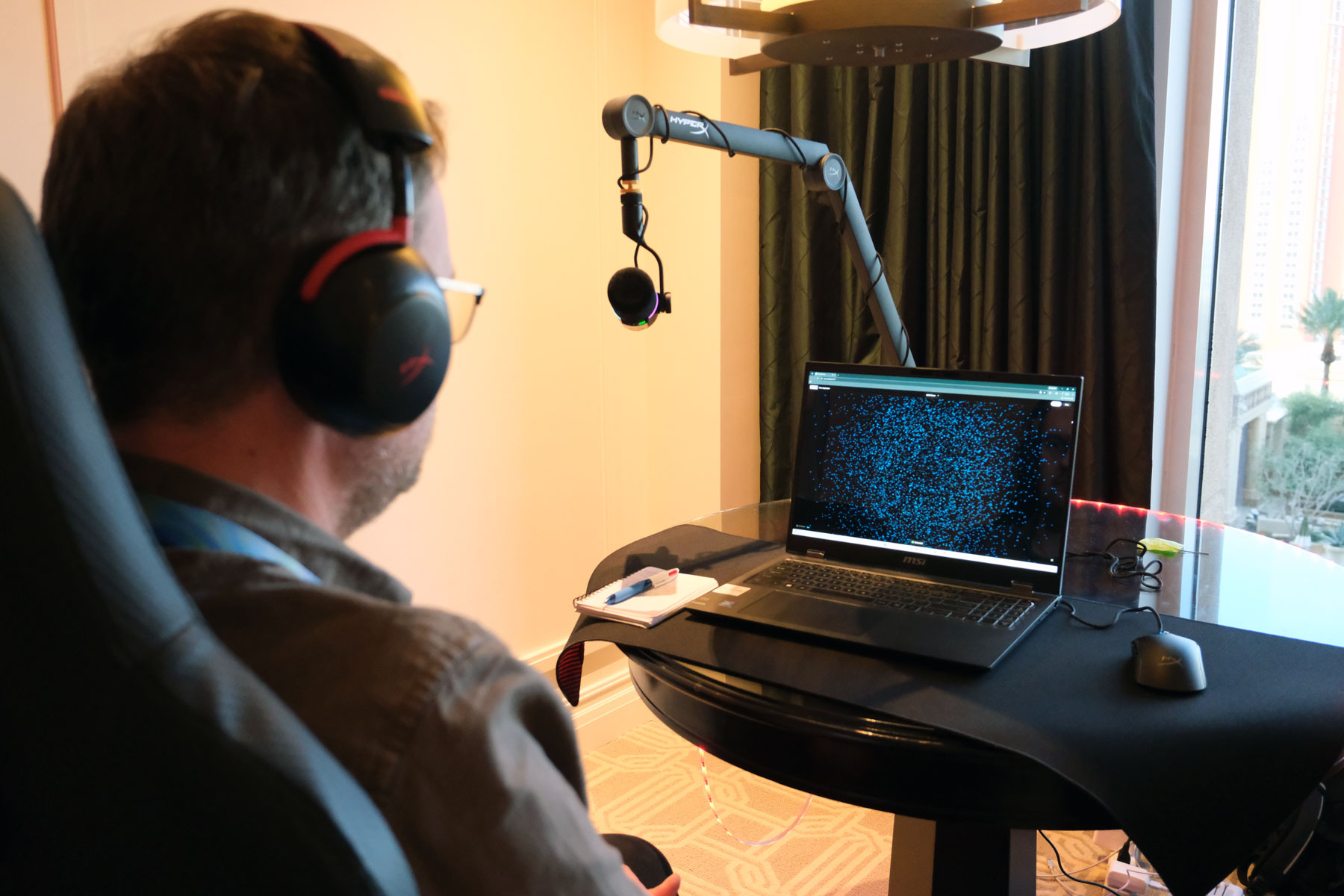
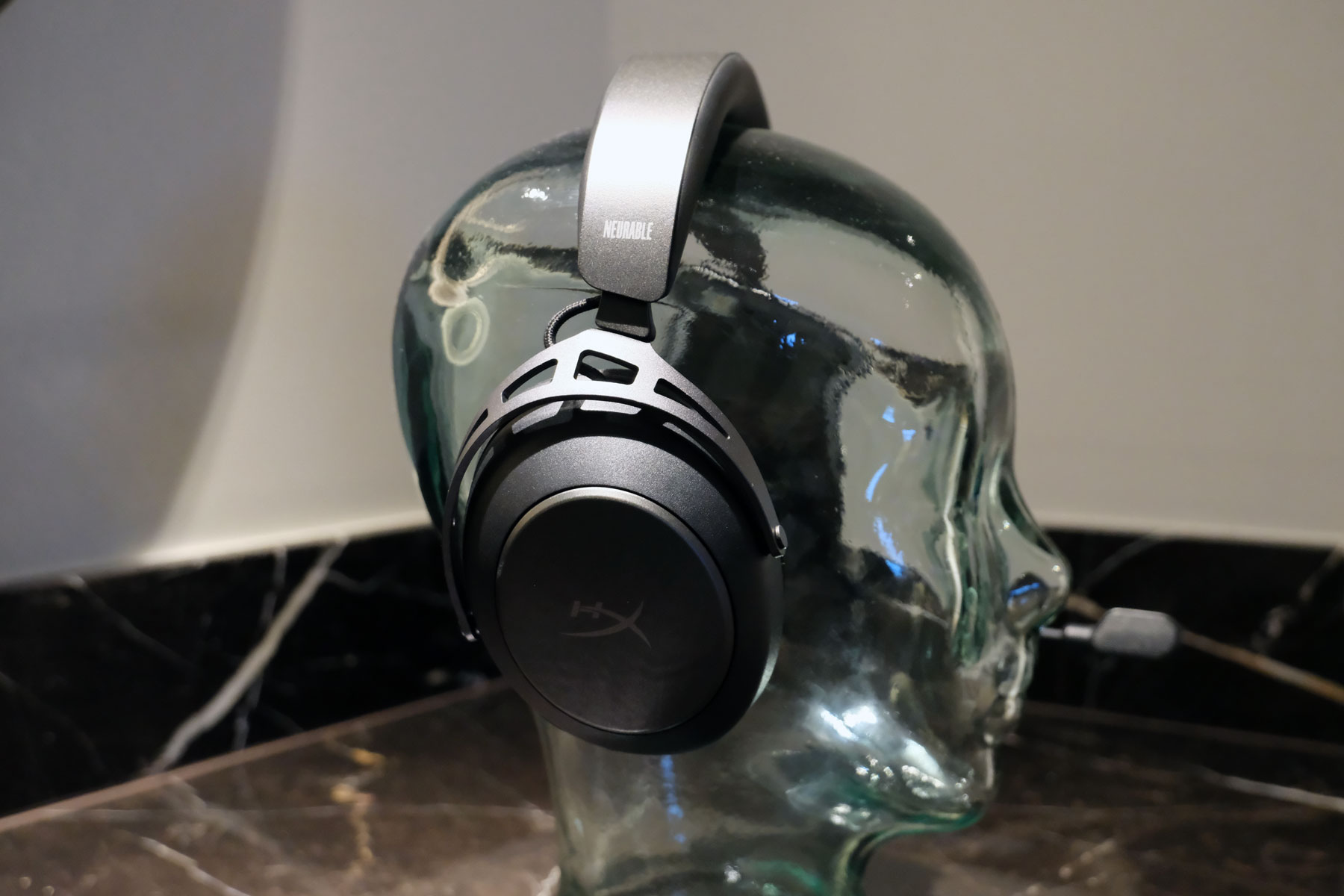
At CES this year, Neurable announced a partnership with HP’s gaming arm HyperX to produce EEG headsets with specific benefits for gamers. As gamers are looking for any way to improve their performance, the company has developed algorithms and training programs to help. You might already know that being in a place of high stress isn’t great for your concentration and focus. Consequently, Neurable research scientist Dr. Alicia Howell-Munson walked me through a system that encourages you to reach a state of calm focus with demonstrable improvements in reaction time and accuracy. It’s a system that was initially designed in partnership with Singapore’s Air Force to help ensure pilots remain in a state of calm focus. 

I sat through this demo myself, initially testing my skills in Aimlabs (a tool people use to test their reflexes) where my accuracy and reaction times were measured. Then, while wearing Neurable’s headset, I had to practice focusing my attention on a galaxy of dots, the greater my focus, the slower and closer together the dots got. That wasn’t an easy process, and it took me nearly five minutes to reach the point where I could push all of the dots to coalesce into a single point on the screen. But, when I had, I retook the shooting gallery, and saw dramatic spikes in my performance. My accuracy increased from 91.3 to 99.1 percent, while my reaction time fell from 623ms to 532ms. 

Neurable HyperX headset
Daniel Cooper for Engadget

Neurable believes that its systems, which are designed to integrate with any manufacturer’s gear, has the potential to dramatically increase a person’s brain health and productivity. For instance, by taking a break when a person’s focus started to wane, they were able to bounce back and function for far longer than if they’d simply pushed harder. Similarly, the company can advise on your cognitive speed and brain age and guide you toward making healthy choices. The company says that this isn’t just about wellness, either, as being able to identify loss of focus is vital, for instance, to help reduce auto accidents when truck drivers feel fatigued. 

Co-founder Adam Molnar explained that the benefits of this technology compound over time, so the more practice a user has in finding that mental state of calm focus, the easier it will be to maintain it for longer. CEO Ramses Alcaide added the company’s aim is to enable people to visualize the often invisible symptoms of cognitive stress to ensure they’re looking after themselves. He added that one thing that separates Neurable from other companies is that it’s looking at far finer-grain detail from its EEG data. 

MyWaves
MyWaves
Daniel Cooper for Engadget

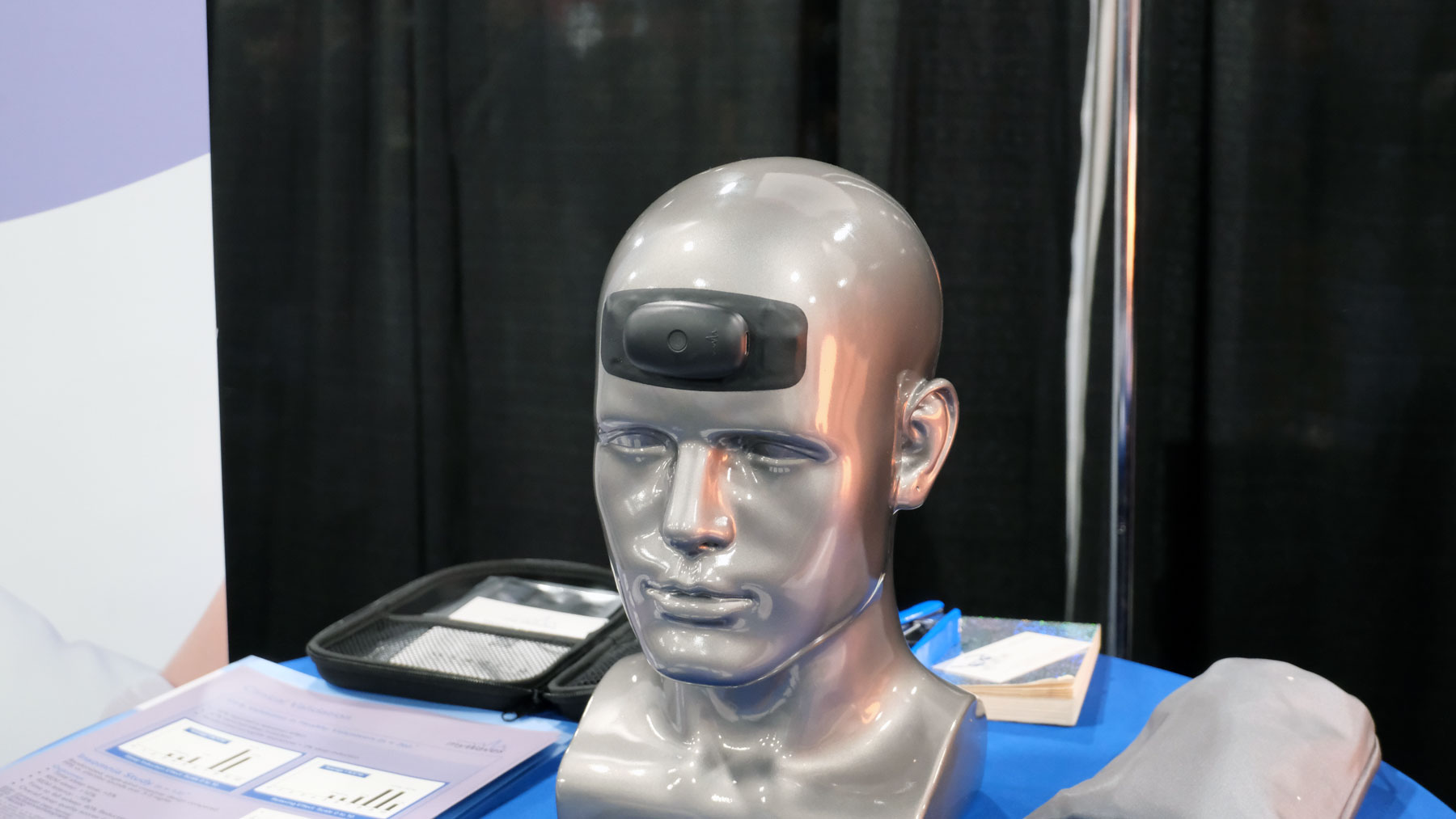
There are plenty of companies at CES that are using EEGs for more specific goals, such as MyWaves. It uses an EEG as part of its broader offering to use sound patterns to make it easier to go to sleep. It sells you a pricey forehead-worn EEG which you wear for a few nights over the course of a year. From there, the system produces a half hour audio file that will mirror the pattern of your delta brainwaves. It claims that, if you listen to the track before you go to bed, the experience of hearing your delta waves will help you fall asleep faster and experience more REM sleep.

And there are plenty of companies which are building EEGs for you to wear to keep an eye on your mental health. Brain-Life, for instance, showed off an early prototype of Focus+, a headband EEG with a companion app that can offer feedback on your cognitive load. It can also tell you how long you can sustain your attention and how well your mind relaxes and recovers. The company didn’t have details on when the hardware would be available or how much it cost, as it’s still early days.

BrainEULink.
BrainEULink.
Daniel Cooper for Engadget

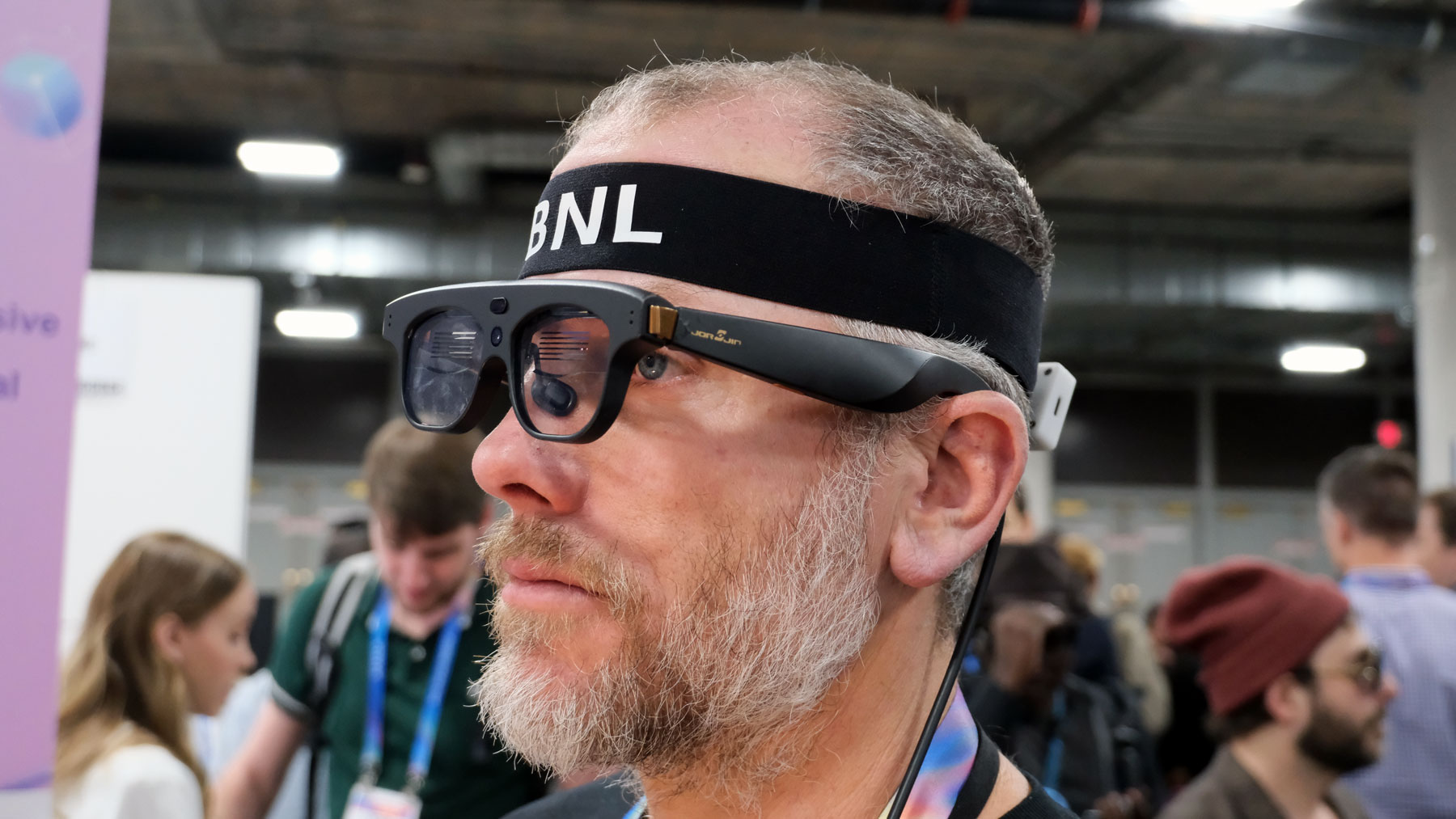
There is broad potential to use an EEG as a brain computer interface, such as the one worked on by Braineulink. That company has combined an EEG with an AR headset to enable people to interact with the world just with their brains. For instance, in a demonstration in the show floor at CES, I was able to turn a light on and off by “focusing” on it, although it’s hard to know how useful that would be in, for instance, creating an assistive device for folks with limited mobility. Like Brain-Life, it’s early days, and so there’s no product that we can point to, but it’s clear we’re going to see more startups looking to enter this world. 

Brain-Life
Brain-Life
Daniel Cooper for Engadget

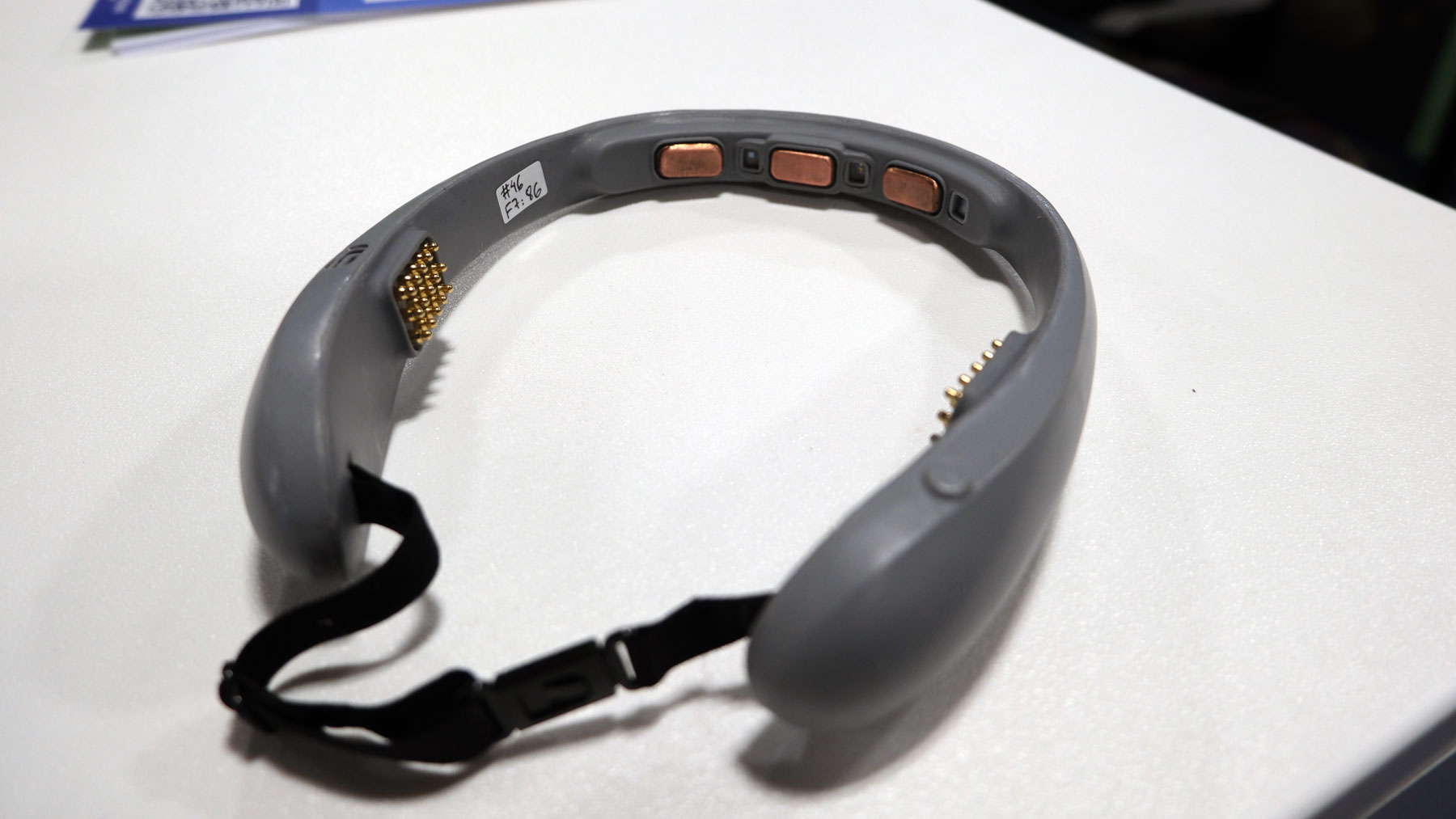
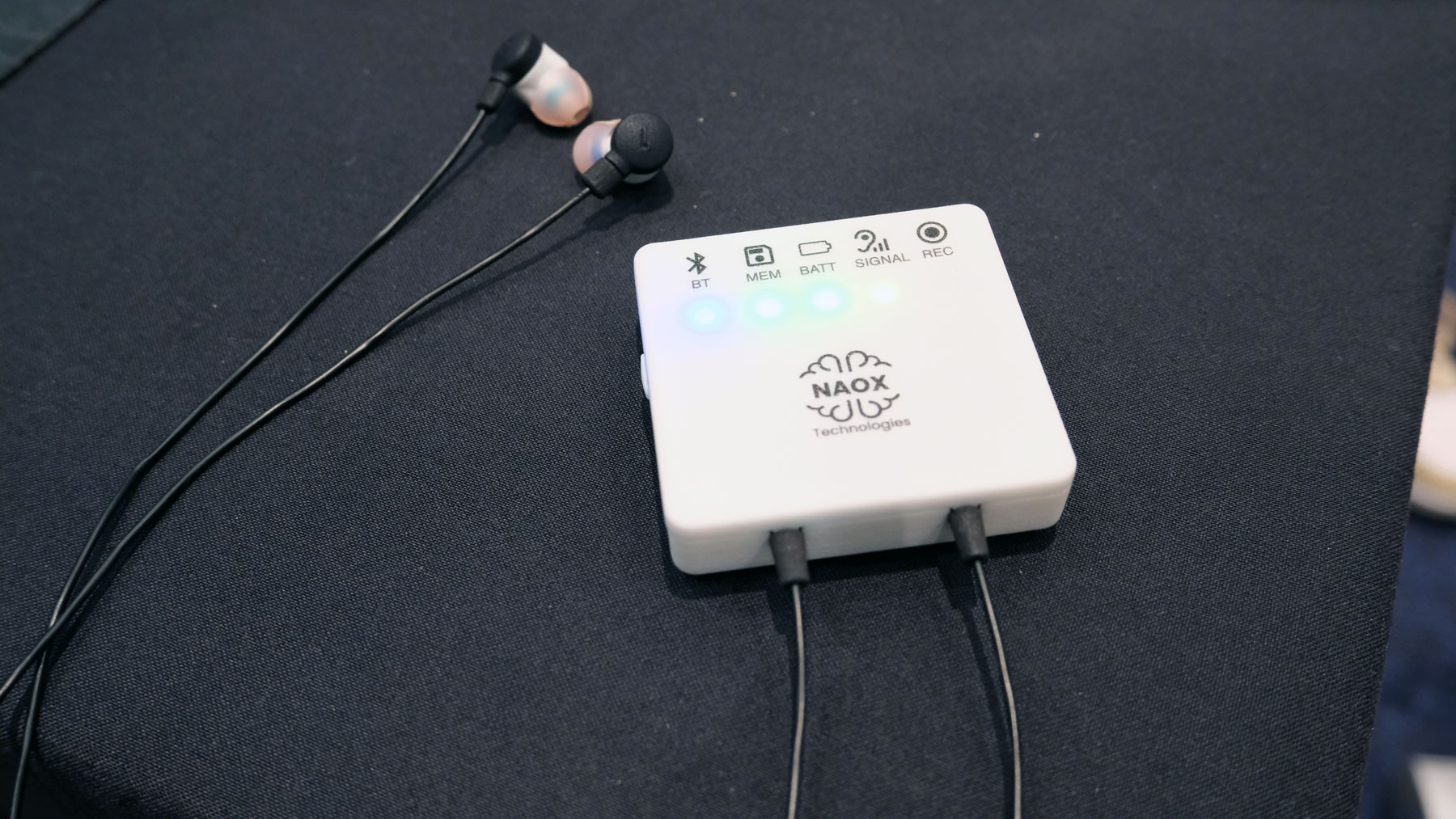
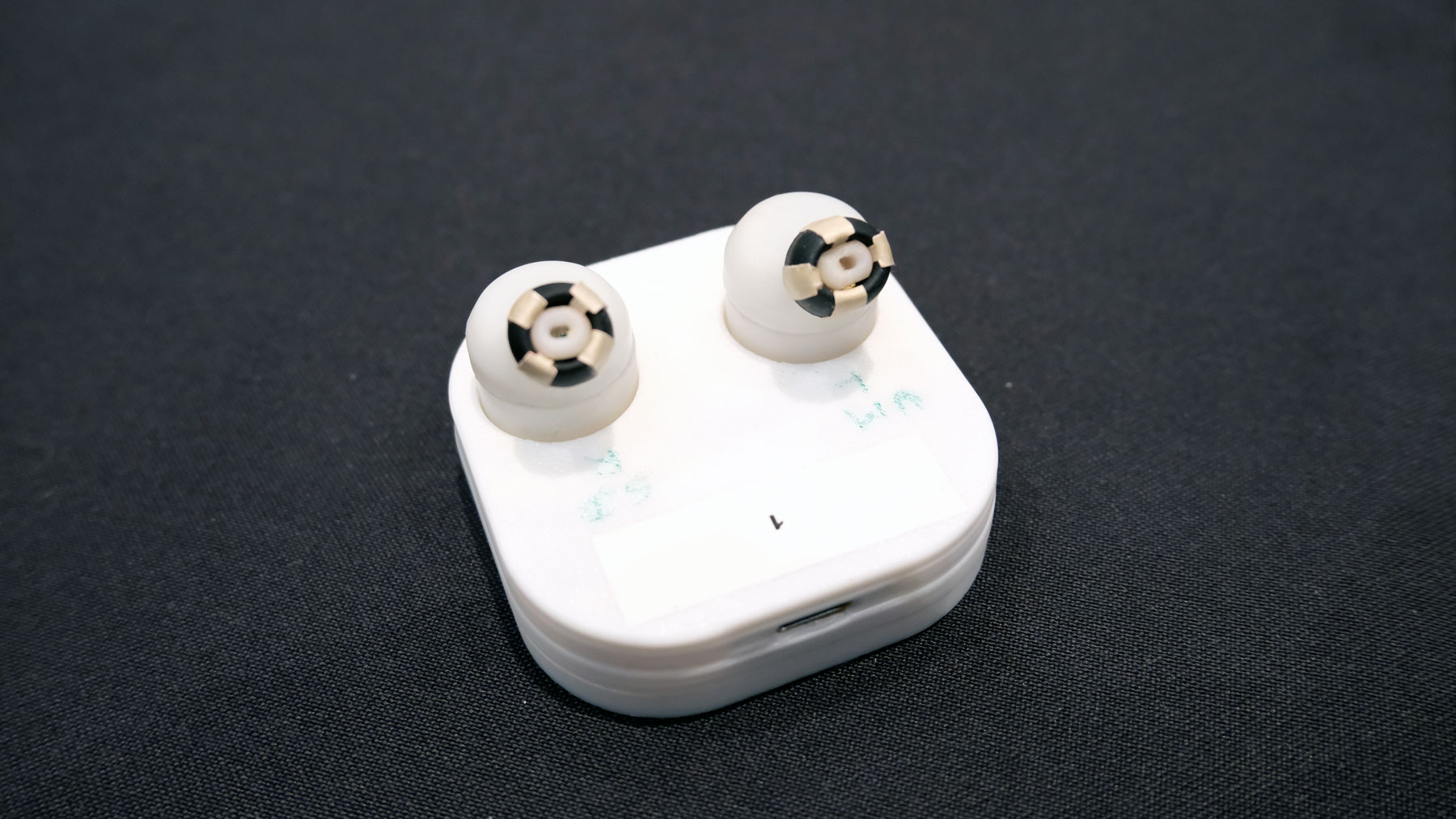
As EEGs become more commonplace, it’s likely they’ll be packaged in smaller devices which fit more seamlessly into our lives. One such example is NAOX, a French startup which has built a wearable, clinical-grade EEG into a pair of earbuds for the sort of longitudinal testing required to diagnose conditions like epilepsy. But the company is also planning on incorporating the technology into a pair of true wireless earbuds.These headphones won’t be arriving until the end of 2026, but Naox says the tech is small enough that it can be integrated with other companies earbuds. Consequently, it’s certainly plausible we could see plenty of earbuds that will keep an eye on our brain health as a side hustle. 

Naox
Naox
Daniel Cooper for Engadget

NAOX was co-founded by Dr. Michel Le Van Quyen who, at a talk in London in December 2025, talked about the rationale for creating an in-ear ECG. Essentially, he was looking to build a brain equivalent to the Apple Watch’s continuous heart rate monitoring (and ECG). I was curious about the science behind an ear-mounted EEG given they commonly use the scalp. Professor Friston said that an ear-mounted EEG is potentially more useful as “you can get slightly closer to the sources of activity.” And that it makes a lot of sense for a consumer-grade EEG to be added to wireless earbuds given their utility in practices like meditation.

Naox's prototype TWS earbuds sensors.
Daniel Cooper for Engadget

One downside of the proliferation of wearable EEGs is that it could lead users to jump to the wrong conclusions about their mental health. For instance, if someone is to be diagnosed with a condition such as epilepsy, they need to undergo a 24-hour perambulatory EEG. As Professor Friston explained, the recording of that 24 hour EEG would be “carefully scrutinized by experts who are able to run a differential diagnosis ... to specify what further investigations are required.” He, like a lot of clinicians, is concerned about ill-informed consumers using these devices to make medical interventions without consulting a professional. 

Friston added that people shouldn’t expect wearable EEGs to be magic bullets for their brain health or cognition. He said the best way for a consumer to approach them is by treating them with the same level of reverence as a household thermometer. “Are thermometers useful in managing the wellness of my children?, Yes,” he explained, “can your thermometer tell you what particular virus you have? Absolutely not.” “In the context of well-being and to augment or validate practices such as mindfulness and meditation, they can be fun and useful quantitative devices.” But, fundamentally, that is all he feels they can be, especially right now.

This article originally appeared on Engadget at https://www.engadget.com/wearables/the-ces-companies-hoping-your-brain-is-the-next-big-thing-in-computing-175048601.html?src=rss

©

  •  

ChatGPT is launching a new dedicated Health portal

OpenAI is launching a new facet for its AI chatbot called ChatGPT Health. This new feature will allow users to connect medical records and wellness apps to ChatGPT in order to get more tailored responses to queries about their health. The company noted that there will be additional privacy safeguards for this separate space within ChatGPT, and said that it will not use conversations held in Health for training foundational models. ChatGPT Health is currently in a testing stage, and there are some regional restrictions on which health apps can be connected to the AI company's platform.

The announcement from OpenAI acknowledges that this new development "is not intended for diagnosis or treatment," but it's worth repeating. No part of ChatGPT, or any other artificial intelligence chatbot, is qualified to provide any kind of medial advice. Not only are these platforms capable of making dangerously incorrect statements, but feeding such personal and private information into a chatbot is generally not a recommended practice. It seems especially unwise to share with a company that only bothered paying even cursory lip service to the psychological impacts of its product after at least one teenager used the chatbot to plan suicide.

This article originally appeared on Engadget at https://www.engadget.com/ai/chatgpt-is-launching-a-new-dedicated-health-portal-210150083.html?src=rss

©

  •  
❌