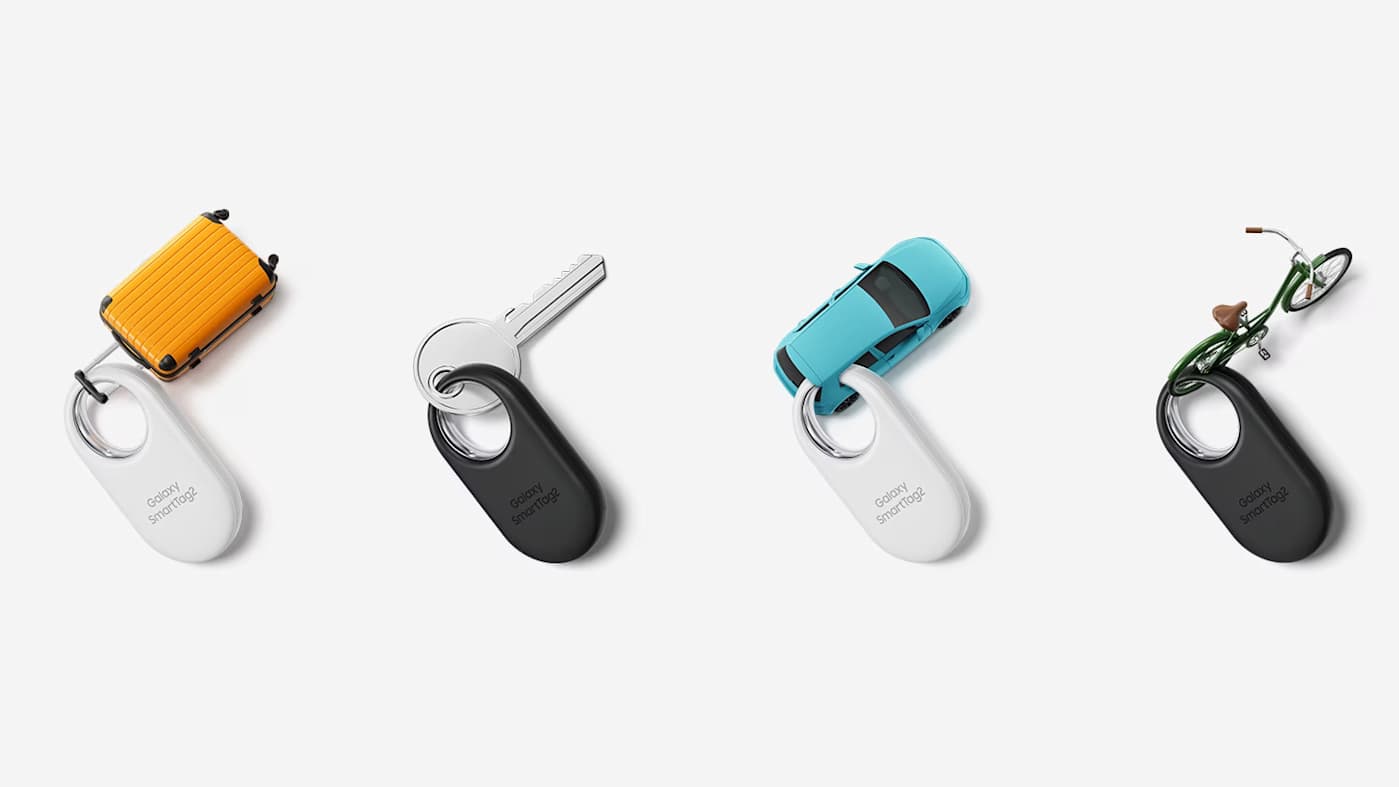
Samsung SmartTag 2 trackers are back on sale if you're willing to pick up a bundle. Woot has a four-pack down to just $45, which undercuts the previous all-time low we’ve seen on Amazon ($55) by $10. That's a discount of 55 percent from the retail price of $100. It's a compelling opportunity to stock up if you're already in Samsung's ecosystem.
We named the SmartTag 2 the best Bluetooth tracker for Samsung devices. The companion SmartThings Find app is easy to use, showing locations on a Google Maps-based interface. Much like Apple's Find My network, the location of a SmartTag is pinpointed using nearby Samsung phones. While nothing can beat the sheer size of Apple's tracking infrastructure given the number of iPhones in the US, it still worked well in our tests.
The SmartTag 2's design is more practical than some competitors since the oblong fob has a built-in hole that lets you easily attach your keys without buying an extra accessory. It’s IP67 rated for water and dust resistance, and uses a replaceable battery that Samsung says offers about 16 months of juice. The volume on the tag is pretty loud and users can select from multiple ringtones. Additionally, a double-squeeze of the SmartTag 2 will ping your handset, something you can't do with an AirTag.
The tracking is not quite as precise as Apple's AirTag, but it's a solid option for Samsung users looking to keep track of their things and can be scooped up at a bargain price.
This article originally appeared on Engadget at https://www.engadget.com/deals/you-can-get-a-four-pack-of-samsung-smarttag-2-trackers-for-just-45-173936230.html?src=rss
E Ink tablets have always been intriguing to me because I’m a longtime lover of pen and paper. I’ve had probably hundreds of notebooks over the years, serving as repositories for my story ideas, to-do lists, meeting notes and everything in between. However, I turned away from physical notebooks at a certain point because it was just easier to store everything digitally so I always had my most important information at my fingertips.
E Ink tablets seem to provide the best of both worlds: the tactile satisfaction of regular notebooks with many of the conveniences found in digital tools, plus easy-on-the-eyes E Ink screens. These devices have come a long way in the past few years, and we’re just starting to see more color E Ink tablets become more widely available. I tested out a number of different E Ink tablets to see how well they work, how convenient they really are and which are the best tablets using E Ink screens available today.
Best E Ink tablets for 2026
Are E Ink tablets worth it?
An E Ink tablet will be a worthwhile purchase to a very select group of people. If you prefer the look and feel of an e paper display to LCD panels found on traditional tablets, it makes a lot of sense. They’re also good options for those who want a more paper-like writing experience (although you can get that kind of functionality on a regular tablet with the right screen protector) or a more distraction-free device overall.
The final note is key here. Many E Ink tablets don’t run on the same operating systems as regular tablets, so you’re automatically going to be limited in what you can do. And even with those that do allow you to download traditional apps like Chrome, Instagram and Facebook, E Ink tablets are not designed to give you the best casual-browsing experience. This is mostly due to the nature of E Ink displays, which have noticeable refreshes, a lack of vibrant colors and lower picture quality than the panels you’ll find on even the cheapest iPad.
Arguably the biggest reason why you wouldn’t want to go with an iPad (all models of which support stylus input, a plethora of reading apps, etc) is because it’s much easier to get distracted by email, social media and other Internet-related temptations.
What to look for in an E Ink tablet
Writing and latency
Arguably the most important thing to consider when looking for an E Ink tablet is the writing experience. How good it is will depend a lot on the display’s refresh rate (does it refresh after every time you put pen to “paper,” or at a different regular interval) and the stylus’ latency. Most of the tablets I’ve tested have little to no latency, but some are certainly better than others. Finally, you should double check before buying that your preferred E Ink tablet comes with a stylus, or if you need to purchase one separately.
Reading
How much will you be reading books, documents and other things on this tablet? E Ink tablets come in many sizes, but most of them tend to be larger than your standard e-reader because it makes writing much easier. Having a larger display isn’t a bad thing, but it might make holding it for long periods slightly more uncomfortable. (Most e-readers are roughly the size of a paperback book, giving you a similar feeling to analog reading).
The supported file types for e-books can also make a big difference. It’s hard to make a blanket statement here because this varies so much among E Ink tablets. The TL;DR is that you’ll have a much better reading experience if you go with one made by a company that already has a history in e-book sales (i.e. Amazon or Kobo). All of the titles you bought via the Kindle or Kobo store should automatically be available to you on your Kindle or Kobo E Ink tablet.
Also with Kindle titles, specifically, since they are protected by DRM, it’s not necessarily the best idea to try to bring those titles over to a third-party device. Unless the tablet runs an operating system like Android that supports downloads for apps like Kindle and Kobo, you’ll be limited to supported file types, like ePUB, PDF, MOBI, JPEG, PNG and others.
Search functionality
Most E Ink tablets have some on-device search features, but they can vary widely between models. You’ll want to consider how important it is to you to be able to search through all your handwritten notes and markups. I noticed in my testing that Amazon’s and Kobo’s E Ink tablets made it easy to refer back to notes made in books and files because they automatically save to the specific pages on which you took notes, made highlights and more.
Searching is less standardized on E Ink tablets that have different supported file types, but their features can be quite powerful in their own right. For example, a few devices I tested supported text search in handwritten notes along with handwriting recognition, the latter of which allows you to translate your scribbles into typed text.
Sharing and connectivity
While we established that E Ink tablets can be great distraction-free devices, most manufacturers understand that your notes and doodles aren’t created in a vacuum. You may want to access them elsewhere, and that requires some form of connectivity. All of the E Ink tablets I tried have Wi-Fi support, and some support cloud syncing, companion mobile apps and the ability to export notes via email so you can access them elsewhere.
None of them, however, integrate directly with a digital note taking system like Evernote or OneNote, so these devices will always be somewhat supplementary if you use apps like that, too. I’d argue that, if you already lean heavily on apps like OneNote, a standard tablet with a stylus and screen protector might be the best way to go. Ultimately, you should think about what you will want to do with the documents you’ll interact with on your E Ink tablet after the tablet portion is done.
Price
E Ink tablets aren’t known for being cheap. They generally fall into the $300-$800 price range, which is what you can expect to pay for a solid regular tablet, too. A key factor in price is size: cheaper devices with E Ink displays are likely to have smaller screens, and stylus support isn’t as much of a given. Also, those types of devices are generally considered e-readers because of their size and may not be the best for note-taking, doodling and the like.
E Ink tablets have gone up in price recently. Supernote and Onyx Boox increased prices, as did reMarkable. The former said it was due to "increased costs,” and a reMarkable representative confirmed this to Engadget and provided the following statement: "We regularly review our pricing based on market conditions and operational costs. We've communicated an upcoming adjustment for the US market effective in May to provide transparency to our customers. Multiple factors influence our pricing decisions, including supply chain dynamics and overall operational costs in specific markets.”
As a result, the reMarkable Paper Pro jumped from $579 to $629 (that's for the bundle with the standard Marker and no Folio). This isn't great, considering the Paper Pro was already on the expensive side of the spectrum for E Ink tablets. It's also worth noting that Supernote and Onyx Boox have raised prices in the past few months as well.
Other E Ink tablets we've tested
Onyx Boox Tab X C
The Boox Tab X C is a color-screened version of the Tab X, the company’s all-purpose e-paper Android tablet. The Tab X C has a lovely 13.3-inch Kaleido 3 E Ink color display, an octa-core processor, 6GB of RAM and it runs on Android 13, making it one of the most powerful tablets in Boox’s lineup. I’ve used the Tab X in the past and this color version runs similarly, if not better, and at 5.3mm thick, it’s impressively svelte even when you pair it with its folio keyboard case. As someone who loves legal-pad sized things to write on, I also like how the Tab X C is most akin to A4-size paper. But at $820 for the bundle with the standard case (or a whopping $970 for the tablet and its keyboard case), it’s really only best for those who are ready to go all-in on a premium E Ink tablet.
Lenovo Smart Paper
Lenovo made a solid E Ink tablet in the Smart Paper, but it's too pricey and too married to the company's companion cloud service to warrant a spot on our top picks list. The hardware is great, but the software isn't as flexible as those of competitors like the reMarkable 2. It has good Google Drive integration, but you must pair it with Lenovo's cloud service to really get the most use out of it — and in the UK, the service costs £9 per month for three months, which is quite expensive.
Onyx Boox Tab Ultra
The Boox Tab Ultra has a lot of the same features we like in the Note Air 2 Plus, but it’s designed to be a true, all-purpose tablet with an E Ink screen. Running Android 11 and compatible with a magnetic keyboard case, you can use it like a standard 2-in-1 laptop, albeit a low-powered one. You can browse the web, check email and even watch YouTube videos on this thing — but that doesn’t mean you should. A standard 2-in-1 laptop with a more responsive screen and better overall performance would be a better fit for most people who even have the slightest desire to have an all-in-one device. Like the rest of Onyx’s devices, the Tab Ultra is specifically for those who put reading and eye comfort above all else.
This article originally appeared on Engadget at https://www.engadget.com/mobile/tablets/best-e-ink-tablet-130037939.html?src=rss
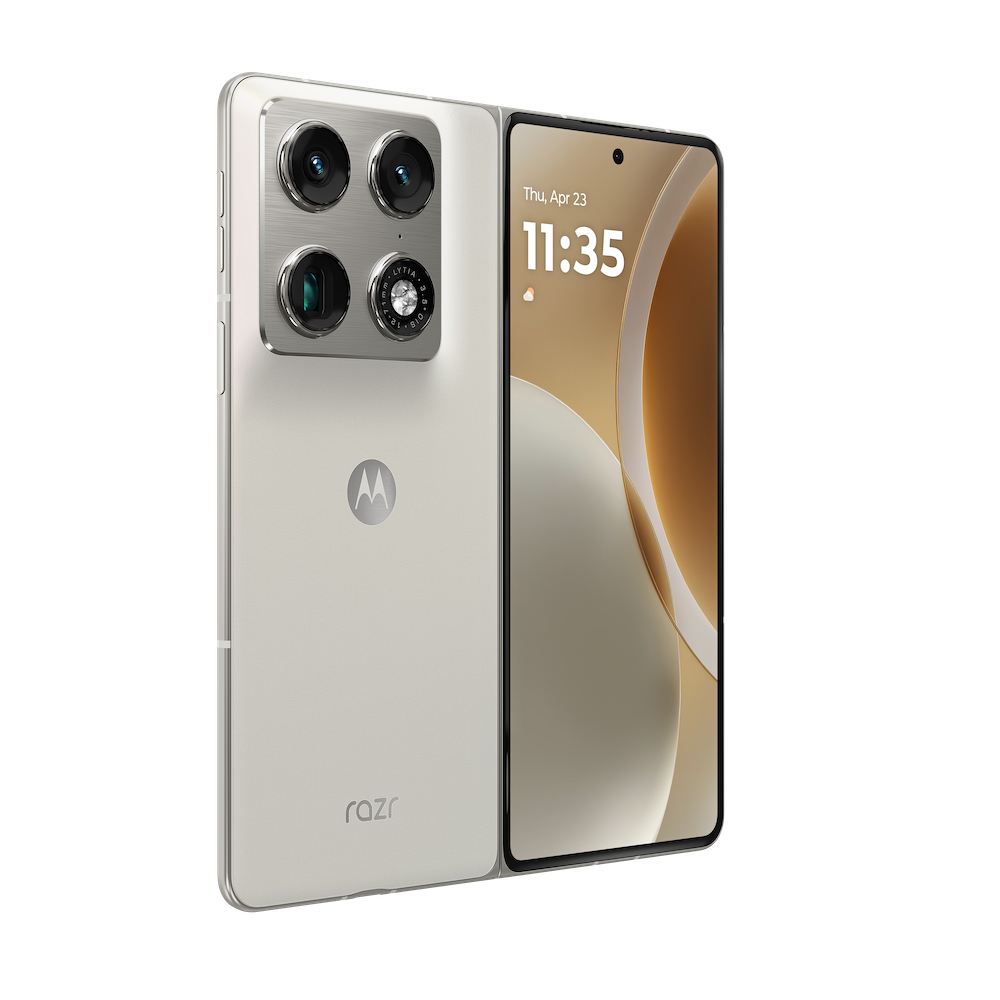
Samsung and Google have new competition in the foldable space. At CES 2026, Motorola unveiled its first side-foldable smartphone: the Razr Fold. The handheld sports an impressive 6.6-inch external screen and an 8.1-inch flexible main display. Motorola hasn’t provided dimensions yet, so we don’t know how thick it is yet or how it compares to other foldables in that respect.
We do know, however, that it'll include support for the Moto Pen Ultra stylus. This is actually a fairly big deal, as Samsung dropped the feature for the Z Fold 7. Modern foldables basically double as tablets, so a stylus is always appreciated.
A phone.
Motorola
There's a robust camera system here, with a 50MP Sony sensor, a 50MP ultra-wide/macro, a 50MP telephoto, a 32MP external selfie lens and a 20MP internal camera. It also offers the ability to record in Dolby Vision.
The Razr Fold will be available in blue and white. We don't have any information regarding internal specs, pricing or availability. Motorola says that "more specifications will be shared in the coming months."
It's worth noting that while this is the company's first side-folding camera, Motorola has always made top-folding phones. After all, that's what a flip phone is. The company continues to refine this basic idea with its standard Razr line of midrange top-folding smartphones.
This article originally appeared on Engadget at https://www.engadget.com/mobile/smartphones/motorola-just-announced-a-foldable-phone-to-rival-samsung-and-google-at-ces-010015323.html?src=rss
Anker rolled out a bunch of new chargers and other gear at CES 2026, including a cute one that's already on sale. The new Nano charger with smart display, which is an upgrade to the existing Nano charger in Anker's lineup, is on sale for $30 right now for Prime members. That's $10 off the regular price.
The 45W charger includes a smart display that shows real-time data like power flow, temperature and charging status. It also features "fun animations to keep things cheerful." Anker says it can recognize what's being charged and automatically adjust certain metrics to ensure a longer battery lifespan.
To that end, it works with just about everything. The company advertises that this charger is a good fit for the iPhone, Apple Watch, AirPods and Samsung devices, among others. The new Nano Charger is on the smaller side, with dual folding prongs that rotate to fit most outlets.
This article originally appeared on Engadget at https://www.engadget.com/deals/the-latest-45w-anker-nano-charger-with-smart-display-is-10-off-right-now-160707685.html?src=rss
Anker dove into CES 2026 with a slew of announcements that bring new chargers and accessories under its umbrella. The new accessories include improved visual interfaces, faster Qi2 wireless charging and “upgraded ecosystems” that support the latest iPhones. Some of the latest devices are even available to buy right now.
First up is the Anker Nano Charger with smart display, which features a tiny screen, 180-degree foldable prongs and provides up to 45W of power. The plug can identify the exact iPhone model connected and then deliver the right amount of power for your phone. Anker says the Nano uses three-stage power delivery and a "Care Mode" that the company claims keeps batteries cooler than some competing 45W chargers. It arrives in late January 2026 and will retail for $40.
For fans of wireless charging stations, the Anker Prime Wireless Charging Station offers a 3-in-1 solution for iPhone, Apple Watch and AirPods. It uses a "AirCool" system for "faster, safer performance" and offers up to 25W of Qi2 wireless power. The design is also foldable for compact travel. It's set for release in Q1 2026 and will retail for $150.
The company debuted a clamp-on 10-in-1 Nano Power Strip with 70W of output and built-in surge protection. It sports two USB-C ports, two USB-A ports and six AC outlets. The Nano Power Strip is getting a late January release, and it will sell for $70.
Anker also unveiled a 13-in-1 Nano Docking Station. This serves as an all-in-one hub with support for up to three displays (with 4K resolution supported on a single display), up to 100W of upstream charging and 10 Gbps of data transfer between connected devices. It also features a removable 6-in-1 hub with SD and microSD card readers, a USB-A port and a 5 Gbps USB-C port. The Nano Docking Station is available now and retails for $150.
This article originally appeared on Engadget at https://www.engadget.com/computing/accessories/anker-unveils-a-new-lineup-of-chargers-docks-and-accessories-at-ces-2026-160021025.html?src=rss
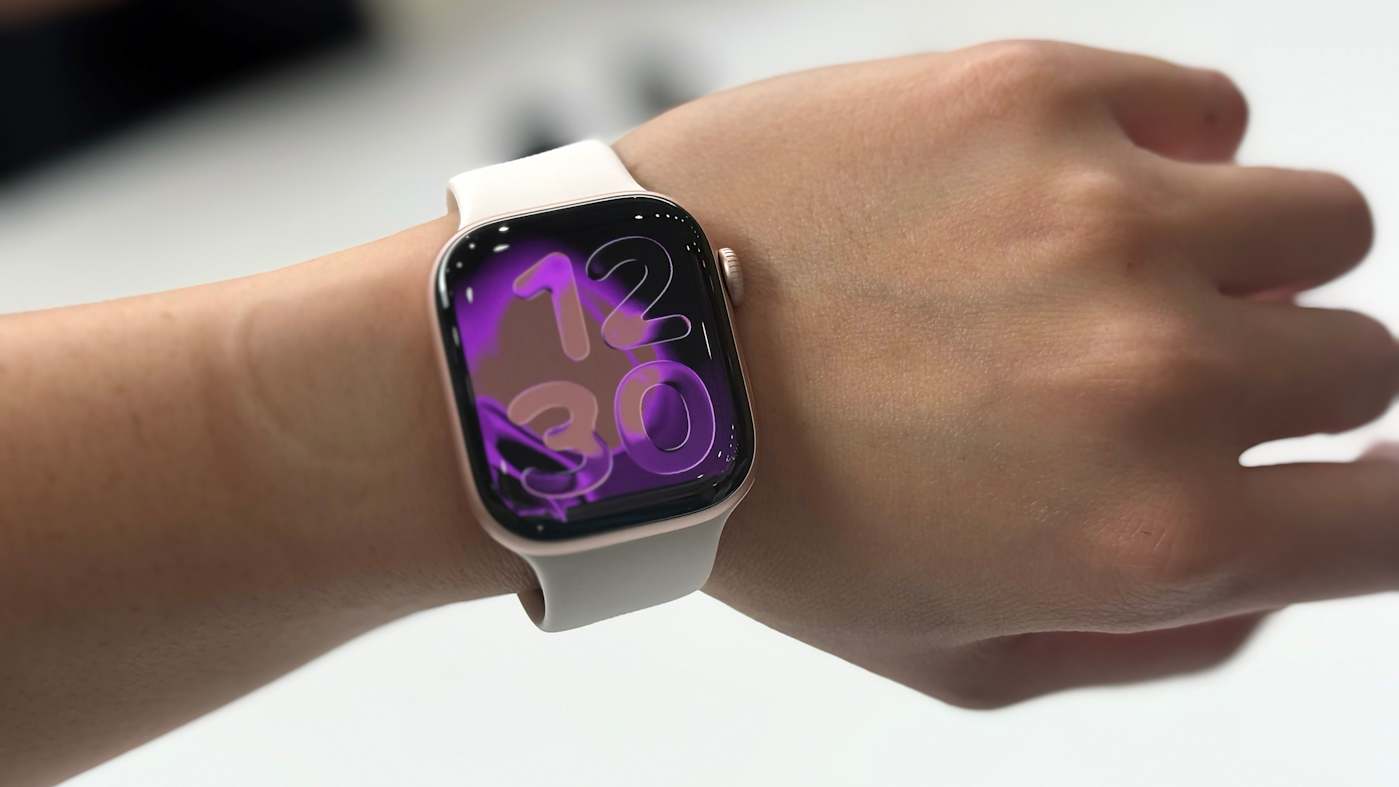
The Apple Watch Series 11 is on sale for the lowest price we've ever seen. You can pick up the smartwatch for $299, which is 25 percent off its regular price, a discount of $100. Discounts tend to increase as we get closer to September, when the next generation of Apple Watch is typically announced.
The Series 11 is our best overall smartwatch pick, and we gave it a score of 90 out of 100 in our hands-on review. We were impressed with the battery life, which lasted longer than the 24 hours it's rated for in our testing. We also liked how lightweight and thin the watch is. The 9.7mm thick case on the Series 11 ties the Series 10 for the thinnest Apple Watch so far.
Fitness and health tracking are the main appeals of an Apple Watch, and the Series 11 introduces sleep tracking and hypertension notifications. The sleep tracking was comfortable thanks to the watch's small form factor. The watch also added a new wrist flick gesture that lets you dismiss notifications, end calls and silence alarms or timers.
The GPS + cellular model of the Series 11 is also $100 off, and it's the first Apple Watch to support 5G networks. It's not too often you see an Apple product for 25 percent off its retail price, so if you were in the market for a smart watch, and especially if you are an iPhone user, it's worth checking out.
This article originally appeared on Engadget at https://www.engadget.com/deals/the-apple-watch-series-11-is-on-sale-for-a-record-low-price-154609244.html?src=rss
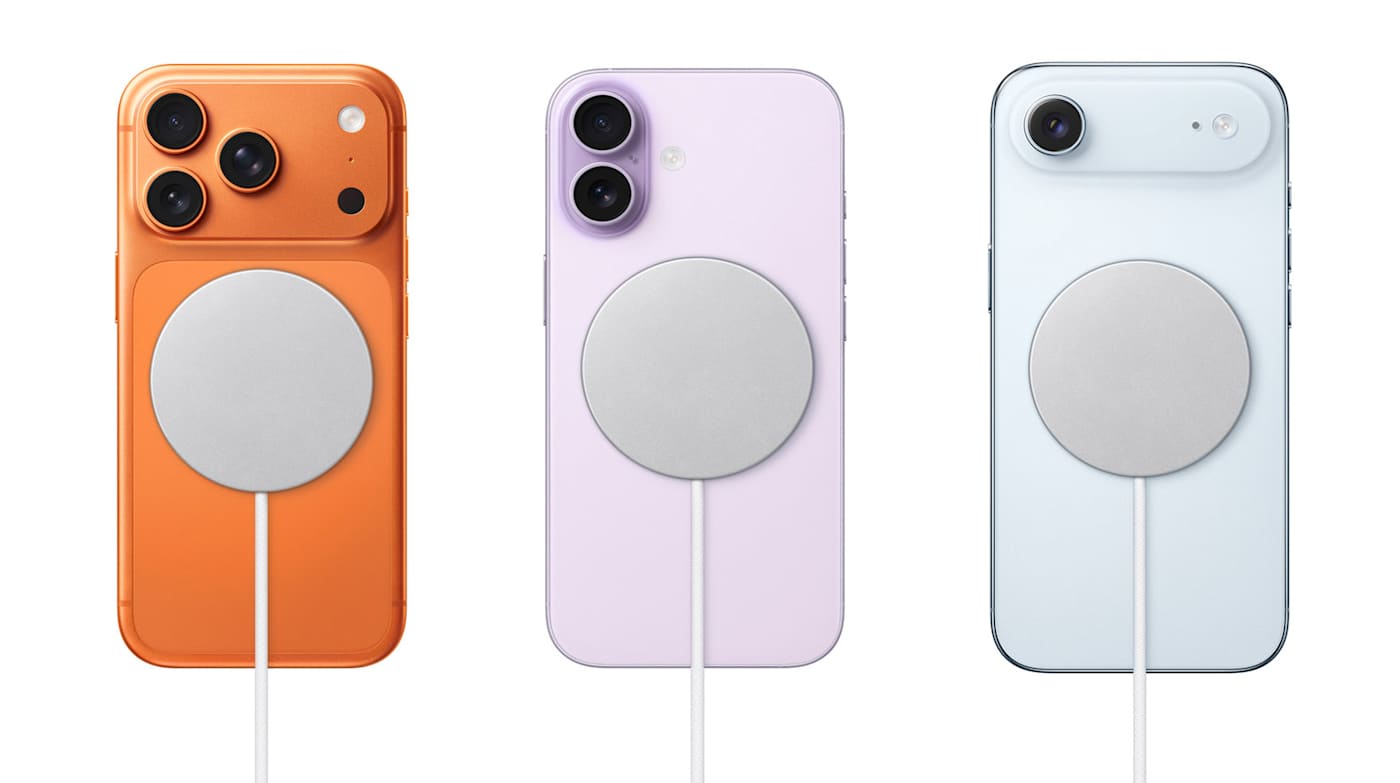
If you want a wireless charger for your iPhone and prefer to stick with Apple, Amazon has a sale that may pique your interest. The retailer is selling the one meter Apple Magsafe charger for $30, saving you $10 off the regular price, while also selling the two meter model for $40 ($10 off).
If you have an iPhone 16, iPhone 17 or iPhone Air, this cable can charge your device at 25W as long as it's connected to a 30W power adapter on the other end. While you'll need a more recent iPhone to get the fastest MagSafe charging speeds, the charger can wirelessly top up the battery of any iPhone from the last eight years (iPhone 8 and later). With older iPhones, the charging speed tops out at 15W. The cable works with AirPods wireless charging cases too — it's certified for Qi2.2 and Qi charging.
The MagSafe charger is one of our favorite iPhone accessories, and would pair quite nicely with your new iPhone if you're picking up one of the latest models. If you're on the fence about that, be sure to check out our reviews of the iPhone 17, iPhone Pro/Pro Max and iPhone Air.
This article originally appeared on Engadget at https://www.engadget.com/deals/apples-latest-25w-magsafe-charger-is-on-sale-for-30-141707297.html?src=rss
If you’ve upgraded your phone recently, there’s a good chance it supports wireless charging. Battery life can be one of the first things to deteriorate as your phone ages, so you’ll need quick and easy ways to power up wherever you are. You may not always be able to have a cable on your person, but investing in a wireless phone charger (or a few) can make it more convenient to plop your phone down and know it’ll have more juice when you pick it back up again.
While you’re not going to get the same charging speed with a wireless charger that you would with a power cable, the convenience of a power source like this is undeniable. Stick a wireless charger on your bedside, on your desk at work, in your kitchen or wherever you spend a good chunk of your time and you’ll have a reliable way to power up your phone, sans bulky, messy cables. Needless to say, there are a ton of options out there with different charging capabilities and price ranges. Below, we’ve collected the best wireless chargers we’ve tested to make your search a little easier.
While it’s tempting to buy a wireless charging pad optimized for the specific phone you have now, resist that urge. Instead, think about the types of devices (phones included) that you could see yourself using in the near future. If you’re sure you’ll use iPhones for a long time, an Apple MagSafe-compatible magnetic wireless charger will be faster and more convenient. If you use Android phones or think you might switch sides, however, you’ll want a more universal design. If you have other accessories like wireless earbuds or a smartwatch that supports wireless charging, maybe you’d be better off with a 3-in-1 wireless charger or full wireless charging station.
Where and how will you use your charger?
Odds are that you have a specific use case in mind for your charger. You may want it by your bedside on your nightstand for a quick charge in the morning, or on your desk for at-a-glance notifications. You might even keep it in your bag for convenient travel charging instead of bulky portable chargers or power banks. Think about where you want to use this accessory and what you want to do with the device(s) it charges while it’s powering up. For example, a wireless charging pad might be better for bedside use if you just want to be able to drop your phone down at the end of a long day and know it’ll be powered up in the morning. However, a stand will be better if you have an iPhone and want to make use of the Standby feature during the nighttime hours.
For a desk wireless charger, a stand lets you more easily glance at phone notifications throughout the day. For traveling, undoubtedly, a puck-style charging pad is best since it will take up much less space in your bag than a stand would. Many power banks also include wireless charging pads built in, so one of those might make even more sense for those who are always on the go. Some foldable chargers are also designed for travel, collapsing flat to take up less space.
Wireless charging performance
Although wireless charging is usually slower than its wired equivalent, speed and wattage are still important considerations. A fast charger can supply enough power for a long night out in the time it takes to change outfits. Look for options that promise faster charging and support standards like Qi2 certified charging for the best balance of efficiency and compatibility.
In general, a 15W charger is more than quick enough for most situations, and you’ll need a MagSafe-compatible charger to extract that level of performance from an iPhone. With that said, even the slower 7.5W and 10W chargers are fast enough for an overnight power-up. If anything, you’ll want to worry more about support for cases. While many models can deliver power through a reasonably thick case (typically 3mm to 5mm), you’ll occasionally run into examples that only work with naked phones.
There are some proprietary chargers that smash the 15W barrier if you have the right phone. Apple’s latest MagSafe charging pad can provide up to 25W of wireless power to compatible iPhones when paired with a 30W or 35W adapter — the latter being another component you’ll have to get right to make sure the whole equation works as fast as it possibly can.
Quality and box contents
Pay attention to what’s included in the box. Some wireless chargers don’t include power adapters, and others may even ask you to reuse your phone’s USB-C charging cable. What may seem to be a bargain may prove expensive if you have to buy extras just to use it properly. As mentioned above, you’ll want to make sure all of the components needed to use the wireless charger can provide the level of power you need — you’re only as strong (or in this case, fast) as your weakest link.
Fit and finish is also worth considering. You’re likely going to use your wireless charger every day, so even small differences in build quality could make the difference between joy and frustration. If your charger doesn’t use MagSafe-compatible tech, textured surfaces like fabric or rubberized plastic are more likely to keep your phone in place. The base should be grippy or weighty enough that the charger won’t slide around. Also double check that the wireless charger you’re considering can support phones outfitted with cases — the specifications are usually listed in the charger’s description or specs.
You’ll also want to think about the minor conveniences. Status lights are useful for indicating correct phone placement, but an overly bright light can be distracting. Ideally, the light dims or shuts off after a certain period of time. And while we caution against lips and trays that limit compatibility, you may still want some barriers to prevent your device falling off its perch on the charging station.
Wireless chargers FAQs
Do wireless chargers work if you have a phone case?
Many wireless chargers do work if you leave the case on your phone. Generally, a case up to 3mm thick should be compatible with most wireless chargers. However, you should check the manufacturer’s guide to ensure a case is supported.
How do I know if my phone supports wireless charging?
Checking the phone’s specification should tell you if your phone is compatible with wireless charging. You might see words like “Qi wireless charging” or “wireless charging compatible.”
Do cords charge your phone faster?
Most often, wired charging will be faster than wireless charging. However, wired charging also depends on what the charging cable’s speed is and how much power it’s designed to carry. A quick-charging cable that can transmit up to 120W of power is going to be faster than a wireless charger.
This article originally appeared on Engadget at https://www.engadget.com/computing/accessories/best-wireless-charger-140036359.html?src=rss

 Anmelden